Overview

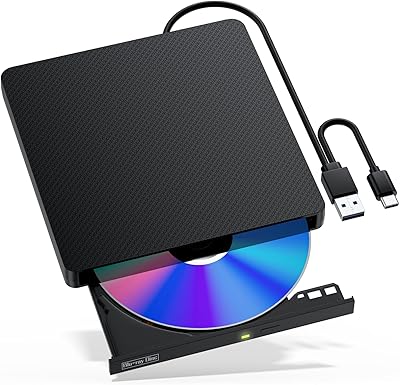
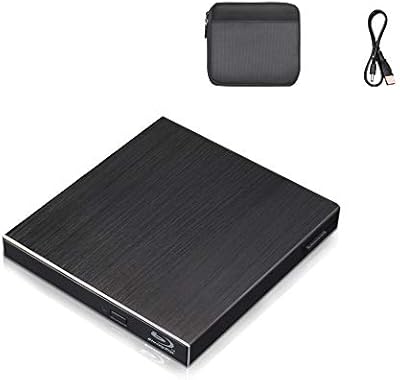
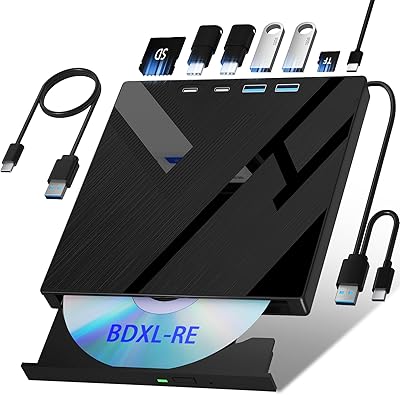
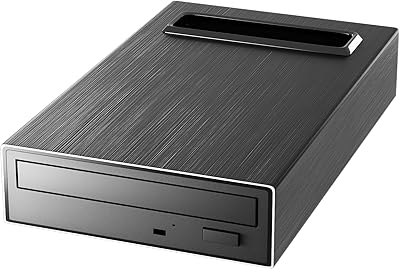
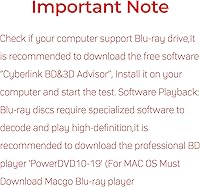
The BPAKDU B21-Y External Blu-ray Drive entered the market in early 2024 as a mid-range option aimed at laptop users who no longer have a built-in optical drive. BPAKDU is a newer name in a space long dominated by LG and Pioneer, but the drive earns attention with its slim, portable build — 6 x 5.6 x 0.7 inches — and an integrated cable that removes the hassle of keeping track of a separate cord. One important caveat before purchase: Blu-ray playback requires third-party software such as PowerDVD for Windows or Macgo for macOS, and neither comes in the box. Many buyers miss that detail, so it is worth knowing going in.
Features & Benefits

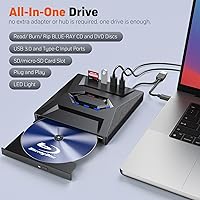
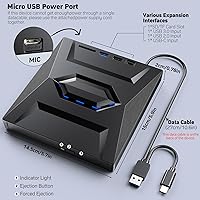
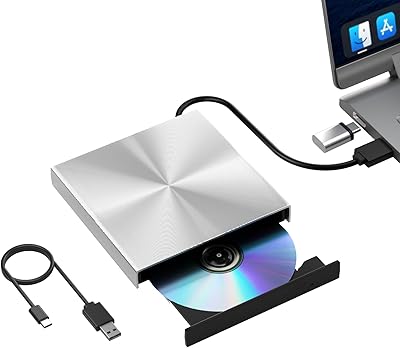
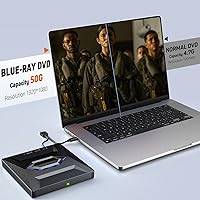
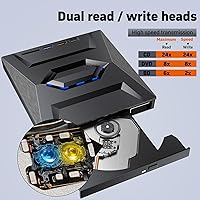
What genuinely separates this external Blu-ray drive from the pack is not just disc support — it is the built-in USB hub. Plugging in gives you two USB-A ports, a Type-C port, and two SD/TF card slots alongside the optical drive itself, which is a meaningful perk for ultrabooks running short on ports. It handles Blu-ray, DVD, and CD formats in both read and write modes, supports BDXL discs up to 100GB for archival work, and connects over USB 3.0 for transfer speeds up to 5Gbps. Read speeds hit 6x for Blu-ray, 8x for DVD, and 24x for CD. Setup is completely driver-free — plug it in and it is recognized immediately.

Best For

This portable disc burner is a natural fit for laptop owners who need optical drive access occasionally — think ripping a Blu-ray collection, archiving home videos, or reading old software CDs — rather than anyone burning discs daily. Small offices and creative professionals dealing with legacy media will find it covers the basics without requiring a full desktop rig. Mac users can make it work, but Blu-ray playback specifically needs Macgo installed, while DVD and CD reading function natively without extras. At 13.7 oz, it is not the lightest drive in the category, so if ultralight portability is the priority, it is worth comparing alternatives before committing.

User Feedback

Sitting at 3.9 stars across 465 ratings, the BPAKDU drive lands in honest middle-ground territory. Positive feedback consistently points to the plug-and-play reliability, the unexpectedly useful hub ports, and how tidy the integrated cable keeps things. The most common frustration, however, does not stem from any hardware flaw — it is buyers who never realized Blu-ray playback requires separate software, and that misunderstanding accounts for a notable share of the lower ratings. Some users also flag disc recognition issues with older pressed CDs or home-burned DVDs, and Mac users report a more involved setup compared to Windows. The 13.7 oz weight also surprises those expecting something lighter.

Pros

  • Reads and writes Blu-ray, DVD, and CD formats — all three covered in one compact unit.
  • The built-in USB hub adds two USB-A ports, one Type-C port, and dual SD card slots — genuinely useful for slim laptops.
  • Plug-and-play on Windows means it is recognized within seconds, no driver downloads required.
  • Supports BDXL discs up to 100GB, a meaningful spec for photographers and archival users.
  • The integrated cable means you will never leave a required accessory behind when traveling.
  • Anti-slip rubber pad keeps the drive stable on a desk during active use.
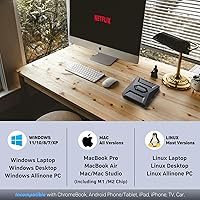
  • Compatible with a wide OS range including Windows 11, macOS, and Linux.
  • DVD and CD functions work natively on macOS without any additional software installation.
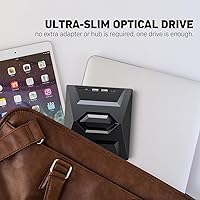
  • Slim profile at just 0.7 inches thick slides into a laptop bag without noticeable bulk.

Cons

  • No Blu-ray playback software is included — buyers must research, download, and often pay for it separately.
  • Disc recognition can be inconsistent with older pressed CDs and home-burned DVDs, requiring multiple insertion attempts.
  • At 13.7 oz, this external Blu-ray drive is heavier than several competing portable options in the same price range.
  • Mac users face a more involved setup for Blu-ray playback, with Macgo being a paid requirement rather than a free fix.
  • Blu-ray write speed tops out at 6x, making high-volume burning sessions slow and impractical.
  • USB hub port throughput can dip when multiple devices are connected simultaneously under load.
  • BPAKDU is a newer brand with a limited track record, making long-term reliability harder to assess.
  • The plastic casing feels adequate rather than durable, with some users reporting tray looseness after extended use.
  • No compatibility with Chromebooks, tablets, smartphones, smart TVs, or projectors — the exclusions list is notably long.

Ratings

The BPAKDU B21-Y External Blu-ray Drive has been scored across 12 key categories by our AI rating system, which analyzed hundreds of verified global buyer reviews while actively filtering out incentivized, bot-generated, and spam submissions. The scores below reflect an honest composite of real-world experiences — strengths and frustrations included — so you can weigh exactly where this portable disc burner delivers and where it falls short before spending a cent.
Disc Read Reliability
71%
29%
For standard pressed Blu-ray discs and commercially manufactured DVDs, most users report consistent and reasonably quick recognition with no repeated insertion attempts. Day-to-day tasks like ripping a store-bought movie or reading a software disc generally go without issue.
Older pressed CDs and home-burned discs are where things get inconsistent — a pattern that shows up across multiple independent reviews. Users archiving aging media collections report occasional read failures that require retrying the same disc multiple times, which erodes confidence in the drive for that specific use case.
Blu-ray Playback Experience
58%
42%
Once third-party software like PowerDVD is properly installed and configured on Windows, playback of Blu-ray titles works as expected. Users who went in prepared report smooth HD video output with no dropped frames during standard viewing sessions.
The absence of any bundled playback software is a genuine friction point, and it accounts for a disproportionate share of the negative reviews. Many buyers discovered only after purchase that playing a Blu-ray disc requires a separate, often paid application — a detail that should have been front and center in the product listing.
Mac Compatibility
62%
38%
DVD and CD reading works natively on macOS without any additional software, which is appreciated by Mac users who mainly need to access legacy data discs or rip audio CDs. Plug-and-play recognition on MacBook Pro and MacBook Air models is generally reliable for these standard formats.
Blu-ray playback on macOS requires Macgo Blu-ray Player, which is a paid application, and the setup process frustrates users who expected the drive to just work out of the box the way a USB flash drive would. The Mac experience is notably more involved than on Windows, and that gap is reflected clearly in buyer feedback.
Integrated USB Hub & Card Slots
88%
The built-in hub — two USB-A ports, one Type-C port, and dual SD/TF card slots — is the feature that most pleasantly surprises buyers. For someone using a slim laptop with only one or two ports, having the drive double as a hub while also reading a memory card from a camera is a genuine workflow improvement.
A few users note that the USB hub ports do not always deliver full USB 3.0 throughput when multiple devices are connected simultaneously, suggesting some bandwidth sharing under load. It is also worth noting that the hub functions only when the drive is powered via a host port — there is no independent power mode.
Portability & Form Factor
74%
26%
At 6 x 5.6 x 0.7 inches, the drive slides into a laptop bag without taking up meaningful space, and the integrated cable removes the perennial annoyance of hunting for a loose USB cord before a trip. The rubber anti-slip pad keeps it steady on a desk during use, which is a small but sensible design choice.
The 13.7 oz weight puts this drive on the heavier end of the portable category, and buyers who compared it to lighter rivals — some closer to 8 or 9 oz — noticed the difference after carrying it daily. It is portable in the sense that it fits in a bag, but it is not something you would forget is there.
Write & Burn Performance
67%
33%
For occasional burning tasks — creating a data backup disc, archiving photos to BD-R, or producing a DVD for a client — the drive handles the job at a pace that most casual users find acceptable. The 24x CD write speed in particular is adequate for audio disc projects.
At 6x Blu-ray write speed, this portable disc burner is not built for high-volume burning workflows. Users who regularly produce large batches of Blu-ray discs will find the throughput limiting, and the drive is clearly optimized for occasional use rather than production environments.
Setup & Ease of Use
84%
Plug-and-play performance on Windows is one of the consistently praised aspects across reviews — users report that the drive is detected within seconds of connecting, with no driver downloads or system restarts required. This makes it genuinely accessible even for less technically confident buyers.
The ease-of-use score takes a hit primarily because Blu-ray playback introduces a setup step that feels hidden rather than disclosed. The product presents itself as plug-and-play, which is accurate for disc recognition but misleading when it comes to actually watching a Blu-ray movie.
Build Quality & Durability
69%
31%
The drive has a solid enough feel for the price point — the casing does not flex noticeably under hand pressure, and the disc tray slides in and out with reasonable resistance. Users who have used it regularly for several months report no mechanical degradation in the drive mechanism.
The plastic housing gives an impression that is adequate rather than premium, and a handful of users report the disc tray feeling slightly loose after extended use. For a device in this category, build concerns tend to surface after six months or more rather than immediately.
Transfer Speed
76%
24%
The USB 3.0 interface means data transfer is not a bottleneck for most tasks — ripping a DVD to a hard drive or copying files from an SD card through the hub happens at speeds that feel current rather than dated. The 5Gbps ceiling is rarely the limiting factor compared to the drive mechanism itself.
Real-world BD read throughput at 6x is functional but not fast by modern standards. Users pulling large Blu-ray image files for archiving note that the process takes noticeably longer than they expected based on the USB 3.0 specification, since the optical mechanism caps actual speeds well below the interface limit.
BDXL & High-Capacity Disc Support
79%
21%
Support for 100GB BDXL discs is a legitimate differentiator at this price point and is especially relevant for photographers, videographers, and archivists who want a single disc to hold a meaningful volume of data. Users working in archival contexts specifically cite this as a reason they chose this drive over cheaper alternatives.
BDXL media is still relatively expensive and niche, so while the spec is there, the real-world user base benefiting from it is narrow. Feedback on BDXL write consistency specifically is limited, making it harder to assess long-term reliability for that particular format.
Value for Money
72%
28%
Relative to established brands in the same category, this external Blu-ray drive offers a meaningful feature set — hub ports, card slots, BDXL support, and multi-format read/write — at a price that does not require much justification for occasional users. Buyers who use it primarily for DVDs and CDs often feel they got more than they paid for.
The value calculation shifts for buyers who need reliable Blu-ray playback, since factoring in the cost of a software license like PowerDVD narrows the gap between this drive and pricier options that bundle software. If Blu-ray movie watching is the main use case, the total outlay is higher than the drive price alone suggests.
Software & Ecosystem Support
51%
49%
The drive itself is hardware-only in a clean sense — it does not install any bloatware or proprietary utilities, and compatibility with standard disc authoring and ripping software like ImgBurn or HandBrake is straightforward. Advanced users who already own playback software appreciate not having a cluttered installation process.
For everyone else, the lack of any included software — even a trial version — creates a frustrating first experience. BPAKDU recommends PowerDVD 10 through 19 for Windows and Macgo for Mac, but neither comes in the box or as a download code, leaving buyers to research, download, and often pay for something they assumed was part of the deal.

Suitable for:

The BPAKDU B21-Y External Blu-ray Drive is a strong fit for laptop users who simply no longer have an optical drive built in and need one available when the occasion calls for it — not every day, but often enough to justify owning one. Home users who want to rip a Blu-ray movie collection, archive family videos to disc, or access software on old CDs will find it handles those tasks without demanding a complicated setup. It works particularly well for creatives and small office workers who deal with legacy media formats and appreciate that the drive doubles as a USB hub and card reader, reducing dongle clutter. Photographers shooting with SD cards will find the dual card slots useful alongside the disc functions. Windows users get the most friction-free experience overall, and Mac users who primarily need DVD or CD access — and are willing to install Macgo separately for Blu-ray playback — will also get solid value from this portable disc burner.
Not suitable for:

Anyone whose primary goal is sitting down to watch Blu-ray movies right out of the box should think carefully before buying the BPAKDU B21-Y External Blu-ray Drive, because there is no bundled playback software — and factoring in the cost of a license for PowerDVD or Macgo changes the overall value equation. Mac users in particular should go in with eyes open: Blu-ray playback on macOS requires a paid third-party application, and the setup process is more involved than on Windows. This portable disc burner is also not the right tool for high-volume burning workflows — at 6x Blu-ray write speed, anyone producing large batches of discs regularly will find it slow and frustrating. Users hoping for an ultralight travel companion may be disappointed by the 13.7 oz weight, which sits on the heavier side compared to competing drives. Chromebook, tablet, smartphone, and smart TV users should note that this drive is simply not compatible with those platforms at all.

Specifications

  • Brand & Model: Manufactured by BPAKDU under model number B21-Y, first listed in January 2024.
  • Dimensions: The drive measures 6 x 5.6 x 0.7 inches, keeping it slim enough to fit in most laptop bag side pockets.
  • Weight: Unit weighs 13.7 oz, which sits on the heavier side compared to competing portable optical drives.
  • Color: Available in black only.
  • Interface: Connects via USB 3.0 Type-A and USB Type-C, with a built-in cable that requires no separate cord.
  • Transfer Speed: USB 3.0 interface supports data transfer rates up to 5Gbps (625MB/s) under ideal conditions.
  • Blu-ray Read Speed: Reads BD-ROM single-layer, dual-layer, and UHD 50GB discs at up to 6x CAV.
  • DVD Read Speed: Reads DVD-ROM single-layer and dual-layer discs at up to 8x CAV.
  • CD Read & Write: Reads and writes CD-R, CD-RW, and CD-ROM formats at up to 24x CAV.
  • Max Disc Capacity: Supports BDXL disc read and write up to 100GB per disc.
  • Disc Formats: Compatible with BD-R, BD-RE, DVD+R, DVD-R, DVD+RW, DVD-RW, CD-R, and CD-RW formats.
  • Hub Ports: Includes 2x USB-A ports, 1x USB Type-C port, and 2x SD/TF card slots built directly into the drive body.
  • Driver Requirement: No driver installation is needed on supported operating systems — the drive is recognized automatically upon connection.
  • Compatible OS: Works with Windows XP through Windows 11, macOS, and Linux operating systems.
  • Incompatible Devices: Not compatible with iPads, Android or Windows tablets, Chromebooks, smart TVs, projectors, or smartphones.
  • Playback Software: Blu-ray disc playback requires third-party software — PowerDVD 10 through 19 for Windows, or Macgo Blu-ray Player for macOS; neither is included.
  • Cable Design: USB cable is permanently integrated into the drive body, eliminating the need to carry or store a separate cable.
  • Anti-slip Base: Rubber pad on the underside prevents the unit from sliding on flat surfaces during use.
  • Special Features: Marketed features include backward compatibility with older disc formats, dust resistance, and error correction technology.
  • BSR Ranking: Ranked number 38 in the External Blu-ray Drives category on Amazon at time of listing, with a 3.9-star average from 465 ratings.

Related Reviews

Wintale Portable External Blu-ray Drive
72%
91%
Ease of Setup
72%
Read Performance
69%
Write & Burn Reliability
44%
Software & Out-of-Box Readiness
61%
Build Quality
More
Yaeonku 50GB External Blu-ray Drive
70%
86%
Plug-and-Play Setup
78%
Blu-ray Read & Burn Performance
89%
Dual-Interface Connectivity
41%
Software & Playback Experience
83%
Compatibility Across Operating Systems
More
NOLYTH Portable External Blu-ray Drive
71%
91%
Portability & Form Factor
88%
Plug-and-Play Setup
44%
Blu-ray Playback Software Experience
71%
Disc Read & Write Performance
67%
Build Quality & Materials
More
Alphami USB-C External Blu-ray Drive
65%
78%
Ease of Setup
67%
Blu-ray Playback Quality
59%
Compatibility
54%
Portability
56%
Build Quality
More
NVOPERANG BD015 External Blu-ray Drive
72%
78%
Plug-and-Play Ease
61%
Blu-ray Playback Experience
84%
CD & DVD Performance
67%
Build Quality & Durability
81%
Connectivity & Compatibility
More
Cloudtale Portable Slim External Blu-ray Drive
71%
91%
Ease of Setup
61%
Mac Compatibility
78%
Build Quality
74%
Read Performance
88%
Portability
More
LG WP50NB40 External Blu-ray Writer
78%
93%
Portability & Form Factor
91%
Bus-Powered Convenience
89%
Plug-and-Play Setup
86%
Burn Quality & Reliability
78%
Blu-ray Playback Performance
More
VSVABEFV External USB Blu-Ray Drive
82%
93%
Ease of Use
90%
Portability
65%
Write Speed
78%
Software Compatibility
88%
Compatibility with Operating Systems
More
Xglysmyc USB 2.0 External Blu-ray Drive
64%
88%
Ease of Setup
57%
Blu-ray Playback
79%
CD and DVD Burning
21%
Blu-ray Burning
61%
Build Quality
More
MthsTec 4-in-1 External Blu-ray Drive
69%
83%
Optical Read Performance
76%
Blu-ray Burn Quality
79%
HDD Enclosure Functionality
72%
USB Hub Usability
54%
Fast-Charging Effectiveness
More

FAQ

For reading data discs, burning CDs and DVDs, and ripping content, no software installation is needed — just plug it in and your operating system handles the rest. However, if you want to actually watch Blu-ray movies, you will need to install a third-party player separately. On Windows, PowerDVD (versions 10 through 19) is the recommended option, and on macOS you will need Macgo Blu-ray Player, which is a paid application. This is the single most important thing to know before buying.

It works on macOS, but the experience depends on what you need it for. Reading data DVDs, CDs, and burning discs all work natively without installing anything extra. Blu-ray playback is where things get more involved — you will need to purchase and install Macgo Blu-ray Player, as macOS does not support Blu-ray natively and no software comes bundled with the drive. Windows users generally report a smoother out-of-the-box experience overall.

Unfortunately, no. This portable disc burner is not compatible with Chromebooks, Android tablets, iPads, or Windows tablets. It also will not work with smart TVs, projectors, or smartphones. It is designed specifically for traditional computers running Windows, macOS, or Linux.

The BPAKDU B21-Y External Blu-ray Drive includes a built-in hub with two USB-A ports, one USB Type-C port, and two SD/TF card slots, all of which are active whenever the drive is connected to your computer. For slim laptops that only have one or two ports, this is genuinely useful — you can read a memory card from your camera and plug in a mouse at the same time as using the optical drive. Keep in mind that connecting multiple devices simultaneously may slightly reduce throughput on the hub ports, so it is best suited for light concurrent use rather than simultaneous high-speed transfers.
It should handle most standard pressed CDs from that era without issue, but user feedback does indicate some inconsistency with older and more worn discs. Home-burned CDRs from older burners can also be hit or miss. If you are working through a large collection of aging or scratched discs, expect occasional read failures that may require retrying — it is not a professional disc recovery tool.

The cable is permanently integrated into the drive body — it folds away when not in use and connects directly to your computer's USB port without needing a separate cord. The practical benefit is that you can never lose or forget the cable. The downside is that if the cable itself were to fail, you cannot swap it out, so the entire drive would need to be replaced. For most users this is not a concern in normal use, but it is worth being aware of.

The drive supports reading UHD Blu-ray discs and can write to BDXL media up to 100GB, but actually burning a 4K UHD Blu-ray title is a separate matter that depends heavily on your authoring software and the content involved. For archiving your own 4K video files to BDXL disc, it is technically capable. Reproducing commercial 4K UHD titles is a different and more complex issue due to content protection.

At 13.7 oz, it is not the lightest portable optical drive on the market. Some competing drives come in closer to 8 or 9 oz, so if you are extremely weight-conscious about your daily carry setup, it is worth comparing options. It is slim enough to fit in a bag easily, but you will notice it is there — it does not disappear the way a small USB stick would.

It is bus-powered, meaning it draws all the power it needs directly from your computer's USB port — no separate power adapter or cable is required. This keeps the setup clean and travel-friendly. On some older laptops or USB hubs that deliver lower power output, you may occasionally see performance issues, but on any modern computer with a standard USB 3.0 port it should work without trouble.

BPAKDU is a newer brand and does not carry the same track record as LG or Pioneer, which have been making optical drives for decades. The hardware specifications are competitive for the price point, and many users are satisfied with the result, but if long-term reliability and brand support are important factors for you, established names offer more peace of mind. The main advantage this drive has over many single-purpose options from bigger brands is the built-in hub and card slots, which are not standard inclusions on most competitor models in this segment.