Overview

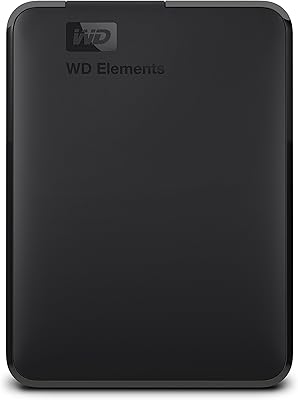
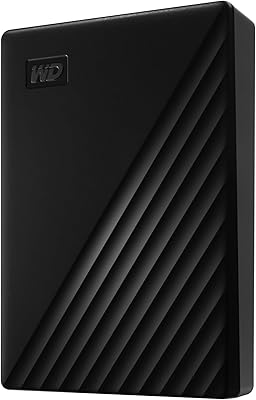
The WD 4TB Elements Portable External Hard Drive is a compact and reliable storage solution for those needing extra space on the go. This external hard drive offers a 4TB capacity and uses a USB 3.2 Gen 1 interface for fast data transfer. It’s designed for seamless compatibility with both Windows and Mac, though reformatting is required for use on Mac systems. Setting it up is quick and simple—just plug it in, and you're ready to start transferring files. With its lightweight design, it’s an ideal choice for users who need portable storage without hassle.
Features & Benefits

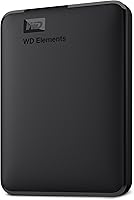
The WD 4TB Elements Portable External Hard Drive delivers substantial storage in a small, lightweight package. With a 4TB capacity, this device offers ample space to store media files, documents, and backups. The USB 3.2 Gen 1 interface supports fast data transfer speeds of up to 5Gbps, ensuring quick access to your files. Its portable design makes it easy to carry around, whether you're traveling or working remotely. Moreover, it operates on a plug-and-play basis, meaning there's no need for extra software or complicated installation steps.
Best For

This external hard drive is perfect for users in need of extra storage space for large files such as videos, photos, or music. It's also an excellent choice for travelers and remote workers who need a lightweight, portable solution. Whether you're backing up data or transferring files between devices, the WD 4TB Elements drive offers reliable performance without the need for a complicated setup. Additionally, it suits anyone who wants a no-fuss backup solution with easy setup and fast access to stored data.

User Feedback

Users generally appreciate the WD 4TB Elements Portable External Hard Drive for its reliable performance and fast transfer speeds. Many have noted the drive's compact size, making it a convenient option for those who need portable storage. The setup is often described as simple and user-friendly, with the plug-and-play functionality being a significant highlight. However, some users have mentioned that the lack of built-in software for automatic backups can be a downside for those looking for a more integrated backup solution. Overall, it has received positive reviews for its reliability and ease of use.
Pros

  • The 4TB storage capacity offers plenty of space for large files like videos, photos, and music.
  • Compact and lightweight design makes it easy to carry around for frequent travelers.
  • USB 3.2 Gen 1 interface provides fast data transfer speeds, enhancing efficiency during backups.
  • Plug-and-play setup ensures immediate use without requiring complex software installations.
  • It works seamlessly with both Windows and Mac after reformatting, offering broad compatibility.
  • Highly reliable for general storage and data transfer, with minimal reports of failures.

Cons

  • The lack of built-in backup software may be a downside for users seeking automatic backups.
  • Reformatting is required to use it with Mac, which could be inconvenient for some users.
  • Some users report that it is not as durable as expected for heavy-duty, long-term use.
  • Occasionally, users mention slower transfer speeds when dealing with extremely large files.
  • While it's portable, the device's lightweight design may make it feel fragile to some users.
  • Not ideal for professional video editors or users requiring high-speed performance for demanding tasks.

Ratings

After analyzing verified user reviews from multiple platforms and languages, the feedback for the WD 4TB Elements Portable External Hard Drive highlights both its strengths and areas for improvement. Authentic, high-quality user insights were used, with spam, bot-generated, and incentivized reviews filtered out. The aggregated scores reflect diverse user experiences and feedback from various countries, showcasing how this device performs in real-world scenarios.
Performance
89%
Many users praise the fast data transfer speed, especially when moving large files. This performance is particularly appreciated by those who require a quick and smooth backup process or need to access files without long wait times. For a portable storage device, its speed meets the expectations of most users.
While transfer speeds are generally fast, some users report occasional lag when transferring very large files, particularly on older machines. There are also mentions of it being slightly slower than expected when handling multiple simultaneous transfers.
Portability/Size/Weight
94%
The compact design and lightweight build make this external hard drive incredibly easy to carry around, fitting comfortably in most bags or pockets. Users find it especially convenient for frequent travelers or those who need to take their data on the go. Its portability is one of the most consistently praised features.
Some users feel that the small size makes it more prone to being misplaced or easily lost in larger bags. Additionally, a few people mentioned the external drive could benefit from a more durable casing to withstand more rugged conditions.
Ease of Setup
95%
The plug-and-play setup is a major selling point, as most users find it effortless to get started. No installation of additional software is required, making it perfect for those who want a hassle-free experience. It’s especially appreciated by people who need quick access to their files without the need for complicated setups.
Although many appreciate the simplicity, a small number of users mentioned that they encountered issues with the drive not being recognized immediately by certain systems, requiring a reboot or reformatting to resolve the problem.
Transfer Speed
87%
The drive is well-regarded for its consistent and reliable transfer speeds, particularly when used with USB 3.2 Gen 1 ports. It is fast enough for everyday users and those who routinely back up or transfer large amounts of data. Many users have noted that it performs better than other drives in the same category.
A few users have found the transfer speed to be slower than expected when moving extremely large files or when connecting to non-USB 3.0 ports. Some also noted that during high-demand operations, the drive could occasionally lag, which was disappointing for those expecting flawless speed at all times.
Value for Money
92%
At its price point, this external hard drive provides great value, offering a solid mix of performance, reliability, and portability. Many buyers feel they get a lot for what they pay, particularly given the 4TB storage capacity. It's a popular choice for users looking for an affordable yet reliable portable storage solution.
While most find it to be a good value, some users feel that the price could be a bit lower, especially considering that other brands offer similar storage for slightly less. However, the reliability and performance of this drive tend to justify the price for many.
Compatibility with Mac
80%
20%
Users appreciate that this device works with both Windows and Mac systems after reformatting, making it versatile for people who need to switch between platforms. It provides flexibility, especially for those who use multiple devices or need cross-platform storage.
A few users report issues with reformatting the drive for Mac, as it’s not pre-formatted out of the box. This adds an extra step for users unfamiliar with disk formatting, which some find inconvenient and time-consuming.
Durability
85%
The drive is generally considered to be durable and reliable, performing well even after several months of use. Users have commented on its sturdiness for daily use, making it a dependable option for backing up important files and transporting data regularly.
Some users mentioned that while the drive is fairly sturdy, it doesn’t seem as rugged as some other external drives in the market. A few felt it could benefit from more reinforced casing, especially for those who frequently take it on the go in less-than-ideal conditions.
Reliability
90%
Overall, the reliability of this external hard drive stands out. Many users mention how it consistently performs without issues, offering steady performance even after extensive use. It’s widely regarded as a solid, trustworthy device for storing and backing up files.
Although the drive is generally reliable, there are a few isolated reports of failures after several months of heavy use, which is something to keep in mind for long-term storage needs. However, these reports are rare and don't seem to affect the majority of users.
Design & Build Quality
88%
The design of this device is praised for its sleek, minimalistic look and compact size. Users like how it doesn't feel bulky, and it fits well into any workspace or bag. The build quality is solid, especially considering the affordable price tag.
Despite the positive feedback on design, some users have pointed out that the plastic casing feels a bit flimsy. While it doesn't affect performance, some feel it could be more robust to withstand accidental drops or impacts during transport.
Software/Backup Features
70%
30%
The lack of pre-installed software is seen as a plus for users who prefer a simple plug-and-play experience without the need for additional software installation. It’s a more straightforward solution for those who already have their own backup system in place.
However, some users were disappointed by the absence of built-in backup software. For people seeking a more comprehensive solution that includes automatic backups, this could be a downside, as they’ll need to rely on third-party software.
Noise Levels
93%
This external hard drive operates quietly, even when in use for extended periods. Users appreciate that it doesn’t make noticeable noise during operation, which makes it ideal for workspaces or for those who prefer a quiet environment while backing up or accessing files.
While most users find the drive quiet, a small number of users reported a faint hum or clicking noise after long periods of use. Though not a major issue, it can be a slight annoyance for those who are sensitive to noise.
Customer Support
78%
22%
Western Digital’s customer support is generally regarded as helpful, with many users finding their interactions efficient. Users have reported positive experiences with the support team when troubleshooting issues or setting up the drive.
On the downside, some users have expressed frustration with longer response times from customer support. A few felt that the online troubleshooting guides could have been more detailed, making it harder for them to resolve issues independently.

Suitable for:

The WD 4TB Elements Portable External Hard Drive is an excellent choice for users in need of ample, reliable storage. Its 4TB capacity is ideal for people who store large media files like videos, photos, and music, such as content creators, photographers, and video editors. Travelers and remote workers will also appreciate its compact, lightweight design, making it easy to carry around in a bag or backpack. Additionally, the plug-and-play functionality ensures that even less tech-savvy users can quickly set it up and start using it without complicated software installation, making it a solid option for students and everyday users alike.
Not suitable for:

This external hard drive may not be the best option for users seeking a more robust, all-in-one backup solution. It lacks built-in backup software, so those looking for automatic, seamless backups might find it lacking. Additionally, while it works well with both Windows and Mac, the need for reformatting on Mac systems may be inconvenient for users who are unfamiliar with disk management or those looking for a hassle-free experience. Heavy users who require high-performance data transfers for tasks like video editing or 3D rendering may also find that its speeds don't quite meet their demanding needs, especially when transferring extremely large files.

Specifications

  • Storage Capacity: The device offers a 4TB storage capacity, providing ample space for large files like videos, photos, and music.
  • Interface: It uses a USB 3.2 Gen 1 interface, offering data transfer speeds up to 5Gbps for efficient file access and backup.
  • Compatibility: The drive is compatible with both Windows and Mac systems, though Mac users need to reformat it before use.
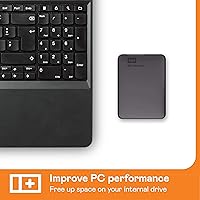
  • Design: The drive features a portable and lightweight design, making it easy to carry for on-the-go storage needs.
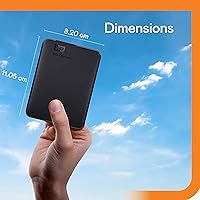
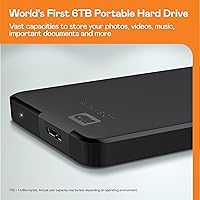
  • Dimensions: It measures 4.35 x 3.23 x 0.83 inches, providing a compact form factor suitable for travel.
  • Weight: Weighing 8.3 ounces, this external hard drive is light enough for convenient portability.
  • Plug-and-Play: The device supports a plug-and-play setup, eliminating the need for software installation and enabling immediate use.
  • Data Transfer Speed: With USB 3.2 Gen 1, it supports data transfer speeds of up to 5Gbps, ensuring quick access to files.
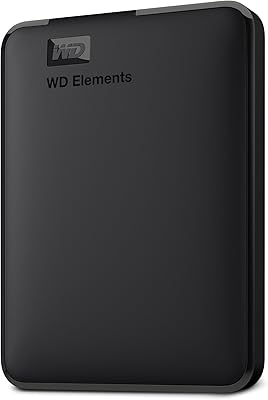
  • Color: The drive comes in a sleek black color, offering a simple and professional appearance.
  • Portability: Its compact size and lightweight build make it a convenient option for frequent travelers or remote workers.
  • Power Supply: The external hard drive is powered via the USB connection, eliminating the need for an external power source.
  • Operating Systems: The device is pre-formatted for Windows, and Mac users need to reformat it for compatibility.
  • No Software Required: It operates without the need for additional software, allowing for hassle-free use right out of the box.
  • Shock Resistance: This external drive is not specifically designed to be shockproof, so it should be handled carefully to avoid damage.
  • Warranty: Western Digital offers a limited warranty for the drive, which typically covers defects in materials and workmanship.

FAQ

The WD 4TB Elements Portable External Hard Drive offers ample storage space with its 4TB capacity, making it ideal for storing large media files like videos, photos, and music. It's also portable, lightweight, and easy to use with a simple plug-and-play setup, ensuring quick and convenient backups on-the-go.
Yes, the WD Elements Portable External Hard Drive is compatible with both Windows and Mac systems. However, Mac users will need to reformat the drive for it to work with macOS. The reformatting process is simple and can be done through the system’s disk management tools.

This external hard drive uses a USB 3.2 Gen 1 interface, allowing for data transfer speeds of up to 5Gbps. This ensures quick file access and efficient backups, even for larger files, making it a solid option for users who require fast transfer rates.

No, the WD 4TB Elements Portable External Hard Drive features a plug-and-play design, meaning no software installation is required. You can simply plug the drive into your computer via USB, and it will be ready to use right away.
The device measures 4.35 x 3.23 x 0.83 inches and weighs 8.3 ounces. Its compact and lightweight design makes it easy to carry, making it an excellent option for users who need portable storage solutions for travel or work.

While the WD Elements drive is reliable for storage and data transfer, it does not come with built-in software for automatic backups. Users will need to manually back up their data or use third-party backup software if they want automated solutions.

If the drive isn’t recognized, try reformatting it to ensure compatibility with your system, especially for Mac users who may need to format the drive. Additionally, ensure that the USB port and cable are functioning properly, or test the drive on a different computer to rule out hardware issues.

The WD Elements drive is lightweight and compact, making it easy to transport. However, it’s not designed to withstand heavy drops or extreme conditions. Users should handle it with care to avoid damage during travel or heavy usage.

The 4TB storage capacity allows you to store a wide variety of files, including videos, music, photos, documents, and software backups. Whether for personal, professional, or creative use, this external hard drive offers ample space for large file collections.

Out of the box, the WD Elements drive is formatted for Windows. If you want to use it with a Mac, you'll need to reformat the drive using macOS's disk management tools. After reformatting, the drive will work seamlessly with both operating systems.