Overview

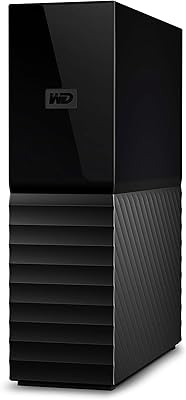
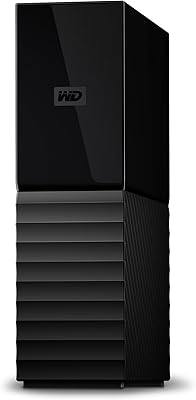
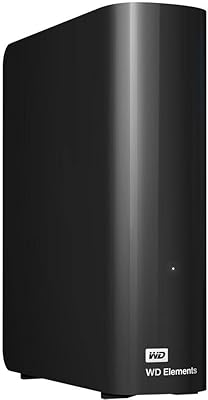
The WD Elements Desktop 3TB External Hard Drive has been around since 2013, and the fact that it still sells well and earns strong ratings says something real about its reliability. This is not a drive built to impress spec hunters — it's built for people who just need large, dependable storage without fuss. No complicated setup, no subscription software to wrestle with, no learning curve. You plug it in, your computer recognizes it, and you get to work. For buyers who want straightforward bulk storage without paying a premium for features they'll never use, this desktop hard drive still holds up surprisingly well in a crowded market.
Features & Benefits

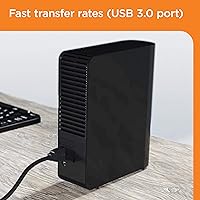
The USB 3.0 interface makes a genuine difference when you're moving large files — think full movie folders or game installs — compared to older USB 2.0 connections, though keep in mind this is a mechanical hard drive, not a solid-state one, so don't expect SSD-level speeds. The 3TB capacity gives you substantial room to store photo archives, video projects, or years of music without constantly shuffling files around. It connects with a single cable and works right away on Windows PCs and most game consoles including PS4 and Xbox. Mac users should know upfront that reformatting is required before the drive is usable on macOS — a quick process, but worth knowing before you buy.

Best For

This external HDD is a natural fit for home media archivists — people sitting on years of family photos, video recordings, or music collections who just need somewhere safe to put it all. Console gamers will find it equally useful; plugging it into a PS4 or Xbox to offload games frees up internal storage without any complicated configuration. It also works well as a quiet, low-maintenance backup destination for a home office setup. If you're moving data off an older machine that's running low on space, this desktop hard drive handles that migration without drama. What it's not ideal for is anyone who needs hardware-level encryption or built-in cloud backup — those features simply aren't here.

User Feedback

Across more than 650 ratings, the WD Elements 3TB holds a 4.6-star average, which is genuinely impressive for a drive that's been on the market this long. Buyers consistently mention how easy it is to set up and how it just keeps working — no drama, no failures after months of regular use. The criticism that does surface falls into a couple of recurring areas: some users find the drive audible under heavy load, which can be noticeable in quiet rooms, and others wish a backup application were included out of the box. Neither complaint is a dealbreaker, but they're worth knowing about. Most buyers still consider it a solid, no-regrets pick in 2025.

Pros

  • Plug-and-play setup — most Windows users and console gamers are up and running within minutes.
  • 3TB of storage handles years of photos, video files, and game libraries without hitting limits quickly.
  • Works out of the box with PS4 and Xbox, making console storage expansion genuinely painless.
  • USB 3.0 connection offers meaningfully faster transfers than older USB 2.0 drives for large files.
  • No bloatware or proprietary software to install — works with whatever backup tools you already use.
  • Holds a 4.6-star average across hundreds of verified reviews, reflecting years of consistent real-world performance.
  • Cost per terabyte is competitive, making it a smart pick for buyers who prioritize capacity over premium extras.
  • The desktop form factor keeps the drive stable and cool during long backup sessions compared to compact portable alternatives.

Cons

  • Requires an external AC power adapter — not a bus-powered solution, so a free wall outlet is always needed.
  • Mac users must reformat the drive before use, which is not communicated clearly at the point of purchase.
  • Produces an audible mechanical hum under heavy load that can be distracting in a quiet room or office.
  • No hardware encryption or password protection — sensitive data stored here is not secured at the drive level.
  • No backup software is included, leaving users to sort out their own backup workflow from scratch.
  • 3TB may fill faster than expected for anyone managing 4K video archives or large professional file collections.
  • The plastic casing scuffs easily and collects dust visibly, which bothers buyers who care about desk aesthetics.
  • Older product design means it lacks some convenience features found on newer competing drives at similar price points.

Ratings

Our AI scoring system analyzed hundreds of verified global buyer reviews for the WD Elements Desktop 3TB External Hard Drive, actively filtering out incentivized and bot-generated feedback to surface what real, long-term users actually experienced. The scores below reflect a balanced view — genuine strengths are recognized, and recurring frustrations are not glossed over. Whether this external HDD earns a spot on your desk depends on your specific needs, and these ratings are designed to help you decide honestly.

Ease of Setup
94%
Buyers across skill levels — from teenagers setting up a PS4 expansion to older adults backing up family photos — consistently report having the drive recognized and ready within minutes of plugging it in. No driver downloads, no account creation, no software to wrestle with before you can start using it.
Mac users face a small but real extra step: the drive ships formatted for Windows, so macOS users need to reformat it before it works properly. It takes only a few minutes, but first-time Mac buyers who aren't aware can find this momentarily confusing.
Storage Capacity
91%
Three terabytes gives most home users more breathing room than they expect. Reviewers mention comfortably storing full game libraries, years of RAW photo files, video project archives, and system backups — often all on the same drive — without hitting the ceiling for a long time.
For power users or anyone managing 4K video production or large server backups, 3TB fills up faster than anticipated. A handful of buyers wished they had stepped up to a higher capacity model from the start, particularly those using the drive as a sole backup destination.
Transfer Speed
74%
26%
The USB 3.0 connection makes a practical difference when moving large batches of files compared to older USB 2.0 drives. Users copying movie folders or game installs report respectable speeds that do not feel like a bottleneck in everyday use.
This is a mechanical hard drive, not a solid-state one, and the speeds reflect that reality. Users coming from SSDs will notice the difference immediately, especially during sustained large transfers. It is not slow, but calling it fast would be misleading.
Build Quality & Durability
82%
18%
The drive has a solid, no-nonsense plastic casing that feels sturdy on a desk without being unnecessarily bulky. Many buyers report using the same unit for two, three, or more years without any mechanical issues, which speaks well for its long-term construction.
The enclosure does not feel premium — it is functional rather than refined. A few users note that the casing scuffs easily and picks up dust visibly. It is also not designed to survive drops, so anyone without a stable desk setup should be cautious.
Noise Level
63%
37%
Under light usage — occasional file access, background backups — the drive is quiet enough that most users barely register it. In a typical living room or home office with ambient noise, it sits in the background without drawing attention.
Under sustained heavy load, such as large file transfers or defragmentation, the drive produces an audible mechanical hum and occasional clicking that some users find distracting in quiet rooms. This is normal HDD behavior, but buyers accustomed to silent SSDs may be put off.
Compatibility
89%
Out of the box, the drive works with Windows PCs, PS4, and Xbox without any configuration at all. Console gamers in particular appreciate not having to do anything beyond plugging it in to immediately expand their game storage.
Mac compatibility requires reformatting, and the drive is not natively compatible with Apple File System. Users who need to share the drive regularly between a Mac and a Windows machine will need to format it as exFAT, which adds a step that not everyone anticipates.
Value for Money
88%
Buyers consistently frame this as one of the better cost-per-terabyte options in the desktop external HDD category. For users who need reliable bulk storage without paying for encryption, cloud integration, or backup software they may never use, the pricing feels fair and well-justified.
The price has fluctuated over time, and at certain points competing drives offer similar capacity at a slightly lower price point. A small number of reviewers noted they found comparable options from other brands at a meaningful discount during sales periods.
Software & Features
51%
49%
The absence of bundled software is actually a point of praise for some buyers — particularly those who find manufacturer software bloated or intrusive. The drive works with whatever backup tools the user already prefers, including built-in OS utilities like Windows Backup or Time Machine after reformatting.
There is no included backup application, no hardware encryption, and no password protection. For buyers who assumed a drive at this price tier would come with at least basic security features or a bundled utility, the bare-bones approach is a genuine letdown.
Heat Management
71%
29%
During typical daily use — reading and writing files a few times throughout the day — the drive stays at a reasonable temperature and does not get uncomfortably warm to the touch. The desktop form factor helps here compared to more compact portable drives.
During extended, intensive transfers, the casing does warm up noticeably. It does not get dangerously hot under normal circumstances, but users who plan to run continuous backups for hours at a time should ensure the drive has adequate ventilation around it.
Power & Cable Management
76%
24%
The single USB cable for data keeps the connection side tidy. For users who already have a cluttered desk, the simplicity of one cable to the computer is a small but appreciated design choice that reduces cable management headaches.
The drive requires an external AC power adapter in addition to the USB cable, which means two cables and an occupied wall outlet rather than one. Users hoping for a fully bus-powered solution — common with portable drives — will need to plan for this extra requirement.
Mac Compatibility Experience
67%
33%
Once reformatted to exFAT or Mac OS Extended, the WD Elements 3TB works reliably with macOS and integrates well with Time Machine for automated backups. Mac users who know what they are getting into report a smooth long-term experience after the initial setup step.
The out-of-box experience for Mac buyers is noticeably less smooth than for Windows users. The reformat requirement is not clearly communicated at the point of purchase, and a meaningful number of Mac reviewers express frustration at discovering this only after unboxing.
Long-Term Reliability
86%
Given that this drive has been on the market since 2013 and continues to earn strong ratings, its track record is one of its most compelling qualities. Many buyers specifically mention using the same unit for several years without incident, which is the most honest reliability signal possible.
A small percentage of reviews report early drive failures, which is a reality with any mechanical hard drive regardless of brand. WD's warranty coverage helps in these cases, but buyers relying on this as their only storage copy should always maintain a secondary backup.
Portability
44%
56%
The drive is compact enough to move between rooms or take to a friend's house occasionally. Its 3.5-inch desktop form factor is standard and not excessively large by the category's norms, so relocation is manageable when needed.
This is fundamentally a desktop device — it needs AC power, it weighs over two pounds, and it is not designed to travel. Anyone expecting to carry it in a bag daily or use it on the go will find it genuinely impractical compared to a portable bus-powered alternative.
PS4 & Xbox Integration
92%
Console gamers are among the most satisfied buyers of this drive. It is recognized immediately by both PS4 and Xbox, and users report smooth game loading and installation performance once set up as extended storage — all without any technical knowledge required.
The drive does not come with any console-specific accessories such as a short angled USB cable or a mounting solution to keep it tidy alongside a console. Some users find the cable length and drive footprint slightly awkward when positioning it next to gaming hardware.

Suitable for:

The WD Elements Desktop 3TB External Hard Drive is a strong fit for anyone who needs a large, dependable storage destination without any technical complexity. Home users sitting on years of photos, home videos, or music libraries will appreciate having 3TB of organized, centralized space that just works every time they plug it in. Console gamers — particularly those on PS4 or Xbox who have burned through their internal storage with large game installs — will find this desktop hard drive recognized and ready to use almost instantly. It also makes a practical, low-maintenance backup solution for freelancers or small home offices that want local copies of important files without paying for a cloud subscription. Anyone who is migrating data off an old, failing, or nearly full machine will find this external HDD a capable and affordable destination for that transition.
Not suitable for:

The WD Elements Desktop 3TB External Hard Drive is not the right pick for buyers who need speed above all else — this is a mechanical hard drive, and anyone coming from an SSD workflow will notice the difference during large or sustained transfers. It also lacks any form of hardware encryption or password protection, which rules it out for anyone handling sensitive professional, financial, or personal data that needs to stay secure. Mac users should be aware upfront that the drive requires reformatting before it works with macOS, which adds a step that is minor in practice but can be a surprise if you are expecting an instant out-of-box experience. The drive also needs its own AC power adapter, so it is not suited for use on the go or in situations where a wall outlet is not available. Finally, buyers who want bundled backup software, cloud sync features, or a genuinely portable form factor should look elsewhere — this external HDD does none of those things by design.
Specifications

  • Storage Capacity: The drive offers 3TB of usable storage space, suitable for large media libraries, game installations, and full system backups.
  • Interface: It connects via USB 3.0, which is backward compatible with USB 2.0 ports, though transfer speeds will be limited on older connections.
  • Form Factor: The drive uses a 3.5-inch desktop form factor, designed for stationary use on a desk rather than portable carry.
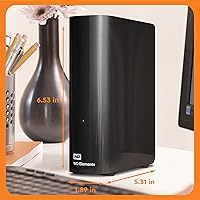
  • Dimensions: The unit measures 8 x 7 x 5.5 inches, giving it a compact desktop footprint without being overly bulky.
  • Weight: The drive weighs 2.01 pounds, which is typical for a 3.5-inch external desktop hard drive.
  • Power Source: An external AC power adapter is required; the drive is not bus-powered and cannot run on USB power alone.
  • Compatibility: It is compatible out of the box with Windows PCs, PS4, and Xbox; Mac users must reformat the drive before use.
  • Mac Formatting: On macOS, the drive must be reformatted to exFAT or Mac OS Extended via Disk Utility before it will function correctly.
  • Plug-and-Play: No driver installation or proprietary software is required on Windows and most console platforms — the drive is recognized immediately upon connection.
  • Backup Software: No backup application is included in the box; users must supply their own preferred backup solution or use OS-native utilities.
  • Hardware Encryption: The drive does not include hardware-level encryption or password protection of any kind.
  • Color: The unit is finished in a matte black casing with no LED indicators on the front face.
  • USB Ports: One USB 3.0 port is available on the drive for connecting to a host device via the included cable.
  • Average Rating: The drive holds a 4.6-out-of-5-star average based on 651 verified ratings at the time of evaluation.
  • Market Rank: It holds the #483 position in the External Hard Drives category, reflecting consistent long-term sales performance.
  • Release Date: The WD Elements Desktop line was first made available in August 2013 and remains in active production and sale.
  • Manufacturer: The drive is manufactured by WD (Western Digital), a well-established storage brand with decades of industry presence.
  • Model Number: The specific model identifier for this variant is WDBWLG0030HBK-NESN.

Related Reviews
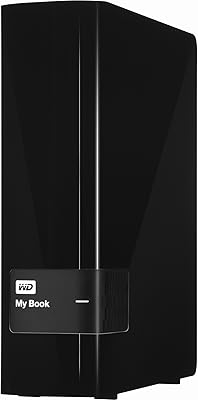
WD 3TB My Book Desktop External Hard Drive
85%
91%
Data Transfer Speed
89%
Ease of Use
85%
Backup Software Experience
87%
Build Quality
88%
Security Features (Encryption)
More
WD Elements Portable 3TB External Hard Drive
75%
93%
Ease of Setup
91%
Storage Capacity
67%
Transfer Speed
88%
Portability & Form Factor
63%
Build Quality & Durability
More
WD 20TB Elements Desktop External Hard Drive
86%
97%
Storage Capacity
91%
Ease of Setup
89%
Data Transfer Speed
88%
Build Quality
65%
Noise Levels
More
WD 12TB My Book Desktop External Hard Drive
85%
96%
Storage Capacity
88%
Ease of Use
92%
Data Security & Encryption
85%
Performance Speed
78%
Software/Backup Functionality
More
WD 24TB My Book Desktop External Hard Drive
85%
95%
Storage Capacity
89%
Data Security
91%
Ease of Setup
87%
Build Quality
82%
Software Functionality
More
Toshiba 3TB Canvio Desktop External Hard Drive
83%
86%
Performance
92%
Storage Capacity
89%
Ease of Setup
85%
Compatibility
80%
Build Quality
More
WD Elements Portable 2TB
75%
96%
Ease of Setup
88%
Reliability & Longevity
93%
Portability & Form Factor
61%
Transfer Speed
84%
Value for Money
More
WD Elements Portable 5TB External Hard Drive
69%
93%
Value for Money
96%
Ease of Setup
91%
Storage Capacity
61%
Transfer Speed
89%
Portability & Size
More
WD 18TB My Book Desktop External Hard Drive
85%
96%
Storage Capacity
89%
Performance and Speed
93%
Ease of Setup
85%
Software Functionality
80%
Build Quality
More
WD 22TB My Book Desktop External Hard Drive
86%
91%
Value for Money
96%
Storage Capacity
93%
Data Security
85%
Ease of Setup
88%
Transfer Speed
More

FAQ

On a Windows PC or a PS4 and Xbox console, yes — you just plug it in and it shows up immediately with no software to install. The only exception is Mac: if you're on macOS, you'll need to reformat the drive using Disk Utility before it works, which takes just a few minutes but is a necessary step.

It will, but not right out of the box. The drive ships formatted for Windows, so Mac users need to open Disk Utility and reformat it to either exFAT (if you want to share it between Mac and PC) or Mac OS Extended (if it's Mac-only). Once that's done, it works reliably and plays nicely with Time Machine for automated backups.

Yes, and this is actually one of the most popular uses for this desktop hard drive. The PS4 recognizes it immediately, and you can store and run games directly from it. Just plug it into the PS4's USB port, follow the on-screen setup prompt, and you're ready to offload or install games to the expanded storage.

For everyday tasks — backing up files, storing and accessing photos, copying documents — the speed is perfectly fine. Where you'll notice it is during large transfers, like moving hundreds of gigabytes at once; it's faster than an older USB 2.0 drive, but it's a mechanical hard drive, not an SSD, so don't expect lightning-quick speeds. For most home users, it's not a bottleneck.

It needs its own power adapter plugged into a wall outlet — it can't run on USB power alone. So you'll have the USB data cable going to your computer and a separate AC cable going to a power socket. This is standard for 3.5-inch desktop drives; just make sure you have a spare outlet available near your desk.

No, there isn't. The drive has no hardware encryption and no password lock feature. If data security matters to you — say, you're storing sensitive work files or personal financial documents — you'd need to use third-party encryption software on top of the drive, or consider a different model that includes those features built in.

During light use, like opening files or occasional backups, it's quiet enough that you'll barely notice it. Under heavy load — large transfers, full backups, or heavy read/write activity over an extended period — it does produce a noticeable mechanical hum and some vibration. It's not disruptive in a busy environment, but in a very quiet room late at night, some users do notice it.

None, unfortunately. The drive ships bare — just the hardware, a USB cable, and the power adapter. You'll need to use your own backup solution. On Windows, the built-in Backup and Restore tool works fine. On Mac, Time Machine handles it well once you've reformatted the drive. If you want something more feature-rich, plenty of free third-party options are available.

You can share it between both, but not simultaneously — it connects to one machine at a time. To make it readable and writable on both platforms without reformatting every time, format it as exFAT using Disk Utility or Windows Disk Management. That format is natively supported by both macOS and Windows, so you can move the drive between computers freely.

It depends entirely on what you're storing. For most home users — photo archives, document backups, a game library — 3TB is genuinely comfortable and won't feel cramped for years. If you're working with 4K video, large raw photo collections, or planning to use it as your only backup destination for multiple machines, stepping up to a 4TB or larger model is probably the smarter long-term call. For everyday household storage, 3TB still hits a practical sweet spot.

Where to Buy