Overview

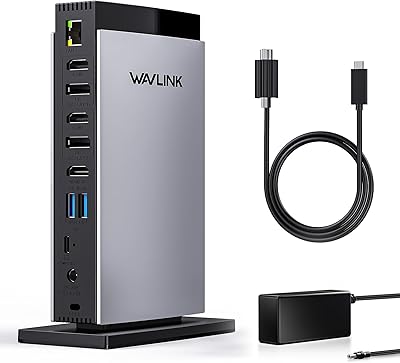
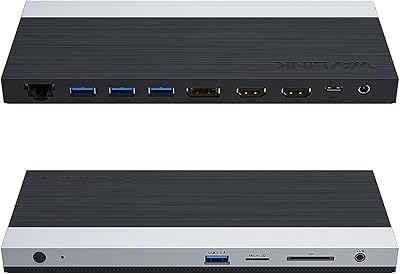
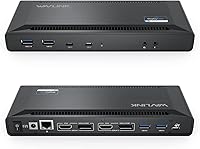
The WAVLINK UG69PD2 Pro Laptop Docking Station sits squarely in the mid-range of the DisplayLink dock market — a meaningful step up from basic USB-C hubs for anyone running dual monitors from a single cable. This is the upgraded successor to the original UG69PD2, with the power supply bumped from 100W to 130W, which matters when you're charging a power-hungry laptop while driving two displays simultaneously. The WAVLINK dock has a slim, bar-style profile that tucks neatly under monitors without dominating a desk. One important note upfront: this is a DisplayLink-based dock, not a native Thunderbolt device, so Mac users will need to install a driver before anything works.
Features & Benefits

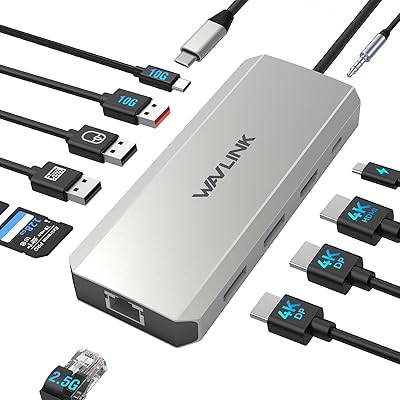
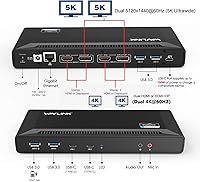
Four video outputs — two HDMI 2.0 and two DisplayPort 1.2 — give you real flexibility. Run dual 4K at 60Hz, or pair both DP ports to drive a 5K ultrawide display if your workflow calls for it. The 100W Power Delivery keeps most modern laptops charged without a separate adapter cluttering your desk. Five USB-A 3.0 ports handle a keyboard, mouse, external drives, and a webcam simultaneously without issue. Gigabit Ethernet is a quiet but practical inclusion — video calls and large file transfers run noticeably more reliably over wire than Wi-Fi. A 3.5mm audio jack rounds things out, and the dock plays nicely with Windows, macOS, ChromeOS, and Ubuntu, with the driver caveat on Mac remaining in effect.

Best For

This docking station hits a sweet spot for home-office workers who want a clean, single-cable desk setup driving two full-resolution displays. If you're running a Dell XPS, Lenovo ThinkPad, or HP Spectre, this USB-C hub upgrade connects cleanly and charges your machine at the same time. MacBook M1 and M2 owners can absolutely use it — but you need to be comfortable downloading and managing the DisplayLink driver; it's not plug-and-play on macOS. It also suits buyers who consistently run out of USB-A ports, since five available slots is more than most competing docks offer at this price. If you need a true Thunderbolt dock with zero-driver setup, look elsewhere.

User Feedback

With 371 ratings averaging 3.8 stars, the WAVLINK dock has a moderately sized sample to draw from — enough to spot real patterns. Windows users are generally satisfied: setup is quick, dual 4K output is stable, and build quality holds up well for the price. The frustrations cluster around Mac. DisplayLink driver installation trips up more users than it should, and a handful report intermittent display flickering after longer sessions. The dock also runs noticeably warm under full load — fairly typical of DisplayLink hardware, but keep it in open air if possible. A few users on demanding laptops found that 100W PD charging struggled to keep pace during sustained heavy workloads, so factor that in accordingly.

Pros

  • Drives two 4K displays at 60Hz simultaneously over a single USB-C cable, replacing a tangle of individual connections.
  • Five USB-A 3.0 ports handle a full peripheral setup — keyboard, mouse, webcam, and drives — without a secondary hub.
  • 100W Power Delivery keeps most thin-and-light laptops charged throughout the workday without a separate adapter.
  • Gigabit Ethernet delivers stable, consistent wired connectivity that Wi-Fi simply cannot match for video calls or large transfers.
  • The WAVLINK dock supports both HDMI 2.0 and DisplayPort 1.2 outputs, giving flexibility for mixed monitor setups without adapters.
  • Dual DisplayPort configuration unlocks 5K ultrawide output, a genuinely rare capability at this price tier.
  • Slim, bar-style form factor integrates neatly into desk setups without consuming meaningful surface space.
  • Explicit Ubuntu 20.04/22.04 and ChromeOS support serves developer and education users that most competing docks ignore.
  • Windows setup is fast and reliable — most users report both displays online within minutes of first connection.
  • The 130W power supply upgrade over the previous model provides meaningful headroom for stable operation under full load.

Cons

  • Mac users must install and maintain a DisplayLink driver — this is not optional, and macOS updates can break it temporarily.
  • No downstream USB-C data port limits compatibility with newer accessories and USB-C external storage drives.
  • The unit runs noticeably warm under sustained dual-display load and should not be placed in enclosed or poorly ventilated spaces.
  • Intermittent display flickering has been reported by a portion of macOS users, particularly during longer work sessions.
  • High-TDP laptops with discrete GPUs may find 100W PD charging insufficient, causing gradual battery drain while docked.
  • The host cable is fixed and non-detachable, which restricts placement flexibility on larger or unconventionally arranged desks.
  • The power brick is disproportionately large relative to the dock itself and requires its own cable management consideration.
  • Driver stability on Mac is tied to DisplayLink release cycles, meaning OS upgrades can leave users without display output for days.
  • The single 3.5mm combo audio jack cannot simultaneously support a separate dedicated microphone and headphone connection.
  • With 371 ratings averaging 3.8 stars, the review base is moderate — enough to identify trends but not as extensively validated as top-selling competitors.

Ratings

The scores below for the WAVLINK UG69PD2 Pro Laptop Docking Station were generated by our AI review engine after analyzing hundreds of verified global buyer reviews, actively filtering out incentivized, bot-generated, and duplicate submissions to surface what real users actually experience. Both the genuine strengths and the recurring frustrations are reflected transparently — so you can decide whether this dock fits your specific setup before committing.
Dual Monitor Performance
83%
Running two 4K displays at 60Hz simultaneously is genuinely stable for the vast majority of Windows users, with no perceptible lag during everyday tasks like spreadsheet work on one screen and a video call on the other. The dual DisplayPort configuration for 5K ultrawide output is a legitimately rare feature at this price point.
A portion of users — particularly on macOS — report intermittent flickering after extended sessions, which becomes distracting during focused work. The dual-monitor experience is noticeably more reliable on Windows than on Mac, and that gap is wide enough to affect buying decisions.
Mac Compatibility
61%
39%
M1 and M2 MacBook owners can absolutely get dual-monitor output from this docking station, which Apple's own hardware limitations make frustratingly difficult with native docks. When the DisplayLink driver installs cleanly, the experience is functional and reasonably stable for day-to-day use.
The driver installation process catches a meaningful number of Mac users off guard — this is not plug-and-play, and macOS Ventura and Sonoma have added additional permissions steps that aren't clearly documented in the box. Driver update friction after macOS upgrades is one of the most repeated complaints across reviews.
Windows Compatibility
91%
On Windows 10 and 11, this USB-C hub upgrade behaves almost exactly as advertised — connect the cable, let the driver install automatically, and both displays come online within minutes. Dell XPS, Lenovo ThinkPad, and HP Spectre users consistently report the smoothest experiences.
A small subset of Windows users encountered driver conflicts, particularly on machines with older Intel graphics stacks or custom enterprise IT configurations. These cases appear to be the exception rather than the pattern, but they do exist.
Laptop Charging (Power Delivery)
74%
26%
For most thin-and-light laptops — a 13-inch or 14-inch MacBook, a ThinkPad T-series, or a Dell XPS 13 — the 100W PD output is sufficient to keep the battery level stable even during active use, which removes the need for a second charger on the desk entirely.
Users running power-hungry machines, such as a 16-inch MacBook Pro under sustained load or a gaming-adjacent Windows laptop with a discrete GPU, report the battery gradually draining even while docked. The WAVLINK dock was not designed to fully replenish high-TDP devices under stress.
Port Selection & Quantity
88%
Five USB-A 3.0 ports is genuinely generous for a dock in this category — enough to run a keyboard, mouse, webcam, external hard drive, and a card reader without reaching for a secondary hub. The inclusion of both HDMI and DisplayPort outputs adds real flexibility for users with mixed monitor inventories.
There is no USB-C data port beyond the host connection, which is a meaningful gap for users who have newer accessories or external SSDs that rely on USB-C. A single downstream USB-C port would have made this a much more complete package.
Network Connectivity
89%
The Gigabit Ethernet port performs consistently well — users working from home on video-heavy calls or transferring large files to NAS drives report stable throughput without the packet loss that creeps into Wi-Fi connections. It works reliably across Windows and macOS once the dock is recognized.
A small number of users noted the Ethernet connection dropping briefly after the system woke from sleep, requiring them to unplug and replug the dock. This appears to be an intermittent driver-side issue rather than a hardware defect, but it is annoying in a professional context.
Build Quality & Design
77%
23%
The slim, elongated form factor is genuinely desk-friendly — it slides neatly under a monitor stand or along the back edge of a desk without taking up meaningful surface space. The matte plastic finish resists fingerprints and looks reasonably professional in a home-office environment.
The housing feels lightweight in a way that reads as plasticky rather than premium, and the host cable is not braided or reinforced at the connectors. For a dock that sits in a fixed position this is tolerable, but it is a noticeable contrast to metal-chassis competitors at higher price points.
Thermal Management
66%
34%
Under moderate load — two monitors running, Ethernet active, a few USB devices connected — the WAVLINK dock stays at a warmth level that is entirely normal and raises no concern. The passive cooling design keeps it silent, which matters in quiet home-office environments.
Under sustained full load, particularly with high-resolution output on both displays simultaneously, the unit becomes noticeably warm to the touch. Users keeping it in enclosed desk compartments or cable management boxes have reported occasional thermal throttling behavior, so open placement is advisable.
Setup & Out-of-Box Experience
72%
28%
Windows users typically have the dock fully operational within a few minutes, with the DisplayLink driver installing automatically in many cases. The physical setup is straightforward — one cable to the laptop, power adapter in, monitors connected, done.
The Mac setup experience is meaningfully more involved and the included documentation undersells this. Users who expected plug-and-play behavior on their MacBook frequently left frustrated reviews, not because the dock failed, but because the driver requirement was never clearly communicated before purchase.
Video Output Flexibility
84%
Having both HDMI 2.0 and DisplayPort 1.2 outputs available simultaneously is practical for desks where one monitor is older HDMI-only and the other is newer with DisplayPort. The ability to mix output types without adapters is a quiet but real convenience.
Maximum resolution per port drops when using HDMI-only configurations compared to dual DisplayPort, and the listing language around this is not always clear. Users expecting Cinema 4K on both HDMI outputs simultaneously may need to adjust their expectations based on their specific monitor combination.
Audio Output
71%
29%
The 3.5mm combo jack works cleanly for headphones and desktop speakers, giving users a convenient way to route audio through the dock rather than plugging directly into the laptop. Signal quality is clean and free of the static noise that plagues cheaper USB audio implementations.
It is a single combo jack rather than separate headphone and microphone ports, which limits flexibility for users who want to use a dedicated desk microphone alongside headphones. There is no optical audio output for users with higher-end speaker setups.
ChromeOS & Linux Support
69%
31%
ChromeOS and Ubuntu 20.04/22.04 support is a genuine differentiator — most competing docks at this price point either ignore Linux entirely or offer vague compatibility claims. Chromebook users working with the supported device list report functional dual-display setups without significant friction.
Linux support is version-specific, and users on distributions or kernel versions outside the tested range have reported unreliable behavior. ChromeOS compatibility is also device-dependent rather than universal, so checking the supported device list before buying is not optional.
Value for Money
81%
19%
For the feature density on offer — dual 4K output, 100W charging, five USB-A ports, Ethernet, and broad OS support — this docking station lands at a price point that would be difficult to match with a native Thunderbolt dock. For Windows-centric buyers, the value equation is strong.
Mac users who factor in driver management overhead, occasional macOS compatibility friction after system updates, and the absence of a zero-configuration setup experience may feel the value proposition is less clear for their use case. The trade-offs are real and worth pricing in.
Driver Stability Over Time
63%
37%
When the DisplayLink driver is properly installed and the operating system remains stable, the dock tends to run without issues for extended periods. Windows users in particular report months of consistent daily use without needing to reinstall or troubleshoot the driver stack.
macOS point releases and major version upgrades have historically broken DisplayLink functionality temporarily, leaving users without display output until an updated driver is released. This is a platform-wide DisplayLink issue rather than specific to this dock, but it affects the long-term ownership experience meaningfully.
Cable Management & Desk Integration
75%
25%
The single-cable connection to the laptop is the core appeal here — one USB-C cable replaces a tangle of individual monitor, charger, and peripheral connections, which makes arriving at and leaving a desk genuinely faster. The dock's slim profile integrates without dominating the workspace.
The host cable is fixed-length and non-detachable, which limits placement flexibility for users with larger or unconventionally arranged desks. The power brick is also notably large relative to the dock itself and requires its own cable management consideration.

Suitable for:

The WAVLINK UG69PD2 Pro Laptop Docking Station is a strong fit for home-office workers and remote professionals who want to consolidate their desk setup into a single USB-C cable connection while running two external monitors. Windows laptop users on popular business lines like the Dell XPS, Lenovo ThinkPad, or HP Spectre will find the experience close to plug-and-play, with stable dual 4K output and 100W charging handling most thin-and-light machines without a separate power brick. It also suits MacBook M1 and M2 owners who are technically comfortable enough to install a DisplayLink driver and manage occasional updates — for that audience, this docking station unlocks dual-monitor functionality that Apple's native hardware simply does not support at this price. ChromeOS and Ubuntu users are a less commonly served group in this category, and the explicit support for both is genuinely useful for developers or education environments running Linux. Anyone who regularly runs out of USB-A ports will also appreciate having five available simultaneously, removing the need for a secondary hub cluttering the desk.

Not suitable for:

The WAVLINK UG69PD2 Pro Laptop Docking Station is not the right choice for buyers expecting a true zero-driver, zero-configuration experience on macOS — if you plug a dock into your MacBook and expect it to simply work without touching system settings or downloading software, you will be frustrated quickly. Users running high-performance laptops with discrete GPUs or large-screen workstation machines may also find the 100W Power Delivery insufficient, as demanding CPU-plus-GPU workloads can outpace what the dock delivers, leaving the battery slowly draining while docked. This is not a Thunderbolt 4 dock, so users who specifically need Thunderbolt bandwidth for daisy-chaining storage arrays, external GPUs, or ultra-high-refresh-rate displays should look at dedicated Thunderbolt solutions instead. The dock also lacks a downstream USB-C data port, which is a real gap for users with newer USB-C accessories or NVMe enclosures that require it. Finally, anyone who needs to place their dock inside an enclosed desk compartment or cable-management box should be cautious — the unit runs warm under heavy load and genuinely benefits from open-air placement.
Specifications

  • Model Number: This docking station carries the official model designation WL-UG69PD2-Pro-US.
  • Dimensions: The dock measures 8.78″ long by 3.15″ wide by 1.02″ tall, making it a compact bar-style unit suited for most desk setups.
  • Weight: The unit weighs 7 oz, light enough to reposition easily but stable enough to stay put on a flat surface.
  • Host Connection: A single USB-C port connects to the host laptop, carrying data, display signal, and Power Delivery charging over one cable.
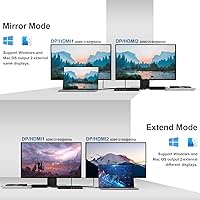
  • Video Outputs: The dock provides two HDMI 2.0 ports and two DisplayPort 1.2 ports, supporting dual external monitor configurations simultaneously.
  • Max Resolution: Using both DisplayPort outputs enables a maximum resolution of 5120x1440 at 60Hz for ultrawide displays, or 4096x2160 at 60Hz in Cinema 4K mode.
  • HDMI Resolution: In dual-HDMI or mixed HDMI-plus-DisplayPort configurations, maximum resolution per display is 3840x2160 at 60Hz.
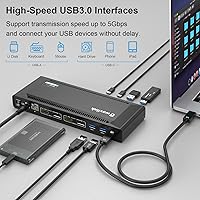
  • USB-A Ports: Five USB-A 3.0 ports are available for peripherals such as keyboards, mice, external drives, and webcams.
  • Power Delivery: The dock delivers up to 100W of Power Delivery charging to the connected host laptop via the USB-C host cable.
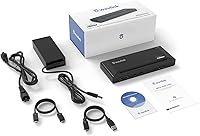
  • Power Supply: An external 130W power adapter is included, providing sufficient headroom for simultaneous display output, charging, and peripheral operation.
  • Networking: A single Gigabit Ethernet (RJ-45) port provides wired LAN connectivity at speeds up to 1000 Mbps.
  • Audio: One 3.5mm combo audio jack supports both headphone output and microphone input through a single connection.
  • Chip Technology: Display output is powered by a DisplayLink chip, which requires a software driver to be installed on the host machine.
  • OS Support: Compatible operating systems include Windows, macOS 10.14 and later, ChromeOS, Ubuntu 20.04, and Ubuntu 22.04.
  • Mac Compatibility: Apple M1 and M2 Mac computers are supported when the DisplayLink driver is downloaded and installed prior to use.
  • Total Port Count: The dock offers 15 total ports across all connection types, including video, USB, audio, network, and power.
  • Cooling Method: Thermal management is passive with no internal fan, relying on the aluminum-and-plastic enclosure to dissipate heat during operation.
  • Cable Arrangement: The host USB-C cable is attached and non-detachable, with a fixed length designed for standard desk placement scenarios.

Related Reviews

WAVLINK UMD23M-10GB 13-in-1 Laptop Docking Station
74%
67%
Multi-Monitor Performance
83%
Built-in SSD Enclosure
61%
Build Quality & Materials
54%
Thermal Management
78%
USB Port Speed & Variety
More
WAVLINK UMD306B Docking Station
88%
91%
Dual Monitor Performance
88%
Data Transfer Speed
89%
Build Quality
92%
Ease of Setup
87%
Network Connectivity (Ethernet)
More
TobenONE UDS047 Dual Monitor Laptop Docking Station
82%
91%
Dual Monitor Output Quality
88%
Build Quality & Sturdiness
86%
Vertical Laptop Stand Design
84%
USB Data Transfer Speed
78%
Power Delivery Performance
More
UGREEN Revodok Pro 209 USB-C Docking Station
75%
83%
Dual Monitor Performance
61%
Driver Setup & Compatibility
78%
Build Quality & Design
86%
Data Transfer Speed
89%
100W Power Delivery
More
WAVLINK UG69DK13 Triple Monitor USB-C Docking Station
74%
88%
Multi-Monitor Performance
61%
Setup & Ease of Use
91%
Port Selection & Variety
86%
Video Output Quality
83%
Data Transfer Speed
More
WAVLINK WL-UG69PD12 Quad Monitor Docking Station
75%
83%
Multi-Monitor Performance
58%
Driver Setup & Installation
74%
macOS M1/M2 Compatibility
86%
Laptop Charging (Power Delivery)
78%
Build Quality & Design
More
StarTech 129N-USBC-KVM-DOCK Dual-Laptop KVM Docking Station
75%
83%
KVM Switching Reliability
88%
Display Performance
51%
Setup & Driver Experience
72%
Power Delivery
81%
Build Quality
More
WAVLINK USB C Docking Station 3 Monitor 100W PD
87%
90%
Display Performance
88%
Build Quality
85%
Ease of Setup
92%
Charging Speed
87%
Connectivity Options
More
iVANKY FusionDock Pro 1+ 14-in-1 Docking Station for MacBook
85%
92%
Value for Money
90%
Display Support
88%
Build Quality
85%
Ease of Setup
91%
Port Selection
More
ZMUIPNG DisplayLink Docking Station 18-in-1 for MacBook & USB-C Laptops
85%
88%
Overall Performance
91%
Video Output Quality
85%
Data Transfer Speed
89%
Power Delivery
92%
Connectivity and Compatibility
More

FAQ

Yes, and this is the single most important thing Mac buyers need to know before purchasing. The WAVLINK UG69PD2 Pro Laptop Docking Station uses a DisplayLink chip for its display output, which requires you to download and install the DisplayLink Manager app from displaylink.com before your monitors will be recognized. On newer macOS versions you will also need to grant screen recording permissions during setup. It is not plug-and-play on Mac the way a native Thunderbolt dock would be.

You can run dual 4K at 60Hz simultaneously, but the output combination affects the maximum resolution available. Using both DisplayPort outputs gives you the highest quality, reaching up to 5K ultrawide resolution. If you use both HDMI ports or mix one HDMI with one DisplayPort, each display is capped at 4K at 60Hz, which is still excellent for the vast majority of users. The catch is primarily for Mac users, where DisplayLink driver performance under heavy load can occasionally cause minor frame drops.

For most thin-and-light laptops — a 13-inch or 14-inch MacBook Pro, a ThinkPad T-series, or a Dell XPS 13 — 100W is typically sufficient to maintain or slowly increase battery level during normal use. Where it runs into trouble is with high-performance laptops that have discrete graphics cards or large displays, like a 16-inch MacBook Pro under sustained load. Those machines can draw more power than 100W covers, so the battery may gradually drain even while the dock is connected.

No, this is not a native Thunderbolt 4 dock. It connects via USB-C and uses DisplayLink technology for display output, which is a different approach entirely. DisplayLink docks work well and support a broader range of host devices, but they do not provide the dedicated Thunderbolt bandwidth that daisy-chaining high-speed storage or external GPUs would require. If your workflow specifically depends on Thunderbolt 4 capabilities, you would need a different product.

This is a known pain point for DisplayLink-based docks across all brands, not just this one. Major macOS version upgrades can temporarily break display output until DisplayLink releases an updated driver version. In practice, that delay is usually a few days to a couple of weeks after Apple releases the update. The workaround most users follow is to delay upgrading macOS until a compatible DisplayLink driver is confirmed available — it is an inconvenience, but a manageable one if you plan ahead.

Yes, comfortably. Five USB-A 3.0 ports give you enough slots to run all of those simultaneously without needing a secondary hub. USB 3.0 speeds are sufficient for external hard drives and card readers without becoming a bottleneck for typical file transfer work. The one thing to note is that there is no downstream USB-C data port, so if any of your peripherals use USB-C connectors, you would need an adapter.

That warmth is normal behavior for a passively cooled DisplayLink dock running at full capacity. When you are driving two high-resolution displays, charging a laptop, and running several USB peripherals simultaneously, the dock generates heat that it dissipates through the housing since there is no internal fan. As long as it is sitting on an open, flat surface with some airflow around it, this is not a cause for concern. What you want to avoid is placing it inside an enclosed desk compartment or cable management box, where heat can build up and potentially cause throttling.

Ubuntu 20.04 and 22.04 are explicitly supported, and this is not purely a marketing claim — DisplayLink publishes and maintains Linux drivers that cover these versions. That said, support is version-specific, so if you are on a different distribution or a kernel version outside the tested range, your experience may vary. For developers running a mainstream Ubuntu LTS release as their daily driver, this docking station is one of the more Linux-friendly options available at this price point.

The Gigabit Ethernet port performs reliably for video conferencing, large file transfers, and VPN connections — the kinds of tasks where Wi-Fi instability causes real headaches. Most users report consistent throughput without the packet loss or latency spikes that crop up on busy wireless networks. A small number of users have noted the Ethernet connection briefly dropping when waking the laptop from sleep, which typically resolves itself or clears up after unplugging and reattaching the dock's USB-C cable.

Microsoft Surface devices are listed in the compatibility documentation, including the Surface Book 2, Surface Go, Surface Laptop 3, and Surface Pro 7. For Chromebooks, compatibility is device-specific rather than universal — the Chromebook C340-15 and Pixelbook Go 2019/2020 are among the confirmed supported models. Before assuming your specific Chromebook will work, it is worth checking WAVLINK's compatibility list, since not every Chromebook handles DisplayLink output the same way.