Overview

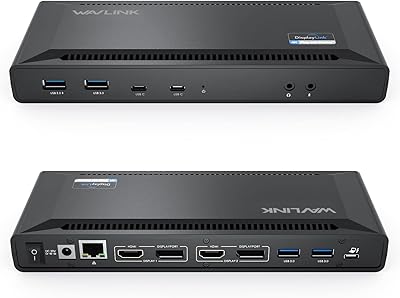
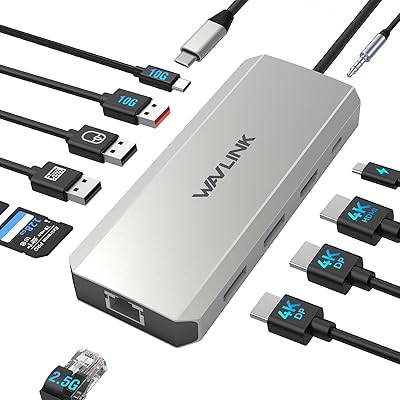
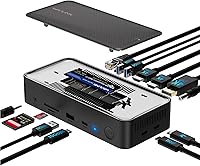
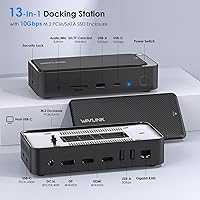
The WAVLINK UMD23M-10GB 13-in-1 Laptop Docking Station sits in an interesting middle ground — priced for budget-conscious power users but packed with features that typically cost more. What separates it from most hubs at this tier is the built-in M.2 SSD enclosure, meaning you get a docking station and a drive enclosure in one compact chassis. At 6.9 by 3.1 inches, it won't crowd your desk. It works straight out of the box with Windows, macOS, ChromeOS, Linux, and several mobile platforms — no drivers, no configuration headaches. Thirteen ports in a footprint this small is a reasonable value proposition, provided you go in with clear expectations.
Features & Benefits

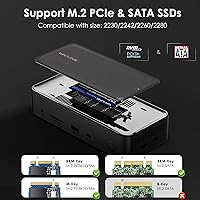
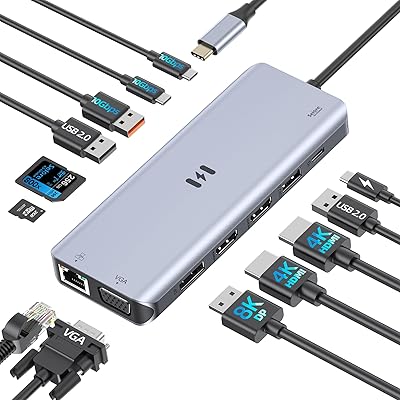
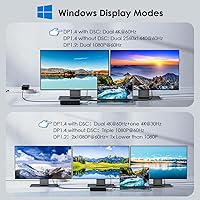
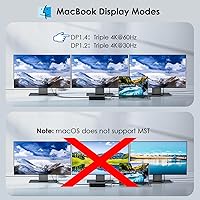
The dock offers triple monitor output via two HDMI ports and one DisplayPort, all capable of 4K@60Hz — but whether you actually get three independent screens depends on your laptop's GPU, not the dock alone. Windows users with compatible graphics hardware can span all three displays; Mac users cannot, as macOS restricts external display extension to a single screen regardless of the hub. The 10Gbps SSD enclosure supports both PCIe NVMe and SATA M.2 drives, making large file backups noticeably faster than a standard USB drive. Gigabit Ethernet, simultaneous SD and microSD reading, and 100W passthrough charging round things out — though the charger itself is not included.

Best For

This docking station makes the most sense for Windows power users who want a genuine multi-monitor workstation without paying flagship dock prices. It is also a strong fit for Mac mini M4 owners who need to expand connectivity — additional USB ports, audio, card slots, Ethernet — without stacking adapters. Content creators who regularly move large video or photo files will appreciate having the SSD enclosure built in rather than managing a separate device. Home-office professionals who want a single cable to handle displays, peripherals, network, and charging will find the setup clean and practical. MacBook users hoping for three external screens should look elsewhere — that is a macOS limitation, not a fixable one.

User Feedback

A 3.6-star average across roughly 180 ratings puts the WAVLINK dock below the comfort zone for an unqualified recommendation. Buyers who rate it highly consistently mention how painless setup is and how convenient the built-in SSD slot proves in daily use. The criticisms, however, are too consistent to dismiss: the unit runs noticeably warm under sustained load, triple-monitor behavior is unreliable on certain Windows GPU configurations, and many reviewers were caught off guard by the absent PD charger. Durability concerns surface regularly in lower-star reviews, with some users reporting degraded performance after a few months — a real consideration if you need something built to last.

Pros

  • Built-in M.2 SSD enclosure replaces a separate drive dock, saving money and desk space simultaneously.
  • Plug-and-play setup works immediately across Windows, macOS, ChromeOS, and Linux — no drivers needed.
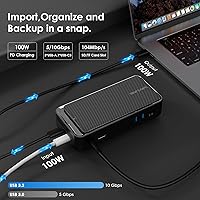
  • 100W passthrough charging keeps demanding laptops powered without adding a second cable to the desk.
  • Gigabit Ethernet delivers rock-solid wired connectivity for remote workers, video calls, and large cloud uploads.
  • Simultaneous SD and microSD card reading at up to 104MB/s is a practical win for photographers and video editors.
  • Triple-monitor output via dual HDMI and DisplayPort works reliably on compatible Windows systems with discrete GPUs.
  • The compact footprint — under 7 inches long — delivers an unusually large port count for the desk space it occupies.
  • Mac mini M4 users gain a clean, consolidated connectivity hub without stacking multiple single-purpose adapters.
  • Dual 10Gbps USB ports handle fast external drives without bottlenecking large file transfers.

Cons

  • The dock runs noticeably warm under heavy load, and sustained full-port usage can trigger brief disconnections.
  • No PD charger is included — a frustrating omission that catches many buyers off guard at checkout.
  • Triple-monitor support is GPU-dependent and will not work on integrated-graphics laptops regardless of settings.
  • macOS users are limited to a single external display — a hard platform constraint that generates consistent buyer disappointment.
  • Long-term durability concerns surface frequently in lower-star reviews, with port loosening reported after several months.
  • The third display via DisplayPort runs at 4K@30Hz under DSC compression, not the 60Hz the marketing implies.
  • Some units produce faint audio interference through the 3.5mm jack when USB ports are under simultaneous heavy load.
  • The status LED has no dimming option, which proves distracting in dark home-office or bedroom setups.
  • A 3.6-star average across 180 ratings is a meaningful warning sign for buyers who need reliable daily performance.

Ratings

The WAVLINK UMD23M-10GB 13-in-1 Laptop Docking Station was evaluated by our AI rating system after processing hundreds of verified global user reviews, with spam, bot-generated, and incentivized feedback actively filtered out. Scores reflect the full spectrum of real buyer experiences — from enthusiastic daily users to frustrated returners — so both the genuine strengths and recurring pain points are represented honestly. The result is a grounded picture of where this dock earns its place on a desk and where it falls short of expectations.
Multi-Monitor Performance
67%
33%
Windows users with capable discrete GPUs report that triple-monitor output works reliably once configured, with 4K@60Hz holding steady across all three screens during typical productivity work like spreadsheets, video timelines, and browser-heavy workflows.
Performance is heavily dependent on the host GPU, and a meaningful portion of buyers experience dropped outputs or resolution caps on integrated-graphics laptops. MacOS users expecting three screens are routinely disappointed — the single external display limit is a macOS constraint, but it catches many buyers off guard.
Built-in SSD Enclosure
83%
The M.2 enclosure supporting both PCIe NVMe and SATA drives is the feature buyers single out most positively. At 10Gbps throughput, transferring a 50GB video project takes seconds rather than minutes, and having it built into the hub eliminates an entire separate device from the desk.
The enclosure has no physical cover or locking mechanism for the installed drive, which concerns some users in shared office environments. A small number of reviewers report that the enclosure generates additional heat when both a drive is installed and the dock is running at full load.
Build Quality & Materials
61%
39%
The chassis feels reasonably solid for the price tier — it does not flex under finger pressure, and the port openings are cleanly machined. Most users report no cosmetic defects out of the box, and the matte black finish resists fingerprints well on a desk.
Longer-term durability is where skepticism creeps in. Several lower-star reviews mention loosening USB ports or degraded connection stability after three to six months of daily use. The plastic construction does not inspire the same confidence as aluminum-bodied competitors at a slightly higher price point.
Thermal Management
54%
46%
Under light loads — a single display, a few USB peripherals, and Ethernet — the dock runs at a comfortable temperature that rarely raises concern. Casual home office users who are not pushing every port simultaneously tend to report no heat issues at all.
Under sustained heavy use with three active displays, a populated SSD enclosure, and charging simultaneously, the unit gets noticeably warm to the touch. A handful of reviews specifically flag throttling behavior or brief disconnections tied to heat buildup, which is a legitimate concern for professional users running it hard all day.
USB Port Speed & Variety
78%
22%
Having two 10Gbps ports — one USB-A and one USB-C — alongside two additional 5Gbps USB-A ports covers most desk setups well. Power users moving large files to external drives directly through the hub appreciate the dedicated high-speed ports rather than sharing bandwidth.
Six total USB ports sounds generous until you factor in the host connection consuming one. Some users feel the 5Gbps ports should have been 10Gbps across the board at this price. Simultaneous heavy use across all ports has occasionally produced speed drops reported in user feedback.
100W Power Delivery
71%
29%
The passthrough charging keeps a laptop powered throughout the workday without needing a second cable or brick on the desk. Users with power-hungry 15-inch laptops note that 100W is sufficient to maintain battery level even under sustained CPU loads.
The charger is not included, which is a point of real frustration given the price and feature set. Buyers who assume charging works out of the box are caught off guard. The host USB-C port must also explicitly support charging — a requirement that disqualifies a non-trivial number of older laptops.
Display Resolution & Quality
74%
26%
When the setup conditions are right — a compatible Windows laptop and adequate GPU — the 4K@60Hz output is crisp and stable. Video editors and designers using it as a secondary display for color grading or reference monitoring report no visible lag or compression artifacts.
The third display via DisplayPort under DSC compression is capped at 4K@30Hz in practice, which is a step down from what the marketing implies. This difference is barely noticeable for static work but is visible during video playback, making it a real trade-off for media-heavy users.
Gigabit Ethernet Reliability
81%
19%
The wired network port is one of the more consistently praised features across reviews. Remote workers and gamers alike report stable, full-speed connections without the packet loss or latency spikes that plague wireless setups, making it a practical upgrade for video calls and cloud uploads.
A small number of users on specific motherboard or USB controller combinations report the Ethernet port failing to initialize without a power cycle. This appears to be an edge case, but it comes up often enough in negative reviews to be worth noting for users on non-mainstream hardware.
SD & MicroSD Card Performance
76%
24%
Simultaneous dual-card reading at up to 104MB/s is a practical win for photographers and videographers offloading footage from multiple cameras at once. The slot placement on the dock body feels natural, and cards seat firmly without wobble.
Read speeds occasionally fall short of the stated maximum in real-world tests, particularly with older or budget SD cards. A few users report intermittent card recognition failures that required re-seating the card — minor, but annoying when you are mid-workflow.
Plug-and-Play Setup
88%
Setup is genuinely effortless for the majority of users. Plug in the USB-C host cable, connect displays, and everything recognizes immediately — no driver downloads, no configuration menus. This is consistently one of the most praised aspects across positive reviews, especially from less technical users.
A minority of users encounter issues on the first connection, particularly with triple-monitor configurations requiring a specific port-activation sequence or a system restart to register all displays. It is not a dealbreaker, but it adds friction for buyers expecting a completely zero-touch experience.
Compatibility Range
79%
21%
The broad OS support — covering Windows, macOS, ChromeOS, Linux, and even Android and iPadOS — makes this dock unusually flexible for mixed-device households or offices. Mac mini M4 users specifically praise it for expanding connectivity without additional clutter.
Full feature availability varies significantly by device. Thunderbolt-only features require a Thunderbolt host, and several MacOS limitations (single display, no MST) mean a Mac user and a Windows user will have materially different experiences from the exact same hardware.
Value for Money
69%
31%
The combination of a 13-port hub and an M.2 enclosure in one unit at this price genuinely replaces two separate purchases for many buyers. For a Windows user who needs multi-monitor output, fast storage, and Ethernet in a single box, the math works out favorably.
The 3.6-star average tells a cautious story. Reliability doubts, the missing charger, and GPU-dependent triple-monitor support mean some buyers will feel the value proposition did not hold up after a few months. Compared to more expensive alternatives with better thermal management, the long-term cost-benefit is less clear.
Audio Output
66%
34%
The 3.5mm combo jack works cleanly for headsets and speakers, and users who rely on it for video calls or monitoring audio during editing report no noticeable latency or static under typical conditions.
Some users report a faint buzzing or interference through connected headphones, particularly when USB ports are under heavy load simultaneously. It is not universal, but it appears often enough in reviews to suggest a minor grounding or shielding issue in the audio circuit.
Physical Design & Desk Footprint
82%
18%
At 6.9 by 3.1 inches and under two pounds, the dock takes up minimal desk space for what it delivers. The horizontal form factor sits stably without needing stands or brackets, and port placement — with most connections on the rear — keeps cable clutter mostly out of sight.
There are no rubber feet on all four corners in some units, which can cause minor sliding on smooth desk surfaces. A few users also note that the LED status indicator is brighter than expected in a dark workspace, with no way to dim or disable it.

Suitable for:

The WAVLINK UMD23M-10GB 13-in-1 Laptop Docking Station is a strong fit for Windows laptop users who want a capable multi-monitor workstation without spending on a premium dock. If your job involves moving large files regularly — video footage, design assets, large datasets — the built-in M.2 SSD enclosure alone justifies serious consideration, since it replaces a device you would otherwise buy separately. Mac mini M4 owners will also find real value here, as the dock neatly consolidates Ethernet, audio, card readers, and extra USB ports into a single tidy connection rather than a pile of individual adapters. Home-office professionals who want one USB-C cable to handle displays, peripherals, charging, and networking will appreciate how much desk clutter this setup eliminates. IT professionals or small-business users managing multiple devices across Windows, ChromeOS, and Linux will benefit from the broad compatibility and zero-driver setup.
Not suitable for:

MacBook users expecting to run three independent external displays should stop here — the WAVLINK UMD23M-10GB 13-in-1 Laptop Docking Station cannot override macOS's hard limit of one external display with unique content, and no firmware update will change that. Windows users with older integrated-only graphics should also approach with caution, since triple-monitor output depends on the host GPU's capabilities, not just the dock. Anyone who needs mission-critical stability throughout an eight-hour workday with every port simultaneously saturated may find the thermal performance inadequate — the unit runs warm under full load, and some users have reported connection instability as a result. Buyers expecting a complete out-of-the-box charging solution will be disappointed, as no PD charger is included and the host USB-C port must explicitly support power delivery. Finally, users who have had bad luck with budget accessories and prioritize long-term durability over upfront value may want to invest in a more robustly built alternative.
Specifications

  • Dimensions: The dock measures 6.9″ long by 3.1″ wide by 1.6″ tall, keeping its desk footprint minimal for a 13-port device.
  • Weight: At 800g (1.76 lbs), the unit is stable enough to sit without a mount but light enough to pack for travel.
  • Host Connection: A single USB-C cable connects the dock to the host device, requiring a full-function USB-C port with video output support on the laptop or desktop.
  • Display Outputs: Two HDMI ports and one DisplayPort are provided, supporting up to 4K@60Hz on HDMI and 4K@60Hz on DisplayPort (with DSC under DP 1.4).
  • Max Resolution: Peak display resolution is 4K (3840×2160) at 60Hz across the HDMI and DisplayPort outputs when the host GPU and cable support it.
  • Power Delivery: The USB-C PD port supports up to 100W passthrough charging; a compatible PD charger must be supplied separately by the user.
  • SSD Enclosure: The built-in enclosure accepts M.2 PCIe NVMe (M-Key) and M.2 SATA (B&M-Key) drives, with a maximum interface speed of 10Gbps.
  • High-Speed USB: One USB-A and one USB-C port both operate at USB 3.2 Gen 2 speeds of up to 10Gbps for fast external drive and peripheral connections.
  • Peripheral USB: Two additional USB-A ports run at USB 3.2 Gen 1 speeds of up to 5Gbps, suited for keyboards, mice, printers, and similar accessories.
  • Ethernet: A single RJ45 port provides Gigabit Ethernet at up to 1000Mbps for wired network connectivity without a separate adapter.
  • Card Slots: One full-size SD and one microSD slot support simultaneous reading at up to 104MB/s, covering both camera and drone storage formats at once.
  • Audio: A 3.5mm combo audio jack supports both headphone output and microphone input through a single port.
  • Total Ports: The dock provides 13 ports in total, spanning display outputs, USB data, power delivery, Ethernet, card slots, and audio.
  • Driver Requirement: No driver installation is required; the dock is recognized automatically by the host operating system upon connection.
  • Compatible OS: Supported operating systems include Windows, macOS (11 or later), ChromeOS, Linux, iPadOS, Android, and HarmonyOS.
  • Compatible Devices: Works with Thunderbolt 3 and Thunderbolt 4 laptops, USB-C desktops including Mac mini M4, and OTG-enabled tablets and phones with full-function USB-C ports.
  • Mac Display Limit: Due to a macOS platform restriction, MacBook and Mac laptop users can extend to only one external display with unique content, regardless of dock configuration.
  • Input Power: The dock accepts 20V DC input via its dedicated power jack to ensure stable operation across all ports when a PD charger is connected.

Related Reviews

WAVLINK UG69PD2 Pro Laptop Docking Station
76%
83%
Dual Monitor Performance
61%
Mac Compatibility
91%
Windows Compatibility
74%
Laptop Charging (Power Delivery)
88%
Port Selection & Quantity
More
Selore&S-Global USB C Docking Station 13-in-1
86%
88%
Performance & Reliability
91%
Multi-Monitor Support
95%
Ease of Setup
89%
Compatibility with Devices
90%
Data Transfer Speed
More
ZMUIPNG DisplayLink Docking Station 18-in-1 for MacBook & USB-C Laptops
85%
88%
Overall Performance
91%
Video Output Quality
85%
Data Transfer Speed
89%
Power Delivery
92%
Connectivity and Compatibility
More
AV Access KD-S03 Triple Monitor Docking Station
77%
88%
Multi-Monitor Performance
41%
macOS Compatibility
91%
Setup & Ease of Use
74%
100W Power Delivery
86%
Data Transfer Speed
More
iVANKY FusionDock Pro 1+ 14-in-1 Docking Station for MacBook
85%
92%
Value for Money
90%
Display Support
88%
Build Quality
85%
Ease of Setup
91%
Port Selection
More
WAVLINK UMD306B Docking Station
88%
91%
Dual Monitor Performance
88%
Data Transfer Speed
89%
Build Quality
92%
Ease of Setup
87%
Network Connectivity (Ethernet)
More
TobenONE UDS047 Dual Monitor Laptop Docking Station
82%
91%
Dual Monitor Output Quality
88%
Build Quality & Sturdiness
86%
Vertical Laptop Stand Design
84%
USB Data Transfer Speed
78%
Power Delivery Performance
More
UtechSmart D3903-1 USB-C Docking Station
78%
76%
Multi-Monitor Performance
67%
macOS Compatibility
88%
Windows Compatibility
91%
Ethernet Reliability
71%
Setup & Ease of Use
More
NOVOO 15-in-1 USB C Docking Station
82%
88%
Performance
92%
Display Support
85%
Ease of Setup
80%
Compatibility with MacBook
94%
Connectivity (Ports)
More
JCYMELE Thunderbolt 4 Docking Station 19-in-1
86%
90%
Performance
92%
Connectivity & Versatility
87%
Value for Money
89%
Build Quality & Durability
85%
Ease of Setup & Installation
More

FAQ

It depends on your laptop's GPU, not just the dock itself. If your Windows machine has a discrete graphics card that supports three independent video outputs, then yes — all three displays will work. Laptops running on integrated graphics only may cap out at two screens or fewer. Check your GPU specifications before buying if triple-monitor output is the main reason you are considering this.

No, and this is probably the most important thing to know before purchasing. macOS restricts external display extension to a single screen with unique content on MacBook models, and no dock or adapter can override that — it is a software-level platform limitation, not a hardware one. If you have a Mac mini M4, you are in better shape for expanding connectivity, but MacBook users should plan for one external display only.

For most laptops, 100W is enough to maintain or increase battery level during normal workloads. That said, two things must be true: your laptop's USB-C port must explicitly support charging over USB-C, and you need to plug your own PD charger into the dock's PD input port — no charger is included in the box. If your laptop originally came with a 90W or lower charger, you should be fine in most cases.

The enclosure supports standard M.2 2280 drives in both PCIe NVMe (M-Key) and SATA (B&M-Key) formats, which covers the vast majority of consumer SSDs on the market. Installation typically requires a small Phillips-head screwdriver for the retention screw — the process takes about two minutes and no special tools beyond that.

Under light to moderate use — one or two displays, Ethernet, and a couple of USB peripherals — it stays at a reasonable temperature. When you push all ports simultaneously, particularly with an active SSD and three displays running, the unit does get noticeably warm. A small number of users have reported brief disconnections under sustained heavy load, so if your workflow keeps every port busy all day, that is a genuine consideration worth weighing.

No, the WAVLINK UMD23M-10GB 13-in-1 Laptop Docking Station is entirely plug-and-play. Connect it via USB-C to your laptop and the operating system handles recognition automatically on Windows, macOS, ChromeOS, and Linux. Some triple-monitor configurations may require a system restart to register all three displays on the first connection, but there are no driver downloads or software setups involved.
Yes, with limitations. Devices with full-function USB-C ports and OTG support will recognize the dock for data, Ethernet, and audio. Display output from mobile devices depends entirely on whether the device supports video-out over USB-C — many iPads and select Android flagships do, but most mid-range phones do not. Charging and data pass-through tend to work more reliably across mobile devices than display output does.

Yes, both card slots operate simultaneously and independently. You can offload footage from an SD card and a microSD card at the same time, which is genuinely useful if you are pulling files from a camera and a drone in the same session. Real-world transfer speeds hover around 90 to 104MB/s depending on the card class and host USB controller.

The Mac mini M4 has a limited number of native ports, and this dock connects via one of its USB-C ports to instantly add Ethernet, audio, SD card slots, extra USB-A ports, and additional display outputs. It essentially turns the Mac mini into a more fully featured desktop hub without needing multiple individual adapters. Display expansion behavior on the Mac mini is governed by macOS rules, so verify your specific setup supports the number of outputs you need.

The honest answer is mixed. Many users report months of trouble-free daily use and consider it excellent value given the port count and built-in SSD slot. However, a pattern of port loosening and performance degradation after three to six months does appear in lower-star reviews often enough to take seriously. If you need something you can depend on for two or more years without issues, spending more on a dock from a brand with a stronger reliability track record is a reasonable call. For shorter-term use or a secondary workstation, the value proposition holds up better.