iVANKY FusionDock Pro 1+ 14-in-1 Docking Station
Overview
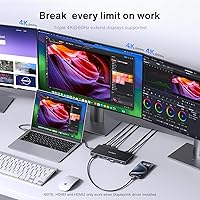
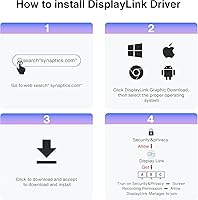
The iVANKY FusionDock Pro 1+ 14-in-1 Docking Station arrived on the market in May 2025 as iVANKY's answer to the growing demand for true multi-monitor setups on Apple silicon MacBooks. Using DisplayLink technology, this MacBook dock can drive three external displays simultaneously — something M2 through M5 chips cannot do natively without help. It sits in the mid-to-premium price range, competing directly with established names like CalDigit and Plugable. One critical point upfront: DisplayLink driver installation is non-negotiable before you get full functionality. Skip that step and two of the three HDMI ports simply won't activate. Early reception has been solid, with a 4.2-star rating from around 150 buyers.
Features & Benefits
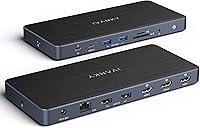
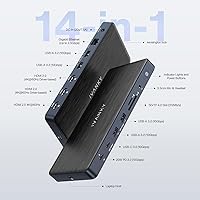
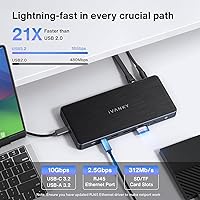
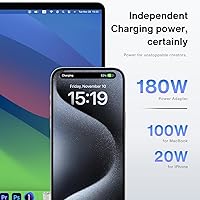
The headline capability here is triple 4K@60Hz output across all three HDMI 2.0 ports — for MacBook users stuck on a single external display, that's a meaningful step up. While running three screens, the FusionDock Pro 1+ simultaneously delivers 96W of power back to your MacBook through the upstream USB-C connection, so battery drain isn't a concern during long sessions. Data-heavy workflows benefit from four USB-A 3.2 ports and two USB-C ports, all running at 10Gbps. The SD/TF 4.0 card slot hits up to 312MB/s, which matters when offloading footage or RAW files regularly. Rounding things out, the 2.5GbE Ethernet port keeps your network connection stable and well above standard gigabit speeds.
Best For
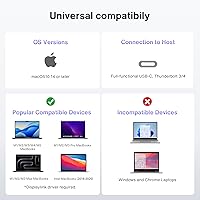
This DisplayLink docking station makes the most sense for MacBook owners on M2 through M5 chips who need two or three monitors without buying into a more expensive Thunderbolt-based solution. Creative professionals — photographers dumping SD cards, video editors moving large files — will appreciate the fast card reader and high-speed USB ports working simultaneously. It's also a strong pick for hybrid workers wanting a single-cable desk setup: plug in and you've got displays, wired network, and charging all handled at once. That said, anyone uncomfortable installing a third-party driver like DisplayLink should factor that step into their decision before purchasing. This isn't a hub you simply plug in and forget.
User Feedback
With just over 150 ratings and a May 2025 launch, the review pool is still relatively small — worth keeping in mind when weighing the overall score. Early buyers are largely positive, with consistent praise centered on the dock delivering a reliable triple-monitor experience once the DisplayLink driver is properly set up, and the 96W charging holding steady under real workloads. A few users flagged that the unit runs noticeably warm during extended multi-display sessions; that behavior isn't unusual for a dock pushing this much bandwidth, but it's worth knowing upfront. The 24-month warranty and reportedly responsive customer support have also drawn favorable mentions, with no significant hardware complaints surfacing yet.
Pros
- Drives three external displays at 4K and 60Hz simultaneously, which Apple silicon MacBooks cannot do natively on their own.
- The 96W upstream Power Delivery keeps your MacBook charged even when all ports are in active use.
- Four USB-A 3.2 ports running at 10Gbps make it easy to connect drives, peripherals, and accessories without sacrificing speed.
- The SD/TF 4.0 card reader is genuinely fast at up to 312MB/s, a real advantage for photographers and video editors.
- 2.5GbE Ethernet delivers a rock-solid wired connection that standard gigabit hubs simply cannot match.
- The 180W power adapter is included in the box, so there are no hidden accessory costs out of the gate.
- A 24-month warranty with a reportedly responsive support team adds meaningful peace of mind for a newer product.
- At its price point, the FusionDock Pro 1+ undercuts several established competitors while offering a comparable or broader port selection.
- Early user ratings skew positive, suggesting the dock performs reliably once the DisplayLink driver is correctly installed.
Cons
- HDMI ports 2 and 3 are completely non-functional until the DisplayLink driver is downloaded and installed — not obvious from the box.
- DisplayLink relies on software rendering, which can introduce minor visual compression artifacts that native Thunderbolt output avoids.
- The driver must be kept up to date as macOS updates; falling behind on driver versions can break multi-monitor functionality after a system upgrade.
- The unit runs noticeably warm during sustained multi-display use, which may be uncomfortable in a compact or enclosed desk setup.
- With only around 150 ratings at the time of writing, the long-term reliability track record is still thin compared to more established docks.
- No Thunderbolt 4 passthrough means users with Thunderbolt-specific peripherals or daisy-chaining needs will hit a hard limitation.
- At nearly three pounds, this is not a dock you will want to toss in a bag for travel or hot-desking setups.
- The 20W USB-C PD port is modest for charging tablets or power-hungry USB-C accessories alongside the laptop.
Ratings
The scores below reflect an AI-driven analysis of verified global buyer reviews for the iVANKY FusionDock Pro 1+ 14-in-1 Docking Station, with spam, bot-submitted, and incentivized feedback actively filtered out before scoring. Each category is evaluated against real-world usage patterns reported by MacBook owners across home offices, creative studios, and hybrid work environments. Both the genuine strengths and the friction points buyers consistently encountered are transparently reflected in every score.
Multi-Monitor Performance
Driver Setup Experience
Charging Performance
Data Transfer Speed
Card Reader Speed
Ethernet Reliability
Build Quality & Design
Port Selection & Density
MacOS Compatibility
Value for Money
Thermal Management
Warranty & Support
Out-of-Box Setup
Suitable for:
The iVANKY FusionDock Pro 1+ 14-in-1 Docking Station is built for MacBook users on M2, M3, M4, or M5 chips who want a proper multi-monitor desktop setup without paying for a Thunderbolt 4 dock or an eGPU. If your workday involves jumping between a laptop and a full desk rig — multiple displays, wired Ethernet, USB peripherals, and a charging cable all competing for your attention — this dock consolidates all of that into a single upstream USB-C connection. Creative professionals will get particular mileage from the fast SD/TF 4.0 card reader and the 10Gbps USB ports, which handle large file transfers without becoming a bottleneck. Home office workers and hybrid employees who want reliable, consistent wired network performance will appreciate the 2.5GbE Ethernet, especially compared to the instability that Wi-Fi can introduce during video calls or cloud syncing. As long as you're comfortable downloading and maintaining the DisplayLink driver, this dock delivers a genuinely capable desktop experience at a mid-to-premium price that undercuts some better-known rivals.
Not suitable for:
The iVANKY FusionDock Pro 1+ 14-in-1 Docking Station is not the right choice for buyers expecting a true plug-and-play experience. DisplayLink is a software-dependent technology, and without installing the correct driver version — particularly version 1.11 or later for macOS 15 — two of the three HDMI ports will not function at all; that kind of setup friction is a dealbreaker for less tech-savvy users. If you rely on display-intensive applications where pixel-perfect latency matters, such as motion graphics rendering previewed in real time or competitive gaming, DisplayLink's compression-based approach can introduce subtle artifacts that native Thunderbolt output would not. Windows users will also find this dock mismatched, as it is clearly optimized around the MacBook ecosystem. Those who run their MacBook hard for extended sessions should also factor in that the unit generates noticeable warmth under heavy multi-display load — not a safety issue, but something to account for in a small or poorly ventilated workspace.
Specifications
- Model Number: The dock carries the official model designation VCD11, manufactured by iVANKY.
- Total Ports: This docking station provides 14 ports in total across display, data, charging, and networking connections.
- Display Output: Three HDMI 2.0 ports each support up to 4K at 60Hz, enabling a triple external monitor setup on compatible MacBooks.
- Display Technology: Multi-monitor output beyond one display relies on DisplayLink technology, which requires a separately downloaded driver to function.
- USB-A Ports: Four USB-A 3.2 Gen 2 ports deliver data transfer speeds of up to 10Gbps each for fast peripheral and storage connections.
- USB-C Ports: Two USB-C ports are included: one at 20W and 10Gbps for data and charging, and one at 7.5W and 10Gbps for additional connectivity.
- Host Charging: The upstream USB-C connection delivers up to 96W of Power Delivery to the connected MacBook while the dock is in full operation.
- Power Adapter: A 180W power adapter is included in the package, providing sufficient power for the dock and all connected devices simultaneously.
- Ethernet: The RJ45 port supports 2.5 Gigabit Ethernet, offering a stable wired network connection significantly faster than standard 1GbE ports.
- Card Reader: The integrated SD and TF 4.0 card slot supports read and write speeds of up to 312MB/s for fast media offloading.
- Compatibility: The dock is designed for MacBooks equipped with a full-function USB-C port, covering M2, M3, M4, and M5 chip generations.
- macOS Driver: For macOS 15 users, DisplayLink driver version 1.11 or later (released October 8, 2024) is required for stable triple-display performance.
- Dimensions: The unit measures 8.35 x 5.75 x 3.23 inches, making it a compact but substantive desktop fixture rather than a portable hub.
- Weight: The dock weighs 2.99 pounds including the body, which reflects the internal hardware needed to support 14 active ports.
- Warranty: iVANKY provides a 24-month warranty on this dock, with a stated commitment to replace defective units through their customer support team.
- Market Ranking: As of its early listing period, the dock ranked #358 in the Laptop Docking Stations category on Amazon, a strong position for a newly launched product.
- Launch Date: The dock was first made available for purchase on May 6, 2025, making it a relatively new entrant in the MacBook docking station market.
Related Reviews

Cinema Secrets Ultimate Corrector 5-In-1 Palette
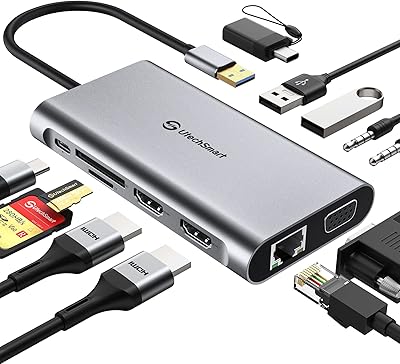
UtechSmart D3903-1 USB-C Docking Station
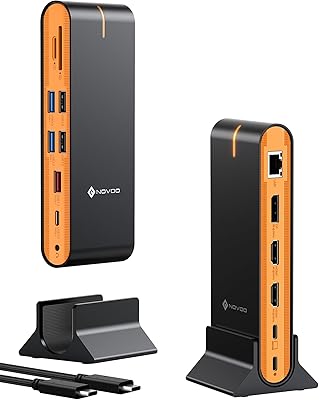
NOVOO 15-in-1 USB C Docking Station
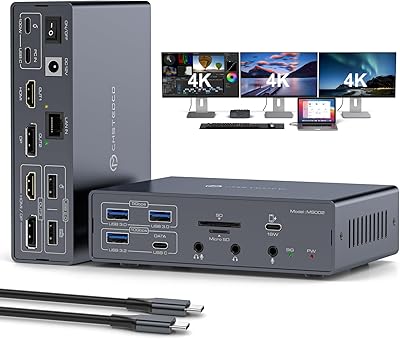
JCYMELE MS002 19-in-1 USB-C Docking Station
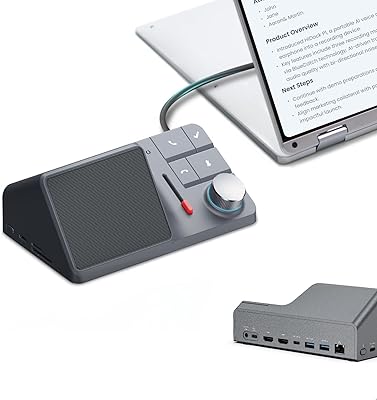
HiDock H1 11-in-1 USB-C Docking Station
UGREEN Revodok Pro 209 USB-C Docking Station
WAVLINK UG69PD2 Pro Laptop Docking Station
Selore 13-in-1 USB-C Quad Monitor Docking Station
Brydge Stone CORE USB-C Docking Station