Overview

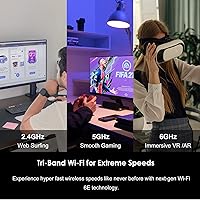
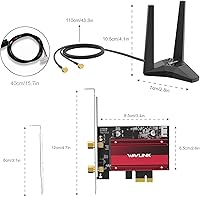
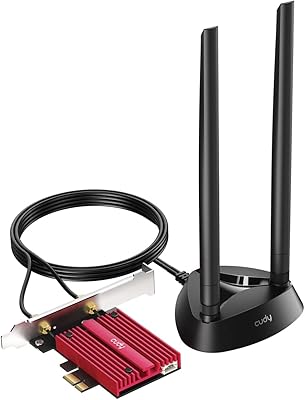
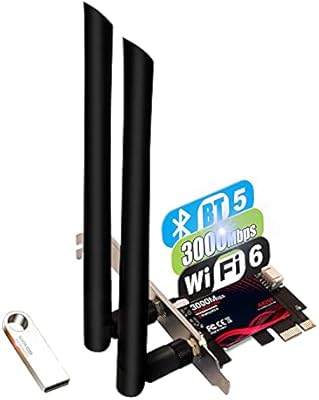
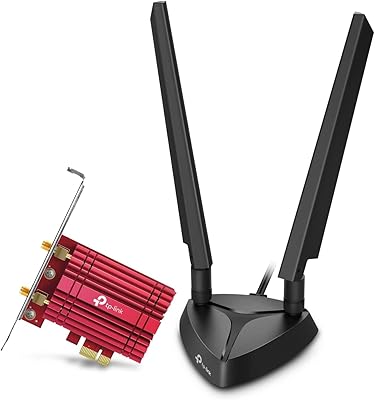
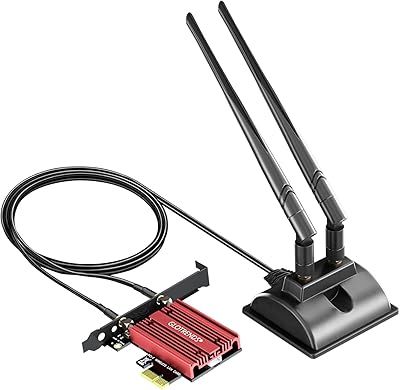
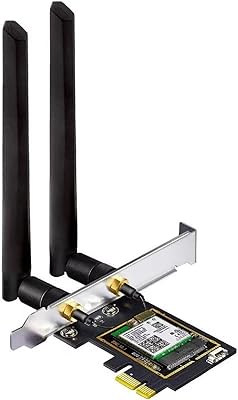
The WAVLINK WL-WN675X3 WiFi 6E PCIe Network Card is a practical, mid-range upgrade for desktop users still running older wireless standards or a wired-only motherboard. Built around Intel's AX210 chipset, this WiFi 6E card covers all three bands — 2.4GHz for range, 5GHz for everyday tasks, and the newer 6GHz band for environments where interference is a genuine problem. It ships with a heat sink, two external antennas on a 3.6ft magnetic-base cable, and both standard and low-profile brackets in the box. That last detail matters more than it sounds — compact PC builders often get burned by cards that only include one bracket type.
Features & Benefits

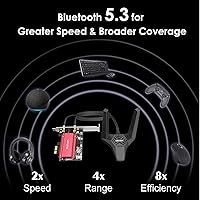
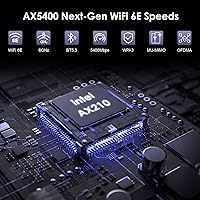
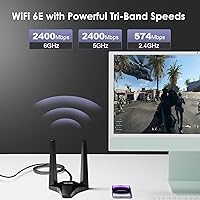
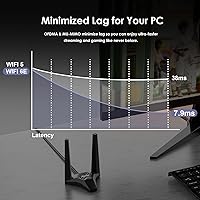
The AX210-based adapter earns its place through a few well-chosen inclusions. On the 6GHz band, you are tapping into spectrum that most competing devices simply are not on yet, which produces noticeably cleaner connections during VR sessions or competitive online play. OFDMA and MU-MIMO handle the heavier lifting behind the scenes, keeping throughput stable when multiple devices are active simultaneously. Bluetooth 5.3 is a quiet but useful addition — it offers a measurable improvement over 5.0 in connection range and re-pairing speed, though the gap is modest in typical desktop use. The onboard heat sink manages card temperature during sustained transfers without adding any active noise.

Best For

This PCIe wireless card is the right call for desktop owners on Windows 10 or 11 who want to cut the ethernet cable without sacrificing performance. It suits gamers and streamers particularly well, though it is worth noting that the 6GHz band is only accessible if your router already supports WiFi 6E — check that before buying. Small-form-factor build owners will appreciate that both bracket types are included rather than sold separately. It also doubles as a Bluetooth adapter, eliminating the need for a USB dongle to connect a controller or headset. For builders who want Intel chipset reliability without paying flagship card prices, this sits in a sensible spot.

User Feedback

Across several hundred reviews, this WiFi 6E card earns consistent praise for how straightforward the physical installation is — the magnetic antenna base in particular gets mentioned as a practical touch that makes cable routing genuinely flexible. Driver setup on Windows 11 is where things can get uneven: most users are up and running quickly, but some need to pull drivers manually from the manufacturer's website, which can trip up less experienced builders. A notable cluster of complaints involves 6GHz band detection — buyers who had not confirmed their router's WiFi 6E support before purchasing were caught off guard. Bluetooth stability alongside WiFi draws mostly positive comments, and the heat sink attracts little criticism either way.

Pros

  • Intel AX210 chipset delivers reliable, stable 5GHz performance well above what older WiFi 5 cards can manage.
  • Access to the 6GHz band keeps connections clean in apartment buildings or homes with many competing wireless devices.
  • Both standard and low-profile brackets are included, making this PCIe wireless card compatible with compact and slim desktop builds.
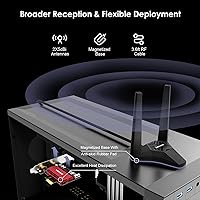
  • The 3.6ft magnetic-base antenna cable allows flexible placement on top of a case or nearby metal surface for better signal.
  • Bluetooth 5.3 is built in, eliminating the need for a separate USB dongle to connect controllers or headsets.
  • OFDMA and MU-MIMO support helps maintain throughput stability when multiple devices are active on the same network simultaneously.
  • The onboard heat sink keeps card temperatures in check during sustained use without adding any fan noise.
  • WPA3 security support protects the connection against modern network vulnerabilities without requiring any manual configuration.
  • Physical installation is straightforward, and most users with basic PC building experience are up and running quickly.
  • At its price point, the combination of Intel chipset, heat sink, dual antennas, and dual brackets represents solid overall value.

Cons

  • The 6GHz band is completely locked out unless your router specifically supports WiFi 6E — a detail that catches many buyers off guard.
  • Windows 11 does not always install drivers automatically, and the box includes no clear instructions directing users to the download page.
  • Buyers without a WiFi 6E router are essentially paying for a premium feature they cannot use until they upgrade their router as well.
  • Bluetooth and WiFi share the same chipset, and a small number of users reported minor interference when both were under heavy simultaneous load.
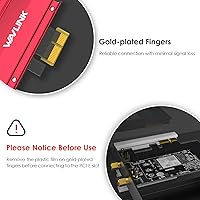
  • The antenna connectors require careful handling during initial setup and feel less robust than the rest of the card.
  • Linux support exists but comes with no official setup guide, making it a frustrating experience for non-Windows users.
  • The magnetic antenna base can lose grip on painted or non-ferrous surfaces, limiting placement options in some desk setups.
  • Real-world 6GHz throughput in typical home environments falls noticeably short of the theoretical maximum speeds listed in the specs.

Ratings

The WAVLINK WL-WN675X3 WiFi 6E PCIe Network Card scores below were generated by AI after analyzing verified global user reviews, with spam, incentivized, and bot-flagged submissions actively filtered out. The results reflect a broad cross-section of real desktop builders, gamers, and home office users who purchased and used this PCIe wireless card in their own setups. Both the standout strengths and the recurring friction points are represented transparently in each category.
WiFi Performance
83%
On 5GHz, most users reported stable throughput that held up well during extended gaming sessions and 4K streaming without dropped frames or stuttering. In less congested environments, the AX210 chipset delivers on its promise of consistent mid-to-high-speed wireless performance that clearly outpaces older AC adapters.
A meaningful portion of buyers found 6GHz speeds underwhelming or unavailable, often because their router did not support WiFi 6E — a compatibility gap that surprised users who assumed any modern router would suffice. Real-world 6GHz gains are hardware-dependent and require a matching router to unlock.
6GHz Band Usability
67%
33%
Users who already owned a WiFi 6E router reported noticeably cleaner connections in busy households with many competing wireless devices, and VR headset pairing over 6GHz drew some of the most enthusiastic feedback in the review pool. The interference reduction in those setups was described as tangible, not marginal.
This is the most polarizing category in the review set. Buyers without a WiFi 6E router get no benefit from 6GHz at all, and several reviewers felt this was not clearly communicated at purchase. The gap between the theoretical headline speed and what most home environments actually deliver is significant.
Installation Ease
74%
26%
The physical installation process — slotting the card into a PCIe lane and routing the antenna cable to a convenient spot — was consistently described as fast and painless, even by users with limited PC building experience. The included hardware and bracket options meant most people had everything they needed straight out of the box.
Driver setup on Windows 11 was a recurring friction point, with a subset of users needing to manually download drivers from the manufacturer website after Windows failed to install them automatically. This is not a dealbreaker for experienced builders, but it tripped up less technical buyers who expected plug-and-play behavior.
Bluetooth 5.3 Performance
78%
22%
For users consolidating peripherals, having Bluetooth 5.3 on the same card as WiFi proved genuinely useful — no extra USB dongle occupying a port, and controller or headset pairing was described as reliable across normal desktop distances. Re-pairing after restarts was faster and more consistent compared to older BT adapters.
Since Bluetooth and WiFi share the same AX210 chipset, a handful of users noticed minor interference between the two when both were under heavy simultaneous load. The improvement over Bluetooth 5.0 is real but incremental — buyers expecting a dramatic upgrade in range or speed may find the difference underwhelming in daily use.
Antenna Design & Placement
86%
The 3.6ft RF cable with a magnetized antenna base was one of the most praised practical details across the review set. Users appreciated being able to mount the antennas on top of their case or on a nearby metal surface to get clear line-of-sight to their router, rather than having them buried inside a cluttered desk setup.
A small number of buyers reported that the magnetic base lost grip on painted or non-ferrous surfaces, which limited placement options in some setups. The cable length is sufficient for most desktop configurations but may feel short if the PC is positioned far from an ideal antenna location.
Heat Management
81%
19%
The onboard heat sink kept the card running at stable temperatures during sustained file transfers and extended gaming sessions without any reported thermal throttling. Users who had owned fanless PCIe cards without heat sinks noticed the difference in long-haul stability, particularly during summer months or in warmer room environments.
A few users questioned whether the heat sink was strictly necessary for a card at this performance tier, suggesting it adds bulk without a perceptible benefit under typical loads. It is a net positive overall, but buyers with very tight PCIe slot spacing may find the added height slightly inconvenient.
Build & Hardware Quality
79%
21%
The card feels solidly constructed for its price tier, with a PCB that does not feel flimsy and a heat sink that is firmly attached rather than rattling loose. The inclusion of both bracket types in the box signals attention to practical usability that buyers at this price point do not always expect.
The antennas themselves feel lighter and less premium than the card body, and a few users noted that the RF connectors required careful handling during initial attachment. Nothing is defective by most accounts, but the overall feel stops short of the premium build quality you would find at a higher price point.
Router Compatibility
66%
34%
On standard 2.4GHz and 5GHz bands, compatibility with existing routers was broadly reported as trouble-free, and most users connected to their home networks without any configuration headaches. For the large share of buyers using the card purely for 5GHz performance, compatibility was a non-issue.
The 6GHz band strictly requires a WiFi 6E certified router, and this caused a notable number of negative reviews from buyers who were unaware of that dependency. Tri-band routers that support only WiFi 5 or WiFi 6 will not expose the 6GHz band to this card, which is a purchasing mistake that shows up repeatedly in low-star feedback.
Windows 11 Compatibility
77%
23%
The majority of Windows 11 users reported no serious long-term issues once drivers were correctly installed, and the card ran stably through multiple Windows update cycles without requiring driver reinstalls. Users who sourced drivers directly from WAVLINK's site reported a smoother setup experience overall.
Out-of-box driver installation via Windows Update was inconsistent — some machines handled it automatically, others did not. Linux support also exists but requires manual driver sourcing with no official setup guide provided in the box, which is a friction point for non-Windows users who discovered this after purchase.
Value for Money
82%
18%
At its price point, getting Intel's AX210 chipset with Bluetooth 5.3, a heat sink, magnetic antennas, and both bracket types in one package represents solid value compared to stripped-down alternatives. Buyers who compared it against competing cards at similar prices consistently rated it favorably on feature-per-dollar terms.
The value proposition weakens if you do not already own a WiFi 6E router, since the headline 6GHz feature becomes inaccessible and you are essentially buying a competent but not exceptional WiFi 6 card. For that specific use case, cheaper AX200-based alternatives exist and may offer better bang for the actual money spent.
Signal Range & Stability
80%
20%
On 5GHz, users in medium-sized homes reported clean, stable connections at distances of 30 to 40 feet with walls in between, which is a credible result for a desktop PCIe card with external antennas. The 5dBi antenna gain contributed to a noticeably broader effective range compared to motherboard-integrated WiFi on similarly specced machines.
Signal stability on 2.4GHz occasionally disappointed users expecting the same consistency they saw on 5GHz, particularly in apartment buildings with heavy channel congestion. A few buyers noted intermittent drops on 2.4GHz that resolved after switching to 5GHz, suggesting the lower band is best treated as a fallback rather than a primary connection.
Package Contents & Documentation
71%
29%
Both bracket types, the RF cable, and the antennas are all included without any apparent upselling of accessories, which is appreciated at this price. Most of the physical setup can be completed without consulting any documentation at all, which speaks to how self-evident the installation process is.
The printed documentation in the box is minimal and the driver situation is not clearly addressed — there is no prominent note directing buyers to the WAVLINK website for Windows 11 drivers, which is where several installation problems begin. A simple printed QR code pointing to the driver download page would prevent a disproportionate number of support headaches.
Low-Profile Bracket Support
88%
Compact and small-form-factor desktop builders consistently highlighted the low-profile bracket inclusion as a deciding factor in their purchase. It is one of the more practical things a PCIe card manufacturer can do, and buyers who needed it were relieved not to have to source a third-party replacement or return the card entirely.
There are no reported functional issues with the low-profile bracket itself, but a small number of users noted that the bracket fit was slightly loose in certain case cutouts, requiring careful alignment during installation. This is a minor complaint and did not affect wireless performance in any reported case.

Suitable for:

The WAVLINK WL-WN675X3 WiFi 6E PCIe Network Card is a strong fit for desktop PC owners who want to cut the ethernet cable without compromising on wireless performance, particularly those running Windows 10 or 11 on a machine that shipped without built-in WiFi. It makes the most sense for users who already own or plan to upgrade to a WiFi 6E router, since that is the scenario where the 6GHz band delivers its real advantage — reduced interference, lower latency, and cleaner connections in busy households. Gamers who play competitively or stream in 4K will notice a tangible difference on 5GHz and 6GHz compared to older WiFi 5 cards. Small-form-factor and compact case builders will appreciate that both a standard and low-profile bracket are included, removing a common compatibility headache. The built-in Bluetooth 5.3 also makes this a practical single-card solution for anyone who wants to connect a wireless controller, headset, or keyboard without occupying a USB port with a separate dongle.
Not suitable for:

The WAVLINK WL-WN675X3 WiFi 6E PCIe Network Card is not the right purchase if your router only supports WiFi 5 or standard WiFi 6, because the 6GHz band — arguably the card's headline feature — will be completely inaccessible to you. If your primary goal is simply adding basic wireless connectivity to an older desktop without any interest in future-proofing, a less expensive AX200-based card would deliver a very similar 5GHz experience at a lower cost. Users who are not comfortable sourcing and installing drivers manually should be aware that Windows 11 does not always handle the driver installation automatically, and there is minimal printed guidance in the box to help. The card is also not suitable for laptop users or anyone without an available PCIe slot — it is strictly a desktop internal component. Linux users should factor in additional setup effort, as official driver documentation for non-Windows systems is limited and not beginner-friendly.
Specifications

  • Chipset: Powered by the Intel AX210 chipset, which supports the full WiFi 6E standard including the 6GHz frequency band.
  • WiFi Standard: Compliant with IEEE 802.11ax (WiFi 6E) and backward compatible with 802.11a/b/g/n/ac networks.
  • Frequency Bands: Tri-band operation across 2.4GHz, 5GHz, and 6GHz simultaneously, each managed independently by the AX210 chipset.
  • Max 2.4GHz Speed: Theoretical maximum throughput on the 2.4GHz band reaches 574Mbps under optimal conditions.
  • Max 5GHz Speed: Theoretical maximum throughput on the 5GHz band reaches 2400Mbps under optimal conditions.
  • Max 6GHz Speed: Theoretical maximum throughput on the 6GHz band reaches 2400Mbps, accessible only when paired with a WiFi 6E certified router.
  • Bluetooth: Integrated Bluetooth 5.3 supports wireless peripherals with faster pairing and improved range compared to Bluetooth 5.0.
  • PCIe Interface: Compatible with PCIe X1, X4, X8, and X16 slots on standard desktop motherboards; not compatible with legacy PCI slots.
  • Antennas: Two external 5dBi omnidirectional antennas are connected via a 3.6ft RF cable with a magnetized base for flexible mounting.
  • Security Protocol: Supports WPA3 encryption for enhanced network security against brute-force and dictionary attacks on modern wireless networks.
  • Key Technologies: Incorporates OFDMA, MU-MIMO, 1024QAM, and Target Wake Time (TWT) to optimize multi-device throughput and reduce idle power draw.
  • Bracket Options: Ships with both a full-height standard bracket and a low-profile bracket, covering the majority of ATX, mATX, and SFF desktop cases.
  • OS Compatibility: Officially supports Windows 10 and Windows 11; Linux is also supported with drivers available via the manufacturer website.
  • Model Number: The official model designation is WL-WN675X3, sold under the WAVLINK brand.
  • Item Weight: The card and included accessories weigh approximately 300 grams in total.
  • Package Dimensions: Retail packaging measures approximately 6.14 x 5.43 x 4.33 inches, sized to accommodate the card, antennas, cable, and both brackets.
  • Thermal Management: An onboard passive heat sink is mounted directly on the AX210 chipset to dissipate heat during sustained high-throughput operation.
  • Warranty: WAVLINK provides a 12-month warranty as standard, extendable to 18 months for users who register their product with the manufacturer.

Related Reviews
OKN AX210 WiFi 6E PCIe Card
78%
91%
Value for Money
83%
Wireless Performance
74%
Installation Ease
61%
6GHz Band Access
71%
Bluetooth Performance
More
WAVLINK 5GB PCIe Network Card
87%
89%
Installation Ease
91%
Performance (Speed)
90%
Value for Money
88%
Compatibility with OS
85%
Build Quality
More
Cudy WE4000 WiFi 6E PCIe Card
81%
91%
Value for Money
83%
WiFi Performance
88%
Installation Ease
62%
Bluetooth Functionality
84%
Driver Stability
More
BZIZU WiFi 6E Intel AX210 PCIe Card
87%
94%
Performance for Gaming
91%
Performance for Streaming
89%
Ease of Setup
85%
Bluetooth 5.3 Connectivity
92%
WiFi Speed (5400Mbps)
More
TEROW ROW076 WiFi 6 PCIe Network Card
85%
87%
Performance
90%
Installation Ease
89%
WiFi Speed & Reliability
85%
Bluetooth Connectivity
91%
Gaming Experience
More
TP-Link Archer TXE75E WiFi 6E PCIe Card
82%
88%
Wireless Performance
83%
Installation Ease
91%
Chipset Reliability
67%
Bluetooth Functionality
74%
6 GHz Band Access
More
Cudy WiFi 7 BE9300 WE9300 PCIe WiFi Card
85%
88%
Wi-Fi Performance
91%
Installation & Setup
84%
Stability & Connectivity
92%
Compatibility with Intel Systems
87%
Bluetooth 5.4 Performance
More
BrosTrend 5Gbps PCIe Network Card
79%
91%
Installation Ease
83%
Real-World Speed Gains
58%
OS & Platform Compatibility
84%
Build & Component Quality
88%
Value for Money
More
Cudy WE3000 WiFi 6 PCIe Card
80%
83%
WiFi Performance
88%
Installation Ease
81%
Signal Range
74%
Bluetooth Quality
69%
Driver Stability
More
GLOTRENDS WiFi 7 PCIe Card with Extension Antenna
85%
93%
Performance & Speed
89%
Signal Coverage
87%
Installation Ease
91%
Compatibility with Windows 11
92%
WiFi 7 Compatibility
More

FAQ

Yes, and this is the single most important thing to check before buying. The 6GHz band only works when your router is WiFi 6E certified — standard WiFi 6 or older routers will not expose the 6GHz band at all. If your current router is not WiFi 6E, you will still get solid 5GHz and 2.4GHz performance, but the headline 6GHz feature will be completely off the table until you upgrade your router.

Most likely yes. Both a standard full-height bracket and a low-profile bracket are included in the box, so you do not need to source a replacement bracket separately. Just confirm your case has an available PCIe X1 or larger slot — the card is not compatible with older PCI slots.

It varies by system. Some Windows 11 machines pull the correct drivers automatically through Windows Update, while others do not. If your card installs but WiFi does not appear in your network list, head to the WAVLINK website and download the driver for the WL-WN675X3 manually — it is a straightforward install once you have the right file.

Generally yes, and for typical desktop use — connecting a controller, headset, or keyboard while browsing or gaming — you are unlikely to notice any conflict. A small number of users have reported minor instability when both radios are under heavy simultaneous load, but in normal use cases this is not a practical concern.

The antennas do not mount directly to the card bracket like some cheaper alternatives. Instead, they connect via a 3.6ft RF cable and attach to a base with a built-in magnet, so you can stick them on top of your PC case, on a nearby metal shelf, or anywhere that gives clearer line-of-sight to your router. It is one of the more practical design choices on this card.

The card does work on Linux, but it is not a plug-and-play experience on that platform. You will need to source and install the drivers manually, and there is no printed guide included in the box to walk you through it. If you are comfortable with Linux driver installation via the command line it is manageable, but if not, be prepared to do some research before you start.

You will get good performance on 5GHz, which is the band most people use for demanding tasks anyway, but the 6GHz band will remain locked until you move to a WiFi 6E router. Whether that is worth it depends on your situation — if your current wireless performance is already solid, you may not notice a dramatic difference over a less expensive AX200-based card that tops out at WiFi 6.

Yes, everything needed for a standard desktop installation is included: the card itself, both bracket types, the RF antenna cable, both antennas with the magnetic base, and the necessary screws. You do not need to purchase any accessories separately for a typical setup.

The heat sink does add some height to the card profile, so it is worth checking your motherboard layout before installing. In most standard ATX and mATX boards the spacing between PCIe slots is sufficient, but on some compact boards with tightly spaced slots it may sit close to an adjacent card. It has no moving parts, so it adds no noise.

WAVLINK offers a 12-month warranty as standard, which extends to 18 months if you register your purchase on their website. Beyond the warranty period, the company advertises lifetime technical support, so if you hit a driver issue or compatibility problem down the road, you can reach out to them directly. Response quality from their support team is generally described as adequate in user feedback, though not exceptionally fast.