Overview

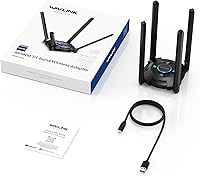
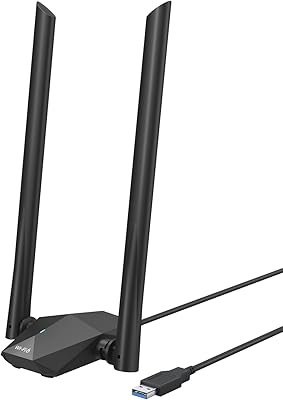
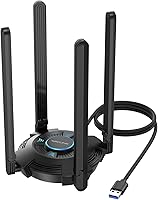
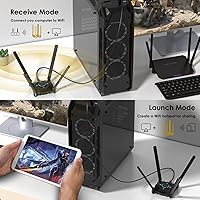
The WAVLINK AX5400 WiFi 6E USB Adapter sits in an interesting middle ground — more capable than the cheap single-band dongles cluttering budget listings, but far less invasive than a PCIe card requiring you to crack open your case. It connects via a 1-meter USB 3.0 cable, which actually matters more than it sounds: that extra length lets you position the adapter away from metal panels or interference-heavy spots near your desk. One hard limit worth knowing upfront — Windows 10 and 11 only. Mac and Linux users should look elsewhere. Released in early 2025, this WiFi 6E adapter is still building a track record, so expect the long-term reliability picture to fill in over the coming months.
Features & Benefits

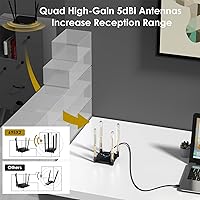
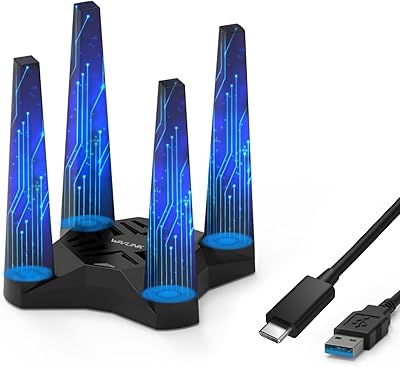
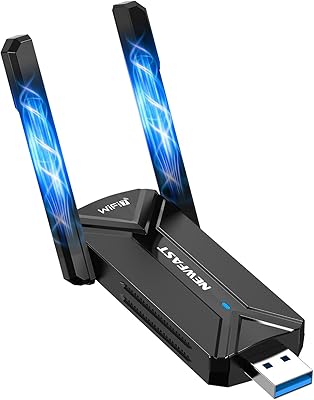
The headline feature is access to the 6GHz band — a chunk of spectrum that is far less crowded than the familiar 2.4GHz and 5GHz ranges, which translates to noticeably lower latency and more consistent speeds when your router supports it. Both the 6GHz and 5GHz bands top out at a theoretical 2402 Mbps; real-world numbers will be lower, but the headroom is there if your network can use it. OFDMA and MU-MIMO help when multiple devices are competing for bandwidth simultaneously, making this wireless upgrade genuinely useful in busy home or office environments. The four rotatable antennas are a practical touch, and the touch-activated LED can be switched off if the glow bothers you at night.

Best For

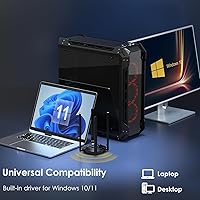
This WiFi 6E adapter makes the most sense for desktop PC owners who want 6GHz wireless without the hassle of installing a PCIe card — especially if your case is tucked away in an awkward spot. It also suits anyone who recently upgraded to a WiFi 6E router and wants to extend that capability to a machine that did not ship with it built in. In congestion-heavy settings like apartment buildings or shared offices, the OFDMA support can make a real difference. That said, this is strictly a Windows 10 or 11 solution; Mac and Linux users have no driver support and need to shop elsewhere. If you are on an older Windows version, the same applies.

User Feedback

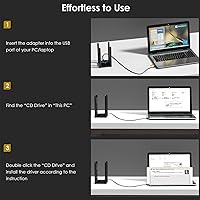
Early buyers of the WAVLINK USB adapter tend to highlight quick, driverless setup as a genuine high point — plug in, and Windows recognizes it without any manual installation hoops. Speed results get mixed reviews: most users see a solid improvement over older adapters, but the gap between theoretical maximums and real-world throughput is noticeable, as it is with most wireless hardware. Some have flagged driver stability concerns after Windows updates, which is worth monitoring given how frequently Microsoft pushes patches. Antenna build quality seems adequate for the price point, though a few buyers note the joints loosen slightly over time. The LED, while a nice touch, has drawn complaints for being too bright in dark rooms — thankfully, it can be toggled off.

Pros

  • No case-opening required — get 6GHz WiFi on a desktop PC in minutes via USB
  • Plug-and-play setup works out of the box on Windows 10 and 11 with no manual driver steps
  • Access to the uncrowded 6GHz band means noticeably cleaner connections on a compatible WiFi 6E router
  • OFDMA support helps maintain stable speeds in busy households with many simultaneous connected devices
  • The 1-meter USB cable lets you position the adapter for optimal signal rather than being stuck at the port
  • Four rotatable antennas give practical flexibility to aim for the best reception angle
  • WPA3 security support keeps the connection in line with modern network safety standards
  • Responsive customer support with both phone and email options, which is rare at this price tier
  • Touch-toggle LED is a small but genuinely useful feature for dark or minimal desk setups

Cons

  • Real-world speeds fall significantly short of the advertised AX5400 maximums in typical home environments
  • Driver recognition issues after Windows cumulative updates have been reported by a consistent subset of users
  • Antenna hinges loosen over time with repeated adjustments, making it harder to hold a preferred angle
  • The 6GHz band range is noticeably shorter than 5GHz, limiting its usefulness in larger homes or multi-room setups
  • Default LED brightness is too intense for darker workspaces, despite the toggle option being available
  • Heat buildup during sustained high-throughput tasks raises questions about long-term component durability
  • One-meter cable length can fall short for users with floor-standing towers or deeply recessed USB ports
  • The product launched in early 2025, so long-term reliability data is still thin and not yet well established
  • No support for Mac, Linux, or any Windows version outside 10 and 11, which sharply limits buyer flexibility

Ratings

The WAVLINK AX5400 WiFi 6E USB Adapter scores below are generated by AI after analyzing verified purchase reviews from buyers worldwide, with spam, bot activity, and incentivized feedback actively filtered out. The result is an honest composite that reflects where this wireless upgrade genuinely delivers and where real users have run into friction. Strengths and pain points are weighted equally so you can make a confident buying decision.

Ease of Setup
88%
The built-in driver support is a genuine convenience win. Most Windows 10 and 11 users report plugging in the adapter and being online within minutes, no disc, no download, no device manager headaches. For buyers who are not particularly tech-savvy, that kind of friction-free first experience earns real goodwill.
A small but vocal group of users encountered issues after Windows update cycles, where the adapter stopped being recognized until they manually reinstalled or rolled back a driver. It is not a widespread problem, but it is consistent enough to flag as a known risk for people on auto-update schedules.
Wireless Speed Performance
71%
29%
On a clear 6GHz channel with a compatible router nearby, users report noticeably lower ping and more stable throughput compared to older USB adapters — particularly useful for video calls and cloud-based work. The 5GHz band also holds up well at moderate distances, offering a meaningful step up from basic 802.11ac adapters.
The advertised AX5400 maximums are theoretical ceilings, and real-world speeds land well below them for most users. Distance, wall materials, and router placement all take a significant bite out of performance, and some buyers expecting near-gigabit results over USB were disappointed by more modest actual throughput figures.
6GHz Band Access
83%
For buyers who recently upgraded to a WiFi 6E router, this adapter gives older desktop machines genuine access to the uncrowded 6GHz spectrum without a motherboard swap or PCIe installation. Users in dense apartment buildings especially noted cleaner connections with less interference compared to the 5GHz band.
The 6GHz band has shorter range by nature, so users with the adapter more than a couple of rooms from the router may find it falls back to 5GHz frequently. A few buyers also noted their existing routers did not fully support 6GHz, meaning the headline feature went unused entirely.
Build Quality & Antenna Design
67%
33%
The four rotatable antennas give users practical flexibility to angle the adapter for the best signal, and the overall unit feels more substantial than cheaply made single-antenna dongles in the same category. The 1-meter cable is a thoughtful addition that lets you position the adapter on top of your desk rather than blocked behind a tower.
Antenna joint durability is a recurring concern in longer-term feedback. Several buyers noted the hinges loosen noticeably after repeated adjustments, making it harder to hold a precise angle over time. The plastic housing also feels mid-grade at best, and a handful of users raised concerns about heat buildup during extended heavy use.
Network Stability
74%
26%
Under normal day-to-day conditions — browsing, streaming, video calls — this WiFi 6E adapter holds its connection reliably and does not drop packets in the way that cheaper USB options sometimes do. OFDMA visibly helps in households with multiple devices competing for bandwidth at the same time.
Under sustained high-load tasks like large file transfers or extended gaming sessions, some users reported occasional dropped connections or speed fluctuations that required them to disconnect and reconnect the adapter. The issue appears more common on 6GHz at longer distances, suggesting it may be partly a signal strength limitation rather than a pure stability bug.
Value for Money
78%
22%
Compared to PCIe WiFi 6E cards at higher price points, this wireless upgrade offers a genuinely accessible entry point to 6GHz connectivity without requiring any hardware installation. For users who rent their machines or simply do not want to open their cases, the price-to-capability ratio is reasonable.
At its price point, buyers are paying a premium over standard WiFi 5 USB adapters, and the real-world performance gains are incremental rather than transformational for most home use cases. If your router does not support WiFi 6E, the price premium is harder to justify since you lose the primary differentiating feature.
Compatibility & OS Support
62%
38%
Within its supported environment — Windows 10 and 11 — the adapter works with a wide range of routers and mesh systems, including WiFi 6, WiFi 6E, and older WiFi 5 networks. No pairing or configuration steps are needed beyond plugging in the device.
The hard Windows-only limitation is a meaningful drawback that eliminates the adapter entirely for Mac and Linux users. It also cannot be used with older Windows versions, gaming consoles, or smart TVs, narrowing the buyer pool considerably and occasionally frustrating users who did not read the compatibility note before purchasing.
LED Indicator & Aesthetics
58%
42%
The touch-toggle LED is a small but practical feature that most users appreciate having. Being able to kill the light without physically covering it or unplugging the adapter is more convenient than it sounds, especially if the adapter sits in a visible spot on a desk.
The default brightness of the LED has drawn consistent complaints from buyers who use their PC in darker rooms or at night. Several reviews specifically mention the glow being distracting during late-night work or gaming sessions. The touch sensor also occasionally registers unintended taps if the cable is moved.
Signal Range
69%
31%
For users positioned in the same room or adjacent room as their router, this adapter delivers consistent signal quality across both the 5GHz and 6GHz bands. The four directional antennas do help squeeze out extra range when properly oriented toward the access point.
Range on the 6GHz band is noticeably shorter than 5GHz, which is a physical characteristic of higher-frequency signals rather than a product flaw — but buyers should understand that multi-room coverage on 6GHz is not realistic. Users more than two walls away from their router should temper expectations accordingly.
USB Cable & Flexibility
81%
19%
The included 1-meter USB 3.0 cable strikes a practical balance between reach and signal integrity. It is long enough to pull the adapter out from behind a desk tower and position it for better line-of-sight to the router, which makes a noticeable difference in signal quality for users with tucked-away cases.
For users whose PC is positioned on the floor or inside a media unit, one meter can fall just short of ideal placement on a desk surface. A slightly longer cable option, or at least a USB extension recommendation in the documentation, would address this without adding cost.
Customer Support
72%
28%
WAVLINK provides both phone and email support with stated response windows, which is a higher level of stated after-sales commitment than many comparable adapter brands. Users who engaged support for setup issues generally report receiving useful guidance rather than generic scripted replies.
Response quality appears inconsistent — some buyers received detailed technical help quickly, while others reported slower replies or solutions that did not fully resolve their driver issues. Support availability is also limited to weekday business hours, which can be frustrating for users troubleshooting connectivity problems outside those windows.
Driver Reliability Over Time
63%
37%
Fresh out of the box, the plug-and-play driver experience is one of the adapter's strongest selling points, and most users go through the first weeks without any issues. The adapter is recognized correctly on clean Windows 11 installations without any manual steps required.
Post-Windows-update driver breakage is the most consistently cited long-term complaint. A subset of buyers report the adapter losing recognition after cumulative OS updates, requiring reinstallation steps that undercut the original plug-and-play appeal. Given how frequently Windows pushes patches, this is a practical reliability concern for everyday users.
Heat Management
61%
39%
Under light to moderate loads — regular browsing, streaming, occasional downloads — the adapter stays at a comfortable temperature and does not cause any noticeable performance throttling. Most users in typical home use scenarios never encounter a heat-related issue.
During prolonged high-throughput activity, the unit gets warm enough that several users flagged it as a concern. While no widespread reports of damage exist, the heat buildup during sustained use is above what you would expect from a passively cooled external adapter at this size, and it may contribute to long-term component wear.

Suitable for:

The WAVLINK AX5400 WiFi 6E USB Adapter is a practical fit for desktop PC users who want wireless connectivity without the commitment of installing a PCIe card — particularly those renting their machines, running pre-built systems with locked cases, or simply uncomfortable with internal hardware upgrades. It makes the most sense when paired with a WiFi 6E router, since that combination is the only scenario where the 6GHz band access actually delivers on its potential. Home office workers in apartment buildings or shared workspaces will likely notice real benefits from the OFDMA-driven congestion management, especially during peak usage hours when the 5GHz band tends to get crowded. The 1-meter USB cable is genuinely useful for users whose tower sits on the floor or behind a monitor, allowing the adapter to be placed on the desk surface for a cleaner signal path. Anyone upgrading from an older 802.11ac or 802.11n USB adapter to a household that already has a modern WiFi 6E router will find this wireless upgrade a straightforward and cost-effective step forward.

Not suitable for:

The WAVLINK AX5400 WiFi 6E USB Adapter is a hard pass for anyone outside the Windows 10 and 11 ecosystem — Mac users, Linux users, and anyone running an older Windows version will find zero driver support and no workaround. It is also the wrong tool for buyers expecting speeds that match the advertised maximums; USB bandwidth constraints and real-world RF conditions mean actual throughput falls well short of those theoretical ceilings, and users chasing near-gigabit wireless performance would be better served by a PCIe card or a wired connection. If your current router does not support WiFi 6E, you are paying a premium for a 6GHz capability you cannot use, since the adapter will simply operate on 5GHz or 2.4GHz like any standard adapter. Power users who need rock-solid stability for latency-sensitive workloads — competitive gaming, live streaming, large file transfers — may find the occasional post-update driver instability frustrating enough to look at more established alternatives. Finally, anyone hoping to future-proof across multiple operating systems or devices should know this adapter is strictly a single-platform, Windows-only solution.
Specifications

  • WiFi Standard: Operates on the 802.11ax (WiFi 6E) standard, with backward compatibility across 802.11a/b/g/n/ac networks.
  • Frequency Bands: Tri-band design covers 2.4GHz, 5GHz, and 6GHz simultaneously for maximum flexibility across device types and environments.
  • Max Speed 2.4GHz: Delivers theoretical peak speeds of up to 573 Mbps on the 2.4GHz band for legacy device and long-range connectivity.
  • Max Speed 5GHz: Supports theoretical peak speeds of up to 2402 Mbps on the 5GHz band for high-throughput mid-range connections.
  • Max Speed 6GHz: Supports theoretical peak speeds of up to 2402 Mbps on the 6GHz band, available exclusively with a compatible WiFi 6E router.
  • Combined Rating: Total combined theoretical throughput across all three bands is rated at AX5400, reflecting the aggregate ceiling under ideal conditions.
  • Antennas: Equipped with four external 5 dBi rotatable antennas that can be individually adjusted to optimize signal direction and reception quality.
  • USB Interface: Connects via a USB 3.0 interface using an included 1-meter detachable cable, compatible with standard USB-A ports on desktop and laptop PCs.
  • Key Technologies: Incorporates OFDMA, MU-MIMO, and 1024QAM to improve network efficiency, reduce latency under congestion, and boost data encoding density.
  • Security Protocol: Supports WPA3 encryption alongside WPA2 for secure connections on modern and legacy routers.
  • Driver Installation: Features built-in drivers that enable plug-and-play operation on supported Windows systems with no manual software installation required.
  • OS Compatibility: Officially compatible with Windows 10 and Windows 11 only; macOS, Linux, and older Windows versions are not supported.
  • LED Indicator: Includes an ambient status LED with a capacitive touch toggle that allows users to switch the light on or off without disconnecting the device.
  • Package Weight: The complete package weighs 1.21 pounds, including the adapter unit, antennas, and USB cable.
  • Package Dimensions: Packaged dimensions measure 10.63 x 9.09 x 1.54 inches, reflecting the full retail box size including accessories.
  • Manufacturer: Designed and sold by WAVLINK, a networking hardware manufacturer that provides dedicated phone and email technical support for this product.
  • Availability Date: First made available for purchase in February 2025, making it a relatively recent addition to the USB WiFi adapter market.

Related Reviews

WAVLINK AX1800 USB WiFi Adapter
81%
88%
Performance
92%
Ease of Setup
85%
WiFi Speed & Stability
78%
Build Quality
82%
Compatibility
More
WAVLINK AX5400 WiFi 6E PCIe Network Card
86%
92%
Performance in Gaming
90%
WiFi Speed & Reliability
85%
Setup & Installation
88%
Bluetooth Connectivity
87%
Value for Money
More
OKN WiFi 6E AX5400 PCIe WiFi Card
88%
91%
Performance
94%
Gaming Performance
89%
Streaming Experience
90%
WiFi Range and Stability
88%
Bluetooth Connectivity
More
BrosTrend AX1800 WiFi 6 USB Adapter
70%
88%
Ease of Setup
74%
Wireless Speed Performance
79%
Range & Signal Penetration
63%
Driver Stability
41%
OS Compatibility
More
NEWFAST BE6500 USB WiFi 7 Adapter
86%
92%
Speed & Performance
89%
Ease of Setup
90%
Signal Strength & Coverage
85%
Compatibility with Windows 11
94%
Gaming Performance
More
Cudy WE4000 AX5400 WiFi 6E PCIe Card
84%
88%
Wi-Fi Speed & Performance
90%
Ease of Installation
75%
Bluetooth Connectivity
92%
Value for Money
84%
Build Quality
More
TP-Link Archer T4U V3 USB WiFi Adapter
83%
91%
Wi-Fi Performance
78%
Setup and Installation
85%
Build Quality
75%
Range and Coverage
89%
Portability
More
ASUS PCE-AXE5400 WiFi 6E PCI-E Adapter
85%
91%
Performance
89%
Range & Connectivity
82%
Ease of Installation
90%
WiFi Speed
87%
Compatibility
More
WAVLINK AX3000 WiFi 6 Outdoor WiFi Extender
87%
94%
Outdoor Coverage
89%
WiFi Performance
90%
Weatherproof Build
86%
Installation Ease
88%
Signal Penetration
More
WAVLINK WL-ST334UA Dual-Bay USB 3.0 Hard Drive Docking Station
72%
83%
Offline Cloning Reliability
74%
Transfer Speed
79%
Build Quality
91%
Ease of Setup
38%
Mac Compatibility
More

FAQ

No, and that is genuinely one of its better features. The adapter has built-in drivers, so on a clean Windows 10 or 11 installation you just plug it in and Windows recognizes it automatically. No disc, no download required. The one caveat is that some users have reported the adapter dropping recognition after a major Windows update, so it is worth keeping an eye on that after OS patches roll in.

Unfortunately, no. The WAVLINK AX5400 WiFi 6E USB Adapter is strictly compatible with Windows 10 and Windows 11. There are no macOS or Linux drivers available, and no unofficial workarounds are reliably documented at this time. If you are on either of those platforms, you will need to look at a different adapter entirely.
Yes, it will work fine with a standard WiFi 6 router on the 5GHz and 2.4GHz bands. The 6GHz capability simply will not be active since your router does not broadcast on that frequency. You will still benefit from the WiFi 6 features like OFDMA and MU-MIMO, which help on congested networks. The upgrade to a WiFi 6E router would be needed to unlock the 6GHz band.

Significantly lower than the advertised maximums, which are theoretical figures measured under controlled lab conditions. In a typical home environment with walls, distance, and other devices competing for bandwidth, most users land somewhere in the range of a few hundred Mbps at best on 5GHz, and closer to that on 6GHz only if you are near the router. Think of the AX5400 rating as a ceiling, not a daily average.

It can be, yes. Metal PC cases can partially block or absorb the wireless signal when the adapter is tucked behind or beside them. That is exactly why the 1-meter cable is useful — you can route the adapter out from behind the tower and place it on your desk surface or on top of the case where it has a cleaner line of sight to the router. Getting even a few inches of clear space makes a measurable difference.

Yes, it is backward compatible with WiFi 5 (802.11ac), WiFi 4, and older standards. You just will not be using the WiFi 6E or WiFi 6 specific features like OFDMA or MU-MIMO in any meaningful way since those require a router that also supports them. It will still function as a regular wireless adapter on those older networks.

There is a capacitive touch sensor on the adapter body — just tap it lightly and the LED toggles off. Tap it again to turn it back on. It is a simple on-off function and does not affect the adapter's performance either way. A few users have noted the sensor occasionally triggers if the USB cable is bumped or moved, which is worth being aware of.

They are rotatable, which is one of the more practical design choices here. All four antennas can be individually positioned and angled, letting you aim them toward your router for better signal strength. The joint quality is adequate but not premium — several users have noted that the hinges loosen with repeated adjustment over time, so once you find a good angle it is worth leaving them there rather than repositioning frequently.

This is a known issue that a subset of users have run into. The most reliable fix is to open Device Manager, uninstall the adapter, physically unplug it, restart the PC, and plug it back in to allow Windows to reinstall the built-in driver fresh. If that does not work, WAVLINK offers phone support on weekdays and email support with a stated response window of around eight hours — both are reasonable options for walking through a driver reset.

It is usable for gaming, particularly on a clear 6GHz channel close to a WiFi 6E router where latency is at its lowest. That said, for competitive gaming where every millisecond matters, a wired Ethernet connection or a PCIe wireless card will generally be more stable and consistent. The occasional post-update driver hiccup that some users report is the bigger concern for gaming use — an unexpected drop mid-session is far more disruptive than a few extra milliseconds of latency.