Overview

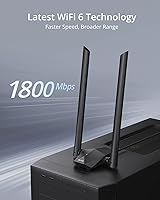
The BrosTrend AX1800 WiFi 6 USB Adapter is a practical solution for anyone whose desktop or laptop simply has no built-in wireless — plug it in, let the pre-loaded driver do its thing, and you're connected. It sits comfortably in the mid-range of the USB adapter market, offering dual-band WiFi 6 without demanding a premium price. One thing worth knowing upfront: this WiFi 6 USB adapter is strictly for Windows 10 and 11. Linux users need to look elsewhere — that limitation is non-negotiable. The included 3.3-foot USB 3.0 extension cable is a thoughtful addition, letting you position the unit where signal reception is strongest rather than wherever your port happens to be.
Features & Benefits

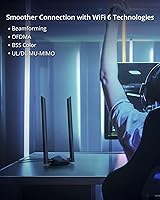
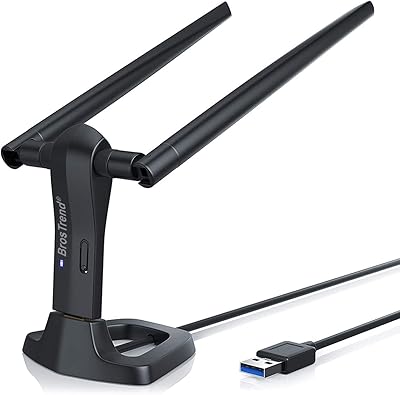
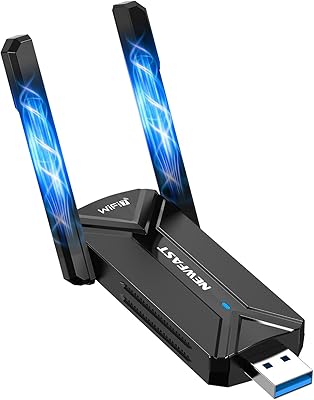
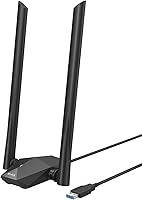
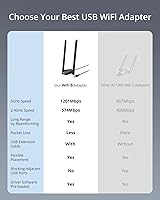
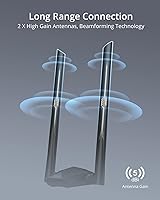
Running on the 802.11ax standard, this wireless dongle covers both the 5GHz band at up to 1201Mbps and the 2.4GHz band at 574Mbps — though real-world speeds will always fall short of those theoretical peaks, depending on your router and environment. The two external 5dBi antennas, paired with beamforming, meaningfully improve signal reach compared to compact single-antenna adapters. OFDMA and MU-MIMO technology help keep the connection stable when multiple devices are active on the same network — useful in busy households. The upright desktop stand keeps the antennas elevated for better exposure, and the USB 3.0 interface ensures the adapter itself is never the bottleneck in your setup.

Best For

This WiFi 6 USB adapter makes the most sense for desktop PC owners who want wireless without cracking open their case for an internal card. It is also a solid pick for gamers and streamers who need a more stable, lower-latency connection than older WiFi standards provide, without the hassle of routing Ethernet cables. If you have already upgraded to a WiFi 6 router, the BrosTrend adapter lets you actually take advantage of that investment on machines that would otherwise be stuck on older protocols. That said, it is only worth considering if you are running Windows 10 or 11 — there is simply no workaround for other operating systems.

User Feedback

With a 4.1-star average across nearly 4,000 ratings, the overall reception for this wireless dongle is cautiously positive. Easy installation and a noticeable speed boost over older adapters come up repeatedly in positive reviews, and range performance gets consistent praise from users in larger spaces. On the downside, some buyers have encountered driver conflicts on certain system configurations, and the Windows-only restriction continues to frustrate those who expected broader compatibility. Long-term reliability is a more mixed story — a handful of users report performance degrading after several months, though others have experienced no such issues. Customer support gets occasional mentions, with satisfaction levels varying considerably between cases.

Pros

  • Plug-and-play setup works cleanly on most Windows 10 and 11 systems without hunting for drivers.
  • Dual-band WiFi 6 support meaningfully outperforms older WiFi 5 adapters on capable routers.
  • Two external 5dBi antennas with beamforming improve signal reach through multiple walls.
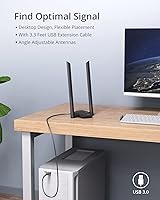
  • The included 3.3-foot USB 3.0 extension cable allows smarter antenna placement right out of the box.
  • OFDMA and MU-MIMO keep the connection more stable in busy multi-device households.
  • The upright desktop form factor keeps antennas elevated and signal exposure better than flat dongles.
  • At its price point, this WiFi 6 USB adapter delivers competitive specs without requiring a premium outlay.
  • Works well for HD and 4K streaming with noticeably fewer buffering interruptions than older adapters.
  • Ranked among the top sellers in its category, with a large review base providing reliable signal on performance trends.

Cons

  • Driver conflicts on some Windows configurations turn the simple setup promise into a troubleshooting headache.
  • Windows Update cycles have triggered disconnects and driver failures for a recurring subset of users.
  • Long-term reliability is inconsistent — some units show degraded performance after six to twelve months of use.
  • The 5GHz band loses range quickly through walls, limiting its advantage in larger or multi-story homes.
  • Real-world speeds fall well short of the advertised 1800Mbps ceiling in typical home environments.
  • Customer support quality varies considerably, leaving some users to resolve driver issues entirely on their own.
  • The antenna hinges loosen with repeated adjustment over time, reducing long-term positioning flexibility.
  • No Linux or macOS support makes this a non-starter for a significant portion of the PC user base.
  • Units placed in poorly ventilated spots can warm up noticeably under sustained heavy-load usage.

Ratings

The BrosTrend AX1800 WiFi 6 USB Adapter has accumulated thousands of verified purchase reviews across global markets, and our AI rating system has analyzed that pool — actively filtering out incentivized, duplicate, and bot-generated feedback — to produce the scores below. What emerges is an honest picture: this wireless dongle does several things genuinely well, but it also carries real limitations that matter depending on your setup. Both sides are reflected here without sugarcoating.
Ease of Setup
88%
The pre-loaded driver experience is one of the most consistently praised aspects across reviews. Users frequently describe plugging it in, waiting a moment, and being connected — no disc, no manual driver hunting. For less tech-savvy buyers adding WiFi to an old desktop, that frictionless first experience carries real weight.
A smaller but vocal subset of users hit driver conflicts, particularly on systems running custom Windows builds or those with existing network adapter software. In those cases, setup stops being simple and turns into a troubleshooting exercise that not everyone is equipped to handle.
Wireless Speed Performance
74%
26%
On a capable WiFi 6 router at moderate distances, users report meaningful speed improvements over older AC adapters — particularly on the 5GHz band. For everyday tasks like HD video streaming and large file downloads, the real-world throughput is noticeably better than what most users were getting before.
Speeds drop more than expected as distance or obstacles increase, and the gap between the advertised 1800Mbps ceiling and actual throughput frustrates buyers who take marketing specs at face value. Performance is heavily dependent on router quality, and users with budget routers see far less benefit.
Range & Signal Penetration
79%
21%
The dual 5dBi antennas combined with beamforming do make a practical difference in real home environments. Several users specifically mention maintaining a usable connection one or two rooms away from their router — a scenario where compact single-antenna adapters often struggle.
Range holds up well on 2.4GHz but the 5GHz band loses strength faster through walls, which limits its advantage in multi-story homes or buildings with dense construction. Users in larger or more complex layouts report inconsistent results that do not match the promotional range claims.
Driver Stability
63%
37%
For the majority of Windows 10 and 11 users on standard configurations, the driver installs cleanly and stays stable through reboots and sleep cycles. Long-term users who have not hit issues tend to describe it as a set-and-forget peripheral that just keeps working quietly in the background.
Driver-related disconnects and failures after Windows updates are a recurring complaint that appears across reviews with enough frequency to be a legitimate concern. Some users report needing to reinstall or roll back drivers after system updates, which undermines the plug-and-play promise for anyone who values low maintenance.
OS Compatibility
41%
59%
Within its supported environment — Windows 10 and 11 — the adapter functions as intended and BrosTrend is transparent about the limitation. Buyers who read the specs carefully and are on a supported Windows version have no surprises waiting for them.
The hard exclusion of Linux, macOS, and older Windows versions is a genuine dealbreaker for a significant portion of the potential buyer pool. Linux users in particular express frustration, especially since the product listing does not always make this restriction visible enough before purchase, leading to returns and negative reviews.
Build Quality & Design
71%
29%
The upright desktop stand gives the adapter a more purposeful, stable footprint than flat dongle-style alternatives. The antennas feel reasonably solid and pivot to a useful range of angles, and the overall construction does not feel cheap for the price tier.
The plastic housing shows fingerprints and scuffs easily, and a few long-term users note that the antenna hinges loosen over time with repeated adjustments. It is not a device that feels built for years of heavy handling — though for something that mostly sits on a desk untouched, that may be acceptable.
Extension Cable Usefulness
83%
The bundled 3.3-foot USB 3.0 cable is a practical inclusion that makes a real difference. Being able to place the adapter on top of a desk or near a window rather than plugged directly into a rear motherboard port often improves signal quality noticeably, and users appreciate not having to buy this accessory separately.
The cable is fixed at 3.3 feet, which works for most desk setups but is limiting for users with large tower cases placed on the floor or in enclosed media cabinets. A longer option, even as an optional accessory, would serve a broader range of real-world placement needs.
Gaming & Low-Latency Use
72%
28%
OFDMA and MU-MIMO support do translate into a more consistent experience during online gaming compared to older WiFi 5 adapters, particularly in households where several devices are active simultaneously. Casual to mid-level gamers report fewer lag spikes than they experienced with their previous USB adapter.
Competitive gamers who require sub-10ms latency will find that any USB WiFi adapter — this one included — introduces more variability than a wired connection or a PCIe card. Users expecting Ethernet-level consistency over WiFi for fast-paced gaming are likely to be disappointed eventually.
Value for Money
81%
19%
Relative to what this adapter actually delivers — WiFi 6 support, dual-band operation, external antennas, and an extension cable — the price point is fair for Windows users who need a quick wireless upgrade. It undercuts several comparable options while matching them on paper specs.
If you factor in the Windows-only constraint and the driver reliability concerns, the value calculation shifts. Buyers who encounter driver issues or need to return the unit eat into that value quickly, and there are cheaper adapters that perform adequately if WiFi 6 is not a strict requirement.
Antenna Design & Adjustability
76%
24%
Having two external antennas rather than one makes signal directionality more manageable, and users appreciate being able to angle them toward their router. In open-plan spaces, the ability to tune antenna orientation noticeably affects signal quality.
The antennas are fixed-gain rather than upgradeable, so users in very challenging environments cannot swap them out for higher-gain options. The physical adjustment range, while adequate, is not as flexible as some competing desktop adapters that offer full 360-degree rotation.
Heat Management
68%
32%
Under typical usage — browsing, streaming, casual downloads — the adapter stays cool enough to handle. Most users never notice any thermal issues during day-to-day use, and the upright orientation does help with passive airflow around the unit.
During sustained high-throughput transfers or extended gaming sessions, some users report the unit becoming warm to the touch, and a few associate this with occasional speed drops after prolonged use. Thermal throttling under heavy load is not officially documented but appears in enough reviews to warrant mention.
Long-Term Reliability
61%
39%
A solid portion of buyers have used this wireless dongle for over a year without problems, particularly those on stable Windows installations who have not run into driver conflicts. For those users, it simply becomes invisible infrastructure — always there, always working.
A meaningful minority report degraded performance or outright failure after six to twelve months, which is earlier than expected for a networking peripheral at this price. Whether this reflects unit variance or a design ceiling under sustained use is unclear, but it is a pattern consistent enough to factor into a buying decision.
Customer Support Experience
58%
42%
BrosTrend does engage with customer issues, and some reviewers mention receiving helpful responses when they reached out about driver problems. The brand is at least responsive enough that it does not feel like a complete black box after purchase.
Support quality appears inconsistent — while some users resolve issues quickly with guidance, others describe slow or unhelpful responses that leave them troubleshooting alone. For a product where driver issues are a known point of friction, more reliable support would meaningfully improve the ownership experience.

Suitable for:

The BrosTrend AX1800 WiFi 6 USB Adapter is a practical fit for Windows 10 and 11 users who want to add reliable wireless connectivity to a desktop PC that shipped without a WiFi card — no case opening required, no internal hardware fiddling. It is equally well-suited for laptop users whose built-in wireless card has failed or underperforms, and who need a quick external replacement. Households that have already upgraded to a WiFi 6 router will get the most out of it, since the adapter actually lets older machines participate in the faster, more efficient network they are already paying for. Streamers running 4K content, remote workers on video calls, and casual gamers who want fewer dropped connections will find the dual-band setup and external antennas a genuine step up from older WiFi 5 dongles. The included extension cable also makes it a sensible pick for tower PC owners whose machine sits on the floor, where plugging directly into a rear port would mean the antennas are blocked by a desk.
Not suitable for:

Anyone not running Windows 10 or 11 should stop reading here — the BrosTrend AX1800 WiFi 6 USB Adapter offers zero Linux support and no macOS compatibility, and there is no workaround available. This is not a minor footnote; it is a hard technical boundary that has frustrated a meaningful number of buyers who discovered it only after purchase. Competitive gamers who need the absolute lowest and most consistent latency should also temper expectations — any USB WiFi adapter, regardless of spec sheet, introduces more variability than a PCIe card or wired Ethernet connection. Users in buildings with thick concrete walls, dense multi-story layouts, or significant wireless interference will find the range does not always live up to promotional claims, particularly on the 5GHz band. And if you are on a budget router that does not support WiFi 6, the adapter will still work, but you will not see any meaningful advantage over a less expensive WiFi 5 option.
Specifications

  • WiFi Standard: Supports WiFi 6 (802.11ax) across both bands, with backward compatibility covering 802.11ac, n, a, g, and b protocols.
  • Combined Speed: Delivers a theoretical maximum of 1800Mbps total — 1201Mbps on the 5GHz band and 574Mbps on the 2.4GHz band.
  • Frequency Bands: Dual-band operation covering both 2.4GHz for broader range and 5GHz for faster throughput in closer proximity to the router.
  • Antennas: Equipped with two fixed external antennas, each rated at 5dBi high-gain, designed to improve signal reception through physical obstacles.
  • Beamforming: Supports beamforming technology, which focuses the wireless signal toward connected devices rather than broadcasting equally in all directions.
  • OFDMA Support: OFDMA (Orthogonal Frequency Division Multiple Access) is supported, enabling more efficient channel use when multiple devices are active simultaneously.
  • MU-MIMO: Supports both uplink and downlink MU-MIMO, allowing the adapter to communicate with the router more efficiently under multi-device network conditions.
  • USB Interface: Uses a USB 3.0 connection, ensuring the interface does not bottleneck wireless throughput during high-bandwidth transfers.
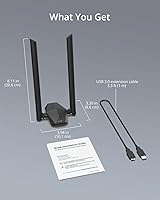
  • Extension Cable: Includes a 3.3-foot (approximately 1 meter) USB 3.0 extension cable for repositioning the adapter away from the host machine.
  • Form Factor: Desktop upright stand design keeps the unit stable on a flat surface with antennas elevated for improved signal exposure.
  • Dimensions: Physical dimensions measure 3.9″ in length, 3.4″ in width, and 8.1″ in height when antennas are extended upright.
  • Weight: The complete unit weighs approximately 100 grams (3.53 ounces), making it lightweight enough for occasional relocation between machines.
  • OS Compatibility: Compatible exclusively with Windows 10 and Windows 11; Linux, macOS, and older Windows versions are explicitly not supported.
  • Driver Installation: Driver comes pre-loaded on the adapter itself, eliminating the need for a CD-ROM drive or manual driver download during initial setup.
  • Data Protocol: Operates on IEEE 802.11ax and 802.11ac/n/a on the 5GHz band, and IEEE 802.11ax/n/g/b on the 2.4GHz band.
  • ASIN: Amazon Standard Identification Number for this product is B09TKG3NMY, useful for verifying the correct listing before purchase.
  • Manufacturer: Designed and sold by BrosTrend Technology LLC, a brand focused on USB and PCIe wireless networking peripherals.
  • Release Date: First made available for purchase on February 28, 2022, and has since accumulated a substantial verified review base.

Related Reviews

WAVLINK AX1800 USB WiFi Adapter
81%
88%
Performance
92%
Ease of Setup
85%
WiFi Speed & Stability
78%
Build Quality
82%
Compatibility
More
ASUS AX1800 PCIe WiFi Adapter PCE-AX1800
82%
91%
Performance & Speed
88%
Bluetooth Connectivity
85%
WiFi Range & Coverage
75%
Ease of Installation
90%
Security (WPA3)
More
BrosTrend WiFi 6 Extender AX1500
84%
87%
Performance & Speed
92%
Ease of Setup
88%
Signal Coverage
85%
Device Compatibility
80%
Reliability & Stability
More
BrosTrend AC3L AC1200 Linux USB WiFi Adapter
75%
88%
Linux Compatibility
63%
Driver Installation Experience
83%
5GHz Signal Stability
81%
Antenna Range & Performance
71%
Windows Plug-and-Play
More
NEWFAST BE6500 USB WiFi 7 Adapter
86%
92%
Speed & Performance
89%
Ease of Setup
90%
Signal Strength & Coverage
85%
Compatibility with Windows 11
94%
Gaming Performance
More
BrosTrend AX3000 WiFi 6 Access Point
84%
87%
Performance
92%
Ease of Setup
85%
Signal Strength
90%
Device Support
80%
Build Quality
More
ZMISDRI 2025 AX1800 WiFi 6 Extender
85%
90%
WiFi Coverage
88%
Performance with Multiple Devices
85%
Ease of Setup
87%
Signal Stability
82%
Device Compatibility
More
WAVLINK AX5400 WiFi 6E USB Adapter
71%
88%
Ease of Setup
71%
Wireless Speed Performance
83%
6GHz Band Access
67%
Build Quality & Antenna Design
74%
Network Stability
More
AX1650x Killer Series WiFi 6 Adapter
85%
93%
WiFi Speed & Performance
88%
Gaming Latency
85%
Bluetooth Connectivity
90%
Installation Ease
91%
Compatibility with Windows & Linux
More
WAVLINK WN573HX1 AX1800 Outdoor WiFi 6 Access Point
80%
92%
Weather Resistance & Durability
84%
WiFi Range & Signal Strength
81%
Installation & Setup
61%
Configuration Interface (UI/UX)
86%
WiFi 6 Performance & Speed
More

FAQ

No — and this is worth knowing before you buy. The BrosTrend AX1800 WiFi 6 USB Adapter is built exclusively for Windows 10 and Windows 11. There are no drivers available for macOS or any Linux distribution, and that is unlikely to change. If you are on either of those platforms, you will need to look at a different product entirely.
No, the driver comes pre-loaded on the adapter itself, so setup is largely automatic on supported Windows systems. You just plug it in, wait a moment for Windows to recognize the device, and it should connect. That said, a small number of users on systems with conflicting network software or non-standard Windows builds have reported needing to manually install or update the driver afterward.

Realistically, no. The 1800Mbps figure is a combined theoretical maximum across both bands under ideal lab conditions — it is not something you will hit in a typical home setup. Your actual speeds depend on your router, the distance between your PC and the router, the number of devices on your network, and physical obstacles in the way. That said, users consistently report real-world speeds that are noticeably faster than what they were getting with older WiFi 5 adapters.

You can absolutely use it with a WiFi 5 router — the adapter is backward compatible, so it will connect and work fine. However, the WiFi 6 specific benefits like OFDMA efficiency and the full speed potential only activate when paired with a WiFi 6 router. On a WiFi 5 router, it functions essentially as a high-quality WiFi 5 adapter, which is still a solid upgrade over many older dongles.

The 3.3-foot cable lets you place the adapter somewhere with a clearer line of sight to your router, rather than having it shoved behind your PC tower or tucked under a desk. You do not have to use it — you can plug the adapter directly into any USB 3.0 port — but using the cable often improves signal quality noticeably, especially for desktop towers where the machine sits on the floor.

For casual to mid-level gaming, it performs well enough that most users will not notice a meaningful difference compared to their previous setup. The OFDMA and MU-MIMO support do help reduce latency spikes in busy network environments. That said, if you are a competitive gamer where even occasional inconsistency matters, a wired Ethernet connection or a PCIe WiFi card will always be more reliable than any USB adapter.

In a typical home environment with standard drywall construction, most users get a solid connection one to two rooms away from their router. The 5GHz band starts to weaken faster over distance and through obstacles, while the 2.4GHz band holds range better but at lower speeds. In larger homes or spaces with thicker walls, range performance may fall short of expectations, particularly if you are relying on the 5GHz band.

Yes, this is a documented pattern in user reviews. A portion of buyers report that Windows updates occasionally break the driver, leading to disconnects or the adapter not being recognized after a reboot. This does not happen to everyone, but it happens often enough to be worth mentioning. Keeping the driver version pinned or checking for updated drivers from BrosTrend after major Windows updates can help.

Physically, yes — you can unplug it from one machine and plug it into another running Windows 10 or 11. The driver installation process may repeat on the new machine the first time, but it is typically quick and automatic. Just keep in mind it is designed to be a desktop peripheral rather than something you carry around daily, so the antenna hinges may loosen over time with repeated repositioning.

The box contains the wireless dongle itself with its upright desktop stand, two external 5dBi antennas that screw into the unit, and the 3.3-foot USB 3.0 extension cable. The driver is pre-loaded on the device, so there is no disc in the box — which is intentional since many modern PCs do not have optical drives.