Overview

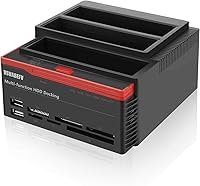
The VSVABEFV YPH01 IDE SATA HDD Docking Station is one of those niche tools that quietly solves a problem most people don’t realize they have until an old computer dies and they’re staring at a drawer full of aging drives. This all-in-one drive reader bridges the gap between decades-old IDE hardware and modern USB 3.0 connections, and it throws in dual SATA bays and a multi-format card reader for good measure. VSVABEFV isn’t a household name, but this unit has accumulated enough real-world reviews to take seriously. Think of it as a practical recovery tool, not a polished premium enclosure — and at its mid-range price, that’s a fair trade.
Features & Benefits

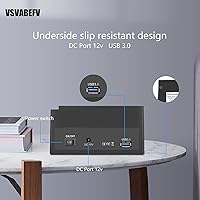
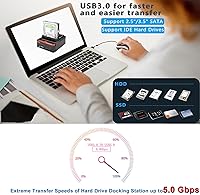
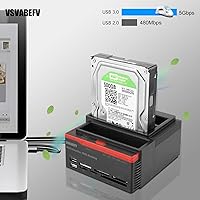
The dock connects via USB 3.0 and delivers transfer speeds up to 5Gbps, a genuine step up from older USB 2.0 adapters. Where it stands out is IDE support — a connector type that most modern docks have quietly abandoned. You can plug in 2.5-inch or 3.5-inch SATA drives alongside an IDE drive and access both at once, which is useful for migration jobs. There’s also a one-touch cloning button that copies one drive to another without a computer in the loop. One caveat worth knowing upfront: two SATA drives cannot run simultaneously — only one SATA and one IDE at a time. The card reader handles six common formats including SD, CF, and TF cards.

Best For

This docking station earns its place most clearly in data recovery scenarios — specifically when someone needs to pull files off a machine that’s years past its prime. IT technicians dealing with legacy hardware will appreciate the IDE port most, since finding a working IDE adapter at this price is increasingly hard. It’s also a reasonable pick for home users who want to consolidate old drives without buying separate adapters for each type. The built-in card reader adds value for photographers juggling multiple card formats. What it isn’t is a daily-use workhorse — if you need simultaneous multi-drive SATA access or SATA III throughput, look elsewhere. This is a specialized, occasional-use tool with a clear purpose.

User Feedback

With a 3.8-star average across nearly 460 reviews, this IDE and SATA dock lands in solid-but-not-spectacular territory. The most consistent praise centers on IDE compatibility — buyers note that options at this price with a functional IDE port are genuinely rare. Drive detection issues do come up, particularly with older or more finicky IDE models, and that’s worth factoring in if your target drive is already showing its age. The cloning function handles straightforward copy jobs well but can struggle with drives that are partially failing, so don’t treat it as a substitute for proper recovery software. Build quality draws a split reaction: the plastic chassis feels lightweight, though most buyers agree it holds up fine for occasional use.

Pros

  • One of the few docks at this price that handles IDE drives alongside modern SATA connections.
  • Plug-and-play setup means no driver installs — just connect and the OS picks it up immediately.
  • One-touch offline cloning lets you copy drives without needing a computer as the middleman.
  • Six card reader slots cover SD, CF, TF, M2, and more — useful for photographers juggling multiple formats.
  • USB 3.0 delivers noticeably faster transfers compared to older USB 2.0 adapters for healthy drives.
  • Hot-swap support lets you cycle through multiple drives in a single session without rebooting.
  • LED indicators give clear, immediate feedback on read/write activity without needing to watch a progress bar.
  • Broad OS compatibility covers Windows versions as far back as 98 and Mac OS 9.x and newer.
  • Compact enough to pack in a laptop bag for on-site IT work or off-site data recovery jobs.
  • One-year warranty with email support adds a baseline of accountability for a lesser-known brand.

Cons

  • Two SATA drives cannot run at the same time — a serious limitation that many buyers discover only after purchase.
  • Drive detection is inconsistent with older or degraded IDE drives, which are the most common recovery targets.
  • SATA III speeds are not supported, so modern SSDs will not perform anywhere near their rated throughput.
  • Cloning can fail or stall when the source drive has bad sectors or is in poor condition.
  • Card reader slots max out at 32GB, leaving out many current high-capacity memory cards.
  • The plastic chassis feels hollow and lightweight in a way that raises durability concerns for frequent use.
  • Email-only customer support means slow response times when you are in the middle of a time-sensitive recovery job.
  • 3.5-inch WD IDE drives are explicitly unsupported — a gap that affects a meaningful number of legacy drive owners.
  • No companion software means zero control over cloning parameters, error handling, or sector-level recovery options.

Ratings

The VSVABEFV YPH01 IDE SATA HDD Docking Station has been scored using an AI-driven analysis of verified global buyer reviews, with spam, bot-generated, and incentivized feedback actively filtered out before any scoring was applied. The ratings below reflect a transparent picture of where this all-in-one drive reader genuinely delivers and where real users have run into frustration. Both the strengths and the recurring pain points are represented honestly across every category.
IDE Drive Compatibility
78%
22%
For a dock at this price, IDE support is the headline feature — and for many buyers, it works exactly as hoped. Users recovering data from aging desktop towers or old laptops frequently report successfully accessing drives they assumed were lost forever, often without needing any additional software or configuration.
Compatibility is not universal. Several users note that certain older or less common IDE drives simply fail to register, and 3.5-inch WD IDE drives are explicitly unsupported. If your specific drive is finicky or degraded, detection can be hit-or-miss even after multiple attempts.
SATA Drive Compatibility
83%
Standard 2.5-inch and 3.5-inch SATA drives tend to connect without drama. Users pulling files from retired laptops or desktop builds report clean recognition and stable transfers, making this a reliable choice for everyday SATA access when paired with a healthy drive.
Only SATA I and II are supported, which limits throughput on newer drives that expect a SATA III connection. Users also need to remember that two SATA drives cannot be active at the same time — a constraint that catches many buyers off guard after purchase.
Simultaneous Multi-Drive Access
41%
59%
The one combination that does work simultaneously — one IDE and one SATA drive — is genuinely useful for direct migration jobs where you are moving data from an old IDE drive to a newer SATA unit without a computer acting as the middleman.
This is the single biggest source of buyer disappointment. Users expecting to access two SATA drives at once will find the dock simply does not support it. For anyone managing multiple modern drives in a small NAS-style workflow, this limitation makes the dock the wrong tool entirely.
Transfer Speed
72%
28%
Under normal conditions with healthy drives, USB 3.0 delivers a noticeable improvement over older USB 2.0 adapters. Buyers transferring large photo archives or video folders from functioning SATA drives report reasonable speeds that get the job done without excessive waiting.
Real-world speeds drop considerably when working with aging or partially failing drives, which is exactly the scenario most buyers purchase this dock for. The 5Gbps ceiling is also capped by the SATA I/II limitation, so modern SSDs will not approach their rated performance here.
Offline Cloning Function
66%
34%
The one-touch cloning feature is a genuine convenience for users who want to duplicate a healthy drive without involving a computer. IT technicians handling simple laptop refreshes or straightforward disk upgrades find it cuts out several steps from an otherwise tedious process.
Performance on failing or unstable drives — again, the most common use case — is unreliable. Several reviewers report cloning jobs stalling, erroring out, or producing incomplete copies when the source drive has bad sectors. For critical recovery work, dedicated software on a proper machine is still the safer path.
Card Reader Functionality
69%
31%
Having six card format slots built into the same unit is a practical bonus, particularly for photographers who carry multiple card types across different cameras. SD, CF, and TF cards all read without fuss in most reported cases, eliminating the need for a separate hub on a cluttered desk.
The card reader is clearly a secondary feature, and it shows. Maximum card capacity tops out at 32GB, which excludes many modern high-capacity CF and SD cards. A few users also mention slower-than-expected read speeds from the card slots compared to dedicated card readers.
Plug-and-Play Setup
88%
No driver installation, no software to configure — just plug it in and the operating system picks it up. Windows users across a wide range of versions report immediate recognition, and Mac users on OS 9.x and newer have an equally smooth experience, which is a real time-saver in a recovery context.
A small number of users on niche or heavily customized system builds report the dock not being recognized consistently on first connection, requiring a port switch or system restart. This is a minor edge case, but it is worth noting for anyone running older or non-standard hardware.
Build Quality
58%
42%
The dock is light and compact enough to toss in a laptop bag, which actually suits its role as an occasional-use recovery tool. The port slots feel reasonably firm when drives are inserted, and the LED indicators give a clear visual cue for read/write activity without being distracting.
The ABS plastic chassis feels noticeably budget in hand — lightweight in a hollow, rather than portable, way. Several buyers mention the casing flexes slightly under pressure, and there is a general sense that the unit would not survive a drop or heavy regular use without showing wear fairly quickly.
Value for Money
74%
26%
The combination of IDE support, dual SATA bays, offline cloning, and a multi-format card reader in one box is genuinely hard to match at this price tier. For a user who needs this feature set occasionally, the cost-per-use math works out favorably compared to buying separate adapters.
Buyers who need the dock to perform reliably under heavy or regular use may find themselves replacing it sooner than expected, which chips away at the value argument. If your use case extends beyond occasional recovery jobs, spending more on a better-built unit is probably the smarter long-term investment.
Drive Detection Reliability
61%
39%
Healthy, modern SATA drives connect cleanly in the majority of reported cases. Users working with recently decommissioned laptops or desktop builds generally find recognition fast and consistent, with the LED indicator confirming activity within seconds of insertion.
Detection becomes noticeably unreliable with older IDE drives, degraded media, or drives from certain manufacturers. This is particularly frustrating because the dock is specifically marketed toward legacy and recovery use cases — the very situations where drive health is most likely to be compromised.
Hot-Swap Support
77%
23%
The ability to swap drives without powering down is a practical workflow advantage for IT users who cycle through multiple drives in a single session. It avoids the tedious shutdown-reconnect loop that older docking solutions required and keeps the work moving at a reasonable pace.
A few users report that hot-swapping occasionally causes the system to fail to recognize the newly inserted drive without a manual rescan or port unplug-replug cycle. It works reliably enough for most, but it is not as frictionless as hot-swap implementations on higher-end docking solutions.
Software & Driver Requirements
86%
Truly driverless operation is one of the dock’s cleanest selling points. In a data recovery situation where you may be working on an unfamiliar machine or a stripped-down environment, not having to hunt for drivers or worry about software conflicts saves real time and reduces stress.
The trade-off of driverless simplicity is that there is no companion software for advanced clone settings, sector-by-sector control, or error logging. Power users who want more control over the cloning process will need to reach for third-party tools regardless.
OS Compatibility
81%
19%
The broad Windows compatibility list stretching back to Windows 98 is a thoughtful inclusion for a dock aimed squarely at legacy hardware users. Mac support from OS 9.x onward covers the vast majority of real-world use cases without any additional configuration needed.
There is no mention of Linux support in the official documentation, which leaves a gap for users running open-source environments or specialized recovery distributions. Anecdotally, some Linux users report it working, but the lack of official guidance creates uncertainty.
Warranty & After-Sales Support
55%
45%
A one-year limited warranty is included, and the brand does respond to email inquiries, which is more accountability than some budget competitors offer. For a niche product from a lesser-known brand, having any formal support channel is a reasonable baseline.
Email-only support with no live chat or phone option means response times can be slow, particularly for users facing time-sensitive data recovery situations. Several buyers report waiting longer than expected for replies, and warranty claim experiences are inconsistently reviewed.

Suitable for:

The VSVABEFV YPH01 IDE SATA HDD Docking Station is purpose-built for a specific kind of user: someone sitting in front of a box of old hard drives, trying to rescue files from hardware that modern laptops have no way to connect to. If you have ever decommissioned an older desktop PC and found yourself wondering how to pull data off its IDE drive without buying an entirely separate machine, this is the tool that bridges that gap affordably. IT technicians who regularly handle end-of-life equipment will find the IDE port genuinely useful, since dedicated IDE adapters at this price are increasingly rare. Home users consolidating years of photos, documents, or backups scattered across a mix of old and new drives will also get real value here, particularly with the plug-and-play setup that requires no driver hunting. The built-in card reader is a practical bonus for photographers or hobbyists who want a single hub for both drive access and memory cards from different cameras or devices. For anyone whose recovery needs are occasional and straightforward, this all-in-one drive reader offers a reasonable feature set without demanding a premium budget.
Not suitable for:

The VSVABEFV YPH01 IDE SATA HDD Docking Station has a hard limit that disqualifies it for certain buyers, and it is worth being direct about: you cannot access two SATA drives simultaneously. If you were planning to use this as a multi-drive workstation tool — say, for running backups across several drives in rotation or managing a small media server — that single constraint makes it the wrong product entirely. Power users who need SATA III throughput for fast SSDs will also hit a ceiling here, since only SATA I and II are supported. The plastic construction is functional but not durable enough for heavy daily use; if this dock is going to live on a desk and get plugged and unplugged repeatedly over months, it may show its budget origins faster than expected. Users attempting to recover data from severely failing or degraded drives should also temper their expectations around the cloning feature, which can stall or produce incomplete results when the source drive is in poor health. And if your specific drive is a 3.5-inch WD IDE model, be aware that this dock explicitly does not support it — a detail easy to miss before purchasing.
Specifications

  • USB Interface: Connects to host computers via USB 3.0, with transfer speeds up to 5Gbps and backward compatibility with USB 2.0 and 1.1 ports.
  • SATA Support: Accommodates both 2.5″ and 3.5″ SATA I and SATA II hard drives and SSDs, with a maximum supported capacity of 6TB per drive.
  • IDE Support: Includes one dedicated IDE port supporting 2.5″ and 3.5″ IDE drives, with the exception of 3.5″ Western Digital IDE models.
  • Drive Bay Count: Features two SATA bays and one IDE port, though only one SATA drive or one IDE drive can be actively read at any given time — not two SATA drives simultaneously.
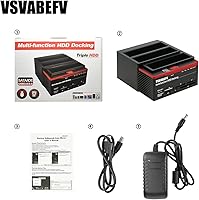
  • Offline Clone: Supports one-touch offline cloning (OTC) and one-touch backup (OTB), allowing drive-to-drive copying without a connected computer.
  • Card Reader: Integrated 6-slot card reader accepts SD, MMC, MS, TF, CF, and M2 memory card formats, with a maximum supported card capacity of 32GB.
  • Driver Requirement: Fully plug-and-play with no driver installation required on supported operating systems.
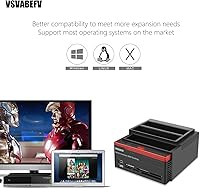
  • OS Compatibility: Compatible with Windows 98, Me, 2000, XP, Vista, 7, 8, and 10, as well as Mac OS 9.x and all later macOS versions.
  • Status Indicators: LED indicators on the unit display real-time read and write activity for connected drives and the power supply status.
  • Hot-Swap Support: Supports hot-swapping, allowing drives to be inserted or removed while the unit remains powered without requiring a system restart.
  • Construction Material: Chassis is constructed from ABS (Acrylonitrile Butadiene Styrene) plastic in a black and red colorway.
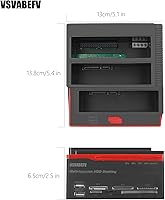
  • Dimensions: The unit measures 6.3 x 5.91 x 4.65 inches, making it compact enough for desk use or transport in a laptop bag.
  • Item Weight: Weighs approximately 2.39 ounces, reflecting its lightweight plastic construction.
  • Warranty: Backed by a 1-year limited after-sales warranty with technical support available via email contact with the manufacturer.
  • Brand & Model: Manufactured under the VSVABEFV brand with model number YPH01-V_LOGO, first made available in September 2018.

Related Reviews
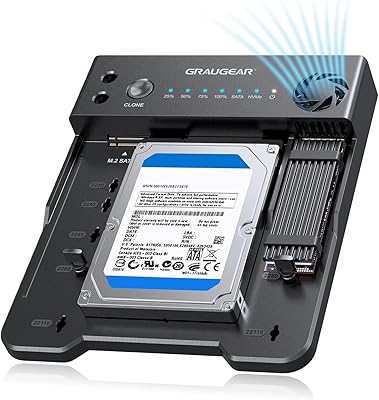
Sabrent DS-4SSD 4-Bay 2.5” SATA SSD/HDD Docking Station
88%
91%
Value for Money
96%
Ease of Setup
85%
Cooling Performance
77%
Drive Compatibility
89%
Build Quality
More
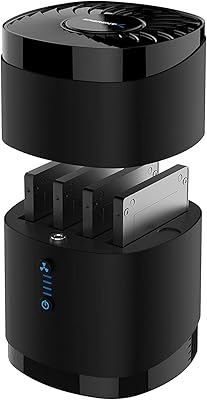
GRAUGEAR G-M2ST235-CL NVMe SATA Drive Docking Station
77%
88%
Offline Cloning
91%
Drive Compatibility
84%
Transfer Speed
79%
Cooling Performance
93%
Ease of Use
More
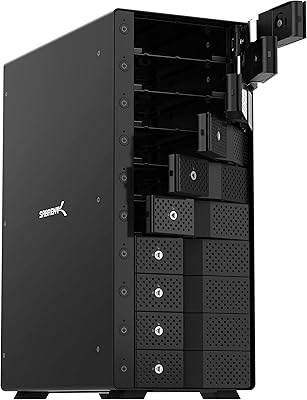
ICY DOCK flexiDOCK MB830SP-B 3-Bay 3.5 Inch SATA/SAS HDD Docking Enclosure
83%
93%
Ease of Installation
88%
Build Quality
87%
Performance & Speed
79%
Cooling Efficiency
65%
Noise Levels
More
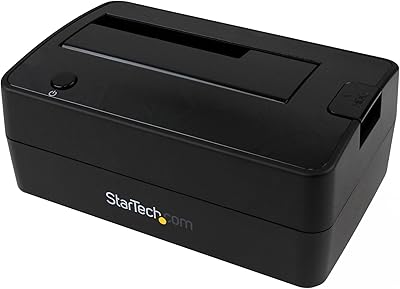
Inateck SA02004 USB 3.0 Hard Drive Docking Station
76%
88%
Offline Clone Reliability
74%
Data Transfer Speed
92%
Setup & Ease of Use
63%
Build Quality & Materials
71%
RGB Lighting
More
Sabrent 10-Bay USB 3.2 Gen 2 SATA Docking Station
85%
94%
Ease of Use
88%
Build Quality
79%
Cooling Performance
90%
Speed & Data Transfer
91%
Compatibility with Operating Systems
More
SABRENT DS-SC5B 5-Bay Hard Drive Docking Station
76%
88%
Build Quality
83%
Cooling Performance
61%
Noise Level
84%
Hot-Swap Usability
74%
Transfer Speed
More
StarTech SDOCKU33BV USB 3.0 Hard Drive Dock
78%
93%
Ease of Setup
84%
Drive Compatibility
78%
Transfer Speed
58%
Build Quality
81%
Hot-Swap Reliability
More
StarTech SDOCKU313 USB 3.1 Hard Drive Dock
80%
88%
Transfer Speed
83%
Drive Compatibility
79%
Build Quality
94%
Ease of Setup
62%
Value for Money
More
StarTech SDOCK2U33EB Dual-Bay Hard Drive Docking Station
78%
83%
Hot-Swap Reliability
88%
Drive Compatibility
74%
Transfer Performance
76%
Build Quality
93%
Ease of Setup
More
Sabrent EC-DFLT USB 3.0 SATA Hard Drive Docking Station
77%
93%
Ease of Setup
88%
Drive Compatibility
76%
Transfer Speed
67%
Build Quality
71%
Power Delivery
More

FAQ

No, and this is the most important thing to know before buying. The dock only allows one SATA drive to be active at a time. The one combination that works simultaneously is one IDE drive and one SATA drive together — but two SATA drives at once is not supported.

In most cases, yes. The dock is specifically designed to support 2.5″ and 3.5″ IDE drives, which are the type commonly found in older desktops and laptops from the early-to-mid 2000s. The one exception is 3.5″ Western Digital IDE drives, which are not compatible. If you are unsure of your drive brand, it is worth checking before purchasing.

No drivers or software are needed. Just plug the dock into a USB port on your computer, insert your drive, and your operating system should detect it within seconds. This plug-and-play behavior works across a wide range of Windows and Mac versions.

Yes, it is compatible with Mac OS 9.x and all later versions. Most modern macOS users report straightforward detection without any additional configuration.

It depends on how far gone the drive is. The one-touch cloning function works reliably for healthy or lightly used drives, but it can stall or produce incomplete results when the source drive has bad sectors or is in poor condition. For a critically failing drive, you are generally better off using dedicated data recovery software on a computer rather than relying on the offline clone button alone.

The card reader handles SD, MMC, MS, TF, CF, and M2 formats. However, the maximum supported card size is 32GB, so a 64GB card will not be recognized. If you regularly use higher-capacity cards, a dedicated card reader would serve you better for that specific task.

It works with SATA SSDs as well as traditional spinning hard drives, as long as they use a SATA I or SATA II interface. Keep in mind that SATA III SSDs will be limited by the dock’s SATA II ceiling, so you will not see the full read/write speeds those drives are capable of.

Yes, the dock has LED indicators that light up to show read and write activity. When you insert a drive and start accessing files, the LED will reflect that activity in real time, so you are not left guessing whether the connection is working.

Yes, the dock is backward compatible with USB 2.0 and even USB 1.1. Transfer speeds will be slower than what USB 3.0 offers, but the dock will function normally. For large file transfers, the speed difference is noticeable, so a USB 3.0 port is preferable when available.

The plastic build is functional for occasional use, but if you are cycling through drives daily in a professional IT environment, it may show wear faster than you would like. The port slots feel reasonably solid, but the chassis overall is on the lighter and more budget side of the spectrum. For heavy, repeated use, it might be worth budgeting for something with a sturdier build.