Overview

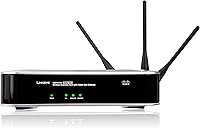
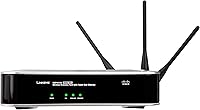
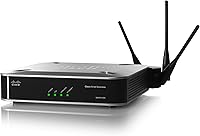
The Cisco WAP4410N Wireless-N Access Point is a business-grade device built for small-to-medium office environments — and despite launching back in 2008, it still turns up in searches and refurbished hardware markets for good reason. Unlike a consumer router, this is a dedicated access point: it extends wireless coverage across a network rather than managing your internet connection. That distinction matters. The WAP4410N earns a 3.9 out of 5 from over 170 buyers, a credible satisfaction score for hardware in this category. What keeps it relevant is Power over Ethernet support, which lets you install it on a ceiling or wall without hunting for a nearby outlet.
Features & Benefits

The WAP4410N runs on draft 802.11n with a 3x3 MIMO configuration — three transmit, three receive — which pushes range and throughput noticeably further than older 802.11g hardware. A Gigabit Ethernet backhaul means the wired connection feeding this access point will not become a bottleneck for bandwidth-heavy applications. The PoE capability is arguably its most practical trait in a commercial setting: no power outlet needed at the install point, keeping cable runs clean and costs down. A web-based setup panel makes configuration accessible to non-specialist staff, and built-in WMM quality-of-service keeps voice and video traffic prioritized over general data in busy environments.

Best For

This business-grade WAP is a natural fit for small offices or retail spaces that need a proper managed wireless layer rather than a repurposed home router. IT teams already running Cisco switches or a structured wired network will find it integrates cleanly — it speaks the same language as the rest of the rack. Hospitality environments like a small hotel or café can put the HTTP Redirect splash page to work for guest Wi-Fi without adding extra software. It also suits buyers comfortable sourcing refurbished enterprise gear, and anyone needing a ceiling-mounted unit in a spot where running a separate power cable simply is not practical.

User Feedback

Across roughly 176 ratings, the pattern is fairly consistent: buyers praise the solid build quality and dependable coverage that Cisco’s commercial background suggests. Long-term users report units holding up through years of continuous operation without obvious issues. On the critical side, the 802.11n standard is genuinely showing its age — anyone comparing it to modern 802.11ac or Wi-Fi 6 hardware will notice the throughput ceiling. Some less technical users flagged the firmware interface as unintuitive, and a handful reported PoE compatibility problems with non-Cisco switches. It is not a perfect device, but for the right environment, its durability track record is difficult to argue with.

Pros

  • Cisco’s commercial build quality means units routinely survive years of continuous, uninterrupted operation.
  • Power over Ethernet support eliminates the need for a power outlet at the install location, keeping deployments clean.
  • The Gigabit Ethernet backhaul ensures the wired connection feeding the WAP4410N never becomes a speed bottleneck.
  • A built-in splash page and HTTP Redirect feature handles guest Wi-Fi captive portals without extra software.
  • WMM quality-of-service keeps voice calls and video streams smooth even when the network is under load.
  • 3x3 MIMO antenna configuration extends reliable wireless range further than single or dual-antenna designs.
  • Web-based configuration is accessible enough that non-specialist staff can handle basic setup and adjustments.
  • Strong fit for existing Cisco network environments where brand consistency and interoperability matter.
  • Still actively listed and supported, making replacement parts and documentation relatively easy to locate.
  • Solid 3.9 out of 5 rating across more than 170 buyers reflects a dependable track record in real-world use.

Cons

  • The 802.11n standard is over 15 years old and cannot match the throughput of modern 802.11ac or Wi-Fi 6 hardware.
  • Single-band 2.4 GHz operation makes it vulnerable to interference in congested wireless environments.
  • Some users report PoE compatibility issues when pairing this business-grade WAP with non-Cisco switches.
  • The firmware interface has a dated design that less technical users find confusing without prior networking experience.
  • No built-in controller or cloud management means scaling across multiple access points requires additional infrastructure.
  • Refurbished units carry the usual risks of unknown wear history and potentially outdated firmware versions.
  • Setup documentation assumes a baseline level of networking knowledge that casual buyers may not have.
  • Not suitable for high-density wireless environments where many simultaneous clients need consistent performance.

Ratings

Our AI-generated scores for the Cisco WAP4410N Wireless-N Access Point are derived from analyzing verified global buyer reviews, with spam, bot submissions, and incentivized feedback actively filtered out before scoring. Each category reflects the honest distribution of praise and frustration across hundreds of real-world deployments, from small office installations to hospitality environments. Both the genuine strengths and the recurring pain points are represented transparently so you can make a clear-eyed buying decision.
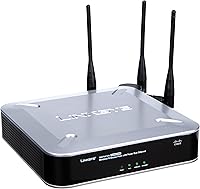
Build Quality
88%
Buyers consistently describe the physical construction as solid and confidence-inspiring — exactly what you would expect from a Cisco commercial product. Units deployed in ceiling mounts or server closets report no cracking, warping, or antenna loosening even after years of continuous operation.
A small number of users noted the plastic casing can accumulate dust in open-air ceiling mounts, and the ventilation design offers no active cooling, which raises occasional concerns about heat management in poorly ventilated spaces.
Long-Term Durability
91%
This is arguably the WAP4410N's strongest suit. Reviewers who purchased units in the early 2010s routinely report them still running without issue, a track record that consumer-grade hardware rarely matches. For 24/7 office or hospitality deployments, that reliability is genuinely meaningful.
Hardware longevity eventually runs up against the reality of aging firmware. As software updates have slowed to a trickle, long-term users face growing security exposure if the device is deployed on a network handling sensitive data.
Wireless Performance
58%
42%
For low-to-moderate traffic environments — a small office with email, web browsing, and occasional video calls — the 3x3 MIMO 802.11n setup delivers stable, adequate coverage without noticeable drops. Users with modest bandwidth needs rarely complained about day-to-day performance.
Against any modern 802.11ac or Wi-Fi 6 access point, the throughput ceiling is obvious and limiting. Environments with more than 15 to 20 simultaneous clients, or internet connections above 150 Mbps, will find the wireless standard itself becomes the bottleneck.
PoE Implementation
76%
24%
Power over Ethernet support is one of the most practically valued features among buyers who installed this business-grade WAP on ceilings or in locations without accessible power outlets. It simplifies cable management significantly and is cited as a deciding factor in many purchasing decisions.
Compatibility is not universal. A recurring theme in critical reviews involves PoE handshake failures with non-Cisco switches, requiring buyers to either swap their switch or add a midspan injector — an extra cost and frustration that is not clearly communicated upfront.
Ease of Setup
62%
38%
IT administrators and network-savvy buyers find the web interface straightforward enough for initial configuration, and the absence of proprietary software means any browser-equipped device can be used for setup and management without additional installs.
Less technical buyers frequently describe the firmware UI as confusing and dated, with non-intuitive menu structures that assume familiarity with networking concepts like VLANs, DHCP settings, and SSID segmentation. There is no guided setup wizard to bridge that knowledge gap.
Signal Range & Coverage
73%
27%
In open-plan office environments and single-floor retail spaces, the adjustable dipole antennas allow users to tune coverage direction reasonably well. Reviewers in medium-sized spaces report reliable connectivity across the entire floor without dead zones.
Multi-floor deployments or spaces with heavy concrete or metal obstructions expose the range limitations of the 2.4 GHz single-band design. Users in denser physical environments often need a second unit where a modern dual-band access point might suffice alone.
Value for Money
79%
21%
When sourced as a refurbished unit, the WAP4410N offers a compelling cost-per-reliability ratio for buyers who do not need cutting-edge wireless speeds. Getting Cisco-grade durability and PoE support at a fraction of a new enterprise access point price is a genuine draw for budget-conscious IT buyers.
Purchased at or near original retail pricing, the value proposition weakens considerably given the availability of modern access points at similar price points with dramatically superior wireless standards and ongoing firmware support.
Guest Network Features
81%
19%
The HTTP Redirect splash page functionality receives consistent praise from hospitality and retail buyers who need a lightweight captive portal for guest Wi-Fi. Setting up a separate SSID with VLAN isolation keeps guest traffic off the primary business network without needing additional hardware.
The splash page customization options are fairly limited compared to dedicated captive portal solutions, and buyers wanting branded landing pages with usage policies or social login will need a third-party controller to extend that functionality.
QoS & Traffic Management
74%
26%
WMM quality-of-service support is appreciated in environments running VoIP phone systems or video conferencing, where voice call clarity can degrade noticeably on networks without traffic prioritization. Users running mixed-use networks note a tangible improvement in call stability with WMM active.
The QoS implementation is relatively basic by current standards. Advanced per-user or per-application bandwidth controls available in modern managed access points are absent here, limiting fine-grained traffic shaping for more complex network environments.
Firmware & Software Support
41%
59%
The firmware that ships with the device covers the core functionality reliably, and for buyers operating in isolated or air-gapped networks where ongoing updates are less critical, the current firmware state is functional enough for daily use.
Active firmware development has effectively ceased for this model, meaning known vulnerabilities are unlikely to receive patches. For any network handling sensitive client or business data, the lack of ongoing security updates is a serious and disqualifying concern for security-conscious IT teams.
Hardware Compatibility
66%
34%
Within a Cisco-centric network environment, the WAP4410N integrates smoothly with existing switching and routing infrastructure. IT teams already standardized on Cisco equipment report minimal interoperability friction during deployment.
Outside the Cisco ecosystem, compatibility unpredictability surfaces across PoE switches and some managed switch brands. This creates additional diagnostic work during setup that buyers running mixed-vendor networks should factor into their planning.
Physical Installation
83%
The compact square form factor and included mounting hardware make ceiling and wall installation relatively straightforward. The lightweight build at under 14 ounces means standard drywall anchors handle the load comfortably without specialized mounting brackets.
The mounting template and instructions included in the box receive mixed reviews for clarity. Some installers working alone report difficulty aligning ceiling mount screws without a second pair of hands, which adds friction to what should be a simple install.
Network Security
67%
33%
WPA2 Personal and Enterprise support covers the security baseline expected from a commercial access point, and VLAN segmentation between SSIDs adds a meaningful layer of network isolation for environments separating staff and guest traffic.
The lack of WPA3 support is a real gap by today's standards, and the stalled firmware update cadence means there is no roadmap for closing it. Organizations subject to compliance frameworks or handling sensitive data should treat this as a meaningful security limitation.
Documentation & Support
55%
45%
Cisco's knowledge base and community forums carry extensive historical documentation for the WAP4410N, and experienced network administrators generally find enough reference material online to troubleshoot most configuration scenarios without contacting support.
Official Cisco support for this product has wound down significantly given its age, meaning buyers encountering edge-case issues may find the support pipeline unhelpful. Less experienced users without access to third-party IT resources can end up genuinely stuck.

Suitable for:

The Cisco WAP4410N Wireless-N Access Point is a strong match for small business owners, office managers, and IT administrators who need a reliable, dedicated wireless access point rather than a repurposed home router. If you are already running a Cisco-based wired network and want to add wireless coverage without introducing a mismatched brand into the stack, this fits naturally. Its Power over Ethernet support makes it genuinely practical for ceiling or wall installs in offices, retail floors, or hospitality spaces where running a separate power cable to a high-mounted device simply is not an option. Small hotels, cafes, or clinics that need a captive portal or splash page for guest Wi-Fi will find that feature built right in. Budget-conscious buyers sourcing refurbished enterprise hardware will also find a unit that punches well above what consumer-grade equipment typically offers in terms of build durability.
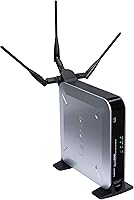
Not suitable for:

The Cisco WAP4410N Wireless-N Access Point is not the right call for anyone chasing modern wireless performance. Its 802.11n standard, while capable for light-to-moderate office use, cannot compete with the throughput or range efficiency of current 802.11ac or Wi-Fi 6 devices, so bandwidth-intensive environments running video production, large file transfers, or dense client loads will quickly feel the ceiling. Home users expecting simple plug-and-play setup may find the web-based firmware interface less intuitive than a consumer router app. If your PoE switch is a non-Cisco brand, there is a real possibility of compatibility friction that will require troubleshooting before the unit cooperates. Anyone who needs dual-band wireless coverage to separate high-priority traffic from general browsing will also be disappointed, as this is a single-band device operating in the increasingly crowded 2.4 GHz space.
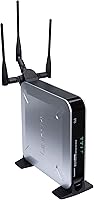
Specifications

  • Wireless Standard: Operates on Draft 802.11n (Wireless-N), delivering improved throughput and range compared to older 802.11b/g hardware.
  • MIMO Config: Uses a 3x3 MIMO arrangement with three transmit and three receive chains for stronger, more consistent wireless signal distribution.
  • Frequency Band: Single-band device operating in the 2.4 GHz frequency range.
  • Antenna Type: Fitted with adjustable and removable dipole antennas that can be repositioned to optimize coverage for a given space.
  • LAN Interface: Includes one Gigabit Ethernet (10/100/1000 Mbps) port to ensure the wired backhaul connection does not restrict wireless throughput.
  • Power Options: Supports both Power over Ethernet (PoE) and an external DC power supply, giving flexibility for installations with or without nearby outlets.
  • QoS Support: Wi-Fi Multimedia (WMM) quality-of-service is built in to prioritize time-sensitive traffic such as voice calls and video streams.
  • Guest Access: HTTP Redirect functionality enables a splash page to be displayed to users on first connection, supporting captive portal and guest network configurations.
  • Configuration: Managed entirely through a browser-based web interface, requiring no proprietary desktop software for initial setup or ongoing adjustments.
  • Dimensions: Measures 1.61 x 6.69 x 6.69 inches, a compact square footprint suited for ceiling or wall mounting in commercial spaces.
  • Weight: Weighs 13.8 ounces, light enough for overhead mounting without requiring heavy-duty hardware or structural reinforcement.
  • Manufacturer: Designed and produced by Cisco, a globally recognized manufacturer of enterprise and commercial networking equipment.
  • Model Number: Officially designated as the WAP4410N within Cisco’s small business access point lineup.
  • First Available: Originally released in October 2008, making it a mature product with a well-established real-world performance track record.
  • Discontinued: As of the time of this review, the manufacturer has not listed this unit as discontinued, and it remains available through various channels.
  • Security: Supports advanced wireless security protocols including WPA2 Personal and Enterprise, helping protect network traffic in business environments.
  • VLAN Support: Capable of supporting multiple SSIDs with VLAN tagging, allowing network segmentation between staff and guest wireless users.
  • Mounting: Designed for ceiling or wall mounting and includes hardware to facilitate installation in commercial or office environments.

Related Reviews

NETGEAR WAX615 Wireless Access Point
86%
91%
Performance
88%
Ease of Setup & Installation
93%
Coverage & Range
89%
Security Features
87%
App & Remote Management
More
BrosTrend AC1200 Dual-Band WiFi Access Point
76%
88%
Ease of Setup
71%
WiFi Signal Strength
74%
Connection Stability
81%
Build Quality & Design
76%
Dual-Band Performance
More
Ubiquiti U6+
Ubiquiti U6+
80%
88%
Wireless Performance
54%
Setup & Configuration
84%
Range & Coverage
82%
Build Quality & Design
91%
PoE+ Implementation
More
TP-Link EAP653 Wi-Fi 6 Access Point
83%
88%
Wireless Performance
79%
Setup & Installation
83%
Omada App & Controller Experience
91%
Build Quality & Design
84%
Range & Coverage
More
EnGenius EAP350 N300 Wireless Access Point
68%
88%
Signal Range & Coverage
83%
Connection Stability
71%
Ease of Setup
52%
Admin Interface & Software
79%
Build Quality & Design
More
Cisco CBW240AC Wi-Fi Access Point
80%
83%
Wireless Performance
76%
Setup & Configuration
88%
Build Quality & Design
81%
Coverage Range
87%
Security Features
More
TP-Link TL-WA1201 AC1200 Wireless Access Point
75%
88%
Value for Money
81%
Wi-Fi Coverage & Range
83%
Ease of Setup
86%
Multi-Mode Flexibility
58%
PoE Implementation
More
Cisco Business 150AX Wi-Fi 6 Access Point
85%
89%
Performance
92%
Security Features
78%
Ease of Setup
85%
Wi-Fi Coverage
80%
Management App Usability
More
Zyxel NWA130BE WiFi 7 Access Point
77%
83%
Wireless Performance
74%
Setup & Initial Configuration
67%
Nebula Cloud Management
81%
Build Quality & Hardware Design
89%
PoE+ Implementation
More
Ubiquiti airCube AC Wireless Access Point
79%
93%
Ecosystem Integration
91%
PoE Passthrough
74%
Wireless Coverage
78%
Setup & Installation
82%
Build Quality
More

FAQ

The WAP4410N is a dedicated access point, not a router. It needs to be connected to an existing router or managed switch that already handles your internet connection and DHCP. Think of it as a wireless extension of your wired network rather than a standalone gateway.

It should work with any 802.3af-compliant PoE switch, but a handful of users have flagged compatibility hiccups with certain third-party brands. If you are using a non-Cisco switch, it is worth verifying that it meets the 802.3af standard before committing to a cable-only installation.

Configuration is handled through a web browser interface, which is more accessible than a command-line setup. That said, you will need a basic understanding of concepts like IP addressing and SSIDs to get it running correctly. It is not quite as hands-off as a consumer mesh router app, so less technical users may want a quick guide or help from an IT contact for the initial configuration.

For everyday tasks like email, web browsing, video calls, and shared file access, 802.11n handles moderate workloads just fine. Where it shows its age is in environments with many simultaneous users or bandwidth-heavy applications like large file transfers or 4K streaming. If your office is relatively small and your internet connection does not exceed 150 to 200 Mbps, the performance ceiling is unlikely to be a daily frustration.

Yes. The Cisco WAP4410N Wireless-N Access Point supports multiple SSIDs with VLAN tagging, meaning you can create a separate wireless network for guests that is isolated from your main business network. The HTTP Redirect splash page feature also lets you display a welcome or terms-of-use screen when guests first connect, which is useful for cafes, hotels, or clinics.
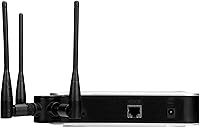
A current Wi-Fi 6 device will outperform this business-grade WAP in almost every measurable way: faster maximum speeds, better performance in high-density environments, and improved battery efficiency for connected client devices. The WAP4410N makes sense if your budget is tight, your client devices are older, and your throughput requirements are modest. If you are building a network from scratch in 2024 and performance is a priority, a modern access point is the more future-proof investment.

The unit supports WPA2 Personal and WPA2 Enterprise, covering the security needs of most small business environments. WPA2 Enterprise in particular is useful if you have a RADIUS server and want individual user authentication rather than a shared passphrase.

Yes, ceiling mounting is one of the intended use cases and mounting hardware is included. The PoE support is especially practical here because it means only a single Ethernet cable needs to run to the ceiling location, eliminating the need for a separate power cable or nearby outlet.

Long-term durability is one of the most consistently positive themes in the user feedback. Multiple buyers report units running continuously for years without hardware failures, which is consistent with the build standards expected from Cisco’s commercial product lines. The bigger long-term concern tends to be software rather than hardware, as firmware updates for this model have slowed considerably given its age.

Availability varies depending on the seller. New old-stock units do appear, but a significant portion of listings are refurbished or open-box. Always check the seller’s listing condition clearly before purchasing, and if buying refurbished, look for sellers that offer at least a short return window so you can verify the unit powers on and connects correctly before committing.

Where to Buy