Overview

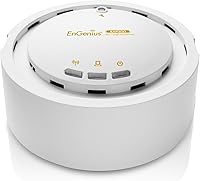
The EnGenius EAP350 N300 Wireless Access Point is a high-power indoor AP built for users who need reliable Wi-Fi coverage that stretches beyond what a typical consumer router can manage. Released in 2011, it runs on the 802.11n standard — single-band 2.4GHz only — which is worth knowing upfront if you're coming from a dual-band setup. That limitation aside, the gigabit Ethernet LAN port was genuinely ahead of many competitors at its price point, avoiding the backhaul bottleneck that plagued Fast Ethernet-only units. Think of this as a business-lite access point: dependable, straightforward, and built to cover ground rather than win spec sheet comparisons.
Features & Benefits

What sets the EAP350 apart from a standard home router's built-in radio is its 29dBm transmit power — considerably higher than the 17–20dBm most consumer gear puts out. In practice, that means the signal punches through concrete walls and covers sprawling floor plans where weaker APs give up. The 802.11n MIMO configuration handles everyday workloads like HD video streaming and file transfers without issue. The gigabit backhaul port ensures the wired connection feeding it won't become the weak link. WDS and Repeater mode support also lets you extend coverage without pulling new Ethernet runs — a real advantage in retrofitted or rented spaces.

Best For

This high-power AP is a natural fit for small business environments — think a dental office, a boutique hotel floor, or a small warehouse where a single consumer router just can't reach every corner. Home office users dealing with dead zones behind thick walls will also get solid value here. It's equally useful for IT admins who need to drop a secondary access point into an existing wired network without a full infrastructure overhaul. That said, if your devices support 5GHz or you run bandwidth-heavy applications, the single-band 2.4GHz ceiling will feel restrictive. This is squarely a legacy connectivity solution — and a capable one within that lane.

User Feedback

Across roughly 100 ratings, this EnGenius access point holds a 4.2-star average, and the pattern is fairly consistent. Buyers highlight the strong signal reach, especially in layouts where other units struggled — that high transmit power clearly makes a real-world difference. Standalone AP setup also earns praise for being manageable without deep networking expertise. On the downside, the web-based admin interface draws repeated complaints for feeling clunky and outdated, which is understandable given the hardware's age. WDS and Repeater performance gets mixed marks — some report stable bridging, others hit reliability walls. Users running it inside a managed multi-AP deployment consistently report the smoothest experience overall.

Pros

  • Transmit power of up to 29dBm delivers noticeably stronger wall-penetrating signal than most consumer-grade gear.
  • The gigabit Ethernet LAN port prevents the wired backhaul from becoming a speed bottleneck.
  • Compact, low-profile design mounts cleanly on a ceiling or wall without drawing attention.
  • WDS and Repeater mode support gives flexible deployment options without pulling new cable runs.
  • Solid 4.2-star rating across roughly 100 real buyers speaks to consistent, dependable performance.
  • Setup as a standalone access point is manageable even without deep networking expertise.
  • Compatible with EnGenius cloud management for admins overseeing multiple APs from one dashboard.
  • Built-in MIMO helps maintain stable throughput when multiple devices connect simultaneously.
  • Internal antenna keeps the unit tidy and reduces physical vulnerability compared to external antenna designs.

Cons

  • Single-band 2.4GHz only — no 5GHz band means no relief from congested channels in dense environments.
  • The web admin interface feels dated and unintuitive, particularly for less experienced users.
  • WDS and Repeater modes have shown inconsistent reliability in real-world deployments according to multiple buyers.
  • Hardware dates back to 2011, so do not expect ongoing firmware updates or long-term vendor support.
  • 32MB of RAM limits the unit under heavier managed-network workloads.
  • No built-in PoE support means an additional power adapter or PoE injector may be required depending on your setup.
  • 300Mbps theoretical throughput will feel restrictive compared to modern dual-band or Wi-Fi 6 access points.
  • Not a practical choice for environments with a high density of simultaneously connected modern devices.

Ratings

The scores below reflect AI-driven analysis of verified global user reviews for the EnGenius EAP350 N300 Wireless Access Point, with spam, bot-generated, and incentivized feedback actively filtered out before scoring. Each category is evaluated against real-world buyer expectations — not manufacturer claims — so both the genuine strengths and the honest pain points are represented as users actually experienced them.

Signal Range & Coverage
88%
The high transmit power is the single most praised aspect of this AP across verified buyers. Users in older buildings with thick concrete or brick walls consistently report coverage extending into rooms where previous routers and cheaper APs simply dropped out.
A handful of buyers in multi-story environments note that vertical signal penetration between floors is less impressive than horizontal range. Coverage claims can also vary depending on interference from neighboring 2.4GHz networks in denser living or office arrangements.
Connection Stability
83%
When deployed as a straightforward wired access point, the EAP350 earns consistent praise for staying connected without random drops. Small offices and home setups running it in basic AP mode report weeks of uninterrupted uptime with minimal intervention needed.
Stability drops noticeably when WDS or Repeater mode is in play — this is a recurring pattern in user feedback, not an isolated complaint. Some buyers had to reboot the unit periodically to maintain a reliable bridge connection in those configurations.
Ease of Setup
71%
29%
For users with basic networking knowledge, getting the EAP350 running as a standalone AP is a reasonably quick process. The web interface walks through the core configuration steps, and connecting it to an existing router or switch is plug-and-play on the hardware side.
The setup experience becomes noticeably harder for less technical buyers. The admin interface lacks modern UX design, help text is sparse, and configuring WDS or multi-SSID setups without prior networking experience can quickly become confusing and time-consuming.
Admin Interface & Software
52%
48%
The interface covers all the core configuration options a network admin needs — SSID settings, channel selection, transmit power control, and VLAN tagging — without requiring third-party tools. It gets the job done for experienced users who know where to look.
There is broad agreement that the web UI feels like a product from 2011, because it effectively is. Navigation is clunky, feedback on configuration changes is minimal, and first-time users frequently report confusion when trying to configure anything beyond the basics.
Build Quality & Design
79%
21%
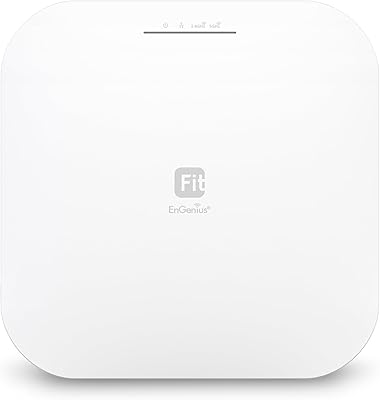
The enclosure feels solid for its weight class — nothing flexes, nothing rattles. The compact square footprint and internal antenna design make it unobtrusive on a ceiling mount, and buyers report it blends cleanly into office and commercial environments.
The all-white plastic finish can show scuff marks and yellowing over time in environments with fluctuating humidity or temperature. The design itself is purely functional with no aesthetic updates since launch, which may look out of place in modern minimalist office builds.
WDS & Repeater Reliability
57%
43%
When WDS pairing works correctly, it offers a practical way to extend network coverage into spaces where running a new Ethernet cable is impractical. Users who took the time to carefully configure channel alignment between paired units report a workable wireless backhaul.
The real-world consistency of WDS and Repeater modes is genuinely mixed across the user base. A notable share of buyers report needing multiple setup attempts, and some abandoned wireless bridging entirely in favor of powerline adapters after persistent reliability issues.
Wired Backhaul Performance
86%
The gigabit LAN port is a meaningful advantage over access points still shipping with Fast Ethernet connections. Users feeding it from a gigabit switch notice no wired bottleneck, which matters in small offices where multiple users are transferring files or streaming simultaneously.
The benefit is only realized if your existing network infrastructure — switch, cabling, and router — is also gigabit-capable. Buyers connecting it to older 100Mbps switches see no real-world advantage from the gigabit port on this end of the link.
Value for Money
74%
26%
For buyers specifically needing high-transmit-power 2.4GHz coverage on a modest budget, the EAP350 delivers functionality that would otherwise require spending considerably more on newer enterprise gear. Longtime users point out it has run reliably for years without needing replacement.
Buyers who later discover the 2.4GHz-only limitation post-purchase feel the value proposition weakens significantly. In a market now dominated by dual-band and Wi-Fi 6 access points at competitive prices, the EAP350 requires a specific use case to justify the spend.
Multi-AP & Managed Deployment
69%
31%
Buyers deploying several units across a small campus or multi-room office find the EnGenius cloud management integration useful for monitoring and pushing configuration changes without visiting each AP physically. The multi-SSID support also helps segment guest and internal traffic cleanly.
The cloud management platform has evolved since this hardware launched, and not all newer dashboard features are fully compatible with the EAP350's older firmware. Users managing a mixed fleet of newer EnGenius APs and EAP350 units sometimes hit capability gaps.
Throughput & Speed
63%
37%
For everyday tasks — web browsing, video calls, standard-definition and HD streaming — the 802.11n throughput is perfectly adequate. Users running small office environments with modest bandwidth needs report no practical complaints about real-world speeds for typical workloads.
The 300Mbps ceiling on 2.4GHz 802.11n feels constrained against modern internet service tiers and current device expectations. Anyone running a gigabit internet plan or regularly transferring large files over Wi-Fi will notice the wireless link becoming the limiting factor.
Band Flexibility
34%
66%
For the specific scenario it was designed for — environments running only 2.4GHz-compatible legacy hardware — the single-band focus means the radio is fully dedicated to that band rather than splitting resources. It does that one job consistently.
This is the EAP350's most significant limitation in today's context. No 5GHz band means no support for faster, less congested connections that virtually every modern laptop, phone, and smart device now expects. It is a hard dealbreaker for mixed-device modern environments.
Mounting & Installation
81%
19%
At just 8 ounces, ceiling and wall mounting is genuinely straightforward for a single installer. The included hardware covers basic mounting needs, and the unit's footprint is small enough that positioning it in a central ceiling location is rarely a logistical challenge.
The mount hardware is basic and may not suit all ceiling types — dropped tile ceilings require additional consideration. Power cable routing can also be awkward depending on how your space is wired, particularly if PoE infrastructure is not already in place.
Long-Term Firmware Support
41%
59%
The existing firmware is mature and stable — bugs that affected early units have long since been addressed, and the current build runs predictably in most supported configurations. There is something to be said for a firmware that is no longer in active flux.
Active development on this hardware has effectively ended. Security patches, feature additions, and compatibility updates for newer network standards are not expected. For environments where firmware currency is an IT policy requirement, this is a genuine obstacle.

Suitable for:

The EnGenius EAP350 N300 Wireless Access Point is a strong pick for small business owners, property managers, or home office users who need to push a reliable 2.4GHz signal through thick walls, across large floor plans, or into dead zones that a standard router simply cannot reach. IT administrators managing a secondary AP deployment on an existing wired network will appreciate the gigabit backhaul port, which keeps the connection from becoming a bottleneck. If your environment runs legacy devices — older laptops, barcode scanners, IoT sensors, or older smart home gear — that only need 2.4GHz connectivity, the EAP350 covers that need without overcomplicating the setup. Facilities like small clinics, boutique retail shops, or co-working spaces with a single floor will find this AP punches well above what a consumer router offers. For budget-conscious IT teams that already have a wired infrastructure in place and are not yet ready to invest in a full Wi-Fi 6 refresh, this high-power AP represents a practical, cost-effective bridge solution.

Not suitable for:

The EnGenius EAP350 N300 Wireless Access Point is not the right tool for households or offices where speed and modern band flexibility are priorities. Being single-band 2.4GHz only, it cannot serve devices that rely on a 5GHz connection for lower latency or higher throughput — a real limitation for video calls, large file syncs, or 4K streaming. Anyone expecting a polished, beginner-friendly interface will likely find the admin panel frustrating; this is hardware designed with network-literate users in mind. Buyers looking for a modern mesh node, Wi-Fi 6 performance, or seamless roaming across multiple APs should look elsewhere entirely. The EAP350 is also not ideal for dense multi-device environments like busy open offices or apartment buildings where channel congestion on 2.4GHz is already a persistent problem. Given its 2011 origins, long-term firmware support and feature development should not be expected.

Specifications

  • Brand & Model: Manufactured by EnGenius under the model designation EAP350, part of the company's indoor access point lineup.
  • Wireless Standard: Operates on the 802.11n (Wi-Fi 4) standard with MIMO technology for improved signal stability across multiple connected devices.
  • Frequency Band: Single-band 2.4GHz only — there is no 5GHz radio in this unit.
  • Max Throughput: Delivers up to 300Mbps of wireless throughput under optimal conditions on the 2.4GHz band.
  • Transmit Power: Supports up to 29dBm RF transmit power, significantly higher than the 17–20dBm typical of most consumer-grade access points.
  • LAN Port: Includes one Gigabit Ethernet (10/100/1000) LAN port for high-speed wired backhaul connection to a switch or router.
  • Memory: Equipped with 32MB of DRAM and 4MB of flash storage for firmware and configuration data.
  • Antenna: Uses an internal antenna design, keeping the unit compact and suitable for discreet ceiling or wall mounting.
  • Dimensions: Measures 4.73 x 4.73 x 1.97 inches, making it a compact square unit that sits unobtrusively on a ceiling or wall bracket.
  • Weight: Weighs 8 ounces (226g), light enough for straightforward single-person ceiling mounting.
  • Power Input: Requires a 12V DC power supply; check whether a PoE injector or standard power adapter is needed for your specific installation.
  • Operating Modes: Supports three deployment modes: Access Point, WDS (Wireless Distribution System), and Repeater, allowing flexible installation scenarios.
  • Cloud Management: Compatible with the EnGenius EnStation Cloud platform, enabling centralized management across multiple deployed access points.
  • Color & Finish: Available in white with a plain plastic enclosure suited for blending into standard office or home ceiling environments.
  • First Available: Originally released in December 2011, making it a mature product with a long deployment history in small business environments.

Related Reviews
BrosTrend AC1200 Dual-Band WiFi Access Point
76%
88%
Ease of Setup
71%
WiFi Signal Strength
74%
Connection Stability
81%
Build Quality & Design
76%
Dual-Band Performance
More
Ubiquiti U6+
Ubiquiti U6+
80%
88%
Wireless Performance
54%
Setup & Configuration
84%
Range & Coverage
82%
Build Quality & Design
91%
PoE+ Implementation
More
EnGenius ENH1350EXT Outdoor Wi-Fi Access Point
76%
88%
Build Quality
91%
Weatherproof Performance
83%
Wi-Fi Range (2.4 GHz)
67%
Wi-Fi Range (5 GHz)
54%
Ease of Setup
More
NETGEAR WAX615 Wireless Access Point
86%
91%
Performance
88%
Ease of Setup & Installation
93%
Coverage & Range
89%
Security Features
87%
App & Remote Management
More
Cisco WAP4410N Wireless-N Access Point
71%
88%
Build Quality
91%
Long-Term Durability
58%
Wireless Performance
76%
PoE Implementation
62%
Ease of Setup
More
TP-Link EAP653 Wi-Fi 6 Access Point

83%
88%
Wireless Performance
79%
Setup & Installation
83%
Omada App & Controller Experience
91%
Build Quality & Design
84%
Range & Coverage
More
TP-Link TL-WA1201 AC1200 Wireless Access Point
75%
88%
Value for Money
81%
Wi-Fi Coverage & Range
83%
Ease of Setup
86%
Multi-Mode Flexibility
58%
PoE Implementation
More
EnGenius EWS276-FIT Wi-Fi 6 Access Point
78%
83%
Wireless Performance
71%
Range & Coverage
74%
Setup & Installation
67%
Management Software
88%
Value for Money
More
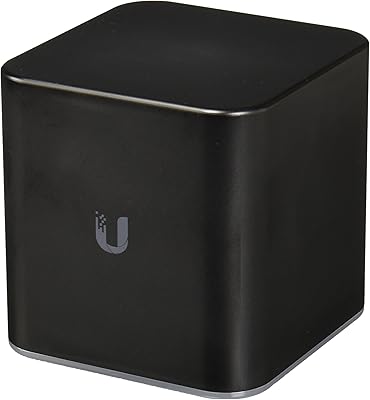
Ubiquiti airCube AC Wireless Access Point
79%
93%
Ecosystem Integration
91%
PoE Passthrough
74%
Wireless Coverage
78%
Setup & Installation
82%
Build Quality
More
Zyxel NWA130BE WiFi 7 Access Point
77%
83%
Wireless Performance
74%
Setup & Initial Configuration
67%
Nebula Cloud Management
81%
Build Quality & Hardware Design
89%
PoE+ Implementation
More

FAQ

It works perfectly fine as a standalone access point — just plug it into your router or switch via the gigabit LAN port, run through the web-based setup, and you're good to go. The cloud management option through EnGenius EnStation is available if you're managing multiple units, but it's completely optional for single-AP deployments.

No. The EAP350 is a single-band 2.4GHz-only device — there is no 5GHz radio onboard. If your devices depend on a 5GHz connection for lower congestion or higher throughput, you'll need a different access point.

Yes, the Repeater and WDS modes are designed for exactly this scenario. That said, real-world results vary — some users report stable wireless bridging, while others find these modes less consistent than a wired AP setup. If you can run a cable, a wired deployment will always be more reliable.

The biggest practical difference is transmit power. Most consumer routers broadcast at around 17–20dBm, while this unit goes up to 29dBm, which translates to a noticeably stronger signal through walls and across larger spaces. If your router's signal dies in certain rooms, this AP can fill those gaps in ways a standard router upgrade might not.

As a basic access point, the setup is manageable — you assign an IP, configure your SSID and password, and connect it to your network. The web admin interface is functional but dated and not particularly intuitive, so if you're completely new to networking concepts, there may be a learning curve. Following EnGenius's documentation helps considerably.

The compact square form factor is designed with ceiling mounting in mind, and the unit does include basic mounting hardware. At just 8 ounces, it's light enough that a single person can handle the installation without much trouble.

EnGenius doesn't publish a hard client limit for this unit, but as a 2.4GHz 802.11n AP with 32MB of RAM, you'd be pushing it beyond about 20–30 active simultaneous clients. It handles typical small office or home loads well, but it's not built for high-density environments like conference halls or large open offices.

Given that this hardware launched in 2011, active firmware development is unlikely at this point. It continues to function reliably on its existing firmware, but buyers should not count on new features or security patches being released going forward.

Yes, the high-power AP supports multiple SSIDs, which allows you to broadcast separate networks — for example, a staff network and a guest network — from the same unit. Basic VLAN tagging is also supported, which is useful for keeping those networks logically separated on your switch infrastructure.

It fits best in small business settings like a single-floor office, a small clinic, a retail shop, or a home office where 2.4GHz coverage needs to stretch across thick walls or a larger square footage than a standard router can handle. It's also a practical choice for anyone supporting a mix of older devices that only operate on 2.4GHz, such as legacy laptops, printers, or IoT sensors.

Where to Buy