

Overview

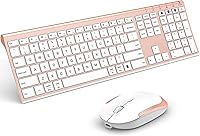
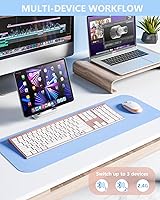
The VssoPlor Bluetooth Keyboard Mouse Combo is a slim, rose gold wireless set aimed at users who juggle multiple devices without wanting to spend a fortune. Launched in late 2023, it has gained real traction quickly — landing in the top 600 of its Amazon subcategory is no small feat for a relatively new brand. The pitch is straightforward: connect to three devices at once, ditch the disposable batteries, and keep your desk looking clean. VssoPlor sits firmly in the value-tier space, but for buyers who want capable, rechargeable peripherals without paying premium prices, that positioning is exactly the point.

Features & Benefits

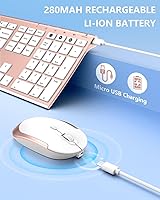
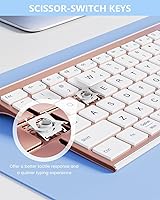
The most practical feature here is one-button device switching — press a dedicated key and you are instantly on a different paired machine. The scissor-switch keys have a noticeably crisper feel than the mushy membrane boards common in this price range, making longer typing sessions less tiring. A full-size layout with a numeric keypad is a genuine plus for anyone doing data entry or spreadsheet work. The mouse handles three DPI levels (1000, 1600, and 2400), giving a usable range from slow precise cursor work to quicker navigation. Both units recharge via USB cable, though the 280mAh batteries are modest — expect to recharge more often under heavy daily use.

Best For

This wireless desktop set makes the most sense for people who live across multiple screens — think a Mac at work, a Windows laptop at home, and a tablet for casual browsing, all managed from one pair of peripherals. It is also a solid pick for shared office environments where quieter keystrokes matter. Students juggling devices on a budget will find the value hard to argue with. Travelers tired of carrying spare AA batteries will genuinely appreciate the built-in rechargeable cells. It is not built for competitive gaming or heavy graphic design, but for everyday productivity and multi-device convenience, this multi-device peripheral pair covers the bases well.

User Feedback

Buyers consistently highlight the rose gold aesthetic as a real draw — it is one of the few combos in this range that actually looks considered on a desk. Typing feel earns solid marks, especially from users stepping up from basic membrane keyboards. That said, a recurring complaint involves Bluetooth re-pairing after auto-sleep: some users report needing to manually reconnect rather than picking up where they left off. Mouse click resistance is generally described as acceptable, not outstanding. Battery life feedback is mixed — light users are satisfied, but heavier typists find the 280mAh cells drain faster than expected. Cross-platform compatibility with Mac and Windows is broadly praised, with no widespread OS-specific issues reported.

Pros

  • Connect up to three devices simultaneously and switch between them with a single keypress.
  • Scissor-switch keys feel noticeably crisper and quieter than membrane boards in the same price range.
  • Built-in rechargeable batteries in both units mean no more stocking disposable AAs.
  • Full-size layout with a numeric keypad suits spreadsheet work and data entry without compromise.
  • Compatible across Windows, Mac, and Android without needing any additional drivers or software.
  • The rose gold finish looks more considered than most budget peripherals, earning consistent praise for desk aesthetics.
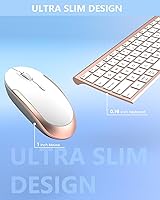
  • Slim profile and modest total weight make it easy to pack for hot-desking or travel.
  • Three adjustable DPI steps give the mouse enough range to handle both wide-monitor navigation and precise clicking.
  • Auto-sleep mode helps conserve battery during gaps in use without requiring manual intervention.
  • The 2.4G USB dongle provides a dependable fallback connection when Bluetooth proves finicky.

Cons

  • Bluetooth reconnection after auto-sleep is inconsistent — some units require a manual re-pair cycle to restore the link.
  • The 280mAh battery capacity is on the small side; heavier users will recharge every few days rather than weekly.
  • Mouse scroll wheel lacks tactile definition, feeling vague compared to mice even slightly above this price tier.
  • Plastic construction shows wear on high-contact surfaces after several months of daily use.
  • Key labeling is Windows-centric, which creates minor confusion for Mac-first users remapping shortcuts.
  • Instruction documentation is minimal, leaving first-time multi-device Bluetooth users to figure out pairing modes through trial and error.
  • Mouse click resistance is softer than expected, which some users find imprecise during fast or repetitive clicking.
  • Keyboard flex under uneven hand pressure is noticeable, particularly toward the edges of the full-size layout.
  • No protective sleeve or travel case is included despite the product being marketed partly at mobile and on-the-go users.
  • Bluetooth 4.0 range and stability fall short in environments with significant wireless interference or when devices are more than a couple of meters away.

Ratings

The VssoPlor Bluetooth Keyboard Mouse Combo has been evaluated by our AI system after processing thousands of verified global purchase reviews, with spam, bot activity, and incentivized feedback actively filtered out. The scores below reflect an honest synthesis of real buyer experiences — strengths and frustrations alike — so you get a clear picture before committing. Where opinions diverged sharply, the score reflects that tension rather than smoothing it over.

Value for Money
88%
At its price point, getting a full-size keyboard with scissor switches, a multi-DPI mouse, and built-in rechargeable batteries in both units is genuinely hard to beat. Most buyers feel they are getting functionality that punches above its cost tier, especially compared to membrane-only combos in the same range.
A small segment of buyers expected more premium build materials for the price and felt the plastic construction revealed itself under extended daily use. Those who compared it directly to slightly pricier competitors noted tactile differences that made the value feel less clear-cut over time.
Multi-Device Switching
83%
The one-button device switching is the feature buyers mention most positively. Switching from a MacBook to a Windows desktop mid-workflow takes a single keypress, which becomes second nature surprisingly fast. Users managing three devices daily describe it as the biggest quality-of-life improvement this combo offers.
Bluetooth re-pairing after the auto-sleep kicks in is where the experience breaks down for some users. Rather than reconnecting automatically, the keyboard occasionally requires a manual re-pair cycle, which disrupts the fluid multi-device experience the product promises.
Typing Feel
79%
21%
The scissor-switch mechanism provides a noticeably crisper, more satisfying keystroke than the flat membrane boards that dominate this price bracket. Extended typing sessions are more comfortable, and the low-profile key travel suits users who spend hours drafting documents or filling spreadsheets.
Buyers upgrading from higher-end scissor-switch keyboards — like those on premium ultrabooks — will notice the difference in consistency and key stability. A few reviewers flagged minor key wobble on the edges of the layout, which slightly undermines the otherwise positive typing experience.
Bluetooth Stability
66%
34%
For stationary desk setups with the connected devices nearby, the Bluetooth connection holds steady across hours of continuous use. Users who keep their keyboard within a meter or two of paired devices report very few spontaneous dropouts during normal work sessions.
Distance and obstacles expose the Bluetooth 4.0 limitations more clearly than buyers expect. Reconnection after sleep is the most commonly cited frustration in negative reviews, with some users reporting the keyboard needing to be turned off and back on to restore the connection reliably.
Build Quality
71%
29%
The slim profile feels intentional rather than flimsy, and the rose gold finish is consistently praised for looking more considered than typical budget peripherals. Out of the box, the combo feels cohesive and the keys have a uniform, stable feel across the main alphanumeric section.
The chassis flexes noticeably when pressure is applied unevenly, and the mouse body in particular feels lightweight in a way that some users interpret as cheap. Over several months of daily use, a handful of reviewers noted the finish showing wear around the most-touched surfaces.
Mouse Performance
74%
26%
Three DPI steps cover a practical range for everyday productivity tasks — the 2400 setting suits wide monitors well, while dropping to 1000 feels natural for precise editing work. Most users find the cursor tracking accurate enough for office and casual creative use without any noticeable jitter.
The scroll wheel feedback is described as adequate but not satisfying — it lacks the tactile definition that users accustomed to mid-range mice expect. Click resistance on both buttons is functional but on the softer side, which some buyers find imprecise during rapid clicking tasks.
Battery Life
62%
38%
Light users — those typing for an hour or two daily — report battery intervals that feel reasonable, with the USB recharge option making top-ups easy to fit into a lunch break or overnight routine. Not having to stock AA batteries is a genuine convenience that buyers consistently appreciate.
The 280mAh capacity is modest, and heavier users are vocal about it. Full-day typists report needing to recharge every few days rather than weekly, and the keyboard and mouse do not always deplete at the same rate, creating slightly awkward charging schedules for both units simultaneously.
Keyboard Layout
84%
A full-size layout with a dedicated numeric keypad is less common in slim wireless combos, and buyers who regularly work with numbers — accountants, data entry professionals, and spreadsheet-heavy workers — call it out specifically as a deciding factor. Multimedia shortcut keys are functional and sensibly placed.
The layout is standard enough that most users adapt quickly, but a minority of Mac-focused buyers noted that key labeling is Windows-centric, requiring some mental remapping for common Mac shortcuts. The function row shortcuts also behave differently across operating systems without clear labeling guidance.
Setup & Pairing Ease
77%
23%
Initial pairing across all three device slots is straightforward — most buyers report being fully set up within a few minutes of unboxing. The 2.4G USB dongle option provides a reliable fallback for devices where Bluetooth setup is more complex or restricted.
The instruction manual is sparse, and first-time multi-device Bluetooth users occasionally struggle to understand the pairing mode sequences without trial and error. A clearer printed guide or a QR code linking to a setup video would reduce the friction several reviewers described.
Cross-Platform Compatibility
81%
19%
Working across Windows, Mac, and Android without dedicated drivers is a genuine plus for mixed-OS households. Mac users in particular appreciate that basic functions work out of the box without hunting for software, making the combo a reliable pick for people who refuse to be locked into one ecosystem.
Some advanced function key behaviors differ between operating systems and are not documented well enough to avoid confusion. A small number of Android tablet users reported intermittent connectivity hiccups that did not occur on the same combo connected to a laptop, suggesting some device-specific variability.
Portability
76%
24%
At 1.63 pounds for the full set, this wireless desktop set is light enough to slip into a laptop bag without adding meaningful bulk. The slim profile means it fits flat against a notebook or tablet in most carry cases, making it a reasonable choice for workers who hot-desk or travel between sites.
The keyboard is still full-size, which means it is not a compact travel board — it occupies real estate in a bag. Users expecting a tenkeyless-style footprint for tight travel scenarios will find it larger than anticipated, and there is no included protective sleeve or travel pouch.
Aesthetics & Design
86%
The rose gold colorway stands out in a category dominated by black and grey, and buyers who prioritize desk aesthetics consistently call the finish a genuine selling point. The slim profile adds to the overall impression of a thoughtfully designed product rather than a generic budget peripheral.
The color is only available in rose gold at this variant, which limits appeal for buyers who prefer neutral tones. A few reviewers noted that under certain lighting the finish skews more pink than gold, which divided opinions on whether it matched expectations from product photography.
Noise Level
82%
18%
The scissor-switch action is meaningfully quieter than membrane alternatives, and office users in open-plan environments specifically note that colleagues have not complained about key noise. The mouse clicks are also subdued, making this a considerate choice for shared quiet workspaces or late-night working sessions.
It is not a silent keyboard — the key registration produces an audible click that some buyers in very noise-sensitive environments, such as recording studios or libraries, still find intrusive. Users expecting near-silent operation comparable to dedicated silent switches may be slightly disappointed.

Suitable for:

The VssoPlor Bluetooth Keyboard Mouse Combo is a strong fit for anyone whose daily workflow spans more than one device — think a student toggling between a personal MacBook and a school-issued Windows laptop, or a remote worker managing a desktop, a work laptop, and a tablet from a single desk. The one-button device switching removes a genuine friction point for these users, making it far more practical than owning separate peripherals for each machine. People who hot-desk, co-work from cafes, or simply refuse to deal with cable clutter will also get real mileage out of the rechargeable setup and slim profile. Open-plan office workers who need quieter keys without stepping up to a mechanical board will find the scissor-switch action a meaningful upgrade over standard membrane combos at this price. Anyone who has grown tired of buying AA batteries every few weeks will appreciate having USB charging built into both units from day one.

Not suitable for:

The VssoPlor Bluetooth Keyboard Mouse Combo is not the right call for buyers who need rock-solid Bluetooth reliability above all else — if your workflow cannot tolerate an occasional manual reconnect after the device wakes from sleep, the frustration will outweigh the convenience. Heavy typists who spend six or more hours a day at the keyboard should temper expectations around battery endurance; the 280mAh cells in both units are modest, and intensive users will find themselves reaching for the charging cable more often than they might like. Gamers or anyone who needs a high-precision mouse with adjustable polling rates and customizable buttons will find the three-step DPI mouse underwhelming for their needs. Graphic designers, video editors, or other creative professionals who rely on precise cursor control for fine detail work will likely outgrow the mouse performance quickly. Finally, buyers who strongly prefer neutral colorways — black, grey, or white — should note that rose gold is the only finish available, which is a purely cosmetic but non-trivial consideration for some desk setups.

Specifications

  • Brand: Manufactured and sold by VssoPlor, a value-tier peripheral brand that launched this product in late 2023.
  • Connectivity: Connects via dual Bluetooth 4.0 channels and one 2.4G USB nano-receiver, supporting up to three paired devices simultaneously.
  • Device Slots: Supports three saved device pairings that can be switched between using dedicated keys on the keyboard.
  • Switch Type: Full-size keyboard uses low-profile scissor-switch mechanisms beneath every key for a quieter, more responsive keystroke than standard membrane designs.
  • Key Layout: Full-size QWERTY layout includes a dedicated numeric keypad and function-row multimedia shortcut keys.
  • Mouse DPI: Optical mouse offers three selectable sensitivity levels — 1000, 1600, and 2400 DPI — adjustable via a button on the mouse body.
  • Battery Capacity: Both the keyboard and mouse contain built-in 280mAh lithium-ion rechargeable cells.
  • Charging Method: Both units recharge via a USB cable included in the box; no proprietary connectors required.
  • Auto-Sleep: Both keyboard and mouse automatically enter a low-power sleep state after 10 minutes of inactivity to conserve battery.
  • OS Compatibility: Compatible with Windows 8 and later, Mac OS X 10.10 and later, and Android 4.3 and later; no additional drivers required.
  • Color: Available in Rose Gold only; the finish is applied to both the keyboard and mouse for a matched aesthetic.
  • Dimensions: Packaged dimensions measure 17.44 x 5.28 x 1.69 inches, reflecting the full-size keyboard footprint.
  • Weight: Combined package weight is 1.63 pounds, covering both the keyboard and mouse units.
  • ASIN: The Amazon Standard Identification Number for this product is B0CPLCP7L1.
  • Wireless Range: Bluetooth 4.0 typically supports an effective operating range of up to approximately 10 meters under unobstructed conditions.
  • USB Receiver: A single 2.4G nano USB dongle is included for wired-equivalent wireless connectivity on devices without Bluetooth support.

Related Reviews
Vssoplor Wireless Keyboard and Mouse Combo
82%
91%
Value for Money
84%
Keyboard Typing Experience
61%
Mouse Ergonomics
88%
Wireless Connectivity & Stability
72%
Battery Life
More
ASLDPUO Bluetooth Keyboard and Mouse Combo
86%
92%
Value for Money
90%
Connectivity & Compatibility
85%
Ergonomics & Comfort
88%
Battery Life
84%
Design & Portability
More
Arteck Bluetooth Keyboard and Mouse Combo
84%
89%
Battery Life
92%
Ergonomics and Comfort
67%
Bluetooth Connectivity
83%
Build Quality
90%
Portability and Design
More
Macally Premium Bluetooth Keyboard and Mouse Combo
87%
88%
Ease of Use
83%
Ergonomics/Comfort
90%
Design & Aesthetics
87%
Typing Experience
85%
Battery Life
More
seenda COE401 Bluetooth Keyboard and Mouse Combo
82%
83%
Multi-Device Switching
88%
Typing Experience
86%
Build Quality
91%
Battery Life
74%
Mouse Performance
More
seenda COE200 Bluetooth Keyboard and Mouse Combo
80%
88%
Wireless Connectivity
86%
Multi-Device Switching
83%
Typing Comfort & Wrist Rest
63%
Mouse Ergonomics
91%
Noise Level
More
Logitech MK250
Logitech MK250
75%
91%
Value for Money
78%
Bluetooth Connectivity
69%
Keyboard Typing Feel
61%
Mouse Comfort & Fit
88%
Battery Life
More
ULSOU KM599 Bluetooth Keyboard and Mouse Combo for Mac
85%
89%
Typing Experience
94%
Battery Life
88%
Connectivity (Bluetooth Pairing)
72%
Mouse Performance (DPI Adjustment)
90%
Portability and Design
More
seenda SKM64-3 Wireless Bluetooth Keyboard and Mouse Combo
87%
94%
Battery Life
90%
Connectivity and Compatibility
87%
Typing Experience
89%
Ergonomics and Comfort
85%
Design and Build Quality
More
Atelus Wireless Keyboard and Mouse Combo
83%
94%
Ease of Setup
88%
Ergonomics & Comfort
90%
Design & Aesthetics
80%
Mouse Performance
86%
Keyboard Performance
More

FAQ

Yes, that is exactly the setup this wireless desktop set is designed for. You can pair it to a Mac, a Windows machine, and a third device — like a tablet — simultaneously, then switch between them with a single dedicated key. You do not need to re-pair every time you switch; the connection slots stay saved.

No drivers are required. The keyboard and mouse work natively with Windows 8 and above, Mac OS X 10.10 and above, and Android 4.3 and above straight out of the box. Just pair via Bluetooth or plug in the USB receiver and you are ready to go.

There are dedicated buttons on the keyboard labeled for each of the three pairing slots. Press the button corresponding to the device you want to switch to, and the keyboard and mouse redirect their connection almost instantly. It becomes very intuitive after a day or two of use.

Battery life varies a lot depending on how heavily you type and click. Light users typically get several days to a week between charges, while heavier users may find themselves recharging every couple of days. The 280mAh cells are modest, so do not expect week-long endurance under demanding use. Charge time is usually a couple of hours via the included USB cable.

This is the most commonly reported frustration with this multi-device peripheral pair. First, try pressing a key a few times to wake it fully. If it still does not reconnect, toggle the keyboard power switch off and back on. In persistent cases, re-entering pairing mode for the affected device slot usually restores the connection.

Optical mice generally struggle on reflective or transparent surfaces, and this one is no exception. For best tracking consistency, use a standard desk mat or mouse pad. On a regular desk surface or fabric pad, the tracking across all three DPI levels is reliable.

The VssoPlor Bluetooth Keyboard Mouse Combo handles moderate daily typing well — the scissor-switch keys are considerably more comfortable than membrane alternatives, and the full-size layout with a numpad suits office work effectively. That said, if you are a heavy typist doing eight-plus hours a day, the modest battery capacity means you will be charging more often than you might prefer, and dedicated mechanical keyboards will offer a more satisfying long-term experience.

Yes, it pairs with Android 4.3 and above via Bluetooth, and most users have reported it working fine with iPads running recent versions of iPadOS as well, since those support standard Bluetooth HID keyboards. Using one of your three pairing slots for a tablet alongside your computers is a common and well-supported use case.

They charge separately — each unit has its own USB charging port and comes with a USB cable. If you want to charge both simultaneously, you will need two USB ports or two chargers available at the same time. There is no shared charging dock included.

The finish holds up well initially, but like most coated plastics at this price tier, high-contact areas — particularly around frequently pressed keys and the mouse palm rest — can show light wear after several months of daily use. Keeping the surfaces clean and avoiding abrasive cleaning materials will help the finish last longer.