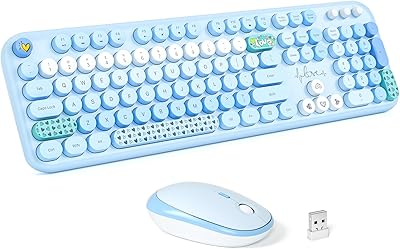
ASLDPUO Bluetooth Keyboard and Mouse Combo


Overview
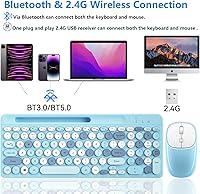
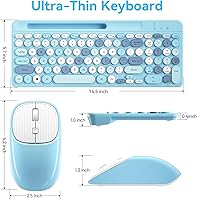
The ASLDPUO Bluetooth Keyboard and Mouse Combo lands in that crowded budget category where buyers want something functional without fuss, and it mostly delivers on that promise. Out of the box, this wireless keyboard and mouse set pairs through either Bluetooth or the included 2.4GHz USB receiver, so there is no driver download or setup wizard slowing you down. The keyboard itself stands out visually thanks to its circular keycaps and an 80% compact layout that trims the footprint without dropping a numeric keypad. A small phone holder is tucked into the design too, which feels like a thoughtful touch rather than an afterthought. For anyone bouncing between a laptop, a tablet, and a phone during the day, this dual-mode combo reads as a sensible, low-commitment starting point.
Features & Benefits
On the spec sheet, this wireless keyboard and mouse set covers its bases: Bluetooth 5.0, Bluetooth 3.0, and a 2.4GHz receiver mean it should connect to nearly any laptop, tablet, or phone you own. The numeric keypad and media hotkeys bring desktop-style shortcuts into a smaller frame, while a rotating volume dial adds a nice physical touch you do not see often at this price. The mouse offers three DPI settings, so switching from detailed work to quick browsing does not require digging through software. Both the keys and the mouse clicks run quiet, which matters if you share a room or work odd hours. A rechargeable battery, topped up over Type-C, rounds things out, and the built-in phone holder gives the desk one less accessory to buy separately.
Best For
This dual-mode combo makes the most sense for people who move between devices rather than living in one ecosystem all day. If your routine involves typing on a laptop, then checking a tablet, then glancing at a phone propped up nearby, the multi-device pairing and built-in stand start to feel genuinely useful instead of gimmicky. Students and remote workers who want a quieter typing experience, especially in shared apartments or open offices, are a natural fit too. It is also a reasonable pick for anyone trying to declutter a desk and cut down on loose cables. That said, buyers chasing premium mechanical switches, heavy gaming performance, or programmer-grade key feel should look elsewhere, since this set is built around value and convenience, not high-end precision.
User Feedback
Real-world impressions of the ASLDPUO combo tend to split along a few predictable lines. Typists who like the round keycaps often praise the tactile feel during shorter sessions, while others find the unconventional shape takes some adjustment over longer stretches of writing. Bluetooth switching between devices generally works as described, though a handful of users report the occasional reconnect delay when hopping quickly between paired devices. Battery life claims sound generous, and most feedback suggests real-world use lands reasonably close to that figure, even if it rarely matches the number exactly. Build quality earns mixed marks, which is fairly typical for the price bracket, and the phone holder draws genuine appreciation as a small but practical bonus most buyers did not expect to use as often as they do.
Pros
- Pairs over Bluetooth or a 2.4GHz receiver without installing any drivers
- Quiet keys and muted clicks work well for shared spaces or late-night sessions
- Three DPI settings let the mouse adjust to different tasks on the fly
- Rechargeable battery means fewer trips to buy replacement AAs
- Compact 80% layout still squeezes in a numeric keypad
- Built-in phone holder is a genuinely handy extra most combos skip
- Auto sleep mode helps stretch battery life between charges
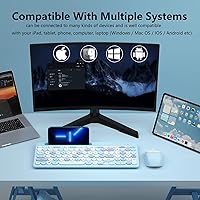
- The ASLDPUO Bluetooth Keyboard and Mouse Combo covers Mac, Windows, iOS, and Android in one package
- Media hotkeys and a rotating volume dial add convenient shortcuts
Cons
- Round keycaps take some adjustment and may not suit every typing style
- Build quality feels inconsistent with reports varying from buyer to buyer
- Bluetooth reconnects between paired devices can lag a beat at times
- Real-world battery life does not always match the advertised runtime
- No backlighting, which limits use in dim or nighttime settings
- Phone holder feels limited to smaller or mid-size phones
- Lacks the tactile precision serious typists expect from premium keyboards
- Plastic construction throughout keeps the overall feel fairly lightweight
Ratings
These scores for the ASLDPUO Bluetooth Keyboard and Mouse Combo were generated by AI after analyzing a wide pool of verified buyer reviews from around the world, with spam, bot activity, and incentivized feedback actively filtered out. The goal is to reflect what real owners actually experience, strengths and frustrations alike, rather than a polished marketing summary. Use the category breakdown below to see exactly where this dual-mode combo earns its reputation and where it falls short.
Connectivity & Pairing
Typing Comfort
Mouse Performance & DPI
Noise Level
Battery Life
Build Quality
Multi-Device Compatibility
Phone Holder Utility
Design & Portability
Value for Money
Range & Signal Stability
Ergonomics
Suitable for:
The ASLDPUO Bluetooth Keyboard and Mouse Combo makes the most sense for people who genuinely move between devices during the day rather than staying parked on one machine. Remote workers who shift from a laptop to a tablet for notes, then check messages on a phone propped on the included stand, will get real use out of the multi-device pairing. Students sharing a dorm room or anyone typing late at night will likely appreciate the quieter keys and muted mouse clicks more than they expect to. It also suits buyers who are simply tired of juggling separate chargers and want one rechargeable set instead. If you mainly want a reliable, no-fuss combo for emails, browsing, and document work, this fits the bill without asking you to spend much.
Not suitable for:
This set is not built for anyone who needs precision input for gaming, video editing, or heavy spreadsheet work, since the focus here is convenience over performance. Buyers used to mechanical keyboards may find the circular keycaps and shallow key travel feel like a downgrade rather than a novelty. Professionals who type for hours at a stretch should be cautious too, as long-session comfort has not been proven the way it would be on a higher-end ergonomic keyboard. Anyone skeptical of unbranded electronics or wary of inconsistent build quality at this price point may also want to look at more established brands instead. Ultimately, those chasing premium materials or guaranteed long-term durability are better served elsewhere.
Specifications
- Connectivity: The combo connects via Bluetooth 5.0, Bluetooth 3.0, or a plug-in 2.4GHz USB receiver, depending on which mode you choose.
- Wireless Range: Both the keyboard and mouse maintain a stable connection up to 33 feet from the paired device.
- Device Compatibility: It works with Mac OS and iOS 10.12 or later, Windows 8 and 10 or later, and Android 4.3 or later.
- Keyboard Layout: The keyboard uses an 80% compact layout that still includes a full numeric keypad and media hotkeys.
- Key Design: Keys feature a circular shape with a low-noise switch mechanism for quieter typing.
- Mouse Sensitivity: The mouse offers three adjustable DPI settings of 800, 1200, and 1600 for different levels of cursor precision.
- Mouse Buttons: Mouse buttons are designed to be low-noise and operate with a muted click for quieter use.
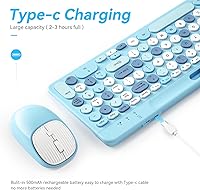
- Battery Type: Both the keyboard and mouse use a built-in rechargeable 500mAh battery charged through Type-C.
- Battery Life: A full 3-hour charge is rated to provide up to 300 hours of continuous use, according to the manufacturer.
- Power Saving: The set automatically enters sleep mode after 30 minutes of inactivity and wakes with any key press.
- Phone Holder: A built-in phone holder is included for propping up a smartphone during calls or video playback.
- Package Dimensions: The package measures 15.39 x 6.22 x 2.28 inches.
- Item Weight: The combo weighs 2 pounds including both the keyboard and mouse.
- Color: The set is finished in a colorful blue color scheme.
- Included Accessories: The package includes a Type-C charging cable and a keyboard cover.
- Setup Requirements: No additional software or drivers are needed to pair either device over Bluetooth or the 2.4GHz receiver.
Related Reviews
Arteck HB086 Bluetooth Keyboard Mouse Combo
VssoPlor Bluetooth Keyboard Mouse Combo
seenda COE200 Bluetooth Keyboard and Mouse Combo
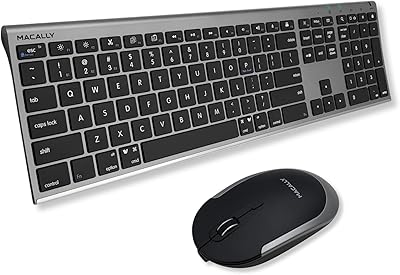
Macally Premium Bluetooth Keyboard and Mouse Combo
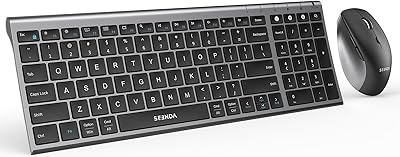
seenda COE401 Bluetooth Keyboard and Mouse Combo
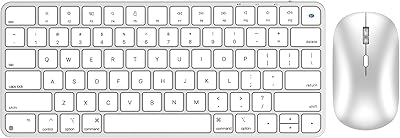
ULSOU KM599 Wireless Keyboard and Mouse Combo
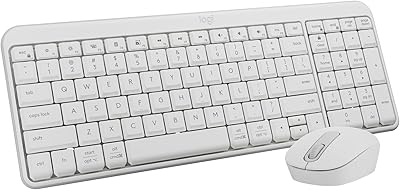
Logitech MK250
seenda SKM64-3 Wireless Keyboard and Mouse Combo
ULSOU Wireless Ergonomic Keyboard and Mouse Combo