Overview

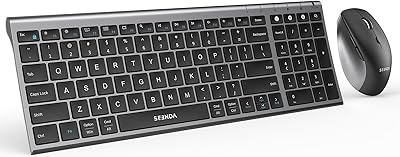
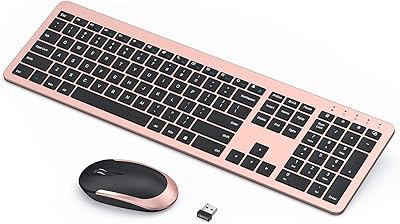
The seenda COE200 Bluetooth Keyboard and Mouse Combo sits firmly in the budget-friendly tier, aimed at home office users and anyone juggling more than one device on their desk. What separates it from similar options at this price is the dual connectivity approach — Bluetooth 5.0 for modern laptops and a 2.4G USB receiver for machines that lack Bluetooth entirely. It works across Windows and macOS without any drivers or software installs, which keeps setup refreshingly simple. The built-in wrist rest is a genuine perk you rarely find at this price point. That said, this is a solid everyday performer, not a mechanical keyboard built for enthusiasts.
Features & Benefits

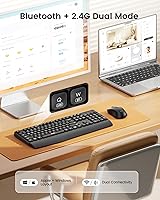
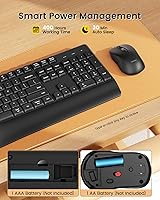
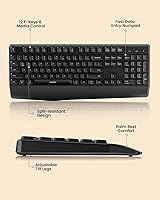
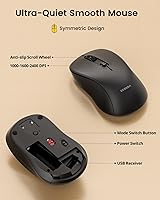
The Bluetooth 5.0 connection handles up to 33 feet reliably, and the 2.4G USB dongle tucks neatly under the mouse so it won't get lost. Switching between two paired devices takes just a button press — no re-pairing required. The full-size layout with a numeric keypad is genuinely useful for data entry or spreadsheet work. Keys are quiet enough for a shared office without drawing attention, and the mouse clicks are equally subdued. The mouse offers three DPI levels — 800, 1200, and 1600 — which covers the range most everyday users need. One important heads-up: batteries are not included, so grab a AAA and an AA before you unbox.

Best For

This wireless combo makes the most sense for remote workers or students who routinely switch between a Windows machine and a MacBook. The dual-connection setup means you can have one device on Bluetooth and another via USB without fussing with cables or adapters. It's also a natural fit for open-plan office environments where quiet typing matters. First-time wireless converts will find the setup process painless — pair or plug in, and you're typing within a minute. If you value low-maintenance peripherals and long battery life over premium materials or programmable keys, this budget wireless duo delivers exactly what it promises without overcomplicating things.

User Feedback

With a 4.4-star rating across a solid number of reviews, the seenda keyboard-and-mouse set earns consistent praise for fast setup and how comfortable the wrist rest feels during extended typing sessions. Buyers frequently highlight two-device support as a standout convenience. On the critical side, users with larger hands have noted the mouse feels a touch compact, and the symmetric shape means it won't suit left-handers wanting contoured support. A handful of reviewers questioned whether real-world battery life lives up to the year-long standby claim, though results vary by usage. Mac users have occasionally flagged minor inconsistencies with OS-specific key labeling, worth knowing before committing.

Pros

  • Dual Bluetooth and 2.4G USB connectivity covers virtually any device without needing two separate peripherals.
  • One-button switching between two paired devices is fast and reliable for multi-computer desk setups.
  • Works out of the box on both Windows and macOS with zero driver installation required.
  • The built-in wrist rest adds genuine daily comfort that is rare to find at this price point.
  • Quiet keys and silent mouse clicks make this wireless combo a considerate choice for shared spaces.
  • Full-size layout with a numeric keypad supports data entry and spreadsheet work without compromise.
  • The USB dongle stores inside the mouse, so it travels safely and never gets lost.
  • Setup takes under a minute whether you use Bluetooth or the USB receiver.
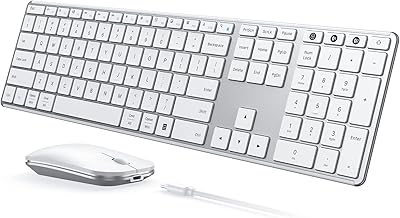
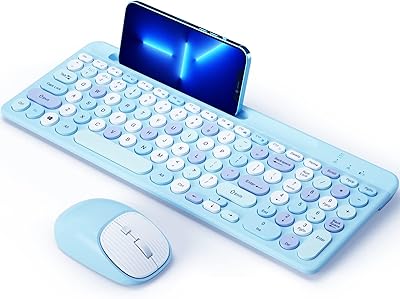
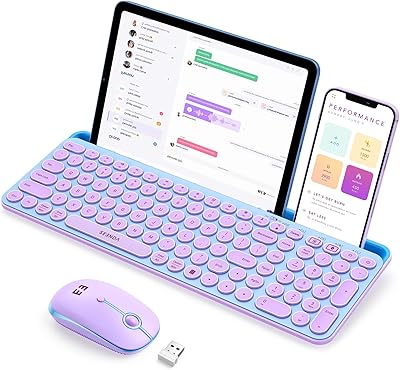
  • Available in black, white, and pink to suit different desk aesthetics.
  • Ranked among the top performers in its Amazon category, reflecting broad buyer satisfaction.

Cons

  • Batteries are not included in the box, which catches many buyers off guard before first use.
  • The wrist rest is rigid plastic, not cushioned, so comfort drops during very long sessions.
  • Advertised 365-day standby life rarely reflects actual daily-use battery performance in practice.
  • Mouse feels lightweight and slightly hollow in hand compared to mid-range alternatives.
  • Mac function key behavior and OS shortcut labeling are not fully accurate for every workflow.
  • Only two devices can be paired simultaneously, which limits usefulness for multi-monitor power setups.
  • Glossy surface finishes on some color variants show fingerprints and smudges quickly.
  • The full-size footprint is not practical for small desks or users who need a compact layout.
  • No software or app means zero customization beyond the three hardware DPI steps on the mouse.

Ratings

The seenda COE200 Bluetooth Keyboard and Mouse Combo scores below are generated by AI after analyzing thousands of verified global user reviews, with spam, bot activity, and incentivized feedback actively filtered out. This wireless combo earns strong marks in several areas while showing real limitations in others — both sides are reflected honestly here so you can make an informed call before buying.
Wireless Connectivity
88%
Most users report a rock-solid connection whether using Bluetooth 5.0 or the 2.4G USB dongle, with no noticeable lag during day-to-day typing and browsing. The ability to store the USB receiver under the mouse is a small but genuinely appreciated touch that prevents it from getting misplaced.
A small number of users on crowded Wi-Fi bands reported occasional brief dropouts over Bluetooth, particularly on older MacBook models. The 33-foot range claim holds up in open spaces, but walls and interference can reduce that noticeably in practice.
Multi-Device Switching
86%
The one-button device switching works reliably and responds quickly, which is exactly what users managing a laptop and a desktop simultaneously need. Reviewers who split time between a Windows PC and a Mac specifically praised how little friction the handoff involves.
The combo only supports two paired devices, so users with three or more workstations will hit a wall. A few buyers also noted that re-pairing from scratch after a long idle period was occasionally needed on the Bluetooth device.
Typing Comfort & Wrist Rest
83%
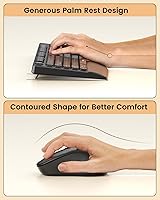
The built-in wrist rest is consistently called out as a genuine comfort aid during longer typing sessions, especially by users working four or more hours daily. At this price tier, finding an integrated rest rather than a separate accessory is a real differentiator that buyers notice immediately.
The wrist rest is attached only to the keyboard side — the mouse has no corresponding palm support — so users with wrist fatigue on their mouse hand will need a separate solution. The rest itself is hard plastic, not cushioned, which some users find adequate but others find uncomfortable over time.
Mouse Ergonomics
63%
37%
The symmetric shape and quiet clicks work fine for average-sized hands during moderate daily use, and the three DPI settings cover a practical range for both precise work and casual browsing. Users with medium-sized hands generally report no complaints during normal office tasks.
Users with larger hands frequently flag the mouse as feeling cramped, and the fully symmetric design offers no contoured support for right-handers who prefer a shaped grip. Left-handed users should be aware this is usable but not optimized for them at all.
Noise Level
91%
Both the keyboard and mouse are consistently praised in open-office and shared-home reviews for being genuinely quiet, not just marketed as quiet. Users on video calls report that keystroke noise rarely bleeds into the microphone, which is a practical benefit that keeps coming up in feedback.
For buyers coming from a mechanical keyboard who enjoy tactile or audible feedback, the muted key feel will feel flat and unsatisfying. The quiet design trades typing feedback for silence, which is the right call for offices but not for everyone at home.
Setup & Ease of Use
93%
Nearly every reviewer mentions how fast the initial setup is — plug in the dongle or activate Bluetooth, and the combo is working within seconds with no software, no drivers, and no account creation required. First-time wireless converts find this particularly reassuring.
The product manual is minimal, and while most setups are painless, users who run into a rare pairing issue have little troubleshooting guidance to fall back on. A slightly more detailed quick-start guide would reduce the small percentage of frustrated first-time users.
Cross-Platform Compatibility
79%
21%
The combo works reliably across Windows and macOS without any configuration, and the keyboard includes both OS layouts so common shortcuts feel natural on either platform. Home office users switching between a work Mac and a personal PC find this particularly convenient.
A subset of Mac users report that some function keys and OS-specific shortcuts do not behave exactly as expected, requiring manual remapping for a fully optimized workflow. The key labeling, while inclusive of Mac symbols, is not always perfectly accurate in layout for every macOS shortcut scenario.
Battery Life
71%
29%
Real-world battery performance is solid for typical office use, with many users reporting weeks of daily use before needing a replacement. The low-power design means the combo does not drain batteries quickly during moderate typing and clicking sessions.
The advertised 365-day standby figure is technically possible but rarely achieved in active daily use, and some reviewers feel it sets unrealistic expectations. It is also worth flagging loudly that batteries are not included in the box, which catches a meaningful number of buyers off guard at first use.
Build Quality & Materials
68%
32%
For a budget-tier peripheral, the keyboard feels sturdier than expected and does not flex noticeably during normal typing. The overall construction is plastic throughout, but it feels deliberate rather than cheap, and the low profile keeps it from feeling flimsy on a desk.
The mouse in particular feels lightweight in a way that suggests cost-cutting rather than intentional design, and the glossy surfaces on some color variants attract fingerprints quickly. Users accustomed to mid-range peripherals will notice the step down in material quality fairly quickly.
Full-Size Layout & Numeric Keypad
87%
Having a numeric keypad on a wireless budget combo is genuinely uncommon and earns consistent praise from users who handle spreadsheets, accounting tasks, or data entry regularly. The key spacing is comfortable and closely mirrors standard desktop keyboard layouts, reducing the adjustment period.
The full-size footprint is obviously not for minimalists or small-desk setups — it takes up meaningful horizontal space. Users who were hoping for a compact or tenkeyless option will need to look elsewhere in the seenda lineup.
DPI & Mouse Precision
72%
28%
Three DPI levels — 800, 1200, and 1600 — cover the practical range for office work, web browsing, and light creative tasks without overcomplicating things with software. Switching between them with a dedicated button is quick and the difference between levels is perceptible.
The DPI ceiling of 1600 is low by modern standards and will frustrate users who do photo editing, detailed design work, or any task requiring very high cursor precision. There is no software to fine-tune sensitivity beyond the three preset steps, which limits flexibility.
Value for Money
89%
Considering the dual connectivity, full-size layout, wrist rest, and cross-platform support bundled together, this wireless combo consistently lands near the top of its price bracket in buyer satisfaction. Most reviewers explicitly say it punches above its price tag for everyday office use.
The value calculus shifts slightly once you factor in the cost of purchasing two batteries separately before first use, which feels like a minor but avoidable hidden cost. Users wanting premium materials or advanced features will quickly outgrow what this combo offers.
Portability & Storage
74%
26%
The USB dongle storage slot under the mouse is a practical design choice that makes the combo travel-friendly, keeping the receiver safely attached during bag transport. The overall weight is light enough that packing it alongside a laptop is not burdensome.
The full-size keyboard is not a natural fit for frequent travelers who move between locations daily, as it adds meaningful length to any bag. Users who need a truly portable solution would be better served by a compact wireless keyboard rather than this desk-oriented combo.
Color Options & Aesthetics
76%
24%
Offering black, white, and pink variants gives buyers enough choice to match common desk setups without overcomplicating the lineup. The matte black finish in particular looks tidy on a professional desk and holds up reasonably well against daily wear.
The aesthetic is utilitarian rather than stylish — there are no RGB options, premium textures, or design-forward touches that would appeal to users who care about a cohesive desk setup. The glossy accents on some variants can look dated quickly compared to more modern peripheral designs.

Suitable for:

The seenda COE200 Bluetooth Keyboard and Mouse Combo is a strong fit for remote workers and students who routinely bounce between a Windows PC and a MacBook, since the dual-connection setup handles both without requiring any software installation or repeated pairing. If your desk hosts two computers and you're tired of cable clutter or swapping a single input device back and forth, this wireless combo solves that problem cleanly and affordably. People working in open offices or shared living spaces will also appreciate the quiet keys and subdued mouse clicks, which genuinely avoid disturbing others nearby. The built-in wrist rest is a real plus for anyone who types for several hours a day and wants basic comfort support without buying a separate accessory. Budget-conscious buyers making their first jump from a wired setup will find the transition painless — the plug-and-play USB dongle requires zero configuration, and the full-size layout with a numeric keypad means there is no adjustment period for anyone used to a standard desktop keyboard.
Not suitable for:

The seenda COE200 Bluetooth Keyboard and Mouse Combo is not the right call for users with larger hands, since the mouse's compact, fully symmetric shape tends to feel cramped during extended use and provides no contoured palm support. Left-handed users who prefer an ergonomically shaped mouse will also need to look elsewhere, as the design makes no accommodation for them beyond basic ambidextrous usability. Anyone who relies on a mechanical keyboard for tactile feedback or loud satisfying keystrokes will find the quiet, membrane-style typing experience flat and unrewarding. If you work with three or more devices and need to switch between all of them, the two-device limit will be a hard blocker. Photo editors, designers, or anyone needing precise cursor control should also know that the 1600 DPI ceiling is low by current standards and cannot be fine-tuned beyond three preset steps. Finally, power users who expect premium build materials, programmable keys, or RGB customization will quickly feel the constraints of a budget-tier peripheral.
Specifications

  • Model Number: The exact model identifier for this combo is COE200, manufactured by seenda.
  • Connectivity: Supports both Bluetooth 5.0 and a 2.4G USB-A wireless receiver for flexible device pairing.
  • Wireless Range: The wireless connection operates reliably at distances up to 33 feet (10 meters) in open conditions.
  • Device Switching: Supports simultaneous pairing with two devices, switchable via a dedicated button without re-pairing.
  • OS Compatibility: Fully compatible with Windows and macOS operating systems without requiring any drivers or additional software.
  • Keyboard Size: Full-size layout including a dedicated numeric keypad, designed for both Windows and Apple key configurations.
  • Wrist Rest: A fixed, hard-plastic wrist rest is integrated directly into the base of the keyboard for typing support.
  • Key Type: Membrane quiet keys designed to minimize noise output during typing in shared or open environments.
  • Mouse DPI: The mouse offers three selectable DPI sensitivity levels: 800, 1200, and 1600, adjustable via a hardware button.
  • Mouse Design: Symmetric, ambidextrous mouse shape with quiet-click buttons suited for moderate daily office use.
  • Keyboard Battery: Requires one AAA battery (not included in the box) for keyboard operation.
  • Mouse Battery: Requires one AA battery (not included in the box) for mouse operation.
  • Standby Life: Manufacturer-advertised standby battery life is up to 365 days under low-activity or sleep conditions.
  • USB Dongle Storage: The 2.4G USB receiver stores in a dedicated slot on the underside of the mouse when not in use.
  • Package Dimensions: The retail package measures 17.4 x 9.69 x 1.93 inches and weighs approximately 2.05 pounds.
  • Color Options: Available in three color variants: Black, White, and Pink.
  • Drivers Required: No software, drivers, or account setup are required for either the Bluetooth or USB receiver connection modes.
  • Amazon Ranking: Ranked #57 in the Computer Keyboard and Mouse Combos category on Amazon at the time of listing.

Related Reviews

seenda COE401 Bluetooth Keyboard and Mouse Combo
82%
83%
Multi-Device Switching
88%
Typing Experience
86%
Build Quality
91%
Battery Life
74%
Mouse Performance
More
seenda SKM64-3 Wireless Bluetooth Keyboard and Mouse Combo
87%
94%
Battery Life
90%
Connectivity and Compatibility
87%
Typing Experience
89%
Ergonomics and Comfort
85%
Design and Build Quality
More
VssoPlor Bluetooth Keyboard Mouse Combo
78%
88%
Value for Money
83%
Multi-Device Switching
79%
Typing Feel
66%
Bluetooth Stability
71%
Build Quality
More
seenda Wireless Keyboard and Mouse Combo
88%
89%
Typing Comfort
87%
Ergonomics
82%
Wireless Connectivity
94%
Setup & Installation
88%
Key Spacing & Accuracy
More
Arteck Bluetooth Keyboard and Mouse Combo
84%
89%
Battery Life
92%
Ergonomics and Comfort
67%
Bluetooth Connectivity
83%
Build Quality
90%
Portability and Design
More
ASLDPUO Bluetooth Keyboard and Mouse Combo
86%
92%
Value for Money
90%
Connectivity & Compatibility
85%
Ergonomics & Comfort
88%
Battery Life
84%
Design & Portability
More
seenda CTU-301 Bluetooth Keyboard and Mouse
88%
88%
Ease of Use
91%
Connectivity Performance
84%
Ergonomics/Comfort
89%
Build Quality
92%
Durability (Key Life)
More
seenda Wireless Rechargeable Keyboard Mouse Combo
79%
91%
Value for Money
83%
Typing Experience
89%
Noise Level
62%
Mouse Quality
74%
Battery Life
More
Macally Premium Bluetooth Keyboard and Mouse Combo

87%
88%
Ease of Use
83%
Ergonomics/Comfort
90%
Design & Aesthetics
87%
Typing Experience
85%
Battery Life
More
Logitech MK250
Logitech MK250
75%
91%
Value for Money
78%
Bluetooth Connectivity
69%
Keyboard Typing Feel
61%
Mouse Comfort & Fit
88%
Battery Life
More

FAQ

No, nothing to install. Whether you connect via Bluetooth or the USB dongle, the combo is recognized automatically by both Windows and macOS. Just plug in the receiver or complete the Bluetooth pairing and you are ready to type within seconds.

No, and this trips up a lot of buyers — batteries are not included. You will need one AAA battery for the keyboard and one AA battery for the mouse before you can use them. It is worth having both on hand before unboxing so you are not stuck waiting for a store run.

You can have both devices paired simultaneously and switch between them with a single button press. The typical setup is one device connected via Bluetooth and the other via the 2.4G USB receiver, which covers most dual-computer desk setups cleanly.

The built-in wrist rest does provide genuine comfort support during extended typing, and most users find it helpful during multi-hour work sessions. That said, the rest is rigid plastic rather than cushioned foam, so people with serious wrist fatigue may still want a separate padded rest for heavier use.

It connects reliably to MacBooks via Bluetooth 5.0 and includes Mac-compatible key labeling. Most standard macOS shortcuts work as expected, though a small number of users have noted that some function key behaviors or shortcut labels do not perfectly match every macOS workflow, so power Mac users may need to remap a key or two.

They are genuinely quiet, not just marketed that way. The keyboard produces a soft, muted thud rather than the sharp clack of a mechanical board, and the mouse buttons barely register a sound. If you are in a quiet open office or on a video call, neither the typing nor clicking is likely to disturb anyone nearby.

Honestly, it can feel a bit small for larger hands during extended use. The mouse is on the compact side, and the symmetric shape offers no palm contouring, so if your hands are large or you prefer a full-grip mouse, you may find it uncomfortable after an hour or two.

The mouse is symmetrical, so a left-handed user can physically use it, but there is no ergonomic shaping designed with left-hand use in mind. It is functional rather than optimized for lefties, so if you need a genuinely contoured left-handed mouse, this combo is not the ideal choice.

The 365-day figure refers to standby time under very low activity conditions, not active daily use. In practice, most users who type and click regularly throughout a workday report needing to replace batteries after several weeks to a few months. It is still solid battery performance for the category, just not a year of heavy use on one charge.

The Bluetooth connection is technically capable of pairing with iOS or Android devices, and some users do use it with tablets for light typing. However, the keyboard layout and some keys are optimized for desktop operating systems, so the experience on mobile is functional but not purpose-built for it.