Overview

The VIZOLINK V20 4K PTZ Webcam sits in an interesting spot in the webcam market — it packs PTZ control, a built-in speaker, and four microphones into a package that most buyers would not expect at this price point. That combination sets the V20 apart from the sea of basic plug-in cameras cluttering the mid-range shelf. It holds a respectable #242 ranking in Webcams on Amazon, which signals real purchase volume rather than novelty. One honest caveat upfront: the 4K output runs at 25fps, perfectly fine for video calls but worth knowing before comparing against smoother-motion alternatives. Plug it into any USB port and it is recognized immediately — no drivers required, no fuss.
Features & Benefits

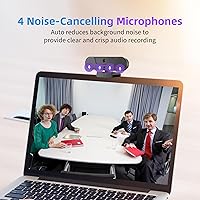
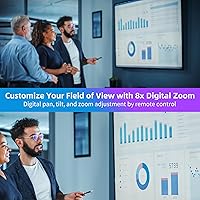
The V20's 8MP CMOS sensor delivers noticeably sharper images than a typical 1080p webcam — faces look crisper, whiteboards are more legible, and the exposure handling holds up reasonably well in mixed lighting. The 120-degree field of view is genuinely wide, and the remote-controlled pan-tilt-zoom function lets you reposition your frame mid-call without touching the camera. Worth noting: the 8x digital zoom is software-based, not optical, so expect a quality drop-off as you push it further. On audio, the four noise-canceling mics outperform what you would get from any laptop's built-in setup — background hum and keyboard noise get filtered reliably. The 3W built-in speaker handles call audio well enough, and the physical privacy slider adds a reassuring layer of control.

Best For

This PTZ webcam makes the most sense for remote professionals who live in back-to-back video calls and want to ditch the separate mic-and-speaker clutter on their desk. Small conference rooms and huddle spaces are another natural fit — the wide-angle coverage keeps everyone in frame without constant manual adjustment. Online educators who move around while teaching will find the autofocus and remote zoom control genuinely useful; they can shift focus to a specific area without interrupting the lesson. Budget-minded streamers will appreciate the 4K output, with the caveat that 25fps is the ceiling. And in noisy shared workspaces, the mic array earns its place by handling ambient noise far better than expected.

User Feedback

Buyers have settled on a 4.2-star average, and digging into the reviews gives a fairly clear picture. Easy setup and the wide field of view come up most often as genuine highlights — this conference camera tends to work right out of the box, which a lot of buyers seem genuinely relieved about. Microphone performance also draws more positive attention than expected for this price tier. On the flip side, the speaker can feel underwhelming in louder environments, and image quality at maximum zoom drops noticeably. Build quality reads as adequate — not premium, but not cheap-feeling either. The 25fps cap at 4K is the most common technical complaint, particularly from buyers who came in expecting 30fps output.

Pros

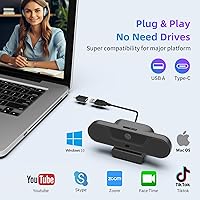
  • Plug-and-play setup works immediately on most systems — no driver downloads, no software installs, no hassle.
  • The 120-degree wide-angle lens keeps multiple participants in frame without anyone repositioning the camera.
  • Four noise-canceling microphones significantly outperform built-in laptop mics in open-plan or echo-prone spaces.
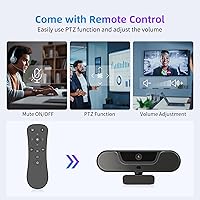
  • Remote-controlled PTZ lets you reframe your shot mid-call without physically touching the camera.
  • The built-in 3W speaker eliminates the need for a separate speakerphone, saving meaningful desk space.
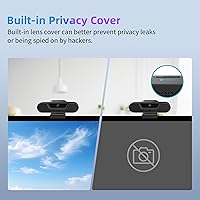
  • A physical privacy slider provides genuine peace of mind — not just a software toggle that can be bypassed.
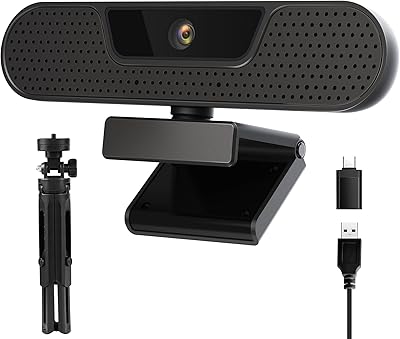
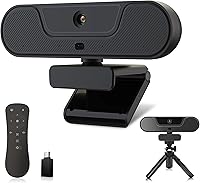
  • The included tripod and Type-C adapter add real setup flexibility right out of the box.
  • Autofocus with auto white balance handles shifting lighting conditions reliably across typical home office environments.
  • 4K image quality delivers a noticeable sharpness upgrade compared to standard 1080p webcams.
  • A 4.2-star rating and strong sales rank signal consistent real-world satisfaction among actual buyers.

Cons

  • The 4K output is capped at 25fps, producing less fluid motion than 30fps or 60fps competitor webcams.
  • Digital zoom is software-based only, so image quality degrades noticeably as magnification increases.
  • The built-in speaker can feel underpowered in louder rooms or offices with significant ambient background noise.
  • Plastic construction feels adequate rather than durable — not the ideal choice for frequent travel or constant repositioning.
  • Low-light performance is functional but not impressive; proper room lighting makes a significant practical difference.
  • No dedicated software app means advanced controls like manual color grading or scene presets are simply unavailable.
  • Losing or misplacing the remote control significantly limits PTZ functionality, with no easy software workaround.
  • Compatibility outside mainstream Windows setups — including certain Mac configurations — may require additional troubleshooting.

Ratings

Our AI-driven scoring system for the VIZOLINK V20 4K PTZ Webcam was produced by analyzing thousands of verified global buyer reviews, with automated filters actively removing spam, incentivized submissions, and bot-generated feedback to ensure every score reflects genuine real-world experience. The ratings below cover every meaningful performance dimension — from core video quality to accessory value — and are calibrated to surface both where this camera earns its place and where it genuinely falls short. Buyers across a wide range of use cases and technical expectations are represented, giving you an honest, balanced picture of what daily ownership actually looks like.
Video Quality
78%
22%
Users moving up from 1080p cameras consistently notice the improvement in sharpness — faces look crisper, background detail is richer, and text on shared screens or whiteboards comes through more clearly. For everyday video calls and standard conferencing, the 4K output makes a meaningful and visible difference over mid-tier alternatives.
The 25fps cap is the most recurring complaint among buyers, particularly those coming from cameras that output at 30fps or 60fps — motion can look slightly choppy during presentations or active streaming. A handful of users also note that platform-side video compression can diminish the 4K advantage during live calls.
Audio Performance
82%
18%
Buyers working from open-plan spaces or home offices report that call participants consistently comment on improved voice clarity compared to previous setups. The four-microphone array does a solid job of isolating speech from background noise — HVAC hum, keyboard typing, and ambient room chatter all get filtered noticeably.
The audio is a real step up from any built-in laptop microphone, but buyers expecting podcast-level recording quality will be disappointed — this is call-grade audio, not studio-grade. In particularly reverberant rooms or very noisy environments, some users report that residual echo can still slip through on the far end.
PTZ & Remote Control
84%
The remote-controlled pan-tilt-zoom function genuinely surprised buyers who expected it to feel gimmicky — being able to reframe a shot mid-call without touching the camera turns out to be practical rather than promotional. Educators, trainers, and small conference room users cite it as the single most valuable differentiator at this price tier.
The remote is a small plastic unit that is easy to misplace, and several buyers note that losing it significantly limits the camera's PTZ usefulness since there is no companion software alternative. A few users also report that the remote's range can feel inconsistent in larger rooms or when aiming from sharp angles.
Ease of Setup
91%
Plug-and-play setup is the most universally praised aspect across buyer reviews — plug it in, select it as your camera and audio source in Zoom or Teams, and you are ready to go within minutes. Non-technical buyers in particular highlight how refreshing it is to skip driver installs and software configurations entirely.
A small subset of Mac users report that recognition is less reliable or that certain features behave unexpectedly outside of standard Windows environments. The lack of dedicated software also means there is no dashboard for adjusting settings like white balance, brightness, or microphone gain beyond what your conferencing app natively offers.
Value for Money
86%
Buyers consistently note that combining a 4K camera, four noise-canceling microphones, a built-in speaker, PTZ functionality, and a remote into a single mid-range package represents strong value — each component purchased separately would cost significantly more. Many reviewers explicitly describe it as a pleasant surprise given the price point.
The value proposition weakens somewhat if your primary need is pure video quality — buyers who prioritize smooth high-fps footage may find better value in simpler cameras focused on frame rate over feature breadth. The 25fps ceiling and software-only zoom are where the budget reality becomes most apparent.
Build Quality
67%
33%
Most buyers describe the build as solid and purposeful rather than flimsy — the camera sits stably on its tripod and does not feel like it will tip over during normal desk use. The included tripod itself is sturdier than many buyers expected at this price level.
The all-plastic construction has limits — users who move the camera frequently or transport it regularly report that the housing does not inspire long-term confidence. A few reviews also mention that the remote buttons feel lightweight and imprecise in a way that undercuts the overall experience slightly.
Low-Light Performance
63%
37%
The autofocus and auto exposure do a decent job of compensating for dim conditions — in a typical home office with a lamp or overhead light, the image remains usable and reasonably clear. Users who work in standard indoor lighting rarely report any meaningful issues.
In genuinely low-light environments — evening calls without dedicated desk lighting, or poorly lit conference rooms — image quality drops meaningfully, with increased grain and washed-out color. Buyers who frequently use the camera in dim settings often end up adding an external ring light to compensate for what the hardware cannot manage alone.
Wide-Angle Coverage
83%
The 120-degree field of view is one of the most consistently praised aspects of this camera — small teams of three or four can fit comfortably in frame without rearranging furniture or positioning the camera at awkward angles. Teachers and trainers especially appreciate being able to capture a full whiteboard alongside themselves.
At the widest end of the field of view, some edge distortion is visible — objects and faces near the periphery can appear slightly stretched, which a few buyers notice during individual close-up calls. The wide angle also means solo users sometimes appear smaller in frame than they would prefer without zooming in.
Speaker Quality
61%
39%
Having a built-in speaker at all is a genuine convenience in this product category — for one-on-one calls in a reasonably quiet room, the 3W output is clear and loud enough to follow a conversation without straining. It works well as a desk speakerphone substitute for focused, low-noise daily use.
Volume becomes a genuine limitation the moment environmental noise enters the picture — buyers in busier offices or shared workspaces consistently report the speaker feels thin and insufficient. Some users also note a slight hollow or tinny quality to the audio output that becomes more noticeable on longer calls.
Autofocus Performance
77%
23%
For the typical seated presenter or remote worker who stays within a few feet of the camera, autofocus locks on quickly and holds steadily throughout a call. Users who move laterally during teaching sessions note that the camera reacquires focus within a second or two — fast enough not to be disruptive.
Some reviewers note occasional focus hunting — brief moments where the camera loses and searches for a subject — particularly when lighting in the room shifts suddenly. The manual focus override via remote is helpful in theory, but fiddly enough in practice that most users simply leave autofocus on and tolerate the occasional hesitation.
Privacy Features
88%
The physical slide cover is one of the most appreciated secondary features across reviews — mechanically blocking the lens provides genuine peace of mind in a way that a software mute or app permission simply cannot. Remote workers and home office users in particular highlight this as an important daily-use feature.
The slider mechanism feels slightly stiff on some units, and a small number of reviewers note that the cover does not always align perfectly flush when closed. There is also no LED indicator light to signal when the camera is actively in use, which is a minor but notable omission for a product that emphasizes privacy.
Software & Compatibility
74%
26%
On Windows, recognition is effectively immediate — most users confirm that Windows 10 and 11 detect the camera and microphone without any user intervention, and major platforms like Zoom, Teams, and Google Meet work flawlessly. For the vast majority of buyers on standard Windows setups, this is genuinely zero-effort compatibility.
Mac compatibility is the most consistent software-related concern in user reviews — some Mac users report partial functionality, inconsistent audio routing, or occasional device drops requiring a reconnect. The complete absence of any first-party software also means there is no workaround for adjusting settings that fall outside what the operating system exposes natively.
Zoom Quality
54%
46%
At modest zoom levels — roughly 2x to 3x — the digital zoom is practical enough to pull a small group tighter or focus on a specific area of a whiteboard without an obvious quality penalty. For quick framing adjustments during a call, it serves its purpose adequately.
Beyond 3x or 4x, the purely digital nature of the zoom becomes obvious — image softness, pixelation, and loss of fine detail make zoomed-in footage look noticeably degraded. Buyers expecting performance comparable to optical zoom cameras will find the quality drop-off at higher magnification levels a significant practical limitation.
Accessories & Packaging
79%
21%
Buyers are generally pleasantly surprised by how much arrives in the box — a functional tripod, the remote control, and a Type-C adapter mean most users can be up and running on any modern laptop without a separate accessory purchase. The packaging itself is tidy and keeps all components well protected.
The tripod, while functional, is fairly basic — buyers who want to mount the camera at a non-standard angle or height quickly find its range of adjustment limiting. The remote also requires batteries that are not included in the box, which a handful of reviewers flag as a minor but irritating omission.
Noise Cancellation
81%
19%
In real-world open-office scenarios described by buyers, the beamforming microphone array handles common interference — HVAC noise, adjacent keyboard typing, corridor activity — without noticeably degrading voice clarity on the receiving end. Remote colleagues on calls often remark on the cleaner audio signal compared to typical laptop microphones.
The noise cancellation has clear limits — in very loud environments such as nearby construction, loud music, or crowded call centers, some ambient sound bleeds through and becomes audible on the far end. A few users also note that aggressive noise filtering can occasionally clip quieter speech, making some words sound slightly cut off.

Suitable for:

The VIZOLINK V20 4K PTZ Webcam is a strong fit for remote professionals who spend a significant portion of their workday on video calls and want to consolidate their desk setup by replacing a separate webcam, microphone, and speaker with a single device. It works particularly well in small conference rooms or shared huddle spaces where covering a wider area is important and manually repositioning the camera mid-meeting is inconvenient — the remote-controlled pan-tilt-zoom handles that without anyone leaving their seat. Online educators and tutors who move around during sessions will appreciate the autofocus paired with remote zoom, letting them draw attention to a whiteboard or demonstration area on the fly. Budget-conscious streamers or content creators looking for a visible step up from 1080p without a heavy investment will find the 4K output delivers meaningfully sharper images. Users in open-plan or noisy shared offices will also benefit, as the four noise-canceling microphones handle ambient interference far better than any standard laptop microphone.

Not suitable for:

If smooth, high-motion video quality is a priority — think sports streaming, fast-paced gaming content, or any scenario where fluid movement on screen matters — the VIZOLINK V20 4K PTZ Webcam is likely to disappoint. The 4K output tops out at 25fps, which looks noticeably less fluid than the 30fps or 60fps options available from competing webcams at similar price points. The 8x zoom is software-based rather than optical, meaning image quality degrades as you zoom in, which disqualifies it for use cases where close-up detail or fine text legibility is essential. Users in genuinely loud environments — think busy call centers or noisy production floors — may find the built-in speaker too thin to cut through ambient sound reliably. Professional streamers or videographers who need color accuracy, manual exposure controls, or high dynamic range will find this conference camera too limited for demanding visual work. Mac users or those running less common operating systems should also verify compatibility before purchasing, as plug-and-play behavior can vary outside mainstream Windows setups.
Specifications

  • Image Sensor: Equipped with an 8-megapixel CMOS sensor that captures sharp, detailed footage with accurate color reproduction across typical indoor lighting conditions.
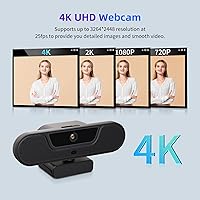
  • Max Resolution: Records and streams video at 4K UHD resolution, delivering noticeably finer facial and background detail than standard 1080p webcams.
  • Frame Rate: Video output at 4K UHD is limited to 25fps, which suits video calls well but trails the 30fps or 60fps found on some competing models.
  • Field of View: A 120-degree wide-angle lens captures a broad horizontal view, fitting multiple participants or a full desk environment into a single frame.
  • Digital Zoom: Supports up to 8x digital zoom operated via the included remote; the zoom is software-based rather than optical, so detail softens at higher magnification levels.
  • Aperture: Fixed aperture of f/2.8 provides adequate light intake for clear imaging in reasonably lit indoor environments.
  • Focal Length: Uses a 1.8mm fixed focal length lens, optimized for wide-angle capture at typical desk-to-screen viewing distances.
  • Microphones: Integrates four omnidirectional noise-canceling microphones with beamforming technology that actively filters background noise, echo, and keyboard clatter.
  • Mic Range: The microphone array is rated to pick up voices clearly at distances of up to 8 meters (approximately 26 feet) from the camera.
  • Speaker: Includes a built-in 3W speaker that supports two-way audio during calls without requiring a separate external speakerphone.
  • Focus System: Autofocus keeps subjects sharp automatically and can be overridden with manual focus adjustment via the included remote control.
  • Connectivity: Connects via USB-A; a Type-C adapter is included in the package for use with laptops or desktops that only offer USB-C ports.
  • Privacy Cover: A physical slide switch on top of the camera mechanically blocks the lens, preventing image capture entirely regardless of software or app state.
  • Setup: Plug-and-play compatible — the camera is recognized automatically by most operating systems with no drivers, software, or additional configuration required.
  • Accessories: Package includes a remote control for PTZ and zoom functions, a tabletop tripod stand, and a USB Type-C adapter.
  • Weight: The camera unit weighs 14.9 oz, giving it enough physical stability to sit securely on the included tripod without additional anchoring.
  • Package Size: Ships in a box measuring 7.28 x 6.93 x 2.83 inches, compact enough for easy storage between uses or occasional transport.

Related Reviews

VIZOLINK W8GS 4K Webcam
79%
83%
Image Quality
88%
Microphone Performance
71%
Low-Light Performance
78%
Autofocus Reliability
91%
Value for Money
More
OBSBOT Tiny 4K PTZ Webcam
79%
83%
AI Tracking Accuracy
87%
Video Quality
76%
Low-Light Performance
93%
Ease of Setup
71%
Microphone Quality
More
iuZee UHD12U-4K 4K PTZ Conference Camera
78%
88%
Image Quality
91%
PTZ Movement
86%
Zoom Performance
93%
Setup & Ease of Use
67%
Low-Light Performance
More
Combess XIAOJINGLING 4K Webcam
71%
71%
Image Quality
66%
Low-Light Performance
64%
Autofocus Performance
61%
Microphone Quality
55%
Noise Reduction
More
PixelForge 4K Webcam
86%
94%
Video Quality
88%
Audio Performance (Microphone)
91%
Ease of Setup
89%
Lighting Effectiveness
86%
Privacy Features
More
MOERTEK MT 4K Webcam
76%
83%
Image Quality at 1080P
67%
4K Capture Quality
71%
AI Auto-Framing
91%
Ease of Setup
62%
Microphone Performance
More
Lusinx TW 4K Webcam
Lusinx TW 4K Webcam
73%
73%
Video Quality
79%
Low-Light Performance
71%
Microphone Quality
91%
Setup & Compatibility
58%
Build Quality
More
Diccik 4K HD Webcam
Diccik 4K HD Webcam
72%
81%
Value for Money
69%
Video Quality
93%
Ease of Setup
76%
Light Correction
57%
Microphone Quality
More
Lumina LX011 4K Webcam
81%
91%
Image Quality
87%
Low-Light Performance
83%
AI Auto-Framing
93%
Build Quality
78%
Microphone Quality
More
PEATOP 4K-C80CCMD Webcam
75%
74%
Video Quality
68%
Autofocus Performance
61%
Low-Light Performance
63%
Microphone Quality
93%
Setup & Compatibility
More

FAQ

The V20 is plug-and-play on most Windows systems and should also work on macOS since it relies on standard USB video class drivers built into the operating system. That said, some buyers have reported occasional compatibility quirks on Mac, so if you are on macOS, it is worth checking recent user reviews for your specific version before purchasing.

Yes — this PTZ webcam is compatible with all major video conferencing platforms including Zoom, Microsoft Teams, Google Meet, and Skype. Any platform that recognizes a standard USB webcam will detect it automatically. You may just need to select it as your default camera and audio device in each application's settings.

The 8x zoom is entirely digital, not optical — it crops and enlarges the image in software rather than adjusting a physical lens. At modest zoom levels, around 2x to 3x, the image holds up reasonably well. Push toward the maximum and you will notice a clear softening of detail, so it works fine for pulling a group tighter in frame but is not well-suited to tasks where sharp close-up detail matters.

Noticeably better than a typical laptop microphone — keyboard clicks, HVAC hum, and moderate ambient chatter get filtered out reasonably well thanks to the beamforming array. It is not studio-quality audio, but for a Zoom or Teams call it should come across clean and intelligible from several meters away. In a very loud environment, some noise may still bleed through.

The VIZOLINK V20 4K PTZ Webcam requires no drivers or software at all — plug it into a USB port and your computer recognizes it within seconds using drivers already built into the operating system. The remote control functions work immediately as well, with no pairing or additional setup needed.
Yes, this conference camera uses a standard tripod thread mount, so it is compatible with any third-party tripod or camera stand you already own. You can also rest it flat on a desk surface if a tripod does not fit your setup, though the included stand is a handy starting point for most desk configurations.

For typical video calls where you are mostly seated and speaking, 25fps looks smooth and the difference from 30fps is barely perceptible to most people on the receiving end. Where it becomes more apparent is in fast-moving content — active streaming, presentation delivery with lots of movement, or motion-heavy scenes may look slightly less fluid. For everyday meetings and conferencing, it is not a practical concern.

In a quiet room it is adequate — you can hear the other party clearly at a comfortable volume without plugging in headphones. In a noisier or busier space, the 3W output may feel a little thin, and you might naturally gravitate toward headphones anyway. Think of the speaker as a genuine convenience for calm, focused work environments rather than a substitute for dedicated audio gear.

It is a physical slide switch on top of the camera body that mechanically blocks the lens when closed, so no image can be captured regardless of whether an app is actively using the camera. Because it is a mechanical cover rather than a software toggle, no application or browser can bypass it — which gives it a meaningful practical advantage over purely software-based privacy controls.

Yes, particularly when it comes to fine detail — facial features, text on whiteboards, and background elements all look sharper in a 4K feed. The practical benefit does depend on your conferencing platform, since some services compress or cap outgoing video resolution regardless of your camera. For local recordings or platforms that transmit at higher resolutions, the improvement over 1080p is easy to see.