


Overview
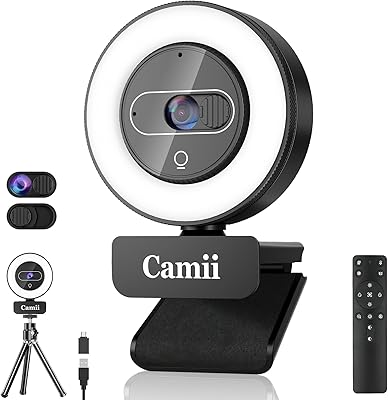
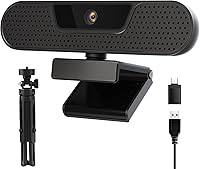
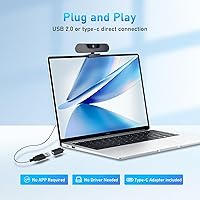
The VIZOLINK W8GS 4K Webcam entered the market in late 2023 and has quietly built a respectable following among budget-conscious shoppers. VIZOLINK isn't a household name yet, but landing inside the top 300 in Amazon's webcam category within its first year says something real. The pitch is straightforward: solid 4K video, decent audio, and a bundle that includes a tripod and Type-C adapter — all without the price tag of better-known brands. Plug-and-play setup means no driver hunting, no software installs, just connect and go. For remote workers or students wanting a noticeable upgrade from a built-in laptop camera, this webcam makes a practical, low-risk choice.
Features & Benefits
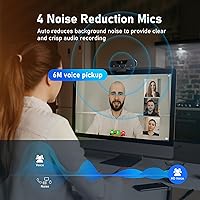
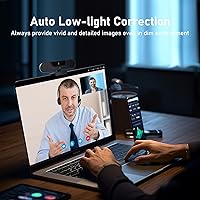
The 8MP CMOS sensor delivers sharp 4K footage, though it tops out at 25 frames per second — one step below the 30fps some rivals offer at this tier. For video calls and standard streaming, most viewers won't notice the difference. The four AI noise-canceling microphones are a genuine standout, using beamforming to isolate your voice from background clatter, fan noise, or a busy household — picking up clearly from up to about 19 feet away. Autofocus, auto white balance, and exposure correction keep your image looking natural even when lighting shifts mid-call. The physical privacy cover is a small but meaningful touch — slide it shut and the lens is genuinely, mechanically blocked.
Best For
This budget 4K camera fits a clear niche. Remote professionals spending most of their day on video calls will get solid, presentable footage without overspending. Teachers and students doing virtual classes benefit from the 85-degree wide-angle view, which keeps a full desk or small whiteboard in frame. If you work from a noisy apartment or open-plan office, the four-mic array gives you a real edge over built-in laptop audio. Casual streamers or content creators who want 4K on a limited budget will find it a reasonable starting point. Anyone who wants to plug in, skip a complicated setup, and just get to work will feel right at home.
User Feedback
Buyers tend to praise image clarity and mic performance most, noting both deliver more than you'd expect at this price point. People in loud environments specifically call out the noise filtering as effective. On the flip side, some users find the 25fps ceiling at 4K slightly choppy during fast movement compared to competing models. The included tripod is functional but clearly basic — adequate for a desk, not built for anything more demanding. A handful of buyers also note that VIZOLINK is still a newer brand, and long-term reliability remains an open question without a longer track record. Overall sentiment leans positive for everyday use cases, with most complaints falling in the minor category.
Pros
- Dramatically sharper video than any built-in laptop camera, with natural color reproduction.
- Four noise-canceling microphones filter out background noise effectively in real home and office conditions.
- Plug-and-play setup works immediately on Windows, macOS, and Chrome OS — no drivers needed.
- Physical privacy cover blocks the lens mechanically, with no software required.
- Auto white balance and exposure correction handle shifting light conditions without manual intervention.
- Includes a tripod and Type-C adapter, adding useful out-of-the-box value at this price.
- 85-degree field of view keeps a full workspace or two people comfortably in frame.
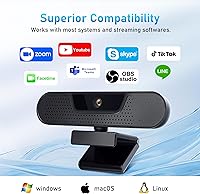
- Recognized instantly by Zoom, Teams, OBS, Skype, and most other major platforms.
- Autofocus is reliable and stable for stationary desk use during calls and lectures.
Cons
- 4K frame rate is capped at 25fps, which can look slightly choppy compared to 30fps rivals.
- Low-light image quality drops noticeably in dim rooms without supplemental lighting.
- Included tripod feels flimsy and is not suitable for adjusted angles or elevated positioning.
- No companion software means zero manual control over exposure, color, or focus settings.
- Edge distortion is visible at the periphery of the wide-angle frame.
- Brand has a limited track record, making long-term durability and warranty reliability uncertain.
- Mic performance can thin out in highly reverberant spaces like tiled rooms or large open areas.
- Linux is not officially supported, limiting options for users on non-standard operating systems.
Ratings
The VIZOLINK W8GS 4K Webcam earns its place in a crowded budget category, and the scores below reflect what real buyers actually experienced — not marketing promises. Our AI has analyzed verified global user reviews, actively filtering out incentivized, spam, and bot submissions to surface genuine patterns. Both the standout strengths and the honest frustrations are reflected transparently in every category score.
Image Quality
Microphone Performance
Low-Light Performance
Autofocus Reliability
Value for Money
Build Quality
Setup & Ease of Use
Privacy Cover
Wide-Angle Field of View
Software Compatibility
Tripod & Accessories
OS & Platform Compatibility
Brand Reliability & Support
Suitable for:
The VIZOLINK W8GS 4K Webcam is a strong fit for anyone upgrading from a built-in laptop camera without wanting to spend heavily. Remote workers who spend most of their day on Zoom or Teams calls will notice a real difference in both video clarity and audio quality — especially in louder home environments where the noise-canceling mic array earns its keep. Students and educators doing virtual classes benefit from the wide-angle view and plug-and-play simplicity, since there's no software to configure before a session starts. Casual content creators or streamers who want 4K footage at an accessible price point will find the W8GS a reasonable entry point without committing to prosumer hardware. It also suits privacy-conscious users well, given the physical lens cover — a feature some more expensive cameras still skip.
Not suitable for:
Buyers who need the smoothest possible 4K video should know upfront that the VIZOLINK W8GS 4K Webcam caps at 25 frames per second at full resolution, which is a step below the 30fps standard offered by many competing cameras in a similar price range. If you're producing professional video content, streaming fast-paced gaming, or conducting high-stakes client-facing presentations where image polish really matters, this budget 4K camera will likely feel like a compromise. Users who work in genuinely dim or low-light conditions will hit its limits quickly — it handles moderate lighting well, but it is not a substitute for a proper low-light camera or a dedicated lighting setup. Those who value long-term brand accountability or need reliable warranty support may also hesitate, since VIZOLINK is still building its track record. Power users who want manual control over focus, color, or exposure settings will find the lack of companion software frustrating.
Specifications
- Resolution: Captures video at 4K UHD (3840×2160) at 25fps, with fallback modes at 2K at 30fps, 1080p at 30fps, and 720p at 30fps.
- Image Sensor: Uses an 8-megapixel CMOS sensor paired with an ultra HD image signal processor for detailed, true-to-life image reproduction.
- Field of View: Fixed 85-degree wide-angle lens provides a broad, stable frame suitable for solo desk use or fitting two people within the shot.
- Autofocus: Continuous autofocus adjusts automatically during use, keeping subjects sharp without requiring manual focus corrections mid-call.
- Exposure Control: Automatic white balance and auto exposure correction adjust in real time to compensate for changing or uneven lighting conditions.
- Microphones: Equipped with four omnidirectional AI noise-canceling microphones using beamforming technology to isolate voice and suppress background noise.
- Mic Range: The beamforming microphone array is rated for clear voice pickup at distances of up to 6 meters (approximately 19 feet).
- Privacy Cover: A built-in physical slide switch on top of the camera body mechanically blocks the lens, providing hardware-level privacy without any software dependency.
- Connectivity: Connects via USB-A; a Type-C adapter is included in the package for use with USB-C-only laptops and devices.
- Plug and Play: Operates as a standard UVC device, recognized automatically by compatible operating systems without requiring driver installation or additional software.
- OS Compatibility: Compatible with Windows XP, Vista, 7, 8, 10, and 11, macOS 10.10 and later, and Chrome OS.
- Software Support: Works natively with Zoom, Microsoft Teams, Skype, Google Meet, OBS Studio, Cisco WebEx, GoToMeeting, and BlueJeans.
- Aperture: The lens has a maximum aperture of f/1.8, which supports reasonable light intake in moderately lit environments.
- Focal Length: Fixed focal length of 1.8mm, optimized for the wide-angle field of view rather than optical zoom capability.
- Included Accessories: Package includes the webcam unit, a desktop tripod stand, and a USB Type-C adapter.
- Weight: The complete package weighs 12.6 ounces, making it light enough for easy desk repositioning or travel packing.
- Package Dimensions: Retail box measures 7.01 × 5.2 × 2.64 inches, compact enough to store in a laptop bag alongside other peripherals.
- Video Format: Supports YUV and MJPEG audio-video output formats, with MPEG-2 listed as the primary video capture format.
- Mount Type: Includes a clip-style monitor mount and a detachable tripod stand, giving users two placement options out of the box.
- Brand & Model: Manufactured by VIZOLINK under the model designation W8GS, first made available in December 2023.
Related Reviews
VIZOLINK V20 4K PTZ Webcam

Diccik 4K HD Webcam

Lumina LX011 4K Webcam

MOERTEK MT 4K Webcam

Combess XIAOJINGLING 4K Webcam

PixelForge 4K Webcam

PEATOP 4K-C80CCMD Webcam

Lusinx TW 4K Webcam
EMEET Nova 4K Webcam