
Overview

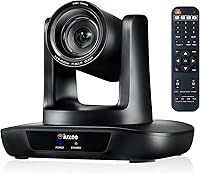
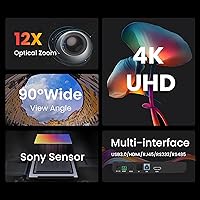
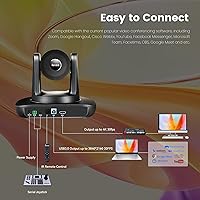
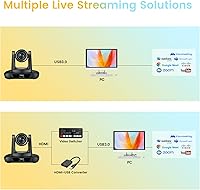
The iuZee UHD12U-4K 4K PTZ Conference Camera sits in an interesting spot — capable enough for professional environments, yet priced accessibly enough for budget-conscious buyers like small churches or growing startups. At its core, you get a 1/2.8-inch CMOS sensor pushing 4K at 30fps, which in practice produces crisp, well-saturated footage without demanding a dedicated capture card. Both USB 3.0 and HDMI outputs mean you can plug it into a laptop for a Zoom call or route it through an HDMI switcher with equal ease. One thing worth flagging immediately: no built-in microphone. You will need a separate audio solution — a USB mic, a room mixer, or a dedicated audio interface. This camera fits small-to-medium spaces well; expecting it to cover a large auditorium would be asking too much.

Features & Benefits

The 12x optical zoom is where this PTZ conference camera genuinely earns its place. In a 30-foot room, you can open wide enough to frame the entire table, then pull in tight to a single speaker — all without touching the unit. Pan and tilt movement is whisper-quiet, a real advantage during live church services or recorded lectures where motor noise would be distracting. Up to 255 preset positions let you lock in key angles and snap back to them instantly. Low-light performance holds up reasonably well thanks to onboard 2D/3D noise reduction, though expectations should stay realistic in very dim environments. Protocol support for VISCA and PELCO makes AV integration feasible, but RS485/232 compatibility is only partial — worth verifying against your existing controller before purchasing.

Best For

This streaming and conferencing camera makes the most sense for anyone who needs PTZ functionality without bringing in an AV specialist. Small conference rooms, hybrid classrooms, and church production teams are the natural sweet spot — environments where a single operator with a remote can handle all the shot changes without disrupting the room. Remote educators and telehealth providers will find the autofocus and zoom range genuinely useful for close-up detail work. IT teams get a low-friction win: USB 3.0 plug-and-play means it shows up correctly in Zoom, Teams, and OBS without driver installation. Content creators stepping up from a basic webcam will also find it a capable and manageable upgrade for home studio or office streaming setups.

User Feedback

Among verified buyers, the most consistent praise centers on image clarity and the smoothness of pan and tilt movement during live sessions — both holding up well in real-world use. The USB setup experience earns nearly universal positive marks; people get it working within minutes. On the other side, the lack of a microphone comes up regularly in lower-rated reviews, with some buyers noting it was not prominently disclosed upfront. A smaller group of professional AV users report that RS485 control did not behave as expected with their existing systems. Support responsiveness gets favorable mentions, with several reviewers specifically calling out helpful remote configuration assistance. Overall, the strong rating reflects a camera that delivers on its core promises for most buyers, even if edge cases exist.

Pros

  • 4K 30fps output delivers noticeably sharper video than most webcams in this category.
  • USB 3.0 plug-and-play setup works reliably across Windows and macOS without driver headaches.
  • Silent pan and tilt motion makes this PTZ conference camera ideal for live or recorded sessions.
  • 255 preset positions allow repeatable, consistent shot framing without manual repositioning each time.
  • 12x optical zoom handles both wide room coverage and tight close-ups from a single fixed mount.
  • HDMI and USB dual output gives you flexibility to feed a laptop, a switcher, or a display simultaneously.
  • Broad software compatibility covers Zoom, Teams, OBS, WebEx, YouTube, and more out of the box.
  • 3-year warranty and a responsive support team that offers remote setup assistance if needed.
  • 30-day no-questions-asked return window reduces purchase risk for first-time PTZ buyers.
  • VISCA and PELCO protocol support allows integration into existing AV control workflows.

Cons

  • No built-in microphone means every buyer must source and set up a separate audio solution.
  • RS485 and RS232 control compatibility is only partial, which can cause real issues for AV integrators.
  • At 6.25 pounds, this streaming and conferencing camera is bulky compared to lighter PTZ alternatives.
  • Low-light performance, while improved by onboard noise reduction, still falls short in very dim rooms.
  • The IR remote only supports 10 preset positions, a notable limitation versus the full 255 available via software.
  • No native IP streaming or NDI output limits compatibility with modern networked AV infrastructures.
  • Cable length constraints — 49 feet for USB and 98 feet for HDMI — may require planning in larger room layouts.
  • The OSD menu interface feels dated and takes some patience to navigate without a dedicated controller.
  • RS232 and RS485 protocol limitations are not clearly flagged during the purchase process, which has caught some buyers off guard.

Ratings

Our AI rating engine analyzed verified global buyer reviews for the iuZee UHD12U-4K 4K PTZ Conference Camera, actively filtering out incentivized, duplicate, and bot-flagged submissions to surface what real users actually experienced. Scores reflect a balanced synthesis of recurring praise and documented frustrations — nothing is smoothed over to flatter the product. Whether this camera fits your setup or falls short depends heavily on your environment, and the categories below are designed to help you make that call clearly.

Image Quality
88%
Users consistently describe the 4K output as noticeably sharper than what they were getting from standard conferencing webcams — particularly appreciated during telehealth consultations and recorded lectures where on-screen text or fine detail matters. Colors come through accurately without the oversaturated look some budget cameras produce.
A handful of reviewers note that the 4K advantage diminishes when the USB output is used over longer cable runs, where the feed sometimes defaults to 1080p. Those expecting broadcast-level image refinement may find the output competent but not exceptional.
PTZ Movement
91%
The silent motor operation is one of the most consistently praised aspects of this PTZ conference camera — church production teams specifically mention being able to reposition mid-service without any audible mechanical noise bleeding into the audio feed. Movement is described as smooth and predictable rather than jerky or laggy.
At maximum zoom, very fast pan movements can introduce a slight motion blur that some users found distracting during rapid speaker-tracking. This is a minor complaint but worth knowing if ultra-smooth high-zoom tracking is a core requirement.
Zoom Performance
86%
In practice, the 12x optical zoom covers real-world distances impressively well — users in 30 to 40-foot conference rooms report being able to pull in tight close-ups of a whiteboard or presenter without any loss of optical clarity. The wide-to-tele range is wide enough to frame an entire team and tight enough for individual detail work.
At maximum telephoto, the field of view narrows to under 8°, which makes precise framing tricky without a controller — the IR remote alone is not granular enough for fine adjustments at full zoom. Depth of field at maximum zoom is also shallower than some users expected.
Setup & Ease of Use
93%
USB 3.0 plug-and-play gets repeated praise from IT administrators and non-technical buyers alike — the camera shows up immediately in Zoom, Teams, and OBS without any driver installation or configuration. Several users mention having it fully mounted and running in under 30 minutes.
The OSD menu, used to configure advanced settings, is navigated via the IR remote and described by more experienced users as unintuitive and slow to work through. Those wanting to fine-tune encoding settings or flip the image for ceiling mounts may need patience and the manual nearby.
Low-Light Performance
67%
33%
In typical indoor lighting — overhead fluorescents or moderate LED setups — the camera holds up well, and the onboard noise reduction keeps the image clean at normal meeting brightness levels. Users in well-lit church stages or corporate conference rooms rarely flag any issues.
In genuinely dim environments like candlelit services, basement classrooms, or poorly lit home offices, the noise reduction visibly struggles and the image takes on a soft, slightly grainy appearance. The advertised low-light capability sets expectations higher than the real-world results consistently deliver.
Preset Accuracy
82%
18%
Users who invested time in configuring preset positions — particularly church AV teams managing repeated weekly productions — report that the camera returns to saved positions with good consistency, making it reliable for scripted multi-shot workflows without manual intervention.
The IR remote is limited to 10 accessible presets, which frustrates users who need quick access to more positions during live events. Accessing the full 255-preset capability requires a USB-connected controller or software, which adds cost and complexity that some buyers did not anticipate.
Platform Compatibility
89%
The iuZee 4K zoom camera works reliably with every major software platform buyers tested it against — Zoom, OBS, Teams, WebEx, YouTube Live, and Facebook all recognized it without any custom configuration. Streamers particularly appreciate the clean MJPG output available for OBS capture.
A small number of macOS users on newer Apple Silicon machines reported occasional handshake delays when reconnecting the USB cable during a live session. This was not universal but appeared in multiple independent reviews and may relate to USB 3.0 hub configurations.
AV System Integration
58%
42%
For buyers using VISCA or PELCO-D/P protocols with a compatible joystick controller, integration is functional and reasonably straightforward. Users operating in purpose-built AV environments with matching controller hardware report a reliable control experience once the protocol is correctly selected via the OSD.
RS485 and RS232 serial control is only partially implemented, and this is a genuine source of frustration for professional AV integrators who assumed full compatibility with their existing control systems. Several one-star reviews trace directly to this limitation — it catches buyers off guard and is not prominently disclosed in the product listing.
Build Quality
76%
24%
The camera has a solid, substantial feel — at 6.25 pounds it is clearly built for permanent installation rather than casual portability, and the housing feels durable enough for long-term wall or ceiling mounting in a professional environment. Mount hardware included in the box is functional and adequate.
A few users note that the plastic finish scuffs more easily than expected during installation, and the overall aesthetic is utilitarian rather than polished — fine for a mounted conference room install but not ideal for visible placement in a high-end broadcast studio or client-facing environment.
Audio Handling
44%
56%
This is less a category to score favorably and more one to flag clearly: buyers who understood upfront that no microphone was included and came prepared with an external audio solution report no issues, treating it as a non-factor in their overall satisfaction.
The absence of a built-in microphone is the single most common source of negative reviews and post-purchase frustration. Many buyers — particularly those upgrading from all-in-one webcams — discovered this limitation only after unboxing, and the additional cost of a quality external mic or speakerphone adds meaningfully to the total investment.
Remote Control
74%
26%
The included IR remote handles basic pan, tilt, zoom, and preset recall reliably within a reasonable line-of-sight range, which is sufficient for small conference rooms or solo-operator church setups where the controller and camera are in the same space.
Range and angle sensitivity are limited compared to dedicated PTZ controllers, and the remote becomes practically unusable in larger or irregularly shaped rooms where direct line-of-sight is broken. The button layout is also criticized as cramped and poorly labeled, with minimal tactile differentiation between keys.
Value for Money
79%
21%
For organizations that need a true optical-zoom PTZ camera with 4K output and broad software compatibility, the price sits at a reasonable point relative to comparable offerings from more established brands. The 3-year warranty and responsive support add real long-term value to the purchase.
When factoring in the mandatory external microphone purchase and the potential need for a proper PTZ controller to unlock the camera's full feature set, the effective total cost climbs noticeably. Buyers on a strict budget may find the all-in cost less compelling than the camera price alone suggests.
Warranty & Support
84%
iuZee's support team earns consistent positive mentions — response times are frequently cited as fast, and the offer of remote configuration assistance has resolved setup issues for multiple buyers who would otherwise have returned the unit. The 3-year coverage window is longer than most competitors at this price tier.
A minority of users report that support interactions, while responsive, occasionally required multiple back-and-forth exchanges to fully resolve technical issues — particularly around RS485 controller compatibility. Email-only support is also a limitation for buyers who prefer phone or live chat assistance.

Suitable for:

The iuZee UHD12U-4K 4K PTZ Conference Camera is a strong fit for small-to-medium organizations that need professional-grade PTZ control without the complexity or cost of enterprise AV systems. Church production teams will appreciate the silent pan and tilt during live services, where any mechanical noise would be disruptive, and the ability to save and recall preset shot positions means a single volunteer can manage camera work reliably. Hybrid workplace IT teams get a genuine plug-and-play win — USB 3.0 works with Zoom, Teams, and OBS without driver installs or custom configuration. Remote educators, telehealth professionals, and corporate trainers who need to zoom in on details — a whiteboard, a demonstration, a physical product — will find the 12x optical zoom far more practical than any fixed-lens webcam at this price point. Streamers and YouTubers outgrowing a basic webcam will also find it a capable step up, particularly if they already own or plan to add a dedicated microphone.

Not suitable for:

Buyers expecting an all-in-one audio-video solution should look elsewhere — the iuZee UHD12U-4K 4K PTZ Conference Camera ships with no built-in microphone, which means budgeting for and setting up a separate audio source is not optional but mandatory. Large venues like auditoriums, houses of worship with deep sanctuaries, or conference halls with more than 50 attendees will likely find the camera underpowered for full room coverage, even with 12x zoom factored in. Professional AV integrators who rely on RS485 or RS232 control integration should verify compatibility carefully before purchasing, as the serial protocol support is only partial and has caused real frustration among users with existing controller setups. Anyone expecting cinema-quality low-light performance — think dimly lit dinner events or candlelit spaces — should temper expectations, as the noise reduction helps but does not fully compensate in very dark environments. Finally, buyers who need NDI or IP streaming output natively will need to look at a different class of camera entirely.

Specifications

  • Image Sensor: Equipped with a 1/2.8-inch CMOS sensor delivering 8.29 megapixels of effective resolution.
  • Max Resolution: Captures video at up to 3840 x 2160 (4K UHD) at 30 frames per second.
  • Optical Zoom: Features 12x optical zoom with a focal length range of f=3.42–40.02mm.
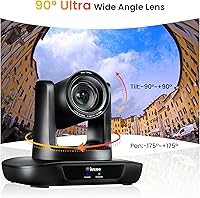
  • Field of View: Covers a 90° diagonal wide-angle view, narrowing to approximately 7.89° at full telephoto.
  • Pan and Tilt: Supports 350° horizontal pan (±175°) and 180° vertical tilt (±90°) with silent motor operation.
  • Preset Positions: Stores up to 255 preset shot positions; 10 are accessible directly via the included IR remote control.
  • Video Outputs: Outputs video simultaneously via USB 3.0 (up to 15m cable) and HDMI (up to 30m cable).
  • Encoding Formats: Supports H.264, H.265, MJPG, and YUY2 encoding formats for broad platform compatibility.
  • Control Protocols: Compatible with VISCA, PELCO-D, and PELCO-P protocols; RS485 and RS232 connectivity is partially supported.
  • Aperture Range: Lens aperture ranges from F1.88 at wide angle to F3.77 at maximum telephoto zoom.
  • Audio: No built-in microphone is included; an external audio source is required for all recording and streaming use cases.
  • OS Compatibility: Works with Windows 7, 8.1, and 10, as well as macOS 10.10 and later, with no additional drivers required.
  • Platform Support: Compatible with Zoom, Microsoft Teams, OBS, WebEx, YouTube, Facebook, GoToMeeting, and most major conferencing applications.
  • Weight: The camera unit weighs 6.25 pounds, making it appropriate for fixed wall, ceiling, or tripod mounting.
  • Package Dimensions: Ships in a box measuring 11.3 x 8.78 x 7.95 inches, including all accessories.
  • In the Box: Package includes the camera, IR remote control, USB 3.0 cable, DC 12V/2A power adapter, wall mount with screws, and a user manual.
  • Power Supply: Powered via the included DC 12V/2A adapter; no USB bus-power option is available.
  • Warranty: Backed by a 3-year limited warranty, a 30-day money-back guarantee, and lifetime online support from iuZee.

Related Reviews
Tenveo VL12U 4K PTZ Camera
74%
88%
Image Quality
79%
AI Auto-Tracking
84%
Zoom Performance
83%
PoE & Connectivity
71%
Ease of Setup
More
Prisual PT20X-4K 4K PTZ Camera
82%
91%
Image Quality
83%
Low-Light Performance
76%
Auto-Tracking Reliability
88%
Zoom Performance
79%
Build & Hardware Quality
More
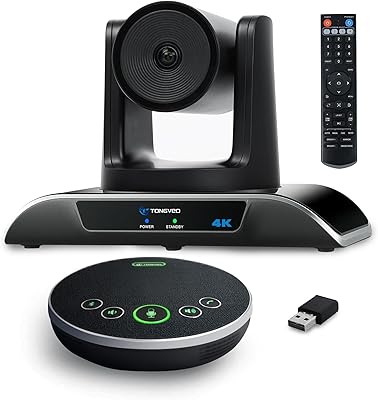
TONGVEO 4K Conference Room Camera System
78%
83%
AI Auto-Tracking Performance
78%
Video Quality
58%
Digital Zoom Quality
74%
Speakerphone Audio Clarity
91%
Ease of Setup
More
SV3C HX02 4K PTZ Outdoor Security Camera
73%
88%
Image Quality
83%
Night Vision Performance
86%
PTZ Coverage & Rotation
74%
Auto-Tracking Accuracy
81%
WiFi Stability & Connectivity
More
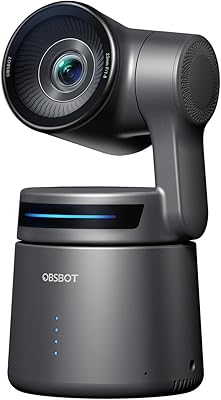
OBSBOT Tail Air NDI
OBSBOT Tail Air NDI
77%
91%
AI Tracking Accuracy
88%
Image Quality
87%
PTZ Range & Positioning
89%
Connectivity & Protocol Support
74%
NDI Integration
More
Yealink MeetingBar A10 Conference Room Camera System
81%
88%
Video Quality
86%
Microphone Quality
79%
AI Framing Accuracy
91%
Setup & Installation
58%
Speaker Output
More
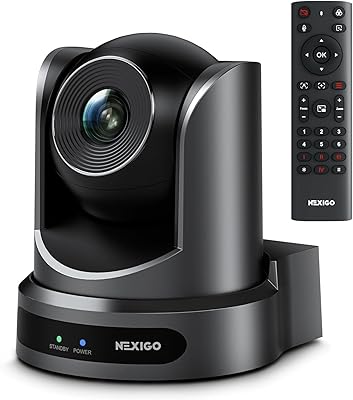
NexiGo P610 10X Optical Zoom PTZ Camera
78%
88%
Zoom Performance
83%
Image Quality
86%
PTZ Movement & Silence
79%
Preset & Remote Control
84%
Setup & Installation
More
Reolink RLC-823S1W PTZ Security Camera
76%
92%
Image Quality
88%
Night Vision Performance
86%
PTZ Mechanics
78%
Auto-Tracking
89%
Optical Zoom & 3D Zoom
More
RayBit SeeUp 4C
RayBit SeeUp 4C
74%
83%
Video Clarity
76%
AI Auto-Framing
78%
Speaker Tracking
71%
Built-in Microphone
67%
Built-in Speaker
More
TONGVEO PTZ 3X Wireless Conference Camera System
74%
74%
Wireless Connection Reliability
83%
Video Quality
71%
PTZ Control Responsiveness
78%
Speakerphone Audio Quality
89%
Ease of Setup
More

FAQ

Yes, it does. The USB 3.0 connection is plug-and-play on both Windows and macOS, so Zoom, Teams, and most other conferencing apps detect it automatically as a standard UVC camera device. No drivers or extra software are needed.

You will need a separate audio source entirely. Common pairings include a USB desktop microphone, a Bluetooth speakerphone like the Jabra Speak series, or a room audio system feeding into your computer via a mixer or USB audio interface. Plan for this cost before purchasing, as the camera handles video only.

The included IR remote control handles basic PTZ movement and lets you save and recall up to 10 preset positions. For more advanced control — like all 255 presets or joystick-style operation — you would need a compatible PTZ controller or a software-based control interface over USB.

It may, but with caveats. The iuZee UHD12U-4K 4K PTZ Conference Camera supports VISCA, PELCO-D, and PELCO-P protocols over RS485 and RS232, but the serial protocol implementation is only partially compatible with third-party controllers. If you have an existing AV control setup, confirm compatibility with iuZee support before committing to the purchase.

It performs reasonably well in moderately low light — the onboard 2D/3D noise reduction keeps the image from looking too grainy in typical indoor conditions. That said, in very dim environments like candlelit spaces or poorly lit stages, the image quality will degrade noticeably. It is not a low-light specialist; adequate ambient lighting makes a significant difference.

Yes, ceiling mounting is supported. The camera includes an OSD (on-screen display) menu where you can enable image flip for inverted mounting. The wall mount hardware is included in the box, though for ceiling installations you may want additional mounting hardware depending on your setup.

In practice, it works well in rooms up to roughly 30 to 40 feet in depth. The 12x optical zoom gives you enough reach to get a clean close-up of a speaker at the far end of a medium-sized conference room or classroom. Beyond that, image detail starts to thin out, and you may find the field of view too limited to cover a large auditorium effectively.

HDMI can carry 4K output, while USB 3.0 handles the video feed to your computer. However, simultaneous 4K over both outputs at full frame rate is not guaranteed — in many configurations, USB output runs at 1080p while HDMI carries the higher-resolution feed. Check the OSD settings to configure output resolution based on your specific use case.

Yes, it works with OBS without any special setup. Once connected via USB, it appears as a standard video capture device in OBS, and you can configure resolution, frame rate, and encoding from there. Streamers who want direct HDMI capture can also route it through a capture card into OBS for potentially higher quality output.

The camera is covered by a 3-year limited warranty, and iuZee has a reputation among buyers for responsive after-sales support, including remote configuration assistance via email. Their stated response time is within 24 hours. For issues outside warranty scope, lifetime online support is also offered, which is a reasonable safety net for a camera that may be installed in a permanent location.