Vivefox MKTBA Wireless Keyboard and Mouse Combo


Overview
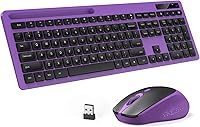
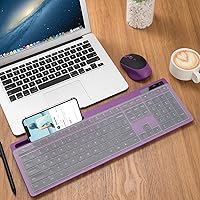
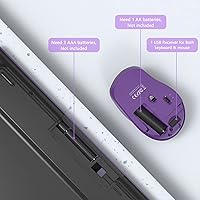
The Vivefox MKTBA Wireless Keyboard and Mouse Combo is a straightforward, budget-conscious pick for anyone who wants to cut the cord without overspending. It comes in a purple colorway that gives your desk a bit of personality — something you don't often see at this price point. The full-size layout includes a dedicated number pad, making it practical for spreadsheet work or data entry. One thing worth knowing before you buy: batteries are not included, so grab a set of AAAs and an AA before unboxing. There's also a built-in phone holder on the keyboard — a small but genuinely useful touch that's rare at this tier.
Features & Benefits
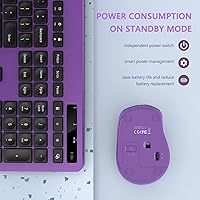
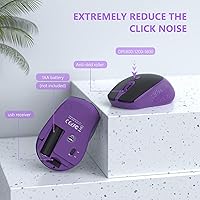
The 2.4GHz nano receiver tucks neatly inside the mouse's battery compartment, so you're not hunting around for a lost dongle. Plug it into any USB port and you're up and running — no drivers needed. The silent mouse clicks are probably the most noticed feature in daily use; they're genuinely quiet, not just slightly dampened. You can cycle through three DPI levels to adjust pointer speed on the fly. One important caveat: the 12 multimedia hotkeys do not work on Mac — this is a Windows-only feature, so Mac users should factor that in. Both devices have on/off switches, a small but practical detail for stretching battery life.
Best For
This wireless combo makes the most sense for Windows PC users who want a dependable daily driver without paying a premium. It's a solid fit for students setting up a dorm workstation, remote workers furnishing a home office on a budget, or anyone who needs a full-size keyboard with a number pad. The quiet click mouse also makes it a good choice for shared spaces — open-plan offices, libraries, or late-night work sessions. If you're equipping a secondary computer or a guest setup where bells and whistles aren't required, this keyboard and mouse set covers the basics without unnecessary fuss.
User Feedback
Across thousands of ratings, the quiet mouse is consistently the feature buyers mention most positively — many say it exceeded their expectations. Key spacing on the keyboard also gets solid marks, with most users finding it comfortable for extended typing. That said, not everything lands perfectly. Color accuracy is a common sticking point, with several buyers noting the purple is deeper or darker than it appears in product photos. The missing batteries catch people off guard at unboxing. Mac users who didn't catch the fine print about multimedia hotkeys tend to leave frustrated reviews. Durability is acceptable but not remarkable — some units show signs of wear after months of regular use.
Pros
- The whisper-quiet mouse clicks are genuinely impressive and stand out even among pricier competitors.
- A full-size keyboard with a dedicated number pad is rare at this price point.
- The nano receiver stores inside the mouse compartment, so losing the dongle is nearly impossible.
- Plug-and-play setup works immediately on Windows with zero driver installation required.
- On/off switches on both devices meaningfully extend battery life between replacements.
- The integrated phone holder is a practical bonus that most budget combos simply do not offer.
- A 10-meter wireless range comfortably covers any standard home office or desk arrangement.
- The purple colorway gives buyers a stylish option beyond the usual black and grey choices.
- Key spacing is comfortable for everyday typing, and most users adapt quickly without frequent misfires.
Cons
- Batteries are not included — you will need to buy them separately before the combo works at all.
- Multimedia hotkeys are completely non-functional on Mac, making this a Windows-only full experience.
- The purple color in person is noticeably darker than the product listing photos suggest.
- Keycap legends and mouse scroll wheel show wear after several months of regular daily use.
- DPI tops out at 1600, which feels limiting on large monitors or multi-screen setups.
- There is no software or app for remapping keys or customizing any settings beyond hardware presets.
- The mouse runs on a single AA battery and drains faster than expected under heavier use.
- The phone holder angle is fixed, so large phones in thick cases may feel unstable during use.
- Long typing sessions may become uncomfortable due to the flat profile and no wrist rest support.
Ratings
The scores below for the Vivefox MKTBA Wireless Keyboard and Mouse Combo were generated by our AI system after analyzing thousands of verified global buyer reviews, with spam, bot activity, and incentivized feedback actively filtered out. Both the standout strengths and the genuine frustrations buyers encountered are reflected transparently in every category. If you are weighing this keyboard and mouse set against alternatives, these ratings are designed to give you an honest, complete picture before you decide.
Value for Money
Mouse Click Noise Level
Keyboard Typing Feel
Wireless Connectivity Stability
Battery Life
Build Quality & Durability
Setup & Plug-and-Play Experience
Mouse DPI & Tracking Accuracy
Multimedia Hotkey Functionality
Keyboard & Mouse Aesthetics
Phone Holder Usability
Ergonomics & Comfort
Compatibility (Windows vs Mac)
Packaging & Unboxing Experience
Suitable for:
The Vivefox MKTBA Wireless Keyboard and Mouse Combo is a practical fit for Windows PC users who need a dependable daily driver without spending a lot. Students setting up a dorm workstation, remote workers furnishing a home office on a budget, and anyone equipping a secondary or guest computer will find this wireless combo covers the essentials without unnecessary complexity. The full-size layout with a number pad makes it particularly well-suited for anyone who regularly works with spreadsheets, accounting software, or data entry tasks where a numpad is not a luxury but a necessity. The silent mouse is a genuine advantage in shared or quiet spaces — open-plan offices, library study rooms, or late-night sessions where loud clicks would be inconsiderate. Anyone who wants a bit of visual personality on their desk without paying a premium for it will also appreciate the purple colorway and the thoughtful addition of an integrated phone holder.
Not suitable for:
The Vivefox MKTBA Wireless Keyboard and Mouse Combo has a clear set of limitations that make it a poor fit for certain buyers, and it is worth being direct about them. Mac users should approach with caution — the 12 multimedia hotkeys do not function on Apple systems at all, which is not a minor inconvenience but a fundamental feature gap that has frustrated many buyers who missed the fine print. Anyone who types for extended hours daily or has ergonomic concerns will likely find the flat keyboard profile and lack of wrist support uncomfortable over time. Power users, designers, or anyone who needs precise mouse control beyond three basic DPI levels will quickly feel constrained by the limited customization options. Buyers expecting a long-term investment should also temper expectations — durability feedback is mixed, and some units show noticeable wear after six to twelve months of regular use, making this a better short-term or supplementary purchase than a forever keyboard.
Specifications
- Brand: Manufactured and sold under the VIVEFOX brand, model number MKTBA.
- Connectivity: Both devices connect via a single 2.4GHz USB nano receiver, requiring no drivers or additional software.
- Receiver Storage: The nano USB receiver stores inside the mouse battery compartment to prevent it from being misplaced.
- Wireless Range: The combo operates reliably at distances of up to 10 meters from the connected USB receiver.
- Keyboard Layout: Full-size US QWERTY layout with a dedicated numeric keypad and 12 multimedia shortcut keys (Windows only).
- Mouse DPI: The mouse offers three selectable sensitivity levels: 800, 1200, and 1600 DPI, switchable via a dedicated button.
- Click Noise: The mouse uses a silent-click mechanism designed to significantly reduce audible click noise during normal operation.
- Keyboard Power: The keyboard is powered by 2 x AAA batteries, which are not included in the package.
- Mouse Power: The mouse is powered by 1 x AA battery, which is also not included in the package.
- Power Switches: Both the keyboard and mouse feature individual on/off switches to conserve battery when the devices are not in use.
- Phone Holder: An integrated phone holder is built into the top edge of the keyboard, accommodating most standard smartphone sizes.
- Compatible OS: Fully compatible with Windows operating systems; Mac is partially supported, with multimedia hotkeys non-functional on macOS.
- Compatible Devices: Designed for use with desktop PCs and laptops equipped with a standard USB-A port.
- Color: Available in Purple; the actual shade may appear darker or more muted in person compared to product listing images.
- Package Dimensions: The retail package measures 17.63 x 8.7 x 2.05 inches, sized to accommodate the full-size keyboard and mouse together.
- Item Weight: The complete packaged unit weighs 1.54 pounds, including both the keyboard and mouse.
- Warranty: VIVEFOX provides a one-year manufacturer warranty and a 30-day no-questions-asked return policy.
- Date Available: This product was first made available for purchase on August 25, 2020.
Related Reviews

Arteck HW192 Wireless Keyboard and Mouse Combo

Kootop Wireless Keyboard Mouse Combo

FOPETT Retro Wireless Keyboard and Mouse Combo

Mobifice Retro Wireless Keyboard and Mouse Combo

MOFII Wireless Keyboard and Mouse Combo

cimetech Wireless Keyboard and Mouse Combo

KNOWSQT Wireless Keyboard and Mouse Combo

JOYACCESS Wireless Keyboard and Mouse Combo

EDJO Wireless Keyboard and Mouse Combo
