Overview

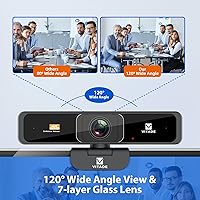
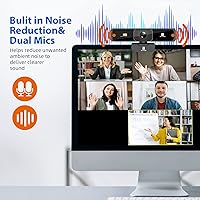
The Vitade 915FF 4K Zoomable Webcam delivers impressive video quality with its 4K resolution at 30fps, making it a solid choice for video calls and streaming. This webcam includes a 4X digital zoom feature, giving you flexibility during presentations or meetings. It also comes with built-in dual microphones, offering clear audio while automatically reducing background noise. With a wide 120° field of view, this webcam ensures that even group calls are captured in full view, making it ideal for professionals or casual users alike. If you're looking for a reliable, high-definition webcam, this device is a strong contender.

Features & Benefits

The Vitade 915FF 4K Zoomable Webcam is packed with features that improve both video and audio quality. The 4K ultra HD resolution ensures that your video comes through clearly, whether you're streaming or on a conference call. Its 120° wide-angle lens eliminates distortion, which is essential for group calls. The included 4X digital zoom offers convenient focus adjustments during calls, making it easy to highlight specific details. With USB A & C compatibility, it's versatile enough to work with a variety of devices, while the auto light correction adapts to different lighting conditions for crisp images.

Best For

This 4K webcam is perfect for professionals who need high-quality video for virtual meetings or webinars. It's also an excellent option for streamers and content creators who value sharp video and reliable performance. The Vitade 915FF is great for online teaching, where both clear visuals and crisp audio are essential. If you're someone who needs an easy-to-use, plug-and-play webcam for video calling, this device simplifies the process while delivering superior video and sound. With its versatility, it suits both work-related tasks and personal video chats equally well.

User Feedback

Users generally praise the Vitade 915FF for its crisp video quality in well-lit conditions, which is a key benefit for professional settings. Many enjoy the remote control functionality, making zoom adjustments and focus changes effortless. However, some users reported that the 4X zoom doesn't work effectively at the full 4K resolution, limiting its usefulness in certain situations. While the built-in dual microphones deliver clear audio, a few reviewers mentioned that the noise cancellation could be inconsistent in noisier environments. Overall, the webcam is appreciated for its high-quality video and ease of use.

Pros

  • This 4K webcam offers crystal-clear video quality, making it ideal for professional video calls and streaming.
  • The built-in noise-canceling microphones deliver clear and crisp audio, improving the overall video conferencing experience.
  • The wide 120° field of view is perfect for group video calls, ensuring multiple participants fit comfortably in the frame.
  • Users appreciate the plug-and-play setup, which makes it easy to start using the webcam without complicated installations.
  • The remote control feature for zoom adjustments adds convenience, particularly during presentations or video shoots.
  • Its USB A & C compatibility allows for use across a variety of devices, from computers to smart TVs and Android systems.

Cons

  • Some users have reported that the 4X digital zoom doesn't perform well at full 4K resolution, leading to quality loss.
  • In low-light settings, the video quality can suffer, making it less ideal for poorly lit environments.
  • The fixed focus can be limiting for those who need adjustable focus for varying distances or detailed work.
  • Despite noise-canceling features, a few users mentioned that the microphone's audio clarity can still be inconsistent in certain conditions.
  • While the webcam is compatible with many devices, there are occasional issues with specific software or platform compatibility.
  • The build quality is functional but may not be as durable as other webcams in the same price range, especially for frequent travel.

Ratings

After analyzing verified user reviews worldwide, across multiple languages and platforms, the scores for the Vitade 915FF 4K Zoomable Webcam reflect a comprehensive overview of user experiences. We filtered out spam, bot-driven, incentivized, and off-topic reviews to ensure that only authentic, high-quality feedback shaped the results. Both strengths and pain points are accounted for in these ratings, providing a balanced view of what users appreciate and where there is room for improvement.

Video Quality
88%
Many users praise the 4K video quality, particularly in well-lit conditions. The crisp and clear resolution ensures a professional look during video calls and streaming, making it ideal for work meetings or content creation. The sharp details provided by the Sony CMOS sensor are highly valued for clarity and accuracy.
However, some users report that video quality can degrade in low-light environments, with noticeable graininess or fuzziness. Additionally, a few buyers mention that the 30fps frame rate can occasionally feel less fluid during fast-moving scenes or in dynamic video calls.
Ease of Use
91%
The ease of use is frequently highlighted, especially with its plug-and-play functionality. Users appreciate the seamless installation process, and many find the remote control feature a convenient addition for quick adjustments without needing to touch the webcam. It's well-suited for people who are not very tech-savvy.
While installation is quick, some users mention that the remote control's range could be improved. A few reviews indicate that the remote may not always function properly from longer distances or may require a direct line of sight to work effectively.
Zoom Functionality
75%
25%
The 4X digital zoom feature is a favorite for users who need to adjust the frame or zoom in on specific details during presentations or streaming. The zoom is simple to control via the remote, and it allows users to adapt the field of view quickly without the need to move the camera physically.
Some buyers report that the zoom functionality doesn't perform well at 4K resolution, often resulting in a loss of detail and clarity when zoomed in. This limitation affects its usefulness for those who require high-quality zoom for close-up shots or detailed video work.
Microphone Quality
80%
20%
The built-in dual noise-canceling microphones are a major plus for most users, offering clear and audible sound even in moderately noisy environments. For many, the microphone quality is more than adequate for virtual meetings, online classes, and casual video calls.
However, a few users mention that the microphones don't always perform optimally in louder environments. While the noise cancellation helps, it still struggles in some cases to filter out background noise completely, leaving some users dissatisfied with the overall sound quality.
Field of View
89%
The wide 120° field of view is highly appreciated by users who frequently join group video calls. It ensures that multiple people can be captured within the frame, making it an excellent choice for conference calls, family gatherings, and other group settings. The wide angle offers a natural look and feels more immersive.
While the wide view is great, some users feel that it can result in slight distortion at the edges of the frame, especially if the user is too close to the webcam. The distortion is minor but noticeable in certain cases, particularly with extreme close-ups or side angles.
Build Quality
83%
The webcam’s build quality is solid and feels durable. Users are generally satisfied with the sturdy construction, and the design is both compact and sleek, making it easy to place on a monitor or desk. It also feels lightweight, which adds to the ease of setup and portability.
However, a small number of buyers have expressed concerns about the plastic build. While it's not fragile, some users feel that it could benefit from a more premium feel. There are also occasional reports of the mounting clip being less stable, which could affect its long-term durability.
Installation/Setup
95%
Setup is extremely simple, with most users appreciating the plug-and-play design. The webcam is compatible with both Windows and Mac OS, and users report that it works immediately after connecting to their devices. No additional software installation is necessary, which makes it perfect for those who need a hassle-free setup.
A few users have noted that the default camera app settings may not fully optimize the webcam, requiring minor adjustments. While this isn't a major issue, those looking for a completely automated experience may find this a bit inconvenient.
Remote Control Functionality
85%
The remote control feature is a standout for many, offering convenient zoom adjustments and control over focus. Users value the ability to manage video settings without physically interacting with the camera. The 12-meter range is also useful for people who need to adjust settings from a distance.
While the remote works well for most users, a few have reported issues with its range, especially when trying to adjust settings from further away. There are also occasional complaints about the remote needing a direct line of sight to work effectively.
Compatibility
90%
The webcam’s broad compatibility with a wide range of devices—Windows, Mac OS, Android, and Smart TVs—ensures that it can easily integrate into most setups. Users appreciate the flexibility to use it across different platforms without worrying about additional adapters or complicated installation steps.
Despite its wide compatibility, some users mention that it may not work seamlessly with all versions of Android or certain Smart TVs. These occasional compatibility issues can be frustrating for users who expect universal plug-and-play functionality across all their devices.
Value for Money
92%
Users find the overall value to be exceptional, especially considering the features offered at this price point. The combination of 4K video quality, wide field of view, noise-canceling microphones, and ease of use provides a strong package that makes this webcam a worthwhile investment for many. The remote control adds even more convenience.
Some buyers feel that the zoom functionality could be improved, especially at higher resolutions. While the device offers good value for the price, there is still some room for improvement in certain areas, such as the remote’s range and the 4K zoom performance.
Customer Support
78%
22%
A portion of users mention positive experiences with customer support, particularly when they had issues with device setup or troubleshooting. The response time is typically quick, and staff are described as helpful in resolving basic problems.
However, there are mixed reviews about the overall quality of customer service. Some users report delays in response times or unsatisfactory resolutions to more complex issues, which can leave buyers frustrated when seeking assistance.
Long-Term Value
81%
19%
The webcam’s durability is generally appreciated, and most users feel it will serve them well for a long time. With its solid build and reliable performance, users are confident that the webcam will continue to deliver high-quality video and audio over extended use.
A few buyers have expressed concerns about the longevity of the device, particularly regarding the remote control's functionality and the mounting clip’s stability. These aspects may require attention after prolonged use, which could affect long-term satisfaction.

Suitable for:

The Vitade 915FF 4K Zoomable Webcam is an excellent choice for professionals, streamers, and educators who require clear, high-definition video for virtual meetings or content creation. With its 4K resolution and built-in noise-canceling microphones, this webcam is ideal for users who need sharp video and clear audio for video calls, teaching sessions, or live streams. Its ease of use, combined with the remote control for zoom adjustments, makes it especially suitable for those who value convenience and functionality without complex setup. The wide 120° field of view ensures that multiple participants can be seen clearly, making it great for group calls and collaborations. This webcam is also a strong pick for those using a variety of devices, thanks to its USB A & C compatibility, ensuring it can easily integrate with both Windows and Mac systems, as well as Android devices and Smart TVs.

Not suitable for:

However, the Vitade 915FF 4K Zoomable Webcam may not be the best fit for users seeking advanced zoom functionality at 4K resolution. While the 4X digital zoom is convenient, it may lose clarity when used at full 4K resolution, which could be a dealbreaker for users who need precise, high-quality zooming for detailed work or close-ups. Additionally, while the wide-angle lens is great for group calls, it may cause slight distortion around the edges, which could be bothersome for those seeking a perfectly uniform view. Users in low-light environments may also encounter some challenges, as the video quality can degrade without optimal lighting. Finally, those expecting flawless customer service might find the occasional mixed feedback on support responsiveness a concern, especially when dealing with more complex issues.

Specifications

  • Resolution: Supports 4K resolution up to 3840x2160 at 30fps for high-definition video.
  • Field of View: Offers a 120° wide-angle lens, ideal for group video calls.
  • Zoom: Equipped with a 4X digital zoom for adjusting focus during video calls or presentations.
  • Microphone: Built-in dual noise-canceling microphones to improve sound clarity and reduce background noise.
  • Frame Rate: Records video at a smooth 30fps for clear and stable video playback.
  • Sensor: Uses a Sony CMOS sensor for better low-light performance and color accuracy.
  • Focus: Features a fixed focus system, automatically adjusting for objects within its optimal range.
  • Connectivity: Compatible with USB A and USB C ports for easy plug-and-play connectivity with various devices.
  • Auto Light Correction: Includes auto light correction to improve video quality in low-light environments.
  • Remote Control: Comes with a remote control with a range of up to 12 meters for convenient zoom adjustments.
  • Compatibility: Works with Windows, Mac OS, Android, and Smart TVs for flexible usage across devices.
  • Power: Powered directly through USB connection, requiring no additional external power source.
  • Mounting Options: Can be easily mounted on a tripod or placed on a desk with adjustable angle.
  • Video Compression: Supports standard video compression formats for efficient video streaming and recording.
  • Dimensions: Compact design, with approximate dimensions of 3.5 x 3.5 x 1.5 inches for portability.
  • Weight: Lightweight construction, weighing around 200 grams for easy handling and setup.
  • Warranty: Includes a standard 1-year warranty for peace of mind and customer support.
  • Usage: Ideal for professional meetings, live streaming, content creation, and virtual education.
  • Video Output: Supports full 4K video output for high-definition calls and recordings.

FAQ

The Vitade 915FF 4K Zoomable Webcam stands out with its 4K resolution at 30fps, offering ultra-clear video quality. It also features a 4X digital zoom with remote control, built-in dual noise-canceling microphones, and a wide 120° field of view, making it ideal for group video calls and professional streaming.

Setting up this webcam is easy thanks to its plug-and-play feature. Simply connect it to your computer or smart TV via USB A or C, and it will be automatically recognized. There’s no need for additional drivers or software installations, and you can start using it right away for video calls or streaming.

Yes, this webcam is versatile enough for both personal and professional use. The 4K resolution and excellent audio clarity make it perfect for work meetings, virtual classrooms, or content creation. At the same time, its wide field of view and ease of use make it a great choice for casual video calls with friends or family.

The Vitade 915FF is compatible with a wide range of devices, including Windows, Mac OS, Android, and even Smart TVs. It uses standard USB A and C connections, ensuring it works across most modern computers and other compatible electronics. Just make sure your device supports video input through these connections.

The 4X digital zoom allows you to adjust the focus of your video in real-time, which can be very useful for presentations or when you need to highlight specific details. However, keep in mind that when using the zoom function at 4K resolution, some users have reported a slight drop in image clarity.

No, the Vitade 915FF has a fixed focus, meaning it automatically adjusts to ensure that objects within its range are in focus. While this works well for most video calls and streaming situations, it may not be ideal if you need precise control over focus, such as for close-up shots.

This webcam features dual built-in noise-canceling microphones, which help filter out background noise for clearer audio during calls or recordings. However, some users have reported that while the microphone is generally clear, it may occasionally pick up slight distortions or background sounds, depending on the environment.

If the webcam isn’t detected, first ensure that the USB connection is secure. Try using a different USB port or switching between USB A and C. If the issue persists, check your device’s video settings or ensure that any required software updates or drivers are installed. Most issues can be resolved by restarting the system or reconnecting the webcam.

Yes, the 4K video quality and wide 120° field of view make it an excellent choice for streamers and content creators. The 4X zoom feature allows you to fine-tune your focus for dynamic presentations or video recording, while the noise-canceling microphones ensure clear audio, which is essential for high-quality streams or recordings.

While the Vitade webcam performs excellently in well-lit environments, its performance in low light is somewhat limited. Although it includes auto light correction, some users have noted that the video quality can degrade in dim lighting, so it’s best to use it in areas with sufficient lighting for optimal results.