




Overview
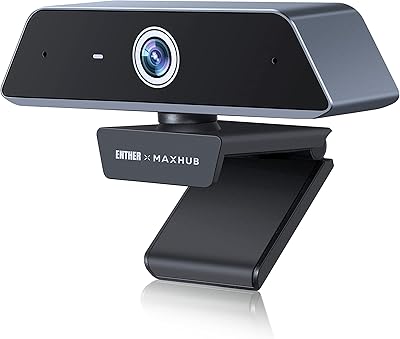
The Saylas V21 4K Webcam with Speaker arrived in early 2025 as a genuinely ambitious budget option — one that bundles a four-mic array and a built-in speaker into a single USB device without the price tag of mid-range competitors. That combination is rare at this tier. The camera ships with a tripod, a Type-C adapter, and a remote control, and sets up without any driver installation. Saylas is not a household name, but the V21 has already climbed to #78 in Webcams on Amazon, which suggests real buyer traction. Expect solid value, but go in with measured expectations around peak 4K output quality.
Features & Benefits
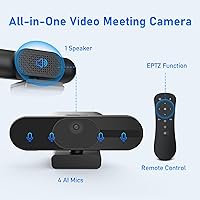
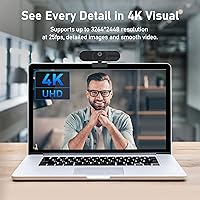
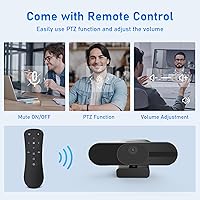
The 8MP CMOS sensor can output at 4K, but at only 25 frames per second — for motion-heavy calls or streaming, dropping to 1080P at 30fps often produces a noticeably smoother result. The four omnidirectional mics use beamforming to cut background noise, and the claimed 8-meter pickup range holds up reasonably well for desk use, though a loud open-plan office will still bleed through. The 3W built-in speaker handles small-room conversations clearly enough that you genuinely may not need a separate speakerphone. The included remote adds EPTZ controls, 8x digital zoom, and one-button muting — a surprisingly practical touch. A 120-degree field of view and automatic exposure adjustments round out an impressively stocked feature set.
Best For
This all-in-one camera makes the most sense for remote workers who want to stop juggling a webcam, a speakerphone, and a separate mic on their desk. Students in dorms or shared living spaces get a similar benefit — one cable, one device, no setup friction. The 120-degree wide angle also makes it a reasonable fit for small meeting rooms covering two or three people. Budget-conscious streamers who want 4K in their setup without spending heavily will find enough to work with here, even if the output won't rival dedicated streaming cameras. Anyone who regularly switches between laptop and desktop will appreciate the plug-and-play USB setup that requires zero configuration switching.
User Feedback
The V21 has a modest review count at this stage — it launched in early 2025 and hasn't yet accumulated the volume of feedback needed to draw firm conclusions about long-term durability. What early buyers do highlight positively is the ease of setup and the genuinely wide field of view. The friction tends to surface on the audio side: some users find the speaker volume underwhelming in larger or noisier spaces, and the noise cancellation, while functional, has real limits when ambient sound is persistent. On the video side, a few buyers feel the 4K label is generous compared to the actual output. Mixed but honest reception overall — worth revisiting as the review pool grows.
Pros
- Built-in 3W speaker enables true two-way audio without a separate speakerphone on your desk.
- Four noise-cancelling mics with beamforming handle typical home office background noise reasonably well.
- The 120-degree wide-angle lens covers small meeting rooms or multi-person desk setups without repositioning.
- Remote control with EPTZ, 8x digital zoom, mute, and volume adjustment is genuinely rare at this price.
- Plug-and-play USB setup works across laptops and desktops with zero driver installation required.
- Sliding physical privacy cover provides a reliable, hardware-level shutter for peace of mind.
- The included tripod and Type-C adapter add real day-one utility without extra purchases.
- Autofocus and auto exposure adjustments handle shifting light conditions adequately for video calls.
- Already ranked #78 in Webcams despite being a 2025 launch, suggesting solid early buyer uptake.
- Consolidates webcam, mic, and speaker into one device, reducing cable clutter for minimal desk setups.
Cons
- 4K output is capped at 25fps, which can look choppy compared to 1080P at 30fps in motion-heavy calls.
- The 3W speaker struggles to fill any room larger than a small personal office.
- Noise cancellation has real limits in loud or open-plan environments with continuous background sound.
- Saylas is a relatively unknown brand with a thin review history, making durability hard to assess confidently.
- The 4K label may oversell the actual perceived sharpness, which some early buyers have flagged as disappointing.
- No wireless connectivity — USB-only means cord management is always a factor on tidy desks.
- Low-light performance improves with auto exposure but still lags behind cameras with larger apertures.
- The 15.8-ounce weight makes this all-in-one camera noticeably heavier than compact clip-on alternatives.
- Limited long-term user feedback means edge cases around software compatibility and firmware issues remain unknown.
Ratings
Our editorial AI has analyzed verified global buyer reviews for the Saylas V21 4K Webcam with Speaker, actively filtering out incentivized, bot-generated, and duplicate submissions to surface what real users genuinely experienced. The scores below reflect both the genuine strengths that earned repeat praise and the friction points that consistently surfaced in critical feedback. Nothing has been smoothed over — the ratings tell the full picture.
Value for Money
Video Quality
Audio Clarity
Built-in Speaker
Ease of Setup
Remote Control
Noise Cancellation
Low-Light Performance
Build Quality
Autofocus Performance
Wide-Angle Coverage
Privacy Cover
Compatibility
Package Contents
Suitable for:
The Saylas V21 4K Webcam with Speaker is built for people who want to consolidate their desk setup without spending heavily — and that is a genuinely useful thing to be good at. Remote workers who currently run a separate webcam and speakerphone will immediately see the appeal: one USB cable replaces two devices. Students in dorms or shared apartments benefit similarly, since the built-in speaker means they can take a video call without hunting for headphones or a Bluetooth speaker. The 120-degree field of view makes it a reasonable fit for a small meeting room serving two or three participants, and the plug-and-play USB connection means it moves effortlessly between a laptop and a desktop without any software setup. Budget-conscious casual streamers who want 4K in their stream metadata will find it serviceable, provided they keep expectations realistic about the output quality relative to dedicated streaming cameras.
Not suitable for:
Anyone who genuinely depends on sharp, broadcast-quality 4K video will likely find the V21 underwhelming — 4K at only 25 frames per second is the hard ceiling, and real-world output at that setting often looks softer than the resolution number implies. Professional streamers, YouTubers, or anyone recording polished on-camera content for an audience should look at dedicated cameras with larger sensors and better glass. The built-in speaker, while convenient, tops out at 3W, which is not enough to fill a medium-sized room or compete with ambient noise during a call. Users in loud open-plan offices will also find that the noise cancellation, while functional, has real limits when background sound is constant and varied. Finally, because the Saylas brand is still early-stage with a limited review history, buyers who prioritize proven long-term reliability and established warranty support should approach with caution or wait until more durability data accumulates.
Specifications
- Image Sensor: The camera uses an 8MP CMOS sensor that captures detailed images with natural color reproduction across standard lighting conditions.
- Max Resolution: Peak video output is 4K at 25 frames per second, with additional modes including 2K@30fps, 1080P@30fps, and 720P@30fps.
- Field of View: A 120-degree wide-angle lens provides broad coverage, making it suitable for desk setups with multiple participants or wider room capture.
- Focal Length: The fixed focal length is 6mm, paired with an f/2.2 aperture that allows reasonable light intake in moderately dim environments.
- Microphones: Four omnidirectional noise-cancelling microphones with a beamforming algorithm provide a rated pickup range of up to 8m (approximately 26ft).
- Speaker Output: A built-in 3W mono speaker supports two-way audio directly through the camera, eliminating the need for a separate speakerphone in small spaces.
- Digital Zoom: Up to 8x digital zoom is available via the included remote control using the EPTZ (electronic pan-tilt-zoom) function.
- Connectivity: The camera connects via USB Type-A; a Type-C adapter is included in the box for use with modern laptops and compact desktops.
- Driver Support: No additional drivers or software installation are required — the camera is recognized automatically by compatible operating systems upon connection.
- Privacy Cover: A sliding physical shutter on top of the housing blocks the lens entirely when closed, providing hardware-level privacy protection independent of software.
- Remote Control: The included remote supports EPTZ adjustment, video freeze, mute toggle, manual focus, volume control, and digital zoom changes.
- Auto Features: Onboard autofocus, auto white balance, and auto exposure continuously adjust image parameters to compensate for changing light and subject distance.
- Video Formats: Supported video capture formats are MJPEG and YUV, which are broadly compatible with major video conferencing and streaming applications.
- Compatible Apps: The V21 works with Zoom, Skype, Microsoft Teams, and most other standard video calling and streaming platforms without additional configuration.
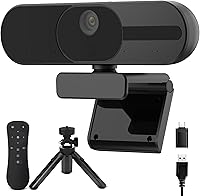
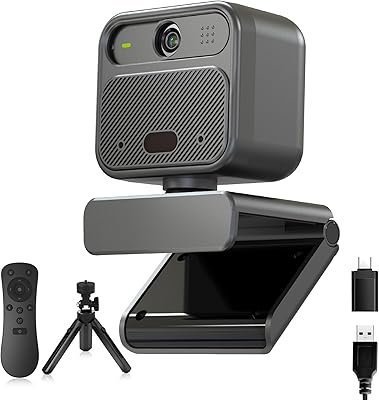
- Package Contents: The box includes the webcam unit, a remote control, a desktop tripod stand, a Type-C adapter, and a user guide.
- Dimensions: The product package measures 7.28 x 6.93 x 2.91 inches, and the complete unit with accessories weighs 15.8 ounces.
- Brand & Model: Manufactured by Saylas under the model designation V21, with the product first made available in January 2025.
Related Reviews
Saylas W12S 4K Webcam

Lusinx TW 4K Webcam

Lumina LX011 4K Webcam

PixelForge 4K Webcam

MOERTEK MT 4K Webcam

PEATOP 4K-C80CCMD Webcam

Diccik 4K HD Webcam

Combess XIAOJINGLING 4K Webcam
Logitech Brio 4K Pro Webcam