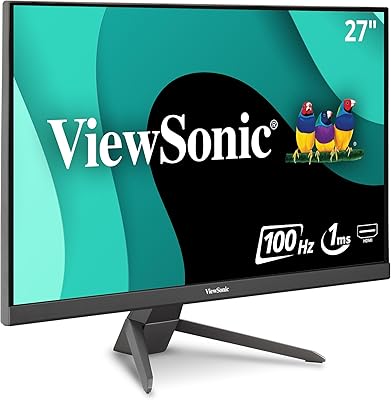
ViewSonic VX3218-PC-MHD 32-inch Curved Gaming Monitor
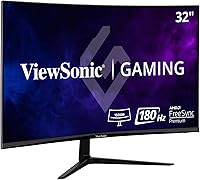
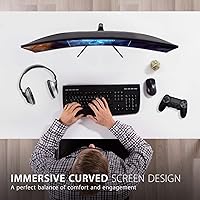
ViewSonic VX3218-PC-MHD 32-inch Curved Gaming Monitor — image 1
ViewSonic VX3218-PC-MHD 32-inch Curved Gaming Monitor — image 2
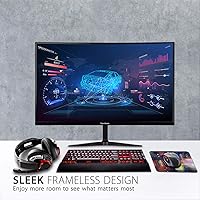
ViewSonic VX3218-PC-MHD 32-inch Curved Gaming Monitor — image 3
ViewSonic VX3218-PC-MHD 32-inch Curved Gaming Monitor — image 4
ViewSonic VX3218-PC-MHD 32-inch Curved Gaming Monitor — image 5
ViewSonic VX3218-PC-MHD 32-inch Curved Gaming Monitor — image 6
ViewSonic VX3218-PC-MHD 32-inch Curved Gaming Monitor — image 7
ViewSonic VX3218-PC-MHD 32-inch Curved Gaming Monitor — image 8
72%
28%

Overview

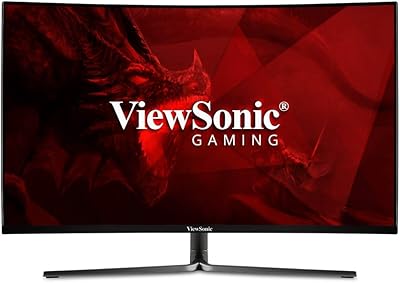
The ViewSonic VX3218-PC-MHD 32-inch Curved Gaming Monitor sits in a competitive spot — it's a large-screen option aimed at casual to mid-core gamers who want size and speed without overspending. The MVA panel is worth understanding: it delivers noticeably better contrast than TN alternatives and holds up reasonably well against entry-level IPS displays, though wide-angle accuracy is a mild trade-off. At this price tier, landing a 32-inch curved screen is genuinely rare. The honest caveat? Running 1080p across 32 inches means pixel density takes a hit, and you may notice softness during everyday productivity work — though for gaming, it's much less of a concern.

Features & Benefits

The 1500R curve radius is well-matched to a 32-inch panel — seat yourself about two feet back and the screen wraps naturally into your peripheral view without feeling forced. The 180Hz refresh rate is the headline number, and it genuinely holds up in fast-paced games where motion clarity counts. One important clarification: the 1ms rating refers to MPRT, a motion blur reduction metric, not the panel's actual pixel transition speed (GtG) — buyers often conflate the two. FreeSync Premium handles adaptive sync cleanly, and AMD GPU owners get the most out of it. Note that 180Hz requires DisplayPort; HDMI maxes at 165Hz. The built-in speakers are functional for basic audio, nothing more.

Best For

This curved gaming monitor makes the most sense for players who prioritize screen size and motion smoothness over pixel sharpness. If you're running an AMD GPU, the FreeSync Premium pairing is a real advantage — adaptive sync eliminates tearing across a wide refresh range, and it works reliably. Upgraders stepping up from a 24-inch or 27-inch flat display will feel the difference immediately in terms of immersion. Racing sims and FPS titles benefit the most from the curve and high refresh rate. Console players on PS5 or Xbox can connect via HDMI, though they'll be limited to 165Hz rather than the full ceiling.

User Feedback

Most buyers are pleased with the out-of-box image quality — colors read as punchy and saturated for an MVA display, and many report minimal tweaking was needed before use. The most consistent criticism centers on desktop clarity: at 32 inches, 1080p starts to show softness in text and small UI elements, which matters more for productivity than gaming. The stand draws frequent complaints — tilt-only adjustment with reported wobble is a real limitation, and many users recommend mounting it on a VESA arm instead, which is a straightforward fix since the monitor supports it natively. The OSD button layout also frustrates a portion of users, though overall ratings remain strong.

Pros

  • Large 32-inch curved screen delivers genuine immersion at a price point where most competitors offer smaller flat panels.
  • The MVA panel produces strong contrast and punchy colors that look great out of the box with minimal calibration needed.
  • 180Hz refresh rate via DisplayPort keeps fast-paced gameplay smooth and responsive for mid-range gaming rigs.
  • FreeSync Premium support eliminates screen tearing reliably for AMD GPU users across a wide frame rate range.
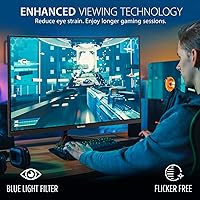
  • Flicker-Free and Blue Light Filter modes make long gaming or work sessions noticeably easier on the eyes.
  • Dual inputs (HDMI and DisplayPort) cover both PC and console connections without needing an adapter.
  • VESA mount compatibility gives users a practical path to better ergonomics if the stock stand feels limiting.
  • The 1500R curve radius feels natural at typical desk distances, wrapping peripheral vision without distortion.
  • Solid build quality for the price tier — the panel itself feels sturdy despite the lightweight overall construction.

Cons

  • 1080p across 32 inches results in visible softness, especially noticeable when reading text or working in productivity apps.
  • The stock stand offers tilt adjustment only — no height, swivel, or pivot, which limits comfortable long-session setups.
  • Some users report the stand wobbles slightly when nudged, which can be distracting during intense gaming moments.
  • Reaching 180Hz requires a DisplayPort connection; HDMI users are capped at 165Hz, which is worth knowing before setup.
  • The OSD button layout is unintuitive and takes time to learn, making on-the-fly adjustments more tedious than they should be.
  • Built-in 2W speakers are barely adequate for casual audio — external speakers or headphones are essentially a requirement.
  • The 1ms MPRT figure can mislead buyers; actual pixel transition (GtG) performance is typical of MVA, not a true 1ms response.
  • No USB hub or additional ports beyond the two video inputs, which limits desk cable management options.

Ratings

Our AI rating system analyzed thousands of verified global user reviews for the ViewSonic VX3218-PC-MHD 32-inch Curved Gaming Monitor, actively filtering out incentivized, bot-generated, and duplicate submissions to surface what real buyers actually experience. The scores below reflect both the genuine strengths that keep this monitor highly rated and the recurring pain points that matter for specific buyer profiles. Nothing is sugarcoated — this is an honest, data-driven picture of where this curved gaming monitor delivers and where it falls short.

Gaming Performance
88%
At 180Hz via DisplayPort, fast-paced titles like shooters and racing games feel noticeably fluid, and FreeSync Premium keeps tearing and stuttering out of the picture for AMD GPU users. Multiple reviewers specifically praised the smoothness during high-action scenes where cheaper monitors would show ghosting.
The 1ms MPRT rating is achieved through backlight strobing, not native panel speed — actual pixel transitions are slower, which some competitive players notice in extreme fast-motion scenarios. Nvidia users may not always get a fully stable adaptive sync experience.
Image Quality
79%
21%
Out of the box, colors on the MVA panel punch above expectations for this price tier — contrast is noticeably richer than TN-based alternatives, and dark scenes in games look genuinely deep rather than washed out. Many buyers reported being pleasantly surprised by how little calibration was needed.
Color accuracy is not class-leading, and wide viewing angles reveal some color shift that is typical of MVA technology. For anything beyond gaming — photo editing, color-sensitive design work — the panel falls short of what an IPS display would deliver at a comparable price.
Resolution Clarity
61%
39%
For gaming at normal desk distances, 1080p on a 32-inch panel is serviceable — the motion smoothness and refresh rate benefits largely compensate for the reduced pixel density during active gameplay. Casual gamers and console users rarely flagged this as a dealbreaker.
At roughly 69 PPI, desktop text and fine UI elements look noticeably soft compared to 27-inch 1080p monitors or any 1440p display at this size. Users who split screen time between gaming and productivity work consistently flagged this as the monitor's most significant limitation.
Immersion & Curve
86%
The 1500R curve feels well-proportioned for a 32-inch screen — at a typical desk distance of two to three feet, the wrap effect draws you in without creating distortion at the edges. Racing sim and open-world game players specifically highlighted how much the curve added to their single-monitor setup.
At very close seating distances, the curve can feel slightly aggressive and some users noticed mild edge distortion when viewing flat content like spreadsheets or documents. It is optimized for gaming immersion, not general-purpose computing.
Value for Money
84%
Getting a 32-inch curved screen with a 180Hz refresh rate and FreeSync Premium in this price range is genuinely hard to match, and most buyers feel they received more monitor than the price suggests. It consistently outperforms similarly priced flat 27-inch options in terms of sheer screen presence and gaming feature set.
The value equation gets shakier if you factor in needing a better stand or monitor arm, which adds to the real cost of ownership. Buyers who also need strong productivity performance may find spending slightly more for a 27-inch 1440p IPS monitor to be a smarter long-term investment.
Build Quality
71%
29%
The panel itself feels solid and well-assembled, and the thin bezels give it a cleaner, more modern look than older budget monitors. For a value-tier product, the overall construction holds up well under daily desk use.
The stand is the weak point — several users reported noticeable wobble when the desk is nudged or during typing, which is distracting during tense gaming moments. The plastic base does not inspire the same confidence as the panel itself.
Ergonomics
53%
47%
The tilt range is smooth enough for basic angle adjustments, and the VESA compatibility means users can bypass the stock stand entirely with a third-party arm for a much better ergonomic setup. For buyers already planning to use a monitor arm, this limitation is largely moot.
Tilt-only adjustment is a real constraint for users who need height or swivel flexibility — there is no height raise, no pivot to portrait mode, and no lateral swivel. Taller users or multi-monitor setups will find the fixed height awkward without a separate mounting solution.
Eye Comfort
81%
19%
Flicker-Free technology makes a noticeable difference during long gaming or work sessions, reducing the eye fatigue that DC-dimming displays often cause. The Blue Light Filter modes are genuinely usable and do not destroy image quality at moderate settings.
The Blue Light Filter's strongest settings introduce a significant warm color cast that some users find too aggressive for gaming. Users sensitive to light temperature shifts may need to experiment to find a balance that feels comfortable without looking unnaturally orange.
Connectivity
74%
26%
Having both DisplayPort and HDMI inputs covers the most common connection needs — PC gamers can run DisplayPort for full 180Hz, while a console can stay plugged into HDMI simultaneously. No adapters required for standard setups, which is a small but practical convenience.
The input selection is minimal compared to monitors that include USB hubs, headphone jacks on the side, or multiple HDMI ports. Users with more complex desk setups — multiple devices, frequent switching — will find the two-input limit restrictive.
OSD Usability
55%
45%
Once initial settings are dialed in, most users rarely need to revisit the OSD menu, so the learning curve does not affect day-to-day use for long. The available options cover the main adjustments — brightness, contrast, picture modes, and Blue Light settings — without being overwhelming.
The physical button placement on the back-right edge is awkward and unintuitive, and the menu navigation logic takes several sessions to feel natural. A number of reviewers expressed specific frustration with accidentally cycling through the wrong menus during initial setup.
Audio
41%
59%
The built-in speakers do handle basic system sounds and low-volume background audio without distortion, which is better than nothing in a pinch. For casual desktop use where audio is secondary, they function adequately.
Two watts per channel simply cannot produce meaningful volume or sound quality for gaming, music, or any media where audio is part of the experience. Nearly every reviewer who commented on audio recommended ignoring the built-in speakers entirely in favor of headphones or external audio.
Setup & Assembly
77%
23%
Assembly is straightforward — the stand clicks together without tools and the monitor is ready to use in under ten minutes. Port access is reasonably easy once the monitor is on the desk, and cable routing through the stand base is tidier than expected at this price.
The instruction manual is minimal and assumes some familiarity with monitor setup, which may leave less experienced users needing to search online for guidance. A few buyers reported the stand attachment feeling slightly loose at first, though it typically stabilizes after full assembly.
Brightness & Glare
68%
32%
In a typical indoor gaming environment with controlled lighting, the 250-nit brightness is comfortable and does not cause fatigue. The matte screen coating handles moderate ambient light well and reduces glare from ceiling lights or nearby windows.
In brighter rooms or near windows with direct sunlight, 250 nits is not sufficient to maintain comfortable viewing — the image can look dim and washed out. Users in naturally bright spaces will need to manage their room lighting more carefully than they might with a higher-brightness display.
Refresh Rate Consistency
83%
Several owners confirmed that 180Hz is stable and achievable on compatible hardware via DisplayPort, and the display handles frame rate fluctuations gracefully when FreeSync Premium is active. The experience holds up across a range of games rather than just in synthetic benchmarks.
Reaching the full 180Hz ceiling requires a sufficiently powerful GPU — budget graphics cards that cannot sustain high frame rates in demanding titles will not make full use of the panel. HDMI users are also capped at 165Hz regardless of GPU capability.

Suitable for:

The ViewSonic VX3218-PC-MHD 32-inch Curved Gaming Monitor is a strong fit for gamers who want a big, immersive screen without stretching their budget into premium territory. If you're running an AMD GPU, the FreeSync Premium support works reliably across a wide refresh range, meaning you get smooth, tear-free gameplay in fast-paced titles without paying extra for G-Sync compatibility. Players who spend most of their time in FPS, racing, or action games — where high frame rates matter more than pixel-perfect sharpness — will get real value from the 180Hz capability via DisplayPort. It's also a smart upgrade path for anyone currently on a 24-inch or 27-inch flat panel who wants more screen presence for single-monitor setups. Console players connecting via HDMI also have a capable large-screen option here, as long as their expectations around resolution are set appropriately.

Not suitable for:

Buyers who use their monitor primarily for productivity, content creation, or anything requiring sharp fine detail should approach this curved gaming monitor with caution. Spreading 1080p resolution across 32 inches results in a noticeably lower pixel density — around 69 PPI — which makes text and small UI elements look softer than they would on a comparable 27-inch or smaller display. Graphic designers, photo editors, or anyone doing color-critical work will also find the MVA panel's color volume and accuracy insufficient compared to higher-end IPS or OLED alternatives. Users who need flexible ergonomics — height adjustment, portrait rotation, or a wide swivel range — will be frustrated by the tilt-only stand, and while a VESA mount solves that problem, it adds cost and effort. Nvidia GPU owners should note that FreeSync Premium may work via Adaptive Sync on supported cards, but it is not a guaranteed or certified G-Sync experience.

Specifications

  • Panel Type: This monitor uses an MVA (Multi-Vertical Alignment) panel, which offers better contrast ratios than TN panels and wider viewing angles, though it falls short of premium IPS displays in color accuracy.
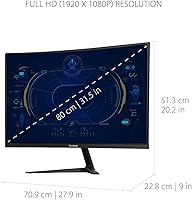
  • Screen Size: The display measures 32 inches diagonally, making it one of the larger options available in the budget gaming monitor segment.
  • Resolution: Native resolution is 1920x1080 (Full HD), which yields a pixel density of approximately 69 PPI — sufficient for gaming but noticeably soft for detailed productivity work at this screen size.
  • Refresh Rate: The panel supports up to 180Hz via DisplayPort and up to 165Hz via HDMI, allowing for very smooth motion in fast-paced gaming scenarios.
  • Response Time: The advertised 1ms response time refers to MPRT (Moving Picture Response Time), a motion blur reduction metric, not the panel's native GtG pixel transition speed.
  • Sync Technology: AMD FreeSync Premium is supported, enabling adaptive sync to eliminate screen tearing and stuttering across a wide dynamic refresh rate range for compatible GPUs.
  • Curve Radius: The screen features a 1500R curve, designed for a more immersive single-monitor experience at typical desk viewing distances of around 2 to 3 feet.
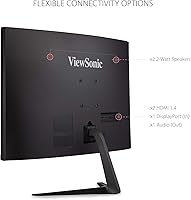
  • Connectivity: The VX3218-PC-MHD includes one DisplayPort 1.2 input and one HDMI 1.4 input, covering both PC and console connection needs without requiring adapters.
  • Built-in Audio: Two integrated 2-watt speakers provide basic stereo audio output, suitable for background sound but not a replacement for external speakers or headphones.
  • Ergonomics: The included stand supports tilt adjustment only, with no built-in height, swivel, or pivot adjustment available out of the box.
  • VESA Compatibility: The monitor is VESA mount compatible, allowing users to attach it to a third-party arm or wall mount for improved ergonomic flexibility.
  • Eye Care: Flicker-Free technology and a built-in Blue Light Filter mode are included to help reduce eye strain during extended viewing sessions.
  • Aspect Ratio: The display maintains a standard 16:9 widescreen aspect ratio, suitable for gaming, streaming, and general multimedia content.
  • Dimensions: With the stand attached, the monitor measures approximately 27.9 inches wide, 20.2 inches tall, and 9 inches deep.
  • Weight: The full unit including the stand weighs approximately 10.8 pounds, making it manageable for single-person setup on most standard desks.
  • Brightness: Typical brightness output is rated at 250 nits, which is adequate for indoor use in a moderately lit room but not suited for bright ambient environments.
  • Contrast Ratio: The MVA panel delivers a static contrast ratio of 3000:1, noticeably deeper than IPS alternatives at this price tier, resulting in richer blacks in dark gaming scenes.
  • Color Coverage: The display covers approximately 90% of the DCI-P3 color gamut, offering solid color saturation for gaming and media without professional-grade accuracy.

Related Reviews
ViewSonic VX3258-PC-MHD 32-inch Curved 1080p Gaming Monitor
82%
91%
Gaming Performance
84%
Visual Quality
95%
Refresh Rate & Response Time
80%
Build Quality
70%
Ergonomics & Adjustability
More
ViewSonic VX2718-PC-MHD 27-inch Curved Gaming Monitor
85%
89%
Gaming Performance
85%
Display Quality
91%
Immersive Experience (Curvature)
87%
Eye Comfort (Flicker-Free & Blue Light Filter)
90%
Refresh Rate & Response Time
More
ViewSonic VX3218C-2K 32-inch Curved Gaming Monitor

77%
88%
Value for Money
91%
Gaming Performance
78%
Image Quality
71%
Build Quality
54%
Ergonomics
More
KOORUI G3221SC 32″ Curved QHD Gaming Monitor

69%
83%
Picture Quality
81%
Gaming Performance
86%
Value for Money
41%
HDR Performance
67%
Color Accuracy
More
KTC H32S17C 32-inch Curved Gaming Monitor
72%
91%
Value for Money
84%
Gaming Performance
76%
Picture Quality
52%
HDR Experience
67%
Color Accuracy
More
ViewSonic VX3276-2K-MHD 32-inch QHD Monitor
77%
88%
Image Quality
82%
Color Accuracy
91%
Value for Money
38%
Ergonomics & Stand
84%
Eye Comfort
More
ViewSonic VX2467-MHD 24-inch Gaming Monitor
74%
91%
Value for Money
78%
Image Quality
83%
Gaming Performance
44%
Ergonomics & Adjustability
89%
Setup & Ease of Use
More
Gawfolk GF320C 32-Inch Curved Gaming Monitor
75%
88%
Refresh Rate Performance
83%
Image Quality
76%
Motion Clarity
86%
Curvature & Immersion
91%
Value for Money
More
Samsung 32-Inch S39C Curved Gaming Monitor
83%
88%
Display Quality
91%
Value for Money
86%
Eye Comfort
89%
Ease of Setup
85%
Build Quality
More
AOC C32G2 32″ Curved Gaming Monitor
76%
91%
Value for Money
84%
Gaming Performance
73%
Image Quality
88%
Refresh Rate & Smoothness
83%
Curvature & Immersion
More

FAQ

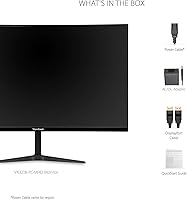
You will need a DisplayPort cable to hit 180Hz — HDMI tops out at 165Hz on this monitor. ViewSonic typically includes a cable in the box, but it is worth checking what is included with your specific unit and picking up a certified DisplayPort 1.2 cable if needed.

Yes, both consoles connect via HDMI and the monitor will work fine. Just keep in mind that current consoles output at up to 4K or 1080p60 or 120Hz depending on the game, so you will not be using the full 165Hz HDMI ceiling in most cases. For pure console use, the large curved screen is still a great experience.

It depends entirely on how you use it. For gaming at a normal desk distance, the lower pixel density is rarely distracting — motion and immersion take priority over sharpness. If you plan to use this as a primary work monitor for reading documents or browsing, the softness in text is more noticeable and may bother you over time.

MPRT (Moving Picture Response Time) measures how long a pixel appears to stay lit during motion, which relates to perceived motion blur. GtG (Gray-to-Gray) measures the actual speed of pixel transitions between shades. For gaming, GtG is generally the more meaningful number. The 1ms MPRT on this monitor is achieved with backlight strobing and does not mean the panel transitions pixels in 1ms — the actual GtG for an MVA panel is typically in the 4 to 8ms range.

Many Nvidia GPUs support Adaptive Sync (G-Sync Compatible mode) over DisplayPort, which can work with FreeSync monitors like the VX3218-PC-MHD. However, this is not a certified G-Sync Compatible monitor, so results may vary depending on your GPU and driver version. AMD GPU owners get a fully certified and reliable experience.

Not with the included stand, no. It tilts forward and back but offers no height adjustment, swivel, or rotation. If you need more flexibility, the monitor is VESA compatible (100x100mm pattern), so swapping to a third-party monitor arm is a practical and popular solution among buyers.

They are functional but modest — 2 watts per channel is enough for system sounds or background audio in a quiet room. For gaming with any kind of sound design, music, or voice chat, you will want headphones or external speakers. Most buyers treat the built-in audio as a backup option at best.

It does warm up the image noticeably, which shifts whites toward yellow and reduces perceived brightness slightly. For gaming sessions, many users find a moderate Blue Light Filter setting acceptable. If color fidelity matters to you, it is better to use the standard picture mode and take regular breaks instead.

The combination of a 32-inch curved panel with a 180Hz refresh rate at this price point is genuinely rare. Most competitors at a similar price either offer a smaller screen or a lower refresh rate. The MVA panel also brings stronger contrast than typical TN-based budget monitors, which makes darker game environments look richer. The trade-off is the 1080p resolution and the basic ergonomics.

Honestly, it takes a little getting used to. The physical buttons on the back-right edge of the monitor are not the most intuitive to locate or press, and the menu layout requires a few sessions before it feels natural. Once you have dialed in your preferred settings, you rarely need to go back into the OSD, so it is more of a first-time friction than an ongoing annoyance.

Where to Buy