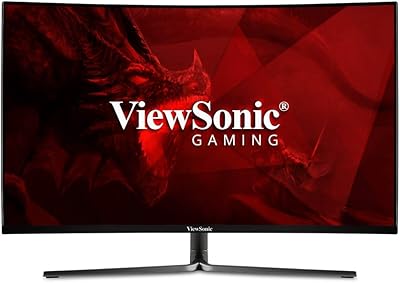
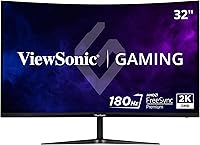
ViewSonic VX3218C-2K 32-inch Curved Gaming Monitor
ViewSonic VX3218C-2K 32-inch Curved Gaming Monitor — image 1
ViewSonic VX3218C-2K 32-inch Curved Gaming Monitor — image 2
ViewSonic VX3218C-2K 32-inch Curved Gaming Monitor — image 3
ViewSonic VX3218C-2K 32-inch Curved Gaming Monitor — image 4
ViewSonic VX3218C-2K 32-inch Curved Gaming Monitor — image 5
ViewSonic VX3218C-2K 32-inch Curved Gaming Monitor — image 6
ViewSonic VX3218C-2K 32-inch Curved Gaming Monitor — image 7
77%
23%

Overview

The ViewSonic VX3218C-2K 32-inch Curved Gaming Monitor sits in a surprisingly competitive spot — a 32-inch QHD curved panel built for gamers who want a meaningful upgrade from 1080p without breaking the bank. ViewSonic has built monitors for decades, and this model reflects that grounded approach: it's not chasing specs for the sake of it, just delivering a reliable, well-rounded display at an accessible price point. The 1500R curve wraps the image around your field of view naturally at this size, and the QHD resolution adds noticeably sharper detail over standard 1080p setups. It's a straightforward value play in a crowded category.

Features & Benefits

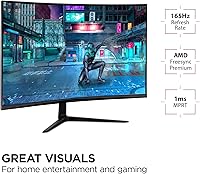
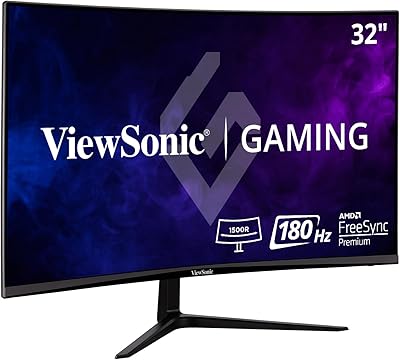
The high refresh rate is what most people are here for, and at 180Hz this curved gaming monitor keeps up with all but the most demanding competitive setups. Worth knowing: the 1ms MPRT spec refers to backlight strobing, not traditional pixel response time — it's a motion-clarity mode, not a measurement of how fast individual pixels shift. That distinction matters when comparing specs across panels. AMD FreeSync Premium handles adaptive sync reliably with compatible GPUs, eliminating screen tearing without the cost of a G-Sync alternative. The game presets for FPS and MOBA titles adjust contrast and sharpness in ways some users find useful, though experienced users tend to calibrate manually. Hitting the full 180Hz requires DisplayPort, not HDMI.

Best For

The VX3218C-2K makes the most sense for PC gamers who want to step up to QHD without committing to a premium panel price. If you play competitive FPS titles or strategy games and refresh rate matters more to you than color accuracy, this display lands in a strong spot. It also works well for hybrid setups where you split time between a PC and a console, since both HDMI and DisplayPort inputs are available. Home office workers who game in the evenings will appreciate the built-in eye-care features. That said, if you need accurate color for photo editing or design work, this is not the right tool — color-critical work demands an IPS panel. Tight desk spaces may also struggle with the 32-inch footprint.

User Feedback

Across a large base of verified purchases, the pattern is fairly consistent: buyers are genuinely satisfied with the image quality straight out of the box and frequently cite the size-to-price ratio as a standout. Where things get more nuanced is the stand — multiple reviewers flag limited height and tilt adjustment, with a few noting some wobble on lighter desks. Color accuracy draws a predictable split: gamers are happy, but anyone who expected IPS-like vibrancy is often disappointed. A handful of users report that the OSD menu navigation feels sluggish and unintuitive. On the reliability front, most long-term owners report no issues after extended daily use, which is a reasonable signal for a monitor at this price tier.

Pros

  • QHD resolution at 32 inches delivers a sharp, detailed image that is a clear step up from 1080p gaming setups.
  • The high refresh rate keeps gameplay fluid and responsive, which makes a real difference in competitive or fast-action titles.
  • AMD FreeSync Premium eliminates screen tearing effectively, especially for users already in the AMD GPU ecosystem.
  • Out-of-the-box image quality consistently earns praise from buyers, with minimal setup required to get a good-looking picture.
  • The 1500R curve enhances immersion at this panel size without feeling exaggerated or uncomfortable during extended sessions.
  • Flicker-free backlight and blue light filter make this curved gaming monitor a reasonable choice for long daily use.
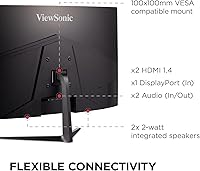
  • Dual inputs — HDMI and DisplayPort — give real flexibility for users running multiple devices from a single display.
  • Matte screen finish handles reflections well in brightly lit rooms, reducing glare without heavy anti-glare graininess.
  • Long-term reliability reports from verified buyers are generally positive, with few hardware failure complaints over extended use.

Cons

  • The stand lacks height adjustment, making ergonomic positioning frustrating for users who need to fine-tune their setup.
  • Some wobble is reported on the stand, particularly on lighter or narrower desks, which can be distracting during use.
  • The OSD menu navigation is widely described as sluggish and unintuitive, slowing down basic calibration tasks.
  • Color accuracy is limited compared to IPS alternatives at a similar price — saturation and hue consistency are not its strengths.
  • Reaching the maximum refresh rate requires a DisplayPort connection; HDMI users will be capped at a lower ceiling.
  • The 1ms MPRT rating refers to backlight strobing, not native pixel response — actual pixel transitions can show some trailing in dark scenes.
  • Off-angle viewing degrades noticeably, which matters in shared viewing scenarios or multi-monitor setups at wide angles.
  • No USB hub or built-in speakers, which some buyers in this price range have come to expect as baseline conveniences.

Ratings

The scores below reflect an AI-assisted analysis of thousands of verified buyer reviews for the ViewSonic VX3218C-2K 32-inch Curved Gaming Monitor, with spam, incentivized, and bot-flagged submissions actively filtered out to ensure the results represent genuine user experience. The methodology deliberately captures both the consistent strengths that keep buyers satisfied and the recurring frustrations that show up across independent purchase reviews worldwide. Nothing here is cherry-picked — the ratings reflect the full picture.

Value for Money
88%
Buyers consistently flag this curved gaming monitor as one of the more honest value propositions at its price tier — you get QHD resolution, a high refresh rate, and adaptive sync without paying the premium attached to more marketed brands. For gamers stepping up from a budget 1080p display, the perceived upgrade feels substantial relative to the outlay.
A small but vocal group of reviewers feel that similarly priced IPS monitors edge it out on color quality, which slightly undercuts the value argument for buyers who want a more versatile display. Those who also need ergonomic flexibility end up spending extra on a monitor arm, which adds to the effective cost.
Gaming Performance
91%
The high refresh rate makes a tangible difference in fast-paced competitive titles — enemy movement is visibly smoother, and the display keeps up without obvious judder or frame pacing issues during sustained gameplay. FreeSync Premium integration works reliably with AMD GPUs, keeping the experience consistently tear-free during sessions that would otherwise expose frame rate mismatches.
Reaching the panel's full refresh rate ceiling requires a DisplayPort connection, which catches some buyers off guard if their GPU only has HDMI outputs readily available. The MPRT-based response time is also a strobing technique rather than a true pixel transition metric, so some dark-scene ghosting is still visible in demanding scenarios.
Image Quality
78%
22%
Out of the box, the VX3218C-2K produces a punchy, high-contrast image that most gaming-focused buyers find immediately satisfying without needing significant calibration. The QHD resolution at 32 inches delivers noticeably sharper in-game textures and UI elements compared to 1080p panels at the same size.
Color accuracy is clearly limited by VA panel characteristics — saturation and hue consistency fall short of what comparable IPS displays can offer, which becomes apparent during content that demands faithful color reproduction. Off-axis viewing degrades faster than buyers sometimes expect, which is a real limitation in shared viewing situations or wide multi-monitor arrangements.
Build Quality
71%
29%
The monitor body itself feels solid and the bezels are slim enough to look current on a modern desk setup. The matte finish on the panel is well-applied and does not add distracting grain to the image, which is a common trade-off on cheaper anti-glare coatings.
The stand is the most-criticized physical element — multiple reviewers describe it as wobbly on lighter desk surfaces and note that the construction feels noticeably less premium than the panel itself. For a display of this weight and size, the base rigidity leaves something to be desired.
Ergonomics
54%
46%
The tilt adjustment that is included works smoothly enough for basic angle changes, and VESA compatibility means buyers who invest in a monitor arm can achieve whatever positioning they need. For users on a fixed desk at a standard height who sit directly in front of the display, the default positioning is adequate.
The absence of height, swivel, or pivot adjustment from the factory stand is a genuine drawback for anyone who shares a desk or needs to fine-tune their viewing angle for posture reasons. This is one of the most consistently mentioned limitations across independent reviews, and it pushes buyers toward an additional purchase to get ergonomics right.
Eye Comfort
83%
The flicker-free backlight is one of the features buyers who use this display for long work sessions specifically call out as genuinely useful — extended hours in front of the screen are less fatiguing compared to panels without this implementation. The blue light filter mode is effective at reducing intensity for late-night use without introducing an overly orange cast at moderate settings.
Some users report that enabling the MPRT motion-clarity mode reintroduces a strobing effect that negates the flicker-free benefit, so the two features are effectively in tension with each other. At the brightest output levels, a small number of buyers with high light sensitivity note some residual discomfort during very long sessions.
OSD & Controls
57%
43%
The on-screen menu covers all the settings most users need, including input switching, game mode presets, and brightness controls that are accessible without digging too deep into submenus. The physical control button placement is functional and easy to locate by touch once you are familiar with the layout.
Navigating the OSD is widely described as slow and unintuitive, with menu traversal that feels like it has noticeable input lag compared to competing monitors in the same category. Buyers who frequently adjust settings — switching between game modes or recalibrating for different content — find the experience genuinely frustrating over time.
Connectivity
76%
24%
Having both HDMI and DisplayPort inputs covers the vast majority of modern PC and console connection needs without requiring a switch or adapter. This makes the display a practical choice for users running a gaming PC and a console from a single monitor without constantly swapping cables.
The port selection is minimal beyond those two inputs — there is no USB hub, no audio passthrough to external speakers via dedicated port, and no USB-C, which is increasingly expected even at this price point. Buyers who expected more peripheral connectivity options will need to source a separate hub.
Refresh Rate Experience
89%
At its maximum refresh rate, the smoothness improvement over 60Hz or even 144Hz panels is visible and meaningful in practice — panning shots in open-world games and tracking fast opponents in shooters both benefit noticeably. The combination of high refresh and adaptive sync makes the overall motion experience one of the strongest arguments for this display.
The caveat is that unlocking the maximum refresh rate requires both a capable GPU and the right cable, which is not always spelled out clearly at point of purchase. Buyers using older mid-range graphics cards may find their hardware bottlenecks the display before the panel's ceiling becomes relevant.
Color Accuracy
61%
39%
For gaming, the contrast and color balance are well-tuned enough that most players find the image engaging and natural-looking during typical gameplay scenarios. Dark scenes benefit from the VA panel's contrast advantage, producing deeper blacks than IPS panels at this price can typically achieve.
Anyone who has worked on a color-accurate IPS display will notice the difference immediately — hue accuracy and color consistency across the panel face are clear weaknesses of this display type. Buyers who assumed VA and IPS panels perform comparably for color work are consistently disappointed, particularly with skin tones and gradient rendering.
Setup & Assembly
84%
Assembly is straightforward and does not require tools — the stand clicks into the monitor base quickly, and most buyers report being up and running within minutes of opening the box. The included documentation is clear enough that even first-time monitor buyers rarely report confusion during setup.
Cable management options built into the stand are minimal, which leaves visible wire clutter behind the display unless buyers use third-party solutions. A small number of reviewers mention that the DisplayPort cable required for full refresh rate is not always included in every regional packaging variant.
Curvature & Immersion
82%
18%
The 1500R curve at 32 inches hits a comfortable middle ground — immersive enough to draw the image into your peripheral field naturally without producing the distortion that tighter curvatures can cause on flat surfaces. Single-monitor users in particular find it adds meaningful presence compared to flat panels of the same size.
For buyers coming from flat displays, the curve takes a short adjustment period before text on the edges feels fully comfortable, particularly during web browsing or document editing. In multi-monitor configurations, the curvature can create alignment challenges with adjacent flat panels.
Long-Term Reliability
81%
19%
Verified purchase reviewers who have owned this display for a year or more largely report no hardware failures, dead pixels, or backlight degradation — a reassuring signal for a monitor in this price bracket. ViewSonic's general reputation for reliable consumer displays aligns with what owners of this model describe over time.
There are scattered reports of OSD firmware quirks that persist across updates, and a small number of owners have noted panel uniformity issues appearing after extended daily use. These are not widespread failures, but they are present in the review pool at a frequency worth noting.

Suitable for:

The ViewSonic VX3218C-2K 32-inch Curved Gaming Monitor is a strong fit for PC gamers who want a tangible visual upgrade from 1080p without committing to a high-end budget. The jump to QHD at this screen size is genuinely noticeable — text is sharper, game environments have more texture detail, and the 1500R curve adds a layer of immersion that flat panels at this size simply do not replicate. Competitive players in fast-paced genres will appreciate the high refresh rate, which keeps motion smooth and responsive during intense sessions. The inclusion of AMD FreeSync Premium makes it particularly well-suited for AMD GPU owners looking for tear-free gameplay without paying extra for proprietary sync technology. Home office users who also game will find the flicker-free backlight and blue light filter useful for reducing fatigue during long hours in front of the screen. Anyone running a dual-input setup — say, a gaming PC and a console side by side — will benefit from having both HDMI and DisplayPort available without needing a switch.

Not suitable for:

Buyers who prioritize color accuracy and wide color gamut coverage should look elsewhere, as this ViewSonic display uses a VA-type panel that, while decent for gaming contrast, falls noticeably short of IPS panels when it comes to color fidelity and off-axis viewing. Graphic designers, video editors, or photographers who rely on precise color reproduction will find the panel's characteristics limiting for professional work. The stand offers minimal ergonomic flexibility — there is no height adjustment and only basic tilt, which is a real drawback for users who are particular about monitor positioning or who share a desk across different users. The 32-inch footprint also demands a reasonably deep desk; smaller workspaces may find the physical size awkward. Users with NVIDIA GPUs should note that FreeSync compatibility with NVIDIA cards is possible but not guaranteed to be fully stable across all titles. Finally, anyone hoping to use this as a primary content consumption display for color-rich films or HDR content will likely be underwhelmed by the panel's HDR handling at this price tier.

Specifications

  • Panel Size: The display measures 32 inches diagonally, offering a large viewing area well-suited to immersive gaming and productivity use.
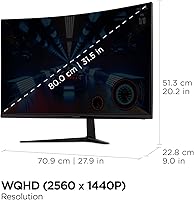
  • Resolution: Native resolution is 2560x1440 (QHD), delivering noticeably sharper detail than standard 1080p at this screen size.
  • Refresh Rate: The panel supports a maximum refresh rate of 180Hz, enabling smoother motion during fast-paced gameplay when connected via DisplayPort.
  • Response Time: The rated 1ms MPRT is achieved through backlight strobing rather than native pixel transition speed, which is a meaningful distinction when comparing monitors.
  • Panel Curvature: The 1500R curvature radius gently wraps the image around the viewer's field of vision, enhancing immersion at the 32-inch form factor.
  • Aspect Ratio: The screen uses a standard 16:9 widescreen aspect ratio, compatible with virtually all modern games, operating systems, and media content.
  • Screen Finish: The matte anti-glare coating reduces reflections from ambient light sources, making the display more comfortable in typical room lighting conditions.
  • Adaptive Sync: AMD FreeSync Premium is supported, providing dynamic refresh rate synchronization to reduce screen tearing and stuttering with compatible AMD GPUs.
  • Connectivity: The monitor includes one HDMI input and one DisplayPort input; DisplayPort is required to reach the full 180Hz refresh rate.
  • Eye Care: Flicker-Free backlight technology and a Blue Light Filter mode are built in to reduce visual fatigue during extended viewing sessions.
  • Visual Modes: Pre-configured picture modes for FPS, RTS, and MOBA genres adjust contrast and sharpness settings to suit each game type.
  • Dimensions: The assembled monitor measures approximately 27.9 inches wide, 20.2 inches tall, and 9 inches deep including the stand.
  • Weight: The full unit including stand weighs 16.5 pounds, which is typical for a 32-inch monitor in this category.
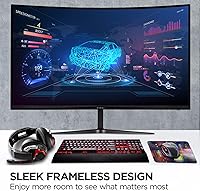
  • Color: The monitor is finished in black with a relatively slim bezel design that keeps the panel border visually minimal.
  • Voltage: The display is rated for 100 volts input, so buyers outside standard North American regions should verify local power compatibility.
  • Ergonomics: The included stand supports basic tilt adjustment only; it does not offer height, swivel, or pivot adjustment without a third-party VESA mount.
  • VESA Compatibility: The monitor supports VESA mounting, allowing users who need full ergonomic flexibility to attach it to a compatible arm or wall bracket.
  • Brand: ViewSonic is an established display manufacturer with a broad product range spanning consumer, professional, and commercial monitor categories.

Related Reviews
ViewSonic VX3218-PC-MHD 32-Inch Curved 1080p Gaming Monitor
84%
88%
Performance for Gaming
84%
Visual Quality
92%
Value for Money
80%
Build Quality
85%
Eye Care Features
More
ViewSonic VX3258-PC-MHD 32-inch Curved 1080p Gaming Monitor
82%
91%
Gaming Performance
84%
Visual Quality
95%
Refresh Rate & Response Time
80%
Build Quality
70%
Ergonomics & Adjustability
More
ViewSonic VS3225-2K 32-inch QHD IPS Monitor

78%
88%
Image Clarity
81%
Color Accuracy
86%
Eye Comfort
83%
Build & Design
51%
Stand & Ergonomics
More
KOORUI 32-inch Curved Gaming Monitor
84%
89%
Display Quality
92%
Gaming Performance
78%
Build Quality
85%
Color Accuracy
82%
Ergonomics & Comfort
More
KTC H32S17C 32-inch Curved Gaming Monitor
72%
91%
Value for Money
84%
Gaming Performance
76%
Picture Quality
52%
HDR Experience
67%
Color Accuracy
More
Gawfolk GF320C 32-Inch Curved Gaming Monitor
75%
88%
Refresh Rate Performance
83%
Image Quality
76%
Motion Clarity
86%
Curvature & Immersion
91%
Value for Money
More
AOC C32G2 32-inch Curved Gaming Monitor
87%
94%
Gaming Performance
89%
Display Quality
72%
Build Quality
88%
Color Accuracy
85%
Ease of Setup
More
ViewSonic VX2728J-2K 27-Inch Gaming Monitor
86%
89%
Gaming Performance
93%
Display Quality
86%
Ergonomics and Adjustability
82%
Setup and Installation
78%
Build Quality
More
Gawfolk GF320E 32-inch 2K Curved Monitor
81%
91%
Display Quality
88%
Ease of Setup
90%
Value for Money
80%
Build Quality
85%
Curvature Experience
More
Samsung 32-Inch S39C Curved Gaming Monitor
83%
88%
Display Quality
91%
Value for Money
86%
Eye Comfort
89%
Ease of Setup
85%
Build Quality
More

FAQ

Yes, you need to use the DisplayPort connection to reach the full 180Hz refresh rate. If you connect via HDMI, the maximum refresh rate will be lower, so make sure your PC has a DisplayPort output before assuming you can hit the top end.

The VX3218C-2K supports AMD FreeSync Premium natively, and many NVIDIA GeForce cards do support FreeSync displays under the G-Sync Compatible program — but compatibility is not guaranteed across every GPU model or game. It will still function as a normal high-refresh-rate monitor with an NVIDIA card; you just may not get fully certified adaptive sync support.

Yes, you can connect a current-generation console via the HDMI port. Keep in mind that consoles typically cap output at 120Hz at 1080p or lower resolutions at higher frame rates, so you may not be taking full advantage of the panel's refresh rate ceiling, but it works well for console gaming.

Not exactly. MPRT stands for Moving Picture Response Time and is measured with backlight strobing enabled, not under standard pixel-transition conditions. It reflects how long a pixel appears lit during motion, which is a different metric than the traditional gray-to-gray response time spec. In practice it means motion clarity can be improved when the mode is active, but some users find backlight strobing causes visible flicker.

No — the included stand only offers basic tilt adjustment. If you need to raise, lower, or swivel the panel, you will need to use a VESA-compatible monitor arm. The good news is that VESA mounting is supported, so third-party arms are straightforward to attach.

Honestly, not ideally. The VA-type panel produces decent contrast and looks great for gaming, but color accuracy and off-axis consistency are not its strengths compared to IPS panels. If color-critical work is part of your workflow, an IPS display calibrated to a color profile will serve you better.

At a 1500R curvature on a 32-inch panel, it feels natural rather than dramatic. Most users seated at a normal desk distance find it comfortable and immersive without the exaggerated fish-eye effect that tighter curves can produce. It also makes sense for a single-monitor setup, since the edges stay within comfortable viewing angles.

It genuinely helps for long sessions. It shifts the color temperature toward warmer tones, which does reduce the intensity of short-wavelength light that can contribute to eye fatigue. It will affect color accuracy while active, so most users toggle it on for late-night browsing or work and switch it off for gaming or media where accurate color matters more.

This is one of the more consistent complaints from buyers — the OSD controls are functional but feel sluggish and are not the most intuitive to navigate. Basic adjustments like brightness and input switching are fine, but deeper calibration settings take some patience to work through. It is not a dealbreaker, but worth knowing if you plan to dial in settings frequently.

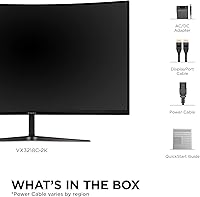
ViewSonic typically includes a DisplayPort cable and sometimes an HDMI cable in the box, along with a power cable. It is always worth checking current retail listings for the exact included accessories, since bundled cables can vary by region or retail channel.