Overview

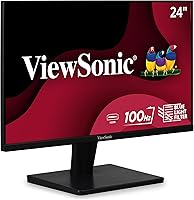
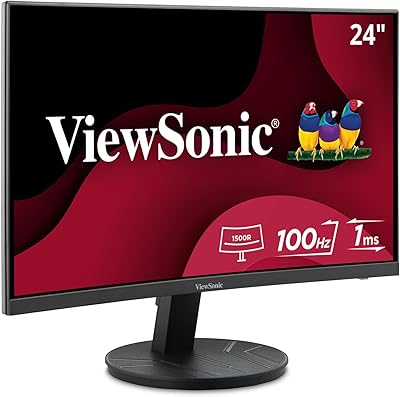
The ViewSonic VS2447M 24-Inch FHD Monitor is ViewSonic's answer to a question a lot of buyers are quietly asking: can you get a decent, reliable screen without spending a fortune? ViewSonic has been making solid mid-tier displays for years, and this one lands comfortably in that tradition. It sits at #42 in Computer Monitors on Amazon with a 4.4-star rating from over 700 buyers — numbers that suggest real, sustained satisfaction rather than a lucky launch week. Physically, this ViewSonic monitor is tidy: slim bezels on three sides, a matte panel, and a compact build that won't dominate a modest desk. Don't expect premium materials or exotic features. This is a workhorse built for people who need a dependable daily screen.
Features & Benefits

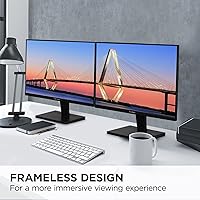
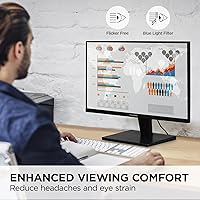
The 100Hz refresh rate is where this 24-inch display quietly punches above its weight class. Compared to a standard 60Hz panel, motion during scrolling, video playback, and lighter gaming looks noticeably cleaner. Pair that with AMD FreeSync and you get tear-free output even with modest graphics hardware — no expensive GPU required. For anyone logging long hours at a desk, the Flicker-Free technology and built-in blue light filter genuinely reduce that familiar end-of-day eye strain. The matte coating handles ambient light well, keeping reflections manageable in brighter rooms. Connectivity covers both HDMI and VGA, which matters if you're connecting older equipment or switching between devices. The thin bezel also makes side-by-side dual-monitor arrangements look clean without visible gaps.

Best For

This ViewSonic monitor makes most sense for home office workers and students who want a reliable screen without overthinking the purchase. If you spend most of your day in spreadsheets, documents, or video calls, 1080p at this size is more than enough. Students building a first workstation will appreciate the low barrier to entry; older hardware users will welcome the VGA input alongside HDMI since it's increasingly rare at this price. Casual gamers get a real benefit from 100Hz and FreeSync, though it's worth being clear: this is not a dedicated gaming display. Response times and color volume won't satisfy competitive players. But for side-by-side dual-monitor builds, those thin three-sided bezels make it a genuinely practical option.

User Feedback

Buyers consistently praise how straightforward the VS2447M is to set up and how comfortable it is to use over a full workday, with many noting a tangible reduction in eye fatigue compared to older screens. The image is described as sharp and well-lit for the price. That said, the feedback isn't without honest criticism. The stand is a sticking point for many: there is no height adjustment or pivot, which limits ergonomic flexibility for taller users or those with specific desk arrangements. A few buyers also mention that while colors look fine for general use, the display isn't suited for photo editing or color-sensitive work. Build quality reads as functional rather than sturdy — the plastic housing feels appropriately light for the price tier. Overall, the majority land on strong value for money as their takeaway.

Pros

  • 100Hz refresh rate makes everyday scrolling, video, and casual gaming noticeably smoother than standard 60Hz monitors.
  • Flicker-free backlight and blue light filter provide real, tangible relief for users working long hours at a desk.
  • AMD FreeSync eliminates screen tearing without requiring an expensive or specific graphics card.
  • The matte anti-glare coating handles bright rooms and mixed office lighting significantly better than glossy panels.
  • HDMI and VGA dual inputs offer genuine flexibility for connecting both modern laptops and older desktop hardware.
  • Thin three-sided bezels make the VS2447M a practical and visually clean choice for dual-monitor configurations.
  • Out-of-box setup is fast and tool-free, with a usable image right away and no driver installation required.
  • At its price point, the feature set — refresh rate, adaptive sync, eye care — consistently exceeds buyer expectations.
  • The 4.4-star average across 700-plus verified buyers reflects consistent, sustained satisfaction rather than a spike from launch-week reviews.

Cons

  • The stand provides tilt adjustment only — no height, swivel, or pivot, which limits ergonomic flexibility for many users.
  • Color accuracy is too limited for photography, graphic design, or any professionally color-sensitive workflow.
  • No USB-C or DisplayPort connectivity makes this a poor fit for modern compact laptops and cable-minimalist setups.
  • Black levels and shadow detail fall short in dark rooms, making nighttime movie watching a noticeably flat experience.
  • The all-plastic chassis feels lightweight in a way that reads as cheap rather than portable.
  • The on-screen display menu is outdated in layout and the physical button placement makes adjustments awkward without looking.
  • Competitive or fast-paced gaming quickly exposes the panel's response time limitations beyond what 100Hz alone can mask.
  • Only two input ports means switching between three or more devices requires an external HDMI switcher.
  • Color consistency between units is generally reliable but not guaranteed across different production batches for matched dual-monitor setups.

Ratings

The ViewSonic VS2447M 24-Inch FHD Monitor earns a strong consensus across thousands of verified global purchases, and the scores below reflect exactly that — generated by AI after systematically analyzing real buyer reviews worldwide, with spam, incentivized posts, and bot activity filtered out before a single number was calculated. The VS2447M performs well where budget-conscious buyers need it most, but the ratings also surface genuine trade-offs that shoppers deserve to know before committing.
Value for Money
93%
Buyers consistently describe this 24-inch display as one of the most satisfying purchases at its price point, often comparing it favorably against pricier alternatives they considered. The combination of 100Hz, FreeSync, and eye care features at this tier makes the price feel almost unreasonably fair.
A small segment of buyers who were expecting IPS-level color richness felt the value proposition weakened once they saw the panel's color limitations. For purely office use the score holds, but creative buyers may feel they need to spend more to get real color accuracy.
Image Clarity
81%
19%
At 24 inches, the 1920x1080 resolution hits a comfortable pixel density that makes text crisp and web content easy to read for long stretches. Most users transitioning from older or lower-resolution displays report an immediately noticeable improvement in sharpness.
Buyers coming from higher-resolution panels will find 1080p limiting, especially for detailed design work or 4K video content. The display does not upscale gracefully, and those with sharp eyes may notice pixel structure during fine-detail tasks at close viewing distances.
Eye Comfort
88%
This is one of the VS2447M's genuine standout qualities in real-world use. Remote workers and students logging eight-plus-hour days repeatedly mention reduced eye strain compared to their previous monitors, crediting the flicker-free backlight and blue light filter as practical, not just marketing.
The blue light filter does introduce a subtle warm color shift at stronger settings, which some users find affects their perception of whites and light grays during document editing. It works well, but buyers who need accurate color temperature alongside eye protection may find the trade-off frustrating.
Refresh Rate & Smoothness
79%
21%
The jump from 60Hz to 100Hz is genuinely perceptible during everyday use — scrolling through long documents, watching fast-moving video, and casual gaming all feel noticeably cleaner and less choppy. Casual gamers in particular appreciate the smoothness without having to buy a purpose-built gaming monitor.
Hardcore or competitive gamers will quickly hit the ceiling here. Response time and motion handling are not in the same league as dedicated gaming panels, and the 100Hz advantage loses relevance once frame rates push past what the rest of the display can handle cleanly.
Adaptive Sync (FreeSync)
76%
24%
FreeSync does its job reliably for the audience this monitor targets. Buyers using mid-range AMD graphics cards report clean, tear-free output during gaming sessions and video playback without needing to fiddle with settings or invest in premium GPU hardware.
The sync range is limited compared to higher-end FreeSync Premium displays, and buyers with NVIDIA GPUs cannot take advantage of the feature at all. It is a solid bonus for the right user, but not a reason by itself to choose this display over a competitor.
Color Accuracy
62%
38%
For spreadsheets, web browsing, video calls, and general media consumption, colors look natural and consistent enough that most users never feel the need to calibrate. The matte coating keeps things looking clean even in varied lighting conditions.
Anyone who works with photography, graphic design, or color-graded video will find the panel's color gamut noticeably narrow. Buyers who tested it against sRGB-targeted content reported visible inaccuracies, and the factory calibration leaves measurable room for improvement even for casual use.
Contrast & Black Levels
67%
33%
In normal office lighting, contrast feels adequate and blacks appear reasonably deep for a budget LED panel. For daytime productivity use, most buyers never feel like the image looks flat or washed out.
In darker rooms or during nighttime movie watching, the limitations of the LED panel become more apparent — blacks shift toward a dark gray, and shadow detail in darker scenes is lost. This is a meaningful drawback for anyone who uses their monitor for films or immersive gaming environments.
Build Quality
63%
37%
The VS2447M is solidly constructed for its price bracket — it does not wobble or creak during normal use, and the stand holds its tilt position without drifting over time. The slim bezels look clean and modern on a desk.
The all-plastic chassis feels noticeably light and hollow, which can make the monitor feel less premium than the image quality might suggest. A few buyers reported minor flex in the back panel under light pressure, and the overall build confidence is noticeably lower than mid-range competitors.
Stand & Ergonomics
44%
56%
Setup is genuinely quick and tool-free, and the stand offers basic tilt adjustment that covers the typical angle range most users need for a fixed desk position.
The stand's limitations are a recurring frustration in buyer feedback. There is no height adjustment, no swivel, and no pivot to portrait mode — meaning taller users or those with ergonomic setups often have to resort to monitor arms or book stacks to reach a comfortable eye level. For a home office display, this is a real daily inconvenience.
Connectivity
74%
26%
Having both HDMI and VGA is genuinely useful in a world where plenty of older desktops and projectors still run VGA outputs. Buyers switching between a laptop and a desktop appreciate not needing an adapter for either connection.
The lack of USB-C or DisplayPort is a legitimate gap for modern users, especially those connecting newer MacBooks or compact laptops that have moved away from full-size HDMI. Two inputs also means no room for a quick three-device switch without an external switcher.
Anti-Glare Performance
82%
18%
The matte coating is one of this display's quiet strengths. In shared offices, bright living rooms, or spaces with windows opposite the desk, the VS2447M holds up significantly better than glossy alternatives, keeping reflections diffused rather than distracting.
The matte treatment does slightly dull peak brightness perception and can give images a faintly hazy quality under intense overhead lighting. It is the right trade-off for most office environments, but buyers prioritizing vivid image pop will find the coating works against that goal.
Setup & Out-of-Box Experience
91%
Almost universally praised in buyer feedback — the monitor ships well-protected, assembles in minutes without tools, and displays a usable image immediately without requiring any calibration or driver installation. Buyers with limited technical experience specifically called this out as a relief.
The included cables are limited, and a handful of buyers reported that the on-screen display menu is somewhat dated in layout, making fine adjustments like brightness or color temperature less intuitive than on competing monitors at similar prices.
Multi-Monitor Compatibility
78%
22%
The thin three-sided bezels make the VS2447M a practical choice for dual-monitor configurations. The gap between two units is narrow enough that most buyers describe the transition between screens as visually clean during everyday use.
The lack of a height-adjustable stand makes perfectly aligning two units at the same height harder than it should be, usually requiring aftermarket arms. Color consistency between two VS2447M units is generally good, but not guaranteed to be identical across production batches.
OSD & Controls
58%
42%
The physical buttons for the on-screen display are accessible and responsive, and navigating basic settings like input switching or brightness takes only a few button presses once a user learns the layout.
The OSD menu itself is functional but dated — the interface is not intuitive on first use, and the button placement on the back-bottom edge of the panel makes adjustments slightly awkward without looking. Buyers accustomed to joystick-based OSD controls on newer monitors find this a step backward.

Suitable for:

The ViewSonic VS2447M 24-Inch FHD Monitor is a strong fit for anyone who needs a dependable, comfortable screen for daily use without a complicated buying decision. Home office workers who spend six to eight hours a day in front of a screen will appreciate the flicker-free backlight and blue light filter, which make a genuine difference over a full workday. Students furnishing a first desk or dorm room get a lot of practical display for a modest budget — sharp 1080p text, easy setup, and enough screen real estate to run multiple apps side by side. Casual gamers who game in their off hours and don't want to pay for a dedicated gaming panel will find the 100Hz refresh rate and FreeSync a welcome bonus on top of an already useful work monitor. Users still running older desktops or legacy peripherals will value the VGA input, which is increasingly rare at this price. And if you're building a dual-monitor setup on a budget, the thin bezels on three sides keep the visual gap between screens tight and clean.
Not suitable for:

The ViewSonic VS2447M 24-Inch FHD Monitor is not the right choice for buyers whose work depends on accurate color reproduction. Photographers, graphic designers, video editors, and anyone doing color-graded creative work will quickly find the panel's limited color gamut and imprecise factory calibration a real obstacle. Competitive or serious gamers who prioritize fast response times and high frame rate support should also look elsewhere — 100Hz is a comfortable bonus for casual play, but it is not in the same category as purpose-built gaming displays. Ergonomics are a genuine dealbreaker for taller users or those with strict posture requirements: the stand offers tilt only, with no height, swivel, or pivot adjustment, which means an aftermarket monitor arm is practically a necessity rather than an option. Users invested in a modern, cable-light workspace will be frustrated by the absence of USB-C and DisplayPort. If your primary use case is content creation or competitive gaming, the money is better spent on a panel built specifically for those demands.
Specifications

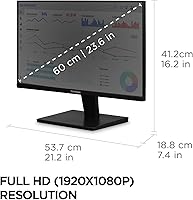
  • Screen Size: The display measures 24 inches diagonally, offering a comfortable viewing area suited to standard desk distances without requiring a wide desk footprint.
  • Resolution: Native resolution is 1920x1080 pixels (Full HD), delivering sharp text and clear imagery for productivity, browsing, and general media use.
  • Refresh Rate: The panel runs at a maximum of 100Hz, providing smoother motion than a standard 60Hz display during video playback, scrolling, and casual gaming.
  • Panel Type: Uses an LED-backlit LCD panel with a matte anti-glare surface coating to diffuse reflections in mixed or bright ambient lighting conditions.
  • Aspect Ratio: Standard 16:9 widescreen aspect ratio, compatible with all modern video formats, operating systems, and productivity layouts.
  • Adaptive Sync: AMD FreeSync (Variable Refresh Rate) is supported over HDMI, synchronizing the monitor's refresh rate with a compatible GPU's output to eliminate screen tearing.
  • Eye Care: Flicker-Free technology eliminates backlight flicker across all brightness levels, and a built-in Blue Light Filter reduces high-energy light emission for reduced eye fatigue during long sessions.
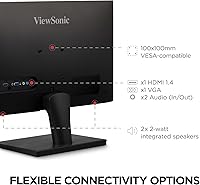
  • Inputs: Connectivity includes one HDMI port and one VGA port, supporting a wide range of modern and legacy devices without requiring adapters in most common setups.
  • Bezel Design: Three-sided thin bezels frame the display on the top and both sides, minimizing visual interruption in dual-monitor configurations.
  • Dimensions: The monitor measures 21.2 x 16.2 x 7.4 inches (width x height x depth) with the stand attached, fitting comfortably on most standard desks.
  • Weight: Total unit weight with stand is 6.2 pounds, making it easy to reposition or transport without assistance.
  • Stand Adjustment: The included stand supports tilt adjustment only; height, swivel, and pivot adjustments are not available without a third-party VESA-compatible monitor arm.
  • VESA Mounting: The VS2447M is compatible with standard VESA wall or arm mounts, allowing users to replace the stock stand for improved ergonomic positioning.
  • Color: The chassis and stand are finished in matte black, providing a neutral, professional appearance that suits most desk and workspace aesthetics.
  • OSD Controls: On-screen display settings are accessed via physical buttons located along the bottom-rear edge of the panel, covering brightness, contrast, input selection, and blue light filter levels.
  • Audio Output: The VS2447M does not include built-in speakers; external speakers or headphones connected to the source device are required for audio output.
  • Power Supply: The monitor operates on a standard AC power connection with an internal power supply, eliminating the need for an external power brick.
  • Certifications: ViewSonic lists this monitor as compliant with standard energy efficiency and safety certifications applicable to the North American and international markets.
  • Warranty: ViewSonic covers the VS2447M with a limited warranty; buyers should confirm current warranty terms directly with ViewSonic at time of purchase, as coverage periods may vary by region.
  • Amazon Rating: The monitor holds a 4.4 out of 5 star average rating based on over 700 verified buyer reviews on Amazon, placing it at #42 in the Computer Monitors category.

Related Reviews
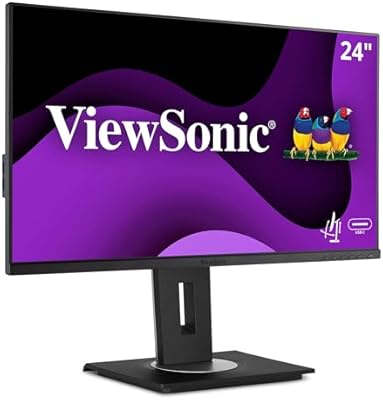
ViewSonic VG2456A 24-Inch Monitor
85%
92%
Build Quality
91%
Display Clarity
88%
Ergonomics & Comfort
85%
Connectivity Options
83%
Ease of Setup
More
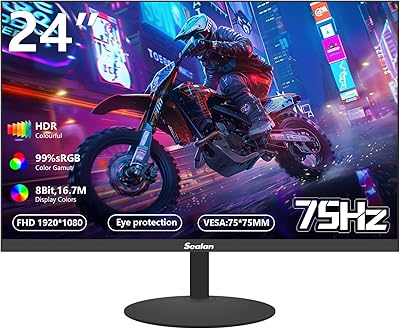
ViewSonic VG2455 24-inch Monitor
83%
91%
Ergonomic Comfort
88%
Display Quality
94%
USB-C Connectivity
89%
Eye Care Features
75%
Build Quality
More
ViewSonic VG2448A 24-Inch IPS Monitor
84%
88%
Value for Money
91%
Display Quality
85%
Ergonomics and Comfort
87%
Connectivity Options
90%
Ease of Setup
More
ViewSonic VA2416C 24-inch Curved Monitor
79%
83%
Image Quality
79%
Refresh Rate & Smoothness
86%
Eye Comfort & Fatigue
77%
Curvature & Immersion
51%
Stand & Ergonomics
More
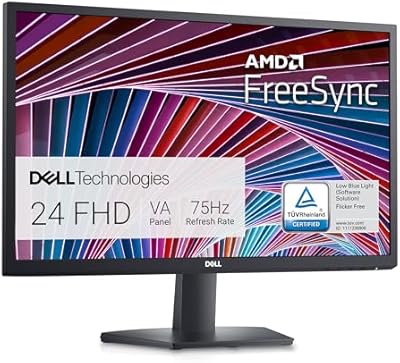
Viewedge USC2412FDA-P 24-inch FHD 144Hz Gaming Monitor
71%
83%
Value for Money
79%
Gaming Performance
76%
Image Quality
81%
Eye Comfort
63%
Build Quality
More
ArcticPro AD24EF2 24-inch Gaming Monitor
73%
88%
Value for Money
82%
Image Quality
79%
Gaming Performance
63%
Build Quality
84%
Connectivity
More
Amazon Basics 24-inch FHD 1080p Monitor
76%
83%
Image Quality
91%
Value for Money
78%
Refresh Rate & Smoothness
94%
Ease of Setup
52%
Stand & Ergonomics
More
ViewSonic XG2431 24-Inch Gaming Monitor
86%
92%
Gaming Performance
88%
Display Quality
93%
Response Time
85%
Ergonomics and Comfort
89%
Visual Clarity
More
Sealan Z24B1A 24-inch FHD Monitor
84%
89%
Value for Money
87%
Display Quality
91%
Ease of Setup
90%
Color Accuracy
84%
Ergonomics/Adjustability
More
Philips 24B2N2100 24-inch FHD Monitor
86%
92%
Value for Money
89%
Display Quality
88%
Gaming Performance
85%
Ergonomics and Comfort
91%
Energy Efficiency
More

FAQ

Yes, the VS2447M connects to Macs and MacBooks without any special software. If your MacBook has only USB-C ports, you will need a USB-C to HDMI adapter, which is not included in the box. Once connected, macOS recognizes it automatically and you can adjust resolution and arrangement through System Settings.

FreeSync on this display is officially supported for AMD GPUs. NVIDIA cards support adaptive sync on FreeSync monitors through the G-Sync Compatible program, but compatibility depends on your specific GPU model and driver version. Check NVIDIA's G-Sync Compatible list before assuming it will work with your setup.

It is genuinely well-suited for that. The combination of a flicker-free backlight and the blue light filter makes a noticeable difference over a full eight-hour workday compared to a basic monitor. The matte screen also helps in rooms where lighting conditions change throughout the day. Most remote workers who left reviews specifically mentioned reduced eye fatigue as a real benefit.

No, this monitor does not include internal speakers. You will need to use speakers or headphones connected to your computer or source device for audio. This is a common trade-off at this price point, and most users in this category already rely on external audio anyway.

Unfortunately, no. The included stand only supports tilt adjustment. There is no height, swivel, or pivot function. If ergonomics are a priority for you, the monitor does support VESA mounting, so pairing it with an aftermarket monitor arm is a straightforward fix.

At 24 inches, 1080p hits a pixel density that looks sharp and comfortable at a normal desk viewing distance of around 2 feet. Text is crisp, web content looks clean, and most users do not notice individual pixels during everyday use. If you were to sit very close or run it at a non-native resolution, you might see pixel structure, but at a standard desk setup it is a non-issue.

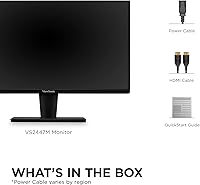
ViewSonic typically includes an HDMI cable with this monitor, along with a power cord. A VGA cable is generally not included, so if you plan to connect via VGA, you will need to supply your own cable. It is worth checking the box contents at the time of purchase since accessory bundles can vary.

Yes, it works well for console gaming at a casual level. Connect via HDMI, and you get a clean 1080p image with 100Hz smoothness that makes console games look noticeably fluid. FreeSync is a bonus for AMD-based hardware but does not apply to most current consoles. Just keep in mind that response times are adequate for casual play but not optimized for competitive fast-paced multiplayer gaming.

The blue light filter is accessible through the on-screen display menu, which you navigate using the physical buttons on the back-bottom edge of the panel. There are typically multiple filter strength levels to choose from. Be aware that higher blue light filter settings introduce a warm color tone, which is normal and expected.

Not really, and it is worth being upfront about that. The color gamut and factory calibration are adequate for general office tasks and media consumption, but they fall short of what professional or even enthusiast-level color work requires. If accurate color reproduction matters for your workflow, you should look at monitors specifically marketed for color accuracy, typically with wider color gamut coverage and better factory calibration.

Where to Buy