
Overview

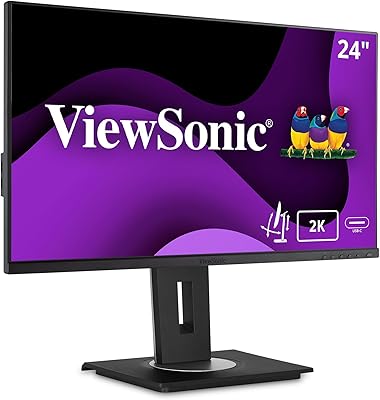
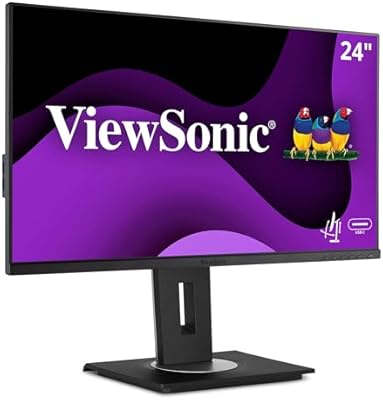
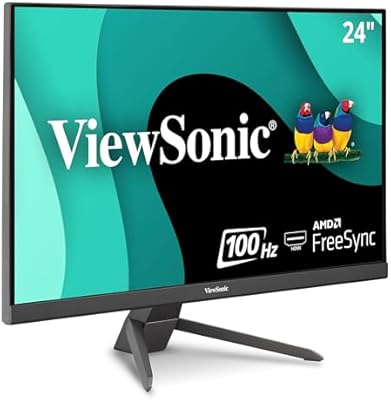
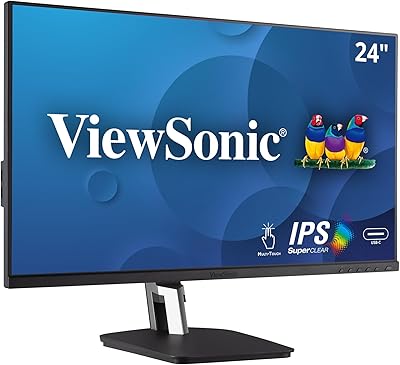
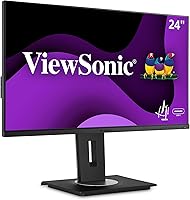
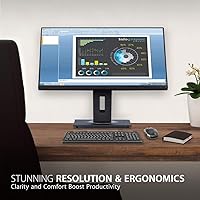
The ViewSonic VG2455 24-inch Monitor is a versatile, ergonomic display ideal for both home and office setups. Offering a 24-inch IPS screen with Full HD (1920x1080) resolution, this monitor delivers clear, vibrant visuals. The ergonomic stand allows for easy adjustments, including tilt, swivel, and height changes, ensuring comfort during long working hours. Connectivity is a breeze with options like USB-C, HDMI, DisplayPort, and VGA, providing flexibility for various devices. Additionally, its flicker-free technology helps reduce eye strain, making it a great option for users with extended screen time.

Features & Benefits

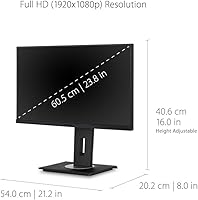
The VG2455 offers several features that enhance both functionality and comfort. Its USB-C port supports fast data transfer and 60W charging, reducing cable clutter and making it perfect for modern laptops. The built-in Blue Light Filter and flicker-free technology work together to minimize eye strain, ideal for those who spend long hours at their screens. Its 40-degree tilt and height adjustability make it easy to find the perfect viewing angle, while the slim bezels give it a sleek, modern look that suits any workspace.

Best For

The ViewSonic VG2455 is a great choice for professionals and home office workers who value ergonomic design and versatile connectivity. Its ability to handle multiple devices via USB-C, HDMI, and DisplayPort makes it ideal for people working with both PCs and Macs. Those with long screen time will appreciate the eye care features, which reduce fatigue and discomfort. Whether you need a monitor for general office work or a display for creative tasks, this 24-inch IPS monitor offers the flexibility and comfort required for all-day use.

User Feedback

Users are generally impressed with the VG2455's ergonomic features, particularly its adjustability. Many appreciate the sharp display and accurate colors, making it a solid choice for design and content creation. However, a few have noted that the stand could be more stable, especially when adjusting height or tilt. The USB-C connectivity is often highlighted as a standout feature, providing both charging and data transfer with a single cable. While some users report a slight lack of sturdiness, overall, the monitor delivers excellent value for its price range.

Pros

  • The ergonomic stand allows for tilt, swivel, and height adjustability, ensuring comfort during long work hours.
  • USB-C connectivity provides both fast data transfer and charging, making it ideal for modern work setups.
  • The display offers vibrant colors and sharp image clarity, appreciated by users for office tasks and media consumption.
  • Flicker-Free technology and the Blue Light Filter reduce eye strain, benefiting those with extended screen time.
  • With thin bezels, this monitor provides a sleek and modern look, fitting well into both home and office environments.
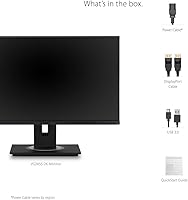
  • Setup is straightforward, and the monitor’s VESA compatibility offers flexible mounting options for varied workspaces.

Cons

  • Some users reported that the stand could be sturdier, leading to slight wobbling during adjustments.
  • The maximum brightness of 250 cd/m² may not be sufficient for use in very bright rooms or direct sunlight.
  • A few users mentioned that the 24-inch screen size feels limiting for multitasking or immersive gaming experiences.
  • There is no dedicated USB hub, which might be inconvenient for those who need to connect multiple devices.
  • While the monitor is comfortable for office use, its refresh rate and response time may not meet the needs of competitive gamers.
  • The build quality could be more premium, with some noting that the materials feel lightweight and not as durable.

Ratings

After analyzing verified user reviews worldwide, across multiple platforms and languages, we have compiled the following ratings for the ViewSonic VG2455 24-inch Monitor. Spam, bot, incentivized, and off-topic feedback has been filtered out to ensure only high-quality, authentic opinions are reflected. While this monitor receives high praise for its ergonomic features and display quality, some users have pointed out potential drawbacks, particularly with its stand stability. The scores below represent a balanced view of both strengths and pain points reported by users across various sources.

Ergonomic Comfort
91%
Many users have praised the adjustable features, such as tilt, swivel, and height adjustments, which allow for a personalized and comfortable viewing experience. These ergonomic options make it easy to customize the setup, ensuring comfort during long hours of use, whether at home or in the office.
A few users have mentioned that while the ergonomic features are great, the stability of the stand could be improved. Some reported that the monitor wobbles slightly when adjusting, which may affect comfort during intense use.
Display Quality
88%
The 24-inch IPS display delivers crisp, clear Full HD resolution, and the color accuracy is a standout feature. Users often highlight the sharpness and brightness, making it an excellent choice for both work tasks and casual media consumption.
While most users are satisfied with the display quality, a few have expressed concerns over the maximum brightness, which some feel could be higher for use in brightly lit environments. Additionally, a small number of reviews mention minor color shifting when viewing from certain angles.
USB-C Connectivity
94%
The USB-C connectivity is a major highlight for many, offering both fast data transfer and up to 60W charging for compatible devices. This feature makes it especially appealing for users with modern laptops or devices, streamlining both power and data connections through a single cable.
A few users have reported occasional compatibility issues with specific devices, particularly older models. These users noted that while USB-C is a great feature, it may not work seamlessly with all setups or require additional adapters.
Eye Care Features
89%
The Flicker-Free technology and Blue Light Filter are highly appreciated by users who spend long hours in front of the screen. These features help reduce eye strain, making this monitor a good option for extended use, especially in home office or work-from-home environments.
Although the eye care features are well-received, a small number of users did not notice a significant difference in eye comfort compared to other monitors without these features. A few also mentioned that the filter could be more customizable for individual preferences.
Build Quality
75%
25%
Overall, the monitor is considered well-built with a sturdy frame and a sleek, modern design. The thin bezels give it a clean, professional look, making it suitable for both work and home environments.
However, some users have raised concerns about the sturdiness of the stand, with a few noting that it feels flimsy. There were also mentions of the base being slightly too small to provide complete stability, leading to minor wobbling.
Adjustability
85%
The monitor's adjustability, especially the height and tilt, is a big plus for users looking for flexibility. The ability to fine-tune the viewing angle ensures that users can work comfortably for long hours, which is a major advantage for those with specific ergonomic needs.
Some users have found that while the adjustments are useful, the mechanism could be smoother and easier to operate. A few reviews mentioned that it can feel stiff or require extra effort to adjust the height and tilt.
Value for Money
92%
This monitor is considered a strong value for its price point. Users feel they are getting great features like USB-C, ergonomic adjustability, and solid display quality without breaking the bank. The combination of functionality and affordability makes it a top choice for home offices.
A small portion of buyers felt that the build quality could be improved, particularly with the stand. Some suggested that a higher-end, more premium design might be worth paying more for, depending on personal preferences.
Design & Aesthetics
80%
20%
The monitor's modern, minimalist design with thin bezels is appreciated by many, adding a sleek touch to any desk setup. The slim profile is ideal for users who need a space-efficient setup while maintaining a professional look.
However, a few users have pointed out that the overall design feels a bit too basic for a premium monitor. Some wished for more refined materials or a more stylish finish to match higher-end models.
Setup & Installation
82%
18%
The setup process is straightforward, with clear instructions and a simple plug-and-play experience. Most users report no issues getting the monitor up and running quickly, making it a hassle-free choice for those who value ease of use.
A few users encountered minor challenges during setup, mainly related to adjusting the stand or connecting to older devices. Some noted that the display settings required additional tweaks for optimal picture quality.
Portability
70%
30%
While the monitor is not explicitly designed for portability, its lightweight design makes it reasonably easy to move around. It's a good option for users who need a stationary setup but occasionally want to move the monitor from room to room.
The lack of a carrying case or more compact features makes it less portable than some other monitors. Users who need to travel frequently with their setup have found it bulky compared to more portable models.
Customer Support
77%
23%
ViewSonic’s customer support is generally considered helpful by many users. Those who reached out for warranty issues or troubleshooting received prompt responses and assistance, making the experience relatively smooth.
Some users have expressed frustration with long wait times or unhelpful responses in certain cases. A few noted that their issues were not resolved as efficiently as expected, leading to minor dissatisfaction with customer service.
Durability
72%
28%
The monitor has a solid build that stands up well to regular use. Many users report that it holds up well in terms of functionality and performance over time, even with extended screen time.
A few users experienced issues with the durability of the stand or reported that the monitor developed issues with color uniformity after several months of use. There are concerns about the longevity of certain components, especially with frequent adjustments.
Screen Size & Aspect Ratio
86%
The 24-inch screen strikes a great balance between size and desk space, offering a spacious view without overwhelming your setup. The 16:9 aspect ratio is well-suited for a variety of tasks, from professional work to media consumption.
Some users felt the screen size was a bit small for those looking for a more immersive experience. A few mentioned that for certain tasks like gaming or video editing, a larger screen might be more beneficial.
Brightness
78%
22%
The maximum brightness of 250 cd/m² is suitable for most indoor environments, and users report that the monitor works well in typical office lighting conditions.
However, in very bright or sunlit rooms, some users found the screen could feel dimmer than expected. A higher brightness would be appreciated by those who work in well-lit spaces or near windows.

Suitable for:

The ViewSonic VG2455 24-inch Monitor is ideal for users who prioritize comfort and flexibility, such as home office workers and professionals who spend long hours in front of the screen. Its ergonomic features, including tilt, swivel, and height adjustability, allow for a customized and comfortable viewing experience. The monitor’s USB-C connectivity is a strong point for modern setups, making it great for those with compatible laptops or devices that require both fast data transfer and charging. With eye care features like Flicker-Free technology and a Blue Light Filter, it’s particularly well-suited for individuals with extended screen time, such as remote workers or those engaging in detailed design work or media consumption.

Not suitable for:

However, the ViewSonic VG2455 24-inch Monitor may not be the best choice for users seeking a premium, high-end build. The stand could be sturdier, and some users have noted slight wobbling when adjusting the monitor, which might be a concern for those who need maximum stability for detailed or fast-paced tasks. While the 24-inch size is well-suited for most office tasks, it may feel limiting for users who require larger screens for multitasking, gaming, or immersive media experiences. Additionally, users in very bright rooms might find the monitor’s maximum brightness of 250 cd/m² insufficient, especially in direct sunlight or well-lit environments.

Specifications

  • Display Size: The monitor features a 24-inch screen, providing ample workspace for multitasking and media consumption.
  • Resolution: It has a Full HD (1920x1080) resolution, delivering clear and sharp visuals for everyday tasks.
  • Panel Type: The monitor uses an IPS panel, offering wide viewing angles and accurate color reproduction.
  • Refresh Rate: It supports a 100Hz refresh rate, providing smooth transitions and improved visual fluidity in video playback and casual gaming.
  • Response Time: The response time is 5ms, ensuring minimal motion blur and ghosting in fast-moving images.
  • Connectivity: It includes multiple connectivity options, such as USB-C, HDMI, DisplayPort, and VGA, for easy connection with various devices.
  • USB-C Support: The USB-C port supports both fast data transfer and up to 60W charging for compatible devices.
  • Ergonomic Features: The stand allows for tilt, swivel, and height adjustments, promoting comfort and flexibility for prolonged use.
  • Flicker-Free Technology: Flicker-Free technology reduces eye strain, making it suitable for long hours of use.
  • Blue Light Filter: The Blue Light Filter helps minimize exposure to blue light, reducing eye discomfort during extended screen time.
  • Brightness: The monitor offers a peak brightness of 250 cd/m², suitable for most indoor lighting conditions.
  • VESA Compatibility: It is VESA mount compatible, allowing for easy mounting on a wall or adjustable arm for a cleaner workspace.
  • Power Consumption: The monitor has a power consumption of 30W, making it energy-efficient for daily use.
  • Stand Stability: The ergonomic stand is adjustable but some users report that it could be sturdier during adjustments.
  • Weight: The monitor weighs approximately 5.7 kg (12.6 lbs) with the stand, providing a stable setup for desk use.
  • Mounting Options: The monitor supports both desktop stand and VESA mounting options for flexible setup configurations.
  • Color Accuracy: The IPS panel offers high color accuracy, making it ideal for tasks that require precise color reproduction.
  • Warranty: The monitor comes with a standard manufacturer warranty, ensuring peace of mind in case of defects or issues.

FAQ

The ViewSonic VG2455 is a 24-inch Full HD IPS monitor designed for ergonomic comfort and versatility. It features a tilt, swivel, and height-adjustable stand, USB-C connectivity for fast data transfer and charging, and flicker-free technology to reduce eye strain. It’s well-suited for home and office use.

This monitor comes with an ergonomic stand that allows you to tilt the screen up to 40 degrees and adjust the height to your preferred level. Simply hold the base and raise or lower the screen to find the most comfortable position for your viewing angle.

Yes, the ViewSonic VG2455 supports USB-C connectivity. It can transfer data quickly and also charge devices up to 60W, making it a great option for modern laptops, tablets, and smartphones that use USB-C ports for both display output and charging.

Yes, the ViewSonic VG2455 is equipped with Flicker-Free technology and a Blue Light Filter to help reduce eye strain during long hours of use. These features are particularly beneficial for people working or gaming on the screen for extended periods.

The VG2455 features a Full HD (1920x1080) resolution, which delivers sharp and clear images for everyday tasks like office work, web browsing, and media consumption. The IPS panel ensures vibrant colors and wide viewing angles, making it ideal for both work and entertainment.

While the ViewSonic VG2455 is not specifically designed for gaming, it does feature a 100Hz refresh rate and a 5ms response time, which provides a smooth experience for casual gaming. However, for competitive gamers looking for ultra-fast refresh rates and low latency, there may be better options.

The monitor has a maximum brightness of 250 cd/m², which is adequate for most office settings. However, if you're using the monitor in a very bright room or under direct sunlight, you may find the brightness a bit limited compared to higher-end models designed for such environments.

Yes, the ViewSonic VG2455 is VESA mount compatible, so you can easily mount it on a wall or use an adjustable arm to free up desk space. This is a useful feature for users who want to create a more flexible or minimalist workstation.

This monitor offers a variety of connectivity options, including USB-C, HDMI, DisplayPort, and VGA. This makes it compatible with a wide range of devices such as laptops, desktops, gaming consoles, and even older systems that use VGA.

While many users appreciate the ergonomic features of the stand, some have noted that the build could be sturdier. The stand might wobble slightly during adjustments, especially if the monitor is touched or moved, but it remains stable enough for regular desk use.