Overview

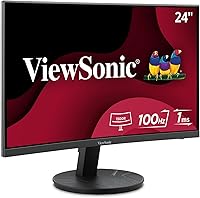
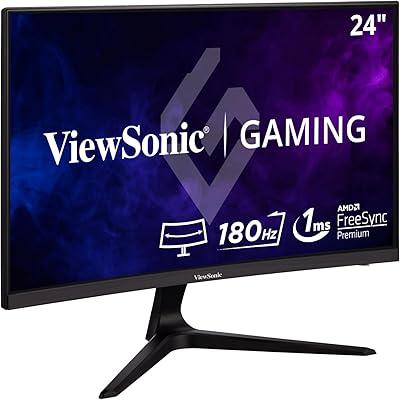
The ViewSonic VA2416C 24-inch Curved Monitor arrived in early 2025 as a curved display from a brand with real pedigree that doesn't ask you to stretch your budget to get there. Built around a VA panel with a gentle 1800R curve and native Full HD resolution, the core proposition is honest and clear — you get a proper immersive screen experience without paying flagship prices. The frameless bezel makes it particularly appealing if you're running two monitors side by side, since the gap between screens stays minimal and tidy. For a monitor that launched just months ago, climbing to #76 in Computer Monitors on Amazon is a meaningful early signal.
Features & Benefits

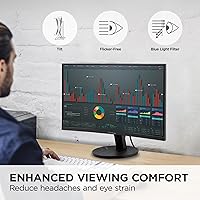
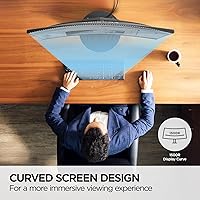
The 1800R curve is subtle enough that it won't distort spreadsheets or documents, yet delivers noticeable depth when watching video. The 100Hz refresh rate pairs with variable refresh rate support to smooth everyday scrolling and light gaming — a genuine step up from the 60Hz panels still common at this price. ViewSonic included Flicker-Free technology and a blue light filter, which genuinely reduce eye strain over long sessions. Dual inputs via HDMI and DisplayPort mean you can connect a laptop and a desktop simultaneously without cable swapping. Five display presets — Game, Movie, Web, Text, and Mono — round things out for quick adjustments.

Best For

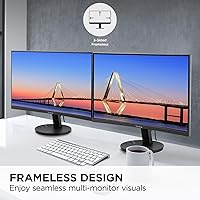
This 24-inch curved display makes the most sense for home office users who clock long hours at a desk and want a screen that's easier on the eyes than a typical budget flat panel. Students and remote workers will appreciate the no-fuss connectivity — plug in a laptop via HDMI, connect a desktop through DisplayPort, and you're done. Casual gamers who don't need ultra-high frame rates will find 100Hz more than adequate for the titles most people actually play. The frameless panel is a specific win for anyone building a dual-monitor setup, because the visual gap between screens stays tight and clean. Mac users are fully supported, which isn't always a given at this price.

User Feedback

With over 900 ratings and a 4.6-star average, the VA2416C has earned its early reputation honestly. Buyers consistently praise out-of-box image quality — most report the picture looks surprisingly good without much manual tuning, and setup gets high marks for being genuinely straightforward. Where feedback gets more mixed is the stand: it offers only tilt, with no height adjustment or pivot. Color accuracy, while solid for everyday tasks, won't satisfy anyone doing serious photo editing. A handful of reviewers note that the blue light filter visibly shifts color temperature — fine for productivity, less ideal if precise color fidelity matters to you. On balance, buyers seem satisfied with what they're getting at this price point.

Pros

  • Genuine eye comfort features — Flicker-Free and Blue Light Filter — that users validate after long daily sessions.
  • The 100Hz refresh rate delivers noticeably smoother scrolling and casual gaming compared to standard 60Hz panels.
  • Frameless bezel design makes dual-monitor setups look clean and professional without extra cost.
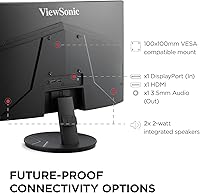
  • HDMI and DisplayPort inputs together cover laptops, desktops, and Macs without requiring adapters.
  • The 1800R VA panel produces deep blacks and solid contrast that punch above typical budget display expectations.
  • Out-of-box setup takes under fifteen minutes with no tools — consistently praised by first-time monitor buyers.
  • Five display presets let users shift between work, gaming, and movie modes quickly without manual adjustments.
  • Matte anti-glare coating handles bright home office lighting reliably, reducing reflections without adding a separate accessory.
  • At its price point, the overall specification list represents strong value compared to older monitors with similar pricing.

Cons

  • Stand offers tilt adjustment only — no height, swivel, or pivot, which limits ergonomic flexibility for many users.
  • No USB hub or audio output means the desk setup requires additional peripherals for a complete workstation.
  • Color accuracy is inadequate for photo editing, design work, or any task requiring reliable color fidelity.
  • The blue light filter shifts color temperature noticeably warm with no intermediate fine-tuning control.
  • OSD buttons are positioned on the back panel and are awkward to locate without feeling around blindly.
  • Variable refresh rate range is not publicly specified, raising doubts about low-frame-rate adaptive sync performance.
  • Plastic build feels lightweight in hand, which some buyers interpret as fragility even if reliability holds up.
  • At 24 inches with 1080p resolution, pixel density can feel soft when sitting closer than arm's length.
  • Cable management around the stand base is minimal, making multi-cable desk setups look untidy without extra effort.

Ratings

The ViewSonic VA2416C 24-inch Curved Monitor has been scored by our AI rating system after analyzing hundreds of verified global buyer reviews, with spam, bot activity, and incentivized feedback actively filtered out. The result is a transparent, balanced scorecard that reflects what real users praise — and where they hit friction. Both the strengths and the genuine trade-offs are represented here without softening either side.
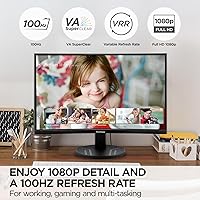
Image Quality
83%
Most buyers report that the out-of-box picture looks noticeably better than expected at this price tier. The VA panel produces deep blacks and solid contrast, making movies and everyday content look rich without manual calibration. Users switching from older TN or low-cost IPS panels frequently mention a visible improvement in depth and color punch.
Color accuracy has limits that become obvious for anyone doing photo editing or design work, where the VA panel's narrower color gamut shows its ceiling. At this screen size, some users also notice the 1080p pixel density isn't razor-sharp when sitting close to the display, particularly with small text.
Refresh Rate & Smoothness
79%
21%
The 100Hz refresh rate with variable sync delivers a noticeably smoother experience than standard 60Hz panels during fast scrolling, video playback, and casual gaming. Users who upgraded from a basic office monitor consistently mention that everyday Windows navigation feels more fluid as a direct result.
Competitive gamers expecting 144Hz or higher will find this display limiting in fast-paced titles. The variable refresh rate range is not publicly specified, so its effectiveness at lower frame rates remains uncertain — a frustration for buyers who expected broader adaptive sync compatibility.
Eye Comfort & Fatigue
86%
Buyers who spend six-plus hours daily at their desk frequently validate the Flicker-Free and Blue Light Filter claims, noting reduced headaches and less eye strain compared to previous monitors. The matte screen surface also cuts down on reflection fatigue in bright home office environments, which users consistently mention as a genuine comfort benefit.
Activating the blue light filter shifts the color temperature noticeably warm, which bothers users who care about accurate whites — particularly during video calls or document work. A few reviewers noted it is either on or off with no fine-tuned control, which feels limiting on extended work sessions.
Curvature & Immersion
77%
23%
The 1800R curve is gentle enough not to distort straight lines in spreadsheets or documents, while still adding a tangible sense of depth during video and browsing. Users coming from flat monitors consistently say the curve feels natural within a day or two and enhances focus by drawing the eye toward the center of the screen.
At 24 inches, the curvature effect is subtler than it would be on a 27-inch or wider panel — some buyers feel it adds less immersion than marketing implies at this screen size. Users expecting a dramatic ultrawide-style wrap effect will likely find the curve underwhelming.
Stand & Ergonomics
51%
49%
The stand is stable and does not wobble during typing, which is a basic but appreciated quality. For users who sit at a fixed desk height with no ergonomic variation needed, the tilt adjustment alone may be sufficient for a comfortable viewing angle.
The stand offers tilt adjustment only — no height, swivel, or pivot. This is a recurring pain point in reviews, especially for taller users or those using ergonomic chairs where eye level sits above the fixed monitor height. Buyers who want proper posture support will need a third-party VESA mount, adding cost and setup effort.
Bezel & Build Design
81%
19%
The frameless edge-to-edge design earns consistent praise from dual-monitor users who value a tight, clean gap between two panels side by side. The slim profile looks modern on a desk, and the all-black finish fits most workspace aesthetics without any visual awkwardness.
The plastic construction feels lightweight, which some buyers interpret as flimsy even if the unit functions reliably. Cable management around the stand base is minimal, and users with multiple peripherals find the back port placement can make cable routing look messy in a tidy desk setup.
Connectivity & Compatibility
88%
HDMI and DisplayPort inputs together cover nearly every modern device scenario, and buyers regularly mention switching between a laptop and a desktop without needing adapters. Mac compatibility is specifically called out in positive reviews as a welcome and reliable feature that is not always guaranteed at this price.
There is no USB hub functionality, which is a common wish among home office buyers who want to reduce cable clutter. The absence of a built-in audio output or speakers also requires an external solution for users who rely on monitor audio for calls or media.
Display Presets & OSD
72%
28%
The five built-in presets — Game, Movie, Web, Text, and Mono — are genuinely useful for quick switching without diving into manual calibration. Users who move between tasks throughout the day appreciate being able to shift the display profile with a few button presses rather than adjusting individual settings each time.
The OSD menu navigation uses physical buttons on the back of the monitor, which buyers describe as awkward to locate without looking away from the screen. Some users report limited granularity in manual settings, finding the image fine-tuning options too basic for anything beyond casual adjustment.
Setup & Out-of-Box Experience
91%
Assembly consistently receives high praise — most buyers report having the monitor unpacked, assembled, and connected within ten to fifteen minutes with no tools required. The included cables and clear instructions make this a genuinely stress-free first-time monitor experience, which entry-level buyers particularly appreciate.
A few buyers noted that the included cable selection could be more complete depending on the device being connected. The lack of a setup guide for display preset optimization means some users stick with default settings that may not be ideal for their specific use case.
Value for Money
89%
At its price point, this curved display offers a specification list — 100Hz, VA panel, dual inputs, eye care tech, frameless design — that would have cost significantly more just a couple of years ago. Buyers repeatedly describe it as feeling like more monitor than they paid for, which is the most reliable signal of genuine value satisfaction.
Buyers comparing it against competing monitors in the same bracket will find alternatives with better stand ergonomics or slightly higher resolution. The value equation holds up well at full price, but the lack of height adjustment and no USB hub make some comparable alternatives worth a closer look before committing.
Color Accuracy
62%
38%
For general productivity tasks, web browsing, and streaming, the color reproduction is more than adequate and performs above average for a VA panel at this tier. Colors appear vibrant and natural in everyday content, and most non-specialist users will have no complaints.
Content creators, photographers, and designers will hit the limits of this display quickly. The color gamut coverage and factory calibration are not suited to accurate color-critical work, and reviewers doing side-by-side comparisons with sRGB-calibrated panels note visible differences in color fidelity that matter professionally.
Viewing Angles
68%
32%
VA panels generally offer better viewing angles than TN alternatives, and this display holds up reasonably well when viewed slightly off-axis. For single-user desk setups, the angles are rarely an issue during normal use.
Color shifting becomes noticeable at wider angles, which matters when a second person is trying to view the screen from the side — a common scenario during presentations or collaborative work from home. VA panel gamma shift at vertical angles is a known trade-off buyers should be aware of upfront.
Glare & Reflection Control
82%
18%
The matte anti-glare coating handles bright windows and overhead lighting reliably, which home office users consistently mention as a practical day-to-day benefit. Working near a window is noticeably less problematic than with glossy-coated alternatives at this tier.
The anti-glare coating has a slightly grainy texture that reduces perceived sharpness compared to glossy displays, particularly noticeable when viewing dark, high-contrast images. Users coming from glossy laptop screens sometimes find the coating takes adjustment to appreciate.
Noise & Heat
93%
The monitor runs completely silent — no fan, no coil whine reported in the review pool, which is relevant for users in quiet home office or study environments. Surface temperature stays low during extended sessions, giving no cause for concern around heat management.
A small number of buyers reported a faint electrical hum during the first few days of use that disappeared over time. This is uncommon and not a widespread issue, but worth noting for users in very quiet environments who are sensitive to electronic noise.

Suitable for:

The ViewSonic VA2416C 24-inch Curved Monitor is a strong fit for home office workers and students who spend the bulk of their day in front of a screen and want genuine eye comfort without paying a premium for it. The Flicker-Free and Blue Light Filter features are practical rather than just marketing checkboxes, making this a sensible pick for anyone who regularly finishes a workday with tired, strained eyes. Remote workers juggling a laptop and a desktop will find the dual HDMI and DisplayPort inputs genuinely useful — no adapters, no fuss. Casual gamers who want a refresh rate above 60Hz for smoother gameplay but cannot justify spending more will find this curved display hits a practical sweet spot. It also suits anyone building a two-monitor setup on a budget, where the frameless bezel makes side-by-side panels look clean and intentional rather than cobbled together. Mac users are fully supported, which is a real convenience at this price tier where compatibility is not always guaranteed.
Not suitable for:

The ViewSonic VA2416C 24-inch Curved Monitor has clear limits that make it the wrong choice for certain buyers, and it is worth being honest about those before committing. Photographers, video editors, and graphic designers will run into the VA panel's color accuracy ceiling quickly — this display is not factory-calibrated for color-critical work, and the gamut coverage will not meet professional standards. Competitive or simulation gamers who rely on high frame rates will find 100Hz restrictive, especially given that the variable refresh rate range is not fully specified. Ergonomically, the stand is the most consistent complaint in the review pool — it tilts and that is it, meaning taller users or those with sit-stand desks will either live with a suboptimal viewing angle or need to budget extra for a VESA arm. There is also no USB hub, no built-in speakers, and no audio output, so anyone hoping to consolidate their desk setup around this display will still need external solutions for audio and device connectivity. If those requirements matter to your workflow, this curved display will feel incomplete despite its other strengths.
Specifications

  • Screen Size: The display measures 24 inches diagonally, providing a comfortable viewing area suited to standard desk depths of 24 to 30 inches.
  • Panel Type: Uses a VA (Vertical Alignment) panel with a 1800R curvature radius, offering stronger contrast and deeper blacks than comparable TN panels at this tier.
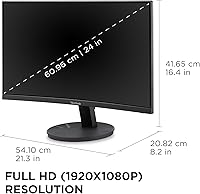
  • Resolution: Native resolution is 1920x1080 (Full HD), delivering a standard 1080p image across the 24-inch curved surface.
  • Refresh Rate: The panel supports a maximum refresh rate of 100Hz, with variable refresh rate (adaptive sync) enabled for smoother frame delivery.
  • Aspect Ratio: Standard 16:9 widescreen aspect ratio, compatible with the overwhelming majority of modern content, applications, and operating systems.
  • Screen Surface: Matte anti-glare coating reduces reflections in bright environments, making it practical for use near windows or under overhead lighting.
  • Brightness: Typical brightness is rated at 250 nits, which is adequate for indoor office and home environments under controlled lighting conditions.
  • Connectivity: Includes one HDMI port and one DisplayPort input, supporting simultaneous connection of two separate source devices without requiring a switch or adapter.
  • Eye Care Tech: Equipped with ViewSonic's Flicker-Free technology and a Blue Light Filter to reduce visual fatigue during extended screen sessions.
  • Display Presets: Offers five factory display modes — Game, Movie, Web, Text, and Mono — accessible directly through the OSD menu for quick scene-based adjustments.
  • Bezel Design: Frameless edge-to-edge bezel on three sides minimizes the visible border gap, making this panel well-suited to side-by-side multi-monitor configurations.
  • VESA Compatibility: The monitor is VESA mount compatible, allowing users to replace the included stand with a third-party arm for improved ergonomic positioning.
  • Dimensions: Assembled product dimensions are approximately 21.3″ wide, 16.4″ tall, and 8.2″ deep, with a total weight of 6.2 pounds including the stand.
  • Power Input: Rated for up to 240 volts input, with a standard IEC power connector; an appropriate power cable for the user's region is included in the box.
  • Color: Available in a single all-black finish that suits most neutral desk and workspace aesthetics without visual distraction.
  • Compatibility: Works with Windows PCs, Mac computers, and most laptops out of the box via standard HDMI or DisplayPort cables without requiring additional drivers.
  • Release Date: First made available in February 2025, making it a recent addition to ViewSonic's entry-level curved monitor lineup.
  • Warranty: ViewSonic typically covers its monitors with a 3-year limited warranty including pixel performance guarantees, though buyers should confirm regional warranty terms at purchase.

Related Reviews
ViewSonic VX2418C 24-inch Curved Gaming Monitor
74%
88%
Gaming Performance
91%
Value for Money
63%
Image Quality
89%
Refresh Rate & Smoothness
82%
Eye Comfort
More
ViewSonic VG2455 24-inch Monitor
83%
91%
Ergonomic Comfort
88%
Display Quality
94%
USB-C Connectivity
89%
Eye Care Features
75%
Build Quality
More
ZZA 24 Inch Curved Monitor
82%
88%
Display Quality
85%
Gaming Performance
92%
Value for Money
83%
Eye Comfort Features
76%
Build Quality
More
CRUA 24-Inch Curved Monitor
84%
88%
Display Quality
91%
Value for Money
84%
Ease of Setup
80%
Gaming Performance
79%
Build Quality
More
ViewSonic VG2456A 24-Inch Monitor
85%
92%
Build Quality
91%
Display Clarity
88%
Ergonomics & Comfort
85%
Connectivity Options
83%
Ease of Setup
More
ViewSonic VS2447M 24-Inch FHD Monitor

74%
93%
Value for Money
81%
Image Clarity
88%
Eye Comfort
79%
Refresh Rate & Smoothness
76%
Adaptive Sync (FreeSync)
More
ViewSonic VG2448A 24-Inch IPS Monitor
84%
88%
Value for Money
91%
Display Quality
85%
Ergonomics and Comfort
87%
Connectivity Options
90%
Ease of Setup
More
ViewSonic XG2431 24-Inch Gaming Monitor

86%
92%
Gaming Performance
88%
Display Quality
93%
Response Time
85%
Ergonomics and Comfort
89%
Visual Clarity
More
Sealan 24-Inch Curved Gaming Monitor
86%
92%
Gaming Performance
88%
Visual Quality
91%
Refresh Rate Smoothness
85%
Design & Build
87%
Eye Care Features
More
Samsung CRG5 24-Inch Curved Gaming Monitor
78%
88%
Value for Money
83%
Image Quality
81%
Gaming Performance
86%
Curvature & Immersion
84%
FreeSync Performance
More

FAQ

Yes, it connects without any issues. Use a USB-C to DisplayPort cable or a USB-C to HDMI cable depending on your Mac model, and it will be recognized immediately at full 1080p resolution. No drivers or special setup needed.

Both ports are active simultaneously, so you can have two devices plugged in at once — say, a laptop via HDMI and a desktop via DisplayPort. You switch between them using the OSD input selection button. It is straightforward and works reliably.

No, and this is the most consistent complaint from buyers. The stand only tilts forward and back — there is no height adjustment, swivel, or pivot. If your eye level sits above the default monitor height, you will want to pick up a VESA-compatible monitor arm, which this display fully supports.

It does shift the color temperature toward warm noticeably, which some users find off-putting during document work or video calls. You can turn it off when color accuracy matters and switch it back on for evening sessions. It is an on/off toggle rather than a sliding scale, which limits fine-tuning.

For casual gaming it holds up well — 100Hz with adaptive sync makes a real difference compared to a 60Hz panel, and the VA panel's contrast adds depth to darker game environments. Competitive gamers who play fast-paced titles at high frame rates will likely want a 144Hz or faster panel instead, but for most gaming use cases this display performs comfortably at its price.

Assembly is genuinely easy. The stand attaches to the panel with a tool-free click mechanism, and the whole process takes under ten minutes. The included documentation is clear, and most buyers report having everything set up and running within fifteen minutes of opening the box.

No, there are no built-in speakers or a headphone audio output on this display. If you need monitor audio, you will need external speakers or a USB audio solution connected to your computer directly.

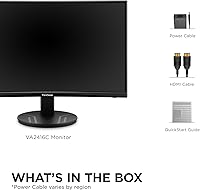
ViewSonic typically includes a power cable and at least one video cable, though the exact cable bundle can vary by region and retailer. It is worth confirming what is included in your specific package and having a backup DisplayPort or HDMI cable on hand just in case.

Yes, this panel is VESA mount compatible. Replacing the default stand with a quality monitor arm is actually a popular choice among buyers who need height or pivot adjustment that the stock stand does not provide. Check the VESA hole pattern specifications before ordering a compatible arm.

For typical desk distances of two feet or more, 1080p on a 24-inch panel looks perfectly clean for web browsing, documents, and video. If you sit very close — under 18 inches — or regularly work with fine text and detailed graphics, you may notice the pixel density is not as crisp as a 1440p alternative. For most home office and general use scenarios, it is a non-issue.

Where to Buy