ViewSonic TD2423D 24-Inch Touch Monitor


Overview
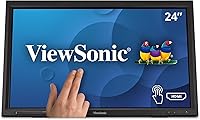
The ViewSonic TD2423D 24-Inch Touch Monitor sits squarely in the mid-range of interactive displays, built for educators, retail operators, and professionals who need reliable touch input without paying premium prices for color-accurate panels. Its freestanding tablet-style stand and matte black finish make it feel purposeful rather than flashy — practical choices for a classroom podium or a shop counter. You get a 24-inch Full HD panel running at 75Hz, which is more than adequate for its intended workloads. This is not a monitor for photo editors or serious gamers. It is a functional daily workhorse designed squarely around touch utility, not visual fidelity.
Features & Benefits
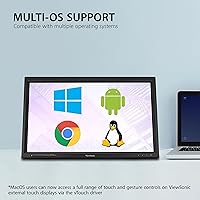
The IR touch layer supports up to 10-point multitouch, meaning you can pinch, zoom, and rotate with both hands without the display missing a beat. A teacher annotating a map or a cashier scrolling through a POS menu will find the input feels direct rather than sluggish. The vTouch driver for macOS is worth calling out specifically: it extends full gesture support to Apple machines, something most competing touch monitors simply skip. Add flicker-free backlighting with a blue light filter for long daily sessions, a 7H scratch-resistant surface for high-contact environments, and a broad input range covering HDMI, DisplayPort, VGA, and a USB hub, and this display covers substantial ground.
Best For
This IR touch display is a strong fit for anyone whose workflow centers on interaction rather than image fidelity. Teachers and classroom trainers will appreciate the responsive surface and built-in eye care features during extended hours of instruction. Small business owners setting up a customer-facing kiosk or POS station get a durable, scratch-resistant screen that handles repeated daily contact without complaint. Mac users benefit from the rare gesture support that most competing touch monitors skip entirely. Home office workers who want to consolidate their desk into one interactive screen will also find it suits their needs. Just don't expect it to replace a dedicated color-grading display.
User Feedback
With a 4.2-star average across more than 200 buyers, the ViewSonic TD2423D earns its score without inspiring outright enthusiasm. Most positive feedback centers on how naturally the touch layer responds and how straightforward the initial setup is — plug in, install the vTouch driver if needed, and it largely just works. Critical notes tend to cluster around stand rigidity and color accuracy; the panel skews cool and the stand, while adjustable, feels less solid than some users expect at this size. A handful of Mac users report the gesture driver works well but demands a little patience during first-time installation. It rates higher in educational and retail contexts than as a general desktop replacement.
Pros
- 10-point IR touch responds naturally to multi-finger gestures, making it practical for real interactive workflows.
- The vTouch driver genuinely extends macOS gesture support, which is rare among touch monitors at this price tier.
- A 7H scratch-resistant matte surface holds up well in classrooms, retail counters, and other high-contact environments.
- Flicker-free backlighting and a built-in blue light filter make long daily sessions noticeably more comfortable.
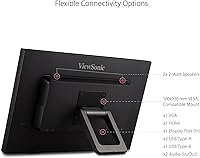
- HDMI, DisplayPort, VGA, and a USB hub cover both legacy and current devices without needing extra adapters.
- The freestanding tablet-style stand makes repositioning or counter-mounting straightforward without a complicated setup.
- Setup is consistently praised as quick and intuitive, with most users reporting a short time from unboxing to working display.
- At 24 inches with a matte panel, glare is less of a problem in bright classroom or retail lighting than on glossy alternatives.
- The 75Hz refresh rate, while modest, is more than sufficient for the instructional and POS use cases this display targets.
Cons
- The stand feels less rigid than expected for a 24-inch display, which can be noticeable in touch-heavy use.
- Color accuracy is average at best; the panel skews cool and is not calibrated for critical visual work.
- 1080p resolution is adequate but increasingly limiting as screen real estate expectations rise in professional settings.
- VGA inclusion, while useful for legacy systems, signals that some design decisions prioritize compatibility over modernity.
- Installing the vTouch driver on macOS requires patience and is not as plug-and-play as the advertising implies.
- At 11.5 pounds, this IR touch display is on the heavier side, making desk repositioning less effortless than it looks.
- Users outside education and retail contexts report a less compelling experience, suggesting narrow optimal use cases.
- No mention of VESA mount compatibility in product data, which limits permanent installation flexibility for some setups.
Ratings
The scores below for the ViewSonic TD2423D 24-Inch Touch Monitor were generated by our AI review engine after analyzing verified global buyer feedback, with spam, bot-submitted, and incentivized reviews actively filtered out before scoring. This touch monitor draws buyers from classrooms, retail environments, and home offices, so the ratings reflect a wide cross-section of real-world use cases. Both the standout strengths and the recurring frustrations are transparently factored into every score you see here.
Touch Responsiveness
macOS Compatibility
Image Quality
Build Quality
Eye Care Performance
Setup & Installation
Connectivity
Stand Adjustability
Durability
Value for Money
Glare & Reflectivity
Multi-User Touch Use
Software & Driver Support
Calibration & Color Temperature
Suitable for:
The ViewSonic TD2423D 24-Inch Touch Monitor was clearly designed with high-contact, task-driven environments in mind, and it shows. Teachers running interactive lessons will find the 10-point IR touch surface responsive enough to annotate slides or demonstrate software in front of a class without frustrating lag. Small business owners setting up a point-of-sale counter or a self-service kiosk get a screen that is built to withstand repeated daily contact, thanks to its 7H scratch-resistant surface and sturdy matte finish. Mac users in particular stand to benefit from the vTouch driver, which extends genuine gesture support to Apple machines — a capability most competing touch displays skip entirely. Home office workers who want a single screen that doubles as both a standard monitor and an interactive touch input device will also find this a practical, space-efficient choice.
Not suitable for:
Buyers prioritizing image quality, color accuracy, or high-resolution output should look elsewhere before committing to this IR touch display. The 1080p Full HD panel is adequate for productivity and instruction, but it is not going to satisfy photographers, video editors, or anyone doing color-sensitive creative work. The ViewSonic TD2423D 24-Inch Touch Monitor also lacks the build rigidity that some users expect at this size — the adjustable stand, while functional, has drawn criticism for feeling less solid than premium alternatives. Gamers will find both the 75Hz refresh rate and the touch-first panel design unsuited to fast-paced play. Anyone expecting a sharp, high-density display for detailed design work or 4K content will walk away disappointed, as the resolution ceiling is a real limitation in those contexts.
Specifications
- Screen Size: The display measures 24 inches diagonally, offering a comfortable viewing area suited to desk, counter, and classroom podium use.
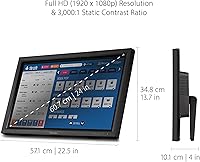
- Resolution: Native resolution is 1920x1080 (Full HD), delivering clear text and imagery for productivity, instruction, and point-of-sale applications.
- Refresh Rate: The panel runs at 75Hz, which is adequate for everyday interactive tasks and general business or educational workloads.
- Touch Technology: A 10-point infrared (IR) touch layer tracks up to ten simultaneous touch points, enabling natural multi-finger gestures across the full screen surface.
- Surface Hardness: The screen carries a 7H hardness rating, providing meaningful scratch resistance for high-contact environments like retail counters and classrooms.
- Screen Surface: The matte panel coating reduces glare and surface reflections, making it more practical under bright overhead lighting than glossy alternatives.
- Aspect Ratio: Standard 16:9 widescreen aspect ratio is maintained, keeping compatibility with the vast majority of software interfaces and media formats.
- Connectivity: Input options include HDMI, DisplayPort, and VGA ports alongside a USB hub, supporting both legacy and current-generation devices from a single unit.
- OS Compatibility: Touch and gesture input is supported on Windows natively and on macOS through ViewSonic's downloadable vTouch driver software.
- Eye Care: Flicker-free backlight technology combined with a built-in blue light filter helps reduce eye fatigue during extended daily viewing sessions.
- Stand Design: The adjustable freestanding stand uses a tablet-style form factor, allowing tilt and height positioning suited to both desk and counter installations.
- Dimensions: The unit measures 4 x 22.5 x 13.7 inches (D x W x H), keeping the footprint manageable on standard workstations or retail counters.
- Weight: At 11.5 pounds, the monitor is solid enough to stay stable during touch interaction but light enough for occasional repositioning.
- Color Finish: The chassis and stand are finished in matte black, a neutral choice that fits most professional and institutional environments without drawing attention.
- Voltage: The unit operates at 240 volts, so users in regions with different power standards should confirm compatibility or use an appropriate adapter.
Related Reviews
ViewSonic TD2455 24-inch Touch Monitor
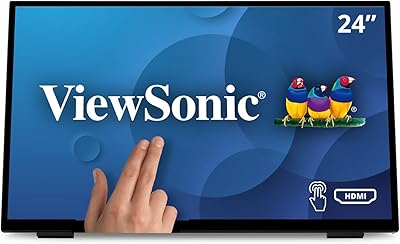
ViewSonic TD2465 24-Inch Touch Screen Monitor
ViewSonic VG2455 24-inch Monitor
ViewSonic VG2456A 24-inch IPS Monitor

ViewSonic XG2431 24-Inch Gaming Monitor

ViewSonic VG2448A 24-inch IPS Monitor
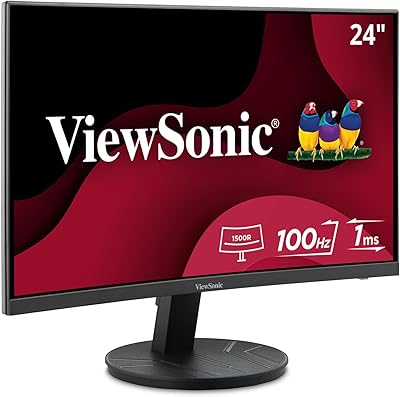
ViewSonic VA2416C 24-inch Curved Monitor
ViewSonic VS2447M 24-Inch FHD Monitor
ViewSonic TD2760 27-inch Touch Monitor