
Overview

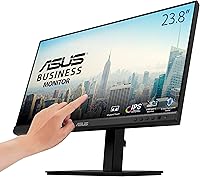
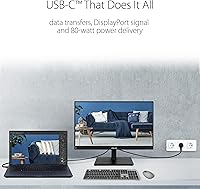
The ASUS BE24ECSBT 24-inch Touch Monitor occupies an interesting spot in the business monitor market — it's not trying to be a creative powerhouse, but rather a practical, well-connected daily driver for hybrid workers. The 23.8-inch Full HD IPS panel delivers solid color accuracy and wide viewing angles, making it a comfortable fit for spreadsheets, video calls, and document work. What really sets this ASUS touchscreen monitor apart from standard office displays is its ergonomic stand and the USB-C single-cable docking story. One cable handles video, data, and up to 80W of power delivery to your laptop. Just be aware: at 1080p on a nearly 24-inch screen, pixel density is on the modest side, which users working close-up may notice.

Features & Benefits

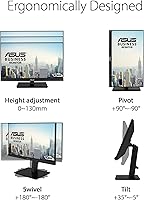
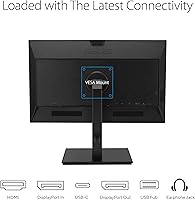
The 10-point capacitive touch layer is one of the more capable you will find on a business monitor — responsive enough for annotation apps and navigating dashboards, though it is worth tempering expectations: it is not as precise as a tablet or a dedicated pen display. USB-C delivers up to 80W of power to your laptop, which is sufficient for most ultrabooks and thin-and-lights, though power-hungry workstations may still need their own charger. The DisplayPort daisy-chain pass-through lets you run a second monitor off one GPU output — genuinely useful in cable-tidy office setups. The stand offers full pivot and swivel alongside 130mm of height travel, the built-in USB 3.2 hub keeps peripherals connected, and the matte panel with flicker-free backlight makes long sessions noticeably more comfortable.

Best For

This business touch display makes the most sense for hybrid workers and professionals who want interactive touch functionality without buying a separate drawing tablet. If you are running a laptop and want to cut down on desk cable sprawl, the single USB-C connection story is a genuine draw. Small reception areas or kiosk-style setups can also benefit from the touch panel and ergonomic flexibility. For users building a dual-monitor daisy-chain configuration on a single DisplayPort GPU output, the BE24ECSBT is one of the few options in this price range that supports it natively. Anyone who regularly reviews long documents will appreciate the portrait pivot mode combined with touch — scrolling through a contract in vertical orientation is noticeably more natural than on a conventional display.

User Feedback

Across a pool of over 6,900 ratings, the BE24ECSBT lands at 4.4 stars, and the patterns are fairly consistent. Touch accuracy and responsiveness draw consistent praise, as does the build quality of the stand and the reliability of the USB-C connection for day-to-day docking. On the other side, the most common complaint involves pixel density — at 1080p on a nearly 24-inch screen, text and icons can look slightly soft to users accustomed to higher-resolution displays. The 75Hz refresh rate also comes up as a limitation for anyone who hoped to use this monitor for gaming. A smaller subset of users on macOS and Linux report occasional touch calibration issues, though Windows users rarely encounter this. Long-term owners generally report no notable degradation in panel or touch performance over time.

Pros

  • Single USB-C cable handles video, data, and up to 80W of laptop charging simultaneously.
  • The 10-point touch layer is accurate and responsive for annotation, document markup, and dashboard navigation.
  • Full ergonomic range — tilt, swivel, pivot, and 130mm height adjustment — is rare at this price level.
  • DisplayPort daisy-chain support lets you connect a second monitor without an extra GPU output.
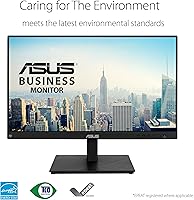
  • Matte IPS panel with flicker-free, low-blue-light settings reduces eye strain during extended work sessions.
  • Sturdy stand with minimal wobble earns consistent praise across thousands of long-term owner reviews.
  • Built-in USB 3.2 hub and integrated speakers reduce cable clutter without sacrificing desk real estate.
  • VESA mounting compatibility gives you flexibility to swap in a wall mount or articulating arm later.

Cons

  • At 1080p on a 23.8-inch panel, pixel density is noticeably lower than on competing 1440p displays.
  • The 75Hz refresh rate rules this out as a practical option for gaming or fast-motion content.
  • macOS and Linux users report occasional touch calibration issues that Windows users rarely experience.
  • Power-hungry laptops requiring more than 80W may still need a separate charger alongside this display.
  • Touch precision does not match a dedicated pen display or drawing tablet for fine creative work.
  • At 13.44 pounds, the monitor and stand assembly is heavier than many comparably sized business displays.
  • Two built-in 2W speakers are adequate for voice calls but lack the presence needed for media consumption.

Ratings

The ASUS BE24ECSBT 24-inch Touch Monitor has been evaluated using AI-driven analysis of verified global user reviews, with spam, bot-generated, and incentivized submissions actively filtered out to ensure every score reflects genuine ownership experience. Across a base of more than 6,900 ratings, our system identified consistent patterns in both praise and criticism — from the connectivity strengths that define this display's daily value to the resolution trade-offs that informed buyers should not overlook. Every score below reflects that balanced picture honestly, giving you the full story before you decide.

Touch Accuracy
83%
Across thousands of reviews, users consistently note that the 10-point touch panel feels fluid for document annotation, on-screen signing, and scrolling through long pages. The palm rejection performs reliably during stylus-free writing tasks, and tap registration rarely misses the intended target in everyday navigation.
It falls noticeably short of a tablet or dedicated pen display when it comes to precision drawing or fine handwriting recognition. A subset of users report a slight lag compared to smartphone-class touch, which becomes apparent during rapid multi-finger gestures or fast on-screen writing.
USB-C Connectivity
91%
The single-cable docking story is the most universally praised aspect in the entire review pool — professionals who previously juggled a power brick, separate video cable, and USB hub report immediately reducing desk clutter to one connection. Ultrabook users in particular highlight how the 80W delivery keeps their device fully charged through intensive workdays.
Laptops requiring more than 80W — including certain gaming laptops and mobile workstations — will not receive a full charge rate and may need a secondary charger running alongside. A handful of users have reported intermittent connection drops on specific laptop models, typically resolved by firmware updates or cable swaps.
Display Quality
67%
33%
The IPS panel delivers accurate colors and wide viewing angles that hold up well for spreadsheet work, video conferencing, and general content consumption at typical desk distances. The matte coating keeps reflections under control in mixed-lighting office environments, which many users appreciate during long workdays.
At 1080p on a 23.8-inch screen, pixel density lands around 93 PPI — noticeably lower than competing 1440p alternatives, and users who sit close report that text edges can look slightly soft. Those coming from a higher-resolution laptop display often find the step down jarring, particularly when reading dense documents.
Build & Ergonomics
88%
The monitor casing and stand consistently draw praise for feeling premium and well-constructed — not the hollow, flex-prone plastic common in this tier. The combination of tilt, swivel, pivot, and 130mm height adjustment is uncommonly thorough, making it genuinely adaptable to different desk setups and working postures throughout the day.
At 13.44 pounds, the full assembly is heavier than many comparably sized monitors, which matters when mounting on a lighter desk arm or repositioning frequently. A few users also note that the stand base has a relatively wide footprint that can reduce usable desk space in tighter setups.
Value for Money
72%
28%
For buyers who actively use both the touch functionality and USB-C docking, the combined value is real — replacing a separate docking station, USB hub, and standard monitor with a single unit makes the price point easier to justify. The build quality and stand versatility add meaningful weight to the overall package.
For users who skip the touch layer or primarily need a sharp, fast display, the premium feels harder to defend given that 1440p or faster non-touch alternatives exist at comparable price points. Those expecting desktop-class visual sharpness may find 1080p a recurring frustration relative to what they paid.
Eye Care & Comfort
86%
The flicker-free backlight and low blue light mode prove popular with users who clock eight or more hours in front of the display daily. Several reviewers who previously experienced end-of-day eye strain report a meaningful improvement after switching, crediting the matte panel surface as much as the dedicated eye care settings.
The low blue light filter introduces a noticeable warm color shift that bothers users who need accurate color representation for their work. Those who prefer a cooler, more neutral white point often find themselves toggling the feature off entirely during color-critical tasks, which defeats its purpose.
Port Selection
89%
The port lineup is notably comprehensive for a business-class display — HDMI, DisplayPort in and out, USB-C, three USB 3.2 downstream ports, and a headphone jack cover virtually every connectivity need a desk worker might have. The USB hub means peripherals like a keyboard, mouse, and USB drive all route through the monitor rather than the laptop directly.
The HDMI port is version 1.4 rather than the more current 2.0, which could matter to users running higher-bandwidth video sources down the line. There is also no RJ45 Ethernet port, which some office users expecting a complete docking solution will find conspicuously absent.
Stand Adjustability
87%
The full tilt, swivel, and pivot range gives this display a degree of flexibility that most office monitors do not offer at this price tier. Portrait pivot is particularly appreciated by users who review legal documents, long code files, or multi-page reports — the 90° rotation paired with touch scrolling creates an efficient vertical workflow.
Rotating into portrait mode requires cable management foresight, as shorter cables can pull taut during a full 90° pivot. A small number of users also report that the pivot mechanism requires slightly more force than expected, which can feel abrupt during the first few orientation changes.
Audio Quality
54%
46%
The built-in 2W stereo speakers handle video call audio and system notification sounds adequately, meaning you do not strictly need a separate speaker for basic communication tasks. For an office monitor, having any onboard audio is a convenience that occasional video conferencing users genuinely appreciate.
At 2W per channel, the speakers lack bass, projection, and volume to fill even a small room comfortably, and most users with any interest in media or music move to external audio quickly. Sound quality is consistently described as thin and tinny across the review pool — it functions as a last resort, not a real feature.
Setup Experience
84%
Most users report getting the monitor fully operational within minutes, particularly on Windows where touch input is detected automatically without additional drivers. The straightforward OSD menu and accessible on-screen navigation receive positive mentions from users who dislike spending time buried in monitor settings.
First-time touch calibration is not always prompted automatically, and skipping it can produce slightly off-center tap registration that frustrates some users early on. Those attempting a daisy-chain configuration for the first time report occasional confusion around MST settings, which require a specific DisplayPort mode selection in the OSD.
Multi-Monitor Support
85%
The DisplayPort 1.4 daisy-chain capability is a standout for users building dual-display workstations — driving two 1080p monitors off a single GPU output is genuinely rare and practical for laptops with limited video outputs. Office users setting up productivity-focused dual-screen arrangements consistently report clean and stable performance across both displays.
Daisy-chaining only works when both the connected GPU and the second monitor support MST, which creates occasional incompatibility headaches for users who assume any DisplayPort connection will work. When both displays are active simultaneously, neither screen supports refresh rates above 60Hz, which surprises some users expecting 75Hz on both.
Gaming Performance
41%
59%
For casual gaming genres — turn-based strategy, card games, and point-and-click titles — the display performs adequately, and touch integration adds a degree of novelty to compatible games. The IPS panel keeps colors looking reasonably vibrant during gaming sessions, which is a step above typical TN-panel alternatives.
At 75Hz with a 5ms response time, the BE24ECSBT is not built for competitive or fast-paced gaming, and motion blur is noticeably present during high-speed scenes. Users who purchased this expecting a dual-purpose work and gaming display have consistently expressed disappointment compared to dedicated 144Hz panels at similar price points.
Cross-Platform Use
61%
39%
On Windows 10 and Windows 11, this business touch display integrates reliably with the operating system's native touch support — connect via USB-C and the touchscreen is typically recognized within seconds. For Windows-first environments, the experience closely matches what the hardware was designed to deliver.
macOS and Linux users frequently encounter the same pattern: video and USB-C power delivery work fine, but touch input is either non-functional or unreliable due to driver limitations outside Windows. This is a consistent complaint across the review pool and represents a meaningful limitation for non-Windows users who bought it specifically for touch.
Long-Term Durability
82%
18%
Users who have owned the monitor for a year or more generally report no degradation in touch sensitivity, panel brightness, or stand mechanism over time. The height adjustment column in particular holds up well under daily repositioning, which is notable given how frequently ergonomic-focused users change their display height.
A portion of long-term owners report backlight uniformity issues developing after extended use, with slight brightness variation appearing near panel edges. The touch layer coating can also accumulate micro-scratches over time if cleaned with anything coarser than a microfiber cloth, which gradually affects the smoothness of touch gestures.

Suitable for:

The ASUS BE24ECSBT 24-inch Touch Monitor is built for hybrid professionals who want a capable, all-in-one docking solution without the bulk or cost of a dedicated docking station. If your daily workflow involves a laptop — Windows or Mac — and you want one USB-C cable to handle power delivery, video, and data simultaneously, this display manages that cleanly for most ultrabooks and thin-and-light machines drawing up to 80W. Knowledge workers who annotate PDFs, mark up documents, or navigate dashboards with touch gestures will find the 10-point capacitive panel genuinely useful, even if it falls short of a dedicated stylus display. The pivot capability makes it especially well-suited for anyone who reads long-form documents or reviews code in portrait orientation, a workflow that pairs naturally with touch scrolling. Small business owners setting up a reception kiosk or point-of-interaction display will also appreciate the combination of touch responsiveness, robust ergonomics, and solid build quality. For users wanting to daisy-chain a second monitor without adding a GPU splitter or hub, the DisplayPort 1.4 in/out support makes this a rare and practical find at this price tier.

Not suitable for:

The ASUS BE24ECSBT 24-inch Touch Monitor is not the right choice if crisp pixel density ranks high on your priority list. At 1080p on a 23.8-inch screen, the pixel-per-inch count falls noticeably short of what a comparable 1440p or 4K display would offer, and anyone sitting close for detailed graphic work, photo editing, or small-text-heavy tasks will notice the difference fairly quickly. Gamers should also look elsewhere — the 75Hz refresh rate and 5ms response time are firmly productivity-tier specs, not designed for fast-paced titles where smoothness matters. Users on macOS or Linux who depend heavily on touch input may run into driver friction or calibration quirks that Windows users typically do not encounter. If your laptop requires more than 80W to charge at full speed, you will still need to run a second cable or charger alongside this monitor. And if you rarely use touch input in your daily workflow, the premium attached to the touch layer here might be better spent on a sharper, faster non-touch panel.

Specifications

  • Panel Type: The display uses an IPS (In-Plane Switching) panel, providing accurate color reproduction and wide viewing angles of up to 178° horizontally and vertically.
  • Screen Size: The active display area measures 23.8 inches diagonally, set within a near-frameless bezel design.
  • Resolution: Native resolution is 1920 x 1080 (Full HD) at a 16:9 aspect ratio, with a resulting pixel density of approximately 93 PPI.
  • Touch Input: Supports 10-point capacitive multi-touch, enabling simultaneous recognition of up to ten independent finger contacts on the screen surface.
  • Refresh Rate: The panel operates at a native 75Hz refresh rate, suited for productivity workloads but not optimized for fast-paced gaming.
  • Response Time: Rated at 5ms gray-to-gray response time, which is adequate for standard office, document, and video conferencing use.
  • USB-C Power: The USB-C port delivers up to 80W of power delivery, allowing compatible laptops to charge, transmit data, and send a video signal over one cable.
  • Connectivity: Ports include USB-C, HDMI 1.4, DisplayPort 1.4 input and output for daisy-chaining, three USB 3.2 downstream ports, and a 3.5mm earphone jack.
  • Ergonomics: The stand supports +35°/-5° tilt, ±180° swivel, ±90° pivot for portrait-mode orientation, and 130mm of continuous height adjustment.
  • Speakers: Two built-in 2W stereo speakers are integrated into the monitor housing for basic system audio without a separate speaker requirement.
  • Panel Surface: The screen uses a matte anti-glare coating to diffuse reflections and reduce glare in brightly lit or mixed-lighting environments.
  • Eye Care: ASUS Eye Care technology incorporates a flicker-free backlight and a software-selectable low blue light filter to reduce visual fatigue during extended sessions.
  • VESA Mount: The monitor is VESA mount compatible, allowing the included stand to be removed and replaced with a third-party wall mount or desk arm.
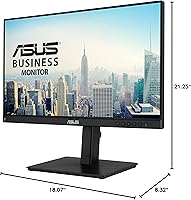
  • Dimensions: With the stand installed, the unit measures 21.25 x 8.32 x 18.07 inches (L x W x H), with the height range reflecting the full adjustment travel.
  • Weight: The complete assembly including the stand weighs approximately 13.44 pounds (6.1 kg).

Related Reviews
ASUS VA24DQSB 24-inch IPS Monitor
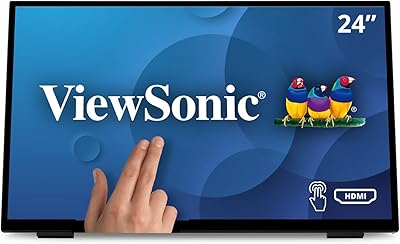
78%
93%
Ergonomic Adjustability
88%
IPS Panel Color Accuracy
61%
Brightness & Glare Handling
91%
Eye Comfort & Fatigue
84%
Build Quality & Stability
More
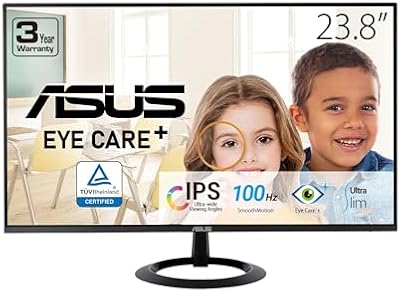
ViewSonic TD2455 24-inch Touch Monitor
78%
88%
Touch Responsiveness
83%
Build Quality
86%
Ergonomics & Stand
67%
Display Clarity
91%
USB-C Connectivity
More
ASUS VZ24EHF 24-inch Eye Care Monitor
86%
91%
Value for Money
88%
Display Quality
93%
Eye Care Technology
86%
Refresh Rate & Performance
85%
Build Quality
More
ViewSonic TD2465 24-Inch Touch Screen Monitor
75%
88%
Touch Responsiveness
84%
Touch Mode Versatility
79%
macOS Compatibility
81%
Build Quality & Durability
62%
Stand Design & Stability
More
ASUS ZenScreen Touch 16-inch Portable Monitor (MB16AMTR)
87%
94%
Portability & Weight
88%
Touchscreen Functionality
72%
Battery Life
85%
Display Quality
90%
Connectivity Options
More
ASUS VG249QE5A 24-inch Gaming Monitor
76%
88%
Image Quality
91%
Refresh Rate Performance
86%
Motion Clarity
93%
Value for Money
47%
Ergonomics & Stand
More
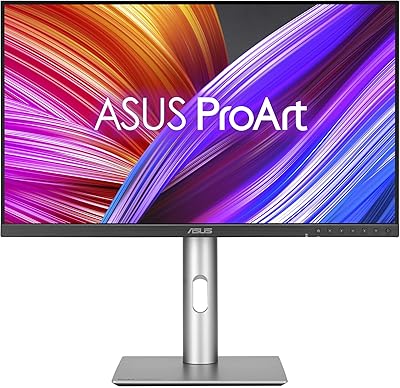
ASUS ProArt PA24ACRV 24-inch QHD Monitor

81%
93%
Color Accuracy
89%
Color Gamut Coverage
88%
Build Quality
91%
Ergonomics & Stand
87%
Connectivity
More
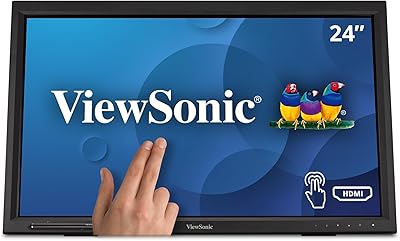
ViewSonic TD2423D 24-Inch Touch Monitor
73%
83%
Touch Responsiveness
76%
macOS Compatibility
62%
Image Quality
71%
Build Quality
84%
Eye Care Performance
More
ASUS ROG Strix XG259QNS 24.5-inch Gaming Monitor
80%
93%
Motion Clarity
91%
Input Responsiveness
78%
Refresh Rate Value
67%
Image Quality
88%
Build Quality
More
ASUS ROG Strix XG259CMS 24.5-inch Gaming Monitor
78%
93%
Motion Clarity
91%
Response Time
84%
Refresh Rate Value
83%
Build Quality
61%
Ergonomics & Stand
More

FAQ

It will connect to a MacBook via USB-C and handle video and charging over that single cable without issue. However, macOS does not natively support the Windows HID touch driver, so touch input is generally unreliable on Mac. Most Mac users connect it purely for display and power delivery, treating the touch layer as a Windows-only feature.

For most ultrabooks and thin-and-light laptops, the 80W power delivery is more than sufficient to maintain charge and even top up the battery during typical workloads. If your laptop has a dedicated GPU or a larger battery that demands more than 80W, you may find it charges slowly or just holds its current charge level under heavy load — in those cases, keeping your original charger nearby is a sensible precaution.

It handles finger-based annotation, light note-taking, and navigation very well. That said, there is no bundled stylus, and the touch layer was not designed to compete with a dedicated pen display or drawing tablet — fine linework and precision illustration will feel noticeably limited compared to those tools. For casual markup, signing documents, or navigating interfaces, it gets the job done.

The BE24ECSBT includes both a DisplayPort 1.4 input and a DisplayPort output, so you can run a cable from your GPU into this monitor and then chain a second DisplayPort-compatible monitor off the output port. The second display also needs to support multi-stream transport (MST) for this to work. At 1080p on both screens, bandwidth is not a constraint and the setup runs cleanly.

A soft, dry microfiber cloth handles most fingerprints and smudges without any risk. For more stubborn marks, lightly dampen the cloth with distilled water or a screen-safe cleaner — never spray liquid directly onto the display. Avoid ammonia-based, alcohol-heavy, or abrasive cleaners, as these can degrade the matte anti-glare coating over time.

Casual and turn-based gaming is fine, but it is not built for competitive play. The 75Hz refresh rate and 5ms response time trail well behind dedicated gaming panels that typically start at 144Hz with sub-2ms response. For fast-paced first-person or action titles, the motion clarity difference will be noticeable. Treat it as a productivity-first display that tolerates occasional gaming, not the other way around.

In most cases, no. Windows 10 and Windows 11 detect the touchscreen automatically through the built-in HID touch driver, and it is ready to use within seconds of connecting. Some users do run a one-time touch calibration through Windows display settings after first setup, which takes about a minute and improves precision noticeably.

Yes, the stand detaches and the monitor has VESA mounting holes, so it is fully compatible with standard third-party wall mounts and desk arms. This is a useful option if you want to free up desk space, mount the display at a specific height for touch use, or fit it into a kiosk-style setup where the stand would be impractical.

At a typical office viewing distance of roughly 20 to 24 inches, 1080p on a 24-inch screen is perfectly workable for documents, spreadsheets, video calls, and web browsing. Where it starts to show its limits is when you sit closer or work with very fine typography at 100% scaling — text edges can look softer than they would on a 1440p panel. Scaling the display up slightly in Windows settings helps, but it is a real trade-off worth knowing about before buying.

The stand has a reputation for being one of the more stable in this category, and most owners report the touch experience feels grounded rather than shaky. That said, firm taps near the edges or at the top of the screen can produce minor movement, especially in portrait mode where the monitor sits taller. For everyday tap and swipe gestures, the stability holds up well in normal use.

Where to Buy