Overview

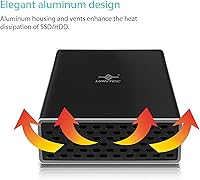
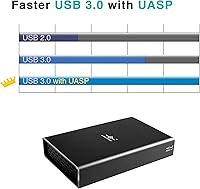
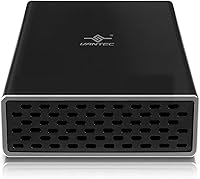
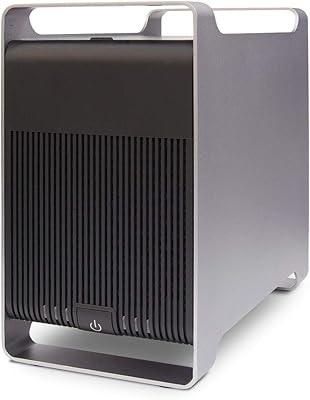
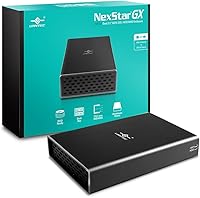
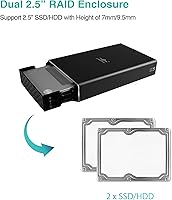
The Vantec Nexstar GX Dual 2.5″ RAID Enclosure is a compact, no-fuss solution for anyone who wants to run two 2.5-inch SATA drives from a single external unit without investing in a full NAS setup. The aluminum housing keeps it light enough to sit on a desk without dominating the workspace, and the front vents do a reasonable job managing airflow during longer sessions. USB 3.0 with UASP support means real-world transfer speeds that leave older USB 2.0 enclosures well behind. One detail worth highlighting: Vantec includes an AC adapter in the box, which sounds minor until you realize how many competing enclosures at this price tier ship without one.
Features & Benefits

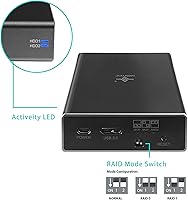
This two-drive caddy supports three distinct operating modes: JBOD for treating each drive independently, RAID 0 for combining them into a single faster volume, and RAID 1 for automatic mirroring. That last option is the standout — if one drive fails, the enclosure rebuilds the mirror onto the replacement without requiring software intervention. Inside, a SATA III interface keeps up with modern SSDs, so you are not leaving performance on the table. A row of LED indicators covers power state, drive activity, and RAID status at a glance. The auxiliary USB Micro-B power port is a thoughtful addition for power-hungry drives, and OS support spans Windows, macOS, and Linux without needing third-party drivers.

Best For

This dual-bay enclosure hits a clear sweet spot for a few specific users. If you have upgraded your laptop and have a pair of old 2.5-inch drives sitting unused, this is an obvious way to consolidate them into one accessible unit. It also suits home office backup needs well — set it to RAID 1, point your backup software at it, and largely forget it exists. Creative professionals working with large video files may appreciate the RAID 0 option as a fast scratch drive over USB 3.0. Anyone weighing a NAS purchase purely for basic redundancy should consider whether this two-drive caddy covers most of that ground at a fraction of the commitment.

User Feedback

Across nearly 4,000 ratings, the Vantec RAID enclosure holds a 4.2-out-of-5 average, and the recurring themes are fairly consistent. On the positive side, build quality gets mentioned regularly — buyers coming from plastic enclosures tend to appreciate the aluminum shell. The caveats are real, though. Drives larger than 2TB may not be recognized reliably, which matters if you are planning a high-capacity setup. Switching RAID modes requires opening the unit and flipping internal DIP switches — not a dealbreaker for a device most people configure once, but not exactly convenient. A handful of users also flagged detection issues on certain USB 3.0 host controllers, though this appears to be an edge case rather than a widespread fault.

Pros

  • Aluminum housing feels solid and noticeably more durable than plastic enclosures in the same price range.
  • Hardware RAID 1 with automatic rebuild means a failed drive does not require software babysitting to recover.
  • AC adapter is included in the box, which is a genuine convenience that budget rivals often skip.
  • USB 3.0 with UASP support delivers real throughput gains over older connection standards.
  • SATA III internals mean modern SSDs can perform without the enclosure creating a bottleneck.
  • JBOD mode gives users the option to treat each drive independently when mirroring or striping is not needed.
  • LED indicators make it easy to confirm drive activity and RAID status without opening any software.
  • Works across Windows, macOS, and Linux without needing to hunt down third-party drivers.
  • The auxiliary power port helps stabilize high-draw drives that might otherwise cause detection issues.
  • With nearly 4,000 ratings averaging 4.2 out of 5, real-world satisfaction is broadly consistent.

Cons

  • Drives larger than 2TB per bay may not be recognized reliably, limiting high-capacity configurations.
  • Switching RAID modes means physically opening the unit and toggling internal DIP switches — not a quick process.
  • Some users have reported detection failures on certain USB 3.0 host controllers, pointing to chipset sensitivity.
  • HDDs can run warm during extended use; the venting helps, but it is not a substitute for active cooling.
  • Drives are not included, which is expected but worth confirming for buyers new to external enclosures.
  • The USB Micro-B connector for auxiliary power is an older standard that feels dated compared to USB-C alternatives.
  • No software management interface means less visibility into drive health beyond what the LEDs show.
  • RAID 0 data is unrecoverable if either drive fails, a risk that buyers need to understand before choosing that mode.

Ratings

The scores below reflect an AI-driven analysis of thousands of verified global user reviews for the Vantec Nexstar GX Dual 2.5″ RAID Enclosure, with spam, bot activity, and incentivized submissions actively filtered out before scoring. Each category is weighted against real-world usage patterns, not just spec sheet claims, so both the genuine strengths and the frustrations that actual buyers ran into are represented transparently.

Build Quality
86%
The aluminum outer shell is one of the most consistently praised aspects of this two-drive caddy, especially among buyers who switched from cheaper plastic enclosures. Users frequently note that it feels substantial without being heavy, and the front vent design gives it a purposeful, finished look that holds up well on a desk over time.
The internal ABS tray feels noticeably less premium than the outer shell, and a handful of users found the drive-seating mechanism required more force than expected. Nothing breaks easily, but the gap between the exterior quality and interior materials is perceptible on close inspection.
RAID Functionality
83%
Hardware RAID 1 with automatic rebuild is the standout feature here, and users who set it up for home backup consistently report it doing exactly what it promises. When a drive fails, the enclosure starts rebuilding the mirror on its own once a replacement is inserted, which is genuinely reassuring for non-technical users.
Switching between RAID modes requires physically opening the unit and adjusting internal DIP switches, which is inconvenient if your needs change after initial setup. Several reviewers also noted that RAID 0 users have no recovery path if either drive fails, a risk that is not clearly communicated in the packaging.
Transfer Performance
79%
21%
With UASP enabled, this dual-bay enclosure delivers noticeably faster sustained transfers than older USB 2.0 or non-UASP USB 3.0 enclosures, particularly when paired with SSDs in RAID 0. Users editing video from an external scratch drive reported smooth playback with large sequential files without the stuttering common in budget alternatives.
Real-world speeds do not always reach the theoretical 5Gbps ceiling, especially on older USB 3.0 host controllers or when running two spinning HDDs under sustained load. Performance variance between host systems was flagged by enough users to suggest the connection quality on the computer side matters as much as the enclosure itself.
Drive Compatibility
61%
39%
The Vantec RAID enclosure handles the vast majority of standard 2.5-inch SATA SSDs and HDDs without issue, and users report clean detection across a wide range of common consumer drives at capacities up to 2TB per bay. Cross-brand compatibility for drives in that sweet spot is genuinely broad.
Drives exceeding 2TB per bay have produced inconsistent results across a meaningful portion of the user base, making this enclosure a risky choice for high-density storage builds. This is not a minor edge case — buyers planning to install 4TB or larger drives should treat compatibility as uncertain until confirmed with their specific drive model.
Thermal Management
67%
33%
When used with SSDs, thermal performance is largely a non-issue — the aluminum housing dissipates heat efficiently enough that the unit barely gets warm during typical workloads. Users running SSD pairs in RAID 0 for video work reported stable temperatures even during extended sessions.
Traditional spinning HDDs tell a different story, with users noting the enclosure can get noticeably warm after an hour or more of sustained activity. There is no active cooling, and while no widespread reports of thermal throttling exist, the passive venting is clearly sized for lighter-running SSDs rather than power-hungry HDDs.
Setup Experience
74%
26%
Plug-in setup is genuinely straightforward for users who have decided on a RAID mode in advance — connect the power adapter, plug in USB, and the host OS detects it without any driver installation on modern Windows or macOS. First-timers who just want JBOD or RAID 1 out of the box can be up and running in minutes.
The DIP switch configuration process is not well-documented for users who are new to hardware RAID, and the included manual provides minimal guidance. Users who want to change modes after initial setup report the process feeling unnecessarily fiddly for what should be a consumer-grade device.
OS Compatibility
82%
18%
Cross-platform support is one of the cleaner aspects of this caddy, with reliable detection on Windows 10, recent macOS versions, and Linux Ubuntu without requiring third-party software. Mac users in particular noted smooth integration with Disk Utility for formatting and monitoring.
Windows 7 and 8.1 support is listed but increasingly irrelevant for most buyers, and a small number of Linux users on non-Ubuntu distributions reported needing manual configuration. Support documentation has not been updated recently, which creates uncertainty for users on newer OS releases.
Value for Money
81%
19%
At its price point, this two-drive caddy offers hardware RAID functionality that would cost significantly more in a dedicated NAS enclosure, and the included AC adapter removes a common hidden cost. Buyers who are repurposing old laptop drives find the value proposition particularly compelling since the drives themselves cost nothing extra.
Buyers who end up experiencing drive compatibility issues or host controller detection problems may feel the savings come with hidden troubleshooting costs in time and frustration. There are slightly cheaper single-mode enclosures available if RAID is not a priority, making the value calculation more nuanced than the sticker price implies.
Power Delivery
78%
22%
Including a DC 5V/2A AC adapter in the box is a meaningful practical decision that separates this enclosure from budget competitors that force buyers to source their own power supply. The secondary USB Micro-B auxiliary port for extra power is a thoughtful addition for drives with higher startup current requirements.
The USB Micro-B connector standard feels dated relative to current USB-C accessories, and the power cable length may be limiting depending on desk layout. A small number of users also reported that drives were not consistently recognized until the AC adapter was firmly reseated, suggesting the power connector tolerances are somewhat loose.
LED Indicators
77%
23%
Having dedicated LEDs for power, standby, activity, and RAID status is more informative than the single-activity-light approach used by many competing enclosures. Users who run the unit in a home office setup found the RAID status LED particularly useful for confirming that a rebuild had completed successfully after a drive swap.
The LEDs are not labeled on the enclosure itself, requiring users to reference the manual to interpret the different states and blink patterns. Brightness is also on the higher end in a dark room, which a few users found distracting when the enclosure is positioned near a monitor.
Portability
71%
29%
At just over 10 ounces without drives and with a footprint smaller than a paperback book, this dual-bay enclosure is manageable for users who need to move it between locations occasionally. It fits comfortably in a bag alongside a laptop for users who treat it as a semi-portable external storage unit.
The requirement for an external AC adapter undermines portability compared to bus-powered single-drive enclosures, making it less practical for truly on-the-go use. Users hoping for a compact travel storage solution may find the power cable and brick add more bulk than the enclosure itself saves.
Longevity & Reliability
73%
27%
The broader user base includes buyers who have run this enclosure continuously for two or more years in home office and small business environments without hardware failures, which speaks to baseline reliability for typical use cases. The aluminum chassis shows minimal cosmetic wear over time compared to plastic alternatives.
Long-term reliability data is harder to assess for RAID configurations specifically, as drive failures are an expected variable. A subset of users reported the unit becoming less stable over time with certain drive combinations, though it is difficult to isolate whether the enclosure or the drives themselves were responsible.
Documentation & Support
54%
46%
Basic setup for standard use cases is intuitive enough that most users never need to consult the manual, and Vantec does provide a support contact for warranty claims. The product has been on the market long enough that community-sourced troubleshooting information is available through forums and user review threads.
The included manual is thin and lacks detail on RAID configuration, DIP switch positions, and troubleshooting steps for detection failures. Vantec's official support responsiveness drew mixed feedback, and the documentation has not been visibly updated to reflect compatibility notes for drives and OS versions released after 2019.

Suitable for:

The Vantec Nexstar GX Dual 2.5″ RAID Enclosure makes the most sense for people who want hardware-level data redundancy without the cost and complexity of a dedicated NAS device. If you have recently upgraded your laptop's internal drive and have one or two 2.5-inch SATA SSDs or HDDs sitting in a drawer, this two-drive caddy is an efficient way to put them back to work. Home office users who want a simple set-and-forget mirror backup will find the automatic RAID 1 rebuild particularly useful — you swap a failed drive, and the enclosure handles the rest. Creative users who move large video or photo files regularly can also take advantage of RAID 0 to get a noticeably faster external scratch volume over USB 3.0. It also appeals to anyone who wants the flexibility of two independent drives in a single chassis without paying for a solution with more overhead than they actually need.
Not suitable for:

The Vantec Nexstar GX Dual 2.5″ RAID Enclosure is not the right call for everyone, and it is worth being honest about where it falls short. If you are planning to install drives larger than 2TB each, compatibility is genuinely uncertain — this is a hardware limitation that has frustrated enough users to be considered a real risk rather than an edge case. Users who expect to switch frequently between RAID modes should also know upfront that doing so requires opening the enclosure and adjusting internal DIP switches, which is inconvenient if your storage needs change often. This two-drive caddy is limited strictly to 2.5-inch SATA drives, so anyone with 3.5-inch desktop drives will need to look elsewhere. And if you need network-attached storage, remote access, or multi-user file sharing, this device simply is not designed for those workflows — a proper NAS is the more appropriate investment in that case.
Specifications

  • Drive Bays: Accommodates two 2.5″ SATA I, II, or III hard drives or solid-state drives simultaneously.
  • Host Interface: Connects to a host computer via USB 3.0 using a USB Micro-B connector on the enclosure side.
  • Internal Speed: The internal SATA III interface supports data rates up to 6Gbps per drive bay.
  • Transfer Rate: External throughput reaches up to 5Gbps over USB 3.0 when UASP is enabled on the host.
  • UASP Support: UASP (USB Attached SCSI Protocol) is supported, reducing latency and improving sustained transfer performance over standard USB 3.0.
  • RAID Modes: Supports three operating modes: JBOD (individual drive access), RAID 0 (striping for speed), and RAID 1 (mirroring for redundancy).
  • Auto Rebuild: In RAID 1 mode, the enclosure automatically begins rebuilding the mirror array when a replacement drive is inserted after a failure.
  • Housing Material: Outer shell is constructed from aluminum with an ABS plastic internal drive tray for a balance of rigidity and weight.
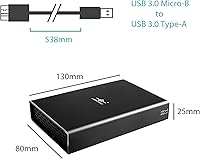
  • Dimensions: The unit measures 5.11″ in length, 3.15″ in width, and 0.98″ in height.
  • Weight: Complete unit weighs approximately 10.6 ounces without drives installed.
  • Power Input: Requires a DC 5V/2A power supply; a compatible AC adapter is included in the packaging.
  • Aux Power Port: A secondary USB Micro-B port is provided to supply additional power for drives with higher current draw.
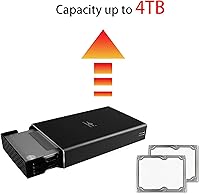
  • Drive Capacity: Supports individual drive capacities stated at 2TB and above, though user reports indicate reliability may vary beyond 2TB per bay.
  • LED Indicators: Four LEDs communicate power status, standby state, drive activity, and current RAID configuration at a glance.
  • OS Compatibility: Compatible with Windows 7, 8.1, and 10; macOS 10.6 and later; and Linux Ubuntu with kernel 2.6.38 or above.
  • Form Factor: Designed exclusively for 2.5-inch drives; 3.5-inch desktop hard drives are not supported.
  • Drives Included: No hard drives or SSDs are included; the enclosure is sold as a standalone unit requiring separately purchased drives.
  • First Available: This model was first listed for sale in August 2017 and has not been discontinued by the manufacturer.
  • Model Number: The official manufacturer model designation for this enclosure is NST-272S3-BK.
  • Thermal Design: Front-facing ventilation slots are built into the aluminum housing to promote passive airflow during operation.

Related Reviews

Vantec NexStar GX 2.5″ USB-C Drive Enclosure
79%
88%
Build Quality
83%
Transfer Speed
91%
Ease of Setup
71%
Heat Management
63%
Drive Fit & Tolerance
More
Vantec NexStar JX 3.5″ HDD Enclosure
76%
93%
Ease of Setup
78%
Transfer Speed — USB
86%
Transfer Speed — eSATA
74%
Thermal Management
67%
Build Quality
More
Vantec NST-371C31-BK NexStar Gx USB 3.1 Gen 2 Type-C 3.5″ SATA HDD/SSD Enclosure
84%
89%
Performance
94%
Ease of Setup
85%
Build Quality
92%
Compatibility with Systems
88%
Data Transfer Speed
More
GODO 2.5″ Dual Bay RAID Enclosure
75%
88%
Value for Money
91%
Ease of Setup
83%
Build Quality
79%
Thermal Management
67%
Transfer Performance
More
Syba SY-ENC50122 5-Bay RAID Enclosure
71%
83%
Build Quality
78%
RAID Functionality
86%
Drive Compatibility
71%
USB 3.0 Performance
54%
eSATA Usability
More
ChenYang CY-SA-060 mSATA M.2 SATA SSD Enclosure
70%
88%
Value for Money
54%
Drive Compatibility
79%
JBOD Functionality
58%
Build Quality
72%
Installation Ease
More
Cenmate 5-Bay Hybrid HDD/NVMe Enclosure
73%
83%
Build Quality
78%
Thermal Management
71%
Transfer Speed
69%
RAID Functionality
76%
Drive Compatibility
More
CT Sounds TROPO-6.5-D2 6.5″ Car Subwoofer
77%
83%
Bass Output for Size
88%
Value for Money
79%
Build Quality
76%
Thermal Management
84%
Installation Ease
More
IO CREST SY-ENC50127 USB 3.2 Type-C Dual Bay HDD + M.2 NVMe External Enclosure
83%
88%
Performance
93%
Ease of Setup
91%
Build Quality
87%
Data Transfer Speed
90%
Cooling/Heat Management
More
ICY DOCK ToughArmor MB998SP-B 8-Bay 2.5” SATA/SAS HDD/SSD Mobile Rack Enclosure for 5.25″ Bay
87%
91%
Performance
88%
Cooling Efficiency
89%
Build Quality
93%
Ease of Installation
72%
Noise Level
More

FAQ

You will need to supply your own drives. The Vantec Nexstar GX Dual 2.5″ RAID Enclosure ships with the enclosure itself, a power adapter, and the necessary cable, but no storage drives are included. Any 2.5-inch SATA hard drive or SSD will work, provided you stay mindful of the capacity considerations mentioned below.
Changing modes requires opening the enclosure and adjusting a set of small DIP switches on the internal circuit board. It is not something you do through software or an external button. For most users, this is a one-time setup decision, so the inconvenience is minor — just plan your configuration before you seal it up and put it on your desk.

Officially the enclosure lists support for drives over 2TB, but real-world user reports suggest compatibility can be inconsistent at higher capacities. If your plan involves two 4TB or larger drives, there is a meaningful risk of detection issues. For drives at or under 2TB per bay, most users report no problems.

It requires the included AC adapter for normal operation. While there is also an auxiliary USB Micro-B port for supplemental power, this caddy is not designed to run bus-powered from your computer alone, especially with HDDs installed. The upside is that the included adapter means you are not hunting for a compatible power supply separately.

There is no active fan — cooling is entirely passive through the aluminum housing and front ventilation slots. For SSDs this is generally fine, as they run cool under normal workloads. If you plan to run traditional spinning hard drives under sustained load, expect the unit to get noticeably warm over time, though most users have not reported thermal shutdowns.

It works on macOS 10.6 and later without needing any additional drivers. Linux users on Ubuntu with kernel 2.6.38 or above are also covered. The cross-platform support is one of the more practically useful aspects of this two-drive caddy.

The enclosure will continue running off the surviving drive, and the RAID status LED will indicate a problem. When you replace the failed drive with a new one of equal or greater capacity, the unit begins rebuilding the mirror automatically. You do not need to run any software or initiate the process manually, which is the main practical appeal of hardware RAID 1 for non-technical users.

In JBOD mode, different drive sizes work fine since each drive is treated as a completely independent volume. In RAID modes, the usable capacity is determined by the smaller of the two drives — the extra space on the larger one is simply unused. Matching drive sizes is always the cleaner approach for RAID configurations.

A small number of users have run into problems with specific USB 3.0 host controllers, particularly on older motherboards or certain add-in cards. Start by trying a different USB port, preferably one that is directly on your motherboard rather than a hub or front-panel header. Updating your USB controller drivers and making sure the AC adapter is firmly connected are also worth doing before assuming the unit is defective.

RAID 1 protects you against a single drive failing, but it is not a substitute for a real backup. If you accidentally delete a file, get hit by ransomware, or the enclosure itself is damaged, both drives are affected equally. Think of this dual-bay enclosure as a way to reduce downtime from hardware failure, not as a replacement for keeping a separate backup copy in another location.

Where to Buy