Overview

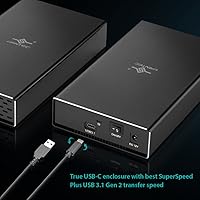
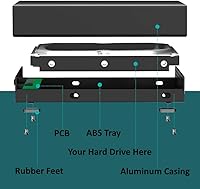
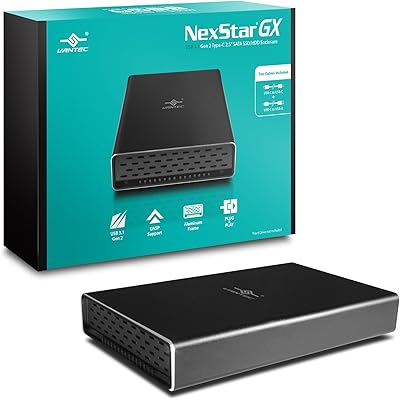
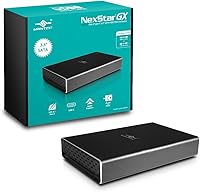
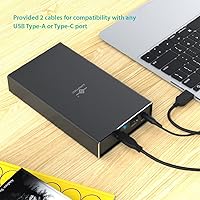
The Vantec NexStar GX NST-371C31 3.5″ HDD Enclosure is a practical, mid-range solution for anyone looking to repurpose an old desktop drive as an external storage unit. It arrived in 2018, which actually works in its favor — the design is mature, the firmware is stable, and it has accumulated a real track record. What sets this Vantec enclosure apart from cheaper options is the aluminum casing: most competitors at this price point ship in plastic, and the difference in feel is immediately noticeable. Both a C-to-C and a C-to-A cable are included, so you can plug into virtually any modern port without hunting for adapters. Works on Windows, macOS, and Linux without installing a single driver.
Features & Benefits

The NexStar GX runs on USB 3.1 Gen 2, which means a 10 Gbps theoretical ceiling — though in practice, that ceiling is set by the mechanical hard drive inside, not the interface. A typical 7200 RPM desktop HDD tops out well below that bandwidth, but the headroom matters if you ever swap in an SSD. UASP support is a genuine plus: it cuts down on CPU usage and keeps transfers more consistent during longer copy sessions. The aluminum body does real work here too, acting as a passive heatsink and keeping sustained temperatures noticeably lower than plastic shells. Rounding things out, the on/off switch and system sleep spin-down protect the drive from unnecessary wear over time.

Best For

This aluminum HDD enclosure is an ideal match for anyone who has a spare 3.5-inch desktop drive collecting dust and wants a simple, no-fuss way to access it externally. It works equally well as a manual backup drive parked on a desk or as supplemental storage when a NAS is running full. Mac and Linux users in particular tend to appreciate the completely driverless setup — nothing to install, nothing to configure. Content creators copying raw video footage will notice the Gen 2 bandwidth advantage over older USB 3.0 enclosures. And if a solid, all-metal chassis matters to you but you are not ready to spend on boutique options, the NexStar GX hits a reasonable middle ground.

User Feedback

Across several hundred reviews, this Vantec enclosure holds a solid 4.2-star rating, and the positive themes are consistent: buyers appreciate the build quality and the fact that it runs cooler than cheaper plastic units under load. That said, it is not without its complaints. A handful of users note that drives — especially high-RPM models — can still get noticeably warm during extended transfers, so leaving some airflow around the unit is worth considering. The included cables are functional but not considered premium by most accounts. A smaller subset of buyers has also run into detection issues on certain USB-C motherboard ports, though this seems tied to specific hardware combinations rather than a consistent product defect.

Pros

  • Aluminum casing feels noticeably more solid than plastic enclosures at a comparable price.
  • USB 3.1 Gen 2 interface offers plenty of bandwidth headroom, especially useful if you ever install an SSD.
  • Both a C-to-C and C-to-A cable are included, so you can connect to virtually any modern computer immediately.
  • Completely plug-and-play across Windows, macOS, and Linux — no drivers, no configuration needed.
  • UASP support keeps CPU usage low and transfers consistent during long copy sessions.
  • The on/off switch and sleep spin-down help extend the lifespan of the housed drive over time.
  • Fits both 3.5-inch and 2.5-inch SATA drives, giving you flexibility if your storage needs change.
  • Supports drives up to 16 TB, so it will not become obsolete as drive capacities grow.
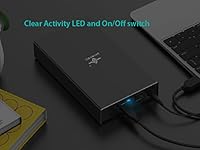
  • Activity LED gives a quick visual confirmation that the drive is reading or writing.

Cons

  • Requires an AC power adapter — there is no bus-powered option for use away from an outlet.
  • Single-bay design only; not an option if you need to house more than one drive.
  • High-RPM desktop drives can push the enclosure to noticeably warm temperatures during extended transfers.
  • Included cables are functional but feel budget-grade; some users swap them out for better-quality alternatives.
  • A subset of buyers has reported intermittent detection failures on specific USB-C motherboard ports.
  • Real-world transfer speeds are limited by the mechanical drive inside, not the Gen 2 interface.
  • The AC adapter adds bulk to your cable setup, which can be inconvenient in tighter desk arrangements.
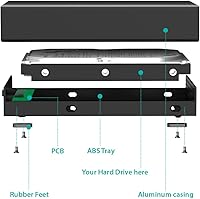
  • No tool-free drive installation — accessing the internals requires a bit more effort than snap-open designs.

Ratings

The scores below for the Vantec NexStar GX NST-371C31 3.5″ HDD Enclosure were produced by our AI rating engine after analyzing verified global buyer reviews, with spam, incentivized feedback, and bot-generated content actively filtered out. Each category reflects the honest consensus across hundreds of real ownership experiences — strengths and frustrations alike — so you can make a confident, eyes-open purchase decision.
Build Quality
88%
The full aluminum casing is the single most praised aspect of this enclosure across buyer feedback. Users coming from cheaper plastic units consistently note that the NexStar GX feels like a meaningful step up — more rigid, more professional-looking, and reassuringly solid when sitting on a desk.
A small number of buyers noted minor fit-and-finish inconsistencies, particularly around the seam where the drive bay opens. Nothing that affects function, but for a product in this price tier, a handful of users expected tighter tolerances throughout.
Heat Management
74%
26%
Compared to plastic enclosures, the aluminum body does measurably better at pulling heat away from the drive during sustained transfers. Users running backup jobs or large file copies over extended sessions generally report the enclosure staying within an acceptable temperature range.
With high-RPM desktop drives — particularly 7200 RPM models — the enclosure can get noticeably warm to the touch after 30 to 60 minutes of continuous use. It is not dangerous, but users working in enclosed spaces or stacking equipment nearby should factor in some airflow clearance.
Transfer Performance
79%
21%
The USB 3.1 Gen 2 interface gives the NexStar GX a real edge over older USB 3.0 enclosures, especially for users housing SATA SSDs. UASP support also makes a tangible difference during sustained large-file transfers, with several users noting smoother, more consistent throughput compared to non-UASP alternatives.
Real-world speeds are bounded by whatever drive is installed — a mechanical HDD will plateau well below the interface ceiling, which can disappoint buyers expecting a dramatic speed jump. The interface headroom is wasted on spinning drives, making the Gen 2 spec most relevant only to SSD users.
Ease of Setup
93%
Plug-and-play operation across Windows, macOS, and Linux is one of the most consistently praised aspects. Mac and Linux users in particular appreciate not having to hunt for drivers — the enclosure simply mounts the drive and gets out of the way, which is exactly what you want from a utility product like this.
Installing the drive itself requires a screwdriver, and the assembly process is not as intuitive as tool-free snap-open designs. First-time users occasionally find the internal bay alignment fiddly, though most describe it as a one-time minor annoyance rather than an ongoing issue.
Compatibility
76%
24%
Cross-platform support covering Windows, macOS, and Linux is broad and well-tested given the product's multi-year track record. The dual-cable bundle means the enclosure works immediately with both legacy USB-A ports and modern USB-C hosts without requiring the user to source additional accessories.
A persistent minority of buyers reports intermittent detection failures when connecting through USB-C ports on certain motherboards, particularly some AMD-based platforms. The issue appears hardware-specific rather than a product defect, but it is frequent enough in reviews to flag as a legitimate risk for users with less common USB controller hardware.
Included Cables
61%
39%
The fact that Vantec bundles two cables — C-to-C and C-to-A — is a practical, buyer-friendly decision that most competitors skip at this price point. Having both on hand means you can connect on day one regardless of what ports your computer offers.
The cables themselves feel entry-grade: thin, with uninspiring connectors that some users describe as loosely fitting over time. Several reviewers proactively replaced both cables with third-party options after a few weeks, which should not be necessary on a mid-range product.
Drive Compatibility
87%
Support for both 3.5″ and 2.5″ SATA drives — including SSDs, HDDs, and hybrid drives — gives this enclosure real flexibility. Buyers repurposing old desktop drives, swapping in a new SSD, or testing multiple drives over time appreciate not being locked into a single form factor.
2.5″ drives require careful positioning inside a bay sized for the larger format, and there is no included adapter bracket to secure them snugly. While functionally fine for most users, it is not an ideal experience compared to enclosures purpose-built for the 2.5″ form factor.
Value for Money
82%
18%
For what it delivers — aluminum construction, Gen 2 interface, UASP support, and dual-cable bundling — the NexStar GX sits at a competitive price point among mid-range enclosures. Buyers consistently describe it as the right step up from budget plastic options without crossing into premium territory.
A few buyers feel the cable quality and minor compatibility edge cases slightly undercut the overall value proposition. If Vantec had included higher-quality cables and addressed the USB-C port detection issue, the value score would be considerably stronger.
Noise & Vibration
71%
29%
The rigid aluminum casing does a reasonable job of damping vibration from spinning HDDs compared to hollow plastic shells, which tend to amplify resonance. Users running the enclosure on solid desk surfaces generally describe it as acceptably quiet during normal read and write operations.
With high-RPM drives under heavy load, some vibration does transmit through the chassis and onto whatever surface the enclosure rests on. Users who are sensitive to desk vibration or who use the enclosure near a microphone setup may notice this during extended transfer sessions.
Power & Drive Longevity
84%
The physical on/off switch is a small but meaningful detail — it lets users fully cut power to the drive without unplugging cables, which reduces unnecessary spin-up cycles over time. The automatic sleep spin-down when the host system hibernates or shuts down adds another layer of drive protection for everyday users.
The requirement for an AC power adapter is a functional limitation that rules out mobile or outlet-free use cases entirely. The adapter itself is not particularly compact, which adds some cable clutter to otherwise clean desk setups.
Portability
48%
52%
At under a pound without a drive installed, the enclosure itself is not heavy, and its footprint is compact enough to sit unobtrusively on a desk or shelf. For stationary desk use, the form factor is perfectly adequate.
The mandatory AC adapter makes true portability impractical — this is a desk-bound product by design. Users who assumed they could carry it between locations and use it laptop-style will find the power dependency a significant inconvenience.
Activity Indicator
78%
22%
The activity LED is a simple addition that earns consistent appreciation from users who want visual confirmation that a transfer is still running. It is particularly useful during large background backup jobs where you are not actively watching a progress bar.
The LED brightness is fixed with no adjustment option, which a handful of users in darker work environments find mildly distracting. It is a minor gripe, but worth noting for anyone who works with the enclosure in their peripheral vision for extended periods.
Long-Term Reliability
81%
19%
With a launch dating back to 2018, the NexStar GX has accumulated enough real-world use to demonstrate solid long-term durability. Many reviewers mention having used the enclosure daily for a year or more without hardware failure, which is a meaningful signal for a product in this category.
A portion of the negative reviews are attributed to units that stopped being detected after several months of use, suggesting some variability in long-term connector reliability. This is not a widespread pattern, but it is consistent enough to suggest the product is not entirely immune to wear-related issues over time.

Suitable for:

The Vantec NexStar GX NST-371C31 3.5″ HDD Enclosure is a strong pick for anyone with a spare desktop hard drive sitting in a drawer after a PC upgrade — it turns that idle hardware into a fully functional external backup unit without any driver installation or technical setup. If you work across multiple operating systems, the native compatibility with Windows, macOS, and Linux is a genuine convenience rather than a marketing checkbox. Content creators or home media enthusiasts who regularly move large files will appreciate the USB 3.1 Gen 2 interface, which offers meaningfully faster throughput than older USB 3.0 enclosures. The all-aluminum construction also makes it a smart choice for anyone running drives for extended periods, since sustained heat is one of the primary killers of spinning HDDs. And if you want something that feels substantial and well-made without paying a premium brand markup, this Vantec enclosure sits in a comfortable spot in the market.
Not suitable for:

If you are looking for a multi-bay enclosure to consolidate several drives, the NexStar GX is a single-drive unit and simply will not fit that use case. Users who need a truly portable, bus-powered drive — one that works without a wall outlet — should also look elsewhere, since this enclosure requires an AC power adapter. The included cables are adequate for basic use, but if you are building a clean, long-term desk setup and care about cable quality, you may find yourself replacing them fairly quickly. It is also worth noting that a small number of users have encountered detection issues on certain USB-C motherboard ports, so if your system has known USB-C compatibility quirks, it is worth researching that combination before buying. Finally, anyone expecting SSD-level transfer speeds should understand that real-world throughput is ultimately capped by the mechanical hard drive inside, not the interface — the Gen 2 headroom is nice to have, but it will not make a spinning HDD perform like flash storage.

Specifications

  • Interface: Connects via USB 3.1 Gen 2 Type-C, delivering a theoretical maximum bandwidth of 10 Gbps.
  • Drive Interface: Internally uses a SATA III connection rated at 6 Gbps, compatible with all standard SATA hard drives and SSDs.
  • Drive Compatibility: Accepts 3.5″ and 2.5″ SATA HDDs, SSDs, and hybrid drives with no adapter required.
  • Max Capacity: Supports drives up to 16 TB, accommodating current high-capacity desktop hard drives without issue.
  • Casing Material: Full aluminum construction provides passive heat dissipation and a more durable build than comparable plastic enclosures.
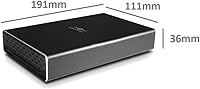
  • Dimensions: Measures 7.5 x 4.4 x 1.4 inches, sized to fit a standard 3.5″ desktop drive with minimal extra footprint.
  • Weight: Weighs 0.75 lbs (12 oz) without a drive installed, light enough for desk use but not designed for pocket portability.
  • Included Cables: Ships with two cables — one USB C-to-C and one USB C-to-A — covering both legacy and modern host ports out of the box.
  • OS Support: Fully compatible with Windows, macOS, and Linux operating systems without requiring any driver installation.
  • Protocol Support: Supports UASP (USB Attached SCSI Protocol), which reduces CPU load and improves transfer consistency on compatible systems.
  • Power Source: Powered via an included AC adapter; the enclosure is not bus-powered and requires a wall outlet during operation.
  • Driver Requirement: Operates as a true plug-and-play device — no drivers, software, or configuration utilities need to be installed.
  • Activity Indicator: Features a front-facing LED that lights up during drive activity, giving a quick visual confirmation of read and write operations.
  • Power Controls: Includes a physical on/off switch and supports automatic spin-down when the host system sleeps, hibernates, or shuts down.
  • Available Since: First made available in May 2018, giving the product a multi-year track record of real-world use and firmware stability.

Related Reviews

Vantec NexStar JX 3.5″ HDD Enclosure
76%
93%
Ease of Setup
78%
Transfer Speed — USB
86%
Transfer Speed — eSATA
74%
Thermal Management
67%
Build Quality
More
Vantec Nexstar GX Dual 2.5″ RAID Enclosure
74%
86%
Build Quality
83%
RAID Functionality
79%
Transfer Performance
61%
Drive Compatibility
67%
Thermal Management
More
Vantec NexStar GX 2.5″ USB-C Drive Enclosure
79%
88%
Build Quality
83%
Transfer Speed
91%
Ease of Setup
71%
Heat Management
63%
Drive Fit & Tolerance
More
Vantec NexStar3 3.5″ External Hard Drive Enclosure
77%
88%
Build Quality
82%
Transfer Performance
84%
Thermal Management
86%
Ease of Setup
71%
Compatibility
More
ikuai 3.5″ USB 3.0 Hard Drive Enclosure
80%
93%
Ease of Setup
71%
Build Quality
62%
Cable Quality & Reliability
88%
Drive Compatibility
74%
Data Transfer Speed
More
Cenmate 5-Bay Hybrid HDD/NVMe Enclosure
73%
83%
Build Quality
78%
Thermal Management
71%
Transfer Speed
69%
RAID Functionality
76%
Drive Compatibility
More
Syba SY-ENC50122 5-Bay RAID Enclosure
71%
83%
Build Quality
78%
RAID Functionality
86%
Drive Compatibility
71%
USB 3.0 Performance
54%
eSATA Usability
More
ORICO DS500U3 5-Bay 3.5″ HDD Enclosure
72%
93%
Ease of Setup
91%
Drive Installation & Swap
67%
Drive Detection Reliability
72%
Transfer Speed
74%
Cooling & Thermal Management
More
ICY DOCK flexiDOCK MB830SP-B 3-Bay 3.5 Inch SATA/SAS HDD Docking Enclosure
83%
93%
Ease of Installation
88%
Build Quality
87%
Performance & Speed
79%
Cooling Efficiency
65%
Noise Levels
More
IO Crest SY-ENC50104 4-Bay HDD Enclosure
80%
84%
Build Quality
81%
Cooling Performance
67%
Noise Level
88%
Setup & Ease of Use
79%
Connectivity & Compatibility
More

FAQ

Yes, the NexStar GX is fully compatible with macOS and requires no driver installation. As long as your MacBook has a USB-C or USB-A port, you can use one of the two included cables and the drive will show up immediately after powering the enclosure on.

That is exactly the use case this enclosure is built for. Any standard 3.5″ SATA hard drive from a desktop PC will fit and work, including drives up to 16 TB. You will need a Phillips screwdriver to secure the drive inside, but the process is straightforward.

No software or drivers are needed at all. Plug the AC adapter in, connect the USB cable to your computer, flip the power switch on, and the drive mounts automatically on Windows, macOS, and Linux.

The Vantec NexStar GX NST-371C31 3.5″ HDD Enclosure uses a USB 3.1 Gen 2 interface with a 10 Gbps theoretical ceiling, but in practice your speeds will be limited by the hard drive itself. A typical 7200 RPM desktop HDD will sustain somewhere in the range of 150 to 200 MB/s — the interface will not be your bottleneck. If you install a SATA SSD, you will see closer to 500 MB/s.
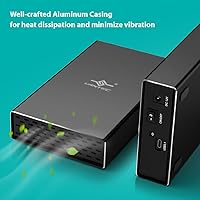
The aluminum casing does a reasonable job of pulling heat away from the drive passively, and it runs noticeably cooler than plastic enclosures. That said, high-RPM desktop drives under sustained load will still make the enclosure warm to the touch. Leaving a few inches of clearance around it on your desk helps.

Yes, the enclosure supports both 3.5″ and 2.5″ SATA drives. Keep in mind that 2.5″ drives will need to be positioned carefully inside the bay, as the chassis is sized for the larger format. Functionally it works fine, and with an SSD installed you will get noticeably faster real-world speeds.

Yes, this enclosure requires an AC power adapter to operate — it is not bus-powered over USB. This means you will need an available outlet wherever you use it, which makes it better suited to a desk setup than truly on-the-go use.

Absolutely. The package includes both a C-to-C cable and a C-to-A cable, so you do not need to buy anything extra to connect to an older laptop or desktop with standard USB-A ports.

It is always best practice to eject the drive properly through your operating system before cutting power, just as you would with any external drive. The enclosure does support automatic spin-down when your system sleeps or shuts down, which helps prevent unexpected disconnections during normal use.

The vast majority of users report no detection issues at all. A small number of buyers have mentioned intermittent problems when connecting through certain USB-C ports on specific motherboards, though the same enclosure often worked fine on a different port or machine. If you run into this, try a different USB port first, and make sure UASP is enabled in your system settings if you are on Windows.