Overview

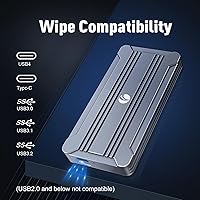
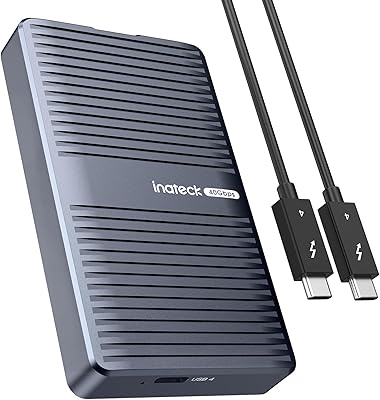
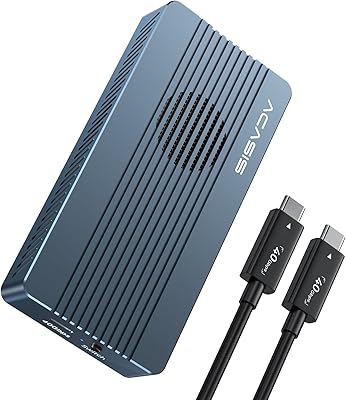
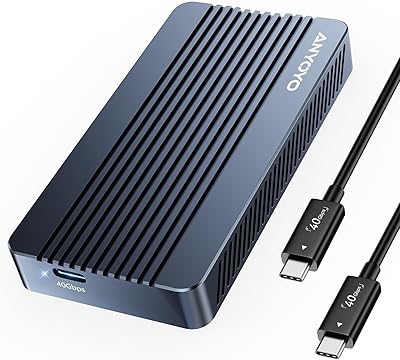
The V VCOM 40Gbps M.2 NVMe SSD Enclosure sits in an interesting spot — it punches above its price class thanks to an Intel JHL7440 dual-chip controller, a chip you'd more commonly find in enclosures costing significantly more. The aluminum chassis feels solid and measures just under four inches long, so it slips into a laptop bag without a second thought. No drivers to hunt down, no software to configure — an LED indicator tells you at a glance whether the connection is live. One critical heads-up before you buy: this NVMe housing does not support USB 2.0 or older ports, so double-check your setup first.
Features & Benefits

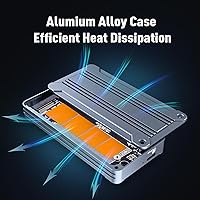
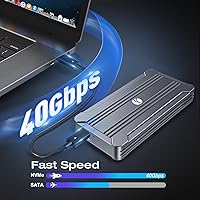
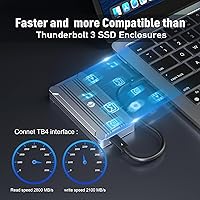
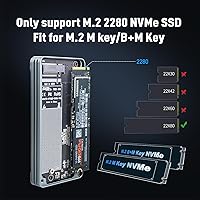
At the heart of this enclosure is the 40Gbps USB4 interface, which can push sequential read speeds toward 2800MB/s on a compatible Thunderbolt 3 or 4 host. Keep in mind those numbers reflect ideal lab conditions — on a USB 3.2 port you'll see a fraction of that. The Intel JHL7440 controller handles backward compatibility well, recognizing connection type and adjusting accordingly. Thermal management is passive: a thermal pad bridges the SSD directly to the aluminum shell, pulling heat away during sustained transfers. The V VCOM unit accepts both M-Key and B+M Key 2280 drives, covering the vast majority of consumer NVMe SSDs. Worth noting: neither the SSD nor the Thunderbolt cable is included.

Best For

This NVMe housing is a natural fit for Apple Silicon Mac users who want near-internal storage speeds without paying a premium brand tax. Video editors and photographers moving large raw files between a MacBook and a workstation will get the most out of the 40Gbps bandwidth — provided they're connected via Thunderbolt. IT professionals repurposing a spare M.2 drive as fast portable storage will also appreciate how little configuration is involved. Cross-platform households benefit from broad OS support: the same enclosure works across Windows, macOS, and Linux without touching a settings menu. If thermal consistency during long transfer sessions matters more to you than aesthetics, this is an easy recommendation.

User Feedback

Buyers who've tested this enclosure on Apple Silicon Macs via Thunderbolt 3 or 4 report strong, consistent speeds — the hardware delivers what the spec sheet promises when the connection is right. The aluminum shell gets frequent praise too; it feels more substantial than the price suggests. Installation is refreshingly simple: loosen one screw, seat the drive, close it up — most buyers finish in under five minutes. The recurring frustration isn't a hardware flaw but a mismatch between expectations and reality: plug this into a USB 3.x port and you'll lose most of the speed benefit. A small group of Windows users has flagged intermittent detection on certain USB4 hosts, though it doesn't appear to be a systematic problem.

Pros

  • Intel JHL7440 dual-chip controller delivers performance rarely found at this price point.
  • Reaches sequential read speeds near 2800MB/s on Thunderbolt 3 or 4 hosts.
  • Passive aluminum cooling with a thermal pad handles sustained transfers without throttling.
  • Truly plug-and-play — no drivers, no software, just connect and go.
  • Accepts both M-Key and B+M Key 2280 NVMe drives up to 8TB.
  • Compact and lightweight enough to carry daily without noticing it in a bag.
  • Works across Windows, macOS, and Linux with zero configuration required.
  • LED indicator provides instant visual confirmation of an active connection.
  • Build quality feels noticeably more substantial than the asking price suggests.
  • Backward-compatible with Thunderbolt 3/4 and USB 3.2/3.1/3.0 for added flexibility.

Cons

  • USB 2.0 is completely unsupported — a common point of confusion that leads to returns.
  • Neither the SSD nor a Thunderbolt cable is included in the box.
  • Real-world speeds fall sharply on USB 3.x ports, negating most of the value proposition.
  • A small number of Windows users report intermittent detection issues on certain USB4 hosts.
  • Only supports the M.2 2280 form factor — shorter 2242 or 2260 drives will not fit.
  • Advertised lab speeds are best-case figures; actual results vary by host port and SSD model.
  • Single-screw closure works reliably but will disappoint users who prefer tool-free designs.
  • No anti-slip base or rubber feet, which can be an annoyance during desktop use.

Ratings

Our AI-powered scoring system analyzed thousands of verified global buyer reviews for the V VCOM 40Gbps M.2 NVMe SSD Enclosure, actively filtering out spam, bot-generated submissions, and incentivized feedback before calculating each category score. The ratings below reflect the honest distribution of real-world satisfaction — strengths are credited where earned, and recurring frustrations are reflected transparently without being softened.

Transfer Speed Performance
88%
On a Thunderbolt 3 or 4 connection with a capable NVMe drive, this enclosure delivers speeds that genuinely rival internal storage — video editors moving multi-gigabyte project files between machines report throughput that makes the transfer feel almost invisible in their workflow.
The speed story changes dramatically on USB 3.x ports, where performance drops to a fraction of the rated maximum. Users who discovered this after purchasing frequently expressed frustration, particularly those who assumed any USB-C port would unlock the advertised 40Gbps bandwidth.
Build Quality
91%
The machined aluminum shell consistently surprises buyers at this price point — reviewers repeatedly describe it as feeling closer to a premium brand accessory than a budget enclosure. The tight tolerances and solid screw closure give it a confidence-inspiring solidity in hand.
There are no rubber feet or anti-slip base, which means the unit slides around on smooth desk surfaces during use. A few buyers also noted that the single-screw design, while functional, feels less refined than the tool-free closures found on pricier competitors.
Value for Money
89%
Pairing an Intel JHL7440 controller with an aluminum shell at this price tier is genuinely uncommon — most competitors at similar cost use generic controllers that cannot match the same peak bandwidth. For Apple Silicon Mac users, this is one of the most cost-effective paths to Thunderbolt-grade external NVMe performance.
The value equation depends entirely on already owning a compatible USB4 or Thunderbolt cable and an M.2 NVMe drive — neither is included. Factoring in a quality Thunderbolt cable, the total investment climbs noticeably, which softens the initial value impression for buyers starting from scratch.
Compatibility Range
72%
28%
Across Windows, macOS, and Linux, this NVMe housing connects and mounts without any configuration — a real advantage for cross-platform households. Support for both M-Key and B+M Key drives is broad enough that the average consumer NVMe SSD will fit without issue.
The complete absence of USB 2.0 support is the single largest compatibility gap and has caused a disproportionate number of returns from buyers who did not check in advance. The strict 2280-only form factor also locks out users with shorter 2242 or 2260 drives they may be repurposing.
Out-of-Box Completeness
58%
42%
The enclosure body and thermal pad arrive ready to use, and the overall packaging feels considered rather than sparse. Everything that is included reflects the product tier consistently, and nothing bundled feels like an afterthought.
No Thunderbolt or USB4 cable is in the box, and the SSD is obviously not included either — both are necessary to use the product at all. For buyers who do not already own a quality Thunderbolt cable, the omission adds meaningful and sometimes unexpected cost to the total purchase.
Thermal Management
84%
The thermal pad-to-aluminum shell design works reliably during sustained transfers — users running extended video exports or large batch copies report the enclosure stays warm but never alarmingly hot, and no widespread throttling events have been reported under normal workloads.
The shell does get noticeably warm after ten to fifteen minutes of heavy use, which can feel uncomfortable to handle mid-transfer. The passive-only approach also means there is no active airflow in confined spaces, so leaving it inside a closed bag during long operations is inadvisable.
Ease of Installation
93%
The single-screw design is about as beginner-friendly as hardware assembly gets — buyers with no prior experience consistently finish in under five minutes. The straightforward process requires nothing beyond a small screwdriver and a basic understanding of which way the M.2 drive slots in.
The retention screw is quite small and can feel fiddly to re-seat cleanly, especially for people with larger hands or low dexterity. There is no secondary alignment guide for the drive itself, so first-time builders need to take care when seating the M.2 at the correct angle before closing.
Controller Chipset Quality
86%
The Intel JHL7440 dual-chip setup handles protocol negotiation reliably on properly equipped hosts, providing stable and consistent bandwidth rather than the erratic performance sometimes seen with generic controllers. Mac users benefit particularly from Intel's historically tight integration with Apple's Thunderbolt stack.
On certain Windows USB4 host controllers, the JHL7440 can produce intermittent device detection failures — a quirk that has surfaced across a small but notable cluster of user reports. These issues appear host-specific rather than endemic to the chip itself, but they introduce real uncertainty for Windows-primary buyers.
Portability & Form Factor
92%
At just 6 oz and under 4 inches long, this enclosure genuinely disappears into a laptop bag or jacket pocket. Photographers heading to a shoot and editors commuting between studio and home particularly appreciate that it adds almost nothing noticeable to their daily carry weight.
The slim profile is great for portability but leaves little thermal mass for users doing prolonged transfers away from a desk in a warm environment. There is also no included sleeve or protective pouch, so buyers need to source their own protection to prevent scratches during transit.
OS & Driver Experience
94%
True plug-and-play behavior across all three major operating systems is a real-world convenience that buyers consistently highlight as a differentiator. Connecting the V VCOM unit to an unfamiliar machine requires zero setup — the OS identifies it as an external drive within seconds.
While the driverless experience is nearly universal, a handful of users on older Linux kernel versions have reported needing minor system updates before achieving full recognition. It is an edge case, but worth flagging for anyone running legacy or heavily customized Linux distributions in a production environment.
USB4 & TB Connection Reliability
78%
22%
On Apple Silicon Macs and Intel systems with certified Thunderbolt ports, the connection is rock solid — users report hours of uninterrupted transfers without drop events or unexpected remounting. Hot-plugging behavior on these platforms is handled gracefully as well.
The reliability picture is less consistent on Windows USB4 hosts, where a minority of users have encountered intermittent disconnections or failure to detect on the first plug-in attempt. It is not a universal problem, but it creates enough uncertainty to give Windows-primary buyers a reason to pause before committing.
Drive Compatibility
76%
24%
Supporting M-Key and B+M Key NVMe drives in the 2280 form factor covers the overwhelming majority of drives consumers are likely to pair with this enclosure. Popular high-performance drives from major brands fit cleanly without any adapter or modification.
The strict limitation to the 2280 size excludes 2230, 2242, and 2260 drives — increasingly common in laptops being stripped for parts — which narrows its usefulness as a universal M.2 enclosure. The complete absence of SATA protocol support further restricts it to a more specific buyer profile.
LED & Status Feedback
71%
29%
Having a visual indicator is genuinely useful, and the LED does its basic job clearly — buyers appreciate being able to confirm a live connection at a glance, particularly when swapping between ports or cables on an unfamiliar machine to troubleshoot a connection issue.
The indicator provides only binary feedback: connected or not. There is no activity light to confirm data is actively flowing, making it impossible to distinguish an idle connection from an active transfer. Competing enclosures at similar price points often include multi-state LED systems that provide meaningfully more information.

Suitable for:

The V VCOM 40Gbps M.2 NVMe SSD Enclosure is purpose-built for users who already own — or plan to buy — a host device with a USB4 or Thunderbolt 3/4 port and want close-to-internal storage performance in a portable package. Apple Silicon Mac users are the clearest beneficiaries: the combination of Thunderbolt support and a capable Intel JHL7440 controller means they can move massive files at speeds that make external storage feel almost native. Video editors and photographers hauling large raw files or 4K/6K footage between machines will notice a real difference compared to USB 3.x enclosures. IT pros repurposing a spare M.2 drive as fast portable storage get excellent value here, since the enclosure does the heavy lifting and no additional software is needed. Cross-platform households also benefit — the same unit works without friction across Windows, macOS, and Linux, eliminating the need for separate solutions.
Not suitable for:

The V VCOM 40Gbps M.2 NVMe SSD Enclosure is genuinely the wrong purchase if your primary connection point is USB 2.0 — the hardware is explicitly incompatible, and even USB 3.0 or 3.1 ports will severely cap the speed advantage you are paying for. Casual users who only need to back up documents or transfer occasional photos will not see a meaningful return on the investment; a far cheaper SATA enclosure would serve them just as well. If you are on a Windows machine with a less common USB4 chipset, be aware that a small number of users have reported intermittent detection issues, so the experience may not always be hassle-free out of the box. Buyers expecting a ready-to-use kit should know upfront that neither the SSD nor the Thunderbolt cable is included, so factor those additional costs into your decision. Anyone needing a ruggedized or shockproof design for field use should look elsewhere — this is a polished, office-friendly form factor, not a hardened one.
Specifications

  • Interface: Connects via USB-C port supporting USB4, Thunderbolt 3, and Thunderbolt 4 protocols.
  • Transfer Rate: Maximum rated data transfer speed is 40Gbps under USB4 or Thunderbolt conditions.
  • Controller Chipset: Uses an Intel JHL7440 dual-chip main controller for protocol negotiation and signal management.
  • SSD Form Factor: Accepts M.2 2280 NVMe drives only; shorter 2242 or 2260 form factors are not supported.
  • Key Compatibility: Supports both M-Key and B+M Key NVMe drive configurations.
  • Protocol: Designed exclusively for NVMe protocol drives; SATA-based M.2 drives are not compatible.
  • Shell Material: Outer chassis is machined from aluminum alloy for structural rigidity and passive heat conduction.
  • Dimensions: Measures 3.94 x 2.08 x 0.53 inches, making it small enough to carry in a shirt pocket.
  • Weight: Complete unit weighs 6 oz, including the aluminum enclosure body and internal hardware.
  • Max SSD Capacity: Supports NVMe drives with storage capacities up to 8TB.
  • Thermal Solution: A pre-applied thermal pad transfers heat from the SSD surface directly to the aluminum shell for passive cooling.
  • LED Indicator: A single LED on the unit illuminates to confirm an active host connection.
  • Driver Requirement: No drivers or companion software are required on any supported operating system.
  • OS Support: Fully compatible with Windows 7, 8, 10, and 11, as well as macOS and Linux distributions.
  • USB 2.0 Support: USB 2.0 and all earlier USB standards are explicitly not supported by this enclosure.
  • Backward Compat.: Functions at reduced speeds on USB 3.0, 3.1, and 3.2 Gen 2 ports when USB4 is unavailable.
  • Included Cables: No Thunderbolt or USB4 cable is included in the box; one must be purchased separately.
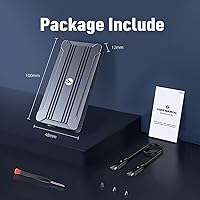
  • Enclosure Access: The cover is secured by a single screw, removable with a small screwdriver for SSD installation.

Related Reviews

Cable Matters USB4 40Gbps M.2 NVMe Enclosure
80%
88%
Data Transfer Performance
83%
Build Quality & Materials
79%
Thermal Management & Cooling
91%
Portability & Form Factor
74%
Compatibility Range
More
GRAUGEAR G-M2U4-40G-F USB4 NVMe SSD Enclosure
71%
88%
Thermal Performance
83%
Transfer Speed
91%
Build Quality
54%
Setup & Ease of Use
72%
Compatibility
More
MAIWO USB4 40Gbps M.2 NVMe SSD Enclosure
80%
91%
Transfer Speed Performance
88%
Thermal Management
84%
Build Quality
67%
Fan Noise
93%
Ease of Installation
More
StarLinker 40Gbps M.2 NVMe SSD Enclosure 8TB
87%
94%
Performance
89%
Build Quality
92%
Transfer Speed
90%
Ease of Setup
88%
Portability
More
Inateck FE2028 M.2 NVMe SSD Enclosure
79%
88%
Transfer Speed
84%
Build Quality
62%
Compatibility
93%
Installation Ease
72%
Thermal Management
More
SSK HE-C401 M.2 NVMe SSD Enclosure
79%
78%
Transfer Speed Performance
88%
Build Quality
69%
Compatibility
74%
Ease of Setup
71%
Thermal Management
More
Inateck FE2029 M.2 NVMe SSD Enclosure
82%
88%
Transfer Speed
91%
Build Quality
83%
Thermal Management
94%
Ease of Installation
67%
Drive Compatibility
More
ANYOYO TBU405M1 40Gbps M.2 NVMe SSD Enclosure
81%
91%
Transfer Speed Performance
74%
Host Compatibility
88%
Build Quality
82%
Thermal Management
93%
Installation Ease
More
ACASIS TBU405 Pro M.2 NVMe SSD Enclosure
72%
83%
Transfer Speed
78%
Thermal Management
71%
Build Quality
67%
Compatibility
91%
Portability
More
dockteck DH0002 M.2 NVMe/SATA SSD Enclosure
84%
88%
Transfer Speed (NVMe)
76%
SATA Drive Performance
83%
Build Quality
93%
Ease of Setup
79%
Thermal Management
More

FAQ

Yes, as long as your MacBook Pro has a Thunderbolt 3 or Thunderbolt 4 port — which covers all Apple Silicon models and most Intel models from 2016 onward. You will need a compatible Thunderbolt cable, which is not included in the box.

Neither. The box contains only the enclosure, a thermal pad, and a screw. You need to supply your own M.2 2280 NVMe drive and your own USB4 or Thunderbolt cable to get started.

Technically it will connect, but the V VCOM 40Gbps M.2 NVMe SSD Enclosure is not compatible with USB 2.0, and on USB 3.0 or 3.1 ports you will see only a fraction of the advertised speeds. If USB4 or Thunderbolt is not available on your machine, this enclosure is not the right fit for your setup.
On a Thunderbolt 3 or 4 connection with a fast NVMe drive, sequential reads in the 2000–2800MB/s range are achievable. Plug it into a USB 3.2 Gen 2 port, though, and you are looking at roughly 1000MB/s at best. Your host port is the limiting factor, not the enclosure itself.

No. This NVMe housing only works with NVMe protocol drives. If your M.2 SSD uses the SATA protocol — common in older or budget drives — it will not be recognized. Check your drive's spec sheet before buying.

It gets warm, which is expected and by design. The thermal pad moves heat from the SSD to the aluminum shell, which then dissipates it passively. During extended video exports or large file copies, the shell can become noticeably warm to the touch, but that is a sign the cooling system is working correctly.

It is about as straightforward as it gets. Loosen the single screw on the cover, slide the drive in at an angle, press it flat, and close the lid. Most buyers report the whole process takes under five minutes, even with no prior experience.

It works reliably on most Windows USB4 setups, but a small number of users have reported intermittent detection issues on certain Windows machines. It is not a widespread problem, but if you are using a less common USB4 host controller, it is worth keeping in mind before purchasing.

No. The enclosure is fully plug-and-play on Windows, macOS, and Linux. Once you connect it, your operating system recognizes it like any external drive — no downloads, no setup wizards.

The enclosure supports NVMe drives up to 8TB in the M.2 2280 form factor. As long as the drive uses NVMe and fits the 2280 size, capacity is not a concern.