Overview

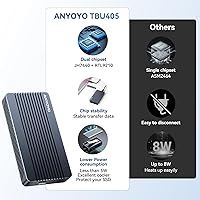
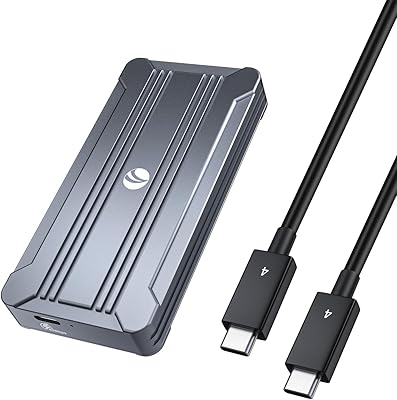
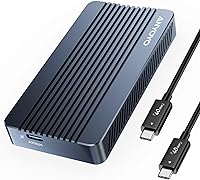
The ANYOYO TBU405M1 40Gbps M.2 NVMe SSD Enclosure sits firmly in the premium tier of external storage solutions, built for users who genuinely need Thunderbolt-class bandwidth rather than just an impressive spec sheet. What separates it from the crowded field of cheaper enclosures is its dual-chip architecture — pairing the JHL7440 with the RTL9210 — which delivers more stable transfers and broader host compatibility than single-chip alternatives. The all-aluminum body is not a cosmetic choice; it is a real thermal and structural statement. Tool-free installation and wide protocol support make this NVMe enclosure practical beyond just flagship use cases. For professionals who depend on fast, reliable external storage daily, this is an enclosure you buy once and trust.
Features & Benefits

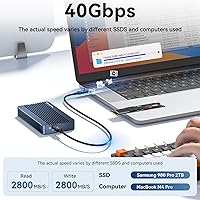
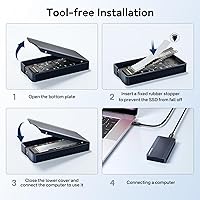
The headline capability is USB4 at 40Gbps, and on a proper Thunderbolt 4 or 5 host, real-world read speeds around 2,800 MB/s and write speeds pushing past 4,000 MB/s are genuinely achievable — not just marketing fiction. That performance is underpinned by the dual-chip design, which handles protocol negotiation more gracefully than budget enclosures when switching between host types. Thermally, the all-aluminum shell combined with a metal heatsink and silicone thermal pad is reported by users to keep sustained transfers from throttling. Drive installation requires no tools and covers form factors from 2230 through 2280. The included silicone protective sleeve is a small but thoughtful addition you rarely see at this tier.

Best For

This NVMe enclosure makes the most sense for people whose workflows genuinely push storage to its limits. Video editors shuttling 4K or 6K ProRes footage between a MacBook Pro and a desktop workstation will notice the difference immediately. Mac users on Thunderbolt-native hardware get the full bandwidth without compatibility asterisks. Gamers with large title libraries can rely on it as a high-speed external drive without the stutter common on USB 3.2. IT professionals cloning or backing up NVMe drives at full speed will appreciate the stability the dual-chip setup provides. And anyone upgrading from an older USB 3.2 enclosure will find the speed jump immediately measurable, not just theoretical.

User Feedback

On Thunderbolt-equipped Macs, buyers consistently report speeds that track closely with advertised figures — reassuring, since that is not always guaranteed. Build quality earns frequent praise; the aluminum finish feels solid and holds up to daily carry without obvious wear. The critical reviews, though, center on Windows USB4 compatibility: users with laptops that technically support USB4 but lack full Intel Thunderbolt certification sometimes fall back to lower speeds or hit intermittent recognition issues. A few buyers have flagged that the included cable is on the shorter side for larger desk setups. Thermal behavior during extended transfers is widely described as warm but not alarmingly hot, with no significant throttling complaints surfacing across reviews.

Pros

  • Real-world speeds on Thunderbolt 4 hosts consistently approach advertised figures — not just peak burst claims.
  • Dual-chip architecture delivers noticeably more stable sustained transfers than single-chip budget alternatives.
  • All-aluminum build feels genuinely premium and has held up well under daily carry use according to long-term owners.
  • Tool-free installation supports four M.2 form factors and takes under two minutes from unboxing to connected drive.
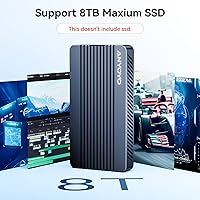
  • Supports NVMe drives up to 8TB, keeping this NVMe enclosure relevant as high-capacity drives become mainstream.
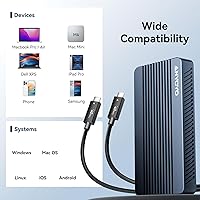
  • Broad protocol compatibility means it works across Thunderbolt 3, 4, 5, USB4, and older USB hosts without adapters.
  • Plug-and-play on macOS with no driver installation required — recognized immediately on any Thunderbolt-equipped Mac.
  • User-reported thermal behavior during normal transfer sessions is warm but well within comfortable operating range.
  • The included silicone protective sleeve adds meaningful scratch protection that most competing enclosures skip entirely.
  • Compact enough at 96 grams to pocket alongside a laptop without adding noticeable weight to a travel bag.

Cons

  • Windows USB4 hosts without Thunderbolt certification frequently fall back to USB 3.2 speeds, wasting the bandwidth premium entirely.
  • The included cable is too short for comfortable use in most standard desk configurations without purchasing a separate longer cable.
  • SATA M.2 drives are completely unsupported — buyers migrating from older storage are often caught off guard by this.
  • The silicone sleeve leaves the connector end exposed, which is precisely where daily carry damage tends to occur first.
  • Long-term reliability data is limited given the product's age, making multi-year durability harder to assess confidently.
  • A small but consistent subset of Windows users reports intermittent device recognition issues that require port-switching or restarts to resolve.
  • The aluminum finish scratches more easily than expected when used without the sleeve, which only partially covers the body.
  • No cable management solution is included, leaving the short cable to dangle loosely in vertical or mounted orientations.

Ratings

The ANYOYO TBU405M1 40Gbps M.2 NVMe SSD Enclosure has been put through its paces by a wide range of buyers — from video editors on MacBook Pros to IT professionals cloning enterprise drives — and our AI has analyzed verified global reviews while actively filtering out incentivized, bot-generated, and duplicate feedback to produce the scores below. This Thunderbolt-compatible enclosure earns strong marks in several areas, but not without genuine caveats that serious buyers should weigh before committing. Both the highs and the frustrations are reflected honestly here.
Transfer Speed Performance
91%
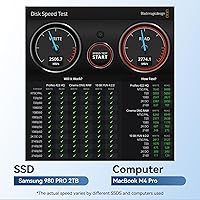
On Thunderbolt 4 and USB4-certified hosts, real-world read speeds consistently land near the advertised ceiling — editors pulling large ProRes or RAW batches report dramatically shorter transfer windows compared to USB 3.2 enclosures they previously used. The dual-chip design appears to contribute meaningfully to sustained throughput rather than just burst performance.
Speed ratings only hold up on properly certified Thunderbolt hosts. Users on USB4 laptops without Intel Thunderbolt certification frequently report falling back to USB 3.2 speeds, which makes the enclosure feel like a significant overspend for their specific machine.
Host Compatibility
74%
26%
The protocol stack is genuinely broad — Thunderbolt 5, 4, and 3, plus USB4, 3.2, 3.1, and 3.0 are all supported, meaning this NVMe enclosure travels well between different machines without adapters. Mac users in particular report plug-and-play recognition with zero driver friction.
Windows USB4 compatibility is the persistent sore spot. Several buyers discovered their laptop's USB4 port lacked full Thunderbolt certification and the enclosure defaulted to much lower speeds without any warning. ANYOYO's compatibility notes could be clearer about this distinction upfront.
Build Quality
88%
The all-aluminum shell feels noticeably more substantial than plastic enclosures in the same category, and buyers who carry it daily report no flex, no creaking, and no cosmetic degradation after months of use. It projects a premium, tool-grade quality that matches its positioning.
A small number of users noted that the aluminum finish picks up fine scratches relatively easily without the included silicone sleeve — which only covers part of the enclosure. Those who prefer a pristine look may want to source a full-coverage sleeve separately.
Thermal Management
82%
18%
User-reported thermal behavior during sustained transfers is generally positive — the enclosure gets warm but not hot enough to cause concern or trigger throttling in typical 10–20 minute transfer sessions. The combination of a metal heatsink and silicone thermal pad seems to distribute heat across the chassis effectively.
Under extended, back-to-back heavy workloads, some users describe the enclosure becoming noticeably warm to the touch, and a handful report minor throttling on prolonged transfers exceeding 30 minutes. Independent thermal benchmarking data from ANYOYO is absent, so these observations rest on user reports alone.
Installation Ease
93%
Tool-free installation is one of those features that sounds minor until you actually use it — swapping in a new drive takes under two minutes with no screwdrivers or loose hardware. Support for 2230, 2242, 2260, and 2280 form factors means most M.2 drives slot in without any adapter fuss.
A small subset of buyers found the retention mechanism slightly stiffer than expected when seating shorter 2230 drives, requiring careful alignment to avoid uneven pressure. It is a minor point, but worth noting for first-time builders.
Drive Compatibility
87%
M-key and B+M-key NVMe PCIe drives are both supported, and the 8TB ceiling means this enclosure will not become obsolete as higher-capacity consumer drives become mainstream. Photographers and video editors storing full project libraries on a single large-capacity drive find this particularly practical.
SATA M.2 drives are not supported — this is NVMe-only, which catches some buyers off guard if they are migrating an older SATA SSD. The listing makes this clear, but it is a friction point for users who did not check closely before purchasing.
Cable Quality & Length
63%
37%
The included USB4 cable is functional and rated correctly for the interface, which is not a given at this price tier — some competing enclosures bundle cables that cannot actually sustain full bandwidth. It works reliably for portable use and travel setups.
The cable length is a recurring complaint among desk users — it is short enough that placement options are limited without a cable extender or a separate longer USB4 cable purchase. For a premium-priced enclosure, a longer cable option in the box would be a straightforward improvement.
Protective Accessories
71%
29%
The silicone sleeve included in the box is a thoughtful touch that many enclosures at this tier simply omit. It provides genuine scratch and impact protection for users who drop the enclosure into a bag alongside other gear.
The sleeve covers the body but leaves the connector end exposed, which is exactly where damage tends to occur in daily carry. Users who travel frequently noted they still needed to source a small pouch or case separately for full protection.
Software & Driver Experience
84%
On macOS, the enclosure requires no driver installation whatsoever — it is recognized immediately and behaves like any native Thunderbolt device. Windows 10 and 11 users on certified hosts also report clean plug-and-play behavior without manual driver hunting.
A minority of Windows users on non-Thunderbolt USB4 machines reported occasional device recognition hiccups that required a port switch or system restart to resolve. Linux support appears functional but is less documented, and edge-case driver issues on older kernels have been noted by technically advanced users.
Portability
89%
At 96 grams and roughly the footprint of a large USB stick, this NVMe enclosure slips into a jacket pocket or camera bag without adding meaningful weight. Professionals moving between offices, studios, or shoots find it far more practical than a portable RAID or bus-powered HDD solution.
The enclosure has no integrated cable management or clip, so the short cable tends to dangle loosely when the unit is connected in a vertical orientation. It is a minor ergonomic annoyance rather than a functional problem, but it would be easy to solve with a simple cable wrap.
Value for Money
68%
32%
For MacBook Pro and Mac Studio users who fully utilize the Thunderbolt 4 bandwidth and need sustained high-speed external storage, the performance-to-price ratio is justifiable — the dual-chip design and thermal engineering represent genuine engineering investment over budget alternatives.
For Windows users who discover post-purchase that their USB4 host cannot deliver full Thunderbolt speeds, the value proposition collapses considerably. The premium pricing is only defensible when the host hardware is fully compatible, making thorough pre-purchase research non-negotiable.
Long-Term Reliability
77%
23%
Buyers who have owned this Thunderbolt-compatible enclosure for six months or more largely report no degradation in recognized speeds or connection stability, suggesting the dual-chip platform holds up under regular professional use. The all-aluminum chassis shows no structural fatigue in extended ownership reports.
The sample of long-term reviews is still relatively limited given the product's market age, so multi-year reliability data is thin. A few users have flagged intermittent disconnection events after heavy use cycles, though it is unclear whether these stem from the enclosure, the drive, or the host.
Aesthetics & Design
83%
The enclosure has a clean, understated look that fits naturally on a professional desk alongside MacBook accessories or high-end peripherals. The brushed aluminum finish and compact proportions give it a considered, purposeful appearance rather than the gamer-aesthetic that plagues some competing products.
Color and finish options are limited — buyers who want something other than silver-toned aluminum are out of luck. The ANYOYO branding on the enclosure is subtle, but a few design-conscious buyers noted they would prefer no logo at all for a cleaner look.

Suitable for:

The ANYOYO TBU405M1 40Gbps M.2 NVMe SSD Enclosure is purpose-built for professionals and power users whose workflows genuinely demand Thunderbolt-class external storage speeds. Video editors working with 4K or 6K ProRes footage will notice the difference immediately — moving a 50GB project file between a MacBook Pro and a desktop workstation takes a fraction of the time compared to any USB 3.2 solution. Photographers dealing with large RAW file batches, especially in tethered or multi-machine studio setups, will find this NVMe enclosure a practical daily workhorse. Mac Studio and MacBook Pro users benefit most, since Apple's Thunderbolt 4 implementation is consistent and fully unlocks the bandwidth on offer. IT professionals who regularly clone NVMe drives, run full-system backups, or image multiple machines will also find the dual-chip stability worth the investment. Gamers with high-capacity NVMe drives storing titles that require fast asset streaming can use this Thunderbolt-compatible enclosure as a reliable high-speed external library without the stutter associated with slower interfaces.
Not suitable for:

The ANYOYO TBU405M1 40Gbps M.2 NVMe SSD Enclosure is a poor fit for buyers whose laptops or desktops do not include a fully certified Thunderbolt 4 or USB4 host controller — and this is a larger group than most people realize. Many mid-range Windows laptops advertise USB4 support but lack Intel Thunderbolt certification, meaning the enclosure will fall back to USB 3.2 speeds and the premium you paid becomes very hard to justify. Casual users who transfer files occasionally, store documents, or stream media from an external drive will find the performance headroom completely unnecessary for their actual needs — a well-built USB 3.2 Gen 2 enclosure would serve them better at a much lower cost. Users hoping to repurpose an older SATA M.2 drive will be disappointed, as this NVMe enclosure does not support SATA protocol drives at all. Anyone planning to use this primarily as a fixed desk solution with a longer cable run should also factor in the short included cable, which may require an additional USB4 cable purchase to reach comfortably across a workstation.
Specifications

  • Interface: Supports USB4 at 40Gbps, Thunderbolt 5, 4, and 3, plus USB 3.2, 3.1, 3.0, and 2.0 via a single USB Type-C connector.
  • Chip Architecture: Uses a JHL7440 and RTL9210 dual-chip controller design for improved transfer stability and broader host compatibility.
  • Max Read Speed: Achieves approximately 2,807 MB/s sequential read when paired with a high-performance NVMe drive such as the Samsung 990 Pro 4TB.
  • Max Write Speed: Achieves approximately 4,016 MB/s sequential write under optimal conditions with a compatible high-performance NVMe drive.
  • Drive Protocol: Compatible exclusively with NVMe PCIe M.2 drives using M-key or B+M-key connectors; SATA M.2 drives are not supported.
  • Form Factors: Accepts M.2 NVMe drives in 2230, 2242, 2260, and 2280 sizes without requiring tools or additional adapters.
  • Max SSD Capacity: Supports NVMe M.2 solid-state drives up to 8TB in capacity, accommodating current and near-future high-density drives.
  • Body Material: Constructed from aluminum alloy, providing structural rigidity and acting as a passive heat spreader across the enclosure surface.
  • Thermal Solution: Integrates a metal heatsink and a silicone thermal pad to transfer heat from the SSD to the aluminum chassis during sustained workloads.
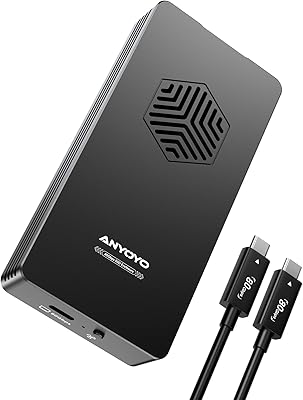
  • Connector: Features a USB Type-C port on the enclosure; a USB4-rated cable is included in the box.
  • Dimensions: Measures 4.09″ in length, 2.13″ in width, and 0.63″ in height, making it pocketable for mobile professional use.
  • Weight: Weighs 96 grams (3.39 oz) without a drive installed, adding negligible burden to a laptop bag or travel kit.
  • Installation: Tool-free design allows drive installation and removal without screwdrivers, using a retention mechanism that secures the M.2 module in place.
  • Included Accessories: Ships with a silicone protective sleeve designed to reduce surface scratches during daily carry and transport.
  • OS Support: Compatible with Windows 7, 8, 10, and 11, Linux, and macOS 10.3 and later, including current macOS releases on Apple Silicon Macs.
  • Model Identifier: The enclosure carries the model designation TBU405M1, identifiable on the product body and packaging for warranty and support purposes.
  • Bus Power: The enclosure is bus-powered entirely through the USB Type-C connection, requiring no external power supply or wall adapter.
  • SSD Included: No SSD is included — the enclosure is sold as a bare housing, and a compatible NVMe M.2 drive must be purchased separately.

Related Reviews

Cable Matters USB4 40Gbps M.2 NVMe Enclosure

80%
88%
Data Transfer Performance
83%
Build Quality & Materials
79%
Thermal Management & Cooling
91%
Portability & Form Factor
74%
Compatibility Range
More
ANYOYO TB502Pro NVMe SSD Enclosure
78%
91%
Transfer Speed Performance
88%
Thermal Management
89%
Build Quality
86%
Thunderbolt 5 Compatibility
41%
TB3 Fallback Behavior
More
GRAUGEAR 40Gbps M.2 NVMe SSD Enclosure
85%
93%
Speed & Performance
88%
Cooling Efficiency
91%
Ease of Installation
85%
Build Quality
75%
Compatibility with Older USB Interfaces
More
V VCOM 40Gbps M.2 NVMe SSD Enclosure
87%
92%
Performance
89%
Ease of Installation
85%
Cooling/Temperature Management
91%
Build Quality
88%
Compatibility
More
StarLinker 40Gbps M.2 NVMe SSD Enclosure 8TB
87%
94%
Performance
89%
Build Quality
92%
Transfer Speed
90%
Ease of Setup
88%
Portability
More
MAIWO M.2 NVMe SSD Enclosure 40Gbps, 8TB
85%
94%
Data Transfer Speed
89%
Cooling Efficiency
91%
Build Quality
87%
Ease of Setup
70%
Portability
More
SSK M.2 NVMe SSD Enclosure 40Gbps USB4, 8TB
88%
94%
Data Transfer Speed
89%
Ease of Setup
91%
Build Quality
75%
Heat Management
88%
Compatibility with Mac/Windows
More
Inateck FE2028 40Gbps M.2 NVMe SSD Enclosure 8TB
85%
94%
Data Transfer Speed
88%
Build Quality
91%
Thermal Management
86%
Portability
90%
Setup & Installation
More
Inateck FE2029 40Gbps M.2 NVMe SSD Aluminum Enclosure 8TB
87%
94%
Performance
92%
Ease of Installation
85%
Cooling Efficiency
90%
Build Quality
88%
Compatibility
More
ACASIS TBU405 Pro M.2 NVMe SSD Enclosure
72%
83%
Transfer Speed
78%
Thermal Management
71%
Build Quality
67%
Compatibility
91%
Portability
More

FAQ

Only if your laptop's USB4 port is backed by a fully Intel Thunderbolt-certified controller. Many Windows laptops advertise USB4 support but use non-Thunderbolt implementations that cap out at USB 3.2 speeds in practice. Before buying, check your laptop's spec sheet specifically for Thunderbolt 4 or Thunderbolt 3 certification — USB4 alone is not a guarantee of 40Gbps performance.

No. On any Thunderbolt-equipped Mac running a supported macOS version, the enclosure is recognized immediately without installing any additional software or drivers. It behaves exactly like a native Thunderbolt storage device from the moment you plug it in.

Unfortunately, no. This NVMe enclosure only supports NVMe PCIe drives — SATA M.2 drives are electrically incompatible and will not be recognized. If you have an older SATA M.2 drive, you would need a separate SATA-compatible enclosure.

Yes, the 2230 form factor is explicitly supported alongside 2242, 2260, and 2280. The tool-free retention system accommodates all four sizes, though some users find seating a shorter 2230 drive requires slightly more careful alignment compared to the more common 2280 length.

Based on user reports, the enclosure gets noticeably warm during sustained transfers but not alarmingly so under typical workloads lasting 10 to 20 minutes. The aluminum body and thermal pad do appear to distribute heat effectively. For very long back-to-back sessions, a small number of users have reported the chassis getting quite warm, though significant throttling complaints are uncommon in the review pool.

It works with Thunderbolt 3. You will be limited to the maximum bandwidth of the Thunderbolt 3 specification, which is still 40Gbps — the same ceiling as Thunderbolt 4 — so in practice there is no meaningful speed difference between the two for this enclosure.

No SSD is included. The box contains only the enclosure housing, the USB4 cable, and the silicone protective sleeve. You need to source and install a compatible NVMe M.2 drive yourself.

The included cable is on the shorter side — multiple buyers have flagged it as limiting for typical desk configurations where the port and the drive sit more than a short reach apart. If you plan to use this as a fixed workstation drive rather than a travel accessory, it is worth budgeting for a longer USB4 cable separately.

Yes, this Thunderbolt-compatible enclosure is backward compatible with USB 3.2, 3.1, 3.0, and even 2.0 ports. The speeds will step down to match whatever the host port supports, but the drive will still mount and function normally — you just will not see anywhere near 40Gbps on a standard USB-C port.

In most cases, yes. macOS supports booting from external Thunderbolt NVMe drives, and this enclosure has been used for that purpose by a number of buyers. However, bootability can depend on your specific Mac model and macOS version, so it is worth verifying Apple's current support documentation for your exact hardware configuration before relying on it as a primary boot volume.