


Overview

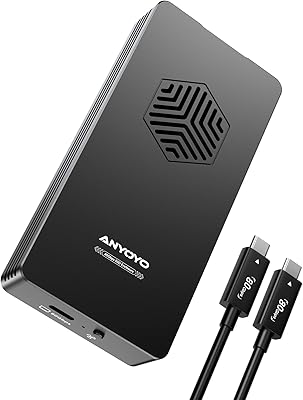
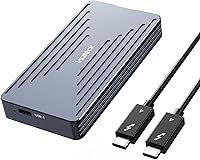
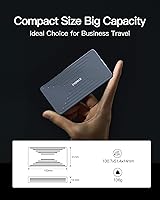
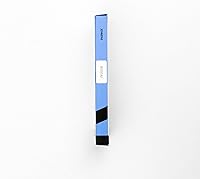
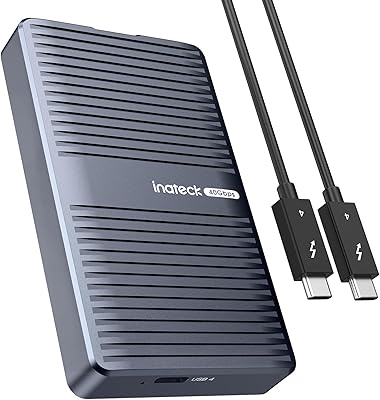
The Inateck FE2028 M.2 NVMe SSD Enclosure is a compact, well-built option for anyone who needs fast, portable NVMe storage access without being tethered to a desktop. What sets it apart at this price point is the USB4/Thunderbolt 4 interface, which puts it in a different league from the flood of USB 3.2 enclosures cluttering the market. The aluminum shell feels solid in hand, and the tool-free design signals that Inateck put thought into usability, not just specs. It accepts 2230, 2242, 2260, and 2280 SSDs, covering nearly every common form factor. One honest caveat: this NVMe enclosure only delivers its full potential when plugged into a USB4 or Thunderbolt 4 host.

Features & Benefits

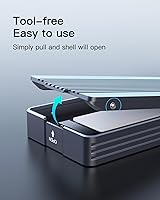
The headline spec on the FE2028 is a 40Gbps transfer ceiling via the USB4 protocol, which translates to real-world read speeds around 2700MB/s — fast enough to move a 100GB video project in under a minute on a compatible host. Cooling is handled thoughtfully: the perforated aluminum shell vents heat passively while an internal thermal silicone pad pulls warmth away from the drive during sustained transfers, which matters when you are doing a long backup. Installing a drive takes about ten seconds — flip open the cover, press the SSD into the M-Key slot, and close it. The FE2028 also supports 8K@60Hz video output, a useful bonus for anyone with a capable display. Plug it into a USB 3.2 port and speeds drop sharply — that is just physics, not a flaw.

Best For

This Inateck enclosure is a strong pick for video editors, photographers, and data professionals who regularly push large files between machines and cannot afford the bottleneck of slower interfaces. It is also a natural upgrade for anyone moving up from a USB 3.2 enclosure who wants noticeably faster transfers without buying a full docking station. Laptop users repurposing a 2230 or 2242 SSD — pulled from a Steam Deck, Surface, or similar device — will appreciate the broad form-factor support. On the other hand, skip it if your laptop or hub only has Thunderbolt 3 or USB-A ports. The speed advantage disappears entirely on older connections, making a cheaper enclosure the smarter choice in that situation.

User Feedback

Sitting at 4.0 out of 5 stars across 118 ratings, the FE2028 earns a respectable but not unanimous endorsement. Buyers consistently praise the build quality and easy drive installation, along with reliable high-speed performance when connected to a proper Thunderbolt 4 host. Where things get rocky is compatibility: a meaningful number of reviewers ran into trouble after assuming their older Thunderbolt 3 Mac would work — it will not, and Inateck should make that limitation far more prominent. The included 50cm cable also draws grumbles; it is functional for desk use but falls short the moment you need a bit more reach. Long-term reliability reports are generally positive, with few complaints about drive detection errors or unexpected failures over time.

Pros

  • Genuine 40Gbps throughput via USB4 means moving a 100GB folder takes under a minute on a compatible host.
  • The aluminum alloy shell feels premium for the price, with no flex or cheap plastic in sight.
  • Tool-free installation is genuinely effortless — flipping the cover and seating an SSD takes about ten seconds.
  • Supports all four common M.2 form factors, including the shorter 2230 and 2242 drives that many enclosures simply ignore.
  • A perforated shell paired with an internal thermal silicone pad keeps the drive stable during long, sustained transfers.
  • Works across Windows, Linux, and macOS out of the box, with no driver installation or configuration required.
  • The FE2028 doubles as an 8K@60Hz video output device, adding real utility for users with a compatible display.
  • Backward compatibility with USB 3.2 and older standards means it functions on a wide range of machines, just at reduced speeds.
  • At 3.68 ounces, it slips into a jacket pocket or laptop bag without adding any noticeable weight.

Cons

  • Thunderbolt 3 hosts are completely incompatible — a hard dealbreaker that catches a surprisingly large number of buyers off guard.
  • The included 50cm Thunderbolt 4 cable is too short for any desk arrangement where the drive is not immediately beside the port.
  • No SATA support at all; if your only available drive is SATA M.2, this enclosure cannot help you.
  • Plugging into a USB-A port strips away any speed advantage, making the premium price pointless in that scenario.
  • The 4.0-star average across 118 ratings suggests a meaningful share of buyers had experiences disappointing enough to lower the score.
  • Some users report thermal throttling during prolonged heavy workloads, particularly with high-performance NVMe drives that run hot under sustained load.
  • B+M Key SSDs may not seat correctly in the M-Key slot — always confirm your specific drive key type before ordering.
  • No carrying pouch or secondary cable is included, which feels like an omission at this price point for a device marketed around portability.

Ratings

Our AI-driven scoring for the Inateck FE2028 M.2 NVMe SSD Enclosure is built on systematic analysis of verified buyer reviews worldwide, with spam, bot-generated, and incentivized feedback actively filtered out before any score is calculated. Every category below reflects what real users consistently experienced — the genuine strengths that earned praise and the recurring frustrations that pulled scores down. Nothing has been smoothed over to make the product look better than it actually performs in daily use.

Transfer Speed
88%
When plugged into a Thunderbolt 4 or USB4 host, the FE2028 genuinely delivers speeds that leave USB 3.2 enclosures well behind. Video professionals report moving multi-gigabyte footage archives in a fraction of the time they were used to, and benchmark results consistently land close to the advertised ceiling.
The impressive throughput is entirely dependent on the host device — connect it to a USB 3.2 or USB-A port and the speed advantage disappears completely. Users without a USB4 or Thunderbolt 4 port were quick to note that this NVMe enclosure offers no real-world gain over much cheaper alternatives in that scenario.
Build Quality
84%
The aluminum alloy shell feels noticeably more solid than the plastic-bodied enclosures common in this category, and buyers consistently describe it as looking and feeling premium out of the box. For a device that travels in pockets and bags daily, the rigid construction gives real confidence that it will hold up over time.
A small number of users noted the flip cover has less resistance than expected and could feel less reassuring if the enclosure gets knocked around frequently. The perforations, while functional for cooling, also mean the chassis is not sealed — dust or debris could work its way inside during extended travel use.
Compatibility
62%
38%
For users on USB4 or Thunderbolt 4 systems — modern MacBooks, recent Windows laptops, and current-gen desktops — compatibility is straightforward and reliable. The enclosure also covers all four standard M.2 lengths, meaning most spare drives, including short 2230 units salvaged from handheld devices, slot right in without any adapter or fuss.
The Thunderbolt 3 incompatibility is the single biggest source of buyer frustration in the reviews — the ports look physically identical, and many users did not discover the issue until after purchase. SATA M.2 drives and B+M Key SSDs are not supported either, catching out buyers repurposing older drives without checking specifications first.
Installation Ease
93%
The tool-free flip cover is one of the most praised aspects across all reviews — buyers describe seating a drive and closing the enclosure in under fifteen seconds with no prior experience needed. This is especially valued by users who swap drives frequently between multiple machines or repurpose SSDs from different devices on a regular basis.
A handful of users noted the flip cover hinge feels slightly loose after repeated open-and-close cycles, raising minor questions about long-term durability under heavy use. There is also no locking mechanism, so accidental opening during transport — while uncommon — has been reported by a small percentage of buyers carrying it loose in a bag.
Thermal Management
72%
28%
The dual approach — perforated aluminum housing paired with an internal thermal silicone pad — performs well during typical workloads like large file copies and backup jobs, keeping drive temperature stable enough for consistent transfer rates. Users running standard daily tasks rarely flagged heat as a noticeable concern in their feedback.
Under sustained heavy workloads — such as running consecutive benchmark passes or extended writes with a high-performance NVMe drive — some users reported noticeable warmth and occasional thermal throttling. The passive-only cooling design has a ceiling, and buyers pushing the FE2028 hard for long periods may see performance drop before the job is done.
Value for Money
76%
24%
For anyone with a genuine USB4 or Thunderbolt 4 setup, the price represents fair value for the interface tier, aluminum build, and real-world speed gains over USB 3.2 alternatives. Buyers upgrading from a slower enclosure who transfer large files regularly tend to feel the cost is justified within the first few uses.
Users who bought this without a compatible USB4 or Thunderbolt 4 port felt they had overpaid significantly for a device they could not use to its potential. The absence of a carrying case or a second cable at this price point also drew criticism from buyers who expected a more complete package in the box.
Portability
91%
At just 3.68 oz and barely over half an inch thick, this NVMe enclosure genuinely fits in a shirt pocket, and multiple buyers described carrying it alongside their laptop without any added bulk. Photographers and field workers moving between locations frequently praised it as the most convenient high-speed storage option they had owned.
There is no included carrying pouch or case, so buyers who want to protect the exposed ports and drive slot during transport need to source that separately. A few users also noted that the short bundled cable makes it slightly awkward to keep the enclosure stable on a desk without resting it against something solid.
Cable and Accessories
54%
46%
The included Thunderbolt 4 cable is certified and functional, and for laptop setups where the enclosure sits directly beside the machine, the 50cm length covers most use cases without requiring an immediate replacement. The fact that a Thunderbolt 4 cable is included at all — rather than a generic USB-C lead — is genuinely worth acknowledging.
Fifty centimeters is short for any desk arrangement, and it is one of the most commonly complained-about aspects across all reviews — buyers expecting a meter or more of reach were routinely disappointed. No additional cable is in the box, and there is no pouch, sleeve, or any other protective accessory included whatsoever.
Driver-Free Setup
89%
Plug-and-play functionality across Windows, Linux, and macOS is something buyers consistently praised, particularly those who braced themselves for driver headaches from a high-speed USB4 device. The FE2028 mounts immediately on first connection in virtually all reported cases, making it accessible even to less technically confident users.
A very small number of users on older Linux kernels or niche OS configurations reported inconsistent drive recognition on first plug-in, though this appears to affect a clear minority. Compatibility failures on Thunderbolt 3 hosts — which some users mistook for driver or OS issues — also skewed a portion of the negative setup-related feedback unfairly.
Form Factor Support
83%
Supporting 2230, 2242, 2260, and 2280 lengths gives this Inateck enclosure broader drive compatibility than many rivals at the same price, which is a practical advantage for buyers working with non-standard sizes. Users who pulled 2230 SSDs from Steam Decks or Surface tablets specifically cited this coverage as the primary reason they chose it.
The M-Key NVMe-only restriction is a hard wall — SATA M.2 drives and B+M Key SSDs will not work, and buyers who did not verify their drive type have occasionally ended up with an incompatible purchase. Clearer product listing labeling would prevent what is an entirely avoidable and frustrating point of friction for some buyers.
Video Output
67%
33%
The ability to push 8K output at 60Hz through the same Thunderbolt 4 connection used for data is a useful bonus for users who have a capable display and want to reduce cable clutter. Creative professionals using a single cable to both transfer footage and run an external display found this feature a genuinely welcome addition.
Most buyers never use the video output feature at all, and for those without an 8K-capable display or a Thunderbolt 4 host, it offers zero practical benefit. A few users felt it was advertised more prominently than its limited applicability warrants, particularly given the broader compatibility concerns already present with this enclosure.
Long-Term Reliability
77%
23%
The majority of buyers reporting on extended use described consistent drive detection and no noticeable performance degradation over months of daily handling, which is encouraging for a device in this price bracket. The aluminum construction holds up physically, with few reports of port wear or external damage after sustained regular use.
With 118 ratings, the sample size is modest enough to limit confidence in projecting long-term failure rates with precision. A small share of reviews mention intermittent drive recognition issues emerging after several months, particularly when using the enclosure across multiple host devices — though it is unclear whether this reflects hardware variance or user-side port inconsistency.
OS Compatibility
86%
Verified support for Windows 8 through 11, macOS 10 and above, and Linux without any driver installation is something buyers across all three platforms praised consistently. Creative professionals switching between a Windows workstation and a MacBook reported identical behavior and zero reconfiguration needed when moving the FE2028 between machines.
A handful of Linux users on less common distributions or older kernel versions reported occasional mount issues, though these appear to be edge cases rather than a systemic problem. Thunderbolt 3 Mac users encountering complete non-function occasionally misattributed their experience to an OS issue, which has introduced some noise into the otherwise positive OS compatibility feedback.

Suitable for:

The Inateck FE2028 M.2 NVMe SSD Enclosure is the right buy for anyone running a USB4 or Thunderbolt 4 host device who regularly moves large files under real time pressure. Video editors shuttling 4K or RAW footage between a laptop and a workstation will feel a genuine difference compared to a USB 3.2 enclosure — the kind of speed jump that actually changes how you work, not just how a spec sheet reads. Laptop users who want a pocketable external drive that keeps pace with fast internal NVMe storage will also find this a natural fit. It is especially practical for people repurposing spare SSDs in 2230 or 2242 form factors — common salvage from Steam Deck upgrades or older Surface devices — since the enclosure handles all four standard M.2 lengths without adapters or fuss. If portability matters and you need real throughput rather than acceptable throughput, this is a well-considered pick at the mid-range price point.

Not suitable for:

If your Mac or hub only has a Thunderbolt 3 port, do not purchase the Inateck FE2028 M.2 NVMe SSD Enclosure — it will not function, and this is the single most common source of buyer regret across the reviews. Thunderbolt 3 and Thunderbolt 4 ports look physically identical, which makes the incompatibility easy to miss, so verifying your exact port specification before ordering is essential. Users whose machines only offer USB-A connections will also find the FE2028 underwhelming; speeds fall back to USB 3.2 levels at best, which makes the price premium very hard to justify when cheaper enclosures deliver the same result. Anyone who needs to house a SATA M.2 drive rather than an NVMe one should look elsewhere, as this Inateck enclosure is strictly M-Key NVMe only. Buyers who need a longer cable for a desktop arrangement where the drive sits well away from the port will also find the included 50cm cable an ongoing frustration rather than a minor inconvenience.

Specifications

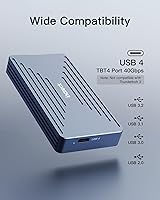
  • Interface: Connects via USB4 and Thunderbolt 4, with full backward compatibility down to USB 2.0.
  • Peak Speed: Maximum data transfer rate is 40Gbps under USB4 or Thunderbolt 4 host conditions.
  • Read/Write: Real-world sequential read and write speeds reach up to 2700MB/s when paired with a fast NVMe SSD and a compatible host.
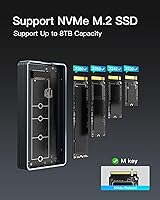
  • SSD Formats: Supports M.2 NVMe SSDs in 2230, 2242, 2260, and 2280 form factors.
  • Key Type: Accepts M-Key M.2 NVMe SSDs only; B+M Key SATA drives are not supported.
  • Max Capacity: Compatible with NVMe SSDs up to 8TB in total storage capacity.
  • Body Material: Outer shell is aluminum alloy with a perforated pattern that aids passive heat dissipation.
  • Dimensions: Measures 3.96″ x 2.02″ x 0.55″ in length, width, and height respectively.
  • Weight: Weighs 3.68 oz, light enough for daily pocket carry without noticeable bulk.
  • Installation: Features a tool-free flip-style cover that allows a drive to be installed or swapped in approximately ten seconds.
  • Cooling System: Combines the perforated aluminum exterior with an internal thermal silicone pad to draw heat away from the drive during sustained transfers.
  • Video Output: Supports 8K display output at 60Hz when connected to a compatible Thunderbolt 4 host and display.
  • Included Cable: Ships with a single 50cm Thunderbolt 4 cable; no additional cable or carrying case is included.
  • OS Support: Works with Windows 8, 10, and 11, Linux, and macOS 10 and above without requiring driver installation.
  • Backward Compat: Functions on USB 3.2, USB 3.1, USB 3.0, and USB 2.0 ports, each capped at that standard's respective maximum speed.
  • TB3 Support: Does not support Thunderbolt 3 host devices despite the physical connector appearing identical to Thunderbolt 4.

Related Reviews
Inateck FE2029 M.2 NVMe SSD Enclosure

82%
88%
Transfer Speed
91%
Build Quality
83%
Thermal Management
94%
Ease of Installation
67%
Drive Compatibility
More
dockteck DH0002 M.2 NVMe/SATA SSD Enclosure

84%
88%
Transfer Speed (NVMe)
76%
SATA Drive Performance
83%
Build Quality
93%
Ease of Setup
79%
Thermal Management
More
ineo C2605-NVMe M.2 NVMe SSD Enclosure

77%
88%
Write Protection Reliability
79%
Transfer Speed Performance
82%
Thermal Management
61%
Fan Noise Level
76%
Build Quality & Materials
More
WAVLINK Dual-Bay NVMe M.2 SSD Cloner

75%
83%
Offline Cloning Reliability
78%
Transfer Speed
71%
Compatibility Range
76%
Build Quality
86%
Ease of Setup
More
Cable Matters USB4 40Gbps M.2 NVMe Enclosure

80%
88%
Data Transfer Performance
83%
Build Quality & Materials
79%
Thermal Management & Cooling
91%
Portability & Form Factor
74%
Compatibility Range
More
Plugable M.2 NVMe SSD Enclosure

87%
94%
Ease of Setup
92%
Data Transfer Speed
88%
Build Quality
90%
Port Compatibility
87%
Cooling & Thermal Management
More
ORICO TCM2 M.2 NVMe SSD Enclosure
78%
83%
Transfer Speed
61%
Thermal Management
74%
Build Quality
91%
Ease of Installation
86%
Cable Bundle Quality
More
GRAUGEAR G-M2U4-40G-F USB4 NVMe SSD Enclosure
71%
88%
Thermal Performance
83%
Transfer Speed
91%
Build Quality
54%
Setup & Ease of Use
72%
Compatibility
More
ANYOYO TB502Pro NVMe SSD Enclosure
78%
91%
Transfer Speed Performance
88%
Thermal Management
89%
Build Quality
86%
Thunderbolt 5 Compatibility
41%
TB3 Fallback Behavior
More
elecacc Dual Bay NVMe SATA SSD Enclosure

75%
93%
Ease of Setup
84%
Offline Cloning
71%
Transfer Speed
88%
Drive Compatibility
63%
Build Quality
More

FAQ

No, and this is the single most important thing to verify before purchasing. The Inateck FE2028 M.2 NVMe SSD Enclosure requires a USB4 or Thunderbolt 4 host port to function. Thunderbolt 3 and Thunderbolt 4 use the same physical USB-C connector, which makes the incompatibility easy to miss, but they are not interchangeable here. Check your MacBook model online — Thunderbolt 4 started appearing on Apple Silicon MacBooks from late 2020 onward.

No drivers needed at all. The FE2028 is fully plug-and-play on Windows 8, 10, and 11, Linux, and macOS 10 and above. Plug it in, wait a couple of seconds for your operating system to recognize it, and it mounts like any other external drive.

No, it ships empty. You need to supply your own M.2 NVMe SSD separately. That actually works in your favor — you can install any compatible NVMe drive up to 8TB, or repurpose one you already own from another device.

Completely tool-free. A flip-style cover opens with your fingers, no screwdriver involved. Slide the M.2 NVMe SSD into the M-Key slot, press it down until it seats, then close the cover. Once you have done it once, the whole process takes about ten seconds.

Yes, the 2230 form factor is fully supported. This Inateck enclosure accommodates 2230, 2242, 2260, and 2280 lengths, covering nearly every M.2 NVMe drive currently in circulation, including the short slabs commonly found in handheld gaming devices and ultra-thin laptops. No adapter is required.

You can, provided you are on a Thunderbolt 4 host. The FE2028 supports 8K output at 60Hz through its Thunderbolt 4 port alongside data transfer on the same connection. It is not a dedicated display adapter, but it handles a single external display without needing a separate cable or hub.

It will get warm, which is normal for any NVMe enclosure under load. The perforated aluminum body and internal thermal silicone pad work together to pull heat away from the drive, and for typical workloads — large file copies, incremental backups — temperatures stay manageable. A subset of reviewers have noted it runs on the warmer side with very high-performance NVMe drives during prolonged heavy use, so keep it in open air rather than tucked inside a bag during extended sessions.

For laptop use where the enclosure sits right beside the machine, 50cm is workable. For a desktop where your Thunderbolt 4 port is on the back of a PC or across a wide desk, it will feel short. Picking up a longer Thunderbolt 4 cable separately is an easy fix, but it is a minor extra cost worth factoring in.

When your host port can keep up, the difference is very real. USB 3.2 Gen 2 tops out at around 10Gbps, translating to roughly 900–1000MB/s in practice, while this NVMe enclosure over USB4 or Thunderbolt 4 can sustain close to 2700MB/s. A 50GB file that takes around 50 seconds over USB 3.2 could complete in under 20 seconds here. Plug the FE2028 into a USB 3.2 or USB-A port, though, and that advantage evaporates entirely — it falls back to those same slower speeds.

Probably not reliably, and potentially not at all. The FE2028 is designed strictly for M-Key NVMe drives. Some B+M Key drives are NVMe and will physically seat in an M-Key slot, but many B+M Key drives are SATA-based and will not be recognized by this enclosure. Check your SSD specifications carefully before ordering — if it is SATA, you will need a different enclosure that explicitly supports SATA M.2 drives.