


Overview

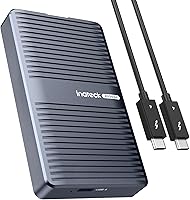
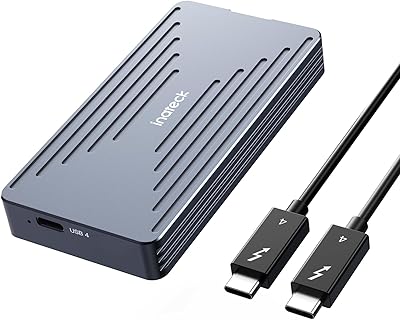
The Inateck FE2029 M.2 NVMe SSD Enclosure arrived in early 2024, targeting power users who need genuinely fast, portable NVMe storage in a package that doesn't feel cheap. Unlike the sea of plastic enclosures cluttering this category, the FE2029 is built from solid aluminum — a choice that pays dividends in both durability and passive cooling. Under the hood, Inateck paired the JHL7440 and RTL9210B chips, a combination chosen for cleaner signal integrity at high transfer rates. One honest caveat worth stating upfront: you'll only unlock those advertised peak speeds if your computer actually has a USB4 or Thunderbolt 3/4 port.

Features & Benefits

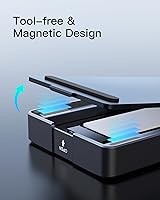
Flip open the magnetic lid, drop in your M.2 drive, and close it — no screwdriver, no tiny brackets to fumble with. On the performance side, this aluminum NVMe enclosure can push read and write speeds that rival a high-end internal SSD, assuming your host machine keeps pace. The aluminum body acts as a passive heatsink, assisted by an internal thermal pad, so sustained transfers during a long video export stay stable rather than throttling partway through. Broad backward compatibility with older USB standards means it stays useful even if you change machines. A Thunderbolt 4 cable ships in the box, which removes one immediate extra purchase.

Best For

This Thunderbolt 4 drive enclosure makes the most sense for people whose work revolves around moving large volumes of data regularly. Video editors shuttling raw 4K or 8K footage between a desktop and a laptop will appreciate read speeds that don't bottleneck the timeline. Photographers backing up large RAW libraries mid-shoot will find the compact footprint genuinely convenient. Developers who boot test environments from an external volume get a reliable, fast option without paying for proprietary storage. If you're still running a USB 3.2 enclosure and feel that drag on every file transfer, this is a practical upgrade — provided your ports can support it.

User Feedback

With roughly 53 reviews and a 4.4-star average, the FE2029 is off to a good start — though it's fair to treat these as early impressions rather than a settled consensus. The magnetic lid earns consistent praise, with buyers highlighting how quick and intuitive drive swaps feel compared to screw-based rivals. Build quality also draws positive comments; the aluminum shell reads as sturdy and professional after regular handling. On the critical side, a handful of users flagged confusion around M-Key compatibility, having tried B+M-Key drives that didn't work as expected. Reported speeds vary somewhat by host machine, so results on older laptops may fall short of the headline figures.

Pros

  • Tool-free magnetic lid makes installing or swapping an NVMe drive genuinely effortless in seconds.
  • Aluminum build feels premium and doubles as passive cooling, keeping temperatures in check during long transfers.
  • Backward compatibility with USB 3.x and Thunderbolt 3 means it stays useful across older and newer machines.
  • A Thunderbolt 4 cable is included in the box, which removes one immediate extra purchase.
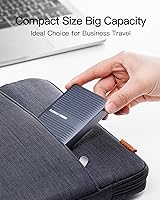
  • The FE2029 is compact and light enough to carry daily without adding noticeable bulk to a bag.
  • Supports up to 8TB drives, giving plenty of headroom as storage needs grow over time.
  • Real-world read and write speeds on compatible hardware rival many high-end internal SSDs.
  • 8K at 60Hz video output adds practical utility for creative professionals using an external display.
  • The JHL7440 and RTL9210B chip pairing contributes to stable, consistent signal at peak transfer rates.
  • Works across Windows, macOS, and Linux without needing additional drivers or software.

Cons

  • Peak speeds are completely dependent on the host device having a true USB4 or Thunderbolt port — most budget laptops will bottleneck it.
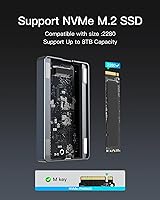
  • Only M.2 2280 M-Key NVMe drives are supported; SATA and non-standard key types will not work.
  • With just over 50 reviews at the time of writing, the long-term reliability track record is still thin.
  • Reported speeds vary noticeably across platforms, meaning results on Windows machines may differ from macOS performance.
  • The 50cm bundled cable is short — users who need more reach between devices will need to buy a longer one separately.
  • Single-bay design means you can only use one drive at a time, which limits flexibility for multi-drive workflows.
  • A handful of buyers have encountered confusion about drive compatibility before purchasing, suggesting the M-Key-only limitation needs more attention before buying.
  • The enclosure does not include an SSD, which can catch some buyers off guard when comparing total cost against pre-built external drives.

Ratings

The scores below are generated by our AI engine after analyzing verified buyer reviews for the Inateck FE2029 M.2 NVMe SSD Enclosure from multiple global sources, with spam, bot submissions, and incentivized feedback actively filtered out. Each category reflects the honest spread of real user experiences — not just the highlights — so both the genuine strengths and the recurring frustrations are factored into every number you see here.

Transfer Speed
88%
Users with Thunderbolt 4 or USB4 laptops consistently report transfer rates that feel transformative compared to their previous USB 3.2 setups — moving a 50GB video project in well under a minute is a commonly cited experience. On compatible hardware, real-world benchmarks frequently land close to the advertised ceiling, which is rare for enclosures in this category.
The catch is that those impressive numbers only appear when the host port actually supports the full bandwidth — and many buyers discover their laptop does not qualify after purchase. On a standard USB-C port, speeds drop to a level that makes the premium price feel hard to justify.
Build Quality
91%
The aluminum shell draws consistent praise for feeling solid and purposeful rather than hollow or plasticky. Buyers who carry it daily in laptop bags report that the finish holds up well without visible scuffing, and the overall weight feels reassuring rather than excessive for a portable device.
A small number of users noted that the magnetic lid, while satisfying in normal use, can feel slightly less secure when the enclosure is jostled around in a bag — the drive itself stays in place, but the lid occasionally pops open. It is a minor point, but worth knowing if you toss it loosely into a pack.
Thermal Management
83%
During extended transfers — think backing up a full camera card or copying a large editing project — the aluminum body absorbs and disperses heat well enough that most users report no throttling. The internal silicone thermal pad does its job quietly, and the enclosure running warm to the touch is generally understood as the system working correctly.
In very warm ambient environments or when placed flat on an insulating surface like a padded laptop sleeve, a handful of users noticed slightly elevated temperatures during prolonged sessions. Passive cooling has its limits, and there is no active fan to compensate when conditions are less than ideal.
Ease of Installation
94%
The flip-open magnetic lid is one of the most consistently praised design choices across all reviews — buyers describe installing a drive as something you figure out in seconds without reading any instructions. For anyone who has wrestled with tiny screws and fiddly brackets on older enclosures, this feels like a genuine quality-of-life improvement.
The only friction point some users mention is that the magnetic closure requires a firm, even press to seat properly — if you close it slightly off-center, it may not click flush. It is a learning curve measured in seconds, but first-time users occasionally think the lid is broken before realizing the technique.
Drive Compatibility
67%
33%
For buyers who already own or plan to purchase a standard M.2 2280 M-Key NVMe drive, compatibility is a non-issue — the enclosure handles them reliably across a wide range of brands and capacities up to 8TB. Users who know what they are buying tend to have zero friction here.
This is the category that generates the most frustrated reviews. Several buyers tried to install B+M-Key SATA drives and ran into problems, and the M-Key-only restriction is not always prominent enough in the purchase flow to catch everyone before they buy. The enclosure also only supports the 2280 length, so anyone with a 2242 or shorter drive is out of luck.
Port Compatibility
79%
21%
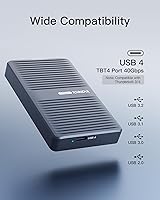
The broad backward compatibility with older USB standards means this enclosure does not become useless the moment you connect it to a machine without Thunderbolt — it still functions as a reliable external drive at lower speeds. Thunderbolt 3 users report full performance parity with Thunderbolt 4, which is reassuring for owners of slightly older MacBook Pros.
The frustration comes when buyers assume any USB-C port is created equal — some users expressed disappointment after discovering their USB 3.2 Gen 2 laptop could not unlock the speed they paid a premium for. The product works across a wide range of ports, but the value proposition weakens considerably as you move down the port hierarchy.
Portability
92%
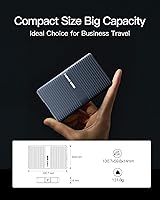
At roughly the size of a standard business card and barely thicker than a thumb, this aluminum NVMe enclosure genuinely fits in a jeans pocket. Travelers and remote workers cite this as one of the main reasons they chose it over bulkier options, and the weight is low enough that you stop noticing it after a few days of carrying it.
The compact dimensions are mostly a strength, but a few users with larger hands find the enclosure slightly too small for comfortable one-handed cable insertion — the USB-C port sits close to the edge and can require a bit of precision to plug in cleanly on the first try in low-light conditions.
Included Accessories
77%
23%
Including a Thunderbolt 4 cable in the box is a genuinely thoughtful touch — these cables are not cheap, and not having to add one to your cart immediately after purchase is something buyers notice and appreciate. The cable quality itself is reported as solid rather than flimsy.
The bundled cable is only 50cm long, which works fine for a laptop on a desk but becomes awkward if you need any meaningful distance between the drive and the machine. Several users wished a longer cable had been included, or at least offered as an option, since buying a quality Thunderbolt 4 replacement adds to the overall cost.
Cross-Platform Support
86%
Plug-and-play behavior is confirmed across macOS, Windows 10 and 11, and various Linux distributions without any driver installation — buyers who switch between a Mac at home and a Windows workstation at the office report zero friction when changing machines. The FE2029 simply shows up as an external drive regardless of the OS.
A small number of Windows users reported intermittent recognition issues on specific laptop models, particularly some older Thunderbolt 3 systems where the port firmware had not been updated. These cases appear isolated rather than systemic, but they do exist and are worth being aware of.
Value for Money
74%
26%
For buyers who have a compatible Thunderbolt 4 or USB4 machine and an M-Key NVMe drive ready to install, the price makes sense against the performance headroom and build quality on offer — it compares favorably to competing aluminum USB4 enclosures when you factor in the included cable. Power users see it as buying capability they will grow into.
For anyone without the right host port, the value calculation falls apart quickly. Paying a mid-to-premium price for an enclosure that ends up operating at USB 3.2 speeds is a hard sell, and the drive-not-included nature means the total investment is higher than first-time buyers sometimes anticipate.
Video Output
71%
29%
The 8K display output capability is a genuine bonus for creative professionals who use an external monitor alongside their working drive — connecting both through a single Thunderbolt daisy-chain simplifies cable management on a traveling workstation setup. Users who actually leverage this feature are pleasantly surprised it works reliably.
The majority of buyers never use or even discover this feature, which makes it feel like a spec-sheet bullet point rather than a practical differentiator for the average buyer. Display compatibility also depends heavily on the host machine and monitor, so results are not universally consistent.
Brand Reliability
78%
22%
Inateck has enough of a track record in the storage accessories space that buyers tend to approach the purchase with reasonable confidence. Users who have owned previous Inateck products cite positive long-term experiences, and early FE2029 owners report no hardware failures in the months since launch.
Because this specific model only launched in early 2024 with a relatively modest number of reviews at the time of analysis, the long-term durability picture is still forming. There is not yet the depth of multi-year owner feedback that would allow a definitive verdict on how the enclosure holds up over extended daily use.

Suitable for:

The Inateck FE2029 M.2 NVMe SSD Enclosure is a strong fit for anyone whose daily work involves pushing large files around quickly and reliably. Video editors and photographers who regularly move raw footage or high-resolution image libraries between machines will get the most out of it, particularly those working on MacBook Pros, Dell XPS laptops, or any other computer with a Thunderbolt 3, Thunderbolt 4, or USB4 port. Developers who need a fast external drive for booting test environments or running virtual machines will also find the speed headroom genuinely useful rather than just impressive on paper. Remote workers and frequent travelers benefit from the small footprint and solid aluminum construction — it's the kind of enclosure you can drop in a laptop bag without worrying about it getting banged up. Anyone upgrading from a USB 3.2 enclosure who wants a meaningful real-world speed improvement, rather than a marginal one, is exactly the target buyer here.

Not suitable for:

If your computer only has standard USB-A or USB-C ports without USB4 or Thunderbolt support, the Inateck FE2029 M.2 NVMe SSD Enclosure will work, but you will not come close to the speeds that justify its price — a much cheaper USB 3.2 enclosure would serve you just as well. It is also strictly limited to M.2 2280 M-Key NVMe drives, so buyers with B+M-Key SATA drives, or drives in other form factors like 2242 or 2260, should look elsewhere. Users who need to swap between multiple SSDs frequently may find a single-bay enclosure limiting over time. Those on a tight budget who only need basic external storage for occasional backups will find the cost hard to justify when far less expensive options handle light workloads adequately. Finally, if you are buying this expecting desktop-class throughput on a mid-range laptop with a generic USB-C port, the hardware bottleneck will be the computer itself, not the enclosure.

Specifications

  • Interface: Connects via USB4 at up to 40Gbps and is fully compatible with Thunderbolt 3 and Thunderbolt 4 ports.
  • Transfer Speed: Supports real-world read and write speeds of up to 2700 MB/s on a host device with a qualifying USB4 or Thunderbolt port.
  • Chipset: Uses a JHL7440 and RTL9210B chip combination for improved signal stability during high-speed sustained transfers.
  • SSD Compatibility: Accepts M.2 2280 NVMe drives with an M-Key connector only; SATA and B+M-Key drives are not supported.
  • Max Capacity: Supports NVMe SSDs up to 8TB in capacity.
  • Shell Material: Outer enclosure is machined aluminum alloy, which contributes to passive heat dissipation during operation.
  • Thermal Design: An internal thermal silicone pad transfers heat from the SSD to the aluminum shell, helping to prevent throttling under sustained load.
  • Installation: Features a flip-open magnetic lid requiring no tools, screws, or brackets to seat or remove an SSD.
  • Video Output: Capable of 8K resolution at 60Hz video output when connected to a compatible display via a supported host.
  • Dimensions: Measures 3.96 x 2.35 x 0.55 inches (approximately 10 x 6 x 1.4 cm).
  • Weight: Weighs 4.6 oz (131.8 g), making it light enough to carry in a pocket or small laptop bag.
  • Included Cable: Ships with a 50cm Thunderbolt 4 data cable in the box.
  • OS Support: Compatible with Windows 8, 10, and 11, macOS 10 and above, and Linux without requiring additional drivers.
  • Backward Compat.: Also works with USB 3.2, 3.1, 3.0, and 2.0 ports, though transfer speeds will be limited by the host port standard.
  • Launch Date: First made available in March 2024.

Related Reviews
Inateck FE2028 M.2 NVMe SSD Enclosure

79%
88%
Transfer Speed
84%
Build Quality
62%
Compatibility
93%
Installation Ease
72%
Thermal Management
More
dockteck DH0002 M.2 NVMe/SATA SSD Enclosure

84%
88%
Transfer Speed (NVMe)
76%
SATA Drive Performance
83%
Build Quality
93%
Ease of Setup
79%
Thermal Management
More
ineo C2605-NVMe M.2 NVMe SSD Enclosure

77%
88%
Write Protection Reliability
79%
Transfer Speed Performance
82%
Thermal Management
61%
Fan Noise Level
76%
Build Quality & Materials
More
WAVLINK Dual-Bay NVMe M.2 SSD Cloner

75%
83%
Offline Cloning Reliability
78%
Transfer Speed
71%
Compatibility Range
76%
Build Quality
86%
Ease of Setup
More
Cable Matters USB4 40Gbps M.2 NVMe Enclosure

80%
88%
Data Transfer Performance
83%
Build Quality & Materials
79%
Thermal Management & Cooling
91%
Portability & Form Factor
74%
Compatibility Range
More
Plugable M.2 NVMe SSD Enclosure

87%
94%
Ease of Setup
92%
Data Transfer Speed
88%
Build Quality
90%
Port Compatibility
87%
Cooling & Thermal Management
More
ORICO TCM2 M.2 NVMe SSD Enclosure
78%
83%
Transfer Speed
61%
Thermal Management
74%
Build Quality
91%
Ease of Installation
86%
Cable Bundle Quality
More
GRAUGEAR G-M2U4-40G-F USB4 NVMe SSD Enclosure
71%
88%
Thermal Performance
83%
Transfer Speed
91%
Build Quality
54%
Setup & Ease of Use
72%
Compatibility
More
ANYOYO TB502Pro NVMe SSD Enclosure

78%
91%
Transfer Speed Performance
88%
Thermal Management
89%
Build Quality
86%
Thunderbolt 5 Compatibility
41%
TB3 Fallback Behavior
More
GEWOKLIY Ge-MC13 M.2 2230 NVMe SSD Enclosure
78%
83%
Transfer Speed
88%
Build Quality
79%
Compatibility
67%
Thermal Management
92%
Ease of Setup
More

FAQ

It only works with M.2 2280 NVMe drives that use an M-Key connector. If your drive is a SATA M.2 or uses a B+M-Key notch configuration, it will not be compatible. Double-check your SSD's spec sheet before purchasing.

It will work and show up as a normal external drive, but you will not get anywhere near the advertised top speeds. The full performance potential only unlocks when the host port is USB4 or Thunderbolt 3/4. On a standard USB 3.2 port, speeds will be capped at that interface's limit, which is a fraction of what this enclosure is designed for.

No tools required at all. The lid flips open magnetically, you slot the drive in at a slight angle, press it flat, and close the lid. The whole process takes about ten seconds once you have done it once.

The aluminum shell acts as a passive heatsink, and there is an internal thermal silicone pad that draws heat away from the SSD. It will get warm to the touch during heavy sustained use, which is normal and expected — that warmth means the cooling is doing its job rather than letting heat build up inside.

Yes, the Inateck FE2029 M.2 NVMe SSD Enclosure works across macOS, Windows, and Linux without needing to install any drivers on either platform. Just be aware that if your drive is formatted for one OS, you may need to reformat or use a compatible file system like exFAT to read it on the other.

They are related but not identical. USB4 is an open standard that can operate at 40Gbps, while Thunderbolt 4 is Intel's certified implementation that also runs at 40Gbps and includes additional requirements around video and data performance. For this enclosure's purposes, both will deliver full speed — the key point is that your port needs to support one of them to hit peak transfer rates.

Yes, many users do exactly this. On macOS, you can install and boot from an external NVMe drive over Thunderbolt without much friction. On Windows, booting from external drives is possible but requires a few extra setup steps depending on your system. The speeds available here make it a viable option for a full working OS rather than just a backup.

You would need to buy a longer Thunderbolt 4 or USB4 cable separately. Just make sure any replacement cable is rated for 40Gbps — not all USB-C cables are, and using an underpowered cable can cap your speeds or cause instability.

The aluminum shell feels noticeably more solid than budget plastic options, and it doubles as part of the thermal management system. Early buyers comment positively on the finish and overall rigidity. It is the kind of enclosure that feels like it will survive regular travel use rather than cracking or scuffing after a few months.

It supports M.2 2280 NVMe drives up to 8TB in capacity. There is no meaningful minimum — even a smaller 250GB or 500GB drive will fit and function correctly, as long as it uses the M-Key interface and is in the 2280 form factor.