Overview

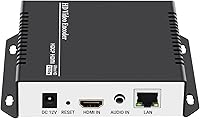
The URayCoder UHE265-1S-4K is a compact hardware encoder that sits in an interesting middle ground — capable enough for serious broadcast work, yet priced within reach of prosumers and small organizations. Built into a sturdy aluminum shell, it takes any HDMI source and outputs a network video stream without needing a PC to carry the encoding load. It supports both H.265 and H.264, which matters because H.265 lets you sustain good image quality at lower bitrates. Lifetime technical support is included, and SDK and API documentation ships with the unit for those who need deeper integration. It is not an enterprise appliance, but it punches well above its weight class.
Features & Benefits

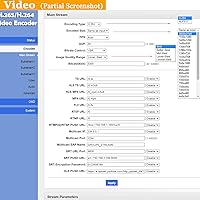
What makes this HDMI streaming encoder genuinely useful is the ability to push four simultaneous streams, each running a different protocol. You could send RTMP to YouTube, SRT to a production switcher, and HLS to your own media server all at once. Resolution handling is important to understand: 4K tops out at 30fps, while dropping to 1080p unlocks 60fps output. Bitrate is adjustable from 32 kbps to 32 Mbps. Audio is flexible too — switch freely between HDMI embedded audio and a 3.5mm external input. OSD overlay options like logos, scrolling text, and clocks add a practical broadcast polish without requiring extra software.

Best For

This hardware encoder suits houses of worship, small event producers, and AV technicians who need to broadcast to multiple platforms without dedicating a full computer to the task. It handles encoding independently, keeping your production setup lean and dependable. For developers and system integrators, the included CGI and API documentation supports custom dashboards or automated control workflows — a genuine advantage for those building larger pipelines. Private IPTV operators will appreciate the broad protocol range. It is less suited to casual streamers looking for a plug-and-play experience; this device rewards users who arrive with a clear technical workflow already in mind.

User Feedback

Across 73 verified ratings, the URayCoder streamer holds a 4.5-star average, and the pattern is consistent: buyers praise long-term stability and low-latency output during extended sessions. Several users specifically noted that connections hold firm over long broadcasts, which matters for houses of worship and event venues where interruptions are costly. On the downside, the mobile app draws criticism for feeling less polished than the web interface, and some beginners found the setup documentation thinner than expected. These are real friction points worth considering. Complaints about core encoding performance, though, are rare — most criticism targets the initial learning curve, not the hardware itself.

Pros

  • Push four simultaneous streams to different platforms or servers without any additional hardware
  • Broad protocol support — RTMP, SRT, HLS, UDP, and more — covers virtually every destination you would realistically need
  • H.265 encoding keeps bitrate requirements manageable on constrained upload connections
  • Fanless aluminum build runs silently and stays cool enough for extended broadcast sessions
  • OSD overlays including logos, scrolling text, and timestamps add broadcast polish without extra software
  • Remote management over a wide area network lets IT teams monitor and adjust streams without being on-site
  • Audio input flexibility — HDMI embedded or external 3.5mm — fits cleanly into varied production setups
  • SDK and API documentation supports developers building automated or custom-controlled broadcast pipelines
  • Buyers consistently report stable, low-latency output across long multi-hour sessions

Cons

  • 4K output is limited to 30fps, which is a real constraint for any fast-motion content
  • Mobile app is unreliable and too rough to serve as a primary control interface
  • Setup documentation is thin and leaves non-technical users to figure out configuration on their own
  • OSD editor offers minimal font and positioning control compared to what software encoders provide
  • No simplified mode for beginners — all protocol options are always visible, which overwhelms new users
  • Firmware updates have historically lagged behind publicly reported bugs by a noticeable margin
  • Port labeling is small and difficult to read in low-light rack or cabinet installations
  • Single HDMI input means there is no flexibility for multi-source switching within the encoder itself
  • Users in enclosed or warm equipment spaces need to plan for external ventilation due to passive-only cooling

Ratings

The URayCoder UHE265-1S-4K has been put through its paces by verified buyers ranging from church AV teams to independent broadcast engineers, and our AI has analyzed that global feedback pool — filtering out incentivized and bot-generated reviews — to produce the scores below. The results reflect a device that earns genuine respect in its core job, while exposing a few friction points that prospective buyers should factor in. Strengths and weaknesses are weighted equally here; nothing is glossed over.
Encoding Performance
91%
Users running extended broadcasts — church services, multi-hour corporate events — consistently report clean, stable output with no mid-session degradation. H.265 encoding in particular draws praise for holding sharp image quality at lower bitrates, which helps on constrained upload connections.
A small number of users noted occasional artifacts when pushing the encoder at maximum 4K bitrate alongside all four streams simultaneously. It is an edge case, but worth knowing if you plan to run the unit at its absolute ceiling regularly.
Multi-Stream Output
89%
The ability to push four independent streams over different protocols at the same time is the feature buyers cite most. AV operators streaming to YouTube via RTMP, a local IPTV server via UDP, and a backup SRT destination simultaneously call this a practical advantage that would cost far more in competing hardware.
Managing four streams through the web interface requires some familiarity; new users occasionally misconfigure protocol settings on secondary streams without realizing it until the stream fails. Better in-interface guidance would reduce these errors significantly.
Protocol Versatility
93%
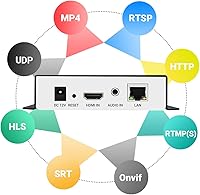
Support for RTMP, RTMPS, SRT, HLS, RTSP, UDP, RTP, and more covers virtually every destination a prosumer or small broadcast professional would encounter. Buyers integrating into corporate AV systems or IPTV infrastructure specifically praised this breadth as a reason they chose this encoder over cheaper alternatives.
The sheer range of protocols can overwhelm less technical users who just want to stream to one platform. There is no simplified mode that hides advanced options, so beginners may feel like they are looking at a cockpit when all they need is one RTMP output.
4K Video Quality
78%
22%
For content where motion is limited — lectures, panel discussions, house-of-worship services — 4K at 30fps looks genuinely impressive. H.265 compression keeps the stream efficient, and buyers using it for static-camera broadcast scenarios reported clean, detailed output.
The 30fps ceiling at 4K is a real limitation for sports, live events with fast movement, or any scenario where motion clarity matters. Buyers who purchased expecting 4K60 performance were disappointed; the 60fps mode requires dropping down to 1080p, which is standard for the hardware tier but still catches some buyers off guard.
Build Quality
84%
The aluminum shell feels solid and professional in hand — noticeably more substantial than plastic-bodied competitors at a similar price. Several buyers running the unit in rack-adjacent setups commented that it stays cool during long sessions, suggesting adequate thermal management for its form factor.
The black-top, silver-bottom two-tone aesthetic divides opinion, and a few buyers noted that the port labeling is small and hard to read in low-light rack environments. Neither issue affects function, but it hints at industrial design decisions made for cost rather than polish.
Web Interface Usability
74%
26%
Most technically inclined buyers find the browser-based control panel logical once they have spent time with it. Remote management over a wide area network works reliably, which is genuinely valuable for IT teams supporting streaming setups across multiple locations without being on-site.
The interface is functional but not refined — layouts feel dated, and some settings lack in-context explanations. First-time hardware encoder users often need to cross-reference external documentation just to complete basic stream configuration, which adds friction to what should be a straightforward setup process.
Mobile App Experience
52%
48%
The app does provide basic control and monitoring capabilities, which is useful for quick checks when a laptop is not nearby. For simple tasks like confirming a stream is live or adjusting bitrate on the fly, it gets the job done.
Multiple reviewers explicitly called out the mobile app as the weakest part of the overall experience. Laggy responses, a cluttered layout, and occasional failure to connect reliably to the encoder make it a backup tool at best. It does not inspire confidence as a primary control interface.
Setup & Initial Configuration
67%
33%
Users with AV or networking backgrounds typically report being up and streaming within 30 minutes of unboxing. The web interface provides access to all necessary settings, and the device does not require driver installation or companion software on a computer.
The included documentation is sparse by most accounts, and non-technical buyers — particularly those setting up for the first time in a house of worship or community venue — report a steep initial learning curve. Online resources and community forums fill the gap, but that burden should not fall entirely on the buyer.
Audio Handling
82%
18%
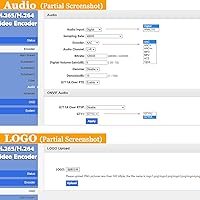
Flexibility between HDMI embedded audio and the 3.5mm external input is a practical touch that broadcast users appreciate. Support for AAC, MP3, AC3, Opus, and G.711 means the encoder fits cleanly into varied production chains without requiring external audio conversion.
Audio configuration options, while comprehensive, are tucked within the same dense web interface as everything else. A few users reported confusion around audio sync when switching input sources mid-session, requiring a stream restart to resolve rather than a hot-swap.
OSD & Overlay Features
79%
21%
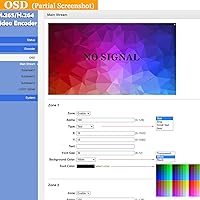
Logos, scrolling tickers, static text, and timestamp overlays add broadcast-grade polish without requiring a separate graphics system. Church streamers and corporate AV teams use these to brand their output, which is a feature set typically found only in more expensive hardware.
The overlay editor is basic — positioning options are limited, and font customization is minimal. Users accustomed to software encoders like OBS will find the OSD tools restrictive for anything beyond simple branding, and there is no preview mode to see how overlays look before going live.
Value for Money
86%
Buyers who compared this HDMI streaming encoder against alternatives in the same tier consistently conclude that the four-stream output, broad protocol support, and hardware independence justify the price. For organizations replacing a streaming PC with a dedicated appliance, the total cost of ownership math often works in this device's favor.
Budget-conscious buyers who only need a single RTMP output to one platform may find the price hard to justify when cheaper single-stream encoders exist. The value proposition is strongest for users who actually need the multi-stream, multi-protocol depth — those who do not may be paying for features they will never use.
Long-Term Reliability
88%
Extended ownership reports are encouraging. Users who have run this encoder through dozens or hundreds of broadcasts describe consistent, low-maintenance operation. The hardware-only approach means there are no software updates breaking configurations overnight, which matters for set-and-forget installations.
With a relatively modest review count, long-term data beyond one to two years of ownership is limited. A handful of users noted that firmware update support could be more proactive, with some versions addressing bugs that users had flagged publicly well before a fix was released.
SDK & Developer Integration
83%
For system integrators and developers building automated broadcast workflows, the inclusion of CGI, SDK, and API documentation is a legitimate differentiator. Users who have embedded control of this encoder into custom dashboards or scheduling systems describe the documentation as workable and the endpoints as responsive.
The SDK materials assume a reasonably high baseline of technical knowledge and are not beginner-friendly. There is no active developer community or public code repository to lean on, so integrators are largely working from the official docs alone, which can slow down custom development work.
Thermal Management & Noise
81%
19%
The aluminum chassis acts as a passive heat sink effectively enough that most users report the unit running warm but never hot during extended sessions. Its fanless design makes it completely silent, which is a genuine advantage in quiet recording environments or in-room streaming setups where fan noise would be picked up by microphones.
In warmer ambient environments — small equipment closets, poorly ventilated AV racks — a few users noted the chassis getting noticeably hot after several hours. No active cooling means that thermal ceiling is fixed; users in hot climates or enclosed racks should factor in adequate ventilation.

Suitable for:

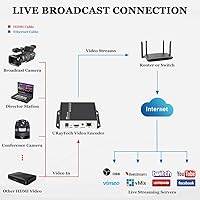
The URayCoder UHE265-1S-4K is a strong fit for anyone who needs a dedicated, always-on encoding appliance that does not depend on a computer to function. Houses of worship are perhaps the most obvious beneficiary — a Sunday service that streams to YouTube, Facebook, and a private IPTV server simultaneously is exactly the scenario this hardware encoder was built for. Small event production companies, corporate AV teams, and educational institutions with regular live broadcast needs will also find it a reliable workhorse once configured. Broadcast professionals who have outgrown free software encoders but cannot justify enterprise-grade hardware will appreciate where this device sits on the capability curve. Developers and system integrators get genuine value too, since the included CGI, SDK, and API documentation makes it possible to embed this HDMI streaming encoder into automated workflows, scheduled broadcast systems, or custom control dashboards without major workarounds.
Not suitable for:

The URayCoder UHE265-1S-4K is not the right choice for buyers who want a simple, beginner-friendly plug-and-stream experience. If your entire workflow is one camera going to one YouTube channel, this device offers far more complexity than you need, and cheaper single-stream options will serve you better. Content creators who shoot sports, gaming, or any fast-action video should also be cautious — 4K output is capped at 30fps, and hitting 60fps requires stepping down to 1080p, which may not align with expectations. The mobile app, which some buyers assume will serve as their primary control interface, currently lacks the polish and reliability to fill that role. Anyone counting on strong out-of-the-box documentation or a guided setup experience will likely feel underserved; the device rewards technically confident users, not those learning broadcast workflows from scratch.

Specifications

  • Video Input: Accepts one HDMI input with HDCP support, compatible with any HDMI-enabled source device such as cameras, computers, or video switchers.
  • Audio Input: Supports HDMI embedded audio or an external audio source via a 3.5mm stereo jack, switchable at any time through the control interface.
  • Video Encoding: Encodes video using HEVC/H.265, H.264/AVC, or MJPEG codecs, allowing users to balance compression efficiency against compatibility with downstream systems.
  • Audio Encoding: Supports AAC, AAC+, AAC++, MP3, MP2, AC3, Opus, and G.711 audio codecs to accommodate a wide range of streaming and broadcast destinations.
  • Max Resolution: Accepts and outputs video up to 3840x2160 (4K UHD), with output resolution adjustable downward to suit bandwidth or platform requirements.
  • Max Frame Rate: Supports up to 30fps at 4K (3840x2160) resolution, and up to 60fps when output resolution is set to 1920x1080 or lower.
  • Output Streams: Outputs up to 4 simultaneous video streams, each of which can use a different streaming protocol and target a different destination server.
  • Video Bitrate: Video bitrate is adjustable from 32 kbps to 32 Mbps, with CBR, Strong CBR, and VBR modes available to suit different network and quality requirements.
  • Audio Bitrate: Audio bitrate is adjustable from 48 kbps to 320 kbps, giving users control over audio quality and bandwidth consumption independently of the video stream.
  • Protocols: Supports HTTP, RTMP, RTMPS, RTSP, SRT, HLS (M3U8), UDP, RTP, FLV, MP4, Multicast, and Unicast streaming protocols across its four output streams.
  • OSD Support: On-screen display options include static text, scrolling text, logo image overlay, and timestamp, all configurable through the web control interface.
  • Control Interface: Managed via a web browser interface or companion mobile app, with support for remote management over wide area networks without requiring a local connection.
  • Developer Access: SDK, API, and CGI control protocol documents are provided for secondary development, enabling custom integration into automated broadcast or enterprise AV systems.
  • Dimensions: The unit measures 5.2 x 4.1 x 1.1 inches, making it compact enough to sit on a shelf, mount in a rack with an adapter, or integrate into a portable kit.
  • Weight: Weighs 0.44 lbs (approximately 200g), light enough to transport easily between venues without adding meaningful bulk to a broadcast kit.
  • Shell Material: The enclosure is constructed from aluminum, which serves as a passive heat sink and provides a more durable and professional feel than plastic-bodied alternatives.
  • Cooling: Uses passive fanless cooling via the aluminum chassis, producing zero operational noise and eliminating the risk of fan failure during extended broadcast sessions.
  • Warranty & Support: Includes free lifetime technical support and warranty coverage, as stated by the manufacturer URay for all encoder and decoder products in their lineup.
  • Model Number: The official model designation is UHE265-1S-4K, which identifies this as a single-channel 4K encoder in the URayCoder hardware lineup.
  • BSR Ranking: Ranked #362 in the Video Converters category on Amazon based on sales velocity at time of listing, reflecting a solid and consistent sales presence in its niche.

Related Reviews

ViewSonic PX701-4K 4K Projector
87%
92%
Image Quality
94%
Gaming Performance
85%
Brightness
90%
Setup Ease
89%
Connectivity
More
IIWEY Q5 4K+4K Dash Cam
86%
93%
Video Quality (4K Resolution)
89%
Night Vision Performance (STARVIS)
88%
Wi-Fi Data Transfer Speed (5G)
85%
Ease of Setup & Installation
82%
Parking Mode (24/7 with Hardwiring Kit)
More
ViewSonic VP2768a-4K 27-Inch 4K Monitor
86%
94%
Color Accuracy
88%
Ergonomics & Comfort
91%
Value for Money
89%
Build Quality
85%
Ease of Setup
More
Miofive S1 Ultra 4K+4K Dash Cam
85%
92%
Video Quality (Daytime)
89%
Night Vision Performance
84%
Ease of Setup
88%
App & Connectivity
91%
GPS Accuracy
More
Vantrue S1 Pro Max 4K+4K
79%
93%
Video Quality
91%
Night Vision Performance
74%
AI Safety Alerts (ADAS & BSD)
82%
Parking Mode
88%
Build Quality & Durability
More
ViewSonic VA2756-4K-MHD 27-Inch 4K Monitor
84%
92%
Display Quality
90%
Color Accuracy
88%
Design & Build Quality
85%
Ease of Setup
89%
Connectivity Options
More
ViewSonic VG2756-4K 27-inch 4K IPS Monitor
86%
92%
Display Quality
89%
Ergonomics
85%
Connectivity Options
88%
Build Quality
90%
Ease of Setup
More
ViewSonic VX4381-4K 43-Inch 4K UHD Monitor
84%
92%
Picture Quality
95%
Display Size & Immersion
89%
Ease of Setup
75%
Color Accuracy
84%
Build Quality
More
ViewSonic VP3256-4K 32-Inch 4K UHD Monitor
88%
94%
Display Quality
92%
Color Accuracy
88%
Ergonomics & Comfort
86%
Build Quality
90%
Ease of Setup
More
ViewSonic VX3267U-4K 32-inch 4K UHD Monitor
86%
91%
Display Quality
88%
Ease of Setup
92%
Connectivity Options
85%
Color Accuracy
89%
Eye Comfort (Blue Light Filter/Flicker-Free)
More

FAQ

No, that is actually one of the main reasons people choose a hardware encoder like this. Once it is configured, it operates completely independently — just power it on, connect your HDMI source and ethernet cable, and it streams on its own. No PC, no software running in the background.

Yes, and that is one of the most practical things about this HDMI streaming encoder. You can configure separate output streams using RTMP or RTMPS for each platform simultaneously. Some users run three or four destinations at once — YouTube, Facebook, a backup server, and a local IPTV feed — all from the same device.

It depends entirely on your content. For church services, lectures, panel discussions, or anything with limited camera movement, 4K at 30fps looks genuinely great. For sports, gaming, or any fast-action content, 30fps at 4K will show motion blur and judder that most viewers will notice. In those cases, 1080p at 60fps is the smarter setting.

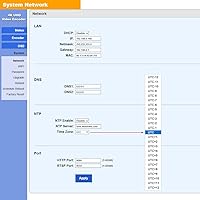
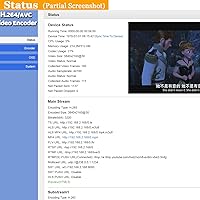
There is no built-in display. You access everything through a web browser by navigating to the device's IP address on your network. The interface is fairly complete, covering stream destinations, bitrate, resolution, OSD overlays, and audio settings. There is also a mobile app, though most users find the browser interface more reliable for anything beyond basic monitoring.

That depends on how many streams you are pushing and at what bitrate. A single 1080p stream at a typical 4–6 Mbps bitrate needs a stable 8–10 Mbps upload to have comfortable headroom. If you are running four simultaneous streams or streaming at higher 4K bitrates, you need proportionally more. The encoder supports VBR mode, which helps adapt to variable connections, but a stable wired ethernet connection is strongly recommended.

Yes, it supports wide area network remote management, so you can access the web interface from anywhere with an internet connection as long as the device is reachable on your network. For more advanced automation, developers can use the CGI and API protocols included with the URayCoder UHE265-1S-4K to build custom control systems or scheduling scripts.
It works with any HDMI-enabled device — cameras, laptops, video mixers, capture cards feeding back into it, media players, and so on. HDCP-protected sources like Blu-ray players or some set-top boxes may not pass through, as HDCP content is specifically designed to block recording and re-transmission.

It is manageable but not effortless for beginners. The web interface covers everything you need, and users with basic networking knowledge — knowing what an IP address and RTMP stream key are — typically get up and running within an hour. The included documentation is on the thin side, so expect to spend some time on the manufacturer's support resources or community forums if this is your first hardware encoder.

Yes, the OSD (on-screen display) feature supports logo image overlays, static text, scrolling text banners, and a live timestamp. You can position these on the output stream. The editor is basic compared to dedicated graphics software, but for a simple branded logo in the corner or a scrolling announcement ticker, it works well and requires no additional equipment.

The aluminum body handles heat passively, and for most installations the unit runs warm but not worryingly hot. Users who have run it through multi-hour church services and all-day events generally report no thermal issues. The one scenario to watch is a poorly ventilated equipment closet or a tightly packed rack with other heat-generating gear — in those situations, making sure there is some airflow around the unit is a sensible precaution.