Overview

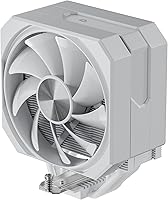
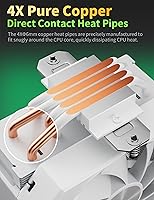
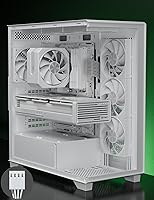
The upHere UP1T4 120mm CPU Air Cooler is a tower-style heatsink built for everyday desktop builds rather than enthusiast rigs chasing record temperatures. Pull it out of the box and the white finish stands out immediately — it is clearly meant for lighter-themed builds where a stock black cooler would look out of place. Underneath that finish sits a fairly conventional setup: four heat pipes making direct contact with the CPU, topped by a single 120mm fan. What's more interesting is how far the socket support stretches. This air cooler covers a long list of Intel and AMD platforms, including some older sockets that newer coolers tend to skip, which makes it a sensible pick for anyone juggling mixed hardware.

Features & Benefits

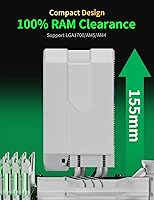
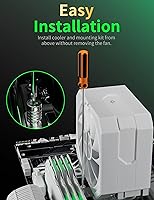
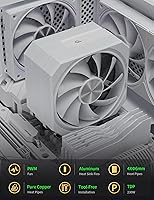
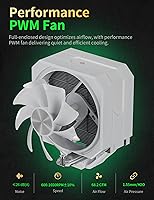
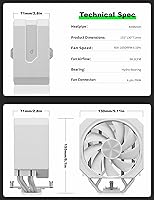
On paper, this CPU cooler runs a 120mm PWM fan that spins up toward 1650 RPM, and in practice that means stronger airflow exactly when you need it under load. The 68.2 CFM rating doesn't mean much by itself, but the real-world payoff is solid heat removal without a screaming fan curve — noise stays under 26dB(A), so most of the time you simply won't notice it running, even during a quiet late-night session. Installation is refreshingly low-effort thanks to tool-free fan clips, and the fin stack is shaped to leave room for taller RAM modules, which matters once your motherboard is packed with parts. A 230W TDP ceiling and a standard 4-pin header keep it compatible with most mid-range builds.

Best For

This heatsink makes the most sense for anyone replacing a worn-out, noisy stock cooler without wanting to spend much to do it. Its 6.1-inch height also plays nicely with compact and micro-ATX cases where tower coolers sometimes barely clear the side panel. If your CPU is a mid-range AMD or Intel chip running at stock speeds or light boost clocks, the cooling here is more than adequate; this isn't the pick for someone chasing aggressive overclocks on a power-hungry flagship. It also suits buyers who would rather have a quiet, low-key cooler than RGB lighting and flashy styling. And because socket support stretches back several generations, it's a practical option for people maintaining or upgrading older Intel or AMD platforms instead of building something brand new.

User Feedback

Feedback on this air cooler tends to circle around a few consistent points. Buyers regularly mention how easy installation turned out to be, often managing the whole process without removing the motherboard, which saves real time during a build or upgrade. Quiet operation comes up just as often, with several owners noting it runs noticeably softer than the cooler that shipped with their CPU. On the downside, a handful of reviewers running hotter, higher-wattage chips say the cooling ceiling shows up sooner than they hoped, particularly under sustained heavy loads. Build quality earns generally positive marks given the price, though it won't fool anyone into thinking it's a premium part. A few buyers also mention wishing it came with RGB lighting, since the all-white design otherwise looks fairly plain sitting inside a windowed case.

Pros

  • Installation is genuinely simple, often completed without removing the motherboard from the case.
  • Runs noticeably quieter than most factory stock coolers during everyday gaming or work sessions.
  • Tool-free fan clips make cleaning dust out of the heatsink quick and hassle-free.
  • Clears tall RAM modules instead of forcing you to swap in low-profile memory.
  • Wide socket compatibility covers multiple Intel and AMD generations, including several older platforms.
  • Solid build quality for the price, with sturdy aluminum construction that feels durable.
  • The white finish fits cleanly into light-themed builds without clashing with other parts.
  • The upHere UP1T4 120mm CPU Air Cooler offers dependable cooling for stock-clocked, mid-range CPUs.
  • Standard 4-pin PWM connector works with virtually any modern motherboard fan header.

Cons

  • Cooling headroom thins out on hotter, higher-wattage chips under sustained heavy workloads.
  • No RGB lighting or customizable aesthetics, which will disappoint buyers wanting a flashy build.
  • Single 120mm fan setup may not match dual-fan towers for raw thermal capacity.
  • Not a realistic option for serious overclockers chasing maximum sustained boost clocks.
  • All-white shell can look plain inside cases with darker or RGB-heavy themes.
  • Fan noise, while low, can still climb audibly when spun closer to 1650 RPM.
  • Lacks the brand recognition of established cooling manufacturers, which may concern cautious buyers.
  • 230W TDP rating leaves little margin for future CPU upgrades to power-hungry chips.

Ratings

These scores for the upHere UP1T4 120mm CPU Air Cooler are generated by AI after analyzing thousands of verified buyer reviews from around the world, with spam, bot activity, and incentivized feedback filtered out before scoring. Each category reflects what real owners actually experienced, both the strengths they praised and the pain points they ran into. The goal is a transparent, balanced picture rather than a polished marketing summary.

Cooling Performance
78%
22%
Most owners running mid-range AMD or Intel chips at stock clocks report solid, dependable temperatures during everyday gaming and multitasking sessions. The four direct-contact heat pipes pull heat away efficiently enough that thermal throttling rarely becomes an issue for typical desktop workloads.
Buyers with hotter, higher-wattage processors or anyone running a modest overclock often notice the cooling ceiling sooner than expected, especially during extended gaming or rendering sessions. It simply isn't built to chase the same thermal headroom as larger dual-fan or 140mm tower coolers.
Noise Level
89%
This is one of the most consistently praised aspects across reviews, with owners noting it runs noticeably quieter than the stock cooler it replaced. Late-night gaming sessions and quiet home offices barely register the fan, even when it spins up under moderate load.
A few users mention that noise becomes more noticeable once the fan climbs toward its 1650 RPM ceiling under sustained heavy load. It is not silent in absolute terms, just unusually quiet relative to typical budget coolers in this price range.
Installation Ease
91%
Reviewers consistently highlight how straightforward setup turned out to be, often completing the install without removing the motherboard from the case. The tool-free fan clips make both mounting and later cleaning noticeably less fiddly than many tower coolers in this category.
A small number of first-time builders mention the included instructions could be clearer, leaving them to figure out backplate orientation through trial and error. Tight cases can still make final cable routing around the heatsink a bit awkward.
Build Quality
82%
18%
Given the price point, the aluminum construction and heat pipe assembly feel sturdier than expected, with no flimsy plastic shrouds or wobbly fan mounts reported. Owners generally describe it as solid enough to handle years of regular use without issue.
It does not carry the premium feel or finish of higher-end coolers from established cooling brands, and the fan clips can feel slightly less robust over repeated removals. Long-term durability beyond a couple of years remains largely untested in available feedback.
Value for Money
86%
For the price, buyers feel they are getting dependable cooling, quiet operation, and broad socket coverage without paying a premium brand markup. It is frequently recommended as a sensible upgrade from a stock cooler for anyone on a tight budget.
Buyers seeking headroom for future CPU upgrades or overclocking may find better long-term value paying more upfront for a higher-capacity cooler. Those who prioritize RGB or premium aesthetics may also feel the plain look stretches the value proposition less.
RAM and Case Clearance
88%
The fin profile is engineered with enough clearance that tall RAM modules with larger heat spreaders typically install without issue, which spares buyers from hunting for low-profile memory kits. Compact and micro-ATX builders particularly appreciate the manageable overall height.
A handful of users with unusually tall RAM sticks or non-standard case layouts still recommend double-checking clearance before buying, since tolerances can vary slightly by motherboard. Extremely cramped cases may still require some careful cable management around the cooler.
Socket Compatibility
93%
Few budget coolers cover this much ground, with support spanning recent Intel platforms like LGA 1700 down through several older AM4, AM3, and FM2 generations. This makes it a practical pick for anyone maintaining older systems or building on a budget.
The broad compatibility list means buyers still need to confirm their exact socket before purchasing, since not every legacy variant is explicitly listed. It is not designed with the newest high-end platforms requiring specialized mounting hardware in mind.
Aesthetic Design
71%
29%
The clean white finish appeals to builders working on light-themed or white-and-silver setups, offering a simple look that avoids clashing with other components. Its understated styling suits anyone who prefers a tidy, function-first build over flashy lighting.
Several reviewers mention wishing it included RGB lighting or a more modern shroud design, since the plain white finish can look fairly basic inside windowed cases. It will not stand out as a centerpiece component for show builds.
Airflow and Fan Performance
80%
20%
The 120mm PWM fan delivers enough airflow to keep temperatures stable during typical gaming and productivity workloads, with speed scaling smoothly as load increases. Owners describe the airflow as adequate rather than aggressive, which suits quieter, everyday use.
Compared to dual-fan towers, a single 120mm fan simply moves less total air, which becomes apparent under sustained heavy workloads or in poorly ventilated cases. Airflow alone cannot fully compensate for limited case ventilation in cramped builds.
Overclocking Headroom
58%
42%
For light, modest boost clock adjustments on mid-range chips, some users report acceptable results without major temperature spikes during normal use. It can handle small bumps in clock speed for buyers who just want a touch more performance.
This is consistently flagged as the weakest area, with users running serious or sustained overclocks reporting noticeably higher temperatures than they expected. Anyone planning aggressive overclocking should budget for a more capable cooler from the start.
Fan Durability
76%
24%
Most owners report the fan running smoothly without rattling or bearing noise developing after weeks of regular use, which matters for anyone running their PC daily. The tool-free clip design also makes occasional fan swaps simple if needed down the road.
Long-term reliability data beyond a year or so is limited in available feedback, so buyers in dusty environments should plan on periodic cleaning to avoid premature wear. A few users note the fan connector feels slightly less substantial than pricier alternatives.
Packaging and Documentation
68%
32%
The cooler typically arrives well-protected, with heat pipes and the fan secured enough to prevent shipping damage, according to buyer feedback. Most components needed for installation are included in the box without requiring separate purchases.
Some buyers mention the included manual is fairly bare-bones, leaving certain mounting steps open to interpretation for less experienced builders. A clearer step-by-step guide or video reference would smooth out the unboxing experience for newcomers.

Suitable for:

The upHere UP1T4 120mm CPU Air Cooler is a smart pick if you're building or upgrading a budget to mid-range desktop and just want to retire a loud, undersized stock cooler. It works well in compact or micro-ATX cases, since its 6.1-inch height stays manageable in builds where taller tower coolers tend to crowd the side panel. Anyone running a mid-range AMD or Intel chip at stock speeds or with light boost clocks will find the cooling here more than adequate for daily gaming and general use. It's also a strong option for people who care more about a quiet, low-key build than RGB lighting or flashy aesthetics. And because socket support reaches back through several older Intel and AMD generations, it suits anyone refreshing or maintaining an existing PC rather than starting from scratch.

Not suitable for:

That said, the upHere UP1T4 120mm CPU Air Cooler isn't built for people chasing serious overclocking headroom or running power-hungry flagship chips near their thermal limits. If your CPU regularly pushes well past the 230W TDP ceiling under sustained load, you'll likely hit a cooling wall sooner than you'd like. Gamers and creators who want RGB lighting or a more eye-catching aesthetic should also look elsewhere, since this cooler keeps things plain and function-first. It's not the right choice either for anyone set on a dual-fan or larger 140mm tower design for maximum thermal headroom. Buyers focused purely on peak performance benchmarks will probably find more capable options at a similar price.

Specifications

  • Heat Pipes: Four 6mm direct-contact heat pipes draw heat away from the CPU surface.
  • Fan Size: A single 120mm PWM fan handles airflow for the entire heatsink.
  • Fan Speed: The fan operates across a range of 600 to 1650 RPM, plus or minus 10 percent.
  • Airflow: Maximum rated airflow is 68.2 CFM.
  • Noise Level: Noise output stays below 26dB(A) even at higher fan speeds.
  • Power Connector: The fan uses a standard 4-pin PWM connector running on 12V DC.
  • TDP Rating: The cooler is rated to handle CPUs with a thermal design power of up to 230W.
  • Material: The heatsink and heat pipes are constructed primarily from aluminum.
  • Dimensions: The cooler measures 155 x 130 x 71mm, or roughly 6.1 x 5.11 x 2.8 inches.
  • Weight: Total weight is 685g, or about 1.51 lb.
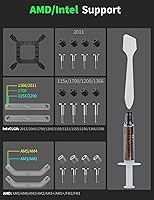
  • Intel Compatibility: Supports Intel sockets including LGA 1851, 1700, 1200, 115X, 1356, 2011, and 2066.
  • AMD Compatibility: Supports AMD sockets including AM5, AM4, AM3, AM2, and FM2.
  • RAM Clearance: The fin design leaves clearance for taller RAM modules without requiring their removal.
  • Fan Installation: Tool-free fan clips allow non-disassembly installation, so the fan mounts without removing the motherboard.
  • Color: The cooler is finished in white.
  • Cooling Method: Cooling is handled entirely through air movement and heat pipes, with no liquid components involved.
  • Fan Quantity: The kit includes a single 120mm fan rather than a dual-fan configuration.

Related Reviews
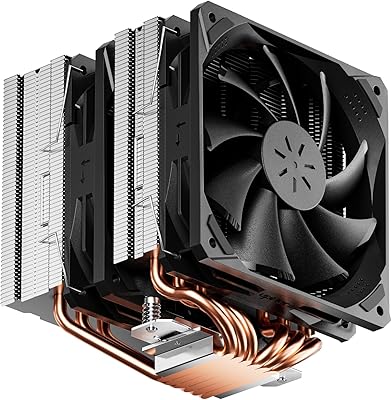
upHere D6SEK Dual Tower CPU Air Cooler
73%
72%
Thermal Performance
81%
Noise Level
91%
Value for Money
86%
Installation Ease
74%
RAM Compatibility
More
Cooler Master Hyper 212 Halo CPU Air Cooler
84%
88%
Cooling Performance
91%
Noise Level
85%
Ease of Installation
89%
Build Quality
80%
RGB Aesthetics
More
Cooler Master Hyper 212 Black CPU Cooler
79%
83%
Thermal Performance
79%
Noise Level
93%
Value for Money
76%
Installation Experience
81%
Build Quality
More
Cooler Master i70C Low-Profile CPU Cooler
78%
72%
Thermal Performance
88%
Noise Level
93%
Form Factor & Fit
86%
Installation Ease
78%
ARGB Lighting
More
Cooler Master i71C RGB Low-Profile CPU Cooler
79%
67%
Thermal Performance
83%
Noise Level
74%
Build Quality
86%
Installation Ease
81%
RGB Lighting Quality
More
Cooler Master MasterAir MA824 Stealth CPU Cooler
81%
88%
Thermal Performance
91%
Noise Level
93%
RAM Clearance
72%
Installation Experience
89%
Build Quality & Materials
More
Cooler Master Hyper 622 Halo Dual Tower CPU Cooler
82%
83%
Thermal Performance
88%
Noise Level
89%
Ease of Installation
67%
RAM Clearance
86%
Build Quality
More
NZXT T120 CPU Air Cooler
82%
74%
Thermal Performance
88%
Noise Level
93%
Ease of Installation
91%
Aesthetics & Design
86%
Value for Money
More
Vetroo V5 CPU Air Cooler
82%
73%
Thermal Performance
84%
Noise Level
91%
Value for Money
71%
Build Quality
88%
ARGB Lighting Quality
More
Thermalright PS120SE CPU Air Cooler
80%
89%
Thermal Performance
86%
Noise Level
93%
Value for Money
74%
Build Quality
81%
Ease of Installation
More

FAQ

Yes, this CPU cooler supports AM4 along with several other AMD sockets like AM5, AM3, AM2, and FM2, so it should bolt onto most AMD boards without needing extra brackets.

No, that's actually one of its strong points. The fan clips on with a non-disassembly design, so most builders manage the whole install without pulling the motherboard out of the case.

The fin stack is shaped to leave clearance for taller RAM modules, so even memory with larger heat spreaders typically clears it fine, though it's worth checking your specific kit's height if it's unusually tall.

It stays under 26dB(A) at full speed, which in practice means it's noticeably quieter than most stock coolers, even during longer gaming sessions or late-night work.

Honestly, it's better suited to CPUs running at stock or light boost clocks. With a 230W TDP ceiling it keeps up with most mid-range chips, but if you're pushing a high-end processor hard with a serious overclock, you'll want something with more cooling headroom.

It's rated for CPUs up to 230W TDP, which covers the vast majority of mainstream desktop processors.

No, this heatsink doesn't include RGB lighting. It's built more for function than flash and is finished in a plain white color instead.

Generally yes. At about 6.1 inches tall, it's compact enough for most micro-ATX builds, though it's always smart to check your case's maximum cooler height before buying.

Because the fan clips on and off without tools, you can pop it free, wipe down the blades, and brush dust out of the heat pipe fins fairly easily during routine maintenance.

Yes, LGA 1700 is on the supported list, along with other Intel sockets like 1200, 115X, 1356, 2011, and 2066, so newer Intel builds are covered too.