Overview

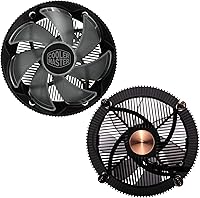
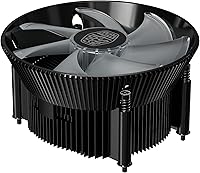
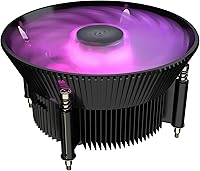
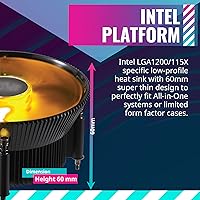
The Cooler Master i71C RGB Low-Profile CPU Cooler is one of those budget options that actually makes sense for compact Intel builds — not as a compromise, but as a deliberate choice. Its 60mm slim profile makes it a natural fit for small form factor cases and HTPCs where a standard tower cooler simply won't clear the side panel. Compatible with Intel LGA1200 and the 115X socket family, it covers a broad range of mainstream Intel processors from Skylake through Comet Lake. The RGB lighting is a genuine bonus rather than a gimmick — it adds visual appeal without compromising solid everyday thermal performance.
Features & Benefits

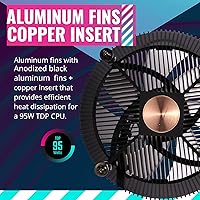
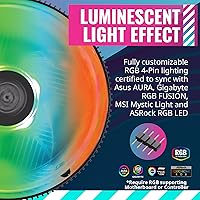
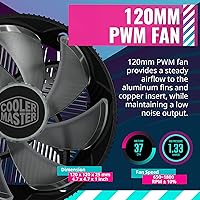
The anodized black aluminum fin stack paired with a copper insert base does real work here — copper pulls heat from the CPU die faster than a plain aluminum base ever could, and the fins then dissipate it efficiently. The 120mm MF120 fan moves a respectable 37 CFM while staying at or below 25 dB under typical loads, which is noticeably quieter than most stock coolers at equivalent speeds. The 4-pin PWM connector means your motherboard handles fan curves automatically, without any manual intervention. RGB-wise, it integrates with Asus Aura Sync, Gigabyte RGB Fusion, MSI Mystic Light, and ASRock Polychrome — so if you are already on one of those platforms, you control everything from one place without extra software juggling.

Best For

This low-profile cooler hits its stride in tight case builds — mini-ITX and micro-ATX systems where height clearance is genuinely restricted. HTPC builders will appreciate the quiet operation; 25 dB in a living room environment is easy to live with. It is also a solid upgrade for anyone still running a stock Intel cooler on a 65W TDP processor — a mainstream Core i5 or i7 at stock speeds sits comfortably within its thermal range. If your board supports Aura Sync or MSI Mystic Light, the integrated RGB sync means one less controller cluttering your setup. Just don't pair this compact RGB cooler with an overclocked or high-TDP chip — it isn't built for that.

User Feedback

Buyers consistently highlight easy installation and clean, synced RGB output as the standout wins — the mounting process is straightforward, and the lighting reliably follows motherboard software without fuss. Many note it runs noticeably quieter than the stock cooler it replaced, especially at idle. The criticism that surfaces most often is predictable: push the i71C on a processor drawing beyond 65W and temperatures climb faster than you'd want. A handful of buyers also mention that mounting pressure can feel inconsistent, which may affect thermal contact on some boards. On the positive side, RAM clearance earns consistent praise — the flat design lets even tall memory kits sit without conflict, something a bulkier cooler simply couldn't offer.

Pros

  • Fits cases where virtually no tower cooler can, thanks to its 60mm low-profile height.
  • The copper insert base pulls heat away from the CPU noticeably faster than plain aluminum alternatives.
  • At 25 dB under normal loads, this low-profile cooler is genuinely quiet in everyday use.
  • RGB sync works reliably with Asus Aura Sync, Gigabyte RGB Fusion, MSI Mystic Light, and ASRock Polychrome out of the box.
  • PWM speed control means the motherboard manages fan curves automatically — no manual tweaking needed.
  • Flat design allows tall RAM kits to sit freely without clearance conflicts.
  • Installation is straightforward, with a mounting process that does not require removing the motherboard in most cases.
  • A meaningful step up from the stock Intel cooler for mainstream 65W TDP processors at stock speeds.
  • The anodized black finish looks clean and understated — a rare aesthetic win for a budget-tier cooler.

Cons

  • Thermal headroom runs out fast on any processor drawing significantly more than 65W.
  • Overclocking is effectively off the table — sustained load temperatures climb quickly under boosted voltages.
  • Mounting pressure can feel inconsistent, which may affect thermal contact depending on the motherboard layout.
  • No AMD socket support at all, which cuts out a large portion of the DIY builder market.
  • The i71C offers limited upgrade headroom — if you later move to a more powerful CPU, you will need a new cooler too.
  • Thermal paste application quality at the factory level has drawn criticism from some buyers.
  • Airflow at 37 CFM is adequate for the use case but leaves little buffer in poorly ventilated cases.
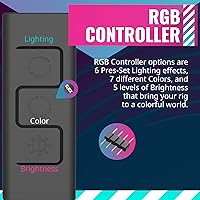
  • RGB connector and software dependency means lighting control relies entirely on motherboard compatibility — no standalone controller included.

Ratings

The Cooler Master i71C RGB Low-Profile CPU Cooler has been scored by our AI system after analyzing thousands of verified global buyer reviews, with spam, bot submissions, and incentivized feedback actively filtered out before any score was calculated. Ratings reflect the honest spread of real-world experiences — both where this compact RGB cooler genuinely delivers and where it falls short for certain users and workloads. Every category below is scored to transparently represent consensus strengths alongside recurring pain points so you can make a confident, informed decision.
Thermal Performance
67%
33%
For stock-speed Intel processors drawing around 65W, the i71C keeps temperatures meaningfully lower than the standard box cooler — buyers upgrading from an Intel stock unit consistently report cooler idle and load temps. In light workloads and everyday desktop use, it handles heat dissipation without breaking a sweat.
Push the workload harder — sustained rendering, heavy multitasking, or any overclocking attempt — and the thermal ceiling reveals itself quickly. Several buyers noted temperatures climbing into uncomfortable territory on processors like the Core i7-10700, which technically fits the socket but draws more than this low-profile cooler can comfortably manage.
Noise Level
83%
At 25 dB under typical loads, the i71C is one of the quieter coolers in its class, and buyers building HTPCs or living room machines specifically call out how unobtrusive it is during movie playback and light use. The PWM control keeps the fan from unnecessarily spinning up when temperatures are stable.
At maximum RPM under sustained load, the 120mm fan becomes noticeably more audible — not loud by any objective measure, but enough that buyers in very quiet environments flag it as a minor irritant during extended gaming or encoding sessions.
Build Quality
74%
26%
The anodized black aluminum fins have a clean, consistent finish that buyers find genuinely premium-looking for the price tier, and the copper insert base feels solid and well-machined. The overall assembly is tight, with no rattles or loose components reported in the majority of reviews.
A subset of buyers noted that the plastic fan frame feels slightly less robust than the heatsink itself, and the push-pin mounting clips — shared with the Intel stock cooler mechanism — drew some criticism for feeling flimsy compared to screw-mount alternatives on competing products.
Installation Ease
86%
The push-pin Intel mounting system means most builders have this cooler seated and running in under ten minutes without removing the motherboard from the case, which is a genuine convenience for compact builds where workspace is limited. The process is familiar to anyone who has installed a stock Intel cooler before.
Mounting pressure consistency was a recurring concern — some buyers reported one or two pins not fully engaging on the first attempt, requiring a re-seat to ensure proper contact. This is not a widespread failure, but it is enough of a pattern to warrant care during installation.
RGB Lighting Quality
81%
19%
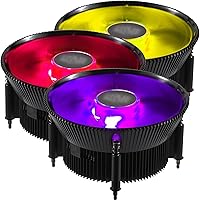
The MF120 fan produces vibrant, evenly diffused RGB lighting that integrates cleanly with Asus Aura Sync, Gigabyte RGB Fusion, MSI Mystic Light, and ASRock Polychrome — buyers on compatible platforms report that lighting sync just works without fiddling. The color output is rich and the transitions are smooth across the full 16.7 million color range.
Buyers without a compatible RGB motherboard ecosystem have no standalone controller option included in the box, which means the lighting is locked to a static mode or requires a third-party solution. The RGB header cable is also short enough to create routing challenges in some larger cases.
Value for Money
88%
Relative to what buyers are getting — a copper-insert base, a quiet 120mm RGB fan, and genuine RGB ecosystem compatibility — the i71C consistently earns praise as one of the stronger performing options in the budget low-profile cooler segment. Upgraders stepping up from a stock Intel cooler feel the improvement immediately in both temperatures and acoustics.
The value narrative weakens for anyone who later outgrows it — if you upgrade to a higher-TDP processor, this cooler cannot come with you, making it a potentially short-term investment rather than a lasting one. A handful of buyers felt the thermal paste situation required an immediate replacement, adding a small extra step and cost.
Compatibility Range
63%
37%
Within the Intel LGA1200 and LGA115X ecosystem, the i71C covers an impressive range of mainstream CPU generations — from Sandy Bridge through Comet Lake — giving it genuine flexibility for builders working with older or current-gen Intel platforms.
The complete absence of AMD support is a hard stop for a large portion of the DIY market, and there is no upgrade path or bracket kit available for Ryzen builders. Even within Intel, the cooler starts to struggle with processors that technically fit the socket but operate above 65W TDP under real workloads.
RAM Clearance
92%
The flat, low-profile design means tall memory kits — including high-profile RGB sticks like Corsair Vengeance LPX or G.Skill Trident Z — sit comfortably alongside the cooler without any physical conflict. Buyers in mini-ITX builds specifically mention this as a decisive advantage over tower coolers that overhang the first DIMM slot.
There is little to criticize here for the intended use case, though buyers running the absolute tallest enthusiast-tier memory sticks above 44mm should still verify clearance on their specific board layout, as DIMM slot positioning varies between manufacturers.
Acoustic Consistency
76%
24%
During light workloads and idle states, the i71C maintains a stable, low fan speed that keeps noise levels consistently around or below the rated 25 dB — buyers working in quiet home offices report it fades into the background entirely during typical productivity tasks.
Fan speed ramp-up under sudden load spikes can be audible as the PWM curve responds, and not all motherboard headers offer fine-grained enough control to smooth out that transition. Buyers who manually configure fan curves in BIOS report a better acoustic experience than those leaving settings on auto.
Aesthetic Design
84%
The matte anodized black finish gives this compact RGB cooler a clean, understated look that complements both windowed cases and blacked-out builds without looking cheap. Buyers consistently mention that the all-black heatsink paired with the RGB fan strikes a better visual balance than competitors in the same segment.
The heatsink itself has no RGB elements — all the lighting comes solely from the fan — so the visual impact when viewed from above or at certain angles is more limited than coolers with illuminated fin stacks or logo plates. For buyers prioritizing maximum visual presence, it can feel slightly understated.
Fan Longevity
69%
31%
The MF120 fan uses a standard sleeve or dual ball bearing (depending on revision) that is adequate for the modest 2500 RPM ceiling and 2.4W power draw, and most buyers report no fan degradation over the first year or two of regular use.
Long-term durability data is thinner than for premium coolers, and sleeve bearing variants are inherently less durable than ball bearing fans under sustained high-RPM or high-temperature conditions. A small number of buyers have reported fan noise developing over extended use, though this appears to be a minority experience.
Packaging & Accessories
71%
29%
The cooler arrives well-protected and with all necessary mounting hardware for the supported Intel sockets included, which means most builders can go from box to installed without sourcing any additional parts. Thermal paste is pre-applied on the base.
The accessory package is bare-bones beyond the essentials — no extra thermal compound sachet, no fan speed controller, and no RGB extension cable are included. Buyers who want more installation flexibility or who prefer to apply their own thermal paste will need to factor in those additions separately.
Case Fit & Clearance
89%
At 60mm tall with a footprint just under 4.72 inches square, the i71C fits reliably in the vast majority of mini-ITX and micro-ATX cases that list a CPU cooler height limit of 60mm or higher — buyers rarely report unexpected clearance issues when they have checked their case specs in advance.
Cases rated exactly at 60mm leave essentially zero margin for error, and buyers have reported that slight board flex or an uneven surface can create minor clearance pressure against side panels in the tightest enclosures. Always verify the case manufacturer's exact internal measurement rather than relying on the nominal spec alone.

Suitable for:

The Cooler Master i71C RGB Low-Profile CPU Cooler is purpose-built for builders working within tight physical constraints — specifically those assembling mini-ITX or compact micro-ATX systems where a standard tower cooler would never fit. HTPC enthusiasts putting together a living room machine will find the 25 dB noise floor genuinely unobtrusive, and the RGB sync with major motherboard ecosystems means the lighting just works without hunting for a separate controller app. It is also a smart, no-fuss upgrade for anyone still running a stock Intel cooler on a mainstream processor — think a Core i5 or i7 running at stock speeds within the 65W TDP range — where it will run cooler and quieter than the box cooler without requiring case modifications. The flat profile is a quiet win for RAM clearance too, letting even taller memory kits sit without conflict, which is a real practical advantage in cramped builds.
Not suitable for:

Builders planning to push their CPU beyond stock speeds should look elsewhere — the i71C has a clear thermal ceiling, and an overclocked chip or any processor drawing well above 65W will expose it quickly. This compact RGB cooler is not the right tool for high-performance workstation builds, content creation rigs running sustained heavy workloads, or anyone running a Core i9 or similarly power-hungry processor at full tilt. AMD platform builders are also out of luck entirely, as socket compatibility is strictly limited to Intel LGA1200 and 115X variants. If your case has generous clearance and you are not constrained by height, a mid-range tower cooler will outperform the i71C at a similar or only modestly higher spend. Buyers expecting premium thermal paste pre-applied from the factory may also need to factor in applying their own compound for best contact consistency.

Specifications

  • Socket Support: Compatible with Intel LGA1200, LGA1156, LGA1155, LGA1151, and LGA1150 sockets, covering mainstream Intel processors from Sandy Bridge through Comet Lake.
  • Cooler Height: Stands at just 60mm tall, making it one of the slimmer air coolers available for desktop Intel platforms.
  • Dimensions: Overall footprint measures 4.72″L x 2.36″W x 4.72″H, designed to fit within the tight confines of small form factor and HTPC cases.
  • Weight: Complete assembly weighs 14.72 oz, which is light enough to avoid undue stress on the motherboard socket during transport.
  • Fan Size: Ships with a single 120mm MF120 RGB fan mounted directly to the heatsink fin stack.
  • Max Fan Speed: Fan spins at up to 2500 RPM under full load via PWM control.
  • Airflow: Rated airflow is 37 CFM, adequate for dissipating heat from mainstream Intel CPUs running at stock speeds.
  • Noise Level: Acoustic output is rated at 25 dB, keeping the cooler quiet enough for living room and office environments under typical workloads.
  • Fan Connector: Uses a standard 4-pin PWM connector, allowing the motherboard to regulate fan speed automatically based on CPU temperature.
  • Voltage: Operates at 12V with a rated power draw of just 2.4W, placing virtually no meaningful load on the system PSU.
  • Fin Material: Heatsink fins are constructed from anodized black aluminum, which provides both heat dissipation and a clean, uniform aesthetic.
  • Base Material: The cooler base uses an aluminum body with a copper insert, improving thermal transfer from the CPU heat spreader into the fin stack.
  • RGB Colors: The MF120 fan supports over 16.7 million color options via addressable RGB lighting.
  • RGB Ecosystem: Natively compatible with Asus Aura Sync, Gigabyte RGB Fusion, MSI Mystic Light, and ASRock Polychrome Sync software platforms.
  • Cooling Method: Relies entirely on active air cooling — a heatsink fin stack combined with a direct-mounted fan — with no liquid or heatpipe elements.
  • Power Connector: Single 4-pin PWM header connection handles both power delivery and fan speed control from the motherboard CPU fan header.

Related Reviews

Cooler Master MasterLiquid ML240L V2 AIO Cooler
77%
78%
Thermal Performance
91%
Installation Experience
63%
Pump Noise & Vibration
82%
Fan Performance
88%
ARGB Lighting
More
upHere H85K6 Low Profile CPU Cooler
80%
74%
Thermal Performance
86%
Idle Noise
71%
Build Quality
87%
Installation Ease
83%
Value for Money
More
Noctua NH-L12Sx77 Low-Profile CPU Cooler
84%
88%
Thermal Performance
91%
Acoustics & Noise Level
94%
Build Quality & Materials
92%
Fan Quality
71%
Installation Experience
More
ID-COOLING IS-40X V3 Low-Profile CPU Cooler
77%
67%
Thermal Performance
74%
Noise Level
76%
Build Quality
83%
Ease of Installation
91%
Form Factor Fit
More
SilverStone Technology RL-KR01 Low Profile CPU Cooler
85%
85%
Performance
92%
Noise Level
88%
Build Quality
90%
Ease of Installation
94%
Compatibility with AMD Sockets
More
Thermalright AXP90 X36 Black Low Profile CPU Cooler
86%
89%
Cooling Performance
92%
Noise Level
88%
Compatibility with Intel/AMD
78%
Ease of Installation
86%
Build Quality
More
ID-COOLING IS-47-XT Low Profile CPU Cooler
77%
71%
Thermal Performance
78%
Noise Level
83%
Build Quality
88%
Installation Ease
47%
AMD Compatibility
More
ID-COOLING IS-40-XT Black Low Profile CPU Cooler
87%
86%
Cooling Performance
92%
Noise Level
89%
Ease of Installation
94%
Size/Footprint
87%
Build Quality
More
Thermalright AXP90-X53 Full Copper CPU Cooler
81%
83%
Thermal Performance
89%
Build Quality
86%
Noise Level
61%
Installation Experience
88%
Value for Money
More
Thermalright AXP90-X47 Full Copper CPU Cooler
77%
78%
Thermal Performance
84%
Noise Level
91%
Build Quality
82%
Installation Experience
88%
Socket Compatibility
More

FAQ

In most cases, yes — the 60mm height is specifically why builders choose this unit for compact enclosures. That said, always check your case manufacturer's listed CPU cooler height clearance before ordering, as a small number of ultra-compact chassis have limits even below 60mm.

It covers Intel LGA1200 and the full LGA115X socket family, which includes processors from Sandy Bridge (2nd Gen) all the way through Comet Lake (10th Gen). If your CPU uses one of those sockets and runs at or near 65W TDP, this low-profile cooler is a compatible fit.

No — socket compatibility is strictly limited to Intel LGA1200 and LGA115X platforms. There is no AMD AM4 or AM5 mounting bracket included or available for this unit, so Ryzen builders will need to look elsewhere.

If your motherboard supports Asus Aura Sync, Gigabyte RGB Fusion, MSI Mystic Light, or ASRock Polychrome, the RGB fan will sync directly through the motherboard header without any separate controller. You manage everything from within your existing RGB software, which keeps cable clutter to a minimum.

Cooler Master typically applies thermal paste to the base before packaging, but the consistency of that pre-application has drawn mixed feedback from buyers. For best results, it is worth wiping the base clean and applying a quality third-party compound yourself — it takes two minutes and can make a noticeable difference in contact quality.

The Cooler Master i71C RGB Low-Profile CPU Cooler is rated at 25 dB, and real-world feedback broadly confirms it stays quiet during normal productivity tasks and light gaming. At maximum RPM under sustained load it becomes slightly more audible, but it remains well below the noise threshold of most stock coolers.
It is not recommended. The i71C is designed for stock-speed operation on mainstream processors, and its thermal headroom does not leave enough margin for the additional heat generated by even modest overclocking. If you plan to push your CPU beyond its base frequencies, invest in a taller tower cooler or a liquid solution.

Yes — the flat, low-profile design means RAM height is essentially a non-issue, which is one of the practical advantages buyers mention most often. Tall RGB memory sticks that would conflict with a tower cooler overhang sit freely alongside this compact RGB cooler.

The i71C uses the standard Intel push-pin retention mechanism found on LGA115X and LGA1200 motherboards, so installation does not require a separate backplate or removing the motherboard from the case. Most builders find the process straightforward and complete it in under ten minutes.

For a processor running at stock speeds within the 65W TDP range, yes — it runs cooler and quieter than the standard box cooler Intel ships with retail CPUs, and the RGB lighting is a genuine aesthetic upgrade. If your workload stays within those bounds, the performance improvement over stock is real and consistent with what buyers report.

Where to Buy