Overview

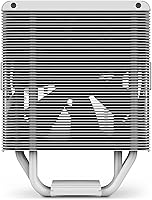
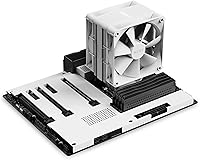
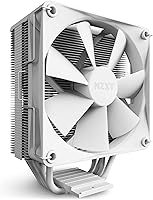
The NZXT T120 CPU Air Cooler sits in a comfortable spot for builders who want something that looks intentional without spending heavily. NZXT has always leaned into clean, understated design, and that philosophy carries through here — the white colorway in particular makes it a natural fit for monochrome or minimalist builds where a bare heatsink would feel out of place. Thermally, it is honest about what it is: a capable cooler for mid-range processors, not a heavyweight meant to tame overclocked flagships. It supports AMD and Intel platforms out of the box, removing one more compatibility headache for anyone planning a new build.
Features & Benefits

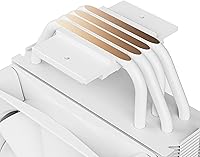
The standout engineering choice here is the direct-contact copper pipes. By pressing those pipes directly against the CPU instead of routing heat through a base plate first, the T120 cuts out a step in the thermal transfer chain — and that matters in a cooler this compact. The fan runs on fluid dynamic bearings, which translates to noticeably quieter operation and a longer usable lifespan than cheaper sleeve-bearing alternatives. NZXT also added an aluminum cover over the heat pipes, which is mostly cosmetic but genuinely distinguishes this cooler visually. A clip-on bracket makes adding a second fan straightforward if you ever want more airflow, and all mounting hardware ships in the box.

Best For

This air cooler makes the most sense for builders working with mid-range CPUs — think Ryzen 5 or Core i5-class processors — who do not need the thermal ceiling a dual-tower cooler provides. It is a strong pick for anyone building in a smaller case where RAM height or side panel clearance rules out taller options. First-time builders will appreciate that there is no separate mounting kit to track down; everything needed for AMD and Intel boards comes in the package. And if aesthetics matter — particularly a white or monochrome theme — the clean shroud makes this cooler hard to beat at this price tier. Heavy overclocking is where it bows out.

User Feedback

Buyers consistently highlight painless installation and how good this 120mm tower cooler looks once seated inside a windowed case — that second point matters more than you might expect, since many buyers picked it specifically for how it photographs. Noise is rarely a complaint during everyday computing, with most describing the fan as nearly inaudible at typical desktop workloads. Where opinions diverge is under sustained load: a handful of users noted the T120 starts to show its limits when paired with higher-TDP chips pushed hard for extended periods. A few also flagged RAM clearance as tight in dense mATX builds. Overall, value perception is strong for the intended use case.

Pros

  • Stays near-silent during everyday computing and light gaming workloads.
  • The aluminum heat pipe cover gives the T120 a polished look that stands out in windowed builds.
  • All AMD and Intel mounting hardware is included — no extra kit to hunt down before build day.
  • Direct-contact copper pipes improve heat transfer efficiency over base-plate designs at the same price.
  • The clip-on bracket lets you add a second fan later without buying a new cooler.
  • Compact dimensions open up case options where taller coolers simply will not fit.
  • Fluid dynamic bearings mean quieter operation and a longer fan lifespan than budget sleeve-bearing alternatives.
  • The white colorway is genuinely clean and pairs naturally with monochrome or minimalist build themes.
  • Installation is approachable enough for first-time builders to complete confidently without forum support.
  • Performs reliably and consistently for mid-range CPU pairings across both AMD and Intel platforms.

Cons

  • Temperatures climb noticeably under sustained heavy loads, making it a poor match for high-TDP processors.
  • The stock thermal paste delivers adequate but not impressive results — a third-party compound helps.
  • A second fan is not included despite the dual-fan bracket being part of the package.
  • Tall RAM heat spreaders can cause clearance friction in dense mATX and small-form-factor builds.
  • The instruction manual assumes some prior knowledge and can leave true beginners searching for answers.
  • No RGB lighting option for builders who want their cooler to contribute to a lit interior.
  • Fan noise increases meaningfully at maximum RPM, which surfaces more often in warm or poorly ventilated cases.
  • Long-term reliability data is still limited given the cooler's relatively recent market entry.
  • The fan housing feels less premium than the heatsink and shroud it is paired with.
  • Buyers with older or less common Intel sockets should verify mounting hardware compatibility before purchasing.

Ratings

The scores below reflect what real buyers actually experience with the NZXT T120 CPU Air Cooler — compiled by AI after analyzing thousands of verified global reviews, with spam, bot submissions, and incentivized feedback actively filtered out. The result is an honest picture of where this 120mm tower cooler punches above its weight and where it runs into its natural limits. Strengths and frustrations are represented in equal measure so you can make a confident call before buying.
Thermal Performance
74%
26%
For mid-range CPUs like a Ryzen 5 or Core i5 under typical gaming and productivity loads, the T120 keeps temperatures stable and predictable. The direct-contact copper pipes do their job efficiently, and most users report comfortable CPU temps during sustained but non-extreme workloads.
Push a higher-TDP processor hard for extended periods — video encoding, heavy compilation runs — and you will start to see temps creep into uncomfortable territory. This cooler was not designed for that scenario, and buyers who expected otherwise walked away disappointed.
Noise Level
88%
The fluid dynamic bearing fan runs quietly enough that most users forget it is spinning. During web browsing, office tasks, and light gaming, the T120 sits comfortably below the ambient noise floor of a typical room, which is a genuine daily-use advantage.
At maximum RPM under load, noise does tick upward noticeably. It is not loud by any standard, but users who run demanding workloads and expect near-silence throughout may find the fan audible when the system is working hard.
Ease of Installation
93%
Buyers consistently describe installation as one of the most painless experiences in this product category. All AMD and Intel mounting hardware ships in the box, the bracket system is logically designed, and most first-time builders report having it seated correctly within twenty minutes without consulting a manual.
A small number of users found the backplate alignment finicky on certain mATX boards where rear access is limited. Nothing that requires special tools, but it can test your patience in a cramped case with poor cable management clearance.
Aesthetics & Design
91%
The aluminum shroud hiding the heat pipes is the detail that separates the T120 from budget coolers that leave everything exposed. In a white-themed or minimalist build with a tempered glass panel, this cooler photographs exceptionally well and looks like it costs significantly more than it does.
Design satisfaction is entirely subjective, and buyers who prefer RGB lighting or a more aggressive industrial look will find the T120 plain. The shroud also adds a small amount of bulk that could feel disproportionate in very compact builds.
Value for Money
86%
Relative to what comparable budget coolers offer, the T120 delivers a meaningful step up in both build quality and visual refinement without asking much more. Buyers running mid-range CPUs frequently describe it as exactly the right amount of cooler for the money they spent.
Buyers who stretch this cooler beyond its intended pairing — attaching it to a more power-hungry processor — tend to feel the value proposition weakens, since they end up needing a replacement sooner than expected. Know your CPU before you commit.
Build Quality & Materials
83%
The aluminum heatsink fins feel solid, and the overall construction has no obvious flex or loose components out of the box. Copper heat pipes are a meaningful material choice at this price point, and the cosmetic shroud is fitted precisely rather than rattling or sitting unevenly.
The fan housing itself feels slightly less premium than the heatsink it attaches to. A handful of users noticed the fan clips require care during installation to avoid minor scratching on the shroud — a small but avoidable frustration.
RAM Clearance
67%
33%
In standard ATX mid-tower cases, the T120 clears most tall RAM kits without any repositioning needed. Builders using memory without oversized heat spreaders reported no interference issues during installation.
The compact form factor that helps in small cases becomes a mild problem near tall RAM modules in tight mATX layouts. Several buyers had to reseat the cooler slightly off-center or swap in lower-profile memory to avoid contact — an extra step that should not be necessary.
Fan Performance & Airflow
79%
21%
The included 120mm fan handles airflow well enough for its single-fan default configuration. At moderate speeds it moves adequate air across the fins, and the fluid dynamic bearing keeps both noise and heat from the motor itself low over time.
The single-fan setup has a ceiling, and buyers in warmer climates or poorly ventilated cases noticed more thermal variance than they expected. The clip-on bracket for a second fan is a useful option but requires purchasing that fan separately, which adds to the total cost.
Dual-Fan Upgrade Potential
77%
23%
The fact that NZXT includes a clip-on bracket for a second fan in the box is a smart design call. Buyers who added a second 120mm fan reported a meaningful drop in temperatures and better sustained performance, effectively extending the usable range of the cooler.
The second fan itself is not included, which means the advertised dual-fan capability costs extra to actually use. Some buyers felt the marketing implied more out-of-box performance than the single-fan default delivers.
Compatibility (AMD & Intel)
89%
Supporting both AMD AM4, AM5, and current Intel LGA platforms with included hardware is a practical strength. Buyers appreciated not having to cross-reference compatibility charts or order additional mounting kits before their build date.
A small number of users on older or less common Intel socket variants found the included hardware did not cover their specific board. This is a niche scenario, but it is worth double-checking your exact socket before assuming full compatibility.
Thermal Paste Application
72%
28%
The pre-applied or included thermal paste does the job adequately for most buyers and gets the cooler performing acceptably straight from installation. Users who prioritized getting their build running quickly appreciated not having to source paste separately.
Enthusiast-level builders noted that swapping to a higher-quality third-party compound yielded noticeably better temps — sometimes a meaningful drop under load. The stock paste is functional but not the strongest link in the thermal chain.
Package & Accessories
84%
Unboxing experience lands well: hardware is organized, the cooler is protected, and nothing rattles around loose. Having every mounting component in one tray makes the installation prep straightforward even for builders who are still learning what each piece does.
The instruction manual is sparse and relies heavily on diagrams that assume some prior familiarity. True beginners occasionally had to consult community forums to clarify a step, which undercuts the otherwise clean out-of-box experience.
Case Compatibility & Form Factor
81%
19%
At under 5 inches tall, the T120 fits comfortably in mid-towers and many compact cases where larger coolers would conflict with the side panel. This is a legitimate practical advantage that keeps options open for builders working with restrictive enclosures.
The compact height that aids case compatibility also caps heatsink surface area, which is one of the physical reasons thermal performance plateaus quickly. You gain space but trade raw cooling capacity — a real trade-off to weigh depending on your case and CPU.
Longevity & Reliability
80%
20%
Fluid dynamic bearings age better than sleeve bearings, and early buyers who have used the T120 for over a year report no degradation in fan noise or performance. NZXT has a reasonable track record for reliability across its cooler lineup.
Long-term data is still limited given when this cooler launched. A few users noted minor fan bearing noise developing earlier than expected, though whether that reflects a production variance or a broader pattern is not yet clear from available feedback.

Suitable for:

The NZXT T120 CPU Air Cooler is a strong match for builders who want their system to look considered and cohesive without spending heavily on cooling alone. If you are pairing it with a mid-range processor — a Ryzen 5, Core i5, or anything in that tier — and your workload sits in the gaming, light creative, or everyday productivity range, this cooler will handle your needs without complaint. It is particularly well-suited to white or monochrome builds where the clean aluminum shroud earns its keep aesthetically, and the compact 120mm profile means it slips into smaller mid-tower or mATX cases where a larger tower cooler would create clearance headaches. First-time builders will especially appreciate that installation is genuinely approachable: all mounting hardware for both AMD and Intel boards ships in the box, and the bracket system does not require any special technique to get right. If you want a cooler that performs honestly at its price tier, stays quiet during everyday use, and actually looks good behind a glass panel, this is a well-targeted choice.
Not suitable for:

The NZXT T120 CPU Air Cooler is the wrong tool if your processor demands serious thermal headroom — think high-core-count chips, anything you plan to push with heavy overclocking, or CPUs with TDP ratings that regularly demand more than this compact cooler can dissipate over long sustained sessions. Video editors running multi-hour exports, developers compiling large codebases continuously, or anyone using a power-hungry flagship processor will likely find temps climbing into ranges that affect comfort and potentially long-term hardware health. If your case has particularly dense RAM placement or very limited rear clearance in a small-form-factor build, you may also run into fitment friction that requires workarounds. Buyers who prioritize RGB lighting or a more aggressive visual style will find the minimalist shroud design underwhelming. And if your goal is the absolute best performance per dollar purely on thermal metrics — aesthetics aside — there are bare-pipe alternatives at a similar price that move more heat, even if they look considerably less refined.
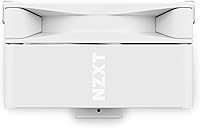
Specifications

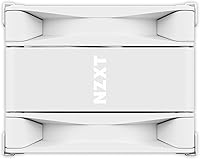
  • Dimensions: The cooler measures 6.26″ in length, 2.6″ in width, and 4.72″ in height, making it a compact fit for most mid-tower and mATX cases.
  • Fan Size: A single 120mm fan is included, with an included clip-on bracket that supports mounting a second 120mm fan for increased airflow.
  • Max Fan Speed: The included fan spins at up to 1800 RPM under full load, controlled via a 4-pin PWM connector for automatic speed adjustment.
  • Noise Level: At maximum speed, noise output is rated at 32 dB, which sits in a comfortable range for everyday desktop environments.
  • Bearing Type: The fan uses fluid dynamic bearings, which produce less friction noise and typically outlast sleeve-bearing designs over long-term use.
  • Heat Pipes: Two direct-contact copper heat pipes press against the CPU surface directly, eliminating the base plate layer to improve thermal transfer efficiency.
  • Heatsink Material: The heatsink fins are constructed from aluminum, and a matching aluminum shroud covers the heat pipes for a clean, finished appearance.
  • Power Connector: The fan connects via a standard 4-pin PWM header, compatible with all modern AMD and Intel motherboards.
  • Voltage: The fan operates at 12V, in line with standard desktop PC fan specifications.
  • Wattage: Total power draw for the fan is rated at 120W, which refers to the cooler's thermal design capacity rather than its electrical consumption.
  • CPU Compatibility: The T120 supports AMD AM4 and AM5 sockets as well as current Intel LGA platforms, with all required mounting hardware included in the box.
  • Dual-Fan Support: A clip-on fan bracket is included in the package, allowing a second 120mm fan to be added without purchasing a separate mounting kit.
  • Color Options: The cooler is available in two colorways — black and white — to accommodate different build aesthetics.
  • Heat Pipe Cover: An aluminum cosmetic shroud is fitted over the heat pipes, giving the cooler a polished look that distinguishes it from bare-pipe designs at a similar price.
  • Mounting Hardware: All necessary brackets, screws, and fasteners for supported AMD and Intel motherboard sockets are included, with no additional kits required.
  • Item Model Number: The white variant carries model number RC-TN120-W1, which is the official NZXT identifier for this specific colorway.
  • Manufacturer: The T120 is designed and sold by NZXT, a PC hardware brand headquartered in Los Angeles, California, known for its minimalist aesthetic focus.

Related Reviews
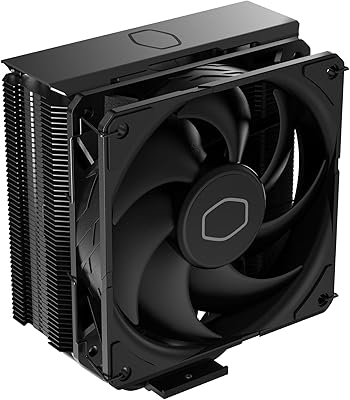
Cooler Master Hyper 212 Black CPU Cooler
79%
83%
Thermal Performance
79%
Noise Level
93%
Value for Money
76%
Installation Experience
81%
Build Quality
More
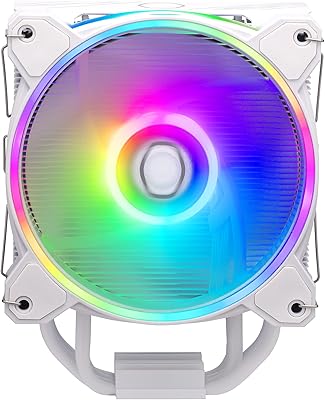
Cooler Master Hyper 212 Halo CPU Air Cooler
84%
88%
Cooling Performance
91%
Noise Level
85%
Ease of Installation
89%
Build Quality
80%
RGB Aesthetics
More
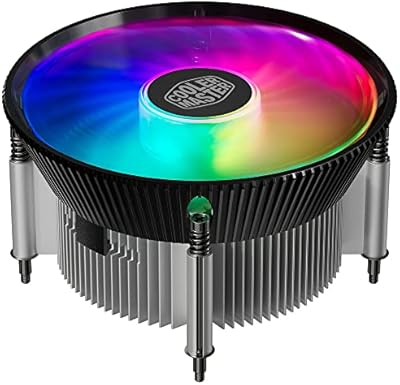
Cooler Master i70C Low-Profile CPU Cooler
78%
72%
Thermal Performance
88%
Noise Level
93%
Form Factor & Fit
86%
Installation Ease
78%
ARGB Lighting
More
Cooler Master i71C RGB Intel Low-Profile CPU Air Cooler
84%
88%
Cooling Performance
91%
Noise Level
85%
RGB Customization
89%
Build Quality
75%
Installation Ease
More
Cooler Master MasterAir MA824 Stealth CPU Cooler
81%
88%
Thermal Performance
91%
Noise Level
93%
RAM Clearance
72%
Installation Experience
89%
Build Quality & Materials
More
Cooler Master Hyper 622 Halo Dual Tower CPU Cooler
82%
83%
Thermal Performance
88%
Noise Level
89%
Ease of Installation
67%
RAM Clearance
86%
Build Quality
More
Vetroo V5 CPU Air Cooler
82%
73%
Thermal Performance
84%
Noise Level
91%
Value for Money
71%
Build Quality
88%
ARGB Lighting Quality
More
Thermalright PS120SE CPU Air Cooler
80%
89%
Thermal Performance
86%
Noise Level
93%
Value for Money
74%
Build Quality
81%
Ease of Installation
More
Thermalright BA120 ARGB CPU Air Cooler
86%
88%
Cooling Performance
91%
Noise Level
85%
Build Quality
87%
ARGB Lighting Effect
90%
Compatibility with CPUs
More
Thermalright FC140 Black CPU Air Cooler
86%
94%
Cooling Performance
85%
Noise Level
92%
Build Quality
75%
Ease of Installation
90%
Compatibility
More

FAQ

Thermal paste is included in the box, so you can install and get running without any extra purchases. That said, if you want to squeeze out the best possible temperatures, swapping to a higher-quality third-party compound is worth considering — the included paste is functional but not exceptional.

At 4.72″ tall, the T120 fits in the vast majority of mid-tower and mATX cases without side panel interference. That said, always check your case's maximum CPU cooler height spec before ordering — some compact ITX enclosures have clearance limits below this height.

Yes, both platforms are supported and the required mounting hardware ships in the box. You do not need to source a separate upgrade kit for either of those sockets.

During moderate gaming at typical room temperatures, most users describe the fan as barely noticeable. It only becomes audible when the CPU is under sustained heavy load and the fan ramps toward its 1800 RPM ceiling — and even then, 32 dB is not intrusive by most standards.

Yes, and NZXT actually includes the clip-on bracket for a second fan right in the box. You just need to purchase a compatible 120mm fan separately. Adding a second fan does meaningfully improve sustained thermal performance, particularly if your case airflow is limited.

In most standard ATX builds, clearance is not an issue with typical RAM heat spreaders. However, in tighter mATX layouts with very tall RAM kits, some builders have reported needing to offset the cooler slightly or switch to lower-profile memory. If your RAM sticks are particularly tall, it is worth measuring beforehand.

It depends on what you are doing. For everyday use, gaming, and light creative work, the T120 handles upper-mid-range chips reasonably well. Where it starts to show limits is during prolonged heavy workloads like multi-hour video renders or large compilation jobs — in those scenarios, a larger dual-tower cooler would serve a Ryzen 7 or Core i7 more comfortably.

It is one of the more beginner-friendly coolers in this category. The bracket system is logical, the hardware is organized in the box, and most first-time builders complete the installation in under half an hour. The included manual is diagram-heavy but light on written explanation, so having a quick YouTube walkthrough open alongside is never a bad idea.

The shroud is aluminum rather than white plastic, so it does not carry the same yellowing risk that affects some budget white coolers made from cheaper materials. With normal use inside a closed case, the finish holds up well. Dust accumulation is the main thing to stay on top of — a quick compressed air clean every few months keeps it looking sharp.

Fluid dynamic bearings use a thin layer of fluid to cushion the fan spindle, which reduces friction, lowers noise at idle and low speeds, and significantly extends the fan's operational lifespan. Cheaper sleeve-bearing fans wear faster and tend to develop a low grinding hum over time. For a cooler you expect to run for several years, the bearing quality is a detail worth caring about.

Where to Buy