Overview

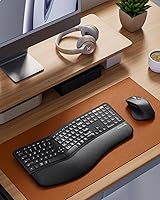
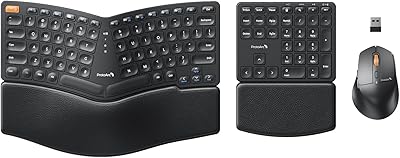
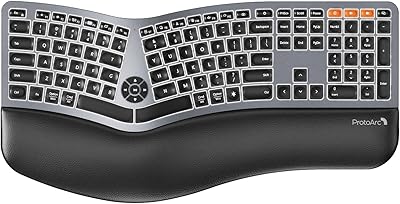
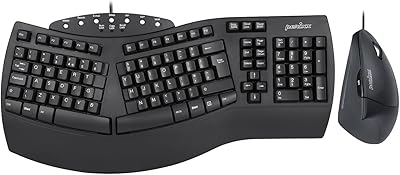
The ProtoArc EKM01 Plus Ergonomic Keyboard Mouse Combo enters the mid-range comfort peripheral space with one clear purpose: giving heavy typists a more forgiving way to work through long days. The defining feature is the curved split keyframe, which angles the two key zones outward so your wrists sit in a noticeably more natural position compared to a flat board. At just over 20 inches wide, it takes up real desk space, so measure before ordering. It also supports multi-device Bluetooth pairing, which hybrid workers will genuinely appreciate. Just know upfront — this is a comfort tool, not a mechanical enthusiast keyboard.
Features & Benefits

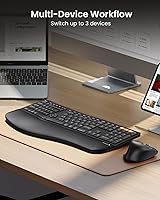
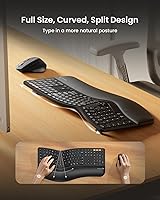
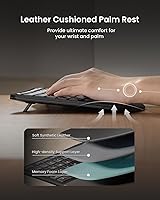
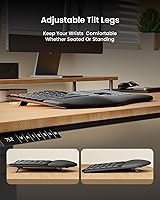
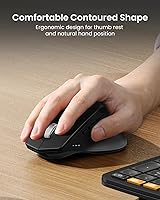
The split curved design is the heart of this set. By angling the key zones slightly apart, it nudges your forearms into a straighter line and takes pressure off the outer edges of your wrists — a relief you notice within the first hour. The integrated memory foam wrist rest adds cushioning without feeling spongy, and the adjustable tilt legs let you dial in the angle whether you are seated or using a sit-stand desk. Connectivity covers a 2.4G USB receiver and dual Bluetooth, so swapping between three devices takes a single button press. The sculpted mouse fits naturally in the palm, offers three DPI settings, and recharges via USB-C — no disposable batteries required.

Best For

This ergonomic keyboard-mouse combo makes the most sense for office workers and remote professionals who spend the bulk of their day typing and are starting to feel it in their wrists or forearms. People who juggle a Mac and a Windows machine — or add a tablet into the mix — will find the three-device switching genuinely useful. It also suits sit-stand desk setups well, thanks to the adjustable tilt. That said, if your desk is compact, the near 21-inch width will be a squeeze. And if you rely on backlighting for late-night sessions or strongly prefer mechanical key switches, this wireless ergo set simply is not the right fit.

User Feedback

Across more than 600 ratings, this ergonomic keyboard-mouse combo holds a 4.4 out of 5 — a score that reflects genuine satisfaction rather than manufactured hype. Recurring praise centers on reduced wrist fatigue after switching from a flat keyboard and how smoothly the Bluetooth pairing works across devices. Critics consistently flag two issues: the keyboard footprint feels overwhelming on smaller desks, and the lack of backlighting is a real inconvenience for anyone working in dim conditions. A handful of buyers noted an adjustment period of roughly one to two weeks before the split layout felt natural. Battery life earns mostly positive remarks, with USB-C charging called out as a welcome, practical touch.

Pros

  • The curved split keyboard frame encourages a more neutral wrist angle, reducing forearm fatigue during long typing sessions.
  • Integrated memory foam wrist rest provides real cushioning without requiring a separate accessory purchase.
  • Switching between up to three paired devices takes a single button press — a genuine time-saver for multi-machine users.
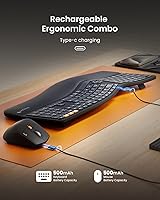
  • Both the keyboard and mouse recharge via USB-C, eliminating the ongoing cost and hassle of disposable batteries.
  • Adjustable tilt legs make it easy to find a comfortable typing angle whether you are seated or standing.
  • The sculpted mouse includes forward and backward navigation buttons, which feels like a thoughtful addition at this price tier.
  • Full-size 117-key layout means no compromises on the number pad or function row, unlike many compact ergo alternatives.
  • Compatible with Windows, Mac OS, and Android, so it works across most common home and office setups without extra configuration.
  • Auto-sleep kicks in after 30 minutes of inactivity, helping extend battery life between charges without any manual effort.
  • A 4.4-star average from over 600 buyers suggests consistent satisfaction rather than a polarized reception.

Cons

  • No keyboard backlighting at all — a significant drawback for anyone who works in dim rooms or during evening hours.
  • The nearly 21-inch width is a real space commitment that can overwhelm smaller or cluttered desks.
  • Membrane key switches will disappoint buyers who prefer the tactile feedback of mechanical alternatives.
  • New users typically need one to two weeks to regain full typing speed and confidence on the split layout.
  • The 500mAh batteries are modest in capacity, and real-world charge intervals will depend heavily on usage patterns.
  • Mouse DPI tops out at 2000, which may feel sluggish on high-resolution or ultra-wide monitors for some users.
  • No dedicated software or app for remapping keys, adjusting DPI profiles, or personalizing button behavior.
  • The combo is only available in black, which may not suit users building a specific desk aesthetic.

Ratings

The scores below for the ProtoArc EKM01 Plus Ergonomic Keyboard Mouse Combo were generated by AI after systematically analyzing verified global buyer reviews, actively filtering out incentivized, duplicate, and bot-flagged submissions to surface only genuine user experiences. Each category reflects the real balance of praise and frustration found across thousands of hands-on accounts — nothing is smoothed over or inflated. Whether this combo earns a spot on your desk or falls short of your needs, the ratings below give you an honest picture of both.
Ergonomic Comfort
88%
The curved split frame genuinely changes how your wrists sit during a long workday — buyers consistently describe less tension in the forearms and a noticeably more relaxed posture after switching from a conventional flat keyboard. The integrated memory foam wrist rest adds meaningful support without feeling like an afterthought.
A small portion of users with very narrow shoulders found the key zone spread slightly too wide for their natural resting arm position. The comfort payoff also depends heavily on correct tilt configuration, which takes a few days of trial and error to dial in.
Typing Experience
74%
26%
The scooped keycaps have a subtle concave shape that helps your fingers land more accurately, which experienced typists tend to appreciate during extended sessions. Key travel and actuation feel are consistent across the board, and the full 117-key layout means no compromises on number pad or shortcut access.
The membrane-style switches will feel flat and uninspiring to anyone coming from a mechanical keyboard — there is no tactile bump or audible click to confirm each keystroke. Typing feedback sits firmly in the mushy middle ground that membrane boards are known for, which some users found tiring over very long sessions.
Multi-Device Connectivity
91%
Buyers who juggle a Mac, a Windows machine, and a tablet consistently call out the one-button device switching as the most underrated feature of this wireless ergo set. Initial pairing across all three slots is straightforward, and the 2.4G USB receiver offers a reliable fallback when Bluetooth signal quality dips.
A handful of users reported occasional Bluetooth reconnection delays of a few seconds when waking a paired device from sleep, which can break flow in fast-paced work. The 2.4G receiver occupies a USB-A port permanently, which is a minor inconvenience on thinner laptops with limited ports.
Mouse Comfort & Design
83%
The sculpted right-handed mouse fits the palm naturally and the built-in thumb shelf keeps the hand in a relaxed, supported position during long browsing or document review sessions. The added forward and backward navigation buttons proved genuinely useful to buyers who spend significant time in web-based tools.
Left-handed users are completely excluded by the asymmetric shell — there is no ambidextrous option in this combo. Some buyers with larger hands also felt the mouse body was slightly compact, leaving their ring and pinky fingers unsupported on the desk surface.
Build Quality
77%
23%
The keyboard frame feels solid underhand with no noticeable flex when typing at speed, and the keys do not rattle or wobble individually. For the price tier this combo occupies, the overall construction inspires confidence that it will hold up through daily office use without issue.
The mouse shell has a slight plastic-y feel that does not quite match the more premium texture of the keyboard body, creating a minor inconsistency in perceived quality. A few buyers noted that the wrist rest surface showed light scuff marks after several months of use.
Battery Life
71%
29%
The auto-sleep function kicks in reliably after 30 minutes of idle time, which meaningfully stretches the time between charges for typical office workers. Most buyers reported charging intervals measured in weeks rather than days, which is a practical outcome for a rechargeable peripheral.
The 500mAh capacity on both devices is modest by current standards, and power users who leave Bluetooth active across multiple connections simultaneously will see noticeably shorter intervals between charges. ProtoArc does not publish an official hour rating, which makes it harder to set expectations before buying.
Charging Experience
86%
USB-C charging on both the keyboard and mouse is a genuine quality-of-life win — buyers appreciated being able to use the same cable they already carry for phones and laptops, eliminating the need to track down a micro-USB cable or stock AA batteries. The included cable works for both devices.
Neither device supports pass-through charging or wireless charging, so you do need to take them briefly out of action when the battery runs low. A visual battery indicator beyond the basic LED signal would help users plan charges before they run out mid-session.
Desk Footprint
58%
42%
For users with a spacious desk of 55 inches or more, the full-size layout combined with the wrist rest creates a cohesive, all-in-one workstation that requires no additional accessories. The physical size also contributes to stability — neither the keyboard nor mouse shifts around during active use.
At nearly 21 inches wide and 11 inches deep, the keyboard alone dominates compact desks and leaves precious little room for a mousepad, notebook, or second monitor base. This is one of the most consistently mentioned frustrations among buyers who underestimated the physical footprint before ordering.
Backlighting
31%
69%
The absence of backlighting keeps the design clean and likely contributes to the power efficiency that supports weeks of use between charges. For buyers who work exclusively in well-lit environments, the lack of RGB is simply a non-issue.
There is no backlighting at all — not even a dim functional glow — which makes the keyboard almost unusable in low-light settings without memorizing key positions. This is the single most frequent complaint from buyers, and it is a hard limitation with no workaround short of a desk lamp.
Mouse Precision
69%
31%
The three DPI settings give users enough range to comfortably handle document editing at 800 DPI and quicker navigation at 2000 DPI, covering the practical needs of most office and creative workflows. Tracking accuracy on standard desk surfaces and mouse pads was rated positively by the majority of buyers.
At a 2000 DPI ceiling, the mouse falls short for users working on high-resolution or multi-monitor setups where faster cursor travel is needed. The DPI button is small and requires a deliberate press, making on-the-fly adjustments during work slightly fiddly.
Setup & Pairing
84%
Out-of-the-box setup is fast — plug in the USB receiver and the keyboard and mouse connect immediately with no driver installation required. Bluetooth pairing follows a standard process that most buyers completed across all three device slots within a few minutes.
A minority of buyers experienced Bluetooth pairing issues on older Mac OS versions near the compatibility boundary, requiring a manual reset before connections stabilized. The pairing instructions in the box are brief and lean on icon-based guides that left some users uncertain about switching modes.
Value for Money
79%
21%
Buyers generally feel the combo delivers on its core promise — meaningful typing comfort improvements, solid multi-device support, and USB-C charging — without asking for a premium-tier investment. For users who have been hesitant to spend significantly more on dedicated ergonomic peripherals, the ProtoArc EKM01 Plus represents a credible entry point.
Buyers who prioritize mouse precision, keyboard tactility, or backlighting will feel the price is less justified once they identify those gaps. A few reviewers noted that individually sourcing a quality ergonomic keyboard and a separate sculpted mouse at this combined price point would be difficult, which keeps the value case intact but not overwhelming.
OS & Device Compatibility
82%
18%
Windows and Mac users both report reliable functionality across the supported OS versions, with Mac-specific keys accessible through standard Bluetooth keyboard mapping. Android tablet support via Bluetooth works well for buyers who use this ergonomic keyboard-mouse combo as part of a tablet-based work setup.
ChromeOS and Linux are not officially listed as supported, and buyer experiences on those platforms are mixed with no manufacturer guidance available. Some Mac users noted that a few function-row shortcuts behave differently than expected without remapping, which requires a workaround.
Adjustment Period
66%
34%
The split layout is approachable compared to more radical ergonomic boards — buyers who have used only standard flat keyboards managed to get through the learning curve without abandoning the switch. Most reported functional productivity returning within the first week.
Typing speed reliably dips for the first one to two weeks, which can be stressful for users in deadline-heavy roles who cannot afford a productivity dip. Touch typists with deeply ingrained muscle memory for specific key positions — particularly B, Y, and T — often found those keys the hardest to reroute to the correct hand on the split layout.

Suitable for:

The ProtoArc EKM01 Plus Ergonomic Keyboard Mouse Combo is a strong match for office professionals and remote workers who spend six or more hours a day at a keyboard and have started noticing discomfort in their wrists, forearms, or shoulders. The split curved layout encourages a more natural arm position without requiring the dramatic relearning curve of a fully split or ortholinear board, making it approachable for first-time ergonomic keyboard buyers. People who work across multiple machines — say, a personal Mac and a work Windows laptop — will find the three-device Bluetooth switching genuinely practical rather than gimmicky. It also fits well into sit-stand desk setups, since the adjustable tilt legs let you reconfigure the typing angle when you raise or lower the surface. If you have been putting off addressing wrist fatigue because ergonomic keyboards felt intimidating or overpriced, this wireless ergo set sits in a range that makes the switch feel low-risk.
Not suitable for:

The ProtoArc EKM01 Plus Ergonomic Keyboard Mouse Combo is a poor fit for anyone who works in low-light conditions and depends on keyboard backlighting — there is none, and that is a hard limitation, not a setting you can enable later. Buyers with compact desks should also pause: at nearly 21 inches wide, the keyboard alone can dominate a small workspace and leave little room for anything else. Mechanical switch enthusiasts will find the typing feel underwhelming, as the keys use standard membrane-style actuation rather than the tactile or clicky feedback that crowd prefers. Gamers should look elsewhere entirely — the mouse tops out at 2000 DPI and lacks the polling rate or programmable buttons that fast-paced gaming demands. Finally, if you need a truly portable peripheral setup that travels with a laptop, the size and weight of this wireless ergo set make it a desk-bound solution, not a bag-friendly one.
Specifications

  • Keyboard Layout: Full-size design with 117 keys, including a dedicated number pad and full function row.
  • Frame Design: Curved split ergonomic keyframe that angles the two key zones outward to encourage a more natural forearm and wrist posture.
  • Wrist Rest: Integrated memory foam wrist rest is built into the keyboard base and cannot be detached.
  • Keyboard Size: The keyboard measures 20.75 inches wide and 11 inches deep, making it one of the larger options in the ergonomic category.
  • Package Weight: The full package weighs 4.29 pounds, including both the keyboard and mouse.
  • Connectivity: Supports 2.4G wireless via a USB receiver and dual Bluetooth, allowing connection to up to three devices simultaneously.
  • Device Switching: A single dedicated button cycles between up to three paired devices with no need to re-enter pairing mode.
  • Keyboard Battery: Built-in 500mAh lithium-ion battery that recharges via the included USB-C cable.
  • Mouse Battery: Built-in 500mAh lithium-ion battery, also rechargeable through the included USB-C cable.
  • Auto-Sleep: Both the keyboard and mouse enter a power-saving sleep mode automatically after 30 minutes of inactivity.
  • Mouse DPI: The mouse offers three adjustable DPI levels — 800, 1300, and 2000 — switchable via a button on the mouse body.
  • Mouse Design: Sculpted right-handed mouse with a built-in palm rest, thumb rest, and dedicated forward and backward navigation buttons.
  • Backlighting: Neither the keyboard nor the mouse includes any form of backlighting or RGB illumination.
  • Tilt Adjustment: Adjustable tilt legs on the keyboard allow the typing angle to be modified for both seated and standing desk positions.
  • OS Compatibility: Compatible with Windows 7, 8, and 10, Mac OS X 10.12 and later, and Android 4.3 and higher.
  • Color: Available in black only; no alternative colorways are currently offered for this model.
  • Key Type: Membrane-style keys with scooped keycaps shaped to match fingertip contours for comfort during extended typing.
  • Model Number: Officially designated as the EKM01 Plus by manufacturer ProtoArc, released in October 2024.

Related Reviews

ProtoArc EKM04 Ergonomic Wireless Keyboard Mouse Combo
76%
83%
Ergonomic Comfort
61%
Wrist Rest Experience
91%
Numpad Flexibility
76%
Wireless Reliability
78%
Key Feel & Typing Experience
More
ProtoArc EK01 Plus
ProtoArc EK01 Plus
74%
83%
Ergonomic Comfort
78%
Wrist Rest Quality
86%
Multi-Device Switching
71%
Backlight Usability
79%
Battery Life
More
JOYACCESS Ergonomic Wireless Keyboard and Mouse Combo
77%
88%
Value for Money
91%
Design & Aesthetics
76%
Typing Comfort
58%
Typing Feel & Key Response
74%
Mouse Performance
More
PEIOUS Wireless Ergonomic Keyboard and Mouse Combo
74%
78%
Ergonomic Comfort
74%
Typing Feel & Key Response
69%
Mouse Ergonomics
83%
Wireless Reliability
61%
Build Quality & Durability
More
GAMCATZ Ergonomic Wireless Keyboard and Mouse Combo
77%
83%
Value for Money
72%
Typing Feel
74%
Mouse Performance
87%
Wireless Reliability
68%
Wrist Comfort
More
ProtoArc XKM01 Foldable Keyboard Mouse Combo
79%
83%
Keyboard Typing Feel
91%
Portability & Folded Footprint
88%
Full-Size Layout with Numpad
79%
Multi-Device Switching
67%
Mouse Quality & Precision
More
Lomiluskr Wireless Ergonomic Keyboard and Mouse Combo
70%
79%
Ergonomic Design
76%
Wrist Rest Quality
63%
Wireless Reliability
58%
Mouse Comfort & Fit
81%
Value for Money
More
E-YOOSO Ergonomic Wireless Keyboard and Mouse Combo
84%
88%
Ergonomic Comfort
91%
Wireless Connectivity
94%
Ease of Setup
82%
Design and Build Quality
85%
Mouse Performance
More
Nulea KM75
Nulea KM75
76%
83%
Ergonomic Comfort
79%
Memory Foam Palm Rest
76%
Keyboard Typing Feel
72%
Mouse Ergonomics
74%
Multi-Device Switching
More
Perixx PERIDUO-512B US Ergonomic Keyboard and Vertical Mouse Combo
83%
88%
Ergonomic Comfort
83%
Build Quality
90%
Ease of Setup
65%
Mouse Learning Curve
84%
Keypad Comfort
More

FAQ

It takes some adjustment, but less than you might expect. Most buyers report that it feels a bit awkward for the first few days, with typing speed returning to normal somewhere between one and two weeks in. The curved split design is not as extreme as a fully separated or tent-style board, so the transition is gradual rather than jarring.

Yes, that is actually one of the most practical things about this ergonomic keyboard-mouse combo. You can pair it with up to three devices — including a mix of Mac and Windows machines — and switch between them by pressing a single button on the keyboard. Both devices switch simultaneously, so you do not need to re-pair the mouse separately.

No, there is no backlighting of any kind on this wireless ergo set. If you regularly work in low-light conditions or type in the evening without overhead lighting, that is worth factoring into your decision before buying.

ProtoArc does not publish an official hour count for battery life, which is a common gap in the specs for this category. Based on user reports, most people charge the keyboard and mouse roughly once every few weeks under normal daily use, aided by the 30-minute auto-sleep feature. Your actual experience will depend on how often you use Bluetooth versus the USB receiver and how frequently the devices are in active use.

This is genuinely worth measuring for. The keyboard alone is nearly 21 inches wide and 11 inches deep — larger than a standard full-size keyboard because of the split frame and integrated wrist rest. If you have a desk under 48 inches wide or share desk space with monitors, speakers, or notebooks, the ProtoArc EKM01 Plus Ergonomic Keyboard Mouse Combo may leave you feeling cramped.
Yes, each has its own built-in 500mAh battery and charges individually via USB-C. The good news is that a single USB-C cable works for both, and you can charge whichever one needs it without affecting the other. They do not need to be charged at the same time.

No. The mouse has an asymmetric sculpted shape with a thumb rest and navigation buttons on the left side, which means it is designed specifically for right-handed use. Left-handed buyers should factor this in before purchasing the set.

Android tablets running version 4.3 or higher are officially supported via Bluetooth. iPad support depends on the OS version and Bluetooth compatibility, but many users report success with modern iPadOS versions since it appears as a standard Bluetooth keyboard and mouse. It is worth checking your specific tablet model if that is a primary use case.

The wrist rest is integrated into the keyboard body — it is not detachable. That means you cannot remove it for a lower-profile setup or replace it independently if it wears over time. For most users the built-in rest is an advantage, but if you prefer to use your own wrist support or want a more compact footprint, that limitation is worth knowing.

The package includes the ergonomic keyboard with integrated wrist rest, the sculpted wireless mouse, a 2.4G USB receiver, a USB-C charging cable, and basic documentation. No extra keycaps, wrist pad covers, or carrying cases are included.

Where to Buy