Overview

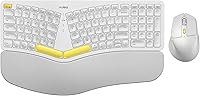
The Nulea KM75 arrived in late 2024 as a budget-friendly answer to a real problem: ergonomic keyboards from established brands often cost two or three times as much. This ergonomic combo targets desk workers and remote professionals who spend long hours typing and are starting to feel it in their wrists. The curved split key-frame and integrated memory foam palm rest are its two strongest selling points at this price tier. Multi-device support across Windows, Mac, and Android adds practical flexibility. And if you want something that does not disappear into a sea of gray peripherals, the yellow colorway certainly makes a statement.

Features & Benefits

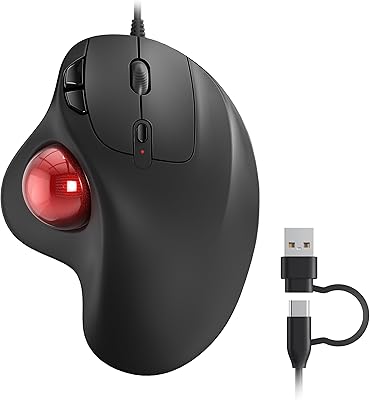
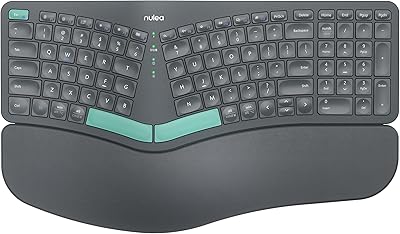
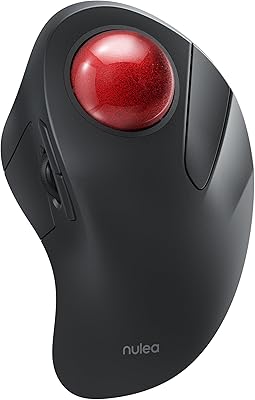
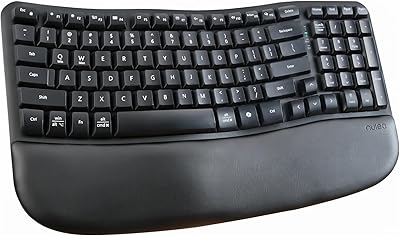
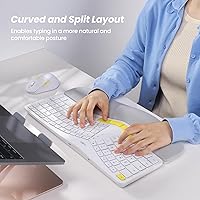
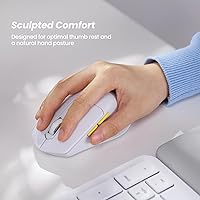
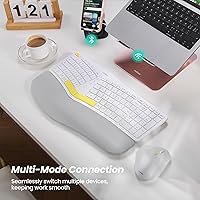
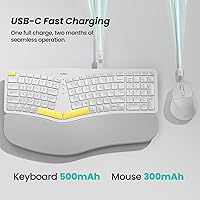
What makes this wireless ergonomic set practical day-to-day is how well the individual pieces work together. The keyboard, mouse, and a single shared dongle handle three connection modes — wired, 2.4G wireless, and Bluetooth — so switching between a work laptop and personal tablet takes one button press. The scooped keycaps feel noticeably different from flat keys; fingers settle into them naturally after a short adjustment period. The sculpted mouse adds palm and thumb rests, plus forward and back navigation buttons. Both devices charge via USB-C and drop into auto-sleep mode after 30 minutes, which helps stretch the modest battery capacities on board.

Best For

This ergonomic combo suits a fairly specific type of buyer, and knowing that helps set expectations. If you spend four or more hours a day at a keyboard and your wrists are already complaining, the built-in palm rest and curved layout offer a meaningful step up from a flat keyboard without a steep learning curve. It also works well for anyone juggling multiple devices — a Mac at work, a Windows PC at home, and an Android tablet in between. That said, users with very large hands may find the mouse a bit compact. It is not aimed at power gamers or anyone who needs mechanical key switches.

User Feedback

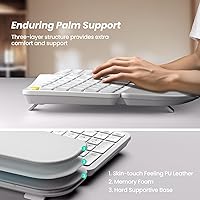
Buyers who switch to the Nulea keyboard and mouse set from a standard flat keyboard tend to report genuine comfort improvements, particularly around reduced wrist fatigue after long sessions. The memory foam palm rest draws consistent praise for holding its shape over weeks of daily use. Opinions on the mouse are more divided — users with larger hands find it cramped, while those with average or smaller hands seem satisfied. Battery life on the mouse draws occasional criticism; 300mAh is lean, and heavy users may need to charge more frequently than expected. Bluetooth pairing is mostly reliable, though it occasionally needs a reset. Overall, value sentiment skews positive.

Pros

  • Memory foam palm rest noticeably reduces wrist strain during long typing sessions.
  • Three connectivity modes let you switch between devices without juggling multiple dongles or receivers.
  • Scooped keycaps feel more natural under the fingers than flat membrane keys after a short adjustment period.
  • The keyboard battery holds up well for most office users between charges.
  • USB-C charging on both devices means one cable type covers the entire setup.
  • Auto-sleep mode genuinely extends usable battery life rather than just looking good on the spec sheet.
  • Multi-OS support across Windows, Mac, and Android works reliably for everyday tasks.
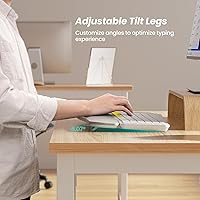
  • Adjustable tilt legs make a real difference for standing desk users who change height throughout the day.
  • The forward and back navigation buttons on the mouse add genuine convenience for browser-heavy workflows.
  • At its price tier, this ergonomic combo delivers features that typically cost significantly more elsewhere.

Cons

  • Mouse battery life disappoints heavy users, with some needing to recharge every two to three days.
  • The curved split layout requires a real adjustment period — expect slower typing speeds for the first few days.
  • Bluetooth reconnection after sleep can lag or require a second button press to register.
  • Mouse feels noticeably compact for users with larger hands during extended sessions.
  • The memory foam palm rest attracts oils and dust with no removable or washable cover.
  • Left-handed users are completely excluded by the asymmetric mouse design.
  • The included USB-C charging cable is short enough to limit flexibility depending on desk layout.
  • Some Android keyboard shortcut mappings behave inconsistently compared to Windows and Mac behavior.
  • Mouse plastic feels a step below the keyboard in perceived solidity, with a slightly hollow feel when tapped.
  • The foam palm rest shows compression for heavy daily users after two to three months of consistent use.

Ratings

The Nulea KM75 scores below are generated by AI after analyzing verified buyer reviews worldwide, with spam, bot-submitted, and incentivized feedback actively filtered out. This ergonomic combo earns strong marks in comfort and versatility, but the analysis does not shy away from the pain points real users flagged around mouse sizing and battery endurance. Both the wins and the trade-offs are reflected transparently in every category score.

Ergonomic Comfort
83%
Users who switched from a standard flat keyboard consistently describe noticeable relief from wrist tension within the first week. The curved key-frame encourages a more natural forearm angle, and most buyers say the integrated palm rest actually supports that claim rather than just looking good in photos.
A small but vocal group found the fixed palm rest height incompatible with their desk setup, particularly users with taller chair-to-desk ratios. The ergonomic benefit is real but not universal — hand size and desk height matter more than the marketing implies.
Memory Foam Palm Rest
79%
21%
The foam holds its shape well through several weeks of daily use according to most long-term reviewers, which is not a given at this price point. It feels softer than the rigid plastic rests found on competing budget combos, and buyers appreciate that it is built in rather than sold separately.
A few users report the foam compressing noticeably after two or three months of heavy use, losing some of its initial cushioning. It also attracts dust and skin oils visibly, and there is no removable cover to wash, which bothers hygiene-conscious buyers over time.
Keyboard Typing Feel
76%
24%
The scooped keycaps draw genuine appreciation from buyers who type for hours at a stretch — fingers settle into the dish-shaped keys naturally, reducing the lateral strain that flat keycaps cause. Key travel feels adequate, and the layout causes fewer accidental keypresses than entry-level membrane boards.
There is a real adjustment period for anyone coming from a traditional straight keyboard. Some users report feeling slower and less accurate during the first few days, and a handful simply could not adapt to the curved split layout and returned the set.
Mouse Ergonomics
72%
28%
The sculpted mouse shape works well for right-handed users with average-sized hands — the thumb ledge and palm ridge keep the wrist in a neutral position during extended browsing or document navigation sessions. The added forward and back buttons earn consistent praise from productivity-focused buyers.
Users with larger hands find the mouse noticeably compact, with fingers curling uncomfortably over the top. Left-handed users are excluded entirely by the asymmetric design, and this is a recurring frustration mentioned across reviews from international markets.
Multi-Device Switching
74%
26%
The ability to hop between three devices with a dedicated button press is a genuine convenience for people running a work laptop, a personal machine, and a tablet simultaneously. The shared 2.4G dongle for both keyboard and mouse means only one USB port is occupied when going wireless.
Bluetooth reconnection after sleep can lag by a few seconds, and some users report needing to press the switch button twice before the connection registers reliably. The experience is smooth most of the time, but it is not as instant or polished as what premium-tier multi-device keyboards offer.
Keyboard Battery Life
81%
19%
The 500mAh keyboard battery holds up well for most buyers, with many reporting multiple weeks between charges under normal office use. The auto-sleep feature kicks in after 30 minutes of inactivity and genuinely extends usable time rather than just existing on a spec sheet.
Heavy typists who disable auto-sleep or use the backlight heavily — if applicable — tend to see battery drain faster than the advertised estimates. Charging via USB-C is convenient, but the cable is short enough that desk placement matters during top-up sessions.
Mouse Battery Life
58%
42%
The USB-C charging port on the mouse is a welcome upgrade over older micro-USB competitors, and the auto-sleep function does help reduce how often users need to plug in. Light users checking email and browsing casually tend to find the battery adequate for their workflow.
The 300mAh cell is genuinely small, and heavy mouse users — particularly those doing design work or long spreadsheet sessions — report needing to charge every few days. This is probably the single most common disappointment flagged in reviews, and it does not align with the generous claims in the product listing.
Build Quality
71%
29%
The keyboard chassis feels more solid than most products at this price range — there is minimal flex when pressing firmly on the center of the board. Key stability is consistent, and the device does not slide around a hard desk surface during use.
The mouse plastic feels a step below the keyboard in terms of perceived quality, with a slightly hollow sound when tapped. A few buyers noted minor surface scuffs appearing faster than expected, particularly on the yellow colorway where marks are more visible.
Connectivity Setup
78%
22%
Pairing across all three modes is straightforward for most buyers, with no driver installation required on Windows or Mac. The plug-and-play 2.4G setup in particular gets praised for working immediately out of the box, even on Chromebooks not officially listed as compatible.
Android compatibility is functional but occasionally inconsistent — some users report certain keyboard shortcuts not mapping correctly on Android tablets, requiring manual remapping. The documentation for switching between modes is minimal, which confuses first-time multi-device keyboard users.
Value for Money
84%
Compared to ergonomic combos from Logitech or Microsoft at two to three times the price, this wireless ergonomic set delivers a surprising proportion of the core ergonomic features. Buyers who approached it as a first step into ergonomic peripherals rather than a replacement for a premium setup consistently rate it as worth the spend.
Buyers who expected premium-tier fit, finish, and reliability were occasionally disappointed — this is a budget ergonomic product and the compromises are real. If your wrists are already dealing with a diagnosed repetitive strain issue, this combo alone is not a substitute for a proper ergonomic assessment.
OS Compatibility
82%
18%
Windows and Mac switching works reliably for the vast majority of buyers, with function keys remapping correctly between operating systems. Android support for basic typing and navigation is solid, which makes this a practical choice for tablet-heavy workflows.
A small number of Mac users report that certain media keys behave unexpectedly after OS updates, requiring a toggle fix. Full compatibility with Linux is not guaranteed and Nulea does not officially support it, which matters to a niche but consistent segment of reviewers.
Design & Aesthetics
77%
23%
The yellow colorway is a polarizing but deliberate choice — buyers who wanted something other than corporate gray responded enthusiastically, and several mention it as the reason they chose this over a nearly identical competing combo. The overall design looks intentional rather than cheap.
The yellow shade photographs warmer than it appears in person, which surprised some buyers expecting a brighter lemon tone. Those who prefer understated desk setups may find the color harder to integrate, and the non-yellow color options receive less visibility in listings.
Packaging & Unboxing
69%
31%
Everything arrives well-protected and neatly organized, with the USB-C cable and receiver tucked into a dedicated tray. First impressions on unboxing are generally positive, and no buyers reported receiving units with physical shipping damage in the reviews analyzed.
The included USB-C cable is quite short — around 3 feet — which limits charging flexibility depending on where your USB port is positioned. The quick-start guide is sparse, and new ergonomic keyboard users often have to look up setup steps online.
Adjustability
73%
27%
The adjustable tilt legs on the keyboard give users a meaningful range of angles rather than the single fixed position common in budget boards. Standing desk users particularly appreciate the ability to fine-tune the angle when the keyboard height changes throughout the day.
The tilt adjustment only works in one direction, so users who prefer a negative tilt — keyboard sloping away from them — are out of luck. There are only two tilt positions rather than a continuous range, which leaves some users settling for close-enough rather than ideal.

Suitable for:

The Nulea KM75 is a strong match for desk workers and students who spend four or more hours a day typing and are starting to notice discomfort in their wrists or forearms. If you have been curious about ergonomic peripherals but balked at the three-figure price tags from established brands, this combo sits at a price point where the risk of trying something new feels manageable. It is particularly well-suited to people who work across multiple devices — think a Windows desktop at work, a MacBook at home, and an Android tablet for reading — since the three-mode connectivity covers that whole ecosystem without requiring separate accessories. First-time ergonomic keyboard buyers will find the curved layout approachable; it is noticeably different from a straight keyboard but nowhere near as dramatic a shift as a full split or ortholinear board. Standing desk users also benefit from the adjustable tilt legs, which let you tune the keyboard angle as your desk height changes throughout the day.

Not suitable for:

This wireless ergonomic set is not the right call for buyers who need their peripherals to just work, flawlessly, every single time — the Bluetooth reconnection behavior after sleep can be inconsistent enough to frustrate people in fast-paced work environments. Users with larger hands will likely find the sculpted mouse cramped after extended sessions, and left-handed users have no viable option here given the fully asymmetric mouse design. If you are dealing with a diagnosed repetitive strain injury or have been advised by a physician to use specific ergonomic equipment, this combo is not a medical-grade solution and should not be treated as one. Power users who rely on precise, high-speed mouse tracking for design, video editing, or gaming will also hit the limits of what this mouse can deliver. Finally, buyers who charge their devices infrequently and expect weeks of battery life from the mouse specifically will be disappointed — the cell is small enough that heavy users may need to charge every few days.

Specifications

  • Keyboard Connectivity: The keyboard supports three connection modes: USB-C wired, 2.4G USB receiver, and Bluetooth, allowing pairing with up to three devices simultaneously.
  • Mouse Connectivity: The mouse connects via Bluetooth or the same 2.4G USB receiver shared with the keyboard, so only one USB port is needed for both devices in wireless mode.
  • Keyboard Battery: A built-in 500mAh lithium battery powers the keyboard, rechargeable via the included USB-C cable.
  • Mouse Battery: The mouse runs on a 300mAh lithium battery, also rechargeable via USB-C, which is on the smaller side for this device category.
  • Auto-Sleep: Both the keyboard and mouse enter auto-sleep mode after 30 minutes of inactivity to conserve battery charge.
  • Key Design: The keyboard uses a curved split key-frame layout with scooped keycaps designed to align with the natural arc of the fingers.
  • Palm Rest: An integrated memory foam palm rest is built into the front edge of the keyboard to reduce wrist extension during typing.
  • Tilt Adjustment: Adjustable tilt legs on the keyboard offer two angle positions, accommodating both seated and standing desk configurations.
  • Mouse Shape: The mouse features an asymmetric ergonomic sculpt with a built-in palm ledge and a dedicated thumb rest shelf on the left side.
  • Mouse Buttons: In addition to standard left, right, and scroll-wheel inputs, the mouse includes dedicated forward and back navigation buttons on the left side.
  • DPI Settings: The mouse offers adjustable DPI settings to let users tune cursor sensitivity for different screen sizes and task types.
  • OS Compatibility: The combo is officially compatible with Windows, Mac OS, and Android, covering the majority of mainstream desktop and tablet operating systems.
  • Multi-Device Support: Users can pair the keyboard and mouse to up to three devices and switch between them using dedicated connection buttons on the keyboard.
  • Charging Port: Both the keyboard and mouse use USB-C for charging, replacing the older micro-USB standard found on many competing budget peripherals.
  • Package Dimensions: The retail box measures 16.97 x 11.69 x 2.05 inches, reflecting the full-size keyboard footprint including the integrated palm rest.
  • Item Weight: The complete package weighs 4.2 pounds, which includes both devices, the USB receiver, and the USB-C charging cable.
  • Color Option: The reviewed variant is available in a yellow colorway, which Nulea markets as a distinctive alternative to the black and gray standard in this category.
  • Receiver Sharing: The single 2.4G USB nano-receiver handles both keyboard and mouse wireless input simultaneously, requiring only one USB-A port on the host device.

Related Reviews
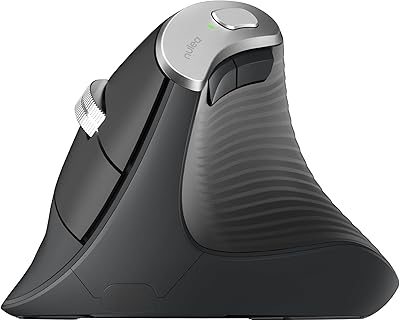
Nulea M510 Vertical Mouse
85%
91%
Ergonomics and Comfort
83%
Build Quality
88%
DPI Adjustability
90%
Wireless Performance
85%
Setup and Installation
More
Nulea HD315 Wireless Ergonomic Keyboard
86%
91%
Ergonomics & Comfort
88%
Wireless Connectivity
93%
Battery Life
86%
Build Quality
84%
Ease of Setup
More
Nulea M509 Trackball Mouse
77%
83%
Ergonomic Comfort
67%
Trackball Precision
74%
Build Quality
94%
Ease of Setup
88%
Cable & Connectivity
More
Nulea M501
Nulea M501
72%
83%
Ergonomic Comfort
78%
Trackball Smoothness
86%
Multi-Device Connectivity
91%
Value for Money
74%
Battery Life
More
Nulea M505 Wireless Trackball Mouse
75%
83%
Ergonomic Comfort
58%
Learning Curve
91%
Battery Life
78%
Multi-Device Connectivity
72%
Cursor Precision & DPI Control
More
Nulea RT08 Wave Keys Wireless Ergonomic Keyboard
89%
95%
Typing Comfort
93%
Ergonomic Design
88%
Build Quality
91%
Wireless Stability
90%
Key Response Consistency
More

FAQ

Officially the Nulea KM75 lists Android as its mobile OS support, but many users have reported it connecting successfully to iPads via Bluetooth as well. Basic typing works fine, though some function key shortcuts may not map correctly. Apple devices are not on the official compatibility list, so your mileage may vary depending on iOS version.

They share a single 2.4G USB nano-receiver, which is a genuinely useful design choice. You plug one receiver into your computer and both devices connect through it, leaving your other USB ports free. Just keep in mind that if you lose that receiver, replacing it specifically for this combo may require contacting Nulea support.

Honest answer: it depends heavily on how much you use the mouse. Light users checking email and browsing casually might get a couple of weeks. Heavy users doing long spreadsheet or design sessions may find themselves charging every two to three days. The 300mAh cell is small by modern standards, so it is worth keeping the USB-C cable nearby.

Yes, and it is worth being honest about that. The curved split layout feels noticeably different from a straight keyboard, and most people report slightly slower, less accurate typing during the first few days. Most buyers adapt within a week of regular use, but if you need to be at full typing speed immediately for work deadlines, plan your switch timing accordingly.

Yes, the adjustable tilt legs help here. The keyboard has two tilt positions rather than a continuous range, but switching between them as your desk height changes is quick and practical. It is not the most sophisticated tilt system, but it is more useful than a fixed-angle keyboard for standing desk setups.

Most users report it holds its shape well through the first couple of months. After that, heavy daily users do notice some compression in the foam, with the rest feeling slightly firmer than when it was new. There is no removable cover to replace or wash, so if hygiene is a concern, wiping it down regularly with a slightly damp cloth is the best maintenance option.

For most users it works well — press the connection button and the keyboard and mouse hop to the paired device within a second or two. Bluetooth switching after the devices have been asleep can occasionally lag or need a second press to register. The 2.4G wireless mode tends to be snappier and more consistent if both devices are in close range.

It can help reduce the kind of discomfort that builds from using a flat keyboard all day, but it is not a medical device and should not be treated as one. If you have a diagnosed RSI or have been advised by a physiotherapist to use specific equipment, consult that advice first. This ergonomic combo is better suited to prevention and general comfort improvement than rehabilitation.

Unfortunately, no. The mouse is fully asymmetric with the thumb rest and navigation buttons positioned for right-handed use only. There is no left-handed version currently available, so left-handed users should look elsewhere.

The box includes the keyboard, the ergonomic mouse, a single 2.4G USB nano-receiver, and a USB-C charging cable. Both devices arrive partially charged in most cases, so you can be up and running quickly. The only thing worth noting is that the included USB-C cable is on the short side, so if your USB port is not close to your desk surface you may want a longer cable for convenient charging.