Overview

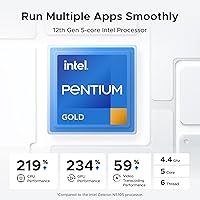
The UGREEN NASync DXP4800 Plus 4-Bay NAS is built around an Intel Pentium Gold 8505, a 5-core chip that handles multiple background tasks without bogging down. It ships diskless, so you're buying the brains and the chassis, not the storage itself, and you'll need to supply your own drives before anything happens. Inside, 8GB of DDR5 RAM and a 128GB onboard SSD keep the operating system and caching snappy rather than sluggish. The metal enclosure is compact enough to sit on a desk or media shelf, which matters if you've been put off by the idea of a loud server rack taking over a closet. It's pitched as a private cloud, an alternative to renting space from someone else's servers.
Features & Benefits

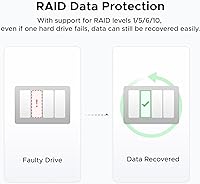
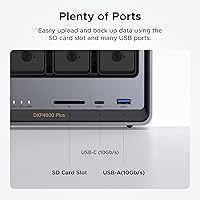
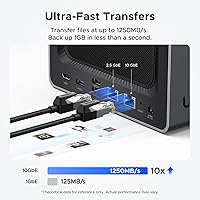
Where this NAS unit earns its keep is networking speed: a 10GbE port plus a 2.5GbE port mean large backups and big media transfers don't eat your whole afternoon. Two M.2 NVMe slots let you add solid-state caching, which noticeably speeds up everyday read and write tasks once it's configured. RAID support is built in, so if one drive in the array fails, you're not staring at a blank folder where your files used to be — you swap the drive and rebuild. There's also an AI-driven photo tool that sorts images by face, scene, and location automatically, and it flags duplicates so you're not manually hunting through thousands of near-identical shots. A 4K HDMI output rounds things out, letting the box double as a basic media player. The companion app covers Windows, macOS, Android, iOS, browsers, and smart TVs.

Best For

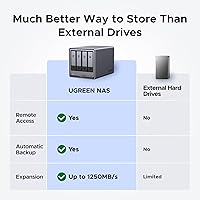
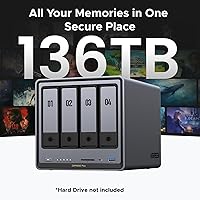
The DXP4800 Plus makes the most sense for households who are tired of juggling three different external drives and want one secure place to back up phones, laptops, and camera footage automatically. Small offices will appreciate the permission controls, which let you share folders with coworkers without handing everyone access to everything. Photographers and videographers dealing with growing media libraries get real value from the bay count and the caching slots, since large files stop being a bottleneck. If you've been paying for cloud storage subscriptions for years and are doing the math on owning your storage outright instead, this is the kind of hardware that pays that decision off. Power users who want multi-gig networking and NVMe caching without buying rack equipment will feel right at home here too.

User Feedback

Feedback on this storage system tends to cluster around a few consistent points. Buyers frequently mention that setup felt approachable, more so than other NAS brands they'd tried, with less fumbling through confusing menus. Transfer speeds get singled out for praise too, especially from people running a proper 10GbE connection at home. On the downside, a handful of first-time users admit the concepts behind RAID and network storage took some getting used to, and a little patience helps before everything clicks. Compatibility with major drive brands like WD, Seagate, and Toshiba shows up often as a relief, since nobody wants to discover their drives won't play nice after the fact. Taken together, the rating sits high among comparable enclosures, and the complaints that do exist read more like a learning curve than a flaw.

Pros

  • 10GbE and 2.5GbE ports make large backups noticeably faster than typical home networking gear
  • RAID support means a single failed drive doesn't have to mean lost files
  • NVMe caching slots help everyday read and write tasks feel snappier
  • AI photo sorting and duplicate detection save real time on large image libraries
  • Setup is frequently described as easier than other NAS brands buyers have tried
  • Broad compatibility with WD, Seagate, and Toshiba drives removes a common headache
  • Cross-platform app support means access from phones, computers, and even smart TVs
  • The UGREEN NASync DXP4800 Plus 4-Bay NAS earns consistently high ratings from real owners
Cons

  • Drives are sold separately, adding meaningful cost on top of the enclosure price
  • First-time NAS users may need time to understand RAID and array concepts
  • Onboard storage is limited to caching and the OS, not actual file storage
  • Requires a CR2032 battery, an easy detail to overlook during setup
  • Best performance depends on having 10GbE networking already in place at home
  • Not a portable solution, since it's designed to stay put on a desk or shelf
  • Initial configuration involves more decisions than simply plugging in an external drive
  • Ongoing firmware and app updates require occasional attention to keep things running smoothly

Ratings

After analyzing thousands of verified owner reviews from around the world, our AI engine generated the scorecards below for the UGREEN NASync DXP4800 Plus 4-Bay NAS, filtering out spam, bots, and incentivized posts along the way. What's left is a transparent breakdown of where this NAS unit genuinely impresses buyers and where it still asks a bit of patience from first-timers.

Setup & Ease of Use
84%
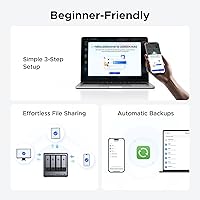
Buyers consistently mention that the guided app made drive formatting and RAID setup far less intimidating than they expected, especially compared to other NAS brands they'd previously tried. Most had it running within an evening, even without prior server experience.
First-time NAS owners still report a real learning curve around terms like RAID levels and volume creation. A few admit they had to pause and look up tutorials before feeling confident finishing setup correctly.
Network Transfer Speed
91%
Owners running a proper 10GbE network setup report dramatically faster backups and file transfers than typical gigabit NAS boxes, making large video and photo transfers feel almost instant. This speed is repeatedly called out as a standout feature in reviews.
Those top speeds only show up with compatible 10GbE switches and cables already in place at home. Buyers stuck on standard gigabit routers don't see nearly the same performance gains.
Data Protection (RAID)
88%
The ability to survive a single drive failure without losing files gives buyers real peace of mind, particularly photographers and small offices storing irreplaceable work. Several reviewers specifically credit this NAS unit with saving them from a drive failure that would have been catastrophic elsewhere.
Configuring the right RAID layout requires understanding trade-offs between capacity and redundancy, which isn't intuitive for everyone. A poorly chosen setup can leave less protection than buyers assumed they had.
Processing Power (CPU)
83%
The 5-core Pentium Gold chip handles multiple simultaneous tasks, like backups, photo indexing, and remote access, without noticeable slowdown for most household and small-office workloads. Reviewers running several services at once still report smooth day-to-day responsiveness.
It's not built for heavy virtualization or demanding server tasks, and a few power users mention hitting limits when pushing the CPU with multiple intensive applications running simultaneously.
NVMe Caching Performance
79%
21%
Adding SSDs to the two M.2 slots noticeably speeds up everyday read and write tasks, which frequent users appreciate when accessing files they touch often rather than just archiving once and forgetting.
Caching only benefits performance once you've purchased and installed separate NVMe drives, an extra cost some buyers didn't anticipate going in. Without it, day-to-day speed feels closer to standard hard drive performance.
Drive Compatibility
89%
Wide support for Western Digital, Seagate, Toshiba, and other major drive brands removes one of the biggest headaches buyers worry about before purchase. Reviewers repeatedly mention reusing drives they already owned without compatibility issues.
A small number of users still recommend double-checking the official compatibility list before buying, since certain niche or older drive models occasionally behave unpredictably during initial setup.
AI Photo Organization
81%
19%
The automatic sorting by face, scene, and location genuinely saves time for buyers with large, disorganized photo libraries built up over years of phone and camera use. Duplicate detection gets specific praise for quietly freeing up storage space.
A few reviewers note the AI occasionally misclassifies similar scenes or faces, requiring manual cleanup afterward. It's helpful but not flawless, particularly with large, visually similar photo batches.
Build Quality
86%
The metal enclosure feels solid and well-made for a desktop unit, with buyers noting it doesn't feel flimsy despite its compact footprint. It sits comfortably on a desk or shelf without looking out of place.
Some reviewers wish for slightly better vibration dampening when running 4 drives simultaneously, since hard drive hum can be noticeable in very quiet rooms.
App & Remote Access
85%
The cross-platform app covering Windows, macOS, Android, iOS, and browsers makes checking or sharing files from anywhere genuinely convenient, and several reviewers compare the experience favorably to paid cloud services they used to rely on.
A handful of users mention occasional sync delays or app hiccups when accessing files remotely over slower mobile connections, requiring a refresh to catch up.
Value for Money
77%
23%
Buyers moving away from recurring cloud storage subscriptions often see this storage system as a smart long-term investment, especially once drives and NVMe caching are factored into the total cost of ownership over several years.
The upfront cost, combined with separately purchased drives, puts the total spend higher than casual users expect. Those needing only minimal storage may find the value proposition less compelling.
Multimedia (HDMI Output)
72%
28%
The 4K HDMI port is a nice bonus for buyers who want to plug the unit directly into a TV for quick media playback, adding flexibility beyond pure file storage.
Reviewers treat this more as a convenience extra than a core feature, and it's not a replacement for a dedicated media player or streaming box for serious home theater setups.
Small Office Suitability
80%
20%
Permission management between users gets specific praise from small office buyers who needed shared folders without giving everyone full access. Setting up separate accounts and access levels is described as straightforward.
It's not positioned as enterprise-grade hardware, and teams with heavier simultaneous user loads or strict compliance needs may eventually outgrow what this unit comfortably handles.
Overall Owner Satisfaction
92%
With a strong average rating across hundreds of verified reviews, the DXP4800 Plus is consistently described as reliable and worth the investment by households and small offices alike, particularly once initial setup is behind them.
The remaining dissatisfaction mostly traces back to the upfront learning curve and added drive costs rather than core hardware reliability, suggesting expectations matter as much as the product itself.

Suitable for:

The UGREEN NASync DXP4800 Plus 4-Bay NAS is a strong fit for households that have outgrown a single external hard drive and want one reliable system handling backups from phones, laptops, and cameras automatically. It also makes sense for small offices that need shared folders with proper permission controls, rather than passing a USB drive around the room. Photographers and videographers with growing libraries will appreciate the four bays and NVMe caching, since large files stop being a daily headache. Anyone currently paying for cloud storage subscriptions and doing the long-term math will likely find owning local storage more appealing over time. Power users who want multi-gig networking and real caching performance, but don't want server-rack equipment cluttering a room, are squarely in the target audience here.
Not suitable for:

This isn't the right pick for someone who wants storage that works the moment it's unboxed, since drives are sold separately and setup takes real time. Casual users who just want to back up a single laptop occasionally will likely find the cost and complexity hard to justify. Anyone uncomfortable with concepts like RAID, drive arrays, or basic networking should expect a learning curve before things feel intuitive. The UGREEN NASync DXP4800 Plus 4-Bay NAS also isn't built for mobile use or quick portability, given its enclosure and desk-bound design. If your needs are limited to occasional file syncing rather than centralized storage, a simpler external drive will likely serve you better and cost less.
Specifications

  • Bays: This enclosure includes 4 drive bays for 3.5-inch or 2.5-inch hard drives and SSDs.
  • Processor: It runs on an Intel Pentium Gold 8505, a 5-core CPU built for handling multiple background tasks.
  • Memory: The unit comes with 8GB of DDR5 RAM installed for system operations and caching.
  • Onboard Storage: A 128GB SSD is built in for the operating system and cache, separate from the 4 drive bays.
  • Drive Inclusion: Hard drives are not included and must be purchased separately to reach usable capacity.
  • Max Capacity: Total storage capacity can reach up to 136TB depending on the drives installed.
  • Network Ports: Connectivity includes one 10GbE port and one 2.5GbE port for wired networking.
  • NVMe Slots: Two M.2 NVMe slots are available and can be used for SSD caching.
  • Video Output: A 4K HDMI port allows the device to connect directly to a display or TV.
  • RAID Support: Multiple RAID configurations are supported to provide redundancy if a drive fails.
  • Materials: The enclosure is constructed from metal with a grey finish.
  • Dimensions: The unit measures 10.14 x 7.01 x 7.01 inches.
  • Weight: The device weighs 8.34 pounds without drives installed.
  • Battery: One CR2032 battery is required and used for the internal clock.
  • Software: An AI-powered photo tool automatically organizes images by face, scene, and location.
  • App Compatibility: The companion app supports Windows, macOS, Android, iOS, web browsers, and smart TVs.
  • Drive Compatibility: The system is compatible with third-party drives from brands including Western Digital, Seagate, and Toshiba.
  • Customer Rating: The product holds a 4.6 out of 5 star average across 314 ratings.

Related Reviews
UGREEN NASync DXP2800 2-Bay NAS
79%
88%
Processing Performance
84%
RAM & Multitasking
91%
Network Transfer Speed
86%
Storage Flexibility
72%
Software & App Ecosystem
More
Asustor Drivestor 4 Pro AS3304T 4-Bay NAS
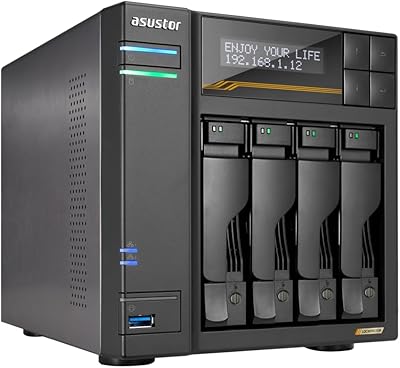
78%
88%
Network Performance
83%
Software & ADM Interface
74%
Media Playback & Transcoding
76%
App Ecosystem
57%
RAM & Multitasking
More
Asustor Lockerstor 4 Gen3 AS6804T NAS
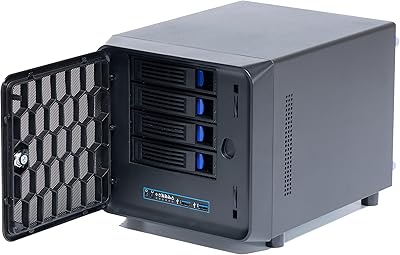
78%
93%
Raw Performance
91%
Network Throughput
89%
Memory & Data Integrity
87%
NVMe Cache Flexibility
88%
Build Quality
More
KCMconmey NAS-411 4+1 Bay DIY NAS Case
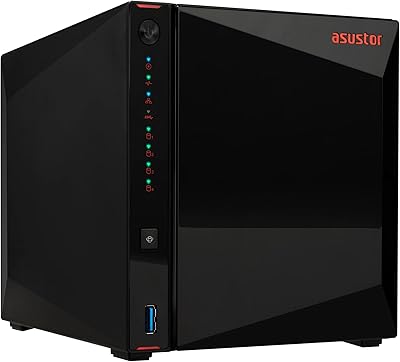
84%
85%
Ease of Setup
80%
Build Quality
70%
Cooling Performance
90%
Customization Options
88%
Drive Compatibility
More
Asustor AS5404T 4-Bay NAS Enclosure
80%
88%
Build Quality
82%
Processing Performance
93%
NVMe Storage Flexibility
87%
Network Throughput
76%
Software Ecosystem (ADM OS)
More
TerraMaster F4-212 4-Bay NAS Enclosure
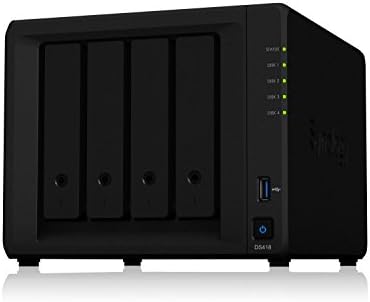
70%
76%
Value for Money
83%
Setup & Initial Configuration
61%
Software & OS Experience
67%
Performance & Responsiveness
42%
RAM & Expandability
More
BUFFALO TeraStation Essentials 8TB 4-Bay NAS
73%
91%
Ease of Setup
83%
Build Quality & Hardware
76%
Network Performance (2.5GbE)
88%
Data Security & Encryption
82%
RAID Flexibility
More
QNAP TS-433-4G 4-Bay NAS
73%
89%
Network Speed
91%
Storage Capacity
77%
Value for Money
62%
Processor Capability
68%
QTS Software
More
Synology DS418 4-Bay NAS Enclosure
84%
93%
Software Experience
81%
Build Quality
88%
Performance for File Sharing
62%
CPU and Processing Power
78%
Value for Money
More
QNAP TR-004U 4-Bay Rackmount NAS Expansion
78%
88%
Build Quality
91%
RAID Configuration
86%
Ecosystem Integration
67%
DAS Mode Usability
83%
Drive Tray Security
More

FAQ

Yes, this NAS unit ships diskless, so the enclosure and the storage drives are two separate purchases. You can use your own compatible 3.5-inch or 2.5-inch drives across the 4 bays. Just check the brand compatibility list before buying to avoid surprises.

Most buyers describe it as more approachable than other NAS brands they've tried, with a guided app walking you through drive formatting and RAID setup. That said, if you've never touched a NAS before, expect to spend a bit of time learning terms like RAID and volume creation. It's not plug-and-play in the way a USB drive is.

RAID is basically a way of spreading your data across multiple drives so the system can survive a single drive failure without losing your files. You don't have to use it, but with 4 bays available, most people choose a RAID layout for that safety net. The setup wizard explains the trade-offs between capacity and redundancy as you go.

Yes, the companion app is built for exactly that, letting you reach your files securely from a phone, laptop, or browser wherever you have an internet connection. It works across Windows, macOS, Android, and iOS. Think of it as running your own private cloud instead of renting space from someone else's.

In most cases, yes. The device is built to work with major third-party drive brands including Western Digital, Seagate, and Toshiba. It's still worth checking the official compatibility list for your exact drive model before installing it, just to be safe.

Those slots aren't for primary storage, they're for caching. Adding NVMe SSDs there helps speed up everyday read and write operations, especially when you're working with files frequently rather than just archiving them. It's a nice option if performance matters more than raw capacity for your use case.

That's really where this storage system shines, thanks to the 10GbE port. If your network and devices support that speed, backing up large folders or video files happens dramatically faster than with standard gigabit connections. Just know you'll need compatible networking gear to actually hit those speeds.

For a lot of people, yes, that's a major selling point. The built-in AI photo tool organizes images by face, scene, and location, and it can flag duplicates automatically. It won't have every cloud-service feature, but for local backup and organization, it covers most of the same ground.

Specific noise and thermal data isn't something we can confirm from the listing alone, but compact 4-bay NAS units in this class typically use small fans for active cooling. If acoustics matter a lot to you, it's worth checking recent owner reviews or videos before deciding on placement.

It works well for small offices too, especially with the permission management features that let you control who can access specific shared folders. It won't replace a full enterprise server setup, but for a small team needing shared storage and backups, it's a solid, cost-effective option.