Overview

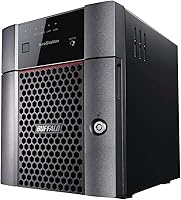
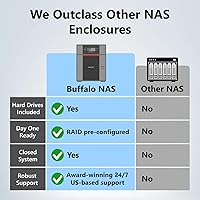
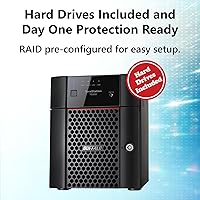
The BUFFALO TeraStation Essentials 8TB 4-Bay NAS sits in an interesting middle ground — it's not a hobbyist enclosure you populate yourself, and it's not a rack-mounted enterprise system requiring an IT team. It ships with four 2TB drives already installed and RAID pre-configured, so you're sharing files across your network within an hour of unboxing. The 2.5GbE networking is a genuine differentiator at this tier, offering a real throughput bump over standard gigabit without forcing a full cabling overhaul. For the price, you're paying for convenience, reliability, and a level of data protection that consumer-grade enclosures rarely match straight out of the box.
Features & Benefits

The 256-bit AES encryption built into this Buffalo NAS is something many competitors treat as an afterthought — here it's core to the system's design, which matters if your team handles client data or anything regulated. The native 2.5GbE port is ready on day one, though you'll only feel the speed improvement if your switch also supports 2.5GbE, so verify that before assuming you'll max it out. RAID modes can be adjusted post-setup, and cloud sync with Amazon S3, Dropbox, Azure, and OneDrive means you're not locked into local-only backup. The 1 GB RAM and 1.4 GHz CPU handle standard file serving well, but don't expect it to absorb heavy concurrent workloads without slowing down.

Best For

The TeraStation Essentials is built for small teams and SOHO environments — think a studio, a small practice, or a home office with up to around 10 users sharing documents and media files. If you want centralized file access without hiring someone to manage a server, this 4-bay unit delivers that without much friction. It's also a strong fit for anyone already routing their workflow through cloud services like Dropbox or OneDrive, since the hybrid sync keeps local and cloud copies aligned automatically. One firm caveat: if your workflow requires iSCSI block storage — for virtual machines or storage-hungry applications — look elsewhere, as this unit doesn't support it.

User Feedback

With over 80 ratings and a 4.3-star average, the TeraStation Essentials earns its score through consistent praise for quick initial setup and dependable uptime over extended use. Buyers frequently highlight the drives-included packaging as genuinely practical — no compatibility guesswork, no extra order to wait on. On the critical side, a portion of users find the web management interface dated and less intuitive than competing platforms, and the documentation doesn't always answer the right questions quickly. A few reviewers noted that real-world transfer speeds vary depending on the rest of the network, tempering expectations around the 2.5GbE spec. Overall, most buyers feel the value holds, though those migrating from richer NAS ecosystems may notice the feature gaps.

Pros

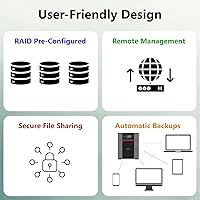
  • Ships with four drives pre-installed and RAID already configured — genuinely ready to use within an hour.
  • 256-bit AES encryption protects data at the drive level, making it a credible choice for compliance-sensitive environments.
  • Native 2.5GbE port delivers real throughput gains when paired with a compatible switch — no new cabling required.
  • Cloud sync with Dropbox, Amazon S3, Azure, and OneDrive enables a practical hybrid backup strategy out of the box.
  • Replication support allows teams to mirror data to a second offsite NAS for meaningful disaster recovery coverage.
  • Long-term reliability is a consistent theme in buyer feedback — units running for years without hardware failure are commonly reported.
  • RAID modes can be changed post-setup, giving teams room to adapt their storage strategy as needs evolve.
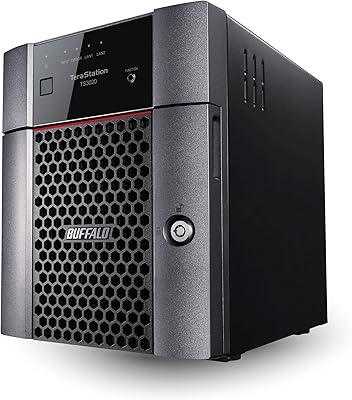
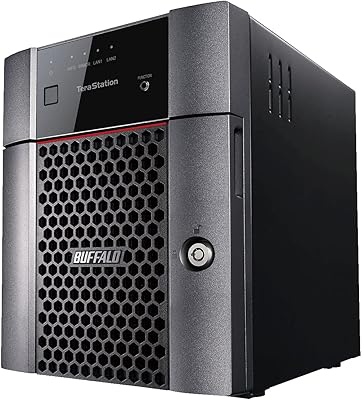
  • Solid build quality for a desktop unit — feels durable and designed for continuous operation, not intermittent home use.

Cons

  • The browser-based management interface looks and feels noticeably dated compared to leading NAS platforms at this price tier.
  • Only 1 GB of RAM limits performance when multiple heavy tasks run simultaneously — a real ceiling for growing teams.
  • No iSCSI support rules this unit out entirely for VM environments or any workflow requiring block-level storage access.
  • Documentation beyond basic setup is thin, and Buffalo's direct support has drawn repeated criticism for slow response times.
  • The 2.5GbE advantage disappears completely if your network switch does not also support 2.5GbE — a common and costly assumption.
  • No failover support means replication protects your data but does not keep operations running if the primary unit goes offline.
  • Fan noise becomes audible under sustained load, which can be a real annoyance in quiet home office environments.
  • Closed software platform means zero third-party app support — functionality is fixed at purchase with no meaningful way to extend it.
  • Firmware updates have occasionally caused temporary access issues, which is a disruptive problem for an always-on storage device.
  • Buyers coming from open NAS ecosystems will find the lack of customization options a significant and ongoing frustration.

Ratings

The BUFFALO TeraStation Essentials 8TB 4-Bay NAS scores below reflect an AI-driven analysis of verified global buyer reviews, with spam, bot-generated, and incentivized submissions actively filtered out before scoring. Ratings capture the full picture — not just what buyers love, but where this unit genuinely falls short compared to expectations at its price tier. Strengths and pain points are weighted equally so you can make an informed call before purchasing.
Ease of Setup
91%
Buyers consistently report having the unit live on their network within an hour of unboxing — drives pre-installed, RAID already configured, and a straightforward wizard handling the rest. For small offices without dedicated IT staff, that kind of frictionless first experience carries real weight.
A minority of users hit snags when integrating with less common network configurations or older routers, where the setup guide offered limited troubleshooting depth. Those edge cases aren't dealbreakers, but they can turn a smooth hour into a frustrating afternoon.
Build Quality & Hardware
83%
The chassis feels solid for a desktop NAS — not flimsy or plasticky in the way some budget enclosures are. Drive trays seat firmly, and the overall construction gives the impression of a unit built to run continuously rather than intermittently.
At over 15 pounds, it's not something you'll reposition often, and the industrial aesthetic won't suit everyone's desk setup. Some buyers noted the drive bays feel slightly less refined than premium competitors like Synology at a comparable price point.
Network Performance (2.5GbE)
76%
24%
When paired with a 2.5GbE-capable switch, real-world transfer speeds are a noticeable improvement over standard gigabit — particularly for moving large video files or running backups across multiple workstations simultaneously. No new cabling required is a practical bonus.
The catch that catches many buyers off guard: if your existing switch only supports 1GbE, you see exactly zero benefit from the 2.5GbE port. Several reviewers felt misled by the spec before realizing the bottleneck was their own network infrastructure, not the NAS.
Data Security & Encryption
88%
256-bit AES drive encryption is implemented at the hardware level, which means data on removed or stolen drives is effectively unreadable without authentication. For small medical practices, legal offices, or any team handling client-sensitive files, this is the kind of protection that justifies the price tier on its own.
The closed-system design that enables this security also limits extensibility — you cannot install third-party apps or expand functionality the way you can on more open platforms like QNAP. Security-conscious buyers gain protection but trade away flexibility.
RAID Flexibility
82%
18%
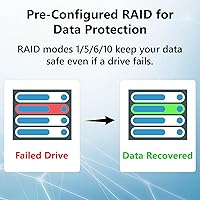
Shipping pre-configured in a protective RAID mode means the unit is immediately safe against single-drive failure without any manual intervention. The ability to switch RAID configurations post-setup is a thoughtful feature for teams whose storage strategy evolves over time.
Reconfiguring RAID modes requires wiping existing data, which is standard across the industry but still trips up buyers who expect a live migration option. Documentation around RAID transitions could be clearer to prevent accidental data loss during the process.
Cloud Integration
79%
21%
Native sync with Amazon S3, Dropbox, Azure, and OneDrive lets teams build a hybrid backup strategy without third-party software. For offices already paying for cloud storage, using the TeraStation Essentials as the on-premise anchor of that setup makes genuine practical sense.
The sync interface is functional but not particularly polished — scheduling options are present but navigating them requires patience. A handful of reviewers found the initial cloud authentication steps confusing, particularly for Azure integration.
Management Interface (UI/UX)
61%
39%
Core functions — user management, shared folder permissions, backup scheduling — are all accessible from the browser-based dashboard without needing command-line knowledge. For day-to-day administration of a small team, the basics are covered.
The interface looks and feels dated compared to what Synology and QNAP ship today, and that gap is regularly cited in negative reviews. Finding less common settings requires real patience, and the overall design language hasn't kept pace with modern NAS management expectations.
Documentation & Support
58%
42%
Buffalo provides a reasonable online knowledge base, and the unit's relatively mainstream feature set means community forum answers exist for many common questions. Initial setup documentation is clear enough for non-technical buyers.
Beyond basic setup, the documentation thins out quickly — advanced configurations, replication troubleshooting, and cloud sync edge cases are often inadequately covered. Several buyers reported slow or unhelpful responses from Buffalo's direct support channels, which is a recurring complaint in lower-rated reviews.
CPU & RAM Performance
67%
33%
The 1.4 GHz quad-core processor handles the core use case — simultaneous file access from several workstations — without breaking a sweat under normal office conditions. For straightforward file serving, the hardware does exactly what it promises.
With only 1 GB of RAM, performance degrades noticeably when multiple heavy tasks run concurrently: think active cloud sync happening alongside several large transfers and a background backup job. It's a ceiling that power users bump into sooner than they expect.
Noise & Thermal Management
71%
29%
Under light to moderate loads, the unit runs quietly enough to coexist in a shared office environment without drawing attention. Thermal management appears adequate for the hardware, with no widespread reports of overheating under normal operating conditions.
Under sustained heavy load or in warmer room environments, fan noise becomes more pronounced — enough that users in quiet home office setups occasionally flag it. It is not exceptionally loud, but it is audible, and that matters if the unit sits near a primary workspace.
Replication & Backup Features
77%
23%
The built-in replication feature lets teams mirror data to a second NAS at an offsite location, which is a meaningful disaster-recovery option that many consumer-grade units simply do not offer. Paired with cloud sync, it enables a credible 3-2-1 backup architecture.
The absence of failover support means replication is for data redundancy only — if the primary unit goes down, there is no automatic promotion of the secondary. For teams expecting true high-availability behavior, this distinction is important to understand before purchasing.
iSCSI & Advanced Protocol Support
41%
59%
For straightforward SMB and AFP file sharing across Windows and Mac workstations, the TeraStation Essentials covers the typical small-office use case without issue. Most SOHO buyers will never need anything beyond what is offered here.
The lack of iSCSI support is a hard stop for anyone running virtual machine environments or needing block-level storage access — use cases that are increasingly common even in small IT setups. Buffalo's own TeraStation 3420DN series covers this gap, but it costs meaningfully more.
Value for Money
73%
27%
The drives-included packaging eliminates the separate purchasing and compatibility research that NAS buyers typically face, and the pre-configured RAID adds immediate data protection with zero extra effort. For time-pressed buyers, that bundled convenience has real dollar value.
Positioned against similarly priced Synology or QNAP units — where buyers often get a richer software ecosystem even without bundled drives — the value equation becomes less clear-cut. Buyers who prioritize interface quality and app flexibility over turnkey convenience may find the price harder to justify.
Scalability & Expandability
64%
36%
Four drive bays allow for meaningful capacity upgrades over time by swapping in higher-capacity drives, and the flexible RAID options mean the unit can adapt as storage requirements grow within a small team context.
The closed software platform limits expansion in ways that go beyond hardware — no third-party app ecosystem means you cannot bolt on functionality like surveillance recording, media servers, or custom automation tools without replacing the unit entirely.
Reliability & Uptime
86%
Long-term buyers are among the most positive voices in the review pool — units running continuously for one to two years with no hardware failures are mentioned frequently, and Buffalo's reputation for durable NAS hardware is generally well-earned across the TeraStation line.
A small but notable share of reviews describe firmware update issues causing temporary accessibility problems, which is disruptive in an always-on storage context. Firmware stability has historically been an occasional weak point for Buffalo compared to the top-tier NAS brands.

Suitable for:

The BUFFALO TeraStation Essentials 8TB 4-Bay NAS is a strong fit for small teams and home office setups where centralized file storage is needed but nobody wants to spend a day configuring it. If your office has fewer than ten people sharing documents, project files, or media assets across Windows and Mac machines, this 4-bay unit covers that use case reliably and without drama. It is especially well-suited for teams that handle sensitive client data — legal, financial, or medical environments where 256-bit drive encryption is a requirement, not a nice-to-have. Buyers who are already invested in cloud platforms like Dropbox, Azure, or Amazon S3 will appreciate having local and cloud copies synchronized automatically without bolting on separate software. And if you have been putting off a NAS purchase because the idea of sourcing compatible drives and configuring RAID felt like too much — this is the unit that removes that barrier entirely.

Not suitable for:

The BUFFALO TeraStation Essentials 8TB 4-Bay NAS will frustrate buyers who want a rich, app-driven platform similar to what Synology's DSM or QNAP's QTS offer — the closed software ecosystem here is intentional for security reasons, but it means no third-party packages, no media server add-ons, and no custom automation. Anyone running virtual machines or storage-intensive applications that require iSCSI block-level access should look elsewhere immediately, as this unit does not support iSCSI at all; that is a hard limitation, not a workaround situation. Power users who plan to push simultaneous heavy workloads — large concurrent transfers, active cloud sync, and background replication all running at once — will hit the ceiling of the 1 GB RAM sooner than expected. Similarly, buyers assuming the 2.5GbE port automatically unlocks faster speeds should know upfront that their network switch must also support 2.5GbE, or the port offers no practical benefit whatsoever. If you are comparing this against similarly priced competitors and software ecosystem depth matters to you, this is not the unit that wins that comparison.
Specifications

  • Total Capacity: Ships with 8 TB of usable raw storage across four pre-installed 2 TB CMR mechanical hard drives.
  • Drive Bays: Four-bay desktop form factor designed for continuous 24/7 operation in small office or home office environments.
  • Drive Type: Standard-grade CMR (Conventional Magnetic Recording) mechanical hard disks with a SATA-600 interface and 5600 RPM rotational speed.
  • Network Interface: One native 2.5 Gigabit Ethernet (2.5GbE) port, which is backward compatible with standard 1GbE network switches.
  • Processor: 1.4 GHz quad-core CPU handles simultaneous file serving and background tasks such as replication and cloud sync.
  • Memory (RAM): 1 GB of RAM is included; this is fixed and not user-upgradeable, which sets a ceiling on concurrent workload performance.
  • Encryption: 256-bit AES drive-level encryption is built in, rendering data on removed or stolen drives unreadable without proper authentication.
  • RAID Support: Ships pre-configured in a protective RAID mode; users can switch to alternative RAID configurations post-setup through the management interface.
  • Cloud Sync: Native synchronization support for Amazon S3, Dropbox, Microsoft Azure, and OneDrive for hybrid local-and-cloud backup strategies.
  • Replication: Supports data replication to a secondary Buffalo NAS unit for offsite redundancy; failover is not supported.
  • iSCSI Support: iSCSI block-level storage access is not available on this unit; buyers requiring iSCSI should consider the TeraStation 3420DN series instead.
  • Compatibility: Compatible with Windows and macOS desktops and laptops via standard SMB and AFP network file sharing protocols.
  • Dimensions: The unit measures 14.6 × 14.3 × 12.7 inches, making it a desktop-footprint device rather than a rack-mountable appliance.
  • Weight: Fully assembled with drives installed, the unit weighs 15.27 pounds — heavy enough that repositioning it is not a casual task.
  • Target Environment: Designed for small office and home office deployments supporting up to approximately 10 to 30 concurrent users.
  • Drive Interface: All four drive bays use Serial ATA-600 (SATA III) connections, enabling the full rated throughput of the included mechanical drives.
  • Color & Finish: The chassis ships in matte black with a utilitarian industrial design intended for functional office placement rather than display.
  • Availability Date: This model was first made available in October 2022 and represents Buffalo's Essentials-tier entry in the current TeraStation lineup.

Related Reviews

BUFFALO TeraStation 3420DN 8TB NAS
85%
87%
Performance
91%
Ease of Setup
90%
Data Protection (RAID 1)
85%
Cloud Integration
88%
Reliability
More
BUFFALO TeraStation 3420D 16TB 4-Bay NAS
78%
88%
Ease of Setup
82%
Value for Money
86%
Data Security
74%
Transfer Speed
83%
Build Quality
More
Asustor Drivestor 4 Pro AS3304T 4-Bay NAS
78%
88%
Network Performance
83%
Software & ADM Interface
74%
Media Playback & Transcoding
76%
App Ecosystem
57%
RAM & Multitasking
More
Asustor Lockerstor 4 Gen3 AS6804T 4-Bay NAS
84%
91%
Performance
88%
Build Quality
94%
Network Speed
87%
Storage Expandability
89%
Ease of Setup
More
KCMconmey NAS-411 4+1 Bay DIY NAS Case
84%
85%
Ease of Setup
80%
Build Quality
70%
Cooling Performance
90%
Customization Options
88%
Drive Compatibility
More
BUFFALO LinkStation 710 8TB NAS
85%
91%
Value for Money
88%
Performance and Speed
85%
Ease of Setup
90%
Security Features
78%
Software Experience (NAS Navigator)
More
Asustor AS5404T 4-Bay NAS Enclosure
80%
88%
Build Quality
82%
Processing Performance
93%
NVMe Storage Flexibility
87%
Network Throughput
76%
Software Ecosystem (ADM OS)
More
TerraMaster F4-212 4-Bay NAS Enclosure
70%
76%
Value for Money
83%
Setup & Initial Configuration
61%
Software & OS Experience
67%
Performance & Responsiveness
42%
RAM & Expandability
More
Buffalo LinkStation SoHo 720 8TB NAS
86%
88%
Performance
93%
Ease of Setup
90%
Data Security
85%
File Transfer Speed
87%
Reliability
More
Synology DS418 4-Bay NAS Enclosure
84%
93%
Software Experience
81%
Build Quality
88%
Performance for File Sharing
62%
CPU and Processing Power
78%
Value for Money
More

FAQ

No additional drives needed — the BUFFALO TeraStation Essentials 8TB 4-Bay NAS ships with four 2 TB drives already installed and RAID pre-configured. You can realistically have it live on your network within an hour of unboxing, which is one of its most consistently praised qualities.
Only if your network switch also supports 2.5GbE. The NAS side of the connection is ready, but if your switch tops out at standard gigabit, you will see standard gigabit speeds — no faster. Before assuming a speed boost, check your switch specifications first.

Yes, RAID modes can be changed through the management interface after initial setup. Be aware, though, that switching RAID configurations requires wiping the existing data, so make sure you have a backup before making that change. It is a standard limitation across the NAS industry, not specific to this unit.

For most small office needs — legal documents, financial records, medical files — the 256-bit AES drive encryption offers serious protection. Data on the drives is unreadable if a drive is removed or the unit is stolen. It is a closed system, which limits flexibility but reinforces security.

No third-party software is required. The TeraStation Essentials has built-in sync capabilities for Amazon S3, Dropbox, Microsoft Azure, and OneDrive, all configurable from the management dashboard. You can schedule sync jobs so your local and cloud copies stay aligned automatically.

For straightforward file access — opening documents, saving files, browsing shared folders — it handles around 10 simultaneous users comfortably. If multiple people are transferring large files at the same time while background tasks like cloud sync or replication are also running, you may notice a performance dip due to the 1 GB RAM ceiling.

No — iSCSI is not supported on this unit, which makes it unsuitable for VM storage or any workflow requiring block-level access. If that is a requirement, Buffalo's own TeraStation 3420DN series supports iSCSI and would be the more appropriate choice.

Under normal load it is quiet enough that most people do not notice it in a shared office setting. During sustained heavy activity — large simultaneous transfers, extended backup jobs — the fan spins up and becomes audible. If your home office is very quiet and the unit will sit close to your desk, it is worth factoring in.

Depending on the RAID mode configured, the unit is designed to keep running and alert you to the failed drive without losing data. You can then replace the faulty drive with a compatible unit and the array will rebuild. It is worth confirming your preferred RAID mode provides redundancy rather than just striping for speed.

The initial setup wizard is simple enough that non-technical buyers complete it without issue, and everyday tasks like creating shared folders or adding users are manageable. Where it gets frustrating is advanced configuration — the interface is functional but dated, and navigating less common settings takes patience. It is not as polished as what Synology or QNAP offer at a comparable price.