Overview

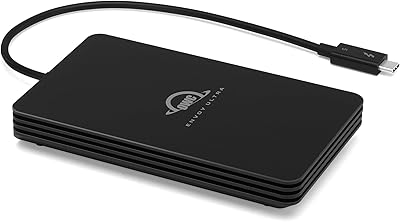
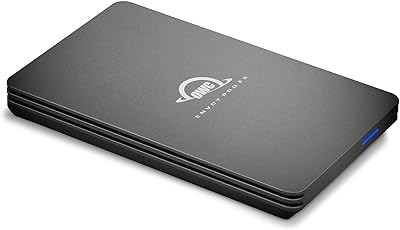
The OWC Envoy Ultra 2TB Thunderbolt 5 Portable SSD arrived in late 2024 as one of the first consumer-accessible drives built around the TB5 standard, targeting creative professionals who've outgrown what older interfaces can offer. There's no power brick, no separate dongle — just a built-in Thunderbolt cable and a compact aluminum chassis rated for dust, drops, and rain. It sits firmly at the premium end of the portable SSD market, competing less with everyday backup drives and more with the kind of gear you'd find in a working pro's bag.
Features & Benefits

The headline figure is over 6000MB/s sequential read — roughly double what Thunderbolt 4 can sustain — and on a TB5-equipped machine, that number holds up in real-world use, not just synthetic benchmarks. The drive is also backward compatible with TB3, TB4, and USB4, so it won't become a paperweight if you're still running older hardware. Its fanless aluminum body dissipates heat passively, staying silent even during sustained large transfers. Throw in weatherproofing, shock resistance, and a 5-year warranty, and it's a drive clearly built to last well beyond its purchase date.

Best For

This Thunderbolt 5 drive makes the most sense for people whose work genuinely demands that kind of throughput. Think a documentary filmmaker offloading 2TB of ProRes footage from a card reader on location, or a photographer syncing a full shoot between a desktop and laptop without sitting through a coffee break. MacBook Pro M4 and Mac Studio owners with native TB5 ports will see the biggest payoff. It also suits anyone tired of hitting the speed ceiling on older interfaces — provided you're already on, or actively planning to move to, hardware that can fully exploit it.

User Feedback

Across its 374 ratings, the OWC Envoy Ultra holds a 4.5-star average, and the feedback is fairly consistent. Buyers on TB5-equipped machines report real-world speeds that genuinely match the advertised claims — not always a given with high-performance storage. The drive runs warm during extended transfers, but nobody reports throttling. The most common criticism is straightforward: users on TB3 or TB4 hardware feel they're paying a premium for bandwidth their ports can't fully deliver. On the positive side, cross-platform compatibility gets repeated praise from those who regularly switch between Mac and Windows workflows.

Pros

  • Real-world TB5 transfer speeds closely match advertised figures — rare for high-performance storage.
  • Bus-powered with a built-in cable means one less thing to forget when leaving for a shoot.
  • Backward compatibility with TB3, TB4, and USB4 protects your investment across hardware generations.
  • Fanless design runs completely silent — genuinely appreciated in quiet edit suites and late-night sessions.
  • Weatherproof and shock-resistant construction holds up in the field, not just on a desk.
  • The OWC Envoy Ultra ships with cross-platform compatibility that works out of the box on Mac and Windows.
  • A 5-year warranty is meaningfully longer than what most competitors offer at any price tier.
  • Dense aluminum chassis feels premium and durable without adding excessive weight to a travel bag.
  • No thermal throttling reported even during sustained back-to-back large file operations.
  • Compact enough for a camera bag while offering 2TB of fast, accessible working storage.

Cons

  • Full TB5 bandwidth is only available on very recent hardware — older machines see a much smaller speed advantage.
  • The built-in cable cannot be replaced if damaged, creating a potential single point of failure.
  • Drive body gets noticeably hot during extended transfers, making it uncomfortable to handle in warm environments.
  • Premium pricing is hard to justify for buyers who are not yet on TB5-capable machines.
  • Write speeds, while strong, are not as dramatically faster than TB4 alternatives as read speeds are.
  • No option to choose cable length — the fixed built-in cable may be too short for certain desk setups.
  • Warranty claims require shipping the drive back, which means potential downtime for professionals mid-project.
  • Relatively new to market, so long-term reliability data beyond several months of heavy use is still limited.
  • iPad Pro and Chromebook compatibility exists but throughput is substantially capped on most of those devices.
  • Reformatting for a specific filesystem like APFS requires manual steps that less experienced users may not anticipate.

Ratings

The OWC Envoy Ultra 2TB Thunderbolt 5 Portable SSD scores here reflect AI-synthesized analysis of verified global buyer reviews, with spam, incentivized, and bot-generated feedback actively filtered out. Ratings are calibrated across real-world professional workflows — from studio editing suites to field shoots — capturing both what this drive does exceptionally well and where it falls short for certain buyers. Strengths and genuine pain points are weighted equally so you can make an informed call.

Transfer Speed
94%
On TB5-equipped machines, verified buyers report real-world sequential read performance that tracks almost exactly with the advertised ceiling — a rarity in high-performance portable storage. Editors pulling 2TB of ProRes footage off a card reader describe transfer sessions that finished before they expected, with no mid-session slowdowns.
The headline speed is strictly a TB5 story. Users on TB4 or USB4 hardware see solid but significantly lower throughput, and a handful felt the marketing undersells that dependency. If your current machine is TB3 or TB4, you are buying future performance, not present performance.
Build Quality
91%
The aluminum chassis feels dense and purposeful — not the hollow, plasticky shell common on cheaper portable SSDs. Field photographers and traveling editors specifically praise its resistance to incidental drops and the confidence that comes from knowing it can survive a bag toss or a light rain shower.
A few users noted the drive runs noticeably warm after 20-plus minutes of sustained high-speed transfers, which can feel concerning even if it never actually throttles. The fanless design handles heat well in practice, but it does mean the body becomes uncomfortable to hold during back-to-back large file operations.
Thermal Management
78%
22%
Passive cooling via the aluminum body works reliably under real workloads — no thermal throttling events have been widely reported even during extended transfers, which matters enormously for professionals mid-session on a deadline.
The drive surface gets genuinely hot during prolonged use, and while it recovers quickly when idle, some users who expected a cool-running drive were surprised. In warm ambient environments — like a car or outdoor shoot in summer — this is worth keeping in mind.
Portability & Form Factor
88%
At just over one pound, this portable SSD travels well in a camera bag or laptop sleeve without adding meaningful weight. The built-in Thunderbolt cable is a practical touch that eliminates the frustration of hunting for a separate cable at the worst possible moment.
It is slightly larger and heavier than some competing portable SSDs in the same capacity tier, which a small number of ultralight travelers flagged. The built-in cable, while convenient, cannot be replaced if it sustains damage — a long-term durability consideration worth noting.
Compatibility
86%
Genuine cross-platform support is one of the more quietly appreciated aspects of the OWC Envoy Ultra. Users who regularly switch between a MacBook Pro and a Windows workstation praised the fact that it worked without driver fuss or reformatting headaches across both ecosystems.
iPad Pro compatibility, while technically present, requires a very recent model with a TB4 or TB5 controller to see meaningful speed gains. A couple of Chromebook users also noted that their devices recognized the drive but capped throughput well below what the hardware is capable of.
Value for Money
67%
33%
The premium is easier to justify when you factor in the 5-year warranty, the rugged construction, and the fact that TB5 bandwidth is genuinely future-proof for the next hardware generation. For working professionals billing by the hour, time saved on large transfers has real monetary value.
For buyers who cannot yet fully exploit TB5 speeds on their current machine, the price gap versus a capable TB4 drive is hard to rationalize. Several users explicitly said they felt they overpaid given their existing hardware, and would have been better served waiting until they upgraded their computer.
Real-World Read Speed
93%
Synthetic benchmarks often flatter storage products; this drive is one of the few where buyers on TB5 machines report that day-to-day transfer speeds — moving massive RAW photo libraries or 8K video projects — land close to what the spec sheet promises. That consistency earns genuine trust.
Write speeds, while strong, are not as dramatically ahead of TB4 competitors as read speeds are, which matters for users who primarily write to the drive rather than read from it. A few video professionals doing real-time write-heavy workflows noted the gap was smaller than they anticipated.
Noise Level
97%
Completely silent operation is one of those things you only fully appreciate in a quiet edit suite or a late-night session. The fanless design produces absolutely no audible output under any workload — not even a faint whir — which a surprising number of reviewers highlighted as a genuine quality-of-life win.
There is essentially nothing to criticize here from a noise standpoint. The only indirect downside is that the silence comes at the cost of active cooling, which loops back to the thermal discussion — a trade-off rather than a flaw.
Setup & Plug-and-Play Experience
89%
Multiple reviewers commented on how effortless initial setup was — plug in, it mounts, it works. No software installation, no firmware update prompts on day one, no compatibility warnings. For professionals who just want a tool that gets out of the way, that straightforward experience matters.
A small number of Windows users reported that the drive was not immediately recognized by older USB4 controllers and required a port swap or system restart to initialize. Not a widespread issue, but worth flagging for PC users with non-standard TB implementations.
Durability & Longevity
88%
The weatherproofing and shock resistance are not just marketing claims — buyers who have taken this portable SSD through dusty environments, light rain, and the general abuse of travel report no functional issues. The 5-year warranty backstops that confidence with real coverage.
The drive is still relatively new to market, so long-term durability data beyond a few months of heavy use is limited. The built-in cable is also a potential single point of failure that a replaceable-cable design would avoid, and OWC has not publicly addressed cable replacement options.
Warranty & Support
84%
A 5-year limited warranty is meaningfully above the 3-year coverage most competitors offer at this price tier. Buyers who have had to engage OWC support describe a responsive experience, with the brand's reputation for standing behind its products cited more than once in longer reviews.
The warranty is limited in scope — accidental physical damage is not covered, and the built-in cable situation creates ambiguity about what constitutes a warranted defect versus user damage. A few buyers noted that the claims process requires shipping the drive back, which creates downtime.
Cable Design
72%
28%
Having the Thunderbolt cable permanently attached is a smart convenience move. It removes the single most commonly forgotten accessory when packing for a shoot or a client meeting, and it keeps the connection point secure during transfers rather than relying on a friction-fit plug.
The permanently attached cable is also a liability — if it sustains damage, the entire unit potentially needs to be serviced or replaced. Users who prefer a modular approach, or who have specific cable length preferences, have no option to substitute. The cable length itself is fixed and short by design.
Cross-Platform Formatting
81%
19%
Out of the box, the drive works across the major platforms without requiring reformatting, which is a practical advantage for buyers managing files across Mac and Windows systems regularly. Mixed-environment studios in particular appreciated not having to choose a filesystem compromise.
Power users who want to reformat for a specific filesystem — like APFS for macOS-only environments — need to do that themselves, which is standard practice but occasionally confused buyers who expected the drive to ship pre-formatted in their preferred format. Documentation on this point could be clearer.

Suitable for:

The OWC Envoy Ultra 2TB Thunderbolt 5 Portable SSD is built for professionals whose work genuinely punishes slower storage — think cinematographers offloading a full day of 8K footage on location, or commercial photographers syncing massive RAW libraries between a studio iMac and a travel laptop without scheduling a coffee break around it. If you own a MacBook Pro M4, Mac Studio, or any recent machine with native TB5 ports, this drive will actually deliver the bandwidth you paid for in those machines. Creative agencies running mixed Mac and Windows environments will also appreciate that it works across both without reformatting gymnastics. The rugged, weatherproof chassis makes it a practical choice for anyone who shoots outdoors or travels frequently with gear — it can take a drop, handle dust, and shrug off a light rain shower. The 5-year warranty adds a layer of long-term confidence that most portable drives simply do not offer at any price.

Not suitable for:

The OWC Envoy Ultra 2TB Thunderbolt 5 Portable SSD is a poor fit for buyers whose current machines top out at Thunderbolt 4, USB4, or older — you will pay a substantial premium for bandwidth your ports cannot unlock, and a capable TB4 drive will serve you just as well for considerably less. Casual home users backing up documents, streaming media, or moving occasional files have no practical use for this level of performance, and the cost-per-gigabyte makes no sense at that usage level. If you primarily write large files to external storage rather than reading from it — say, recording directly to the drive from a camera rig — the write-speed advantage over TB4 alternatives is narrower than the price gap suggests. Buyers sensitive to drive temperature during long sessions may also find the fanless aluminum body uncomfortable to handle, even though it does not throttle. And anyone who needs a modular cable solution — whether for length flexibility or damage repair — should know upfront that the built-in cable is permanent and non-replaceable.

Specifications

  • Storage Capacity: The drive offers 2TB of solid-state storage, suitable for large video project libraries, RAW photo archives, or mixed professional workflows.
  • Interface: Uses a Thunderbolt 5 interface, delivering sequential read speeds exceeding 6000MB/s on compatible TB5-equipped machines.
  • Backward Compatibility: Fully compatible with Thunderbolt 3, Thunderbolt 4, and USB4 ports, with performance scaling to match each connection standard.
  • Drive Type: Internally configured as a solid-state drive with no moving parts, contributing to silent operation and strong resistance to physical shock.
  • Read Speed: Rated for sequential read speeds of 6000MB/s and above when connected via a native Thunderbolt 5 port.
  • Power Source: Entirely bus-powered through the host device connection, requiring no external power adapter or separate charging cable.
  • Cable Design: Ships with a permanently integrated Thunderbolt cable, eliminating the need to carry or track a separate accessory.
  • Cooling System: Uses a fanless, passive heat-dissipation design built into the aluminum chassis, producing zero acoustic output under any workload.
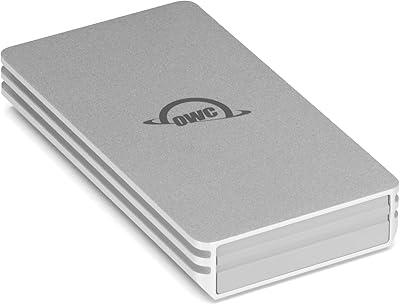
  • Enclosure Material: Constructed from heat-dissipating aluminum alloy that doubles as both structural protection and a passive thermal management surface.
  • Weather Resistance: Rated as weatherproof against dust ingress and water exposure, making it appropriate for outdoor and field use.
  • Shock Resistance: Designed to withstand accidental drops and physical impacts, with internal components protected by the rigid aluminum shell.
  • Weight: Weighs 1.06 pounds, light enough for daily bag carry without adding meaningful load to a travel or camera kit.
  • Package Dimensions: Packaged in a box measuring approximately 7.95 x 5.94 x 2.01 inches, reflecting the compact footprint of the drive itself.
  • Compatible Devices: Works with Mac desktops and laptops, Windows PCs, iPad Pro, Chromebook, and Microsoft Surface devices across relevant port configurations.
  • Warranty: Covered by a 5-year OWC limited warranty, which is notably longer than the 3-year coverage offered by most competing portable SSDs.
  • Model Number: Official OWC model identifier is OWCTB5ENVU02-Z, useful for warranty registration, support inquiries, and parts sourcing.
  • Availability Date: First made available in November 2024, positioning it among the earliest consumer-accessible Thunderbolt 5 portable drives on the market.
  • Platform Support: Compatible with both macOS and Windows operating systems without requiring proprietary drivers or platform-specific software installation.

Related Reviews

OWC 4TB Envoy Ultra Thunderbolt 5 Portable SSD Enclosure
87%
94%
Performance & Speed
90%
Build Quality & Durability
88%
Ease of Use & Setup
91%
Compatibility & Connectivity
86%
Portability & Size
More
OWC Envoy 2TB Ultra Portable NVMe SSD
87%
95%
Speed and Performance
91%
Portability and Size
88%
Durability and Build Quality
90%
Compatibility with Devices
85%
Value for Money
More
Seagate Ultra Compact 2TB Portable SSD
88%
91%
Data Transfer Speed
88%
Build Quality & Durability
94%
Portability & Size
85%
Device Compatibility
90%
Ease of Use
More
OWC Envoy Pro Elektron 4TB Portable SSD
87%
91%
Performance
96%
Build Quality
94%
Durability
85%
Ease of Use
88%
Compatibility
More
OWC Envoy Pro Elektron Portable SSD 1TB
89%
94%
Performance
91%
Build Quality
89%
Ease of Use
96%
Durability
90%
Speed (Data Transfer)
More
OWC 480GB Envoy Pro FX Portable External SSD
88%
93%
Transfer Speed
90%
Build Quality
88%
Portability
85%
Water and Dust Resistance
82%
Compatibility with Devices
More
Sabrent Rocket XTRM Plus 2TB Thunderbolt 3 Portable SSD
88%
94%
Performance
90%
Build Quality & Durability
89%
Portability & Size
96%
Setup & Ease of Use
91%
Compatibility
More
GiGimundo GQ20 Ultra-Slim USB-C Magnetic Portable SSD 2TB
86%
93%
Performance & Speed
88%
Portability & Design
85%
Compatibility with Modern Devices
81%
Magnetic Attachment Feature
90%
Ease of Use
More
CyberPowerPC Gamer Xtreme VR Gaming PC, Intel Core Ultra 5 225F, 16GB DDR5, 2TB SSD, Intel Arc B580 12GB
88%
93%
Performance
90%
Graphics Quality
89%
Value for Money
85%
Build Quality
92%
Gaming Experience
More
Cable Matters 40Gbps Portable USB4 Thunderbolt 4 SSD Enclosure for M.2 NVMe SSD
85%
94%
Performance (Speed)
89%
Ease of Setup
92%
Portability & Design
75%
Cooling Efficiency
90%
Compatibility
More

FAQ

You do not need a TB5 port to use it — the OWC Envoy Ultra 2TB Thunderbolt 5 Portable SSD is backward compatible with Thunderbolt 3, Thunderbolt 4, and USB4. That said, you will only reach the full advertised speed ceiling on a machine with a native TB5 port. On older connections, performance scales down to match what your port supports, which is still fast, just not the headline figure.

It works on both platforms without any reformatting required out of the box. Several users with mixed Mac and Windows workflows specifically praised the cross-platform compatibility. If you want to lock it to a Mac-only filesystem like APFS for performance reasons, you would need to reformat it manually, but that is a user choice rather than a limitation.

Yes, warmth during sustained transfers is expected and by design. The aluminum chassis acts as a heat sink, drawing thermal energy away from the internal components passively. No verified users have reported thermal throttling or data errors related to heat, so while it can become uncomfortable to hold during a long session, the drive is managing temperature correctly.

Not easily, and this is a real consideration worth thinking through before buying. The Thunderbolt cable is permanently integrated into the drive, so damage to the cable would require either a warranty claim or a service repair rather than a simple cable swap. If you tend to be hard on accessories, factor that into your decision.

For everyday tasks like document backup or occasional file transfers, a USB-C SSD is genuinely sufficient and costs considerably less. This Thunderbolt 5 drive is engineered for workflows where you are routinely moving very large files — full video project folders, 2TB card offloads, or large RAW libraries — and where waiting several extra minutes per session adds up to real lost time.

No installation is required on either Mac or Windows. You plug it in, it mounts, and you start using it. OWC does offer optional companion software for drive health monitoring, but the drive operates fully without it from the moment it is connected.

OWC describes the drive as weatherproof against dust and water without citing a specific IP rating number in the product documentation. In practice, field users report it handling dust, rain, and general outdoor exposure without issues, but it would be unwise to submerge it or expose it to sustained heavy water pressure. Treat it as weather-resistant for real-world conditions rather than waterproof for extreme scenarios.

It depends on which iPad Pro you have. Newer iPad Pro models with M4 chips and Thunderbolt ports can take better advantage of the drive, but throughput will still be capped well below what a desktop TB5 connection delivers due to iPad software and thermal constraints. Older iPad Pros will see much more modest performance. It works, but the pairing is not optimized the way a MacBook Pro connection would be.

For most project-based workflows it is a solid working capacity, but it depends on your footage format. Two terabytes holds roughly 4 to 5 hours of 4K ProRes 422 HQ footage, or considerably more in compressed formats like H.264. For cinematographers shooting high-bitrate RAW formats on multi-day productions, 2TB fills faster than you might expect, and this portable SSD works best as a fast transfer and working drive rather than a long-term archive.

OWC has a reasonably strong reputation for honoring warranties, and five years of coverage is genuinely above the industry norm for portable storage. The process does require shipping the drive back for evaluation, which means a period without it. The warranty covers manufacturing defects but not accidental physical damage, so a drop that cracks the chassis would not automatically qualify for a free replacement — read the terms before assuming full accidental coverage.