Overview

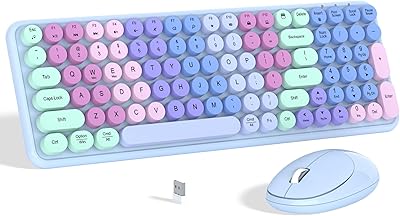
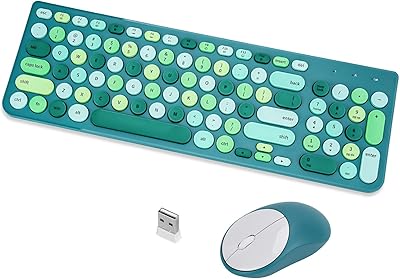
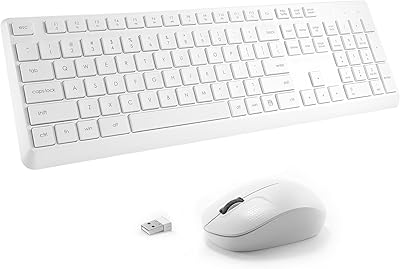
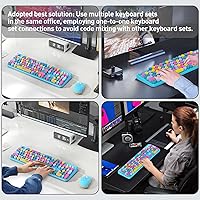
The Ubxxziy V2030 Wireless Keyboard and Mouse Combo is a budget-oriented peripheral set that punches above its price point with a retro typewriter aesthetic that actually looks good on a real desk. Ubxxziy is not a household name, but this wireless combo arrived in early 2025 with over 160 ratings and a 4.3-star average — respectable for a brand still building its reputation. Both devices connect through a single nano USB-A receiver using 2.4GHz wireless, so you only sacrifice one port. Worth flagging upfront: batteries are not included, meaning you will need AA and AAA cells before anything works out of the box.

Features & Benefits

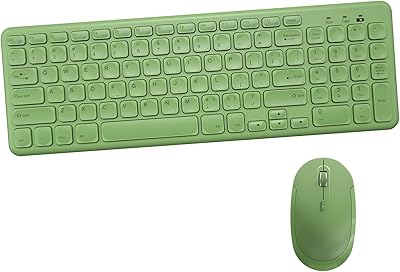
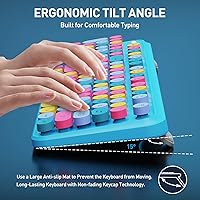
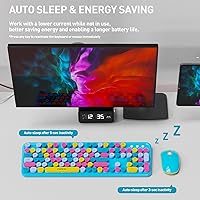
The 105 round retro keycaps are the first thing you notice, and they genuinely do reduce typing noise compared to most standard membrane keyboards — useful when you share a space with other people. An auto-sleep function kicks in after five minutes idle and can stretch keyboard battery life up to 12 months, which becomes a real convenience once you stop thinking about it. Twelve hotkeys handle media controls, email, and search without installing any software. The 10-meter wireless range is generous enough for most home offices. One honest caveat: Mac hotkey support is partial, so Mac users should not expect full shortcut functionality. The mouse, notably, has no power switch at all.

Best For

This wireless combo is a natural fit for students and remote workers who want their desk to look more interesting without spending a lot. The quiet keys make it a sensible pick for shared spaces — libraries, dorm rooms, open offices — where loud keyboards draw unwanted attention. Setup takes about thirty seconds: plug in the receiver, add batteries, and you are typing. No drivers, no software, no account required. That said, if your machine only has USB-C ports, you will need a USB-A adapter sold separately. This is not a set built for gaming or heavy macro workflows. It is aimed squarely at everyday casual use, and within that lane, it performs well.

User Feedback

Early buyers of the retro keyboard set consistently highlight two things: how good it looks on a desk and how quiet it is during actual use. Setup praise is common too, with most people reporting it working immediately without any fuss. On the critical side, build quality concerns come up occasionally — particularly around the battery compartment and mouse button feel, which some find a bit light for extended sessions. Longevity feedback is still limited given how recently it launched. The 3-year warranty and 60-day return window provide meaningful reassurance for a lesser-known brand, and buyers appear to notice and appreciate that coverage. Mac users occasionally flag the hotkey gaps, while Windows users rarely report any issues.

Pros

  • The retro round-keycap design looks noticeably more stylish than competing combos at this price tier.
  • Quiet low-profile switches make this wireless combo a considerate choice in shared or open-plan environments.
  • Single nano USB receiver handles both devices, saving a port and eliminating pairing complexity.
  • Plug-and-play setup works immediately on Windows — no drivers, no accounts, no configuration needed.
  • Auto-sleep extends keyboard battery life significantly, reducing how often you think about replacements.
  • A 3-year warranty from a budget brand is a rare and meaningful commitment that lowers purchase risk.
  • The 10-meter wireless range covers typical home and office room layouts without dropout issues.
  • Twelve hotkeys for media and search work reliably on Windows without any extra software installed.
  • At under two pounds, the combo is easy to move between rooms or workspaces without hassle.
  • Broad device support across Windows, Android, Chromebook, and Smart TV adds practical flexibility.

Cons

  • Batteries are not included — you will need AA and AAA cells before the combo works at all.
  • Mac users will find several hotkeys non-functional, making this a poor fit for macOS-primary workflows.
  • USB-C-only devices require a separate adapter that does not come in the box and is easy to overlook.
  • The mouse has no power switch, so there is no manual way to conserve its battery when not in use.
  • Battery compartment doors on both devices feel flimsy and are the most frequently cited build complaint.
  • Mouse click feedback is lighter than many users prefer, and can feel hollow during sustained daily use.
  • The colorful finish can appear more muted in person than it does in product photography.
  • Longevity data is limited since the product only launched in early 2025, making long-term reliability hard to assess.
  • The full 105-key layout is bulky for small desks or users who prefer a compact tenkeyless footprint.

Ratings

Our AI-generated scores for the Ubxxziy V2030 Wireless Keyboard and Mouse Combo are derived from analyzing verified global buyer reviews, with spam, incentivized, and bot-generated feedback actively filtered out before scoring. The ratings reflect a honest cross-section of real-world usage across home offices, dorm rooms, and casual workstations. Both the genuine strengths and the recurring friction points buyers experience are transparently represented in every category below.

Value for Money
88%
For what this wireless combo costs, buyers consistently feel they are getting more than expected — particularly given the retro styling and the 3-year warranty backing. Most users compare it favorably against similar budget sets that offer neither the aesthetics nor the coverage period.
A few buyers note that the overall feel reminds you of the price when you pick it up, especially the mouse. The requirement to purchase batteries separately is a minor but recurring frustration that slightly undercuts the out-of-box value perception.
Design & Aesthetics
91%
The round retro keycaps are the standout feature for most buyers — many specifically say the keyboard looks far more expensive than it is and genuinely brightens up an otherwise plain desk setup. The colorful finish photographs well and holds up to daily visual scrutiny.
Some buyers find the color slightly more muted in person than it appears in product images, which can feel a little disappointing at unboxing. The mouse design, while inoffensive, lacks the same visual personality as the keyboard and feels like an afterthought aesthetically.
Typing Experience
79%
21%
The low-profile keys are noticeably quieter than standard membrane keyboards, which matters a lot in shared spaces. Colleagues and housemates rarely notice when someone is typing, and the key travel feels adequate for casual daily writing and data entry tasks.
Enthusiast typists used to mechanical switches will find the feedback too soft and slightly mushy under sustained use. The keys also have a slight wobble on some units, which bothers faster typists more than casual users who only type occasionally throughout the day.
Mouse Performance
67%
33%
For basic web browsing, document navigation, and light everyday computing, the mouse tracks reliably on most surfaces and does not require a mousepad. Buyers using it for spreadsheet work or casual home tasks report no real issues during typical sessions.
The click feedback is lighter than many users prefer, and a subset of buyers find the buttons feel slightly hollow when pressed. The absence of a power switch on the mouse also means there is no easy way to cut its battery draw when packing it away.
Wireless Connectivity & Range
86%
The single nano receiver handling both devices is a practical design choice that most buyers appreciate — one port used, nothing else to manage. In typical home and office environments, the connection holds steady without noticeable lag or dropout across the claimed range.
A small number of users in environments with significant wireless interference report occasional micro-stutters during heavy wireless traffic. The range claim is realistic but not exceptional, and buyers expecting coverage across large rooms with obstacles may hit limits.
Build Quality & Durability
63%
37%
At this price tier, the keyboard shell feels reasonably solid for everyday desk use, and most buyers report no structural issues after several weeks of regular typing. The glossy edges resist minor scuffs and look presentable even after daily handling.
The battery compartment door on both the keyboard and mouse is the most commonly criticized build element — it feels flimsy on some units and does not inspire confidence. A few buyers report the mouse clicks developing a slightly different feel after a month of continuous use.
Setup & Ease of Use
93%
Plug-in-and-go is not an exaggeration here — most buyers have both devices working within 30 seconds of opening the box. No driver downloads, no pairing codes, no software installations. For non-technical users, this kind of zero-friction setup is a genuine relief.
The only setup hiccup comes for users with USB-C-only machines, who need an adapter that does not come in the box. This is not a dealbreaker but it is worth knowing before purchase, as it adds a step that slightly undercuts the plug-and-play promise.
Battery Life
84%
The keyboard's auto-sleep function after five minutes idle genuinely contributes to extended battery longevity, with several buyers reporting months of use on a single set of batteries. For light-to-moderate daily users, battery replacements are an infrequent concern.
Batteries are not included, which is a small but genuine inconvenience at unboxing. The mouse battery life draws fewer comments, suggesting it is average rather than impressive, and the lack of a power switch means it cannot be manually conserved when not in use.
Key Layout & Hotkeys
77%
23%
The 105-key layout covers everything most everyday users need, and the 12 dedicated hotkeys for media and search work without any configuration on Windows machines. For students and remote workers who jump between browser, music, and documents, these shortcuts save real time.
Mac users consistently flag that several hotkeys do not function as expected on macOS, which narrows the useful compatibility story. The layout may also feel slightly unfamiliar to users migrating from compact or tenkeyless keyboards due to the traditional full-size arrangement.
Noise Level
89%
Quiet typing is one of the most praised aspects across buyer feedback. In open-plan offices and shared living situations, the low-profile switches keep keystrokes from becoming a source of irritation to nearby people, which is a meaningful real-world benefit during video calls.
It is not silent — at higher typing speeds, there is still an audible click that some very noise-sensitive users notice. Those expecting near-silent mechanical tactile feedback may find the sound level marginally higher than anticipated in very quiet environments.
Compatibility
74%
26%
Windows, Android, Chromebook, and Smart TV support all work reliably in buyer experience. The broad device coverage makes this combo a flexible choice for households with multiple device types, and the lack of driver requirements helps across all supported platforms.
Mac compatibility is the soft spot — basic typing works fine, but the hotkey layer is partially non-functional, which frustrates Mac-primary users who expected full feature parity. USB-C device owners face an additional adapter cost that the product page does not prominently highlight.
Portability & Weight
72%
28%
At under two pounds for the combo, this wireless keyboard set is light enough to move around the home without effort, and the nano receiver stores easily without risk of losing it during short relocations between rooms or workspaces.
The full 105-key layout is not compact, making it less suited for frequent travel or tight desk arrangements. Buyers looking for a keyboard they can toss in a bag for co-working spaces will find the size slightly awkward compared to tenkeyless or compact alternatives.
Warranty & Brand Trust
81%
19%
The 3-year warranty and 60-day money-back guarantee are significant commitments for a budget brand, and buyers explicitly mention them as a reason they felt comfortable taking a chance on an unfamiliar name. The coverage period is notably longer than many competitors at this price.
Ubxxziy is still a relatively unknown brand with a limited track record, so the warranty is only as strong as the company's ability to honor it long-term. A handful of buyers express uncertainty about how easy the claims process actually is if something goes wrong after purchase.

Suitable for:

The Ubxxziy V2030 Wireless Keyboard and Mouse Combo is a strong fit for students, remote workers, and casual home users who want their desk to look more considered without spending a lot. If you primarily work on a Windows machine and spend your day writing documents, browsing, joining video calls, and managing emails, this combo handles all of that without demanding anything complicated from you. The plug-and-play setup is genuinely appreciated by people who are not technically inclined — no drivers, no Bluetooth pairing screens, no software accounts. It is also a smart pick for anyone sharing a workspace or living area, since the quiet keys make a real difference during calls or late-night work sessions when noise matters. The 3-year warranty adds an unusual layer of reassurance for a budget purchase from a newer brand, which makes it easier to justify the spend for cost-conscious buyers who still want some protection if something goes wrong.
Not suitable for:

The Ubxxziy V2030 Wireless Keyboard and Mouse Combo is not the right choice for Mac-primary users who rely on keyboard shortcuts throughout their day — the hotkey layer has known compatibility gaps on macOS that are unlikely to be resolved through software updates. Anyone using a modern laptop or desktop with only USB-C ports will need to source a separate adapter before this combo works at all, which adds friction that defeats some of the plug-and-play appeal. Power users, programmers, or anyone who types heavily for hours at a stretch will likely find the soft, slightly mushy key feedback unsatisfying compared to mechanical or even higher-end membrane alternatives. Gamers should look elsewhere entirely — there is no polling rate advantage, no dedicated macro support, and the mouse lacks the precision and ergonomics that fast-paced gaming demands. Finally, buyers who prioritize long-term durability over aesthetics may find the build quality, particularly around the battery doors, does not inspire confidence for multi-year daily use.

Specifications

  • Model Number: This combo is manufactured under model number V2030 by Ubxxziy.
  • Connectivity: Both the keyboard and mouse connect via a single 2.4GHz nano USB-A wireless receiver.
  • Wireless Range: The combo maintains a stable connection at distances of up to 10 meters from the receiver.
  • Keyboard Layout: The keyboard features a full 105-key layout with round retro-style keycaps and low-profile switches.
  • Hotkeys: Twelve dedicated hotkeys provide direct access to media playback, email, and web search functions.
  • Auto-Sleep: The keyboard enters a power-saving sleep state automatically after 5 minutes of inactivity.
  • Battery Life: Under typical use conditions, the keyboard battery is rated to last up to 12 months on a single set of AA batteries.
  • Battery Type: The keyboard requires AA batteries and the mouse requires AAA batteries; neither are included in the box.
  • Keyboard Dimensions: The keyboard measures 13.5 x 4.2 x 1.2 inches, which corresponds to a standard full-size desktop footprint.
  • Combo Weight: The combined weight of the keyboard and mouse is 1.94 pounds.
  • OS Compatibility: The combo supports Windows, Mac OS, Android, Chromebook, and Smart TV platforms without requiring driver installation.
  • Mac Hotkey Support: Basic keyboard input functions normally on Mac, but several of the 12 hotkeys are not fully compatible with macOS.
  • Power Switch: The keyboard includes an on/off toggle switch; the mouse does not have a dedicated power switch.
  • Receiver Port: The nano receiver uses a USB-A connector; devices with only USB-C ports will require a separately purchased adapter.
  • Driver Requirement: No drivers or software installations are required — the combo operates as a plug-and-play device on all supported platforms.
  • Warranty: Ubxxziy provides a 3-year manufacturer warranty and a 60-day money-back guarantee or replacement option on this combo.

Related Reviews

Arteck HW192 Wireless Keyboard and Mouse Combo
78%
78%
Build Quality
72%
Typing Experience
63%
Mouse Comfort & Ergonomics
81%
Battery Life
69%
Wireless Connectivity
More
EDJO Wireless Keyboard and Mouse Combo
76%
88%
Value for Money
94%
Ease of Setup
71%
Keyboard Typing Feel
63%
Mouse Performance
86%
Wireless Connectivity & Range
More
CHESONA Wireless Keyboard and Mouse Combo
86%
93%
Multi-device Connectivity
87%
Typing Experience
85%
Battery Life
91%
Design & Build Quality
78%
Ergonomics & Comfort
More
Letton Wireless Keyboard and Mouse Combo
83%
89%
Design & Aesthetics
81%
Ergonomics & Comfort
75%
Wireless Connectivity
90%
Battery Life
92%
Value for Money
More
RECCAZR Wireless Keyboard and Mouse Combo
86%
89%
Ergonomics & Comfort
86%
Build Quality & Durability
75%
Keyboard Responsiveness
91%
Mouse Precision & Quietness
94%
Ease of Setup
More
Vssoplor Wireless Keyboard and Mouse Combo
82%
91%
Value for Money
84%
Keyboard Typing Experience
61%
Mouse Ergonomics
88%
Wireless Connectivity & Stability
72%
Battery Life
More
MPTOG S801AG Wireless Keyboard and Mouse Combo
75%
88%
Aesthetic Design
93%
Ease of Setup
78%
Typing Feel
61%
Mouse Tracking Accuracy
82%
Wireless Reliability
More
GEEZER Wireless Keyboard and Mouse Combo
72%
83%
Value for Money
91%
Aesthetic Design
94%
Ease of Setup
67%
Typing Feel
62%
Mouse Quality
More
GUKJOB Wireless Keyboard and Mouse Combo
87%
88%
Typing Experience
91%
Design & Aesthetics
75%
Battery Life
95%
Ease of Setup
72%
Build Quality
More
Links9+ Wireless Keyboard and Mouse Combo
85%
89%
Ergonomics and Comfort
92%
Wireless Performance and Connectivity
85%
Build Quality
94%
Ease of Use and Setup
80%
Battery Life
More

FAQ

No, you do not. Just plug the nano receiver into a USB-A port, add batteries to both devices, and they should be recognized and ready to use within seconds. There is nothing to download and no account to create.

Yes, a single nano receiver handles both devices simultaneously. You only use one USB port on your computer for the entire combo, which is a practical advantage if you are working on a machine with limited ports.

Not directly out of the box. The receiver uses a USB-A connector, so you will need a USB-A to USB-C adapter to make it work. That adapter is sold separately and does not come included, so factor that in before purchasing.

The keyboard takes AA batteries and the mouse takes AAA batteries. Neither are included in the package, so you will want to have both types on hand before you sit down to use it for the first time.

Basic typing works fine on Mac, but the 12 hotkeys are only partially compatible with macOS — several of them will not perform their intended functions. If you rely heavily on keyboard shortcuts in your Mac workflow, this is a meaningful limitation worth considering before buying.

It is noticeably quieter than most standard membrane keyboards, which makes it a reasonable choice for shared offices, libraries, or late-night use. It is not completely silent at higher typing speeds, but most people nearby will not find it disruptive.

The auto-sleep feature kicks in after 5 minutes of no activity, so even if you leave it on, it will conserve power on its own. Waking it back up only requires pressing any key. Under normal daily use, the keyboard battery is rated to last up to 12 months.

Yes, the retro keyboard set supports Android and Smart TV devices in addition to Windows and Chromebook. Keep in mind that some function-specific keys may behave differently across non-Windows platforms, so basic input will work but specialty shortcuts may vary.

The keyboard shell feels solid enough for everyday desk use, but the battery compartment doors on both devices are the most commonly criticized part of the build. They feel thinner than you might expect at this price, and a few buyers have noted they do not snap shut as firmly as they would like.

The 3-year warranty and 60-day money-back window are genuinely longer than what many competing budget brands offer, and they do provide a meaningful safety net. That said, Ubxxziy is still building its track record, so it is worth keeping your order confirmation and reaching out to their support channel directly if any issues arise within the coverage period.