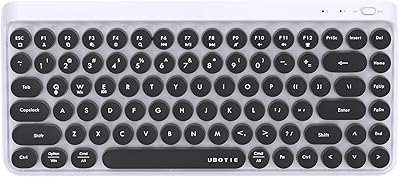
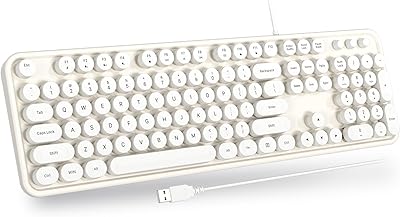
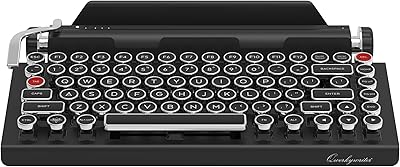
UBOTIE Dual Mode Retro Typewriter Wireless Keyboard
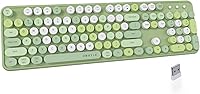
UBOTIE Dual Mode Retro Typewriter Wireless Keyboard — image 1
UBOTIE Dual Mode Retro Typewriter Wireless Keyboard — image 2
UBOTIE Dual Mode Retro Typewriter Wireless Keyboard — image 3
UBOTIE Dual Mode Retro Typewriter Wireless Keyboard — image 4
UBOTIE Dual Mode Retro Typewriter Wireless Keyboard — image 5
UBOTIE Dual Mode Retro Typewriter Wireless Keyboard — image 6
77%
23%

Overview

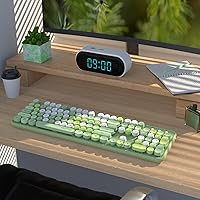
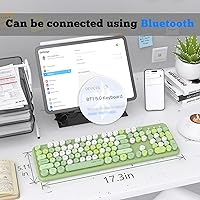
The UBOTIE Dual Mode Retro Typewriter Wireless Keyboard is one of those accessories that earns its place on a desk through personality as much as practicality. It sports a typewriter-inspired design with colorful round keycaps that genuinely turn heads, and the dual connectivity — Bluetooth alongside a 2.4GHz USB nano receiver — gives it a real functional edge beyond just looking good. That said, it is a plastic-built membrane keyboard at a budget price, so walking in with mechanical-switch expectations will leave you disappointed. Think of it as a solid, style-first daily driver for light tasks like emails, browsing, and note-taking rather than a workhorse for marathon typing sessions.

Features & Benefits

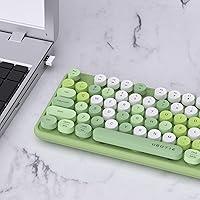
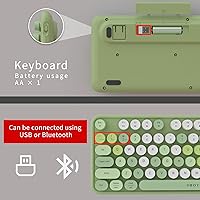
The most practical thing about this retro wireless keyboard is how it handles device switching. You can plug in the tiny USB nano receiver for a wired-like experience, or flip to Bluetooth when you want to type on a tablet or phone — no fuss. The round floating keycaps have a satisfying look and a softer, quieter actuation than a mechanical board, which is fine for shared spaces. A dedicated power switch lets you cut power entirely rather than relying purely on auto-sleep, which genuinely stretches battery life. Hotkeys and media controls round things out, making volume and playback adjustments quick without interrupting your workflow.

Best For

The UBOTIE typewriter keyboard hits a sweet spot for a specific kind of buyer. Students and home office workers who care about how their setup looks — and want something that photographs well on a desk — will find it genuinely rewarding. It also works well for multi-device users; if you regularly switch between a laptop, tablet, and phone, the dual connection modes earn their keep daily. It makes a strong gift option too, especially for anyone drawn to retro aesthetics. Just keep in mind it is best suited for light everyday typing: emails, documents, browsing. Serious coders or gamers will want to look elsewhere.

User Feedback

With a 4.3-star average across more than 500 ratings, this colorful Bluetooth keyboard clearly resonates with most buyers. Design and aesthetics dominate the praise — many users mention that it looks even better in person than in product photos, which is a pleasant surprise for a budget peripheral. On the flip side, a recurring theme in critical reviews is the membrane key feel; some users found the actuation a bit mushy during longer typing sessions. Bluetooth pairing gets mostly positive notes, described as straightforward, though a handful report occasional re-pairing quirks. Color durability appears solid based on short-term reports, though long-term fade resistance remains an open question for many buyers.

Pros

  • Dual Bluetooth and USB nano receiver connectivity gives real flexibility across multiple devices.
  • The round retro keycaps look striking in person and stand out on any desk setup.
  • Switching between a laptop, tablet, and phone is straightforward with the two connection modes.
  • A physical power switch lets you cut power fully, which noticeably extends battery life.
  • Auto power-saving adds a second layer of battery management without any effort from the user.
  • Setup is quick — plug in the USB receiver and it works, no driver installation needed.
  • Compatible with Windows and Mac, so it works across most common home and office setups.
  • At its price point, the build quality is acceptable and the colorful design feels well-executed.
  • Media and hotkeys make everyday tasks like adjusting volume or skipping tracks genuinely convenient.
  • Strong buyer satisfaction rating across a large number of reviews suggests consistent quality control.

Cons

  • Membrane key feel is soft and lacks tactile feedback, which frustrates touch typists over time.
  • No numpad is included, which limits usefulness for spreadsheet-heavy or data-entry work.
  • Some users report occasional Bluetooth re-pairing issues, which can interrupt workflow unexpectedly.
  • The plastic construction feels lightweight and does not convey much durability under heavy daily use.
  • Long-term color durability of the keycaps remains uncertain based on limited extended-use reports.
  • Typing comfort during longer sessions gets mixed reviews, with some users noting hand fatigue.
  • Not ideal for low-light environments as there is no backlit key option available.
  • The keyboard runs on batteries rather than a rechargeable internal cell, adding ongoing replacement costs.

Ratings

Our AI rating system analyzed verified global buyer reviews for the UBOTIE Dual Mode Retro Typewriter Wireless Keyboard, actively filtering out incentivized, bot-generated, and low-signal feedback to surface what real users consistently experienced. The scores below reflect both the genuine strengths that keep buyers satisfied and the honest pain points that show up repeatedly across independent reviewers. Nothing here is airbrushed — if a category underdelivers, the score reflects it.

Visual Design
93%
This is the category where this retro wireless keyboard genuinely shines. Buyers consistently report that the colorful round keycaps look even more vibrant in person than in product photos, which is a rarity for budget accessories. For anyone curating an aesthetic desk setup, it draws compliments reliably.
Design appeal is inherently subjective, and a small segment of buyers found the multicolor scheme busier than expected once it arrived. The bold palette that attracts most buyers is also the thing that puts off those looking for something more understated.
Value for Money
88%
At its accessible price point, the combination of dual connectivity, retro styling, and broad device compatibility is difficult to match from competing options. Most buyers feel they received more than they paid for purely in terms of visual impact and functional flexibility.
While the value proposition is strong for casual users, buyers who compare it against slightly pricier mechanical keyboards start questioning whether the extra spend would have been wiser. The budget build materials become more noticeable once the novelty of the design wears off.
Connectivity Reliability
78%
22%
The 2.4GHz USB nano receiver connection is consistently praised for being rock-solid — plug it in and it just works without any setup friction. Bluetooth performs well for most users on laptops and tablets, making multi-device use genuinely practical for everyday home office routines.
A recurring minority of users report occasional Bluetooth re-pairing requirements, particularly after the keyboard wakes from sleep mode. It is not a widespread failure, but for users who depend on instant, always-ready wireless performance, this intermittent behavior is a real annoyance.
Typing Feel
61%
39%
For light tasks like casual emails, social media browsing, and short note-taking sessions, the membrane keys feel adequately responsive and noticeably quieter than mechanical alternatives — a genuine benefit in shared or open-plan spaces.
Touch typists and anyone spending extended hours at the keyboard tend to find the actuation soft and lacking tactile feedback, which leads to increased errors and hand fatigue over time. This is the single most cited source of disappointment across critical reviews and is directly tied to the membrane construction.
Multi-Device Support
82%
18%
The ability to pair via Bluetooth to a phone or tablet while keeping the USB receiver plugged into a laptop covers a common real-world scenario for students and remote workers who juggle devices throughout the day. Switching modes is straightforward for most users.
Unlike premium multi-device keyboards with dedicated pairing buttons for each slot, this colorful Bluetooth keyboard requires manual mode switching rather than one-tap device hopping. Users managing three or more devices frequently may find the process less fluid than expected.
Build Quality
66%
34%
The keyboard feels reasonably solid for its weight class and price tier — the keys do not wobble excessively and the unit does not flex noticeably during normal typing. For light daily use on a stationary desk, the construction holds up acceptably.
The all-plastic construction is immediately apparent when handling the keyboard, and it does not inspire confidence for long-term durability under heavy or rough use. A few buyers noted creaking sounds when pressing keys near the edges of the board.
Battery Life
79%
21%
The physical power switch, which fully cuts power rather than relying solely on sleep mode, is consistently appreciated by users who leave longer gaps between typing sessions. Combined with the auto-saving idle mode, battery longevity outperforms expectations for the category.
The keyboard runs on replaceable batteries rather than a rechargeable internal cell, which means ongoing battery purchase costs that some buyers find inconvenient compared to USB-C rechargeable competitors even at similar price points.
Setup Ease
91%
Plug-and-play USB nano receiver setup requires zero driver installation on Windows and Mac, and most buyers report being up and running within seconds of unboxing. Bluetooth pairing follows the standard device discovery process and is approachable even for less tech-savvy users.
A small number of users experienced initial difficulty locating the power switch before realizing the keyboard was not powering on — a minor onboarding friction point that better in-box documentation would easily resolve.
Keycap Durability
69%
31%
UBOTIE updated the color application process in the 2024 version specifically to address fading concerns, and early-adopter feedback suggests the keycap colors resist wear better than earlier iterations of similar budget typewriter keyboards available on the market.
Long-term durability data beyond six to nine months of regular use remains sparse, making it difficult to assess how well the colors hold up under sustained daily contact. Buyers with experience of cheaper colorful keyboards understandably remain cautious about this over a multi-year horizon.
Noise Level
84%
The membrane switch construction keeps keypress noise low, which is a meaningful benefit for shared home offices, library use, or any environment where mechanical keyboard clatter would be disruptive. Several buyers specifically called out the quiet operation as a deciding factor.
While quieter than most mechanical keyboards, the key return sound has a slightly hollow plastic resonance that a handful of users found bothersome during late-night or very quiet environments. It is a niche complaint but worth noting for noise-sensitive buyers.
Ergonomics & Comfort
58%
42%
The low-profile design and standard key spacing make the keyboard immediately familiar for most users transitioning from a typical laptop keyboard, requiring little adjustment period for casual typing tasks.
There is no wrist rest included, no tilt adjustment legs, and the flat profile offers limited ergonomic support during extended sessions. Users prone to wrist discomfort during long typing periods will likely need a separate wrist rest accessory to use this comfortably over time.
Hotkeys & Media Controls
76%
24%
Having dedicated media keys for volume, mute, and playback within easy reach speeds up everyday tasks without requiring mouse interaction, and buyers who stream music or video while working appreciate not breaking their flow to adjust audio settings.
The hotkey layout is not always intuitive on first use, and the function key combinations are not clearly documented in the included instructions, leading some users to trial-and-error their way through the shortcuts during the initial setup period.
Portability
72%
28%
At 1.7 pounds and under 18 inches wide, this retro wireless keyboard is easy enough to carry between a home office and a second workspace, and the compact footprint means it fits comfortably on smaller desks or shared worktables without crowding other items.
Without a dedicated carrying case or protective sleeve included in the box, transporting the keyboard risks scratching the colorful keycaps, and the plastic housing shows scuff marks relatively easily if tossed loosely into a bag alongside other gear.

Suitable for:

The UBOTIE Dual Mode Retro Typewriter Wireless Keyboard is a strong fit for anyone who wants their desk setup to reflect a bit of personality without spending heavily. Students and remote workers who primarily handle emails, documents, and light browsing will find it covers daily tasks comfortably while looking far more interesting than a standard office keyboard. If you regularly switch between devices — say, a laptop in the morning and a tablet or phone later in the day — the ability to toggle between Bluetooth and a USB nano receiver is a genuinely useful feature at this price point. It also makes an excellent gift for someone who loves retro aesthetics or nostalgic design, since the colorful round keycaps photograph beautifully and feel distinct from anything generic. Shoppers who prioritize visual style alongside basic wireless functionality will get solid value here.

Not suitable for:

The UBOTIE Dual Mode Retro Typewriter Wireless Keyboard is not the right tool for everyone, and it is worth being direct about that. If you are a heavy typist — someone coding for hours, writing long-form content daily, or gaming — the membrane switch construction will likely feel mushy and unsatisfying compared to even an entry-level mechanical keyboard. The plastic build is honest for the price tier, but buyers expecting premium materials or a sturdy, heirloom-quality feel will come away disappointed. Users who need ultra-reliable, instant Bluetooth pairing for professional workflows may find the occasional re-pairing quirks frustrating. This retro wireless keyboard is also not a great match for those who need a numpad, as the layout does not include one. Finally, touch typists sensitive to key travel and tactile feedback should try a mechanical alternative before committing here.

Specifications

  • Brand: Manufactured and sold by UBOTIE, a brand focused on stylized consumer peripherals.
  • Dimensions: The keyboard measures 17.4 x 5.2 x 1.06 inches, making it a standard compact layout without a numpad.
  • Weight: At 1.7 pounds, the keyboard is lightweight enough for occasional portability between rooms or desks.
  • Material: The housing and key structure are constructed from plastic, consistent with budget-tier peripheral builds.
  • Keyboard Type: Uses membrane switch technology, which produces quieter, softer keystrokes compared to mechanical alternatives.
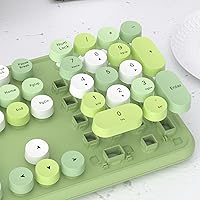
  • Keycap Style: Features round floating retro typewriter-style keycaps with a multicolor design applied to each key.
  • Connectivity: Supports dual-mode connection via Bluetooth and a 2.4GHz USB nano receiver included in the box.
  • Compatible Devices: Works with laptops, desktop PCs, tablets, smartphones, and Smart TVs across multiple platforms.
  • OS Support: Compatible with Windows 7, Windows 8, Windows 10, and macOS operating systems.
  • Included Items: The package includes the keyboard itself and one 2.4GHz USB nano receiver dongle.
  • Power Management: Equipped with a physical power switch for full power cutoff and an auto power-saving idle mode.
  • Special Features: Includes dedicated hotkeys and media control keys for shortcuts, volume adjustment, and playback functions.
  • Color Variant: The reviewed variant is Green Colorful, featuring a multicolor keycap scheme across the full layout.
  • Seller Rating: Holds a 4.3 out of 5 star average rating based on over 500 customer ratings on Amazon.
  • Market Rank: Ranked number 205 in the Computer Keyboards category on Amazon as of available data.
  • Availability Date: First made available for purchase in January 2024 as a new product introduction by UBOTIE.

Related Reviews
YUNZII B307 Wireless Typewriter Keyboard
74%
91%
Design & Aesthetics
61%
Typing Feel
84%
Wireless Connectivity
88%
Integrated Stand
67%
Build Quality
More
CIY GK68 65% Wireless Hotswap Keyboard Kit
75%
91%
Value for Money
88%
Hot-Swap Performance
74%
Wireless Reliability
71%
Battery Life
67%
Build Quality
More
HUO JI Multi-Device Wireless Keyboard
77%
88%
Multi-Device Switching
84%
Value for Money
91%
Portability & Form Factor
61%
Typing Experience
63%
Build Quality & Durability
More
MOWUX Retro Typewriter Wired Keyboard

78%
93%
Aesthetic Design
67%
Typing Feel
63%
Build Quality
91%
Setup & Compatibility
82%
Value for Money
More
YUNZII B303 Wireless Typewriter Keyboard
78%
93%
Aesthetic Design
71%
Build Quality
61%
Typing Feel
78%
Bluetooth Connectivity
82%
Multi-Device Switching
More
UBOTIE Wireless Keyboard and Mouse Combo
79%
88%
Value for Money
74%
Typing Experience
83%
Keycap Design & Aesthetics
67%
Mouse Performance
81%
Wireless Connectivity & Range
More
Adventurers Retro Typewriter Keyboard 75%
77%
88%
Build Quality
93%
Aesthetic & Design
84%
Typing Experience
67%
Bluetooth Connectivity
86%
Hot-Swap Switch Support
More
Atelus Retro Typewriter Keyboard
77%
91%
Aesthetic Design
67%
Typing Feel
74%
Typing Sound
63%
Build Quality
83%
Keycap Removability & Cleaning
More
UBOTIE Retro 84-Key Wireless Bluetooth Keyboard
78%
93%
Design & Aesthetics
58%
Typing Experience
86%
Multi-Device Connectivity
63%
Battery Life
79%
Value for Money
More
Qwerkytoys Qwerkywriter Typewriter Inspired Retro Mechanical Keyboard
84%
89%
Typing Experience
93%
Design & Aesthetic
92%
Battery Life
88%
Build Quality
77%
Ergonomics & Comfort
More

FAQ

It supports both. You can connect via the included USB nano receiver for a plug-and-play experience, or pair it over Bluetooth to devices like tablets and phones. You switch between the two modes depending on what you need, which is one of the more useful things about this retro wireless keyboard.

The keyboard supports connection to multiple devices, but you can only actively type on one at a time. You switch the active connection as needed between your Bluetooth-paired device and the USB receiver device. It is not a one-tap multi-device switcher like some premium keyboards, so keep that in mind.

Most users find it straightforward. You put the keyboard into pairing mode and connect it like any other Bluetooth device from your phone, tablet, or computer settings. A small number of buyers have reported occasional re-pairing quirks, but those appear to be isolated rather than a widespread issue.

The keyboard runs on standard batteries rather than a built-in rechargeable cell. Battery life varies depending on usage, but the physical power switch — which cuts power entirely when you are done — and the auto power-saving mode both help stretch battery longevity considerably compared to keyboards without those options.

Honestly, it is better suited for light-to-moderate use. The membrane switches are quieter and softer than mechanical keys, which some people prefer, but they lack the tactile feedback that touch typists often rely on during extended sessions. For emails, browsing, and casual note-taking, it works well. For hours of coding or writing, you may find the key feel fatiguing over time.

UBOTIE redesigned this in 2024 with color durability in mind, and early user feedback suggests the colors hold up reasonably well. That said, long-term reports beyond several months of heavy use are still limited, so it is fair to say the jury is still out on multi-year durability.

It works with both. The keyboard is compatible with macOS as well as Windows 7, 8, and 10. Just note that some key labeling follows a Windows layout, so Mac users may need a moment to find the equivalent function keys.

It genuinely is, especially for someone who appreciates quirky or retro-styled accessories. The colorful round keycaps make it visually distinctive, it works wirelessly right out of the box, and the price point is accessible enough that it feels like a thoughtful gift without being a major investment. It photographs beautifully too, which matters if you are gifting it to someone who cares about their desk aesthetic.

No, it does not include a numpad. The layout is a standard compact design without the number pad section on the right side. If numpad access is important for your workflow — spreadsheets, accounting, or data entry — you would need a separate external numpad or a different keyboard entirely.

There is no backlighting on this keyboard. If you frequently work in dim environments or at night and rely on seeing the keys, that is worth factoring into your decision. The colorful design is purely aesthetic rather than functional in low-light conditions.

Where to Buy