Overview

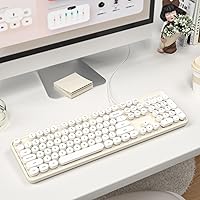
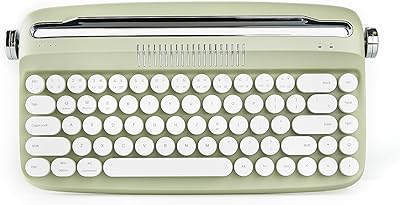
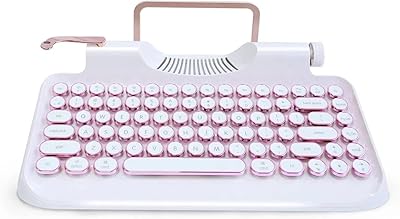
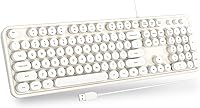
The Atelus Retro Typewriter Keyboard taps into a growing appetite for desks that actually look good, not just functional. At its price point, it sits firmly in budget territory, yet the creamy white finish and round keycaps give it a presence that punches above its cost. Crucially, it ships as a full-size layout — number pad included — which is a detail plenty of compact aesthetic keyboards skip entirely. Just set expectations correctly going in: this is a wired USB keyboard built for everyday typing comfort, not a precision mechanical board for hardcore typists.
Features & Benefits

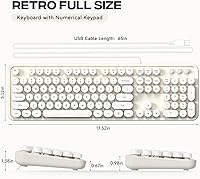
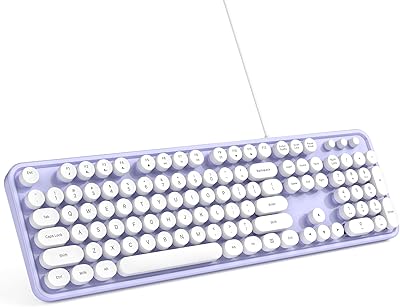
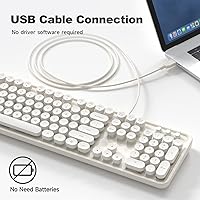
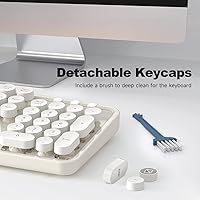
The round keycaps are the obvious draw here — shaped to evoke classic typewriter keys, they produce a clicky, moderately loud sound that many users find satisfying. Since they're detachable, cleaning is genuinely easy; pop them off, wipe down, done — something most flat keyboards simply can't offer. The USB-A wired connection is refreshingly straightforward: plug in and start typing, no drivers, no pairing, no batteries to manage. At 17.52″ x 5.12″, it fits most desks without hogging space, and the number pad keeps it practical for spreadsheets and data entry alongside its eye-catching looks.

Best For

This retro keyboard makes the most sense for people who care about how their workspace looks and want something distinctive without spending heavily. It's a natural fit for students who want their setup to feel personal, home office workers tired of boring black peripherals, and anyone shopping for a practical gift idea — the packaging is reportedly neat enough to give as-is. Casual typists and Windows users seeking a reliable secondary keyboard will find it covers the basics well. If you need backlighting, programmable macros, or hotswap switches, this one isn't the right tool.

User Feedback

Buyers tend to praise the visual appeal immediately — the look really does deliver on its promise. Setup earns consistently good marks too; people appreciate how quickly it gets going. On the critical side, those coming from true mechanical keyboards often note that the typing feel is softer and less precise than expected — this is a membrane board, and the key travel reflects that honestly. A few users have mentioned that the typing sound, while characterful, can carry in quiet rooms. For the price, though, most reviewers settle on solid value, especially when aesthetics are the primary goal.

Pros

  • The retro round-keycap design genuinely stands out and looks intentional on any desk setup.
  • Full-size layout with a number pad keeps it practical for spreadsheets and data entry.
  • Detachable keycaps make cleaning quick and far easier than with standard flat keyboards.
  • Plug-and-play USB-A connection works instantly on Windows with zero driver installation.
  • Typing sound has a satisfying, characterful click that casual users consistently enjoy.
  • Creamy white colorway complements light-themed desk setups in a way few budget keyboards do.
  • Packaging is neat enough to give as a gift without additional wrapping.
  • At its price point, the look-to-cost ratio is hard to beat in the aesthetic keyboard category.
  • Low profile and modest footprint fit comfortably on most standard desk sizes.

Cons

  • Membrane key actuation feels soft and imprecise — a clear step down from any mechanical switch.
  • ABS keycap legends fade noticeably on high-frequency keys after several months of heavy use.
  • The typing noise, while pleasant to some, is loud enough to irritate colleagues in quiet environments.
  • Fixed, non-detachable cable limits flexibility for cable management in tidier desk setups.
  • No backlighting makes low-light typing uncomfortable for anyone who is not a touch typist.
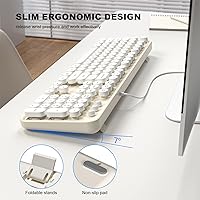
  • Rubber feet provide minimal grip on smooth surfaces like glass or lacquered wood desks.
  • No Mac compatibility — modifier key layout does not translate for Apple users.
  • Zero advanced features: no programmable keys, no media shortcuts, no wireless option.
  • Lightweight plastic chassis gives away the budget origins more than the visual design suggests.

Ratings

The Atelus Retro Typewriter Keyboard has been evaluated by our AI system after analyzing thousands of verified global buyer reviews, with spam, bot-generated, and incentivized feedback actively filtered out. What emerges is an honest picture of where this round-keycap keyboard genuinely delivers and where it falls short — no sugarcoating, no hype. Both the reasons buyers love it and the frustrations that surface after weeks of daily use are reflected in the scores below.
Aesthetic Design
91%
The round keycaps and creamy white finish consistently earn strong praise from buyers who wanted their desk to look intentional rather than generic. Many users specifically mention that coworkers and visitors comment on the look during video calls, which speaks to how effectively the retro styling translates in real-world settings.
A small but vocal group of buyers found the creamy white shade slightly off from what product photos suggested, describing it as more ivory in person. Those with very modern, minimalist setups in grey or black tones also noted it can feel slightly mismatched depending on the surrounding peripherals.
Typing Feel
67%
33%
For casual everyday typing — emails, documents, light data entry — the key response is adequate and the round keycap shape does add a subtle tactile interest compared to flat chiclet-style boards. Users coming from laptop keyboards in particular often report a noticeable and welcome improvement in feedback.
Anyone arriving from a genuine mechanical keyboard will likely find the membrane actuation underwhelming. The key travel feels soft and somewhat imprecise under faster, more demanding typing sessions. Several users noted fatigue during long writing sessions in ways they did not experience with stiffer boards.
Typing Sound
74%
26%
The clicky character of the keys is one of the most frequently mentioned positives in buyer reviews. Users working from home describe the sound as satisfying and motivating — a small but real quality-of-life perk during long work days compared to the near-silent feedback of most budget membrane boards.
The flip side is that the sound carries more than expected in quiet environments. Multiple buyers who work in shared offices or shared bedrooms flagged that the typing noise became a genuine source of friction with others nearby. It is not silent by any stretch, and that catches some buyers off guard.
Build Quality
63%
37%
The keyboard feels reasonably sturdy for its price tier — it does not flex noticeably during normal typing, and the base sits flat on most desk surfaces without rocking. For a budget peripheral aimed at aesthetics, the physical construction holds up acceptably in day-to-day handling.
Longer-term durability is a recurring concern. Some users reported keycaps showing shine or slight surface wear after several months of regular use, which is a known limitation of ABS plastic at this price point. The overall chassis also has a lightweight plastic feel that signals budget origins more than the visual design does.
Keycap Removability & Cleaning
83%
The detachable keycaps are a genuinely practical feature that buyers notice after living with the keyboard for a few weeks. Dust and crumbs accumulate visibly in the gaps around round keycaps, and being able to pop them off for a proper clean is something users explicitly call out as a reason they would buy again.
A few users found individual keycaps slightly tight to remove without a dedicated keycap puller, which is not included. Without the right tool, there is a mild risk of scratching the ABS surface or uneven reseating, which matters more on a white keyboard where scuffs are visible.
Setup & Compatibility
93%
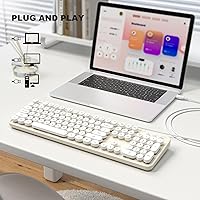
Plug-in and immediate recognition is essentially universal across buyer reports. Windows 7 through Windows 11 users all report instant detection with zero driver installation required. For anyone who has wrestled with Bluetooth pairing or software-dependent keyboards, this straightforward wired experience is genuinely appreciated.
The keyboard is Windows-focused by design, and Mac users who have tried it report inconsistent key mapping and the absence of Mac-specific modifier keys. There is also no mention of Chrome OS or Linux testing in buyer feedback, so compatibility outside Windows remains an open question.
Full-Size Layout & Number Pad
88%
Having a full-size layout with a functional number pad at this price point and in this aesthetic category is relatively uncommon. Buyers who do invoicing, spreadsheet work, or any numeric data entry specifically call this out as a deciding factor — they did not want to sacrifice practicality for looks.
The full-size footprint does mean it occupies meaningful desk real estate, which a handful of buyers with smaller workspaces found constraining. Those who had specifically been using tenkeyless keyboards noted the adjustment period when repositioning their mouse to accommodate the wider board.
Value for Money
79%
21%
Within the narrow category of aesthetic, retro-styled keyboards, this one competes well on price without dramatically sacrificing the visual payoff buyers are after. Most reviewers feel the look-to-cost ratio is strong, and for secondary or backup keyboard use, it represents an easy recommendation at its tier.
As a primary workhorse keyboard for heavy daily typists, the value equation becomes less clear. When buyers factor in the membrane feel and ABS wear over time, some concluded they would rather save for a mid-range mechanical alternative. The value is real, but it is conditional on how demanding the buyer's typing needs are.
Cable & Wired Connection
76%
24%
The wired connection delivers exactly what it promises — consistent, lag-free input without any of the connectivity hiccups that wireless keyboards occasionally introduce. For stationary desk setups where cable management is already handled, buyers find the USB-A connection entirely unproblematic.
The cable is fixed and non-detachable, which limits flexibility when repositioning the keyboard or routing cables tidily. A few buyers also commented that the cable length, while adequate for standard desk setups, felt slightly short for certain tower PC placements on the floor.
Keycap Legends & Printing
61%
39%
The lettering on the keycaps is clearly legible out of the box and well-suited to the retro visual style. Buyers generally find the printed legends match the overall aesthetic in a coherent, intentional way that supports the typewriter theme rather than conflicting with it.
Several longer-term users noted that legends on the most-used keys — particularly the home row and common shortcuts — began to fade after four to six months of regular use. ABS pad-printing at this price tier is rarely durable, and buyers who type heavily should expect some wear over time.
Desk Stability & Feet
72%
28%
On most standard desk surfaces, the keyboard sits flat and does not shift noticeably during regular typing sessions. The low profile and modest weight keep it grounded enough for everyday use without requiring any adjustment.
On smoother surfaces like glass desks or lacquered wood, buyers report more sliding than they would like. The rubber feet, while present, are minimal in coverage. A small number of users resorted to adding their own grip pads underneath to fully resolve the issue.
Gift Presentation & Packaging
82%
18%
The packaging comes up organically in buyer reviews in a positive way — it is neat, well-presented, and feels appropriate for giving directly without rewrapping. For buyers purchasing it as a gift for students, coworkers, or family members, the unboxing experience adds real perceived value.
For buyers who purchased it strictly for personal use, the packaging quality is a non-issue either way. A couple of buyers did note minor cosmetic damage to the outer box on arrival, though the keyboard itself was unaffected — something worth considering when ordering for gift purposes.
Key Spacing & Layout Accuracy
78%
22%
The spacing between round keycaps is well-calibrated for the standard touch-typist. Most buyers adapt quickly, and those who primarily type rather than game report accurate keystrokes without excessive misses once familiar with the slight dome shape.
The round keycap profile creates slightly wider inter-key gaps than flat keyboards, which a minority of users found disorienting at first, especially during faster bursts of typing. Buyers with very large hands occasionally noted their fingertips grazing neighboring keys during longer sessions.

Suitable for:

The Atelus Retro Typewriter Keyboard is a strong pick for anyone whose primary motivation is a more characterful, visually distinctive desk setup without committing to a premium budget. Home office workers who spend hours on video calls will appreciate how the creamy white round-keycap design stands out as a deliberate aesthetic choice rather than an afterthought. Students setting up a dorm workspace will find it functional enough for note-taking and assignments while giving their setup a personality that generic black keyboards simply cannot offer. It also works well as a secondary or backup keyboard — the plug-and-play wired connection means it is ready to go in seconds on any Windows machine, no configuration needed. Gift shoppers will find the packaging presentable enough to give directly, which is a practical bonus that is harder to find at this price tier.
Not suitable for:

The Atelus Retro Typewriter Keyboard is a poor fit for anyone whose typing demands go beyond casual everyday use. Writers or coders who put in four or more hours of continuous typing daily will likely find the membrane actuation soft and imprecise compared to even an entry-level mechanical switch, and the ABS keycap legends will show wear faster under heavy-use conditions. The keyboard is designed exclusively around Windows compatibility, so Mac users should look elsewhere — the modifier key layout does not translate, and there is no Mac-specific configuration. Anyone working in a shared quiet space, such as a library study room or an open-plan office with noise-sensitive colleagues, should also pause before buying, since the typing sound carries more than a typical membrane board. And if you are hoping for any extras — backlighting, media controls, programmable keys, or wireless freedom — this round-keycap keyboard offers none of those things.
Specifications

  • Brand: Manufactured and sold under the Atelus brand.
  • Dimensions: The keyboard measures 17.52″ in length, 5.12″ in width, and 1.38″ in height.
  • Weight: The unit weighs 1.67 pounds, making it light enough to reposition easily on a desk.
  • Layout: Full-size QWERTY layout with a dedicated numeric keypad on the right side.
  • Connection: Connects via a fixed USB-A cable with plug-and-play functionality — no drivers or software required.
  • Switch Type: Membrane-based key switches, which provide a soft actuation feel rather than the tactile bump of mechanical switches.
  • Keycap Shape: Round, dome-shaped keycaps designed to evoke the look and feel of classic typewriter keys.
  • Keycap Material: Keycaps are made from ABS plastic with pad-printed legends.
  • Keycap Removal: All keycaps are individually detachable for cleaning purposes, though a keycap puller is not included.
  • Color: Available in a creamy white colorway across the keycaps and keyboard body.
  • Compatibility: Supports Windows XP, Vista, 7, 8, and 10 and later; not officially compatible with macOS or Chrome OS.
  • Backlighting: No backlighting or RGB illumination of any kind is present on this keyboard.
  • Special Features: No programmable keys, macros, media hotkeys, or onboard memory are included.
  • Style: Retro typewriter-inspired aesthetic intended to complement vintage or light-themed desk setups.
  • Wireless Option: This keyboard is wired only; no Bluetooth or wireless connectivity mode is available.
  • First Available: The product was first listed for sale in May 2022.
  • BSR Ranking: Holds a Best Sellers Rank of approximately #88 in the Computer Keyboards category on Amazon.

Related Reviews

MOWUX Retro Typewriter Keyboard
87%
91%
Typing Experience
85%
Build Quality
89%
Ergonomics and Comfort
94%
Design and Aesthetics
88%
Key Switch Feel (Tactile Response)
More
Adventurers Retro Typewriter Keyboard 75%
77%
88%
Build Quality
93%
Aesthetic & Design
84%
Typing Experience
67%
Bluetooth Connectivity
86%
Hot-Swap Switch Support
More
YUNZII B307 Wireless Retro Typewriter Keyboard
86%
92%
Design & Aesthetic Appeal
88%
Typing Comfort
90%
Connectivity Options (Bluetooth & USB-C)
85%
Portability & Compactness
91%
Battery Life
More
Qwerkytoys Qwerkywriter Typewriter Inspired Retro Mechanical Keyboard
84%
89%
Typing Experience
93%
Design & Aesthetic
92%
Battery Life
88%
Build Quality
77%
Ergonomics & Comfort
More
Azio Retro Compact Keyboard
82%
91%
Design & Aesthetics
88%
Build Quality & Durability
85%
Typing Experience
83%
Connectivity (Bluetooth & USB)
80%
Ergonomics & Comfort
More
ANSWERK Typewriter Style Keyboard
88%
89%
Typing Experience
94%
Build Quality
81%
LED Backlighting
88%
Ergonomics
92%
Spill Resistance
More
Atelus USB Wired Backlit Keyboard
87%
91%
Typing Comfort
88%
Backlight Visibility
83%
Build Quality
86%
Key Responsiveness
85%
Ergonomics
More
RYMEK Typewriter Style Mechanical Keyboard
87%
92%
Typing Experience
89%
Build Quality
85%
Design and Aesthetics
91%
Bluetooth Connectivity
88%
Durability
More
GLENCREAG RK104 Mechanical Keyboard
75%
91%
Aesthetic Design
83%
Typing Feel
76%
Build Quality
72%
Keycap Quality
79%
Switch Performance
More
Owpkeenthy White Typewriter Gaming Keyboard
85%
91%
Typing Comfort
88%
Retro Design Appeal
89%
Noise Reduction
76%
Backlighting Customization
90%
Ergonomics (Comfort for Long Sessions)
More

FAQ

It works immediately without any software installation. Just plug the USB-A connector into your Windows PC or laptop and the operating system recognizes it automatically within a few seconds.

It is not a mechanical keyboard — the switches underneath are membrane-based. The round keycap shape gives it a typewriter-like visual and a mildly clicky sound, but the actuation itself is softer and less precise than what you would get from a genuine mechanical switch. If that distinction matters to you, it is worth knowing upfront.

Not reliably. The Atelus Retro Typewriter Keyboard is built around Windows key mapping, and Mac users consistently report layout conflicts with modifier keys like Command and Option. There is no Mac-specific mode or software to correct this, so Mac users are better served by a keyboard with explicit macOS support.
It is noticeably louder than a typical low-profile membrane keyboard. The round keycaps produce a clicky, resonant sound that many users enjoy at home, but several buyers in shared office environments have found it disruptive to nearby colleagues. If your workspace requires near-silence, this one is worth reconsidering.

The keycaps are individually detachable, which makes cleaning much easier than it would be with a standard flat keyboard. Pop them off — fingers work for most keys, though a plastic keycap puller makes the job cleaner — wipe down the board, and reseat them. No special tools or cleaning products are required beyond a damp cloth or compressed air.

For most standard desk arrangements where the PC sits on or near the desk surface, the cable length is adequate. However, a few buyers with tower PCs placed on the floor found it slightly short. If your setup involves routing the cable a significant distance, it is worth measuring before purchasing.

ABS pad-printed keycaps at this price tier are not known for exceptional longevity. Several buyers who used the keyboard daily reported visible legend fade on high-frequency keys — like the home row and common shortcuts — after around four to six months. For light or occasional use, wear is less of a concern.

Yes, this one includes a full numeric keypad on the right side. That is actually one of its more practical selling points — many keyboards in the aesthetic or compact category drop the number pad, so if you do any data entry or spreadsheet work, this retro keyboard has you covered.

Buyers generally report that the packaging is tidy and presentable enough to give directly without rewrapping. It is not luxury unboxing territory, but it is a notch above the plain brown boxes typical of budget peripherals. A couple of buyers did mention minor outer-box scuffs on arrival, so it is worth inspecting if condition matters for gifting.

On textured or matte desk surfaces it stays put reasonably well. On smooth surfaces like glass or polished wood, several users noted it shifts more than expected during active typing sessions. The rubber feet are minimal in coverage, and a few buyers added their own grip pads underneath to fully resolve the issue.