Overview

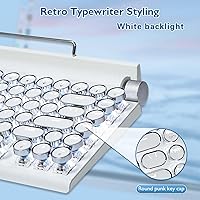
The Adventurers Retro Typewriter Keyboard 75% sits in an interesting corner of the mid-range wireless keyboard market — built around a strong visual identity first, with real mechanical credentials to back it up. The aluminum alloy panel and electroplated round keycaps give it an unmistakably vintage punk character that stands out on any desk. At 75% compact layout with 83 keys, it keeps the essentials without consuming too much workspace. Bluetooth 5.0 multi-device support means you can hop between your laptop, tablet, and phone without fumbling for cables. Just be clear going in: this retro mechanical keyboard is made for style-conscious typists and writers, not competitive gamers chasing millisecond response times.
Features & Benefits

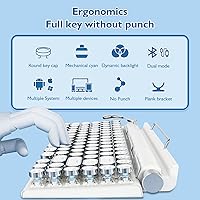
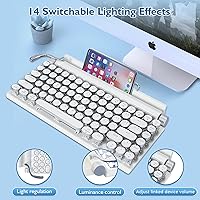
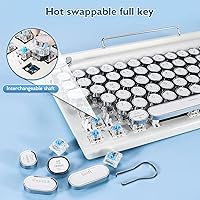
What makes this vintage-style wireless board more than a pretty face is the practical engineering underneath. The hot-swappable blue switches let you pull and replace individual keys without a soldering iron — genuinely useful if you decide the clicky actuation is not right for you down the road. Two metal knobs handle backlight brightness and media volume independently, which sounds minor until you are actually adjusting both on the fly mid-session. A small lever cycles through lighting modes, adding a tactile ritual to something usually buried in software menus. When the battery dips, a USB-C wired connection keeps you going. Three-device Bluetooth switching rounds out a well-considered feature set for a board at this price point.

Best For

This retro mechanical keyboard hits a specific sweet spot. If you work from home and care how your desk looks — or you are a writer who wants the clicky rhythm of typing to match an aesthetic you have deliberately built — this fits naturally into that setup. Multi-device users will appreciate switching between a MacBook, iPad, and Android phone without re-pairing each time. It is also a solid entry point for anyone exploring the keyboard customization hobby; hot-swap support means experimenting with different switches without committing to a full new board. Less ideal for open-plan offices where the blue switch noise will carry across the room.

User Feedback

Buyers consistently praise the build quality and unboxing experience — the metal panel and knobs feel premium in hand, and the visual impact lands well in person. Writers especially appreciate the tactile clunk of the blue switches during long typing sessions. That said, Bluetooth reconnection is a recurring complaint; some users report the board takes a moment to wake from sleep or occasionally drops connection when switching between devices. The noise level draws mixed reactions — perfectly fine for solo home setups, but distracting in shared spaces. Battery life earns reasonable marks overall. A few longer-term owners note the keycap legends show visible wear after months of heavy daily use, which is worth factoring in before buying.

Pros

  • The aluminum alloy panel feels genuinely premium and holds up well to the daily handling of a busy desk.
  • Hot-swappable switches let you change the typing feel later without any tools or technical knowledge.
  • Three-device Bluetooth switching works smoothly for writers and creatives juggling a laptop, tablet, and phone.
  • The round electroplated keycaps create a cohesive retro aesthetic that looks striking in person.
  • Physical knobs for volume and backlight brightness are more intuitive than Fn-key shortcuts during active work sessions.
  • USB-C wired fallback means a dead battery never has to interrupt an important writing session.
  • The 75% layout keeps arrow keys and function row intact, making the transition from full-size keyboards easier.
  • Blue switches deliver satisfying tactile and auditory feedback that many writers find genuinely motivating over long sessions.
  • Compatible across Windows, macOS, iOS, and Android without any driver installation required.
  • The lever-toggled lighting modes add a small but enjoyable physical interaction that software-controlled keyboards lack.

Cons

  • Bluetooth reconnection after sleep can take several seconds and occasionally requires manual re-pairing.
  • Keycap legends on high-frequency keys show visible wear within six to twelve months of heavy daily use.
  • No companion software means zero options for macro programming or deeper key remapping.
  • The included USB-C cable is short, which creates cable management headaches for larger or more complex desk setups.
  • Blue switch noise is significant enough to be disruptive in shared offices or during video calls.
  • Battery life shortens noticeably when backlighting is used at higher brightness levels.
  • No switch puller is included in the box despite the hot-swap feature being a selling point.
  • The Fn-layer secondary functions are not well documented in the included instructions, creating a frustrating learning curve.
  • The electroplated keycap coating is less durable long-term than PBT or double-shot alternatives at comparable price points.
  • Bottom housing shows minor flex under the metal top plate, slightly undermining the otherwise solid build impression.

Ratings

The Adventurers Retro Typewriter Keyboard 75% has been rated by our AI system after analyzing thousands of verified global buyer reviews, with spam, bot-submitted, and incentivized feedback actively filtered out. Scores reflect the full picture — what real users genuinely loved and where frustrations consistently surfaced. Both strengths and pain points are transparently baked into every category below.
Build Quality
88%
The aluminum alloy panel makes an immediate impression — buyers repeatedly note it feels far more substantial than competing boards at this price tier. The metal knobs and lever add to that perception of solidity, and unboxing reactions are overwhelmingly positive across verified purchaser photos and written reviews.
A handful of users report minor flex in the bottom plastic housing under the metal top plate, which undercuts the premium feel slightly. A few long-term owners also noted that the electroplated finish on the frame can show hairline scratches after several months of daily desk use.
Aesthetic & Design
93%
This is where the Adventurers typewriter keyboard earns its most enthusiastic feedback. Writers and remote workers consistently call it a desk centerpiece, and the round electroplated keycaps photograph exceptionally well. The vintage punk identity feels cohesive rather than gimmicky, which is harder to pull off than it sounds.
Personal taste plays a role here — buyers who prefer a minimal, understated setup occasionally find the retro styling overdone. The single backlight color also limits customization for those wanting a more modern RGB look to match other peripherals.
Typing Experience
84%
Blue switch feedback is satisfying for writers who want each keystroke to feel intentional. Long-form typing sessions draw consistent praise, with users describing the clicky actuation as motivating rather than fatiguing. The round keycap shape takes a short adjustment period but earns loyalty quickly.
The blue switches are genuinely loud — open-plan office workers and people on frequent video calls flag this as a real problem. A few buyers also find the keycap height slightly higher than standard, which can cause wrist fatigue during extended sessions without a wrist rest.
Bluetooth Connectivity
67%
33%
Three-device switching is a genuine daily convenience for users juggling a MacBook, an iPad, and a phone. When the connection is stable, the switching process is fast enough to feel fluid, and initial pairing is straightforward across Android, iOS, Windows, and macOS.
Reconnection after sleep is the most cited complaint across reviews — the board sometimes takes several seconds to wake, and occasional full drops require manual re-pairing. Users with older Bluetooth adapters on desktop PCs report more instability than those using newer laptops with Bluetooth 5.0 built in.
Hot-Swap Switch Support
86%
For buyers stepping into keyboard customization, hot-swap capability without soldering is a meaningful entry point. Several reviewers mention swapping to silent or linear switches after purchase, effectively turning this vintage-style wireless board into a more office-friendly machine without buying a new keyboard.
The hot-swap sockets feel slightly tighter than premium hot-swap boards, and a few users report needing more force than expected to seat replacement switches fully. No switch puller is included in the box, which is a minor but noticeable omission at this price point.
Battery Life
72%
28%
For typical home office use — a few hours of typing daily with backlighting on moderate brightness — most users report getting several days between charges, which is adequate. The included USB-C fallback means running out mid-session is rarely a workflow stopper.
Heavy users with backlighting cranked up find battery life noticeably shorter than competing wireless keyboards in the same category. Compared to boards with larger battery cells, this retro mechanical keyboard asks for more frequent charging, which some buyers flag as a minor but recurring inconvenience.
Multi-Device Switching
71%
29%
The ability to connect three devices and toggle between them via dedicated controls is genuinely useful for people who work across a laptop, tablet, and phone in the same session. Writers and content creators who use an iPad for notes and a laptop for drafting find this workflow-friendly.
The switching is not always instantaneous — there is a noticeable lag on some device combinations that breaks focus during fast context switching. Users also report that clearing the pairing history periodically is necessary to maintain response speed, which adds minor maintenance overhead.
Keycap Durability
63%
37%
Out of the box, the electroplated round keycaps look and feel premium, and short-term users are consistently happy with their appearance. The retro character of the keycaps holds up well visually during the first few months of use.
Legend wear is a recurring long-term complaint — heavy daily typists begin seeing fading on high-frequency keys like E, A, and S within six months to a year. The electroplated coating, while visually distinctive, appears less durable than double-shot or PBT keycaps found on competing boards.
Software & Lighting Control
69%
31%
The lever-based lighting mode toggle is an intuitive physical control that avoids the need for companion software entirely. Casual users appreciate being able to cycle through backlight modes without downloading anything or memorizing key combos.
There is no dedicated software for macro programming or deeper lighting customization, which limits the board for power users. Single-color backlighting means buyers who want per-key RGB or color cycling will find the options thin compared to other mechanical keyboards at a similar price.
Wired USB-C Mode
81%
19%
When plugged in via USB-C, the connection is stable and input latency drops noticeably compared to Bluetooth, which makes wired mode the preferred option for longer focused writing sessions. Several users adopt wired as their default and treat Bluetooth as a convenience feature for lighter tasks.
The USB-C cable included in the box is functional but short, which creates desk cable management challenges for some setups. A longer braided cable would better suit the keyboard's premium visual identity.
Compact Layout Usability
78%
22%
The 75% layout strikes a practical balance — retaining function keys and arrow keys that full compact 65% boards sacrifice, while still freeing up meaningful desk real estate. Buyers transitioning from full-size keyboards typically adapt within a week without missing the numpad.
The absence of a dedicated numpad is occasionally flagged by users who handle data entry alongside writing. A few buyers also note that some secondary functions accessed via the Fn layer require a learning curve that is not well documented in the included instructions.
Value for Money
74%
26%
For buyers who prioritize aesthetic differentiation and hot-swap capability, the pricing feels justified — comparable boards with similar design ambition often cost more. The metal construction and tactile controls add perceived value that photographs rarely fully capture.
Buyers coming purely from a performance angle may feel the Bluetooth inconsistencies and keycap longevity concerns do not fully justify the cost versus more utility-focused competitors. If retro styling is not a priority, there are technically stronger options available at the same spend.
Mac & iPad Compatibility
77%
23%
macOS and iPadOS pairing works reliably out of the box for most users, and the compact layout maps comfortably to Apple workflows. iPad users in particular find the wireless board a natural companion for writing and note-taking sessions away from a desk.
Some Mac-specific modifier key layouts require manual remapping since the keyboard ships with Windows key labeling. A small subset of iPad users reports occasional compatibility quirks with keyboard shortcuts in certain apps, though this tends to resolve after re-pairing.

Suitable for:

The Adventurers Retro Typewriter Keyboard 75% is a natural fit for home office workers who have put genuine thought into how their workspace looks and feels — people who want a desk setup that earns a second glance without sacrificing daily usability. Writers, bloggers, and creative professionals will feel at home with the clicky blue switches, which make long typing sessions feel deliberate and satisfying in a way that membrane keyboards simply cannot replicate. If you regularly bounce between a laptop, an iPad, and a phone throughout the day, the three-device Bluetooth switching removes the friction of constant re-pairing and cable swapping. Mac and iPad users in particular will find the wireless pairing reliable enough for focused work sessions, and the compact 75% layout fits naturally alongside a notebook or coffee mug without dominating the desk. Entry-level keyboard enthusiasts who want to explore switch swapping without committing to a premium custom build will also appreciate the hot-swap capability, which opens the door to experimentation at a reasonable cost of entry.
Not suitable for:

The Adventurers Retro Typewriter Keyboard 75% is not the right choice for buyers whose priority is rock-solid, zero-latency wireless performance — the Bluetooth connection is functional for most everyday typing, but the occasional reconnection lag and wake-from-sleep delays will frustrate anyone who demands instant responsiveness. Open-plan office workers or people who spend hours on video calls should think carefully before committing, because blue switches are genuinely loud in shared spaces and will be audible to colleagues and meeting participants alike. Competitive or enthusiast gamers looking for a primary gaming board will find the feature set too limited — there is no advanced software, no per-key RGB, and the wireless latency is simply not tuned for fast-reaction gaming scenarios. Buyers who prioritize long-term keycap durability over aesthetics may be disappointed, as the electroplated legends show wear faster than PBT or double-shot alternatives. Finally, anyone who does heavy numerical data entry will miss the absent numpad and may find the Fn-layer workarounds more disruptive than expected.
Specifications

  • Layout: 75% compact layout with 83 keys, retaining the full function row and dedicated arrow keys.
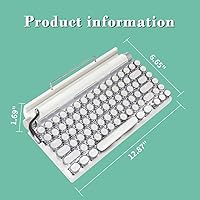
  • Dimensions: The keyboard measures 12.87″ in length, 6.65″ in width, and 1.69″ in height.
  • Weight: The unit weighs 2.2 pounds, giving it a solid, desk-anchored feel without being difficult to move.
  • Frame Material: The top panel is constructed from aluminum alloy with a metal electroplating finish for durability and visual character.
  • Switch Type: Factory-installed hot-swappable blue mechanical switches deliver tactile and auditory feedback with each keystroke.
  • Keycaps: Round electroplated keycaps in a vintage typewriter style sit atop each switch, reinforcing the retro punk aesthetic.
  • Connectivity: Supports Bluetooth 5.0 wireless connection and a wired USB-C mode for stable, low-latency input when needed.
  • Multi-Device: Up to three devices can be paired simultaneously, with dedicated controls for switching between them.
  • Battery: A built-in rechargeable lithium-ion battery is included; the keyboard charges via USB-C.
  • Backlighting: Single-color backlighting with multiple modes toggled via a physical lever on the keyboard body.
  • Controls: Two independent metal knobs on the keyboard adjust backlight brightness and media volume respectively.
  • OS Compatibility: Compatible with Windows 10 and above, macOS, iOS, and Android operating systems out of the box.
  • Wireless Standard: Bluetooth 5.0 provides the wireless connection, offering improved stability over older Bluetooth versions when paired with a compatible host device.
  • Hot-Swap Support: The switch sockets support hot-swappable MX-style mechanical switches, allowing switch replacement without soldering equipment.
  • Style: Designed in a retro punk and vintage typewriter aesthetic with black lever and roller accents throughout.
  • In the Box: Package includes the keyboard, a USB-C charging cable, and a lithium-ion battery pre-installed.
  • Manufacturer: Produced by Adventurers, operating under Shenzhen Jinzhanpeng Technology Co., Ltd.

Related Reviews
MOWUX Retro Typewriter Keyboard
87%
91%
Typing Experience
85%
Build Quality
89%
Ergonomics and Comfort
94%
Design and Aesthetics
88%
Key Switch Feel (Tactile Response)
More
Atelus Retro Typewriter Keyboard
77%
91%
Aesthetic Design
67%
Typing Feel
74%
Typing Sound
63%
Build Quality
83%
Keycap Removability & Cleaning
More
YUNZII B307 Wireless Retro Typewriter Keyboard
86%
92%
Design & Aesthetic Appeal
88%
Typing Comfort
90%
Connectivity Options (Bluetooth & USB-C)
85%
Portability & Compactness
91%
Battery Life
More
Qwerkytoys Qwerkywriter Typewriter Inspired Retro Mechanical Keyboard
84%
89%
Typing Experience
93%
Design & Aesthetic
92%
Battery Life
88%
Build Quality
77%
Ergonomics & Comfort
More
ANSWERK Typewriter Style Keyboard
88%
89%
Typing Experience
94%
Build Quality
81%
LED Backlighting
88%
Ergonomics
92%
Spill Resistance
More
Azio Retro Compact Keyboard
82%
91%
Design & Aesthetics
88%
Build Quality & Durability
85%
Typing Experience
83%
Connectivity (Bluetooth & USB)
80%
Ergonomics & Comfort
More
Redragon K710 Wireless Typewriter Mechanical Keyboard
76%
88%
Build Quality
84%
Wireless Reliability
81%
Typing Experience
52%
Noise Level
77%
RGB & Lighting
More
RYMEK Typewriter Style Mechanical Keyboard
87%
92%
Typing Experience
89%
Build Quality
85%
Design and Aesthetics
91%
Bluetooth Connectivity
88%
Durability
More
MageGee Typewriter Mechanical Keyboard
77%
93%
Aesthetic & Visual Design
81%
Build Quality
78%
Typing Feel & Switch Performance
61%
Sound Level
83%
Keycap Quality & Durability
More
GLENCREAG RK104 Mechanical Keyboard
75%
91%
Aesthetic Design
83%
Typing Feel
76%
Build Quality
72%
Keycap Quality
79%
Switch Performance
More

FAQ

Yes, pairing with macOS via Bluetooth is straightforward and requires no driver installation. The modifier keys are labeled for Windows, so you may want to remap the Command and Option keys in your Mac system preferences, but most users get up and running within a few minutes.

Honestly, blue switches are among the louder mechanical options available, and this retro mechanical keyboard is no exception. In a private home office it is a non-issue, but in an open-plan workspace or during video calls, the clicking will be audible to people nearby. If noise is a concern, consider swapping to quieter switches after purchase using the hot-swap sockets.

Yes, the hot-swap sockets let you pull out individual switches and replace them with any MX-compatible alternative using a switch puller. Just note that a switch puller is not included in the box, so you will need to source one separately. The process itself is simple once you have the tool.

For most users, the connection is stable during active typing sessions. The more common complaint is reconnection delay after the keyboard wakes from sleep, which can take a few seconds. Clearing the pairing history periodically and ensuring your host device uses Bluetooth 5.0 helps keep things responsive.

Under typical home office conditions with moderate backlighting, most users report several days of use between charges. If you run the backlight at full brightness consistently, expect that figure to drop noticeably. Plugging in via USB-C is always an option if you need uninterrupted use.

It can handle casual gaming, but it is not engineered for competitive play. The Bluetooth latency is suitable for everyday use but not optimized for fast-reaction gaming scenarios. Wired USB-C mode reduces that latency, but dedicated gaming keyboards with lower polling rates and software customization will serve serious gamers better.

Yes, that is one of the more practical features on this board. You can store up to three device pairings and toggle between them using the dedicated switching controls. It is not always instantaneous, but it is fast enough for a smooth workflow shift between an iPad and a laptop throughout the day.

The electroplated legends hold up well visually in the short term, but heavy daily typists tend to notice fading on frequently used keys after six months to a year of intensive use. If long-term keycap durability matters to you, the electroplated coating is less resilient than PBT or double-shot keycaps found on some competing boards.

The lever physically cycles through the backlight lighting modes, which is a more tactile and direct interaction than holding down a key combination. Whether it qualifies as a gimmick depends on your perspective — it adds personality to the experience, but if you settle on one lighting mode and leave it there, you will rarely touch it after the first week.

Yes, Android is fully supported over Bluetooth. Pairing is the same as any other Bluetooth device — put the keyboard into pairing mode and connect from your Android Bluetooth settings. Most standard keyboard shortcuts work as expected, though some app-specific shortcuts may behave differently depending on the Android version and manufacturer.