Overview

The Ubiquiti USW-Flex-Mini is a compact managed switch built specifically for the UniFi ecosystem, and it punches well above its physical size. A managed switch — unlike a basic unmanaged one — gives you real control over network traffic: segment devices into VLANs, monitor port activity, apply custom profiles. That capability usually costs considerably more. This mini switch sits at the accessible end of Ubiquiti's lineup, making it genuinely attractive to home lab builders and small office operators already running UniFi hardware. One critical caveat upfront: you need a UniFi controller to unlock its full potential. Without one, you lose nearly all the advanced functionality that justifies choosing it over a cheap unmanaged switch.

Features & Benefits

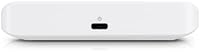
Five Gigabit Ethernet ports fit inside a chassis not much larger than a deck of cards. The USB-C or PoE power input is a practical highlight — route a PoE cable from an upstream UniFi switch and you never need to hunt for a spare outlet. That matters when tucking this pocket-sized managed switch behind a TV or inside a cramped media cabinet. It handles VLAN tagging and port profiles through the UniFi controller, so isolating IoT devices or setting up a guest network is straightforward. Fanless by design, it runs completely silent. The 48 Gbps switching capacity is more than adequate for any home or small office workload you are likely to put through it.

Best For

The Flex Mini shines when you need extra ports in a specific room without pulling new infrastructure cables. Picture a living room where a TV, streaming stick, game console, and NAS all need wired connections — this covers it cleanly. It also fits naturally in small businesses running an existing UniFi stack that need an inexpensive edge switch at a workstation cluster or reception desk. Home lab users building VLAN-segmented test environments on a tight budget will find it surprisingly capable. That said, if you have no UniFi infrastructure and just need a simple plug-in switch, look elsewhere — this is not designed to operate as a standalone device.

User Feedback

Buyers who pick up this mini switch for an established UniFi setup tend to come away satisfied. The USB-C power option draws consistent praise — it is the kind of small, practical detail that meaningfully simplifies installation. On the less positive side, the plastic casing feels lightweight, and some users noted it does not inspire confidence if mounted somewhere it might take occasional knocks. A smaller group ran into early frustration after not realizing a controller was required before purchase. Overall, this pocket-sized managed switch clearly rewards buyers who already have a handle on basic networking concepts — those newer to managed infrastructure should budget some extra time for research and initial setup.

Pros

  • Adopts instantly into an existing UniFi setup with no complex configuration required.
  • PoE-in power option eliminates the need for a nearby outlet, keeping installations clean.
  • Fully silent fanless design makes it ideal for living rooms, bedrooms, and media spaces.
  • VLAN tagging and per-port profiles give real network segmentation control at an accessible price.
  • Compact enough to mount behind a TV, under a desk, or inside a media cabinet without notice.
  • Five Gigabit ports handle simultaneous 4K streaming, NAS transfers, and gaming without bottlenecking.
  • The Flex Mini integrates with the same UniFi dashboard used for all other network devices.
  • USB-C power input adds flexibility for setups where a PoE upstream switch is not available.
  • At its price tier, managed switching with controller support is difficult to match elsewhere.
  • Long-term reliability is solid in stable, climate-controlled environments with consistent firmware management.

Cons

  • No UniFi controller means no VLAN, no port profiles, and essentially no management features.
  • Controller dependency is not clearly communicated on packaging, leading to avoidable buyer confusion.
  • Five ports can feel limiting quickly once cameras, printers, or additional workstations enter the picture.
  • No PoE output means this switch cannot power access points, cameras, or VoIP phones downstream.
  • Plastic casing feels noticeably lightweight and does not hold up well in high-traffic physical environments.
  • Firmware updates pushed through the controller have caused occasional disconnects for a subset of users.
  • Closely spaced RJ45 ports can make fitting thick cable boots or multiple patch cables awkward simultaneously.
  • Mounting hardware included is minimal and the plastic tabs show stress with repeated repositioning.

Ratings

The Ubiquiti USW-Flex-Mini has been evaluated by our AI system after analyzing thousands of verified buyer reviews from global markets, with spam, incentivized, and bot-generated feedback actively filtered out. The scores below reflect a candid picture of where this mini switch genuinely excels and where real-world users have run into friction. Both strengths and pain points are represented transparently so you can make a confident purchase decision.
UniFi Ecosystem Integration
94%
For anyone already running a UniFi network, plugging in the Flex Mini and watching it appear in the controller within seconds is deeply satisfying. Users consistently report that VLAN assignments, port profiles, and traffic monitoring work exactly as expected with no fiddling required.
The integration is so tightly coupled to the UniFi ecosystem that buyers without an existing setup face a frustrating barrier. You cannot configure VLANs or access management features without a controller, which is a dealbreaker for standalone use cases.
Value for Money
88%
At its price point, getting a fully managed Gigabit switch with VLAN support and cloud-managed capability is genuinely hard to beat. Home lab builders in particular note that it costs a fraction of comparable enterprise-tier managed switches with similar feature sets.
The value equation only holds if you are already in the UniFi ecosystem. For someone who also needs to purchase a controller or a Cloud Key to go with it, the total cost of entry climbs considerably, shifting the perceived value downward.
Port Count & Configuration
77%
23%
Five Gigabit ports cover most single-room expansion scenarios well — wiring up a TV, NAS, game console, and a desktop from one tidy unit is exactly the use case it was designed for. Port profiles can be configured per-port from the controller, adding meaningful flexibility.
Five ports is limiting the moment a setup grows even slightly. Several users noted they outgrew it faster than expected, particularly in home office setups where a printer, laptop dock, desktop, and IP camera all compete for wired connections simultaneously.
Power Flexibility (USB-C & PoE-In)
92%
The ability to power the Flex Mini directly from a PoE-capable upstream switch is a standout practical feature. It completely removes the need for a nearby power outlet, making cable-managed under-desk and behind-TV installations significantly cleaner and easier.
USB-C power works well, but the required adapter is not included, which caught some buyers off guard. Users powering via USB-C from a phone charger also noted that not all chargers deliver reliable output, occasionally causing instability.
Build Quality & Durability
61%
39%
The compact plastic shell is light enough to mount almost anywhere without structural concerns, and it stays cool to the touch even under sustained load. For fixed installations tucked inside a cabinet or behind a panel, the build is entirely adequate.
Holding it in hand, the lightweight plastic does not convey confidence. A handful of buyers reported the casing feeling flimsy compared to older Ubiquiti hardware, and those who mounted it in higher-traffic areas noted minor scuff and flex concerns over time.
Setup Experience
71%
29%
For users with an active UniFi controller already running, adoption is fast — adopt the device, assign port profiles, done. The process is well-documented within the UniFi interface and aligns with how every other UniFi switch is managed.
Buyers who purchased without realizing a controller is mandatory hit a wall immediately. The packaging and product listing do not make this dependency obvious enough, leading to a disproportionate number of negative early experiences from otherwise capable users.
Silent Operation
97%
Completely fanless with no moving parts, this pocket-sized managed switch is genuinely inaudible in any environment. Living room and bedroom deployments in particular benefit from this — there is simply nothing to hear, even in a dead-quiet room late at night.
There is almost nothing negative to say here. The only theoretical concern is long-term passive heat management in very hot enclosed spaces, though in practice no significant thermal issues have been widely reported by users.
Physical Size & Placement
91%
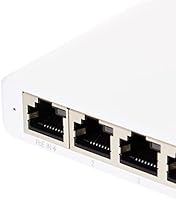
At roughly 4.22″ long and under an inch tall, the Flex Mini fits practically anywhere. Users regularly tuck it behind monitors, inside media consoles, or zip-tie it to the back of a desk — it disappears into the environment without drawing attention.
The compact size means the five ports are closely spaced, and wider RJ45 connectors or thick cable boots can make adjacent ports awkward to populate simultaneously. A couple of users noted this required using right-angle adapters to keep things tidy.
Switching Performance
89%
The 48 Gbps switching fabric handles full Gigabit throughput across all ports simultaneously without any measurable bottlenecking. Home lab users running iSCSI storage traffic and simultaneous 4K streams reported no performance degradation under real workloads.
While the throughput is excellent for its class, the Flex Mini lacks any PoE-out capability, meaning it cannot power downstream devices like IP cameras or access points. For users who assumed otherwise, this is a significant functional gap.
VLAN & Network Segmentation
86%
VLAN tagging works reliably and is easy to configure through the UniFi controller interface. IT home labbers building isolated segments for IoT, guest traffic, and trusted devices praised how straightforward the per-port VLAN assignment process is in practice.
The VLAN functionality is entirely dependent on the controller being online and reachable. In setups where the controller goes offline, some users reported that previously applied VLAN configs persisted, but changes or troubleshooting mid-outage became impossible.
Traffic Monitoring & Visibility
78%
22%
Port-level traffic statistics visible in the UniFi dashboard give users a clear picture of which devices are consuming bandwidth. Small office users found this helpful for spotting unexpected traffic spikes from a rogue device without needing third-party software.
The monitoring tools are functional but not deep. Users coming from more advanced managed switches noted the absence of granular per-flow analytics or SNMP support, limiting its usefulness in more demanding network diagnostic scenarios.
Mounting & Installation Options
82%
18%
Wall and surface mounting options are included, and the low weight means even lightweight adhesive mounts hold it securely. Media room installations where the switch needs to disappear behind a panel or inside a console benefit from the versatile placement options.
The included mounting hardware is minimal, and the plastic mount points feel less robust than those on Ubiquiti's metal-bodied switches. A few users noted the mount tabs showed stress marks after repeated repositioning during initial installation.
Controller Dependency Transparency
44%
56%
Users who did thorough research before buying were fully prepared for the controller requirement and had no issues. For that informed audience, the dependency is a feature rather than a flaw — it is how every UniFi device is designed to work.
This is the single biggest source of buyer frustration across reviews. The product page and packaging do not clearly communicate that a UniFi controller is mandatory for meaningful use, leading to avoidable returns and one-star reviews from otherwise reasonable buyers.
Long-Term Reliability
74%
26%
The majority of long-term owners — particularly those running the Flex Mini in stable, climate-controlled environments — report no failures after extended use. The fanless design removes a common failure point found in active-cooled networking equipment.
A smaller but notable group reported unexpected disconnects or adoption failures after firmware updates pushed through the controller. These incidents appear to be infrequent but are disruptive enough to be worth noting for anyone in a mission-critical setup.

Suitable for:

The Ubiquiti USW-Flex-Mini is purpose-built for people who are already invested in the UniFi ecosystem and need a tidy, low-cost way to expand wired connections in a specific room or location. If you have a UniFi Dream Machine, Cloud Key, or self-hosted controller running at home or in a small office, adopting this mini switch takes minutes and slots right into your existing network management setup. Home theater enthusiasts who want to wire up multiple devices behind a TV — a streaming box, a game console, a NAS — without cluttering the space with a bulky switch will appreciate how easily the Flex Mini disappears behind a cabinet. IT home labbers building VLAN-segmented test environments on a budget will find it handles port profiles and traffic isolation reliably without spending significantly more on a larger managed switch. Small businesses running UniFi hardware at a branch location or reception desk can deploy this as an inexpensive edge switch that stays manageable from the same controller dashboard they already use daily.

Not suitable for:

The Ubiquiti USW-Flex-Mini is a poor fit for anyone who does not already own or plan to set up a UniFi controller, because without one the switch cannot be configured for VLANs, port profiles, or any of the features that differentiate it from a basic unmanaged switch. If you just need to add a few extra ports to a router or modem and want a true plug-and-play experience with no software required, a straightforward unmanaged switch from any number of other brands will serve you better at a lower or similar cost. The plastic build, while functional in a fixed installation, is not well suited to environments where hardware gets handled frequently or exposed to physical stress — it is a desk or wall unit, not something to move around regularly. Users who need to power downstream PoE devices like IP cameras or wireless access points from the switch itself will also be disappointed, as the Flex Mini has no PoE output capability whatsoever. Anyone managing a network without some familiarity with concepts like VLANs and managed switches should be prepared for a meaningful learning curve before they get full value from this hardware.
Specifications

  • Model: The official model designation is USW-Flex-Mini, manufactured by Ubiquiti Networks.
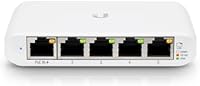
  • Ports: The switch provides five Gigabit Ethernet RJ45 ports, all capable of full 1 Gbps throughput.
  • Switching Capacity: Total non-blocking switching capacity is 48 Gbps, sufficient for simultaneous full-speed traffic across all ports.
  • Dimensions: The unit measures 4.22″ long by 2.76″ wide by 0.83″ tall, making it genuinely pocket-sized.
  • Weight: The switch weighs 5.3 oz (0.15 kg), light enough to mount on a wall with minimal hardware.
  • Power Input: Power is supplied via USB-C at 5V or through 802.3af/at PoE-in from a compatible upstream switch.
  • PoE Output: This switch does not provide PoE output and cannot supply power to downstream devices such as cameras or access points.
  • Cooling: The Flex Mini is fully fanless with no moving parts, ensuring completely silent operation in any environment.
  • Case Material: The enclosure is constructed from lightweight plastic, suitable for fixed desk or wall installations.
  • Mounting: The unit supports both wall and flat surface mounting using the included minimal mounting hardware.
  • Management: Full management requires a UniFi controller (hardware or software-based); the switch cannot be independently configured without one.
  • VLAN Support: The switch supports 802.1Q VLAN tagging and per-port VLAN profile assignment through the UniFi controller interface.
  • Operating Temp: The rated operating temperature is 12°C; the switch is designed for indoor, climate-controlled environments.
  • Interface Type: All five ports use the standard RJ45 connector, compatible with Cat5e, Cat6, and Cat6a Ethernet cables.
  • Firmware Updates: Firmware is delivered and managed automatically through the connected UniFi controller, with no manual update process required.
  • Warranty: Ubiquiti provides a one-year limited hardware warranty and one year of EU spare part availability for this product.
  • UPC: The product UPC identifiers are 817882029698 and 817882029605, and the GTIN is 00817882029698.
  • Availability: The switch has been commercially available since March 31, 2020, and has not been discontinued by the manufacturer.

Related Reviews

Ubiquiti USW-Pro-24
Ubiquiti USW-Pro-24
87%
94%
Network Performance
91%
Build Quality
93%
Layer 3 Routing Capabilities
89%
Port Density and Flexibility
85%
Setup and Installation
More
UbiQuiti USW-LITE-8-POE
84%
88%
Performance
94%
Ease of Setup
89%
PoE Functionality
83%
Build Quality
91%
Energy Efficiency
More
Ubiquiti USW-24-POE Ethernet Switch
85%
91%
Value for Money
88%
Ease of Installation
92%
Build Quality
89%
PoE+ Performance
90%
Fanless Design
More
Ubiquiti USW-Pro-Max-16-PoE (180W)
86%
88%
Performance
92%
Reliability
90%
Installation Ease
93%
Cooling and Noise
75%
PoE Power Output
More
Ubiquiti UniFi Switch USW-Lite-16-PoE
77%
94%
Ecosystem Integration
68%
PoE Power Delivery
88%
Management Software & App
62%
Setup & Initial Configuration
91%
Build Quality & Durability
More
Ubiquiti Networks UniFi USW-Pro-48-POE Gen2 Switch
85%
92%
Performance & Speed
87%
Ease of Setup
90%
PoE+ Power Delivery
88%
Build Quality & Durability
73%
Software & Firmware Experience
More
Apevia ITX-PFC500W Mini ITX/Flex ATX 500W Fully Modular Power Supply
87%
91%
Value for Money
88%
Reliability & Performance
89%
Installation Ease
87%
Build Quality
92%
Power Delivery
More
Apevia ITX-PFC400W 400W Mini ITX/Flex ATX Fully Modular Power Supply
85%
89%
Value for Money
88%
Build Quality
91%
Power Efficiency
65%
Noise Level
94%
Cable Management
More
Beelink Mini S12 Pro (N100, 16GB, 500GB)
83%
83%
Everyday Performance
91%
Value for Money
76%
Build Quality & Design
84%
Thermal Management & Noise
88%
Connectivity & Ports
More
Beelink Mini S12 Mini PC, Intel 12th Gen, 8GB RAM, 256GB SSD
86%
87%
Performance for Everyday Tasks
92%
Energy Efficiency
82%
Multitasking Capability
89%
Setup and Installation
85%
Display Quality
More

FAQ

You can plug it in and it will pass traffic between devices without a controller, acting like a basic unmanaged switch. However, every feature that makes it worth buying — VLAN tagging, port profiles, traffic monitoring — requires an active UniFi controller. If you do not have one and are not planning to set one up, a simpler unmanaged switch is a better fit for your needs.

Yes, the Flex Mini accepts USB-C power at 5V, so a phone charger will work in principle. That said, not every USB-C charger delivers a stable enough output, and a handful of users have reported occasional instability with lower-quality adapters. A reliable USB-C power adapter rated at 5V 1A or higher is the safer choice if you are not using PoE.

The switch will pass traffic on any network regardless of what router you use, but management still requires a UniFi controller running somewhere on the network. The controller itself is free software you can run on a PC, a Raspberry Pi, or a cloud server — it does not have to be a Ubiquiti hardware device. So technically yes, but you still need to set up that controller piece.

No — the Ubiquiti USW-Flex-Mini has no PoE output capability whatsoever. It can receive power from a PoE source upstream, but it cannot pass that power downstream to other devices. If you need to power a wireless access point or camera from the switch, you will need a different model that supports PoE output.
If your home network is simple and you just need more ports, an unmanaged switch is easier and often cheaper. Where the Flex Mini earns its place is when you want to isolate devices — keeping smart home gadgets on a separate VLAN from your computers, for example — or when you want visibility into port-level traffic. For straightforward home use without a UniFi setup, the added complexity is probably not worth it.

It is honest to say the casing feels lightweight in hand — this is not a metal-bodied enterprise switch. For a fixed installation tucked inside a media cabinet or mounted behind a desk, it holds up perfectly fine. Where it falls short is in environments where it gets handled or bumped regularly, so treat it as a set-and-forget device rather than portable hardware.

Yes, if your UniFi controller is set up with remote access enabled — either through UniFi's cloud portal or a self-hosted solution accessible over the internet — you can manage the Flex Mini from anywhere. This is one of the practical advantages of the UniFi ecosystem for small business or multi-site setups.

The good news is that the switch retains its last applied configuration even if the controller goes offline, so traffic continues flowing as expected. The limitation is that you cannot make any changes or troubleshoot through the controller while it is down. It is a common characteristic of all UniFi managed switches, not unique to this model.

It works well as an edge or access switch in a small business that already has UniFi infrastructure, like a retail counter or a conference room needing a few wired drops. For a central distribution switch in a business environment, the five-port count and plastic build may be limiting. Think of it as a last-mile expansion switch, not a core network component.

Basic Layer 2 features like VLANs and port mirroring are supported through the UniFi controller. However, link aggregation (LAG or LACP) is not available on the Flex Mini due to its hardware tier. If link aggregation is a requirement for your setup, you will need to look at a higher-tier UniFi switch in the lineup.