Overview

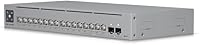
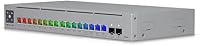
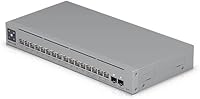
The Ubiquiti USW-Pro-Max-16-PoE 180W Network Switch sits in an interesting spot — capable enough for serious small business deployments, yet approachable enough for the dedicated home lab builder who has outgrown basic unmanaged gear. This fanless Layer 3 switch is not plug-and-play territory; it rewards those willing to invest time in the UniFi ecosystem with genuine network control. The Etherlighting port system stands out as a practical tool: it helps you identify ports, visualize link speeds, and distinguish native VLANs at a glance — far more useful than decorative LEDs. Versatile mounting options — desktop, wall, or rack — add real deployment flexibility, and its ranking at #56 in Computer Networking Switches signals strong buyer confidence across both prosumer and SMB audiences.

Features & Benefits

What makes the USW-Pro-Max-16-PoE genuinely compelling is how its port mix translates to real-world flexibility. The four 2.5 GbE PoE++ ports are perfectly sized for powering Wi-Fi 6E access points or high-draw PTZ cameras that standard GbE PoE+ simply cannot handle, while the twelve GbE PoE+ ports cover the rest of your deployment — IP phones, standard cameras, basic APs. Two 10G SFP+ uplinks give you a fast backbone connection without a bottleneck. The 180W PoE budget sounds generous, and it is — but keep in mind that fully loading every port simultaneously is rarely practical; real deployments typically use 60–70% of that ceiling. The fanless cooling deserves specific mention: there is no hum, no whir, nothing. Just network traffic, silently handled.

Best For

This Ubiquiti managed switch is the right call if you are already committed to the UniFi ecosystem — or are actively building toward it. SMB IT admins juggling mixed PoE devices will appreciate the port variety without needing multiple switches. Home lab builders who want real Layer 3 routing and VLAN segmentation rather than a basic managed switch will find it punches well above entry-level alternatives. It is also a natural fit for noise-sensitive environments: classrooms, recording studios, or conference rooms where a conventional fan would be disruptive. If your setup mixes Wi-Fi 6E APs with older GbE endpoints, the port mix here covers both without compromise. Not ideal for standalone, non-UniFi deployments.

User Feedback

Buyers consistently highlight the build quality and silent operation as standout positives — the compact, fanless chassis earns real appreciation in real-world installs. UniFi dashboard integration is praised for how much visibility it gives into port activity and network health. That said, a recurring frustration surfaces: without a UniFi controller, this fanless Layer 3 switch loses much of its appeal, operating in a limited mode that feels restrictive to anyone expecting standalone functionality. The Etherlighting system draws mixed reactions — some find it genuinely helpful for quick port identification, others consider it cosmetic. A few users also note that PoE headroom can feel tighter than expected when many devices draw power concurrently, though most acknowledge the 180W ceiling is reasonable for a 16-port class switch.

Pros

  • Completely silent operation makes it a natural fit for offices, studios, and any noise-sensitive space.
  • The four 2.5 GbE PoE++ ports handle Wi-Fi 6E APs and PTZ cameras without needing a separate switch.
  • Two 10G SFP+ uplinks prevent the backbone from becoming a bottleneck in high-throughput environments.
  • The USW-Pro-Max-16-PoE Etherlighting system genuinely helps with port identification and VLAN visualization at a glance.
  • Compact and lightweight at just 1.32 pounds, it fits cleanly on a desktop, wall mount, or rack without drama.
  • Layer 3 features including static routing and VLAN management are robust once paired with a UniFi controller.
  • Build quality is consistently praised by buyers — this does not feel like a product cutting corners at its price tier.
  • The port mix covers both legacy GbE devices and newer high-power endpoints without requiring a workaround.
  • UniFi dashboard integration gives detailed per-port stats and network visibility that basic managed switches rarely offer.

Cons

  • Full feature access requires a UniFi controller — without one, the switch operates in a significantly limited mode.
  • 180W total PoE is shared across all ports, so heavy simultaneous loads can strain the budget faster than expected.
  • Setup complexity is real; buyers without prior UniFi experience should budget time for the learning curve.
  • Ecosystem lock-in is a genuine trade-off — migrating away from UniFi later means replacing management infrastructure, not just the switch.
  • No built-in display or traditional web GUI makes standalone troubleshooting less intuitive compared to some competing brands.
  • The Etherlighting feature, while useful, draws mixed reactions — some users see it as cosmetic rather than essential.
  • This fanless Layer 3 switch offers limited appeal to multi-vendor environments that rely on standard CLI or non-UniFi management protocols.
  • Pricing sits firmly in the premium tier, which is harder to justify for buyers who will not use the Layer 3 or advanced PoE capabilities.

Ratings

The scores below reflect AI-driven analysis of verified global buyer reviews for the Ubiquiti USW-Pro-Max-16-PoE 180W Network Switch, with spam, bot-generated, and incentivized submissions actively filtered out before scoring. Each category captures the honest consensus — where real users consistently praised the hardware and where recurring frustrations surfaced. Strengths and pain points are weighted equally so you get an accurate picture before committing.

Build Quality
93%
Users across home lab and SMB deployments consistently describe the chassis as solid and premium-feeling — nothing flexes, nothing rattles. The compact metal housing handles heat passively without any sign of warping or degradation even after months of continuous operation.
A small number of users noted the port labeling can be difficult to read under poor lighting conditions, and a few wished for a more robust physical port indicator beyond the Etherlighting LEDs when the switch is not controller-managed.
Fanless Silent Operation
97%
This is one of the most consistently praised aspects across all user segments. Buyers in recording studios, open-plan offices, and home environments report zero audible noise even under sustained load — something cheaper switches with variable-speed fans simply cannot match.
A handful of users in poorly ventilated server closets reported the chassis running noticeably warm under prolonged high PoE load, which is expected physics but worth noting for anyone planning to install it in a sealed or cramped enclosure.
PoE Port Flexibility
88%
The mix of four 2.5 GbE PoE++ and twelve GbE PoE+ ports is genuinely well-thought-out for real deployments. Users running a mix of Wi-Fi 6E APs alongside legacy cameras and VoIP phones praise not needing a second switch to handle the power and speed differences.
Some users managing larger deployments wished for more than four 2.5 GbE ports, particularly those expanding Wi-Fi 6E coverage across multiple floors. The GbE PoE+ ports, while plentiful, cap out at 1 Gbps which feels limiting as multi-gig client devices become more common.
UniFi Ecosystem Integration
91%
For buyers already running a UniFi environment, the integration is described as effortless — the switch is adopted within minutes, and per-port traffic statistics, VLAN assignments, and PoE controls are all visible in the same dashboard as their APs and cameras.
The dependency on the UniFi controller is a real friction point. Users who expected a self-contained web GUI were caught off guard, and a few reported that transitioning away from UniFi later meant rebuilding their entire management layer from scratch.
Layer 3 Feature Depth
84%
Home lab users upgrading from basic managed switches describe the static routing and VLAN segmentation capabilities as a genuine step up, allowing proper network isolation between IoT devices, guest networks, and trusted infrastructure without needing a separate router for inter-VLAN routing.
Layer 3 functionality is only unlocked through the UniFi controller, which frustrates buyers expecting open CLI or SNMP-native access. Advanced enterprise users also note the routing feature set is adequate but not a replacement for dedicated enterprise-grade routing hardware.
Etherlighting System
76%
24%
Network admins managing dense setups report that being able to visually confirm link speed and VLAN assignment from across the room is legitimately useful during troubleshooting or initial deployment, reducing the need to constantly cross-reference the dashboard for physical port confirmation.
Reaction is genuinely split — a meaningful portion of reviewers consider it cosmetic and redundant with the controller dashboard, and a few wished the LED colors were more customizable or distinguishable in bright ambient light environments.
180W PoE Budget
73%
27%
For typical mixed deployments — a few Wi-Fi 6E APs, several IP cameras, and some VoIP phones — the 180W budget provides comfortable headroom with room to grow. Users in small office and home lab scenarios rarely push past 60–70% utilization in practice.
Buyers who attempted to fully populate all ports with high-draw devices quickly discovered the shared budget becomes a constraint. A few reported needing to carefully plan device placement to avoid PoE power negotiation issues when the aggregate draw climbed too high.
10G SFP+ Uplink Performance
89%
Users connecting this fanless Layer 3 switch to 10G core switches or NAS devices report the SFP+ uplinks perform exactly as expected — clean, stable throughput with no dropped frames. The two uplinks allow for redundant or aggregated backbone configurations in more demanding setups.
Some buyers noted that sourcing compatible SFP+ transceivers and DAC cables added unexpected cost, and a few experienced initial compatibility hiccups with third-party optics that required firmware updates to resolve.
Setup & Onboarding Experience
67%
33%
Users who came from a UniFi background or took time to read Ubiquiti's documentation described onboarding as quick and logical. The UniFi mobile app adoption flow is praised for being more guided than most enterprise alternatives.
First-time UniFi buyers frequently report a steeper learning curve than expected, particularly around controller setup, VLAN tagging, and understanding the difference between controller-managed and standalone modes. Several wished for a clearer out-of-box guide specifically for non-enterprise buyers.
Mounting Versatility
86%
The inclusion of hardware for desktop, wall, and rack mounting in the box is consistently appreciated. Users in varied environments — from under-desk home installs to structured office racks — report the mounting hardware is solid and the instructions are straightforward.
Wall-mount installation drew a few complaints about the bracket alignment being fussier than expected, and some rack users noted the unit occupies 1U but the compact depth means it can shift slightly if not secured carefully in shallow rack enclosures.
Value for Money
78%
22%
Within the UniFi ecosystem, buyers broadly agree the feature-to-price ratio is competitive — the combination of multi-gig PoE++, 10G uplinks, Layer 3 management, and silent operation in one compact unit is not easy to match at this tier.
Buyers outside the UniFi ecosystem — or those who only need basic PoE switching — frequently call out the premium as difficult to justify when much of the feature set sits behind controller dependency. Non-UniFi alternatives offer comparable port specs at lower cost.
Thermal Management
82%
18%
In typical installations with adequate ventilation, the passive thermal design keeps the switch running comfortably warm but never alarmingly hot. Users in temperate environments and properly ventilated spaces report no thermal throttling or stability issues after extended uptime.
In enclosed or high-ambient-temperature environments — like summer-heated home closets — the chassis can get uncomfortably warm to the touch under sustained PoE load. A small number of users in hot climates noted concerns about long-term thermal stress without active airflow.
Dashboard Visibility & Analytics
88%
SMB admins praise the granularity of per-port statistics available through the UniFi controller — real-time traffic rates, PoE power draw per device, and historical uptime data give a level of network visibility that basic managed switches rarely offer at this price point.
The analytics are entirely dependent on maintaining a functional UniFi controller instance. Users who have experienced controller downtime or migration issues report that historical data is not always reliably preserved, which is a frustration for anyone using it for compliance or audit purposes.
Long-term Reliability
85%
Given the product launched in mid-2024, early adopters report stable continuous operation over extended periods with no port failures or unexpected reboots. The fanless design in particular removes the most common point of failure in comparable hardware.
The long-term reliability track record is still being established given its relatively recent release date. A few users flagged that firmware updates occasionally introduced temporary behavioral quirks that required a controller update to resolve.

Suitable for:

The Ubiquiti USW-Pro-Max-16-PoE 180W Network Switch is built for buyers who know what they need and are ready to use it properly. SMB IT admins running UniFi-managed environments will get the most out of it — the mixed port lineup handles everything from legacy GbE IP phones to power-hungry Wi-Fi 6E access points without requiring a second switch. Home lab enthusiasts who have hit the ceiling on basic unmanaged gear and want real VLAN segmentation, static routing, and per-port visibility will find this a meaningful step up. It is equally well-suited for deployments where silence matters: a recording studio, a classroom, or a client-facing office where fan noise would be disruptive or simply unprofessional. If your network already runs on Ubiquiti gear, this fanless Layer 3 switch slots in without friction.

Not suitable for:

If you are not already in — or seriously planning to join — the UniFi ecosystem, the Ubiquiti USW-Pro-Max-16-PoE 180W Network Switch is a harder sell. Without a UniFi controller (hardware or cloud-hosted), the switch operates in a restricted mode that locks out most of its advanced Layer 3 features, making the price premium difficult to justify. Buyers looking for a straightforward plug-and-play switch with a web GUI that works out of the box, independent of any external platform, will likely find the setup process frustrating rather than rewarding. Similarly, anyone running a multi-vendor managed network with Cisco, Juniper, or other enterprise gear may find the UniFi management model too closed and proprietary for their environment. Budget-conscious buyers who just need basic PoE switching and have no plans to expand into a broader managed network should look at more accessible alternatives.

Specifications

  • Model: This switch carries the official model designation USW-Pro-Max-16-PoE (180W), manufactured by Ubiquiti Networks.
  • Total Ports: The switch provides 16 total network ports, combining GbE, 2.5 GbE, and 10G SFP+ connectivity in a single compact unit.
  • 2.5 GbE Ports: Four ports support 2.5 Gigabit Ethernet with PoE++ output, designed for high-power and high-throughput devices such as Wi-Fi 6E access points.
  • GbE PoE+ Ports: Twelve Gigabit Ethernet ports deliver PoE+ power, suitable for standard IP cameras, VoIP phones, and conventional wireless access points.
  • SFP+ Uplinks: Two 10G SFP+ ports are included for high-speed uplink connections to core switches or routers in larger network topologies.
  • PoE Budget: Total PoE power availability is 180W, shared dynamically across all PoE-capable ports based on connected device demand.
  • Switching Layer: This is a Layer 3 managed switch, supporting static routing and advanced VLAN configuration when managed via a UniFi controller.
  • Cooling System: The switch uses a fully fanless, passive cooling design, producing zero audible noise during normal and sustained operation.
  • Etherlighting: Each port features the Ubiquiti Etherlighting system, using per-port LEDs to indicate link status, port speed, and native VLAN or network assignment.
  • Mounting Options: The unit supports desktop, wall-mount, and rack-mount installation, with appropriate hardware included in the box.
  • Dimensions: Physical dimensions measure 5.91 x 3.15 x 5.91 inches, making this one of the more compact managed switches in its port-count class.
  • Weight: The switch weighs 1.32 pounds, light enough for flexible mounting without requiring heavy-duty wall anchors in most installations.
  • Management: Full feature access requires integration with the Ubiquiti UniFi controller platform, available as a hardware device, self-hosted software, or cloud-hosted service.
  • Data Transfer Rate: Maximum data transfer rate on the 2.5 GbE ports reaches 2.5 Gigabits per second, with GbE ports supporting up to 1 Gigabit per second.
  • In the Box: The package includes the switch unit, a power cord, a power adapter, and a hardware mounting kit for installation flexibility.
  • UPC: The product carries UPC code 810084694558 and Global Trade Identification Number 00810084694558 for retail and inventory identification.
  • Market Rank: The switch holds a Best Sellers Rank of #56 in the Computer Networking Switches category on Amazon at time of review.
  • Release Date: The product was first made available for purchase on May 10, 2024, positioning it as a current-generation offering within the UniFi switch lineup.

Related Reviews
Ubiquiti Networks UniFi USW-Pro-48-POE Gen2 Switch
85%
92%
Performance & Speed
87%
Ease of Setup
90%
PoE+ Power Delivery
88%
Build Quality & Durability
73%
Software & Firmware Experience
More
Ubiquiti UniFi Switch USW-Lite-16-PoE

77%
94%
Ecosystem Integration
68%
PoE Power Delivery
88%
Management Software & App
62%
Setup & Initial Configuration
91%
Build Quality & Durability
More
Ubiquiti USW-24-POE 24-Port PoE Ethernet Switch
83%
91%
UniFi Controller Integration
83%
PoE Delivery
88%
Build Quality
93%
Fanless Operation
76%
Value for Money
More
MokerLink POE-F1602G 16-Port PoE Switch
88%
91%
Setup and Installation
93%
Power Output Reliability
88%
Build Quality
87%
Network Stability
90%
Performance for Surveillance Systems
More
Ubiquiti POE-48-24W-WH PoE Injector
77%
93%
Plug-and-Play Setup
91%
Ecosystem Compatibility
89%
Long-Term Reliability
86%
Value for Money
71%
Build Quality
More
Ubiquiti USW-Pro-24 Layer 3 Network Switch
75%
91%
Build Quality
89%
UniFi Ecosystem Integration
86%
Layer 3 Feature Set
88%
Value for Money
58%
Setup & Initial Configuration
More
UbiQuiti USW-LITE-8-POE
84%
88%
Performance
94%
Ease of Setup
89%
PoE Functionality
83%
Build Quality
91%
Energy Efficiency
More
NETGEAR GS116PP 16-Port PoE+ Gigabit Switch
83%
96%
Ease of Setup
93%
PoE Port Coverage
68%
Power Budget Adequacy
88%
Build Quality
97%
Noise Level
More
NICGIGA NIC-AI-FS1621GP 16-Port Unmanaged PoE Switch
76%
88%
Value for Money
93%
Ease of Setup
54%
PoE Port Speed
84%
PoE Power Delivery
79%
AI Watchdog Reliability
More
keepLiNK 16-Port Gigabit PoE Unmanaged Switch
81%
91%
Value for Money
93%
Ease of Setup
78%
PoE Power Delivery
84%
Build Quality
71%
Thermal Performance
More

FAQ

You can plug it in and it will pass traffic without a controller, but you will be missing most of what makes this switch worth buying. Layer 3 features like static routing, VLAN management, and the detailed per-port analytics in the UniFi dashboard all require controller integration. If you want it to work as a basic unmanaged switch, it will — but that is not a great use of the hardware.

In theory, 180W is shared across all active PoE ports, but in practice you are unlikely to ever need full simultaneous draw. A typical Wi-Fi 6E AP might pull 20-25W, a standard IP camera around 10-15W, and a VoIP phone even less. For most real deployments with mixed device types, 180W provides comfortable headroom — just do not plan a build where every port is driving a high-draw device concurrently.

Etherlighting is Ubiquiti's per-port LED system that goes beyond simple link indicators. Each port can illuminate to show you the active link speed, confirm a connection is live, and reflect which native VLAN or network that port belongs to. In practice, it is genuinely handy when you are standing in front of a rack trying to identify which physical port maps to which device or network segment, without pulling up the dashboard.

Absolutely. The PoE ports deliver standard 802.3at (PoE+) and 802.3bt (PoE++) power, which is compatible with virtually any PoE-compliant device regardless of brand. The switch itself connects to any Ethernet device normally. The UniFi controller dependency is purely for management and configuration — your connected devices do not need to be Ubiquiti products.

It is genuinely silent — there are no fans of any kind. The thermal design relies entirely on passive heat dissipation through the chassis. In a quiet room, you will hear absolutely nothing from the switch itself, which makes it well-suited for offices, home installations, studios, or anywhere that fan noise would be disruptive.

Yes, the hardware kit in the box includes rack-mount accessories, and the switch is designed to fit a standard 19-inch rack. It also supports desktop and wall-mount configurations, so you have real flexibility depending on how your installation space is set up.

The four 2.5 GbE ports run at 2.5 Gigabits per second and support PoE++, which means they can deliver up to 60W per port — enough for the latest Wi-Fi 6E access points, high-end PTZ cameras, or other power-hungry devices. The twelve GbE ports run at 1 Gigabit per second with PoE+, capped at around 30W per port, which covers the majority of standard networked devices just fine.

The two SFP+ ports accept standard small form-factor pluggable transceivers running at 10 Gigabits per second. You would typically use these to connect the switch to a core router, NAS, or upstream switch via DAC cables or fiber transceivers. They are not PoE-capable — they are purely for high-speed uplink connectivity to prevent your backbone from becoming a bottleneck.

There is a learning curve, but it is manageable. Ubiquiti has invested in making the UniFi controller interface reasonably approachable, and the initial adoption process for adding the switch is straightforward if you follow their documentation. The harder part is understanding VLAN design and Layer 3 concepts before you start configuring them — the switch will do what you tell it to, so coming in with a clear network plan helps a lot.

The chassis itself acts as a heat sink, and Ubiquiti has designed the internal components to operate within safe thermal limits at full load without active cooling. The switch will get warm to the touch under heavy use, which is normal and expected. Just make sure it has reasonable airflow around it and is not crammed into a sealed enclosure without ventilation — passive cooling needs ambient air to work properly.

Where to Buy