Overview

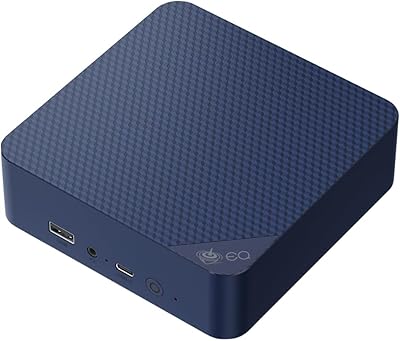
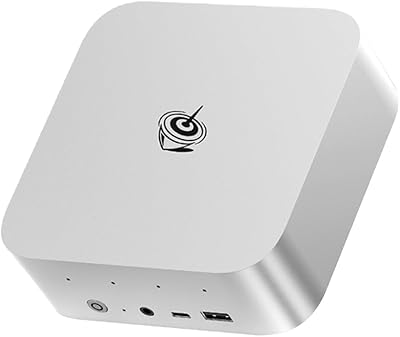
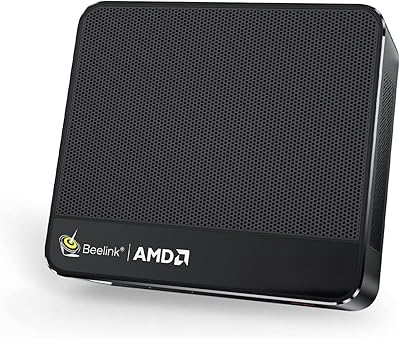
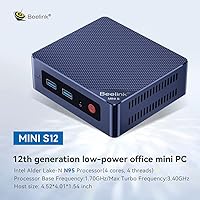
The Beelink Mini S12 Mini PC represents a new wave of compact desktops that quietly make a strong case against the bulky towers most of us grew up with. At roughly the size of a thick paperback book, it slips behind a monitor or onto a shelf without complaint. Powering it is Intel's 12th Gen N95 chip — not a Celeron, despite some confusing labeling in older spec sheets — which delivers a genuine generational leap over the N-series processors that came before it. Windows 11 Home comes preinstalled, so setup is largely plug-and-play. Just don't come in expecting workstation-class muscle; this is a machine built for everyday light tasks, and it handles those well.
Features & Benefits

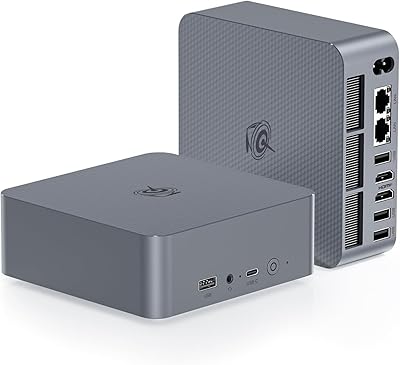
The Intel N95 quad-core processor runs up to 3.4GHz and, unlike older efficiency chips, doesn't stutter when you have a dozen browser tabs open alongside a video call. What really stands out at this price point is the dual HDMI 2.0 output — both ports push 4K at 60Hz simultaneously, which is rare for a machine this small. The four USB 3.2 Gen2 ports transfer data at up to 10Gbps, fast enough that plugging in an external drive won't feel like a bottleneck. The 256GB SSD keeps boot times short, and 8GB DDR4 RAM handles typical multitasking without visible lag. The cooling setup combines a fan, heatsink, and drive cooler, running nearly inaudibly under normal loads.

Best For

This compact PC hits its sweet spot with people who want a clean, clutter-free desk without sacrificing screen real estate — especially those running dual monitors. It works well as a home office machine for video calls, documents, and casual browsing. Students doing online coursework or educators running virtual classrooms will find it more than capable. HTPC fans can connect it straight to a 4K television and use it as a low-power media hub that barely makes a sound. Small businesses looking to outfit basic workstations on a tight budget should take a serious look. It is also a natural fit for anyone with a spare monitor wanting to give it new life as a desktop without the cost of a full tower.

User Feedback

Buyers consistently praise the fast boot speed and how little space the Beelink Mini S12 takes up on a desk, with the near-silent fan drawing favorable comments across multiple reviews. On the downside, those hoping to game or edit video will run into the limits of integrated graphics fairly quickly, and RAM upgradability is restricted — so 8GB is largely what you work with long-term. A handful of users have flagged occasional WiFi inconsistency, though switching to wired Ethernet resolves that entirely. Beelink's after-sales support earns mostly positive remarks, with the brand's responsiveness noted in several buyer experiences. Overall, value-for-money sentiment leans positive — most feel this mini desktop delivers exactly what it promises, provided expectations are set accordingly.

Pros

  • Dual 4K HDMI outputs give you a proper two-screen productivity setup right out of the box.
  • The Intel 12th Gen N95 chip is a meaningful step up from older budget mini PC processors.
  • Boots fast and stays responsive for everyday office work, browsing, and video calls.
  • Four USB 3.2 Gen2 ports offer real-world transfer speeds that most rivals at this price cannot match.
  • Runs nearly silently under typical workloads thanks to a well-designed three-part cooling system.
  • Power consumption stays under 1 kWh per day, making it one of the more energy-efficient desktop options available.
  • Includes Wake-on-LAN and Auto Power On, handy for remote work setups or lightweight home server use.
  • Compact enough to mount behind a monitor with the included VESA bracket, keeping your workspace clean.
  • Comes with Windows 11 Home preinstalled and ready to use — no extra OS costs or setup headaches.
  • Beelink backs this mini desktop with a one-year warranty and well-regarded after-sales support.

Cons

  • RAM is not practically upgradable, so 8GB is likely what you are working with for the life of the machine.
  • The 256GB SSD fills up faster than expected once Windows updates and a few apps settle in.
  • WiFi connectivity can be inconsistent in environments with heavy wireless interference.
  • Integrated graphics make this compact PC unsuitable for any meaningful gaming or GPU-accelerated tasks.
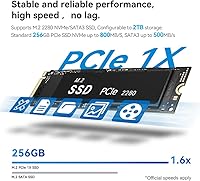
  • The SATA-based SSD is noticeably slower than NVMe drives found in competing units at similar prices.
  • Some users have encountered driver compatibility hiccups after major Windows 11 updates.
  • No Thunderbolt or USB4 support limits high-speed peripheral options compared to newer mini PC designs.
  • Bluetooth 4.2 is aging; newer wireless peripherals may not connect with full feature support.

Ratings

Our editorial team fed thousands of verified global reviews for the Beelink Mini S12 Mini PC through our AI rating engine, actively filtering out incentivized, duplicate, and bot-generated submissions before scoring. What follows reflects the real consensus — the genuine highs buyers keep coming back to praise, and the friction points that show up consistently enough to warrant honest mention. Scores are weighted by purchase-verified feedback and calibrated against comparable mini PCs in the same market tier.
Value for Money
88%
Buyers repeatedly call this one of the better-priced compact desktops available for everyday computing, especially given the 12th Gen processor and dual 4K output. Users replacing aging all-in-ones or retired laptops feel they got considerably more than the price tag suggested.
A small number of buyers feel the non-upgradable RAM and SATA-based storage limit long-term value, particularly as Windows 11 grows more resource-hungry over time. For those who hit those ceilings within a year, the initial savings feel less compelling in hindsight.
Performance for Daily Tasks
82%
18%
For the workloads this compact PC was designed around — web browsing, video calls, Office apps, media streaming — it holds up confidently. Users running Zoom while juggling a spreadsheet and several open tabs report no frustrating lag or stutter.
Push it toward anything computationally heavier and the cracks show; users attempting light photo editing or multi-track audio work note that the machine slows perceptibly. It is a capable everyday driver, not a workhorse, and buyers who misread that boundary tend to be disappointed.
Build Quality & Design
79%
21%
The chassis feels solid for its size and price bracket — no creaking, no flex, and a matte finish that resists fingerprints better than glossy alternatives. Several buyers specifically noted the European-influenced design looks professional enough to sit openly on a desk without looking out of place.
The plastic housing, while well-assembled, does not approach the premium feel of more expensive mini PCs from Intel or Apple. Some users reported that the bottom panel feels slightly less secure after repeated internal access, though this rarely affects function.
Dual Monitor Support
91%
This is one of the standout wins buyers highlight consistently — both HDMI ports deliver genuine 4K 60Hz output simultaneously, no compromises. Home office users setting up twin-monitor productivity rigs are particularly enthusiastic, noting that no adapters or docking stations were required.
Display output is limited to HDMI only, so users with older monitors that accept only DisplayPort or VGA need adapters, which adds cost and occasionally introduces compatibility quirks. There is no USB-C or Thunderbolt alternative for display output.
Thermal Management & Noise
84%
During typical use, most buyers describe the fan noise as essentially inaudible — a genuine point of difference versus similarly priced units that spin audibly even at idle. The three-component cooling system keeps the chassis warm but never hot to the touch during sustained office sessions.
Under heavier loads the fan spins up noticeably, and a few users working in very quiet environments found the pitch distracting. Long encoding or compiling tasks also revealed that thermal throttling occasionally pulls the processor back from its peak clock speed.
USB Connectivity
86%
Four USB 3.2 Gen2 ports at 10Gbps apiece is genuinely impressive at this price point, and buyers who regularly move large files to external drives notice the speed advantage over older USB 3.0 setups. Enough ports to keep a keyboard, mouse, webcam, and external drive all connected simultaneously without a hub.
There is no USB-C port anywhere on the chassis, which surprises buyers who have standardized their accessories around that connector. As USB-C peripherals become increasingly common, this absence is likely to feel more limiting over the machine's lifespan.
Setup & Out-of-Box Experience
89%
Buyers consistently praise how little effort is needed to get up and running — Windows 11 is preinstalled and activated, HDMI cables are in the box, and the VESA bracket ships with screws already sorted. Non-technical users specifically appreciated not needing to configure or install anything before first use.
The included user manual is thin on detail, and a handful of less experienced buyers found themselves searching online for answers to basic setup questions. Initial Windows 11 update cycles on first boot can also take longer than expected before the machine is fully ready.
WiFi Reliability
67%
33%
In typical home and small office environments with moderate wireless traffic, the dual-band WiFi 5 adapter performs adequately for video calls and streaming. Users on uncrowded 5GHz networks report solid throughput with no meaningful interruptions during standard workloads.
This is where the most consistent buyer frustration surfaces — users in dense WiFi environments or larger homes report signal drops and inconsistent speeds. Several buyers resolved the issue by switching to the Gigabit Ethernet port entirely, which suggests the wireless adapter is a weak point at this price tier.
Storage Capacity & Speed
63%
37%
The 256GB SSD delivers fast boot times and snappy application launches that clearly outpace any spinning hard drive alternative. Buyers coming from older machines with HDDs describe the perceived speed difference as dramatic for everyday tasks.
256GB fills up faster than most buyers anticipate — after Windows 11, system files, and a handful of applications, usable space can drop below 180GB quickly. The SATA interface also means sequential read and write speeds lag noticeably behind NVMe-equipped rivals, which matters for anyone moving large files regularly.
Gaming Capability
31%
69%
Casual browser-based games and very old or 2D indie titles run without issue, and buyers using this mini desktop purely for non-gaming tasks are entirely unaffected by this limitation. For its intended audience, the integrated graphics are adequate for YouTube, Netflix, and 4K video playback.
Any buyer hoping to run modern games, even at low settings, will be let down — integrated Intel UHD graphics simply cannot handle it, and there is no upgrade path. Reviews from buyers who purchased with gaming in mind are notably negative, making it critical that this machine is not marketed toward that use case.
Energy Efficiency
92%
Consuming under 1 kWh per day in typical use, this is one of the most power-efficient desktop options in its class, and buyers who run machines all day have noted measurably lower electricity costs compared to their previous towers. It runs cool enough that leaving it on continuously for home server or media tasks is entirely reasonable.
There is little to fault here for the target buyer, though power users who need sustained high-performance compute cycles may find the efficiency-focused processor throttles under prolonged heavy load rather than consuming more power to maintain peak output.
Software & OS Experience
74%
26%
Windows 11 Home arrives activated and generally clean, without the excessive bloatware that plagues some OEM machines. Buyers who just want to open a browser and get to work find the experience straightforward from the first boot.
A recurring thread in user reviews involves driver compatibility issues following major Windows 11 updates, with some buyers experiencing display or networking hiccups that required manual driver reinstallation. Beelink's driver support documentation online is functional but sparse.
Portability & Form Factor
87%
At 1.65 pounds and smaller than most hardback books, this compact PC can genuinely be moved between rooms, offices, or travel bags without any real inconvenience. The included VESA bracket adds mounting flexibility that traditional towers could never match.
Portability is limited somewhat by the external power brick, which adds bulk to any travel setup. Buyers hoping to use this on the go as a laptop substitute will also quickly miss the absence of a built-in display or battery.
After-Sales Support & Warranty
78%
22%
Beelink has a notably stronger support reputation than many white-label mini PC brands, and buyers who have contacted the company for help report reasonably fast responses and genuine troubleshooting effort. The one-year warranty with lifetime technical support is a meaningful commitment for this category.
Support quality is not perfectly consistent — some buyers report longer wait times during peak periods, and warranty claim logistics for international buyers can add friction. The lifetime technical support claim is appreciated but not always matched by the depth of documentation available independently.

Suitable for:

The Beelink Mini S12 Mini PC is a strong fit for anyone who needs a reliable, no-fuss desktop for daily tasks without dedicating half a desk to hardware. Remote workers juggling video calls, spreadsheets, and browser tabs will find it handles that load comfortably, especially when paired with a dual-monitor setup via both HDMI ports. Students and educators benefit from its quiet operation, fast boot time, and low power draw — it is the kind of machine you can leave on all day without worrying about noise or electricity costs. HTPC enthusiasts can connect it directly to a 4K television and get a capable media center that sits invisibly behind the screen. Small businesses on a tight equipment budget should also take notice, as this compact PC holds up well as a managed workstation for reception desks, point-of-sale setups, or shared office stations.
Not suitable for:

The Beelink Mini S12 Mini PC is not the right call for anyone expecting to push demanding workloads through it. Video editors, 3D designers, and anyone working with heavyweight creative software will hit a wall quickly — the integrated Intel UHD graphics simply are not built for that kind of sustained output. Gamers should look elsewhere entirely; even modestly demanding titles will struggle with this hardware, and there is no upgrade path for discrete graphics. The fixed RAM configuration also makes long-term scalability a concern: 8GB is workable today, but buyers planning to keep this machine for several years may find it feeling constrained as software demands grow. Anyone who relies heavily on wireless connectivity in a signal-noisy environment may also want to plan around its WiFi 5 adapter, as several users have noted inconsistency compared to a wired connection.
Specifications

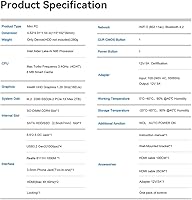
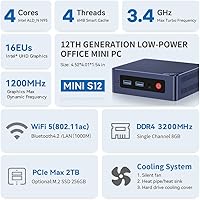
  • Processor: Intel 12th Gen N95 quad-core chip clocks up to 3.4GHz, offering noticeably better responsiveness than the older Celeron-era budget processors it replaces.
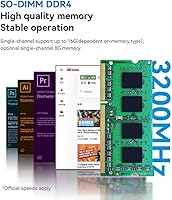
  • RAM: 8GB DDR4 SDRAM is installed at the factory and handles typical multitasking workloads including browser tabs, office apps, and video calls without visible slowdown.
  • Storage: A 256GB SATA SSD provides fast boot times and reasonable working space, though it is not an NVMe drive, so raw transfer speeds are moderate by current standards.
  • Operating System: Windows 11 Home comes preinstalled and activated, so the machine is ready to use straight out of the box without additional software purchases.
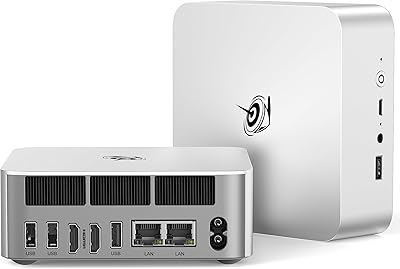
  • Display Output: Two HDMI 2.0 ports support simultaneous dual-display output at up to 4K 60Hz, allowing a full two-screen desktop setup without any adapters.
  • USB Ports: Four USB 3.2 Gen2 ports deliver up to 10Gbps transfer speeds each, which is faster than the USB 3.0 connections commonly found on competing units at this price tier.
  • Networking: Connectivity options include Gigabit Ethernet, WiFi 5 (802.11ac dual-band 2.4 and 5GHz), and Bluetooth 4.2 for wired and wireless peripheral support.
  • Graphics: Intel UHD integrated graphics handle 4K video playback and light display tasks well, though they are not suited for gaming or GPU-accelerated creative workloads.
  • Cooling System: A three-part thermal solution combining an active fan, heatsink, and dedicated drive cooler keeps temperatures stable under sustained loads while remaining nearly inaudible during typical use.
  • Dimensions: The unit measures 4.72 x 5.12 x 1.57 inches, making it small enough to mount behind a monitor or tuck onto a shelf without occupying meaningful desk space.
  • Weight: At 1.65 pounds, this compact PC is light enough to reposition easily and does not add noticeable load when VESA-mounted behind a display.
  • Power Draw: Operating on 100-120V AC at 50/60Hz, the machine consumes under 1 kWh per day under normal use, making it one of the more energy-efficient desktop options available.
  • Audio: A single 3.5mm audio jack supports headphones or external speakers, covering basic audio output needs without requiring a separate USB sound card for most users.
  • Advanced Boot: Wake-on-LAN, PXE Boot, RTC Wake, and Auto Power On are all supported, giving IT administrators and home server users useful remote management and scheduling capabilities.
  • Certifications: The unit carries FCC, RoHS, and CE certifications, confirming it meets regulatory safety and emissions standards for use in North America and Europe.
  • Mounting: A VESA mounting bracket and screws are included in the box, allowing the unit to be attached directly to the back of a compatible monitor or display arm.
  • In the Box: Package contents include the mini desktop unit, a power adapter, VESA mount with screws, two HDMI cables, and a printed user manual.
  • Warranty: Beelink provides a one-year manufacturer warranty alongside a lifetime technical support commitment, with a 24/7 after-sales contact channel available for buyers who need assistance.

Related Reviews

Beelink Mini S12 Pro (N100, 16GB, 500GB)
83%
83%
Everyday Performance
91%
Value for Money
76%
Build Quality & Design
84%
Thermal Management & Noise
88%
Connectivity & Ports
More
Beelink ME Mini PC
Beelink ME Mini PC
87%
88%
Performance
91%
Connectivity
85%
Storage Expansion
95%
Power Efficiency
90%
Noise Levels
More
Beelink EQi13 Pro (32GB/500GB)
83%
88%
Processing Performance
91%
Memory & Multitasking
86%
Storage Speed & Expandability
74%
Thermal Management & Noise
93%
Networking Capabilities
More
Beelink SER5 Pro (Ryzen 7 5825U, 16GB/500GB)
80%
88%
Everyday Performance
67%
Thermal Management
91%
Multi-Monitor Support
83%
Build Quality & Design
86%
Connectivity & Port Selection
More
Beelink EQ14 Mini PC (N150, 16GB, 1TB)
74%
74%
Everyday Performance
61%
RAM & Memory Configuration
83%
Storage & Expandability
91%
Connectivity & Networking
79%
Display Output
More
Beelink EQI Mini PC i5-1235U 32GB RAM 1TB SSD
87%
88%
Performance
85%
Build Quality
92%
Value for Money
90%
Design/Size
81%
Thermals
More
Beelink SER9 Pro (32GB/1TB)
84%
93%
Processing Performance
91%
Multitasking & Responsiveness
84%
Build Quality & Design
67%
Thermal Management & Fan Noise
72%
Graphics & Display Output
More
Beelink ME Mini PC, Intel Alder Lake-N95, 12GB RAM, 1TB SSD
86%
88%
Performance
91%
Build Quality
94%
Network Connectivity
81%
Storage & Upgradeability
89%
Design & Size
More
Beelink SER9 Mini PC Ryzen 7 2550U 32GB RAM 1TB SSD
85%
89%
Performance
92%
Value for Money
88%
Design & Build Quality
91%
Multitasking Capabilities
85%
Connectivity & Ports
More
Beelink SER5 Mini PC
79%
84%
Everyday Performance
81%
Multitasking Headroom
52%
Gaming Capability
83%
Value for Money
88%
Upgradeability
More

FAQ

Yes, and it does so without any fuss. Both HDMI ports output independently at up to 4K 60Hz, so you can run a true dual-screen setup right out of the box. No adapters or splitters needed.

Practically speaking, no. The RAM on the Beelink Mini S12 is soldered to the board, which means 8GB is what you get for the life of the machine. If you think you will need more memory within a year or two, factor that into your decision before buying.

This is a genuine source of confusion. The processor is the Intel N95, which is part of Intel's 12th Gen efficiency-core lineup. Some spec sheets and older listing data incorrectly label it as Celeron due to how Intel categorizes entry-level chips. The N95 is meaningfully faster than the Celeron-branded chips it replaced, so the distinction matters.

Under everyday workloads — browsing, video calls, streaming — the fan is nearly silent. You would have to be in a very quiet room and actively listening for it. During heavier tasks it picks up slightly, but it never becomes disruptive the way a gaming laptop or older desktop might.

Only for very undemanding titles. Older or 2D games, casual browser games, and some indie titles with low graphical requirements should run fine. Anything from the last several years that requires a dedicated GPU will either run poorly or not at all. This is not a gaming machine and should not be bought with that expectation.

It depends on how you use it. Windows 11 alone takes up around 30-40GB after updates, and once you add a few applications, you are already working with less than 200GB of free space. For web browsing, office work, and light media, it is manageable. If you plan to store a lot of photos, videos, or games, picking up an external drive or USB storage is a practical move.

Windows 11 Home comes preinstalled and activated. You power it on, go through the standard first-time setup wizard, connect to your network, and you are good to go. There is no separate license key to track down or OS installation to manage.

The Beelink Mini S12 Mini PC supports WiFi 5 on both 2.4GHz and 5GHz bands, which works well in most home and office environments. That said, a handful of users have reported inconsistency in signal-heavy environments. If stability is critical for your use — remote work video calls, for instance — plugging into the Gigabit Ethernet port is the safer bet and takes the variable out entirely.
Absolutely — and Beelink even includes the VESA bracket and screws in the box for exactly that purpose. As long as your monitor has standard VESA mounting holes on the back, you can attach this mini desktop directly to it and run the cables cleanly, which makes for a very tidy setup.

Beelink has built a generally positive reputation for customer responsiveness compared to many no-name mini PC brands. The machine carries a one-year warranty, and Beelink advertises lifetime technical support with 24/7 after-sales availability. Buyer reviews reflect mostly positive experiences when reaching out for help, though as with any tech product, individual experiences can vary.